Kaizen #166 - Handling Query Variables in Zoho CRM

Hello, Code Enthusiasts!
Welcome to another week of Kaizen!
This week, we'll dive into handling variables in Zoho CRM Queries and see how they can be deployed in Kiosk to dynamically retrieve data. This technique is especially useful for integrating data from third-party applications or CRM itself into your custom interface, such as Canvas and Kiosk.
Variables
Variables are placeholders in Queries that are replaced with real values at runtime. Instead of hard coding data, you can use variables to make your Queries flexible and reusable.
Syntax: {{Variable_Name}}
Query variables in Zoho CRM function differently from conventional Zoho CRM variables. While CRM variables act as containers for dynamic values that can be stored and reused anywhere within the organization, query variables are designed to receive their values at runtime.
Query variables enhance flexibility and are specifically used in:
- COQL: To dynamically filter and retrieve data.
- REST API: For runtime data fetching based on specific parameters.
- Query Criteria: To define conditions dynamically for fetching records.
How to Use a Variable?
To use variables, ensure the fields providing the variable values are available in the context where the Query is executed.
Let’s say you want to evaluate a marketing campaign's performance. For this, you need to fetch all leads with a specific lead source. Since each campaign is associated with a different lead source, you can define the lead source as a variable. When viewing a campaign's details, the lead source will be passed dynamically to the Query.
Business Scenario : Nearby Delivery Hubs
Imagine a telecommerce platform using Zoho CRM to manage sales and deliveries. When a customer provides their PIN code, the salesperson must confirm with the customer for a nearby post office for package pick-ups and drop-offs in Kiosk.
With Zoho CRM Queries, you can achieve this by dynamically fetching the nearby post offices list based on the customer's PIN code and displaying it on the Contact record’s detail page. Here's how to set it up using the Kiosk feature.
Setting Up the Query in Kiosk
1. Access Kiosk Studio
- Log in to Zoho CRM.
- Go to Setup > Customization > Kiosk Studio and click Create Kiosk.
2. Configure the Current Module
- Choose the module where the Kiosk will be deployed.
For this example, select Contacts to use the PIN code from the Contact record.
- Configuring this Current Module is mandatory to use variables from the current record.
3. Add a Screen
- Click the + icon on the flowchart and select Screen.
- Name the screen and click Add.
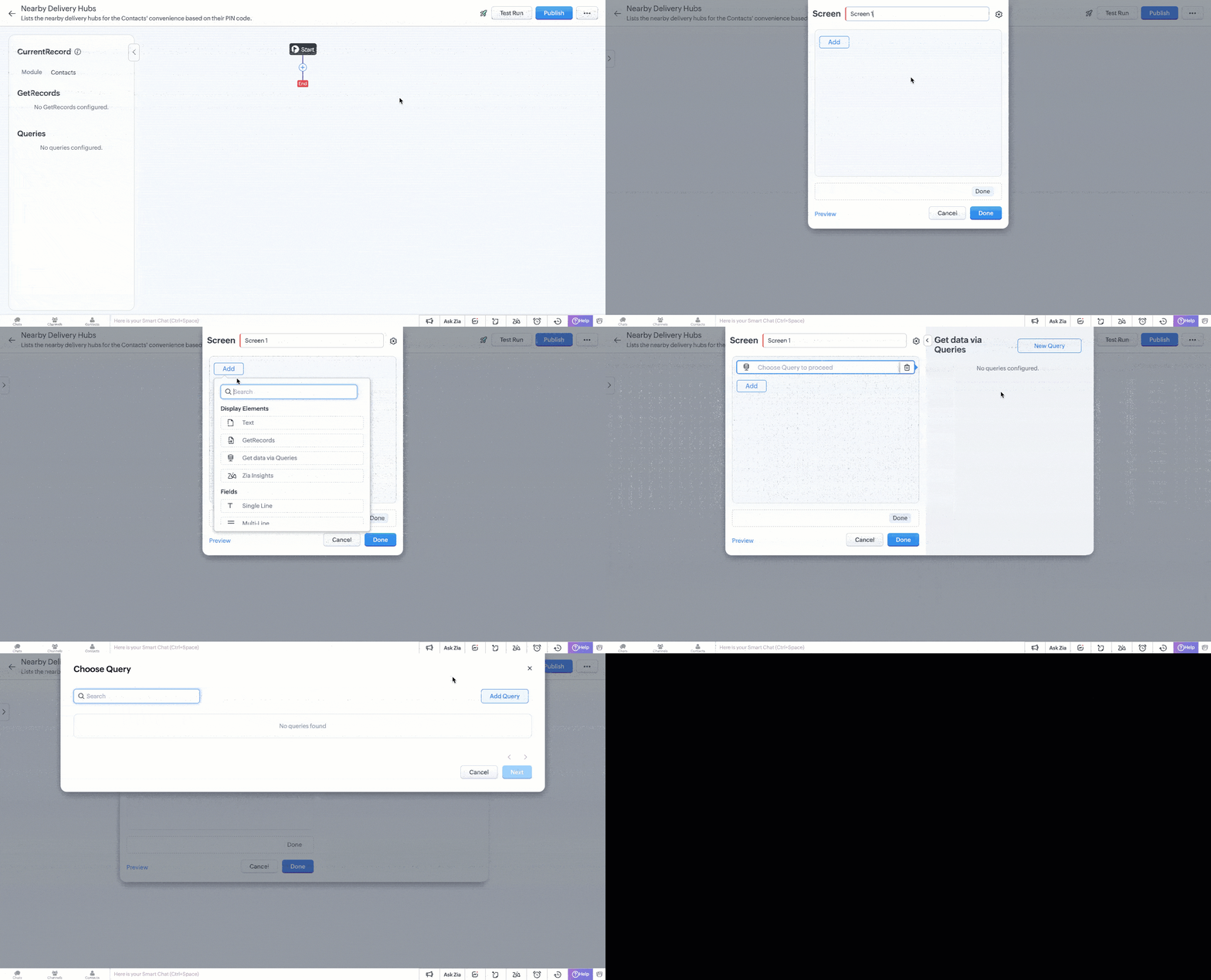
4. Add a Query
- Under Display Elements, choose Get Data Via Queries.
- Click New Query and then Add Query to create a new one.

5. Set Up the Data Source
- Any custom source has to be enrolled either in the Trusted Domains or in the Connections. For demo,
- Add the base URL https://api.postalpincode.in/pincode to Trusted Domain.
- Skip Connections as the Postal PIN Code API is an open source.

- In the Add Query pop-up, click Source and create a new source.
For this demo, we’ll add India Post to fetch post offices based on PIN codes.
- Add default Headers and Parameters to the source if any. This will be added by default whenever the source is used in a query.
6. Define the Query
- In the Information section, provide the query’s Name and API Name to refer to the query wherever needed.
- Use the endpoint URL with a variable, e.g., https://api.example.com/post_offices/{{Mailing_Zip}}.
- You can add headers and parameters specific to the query, but let us skip that for the demo.
- Add a JavaScript serializer to process the Query response. For our case, we will serialize the response with return result[0].PostOffice;.
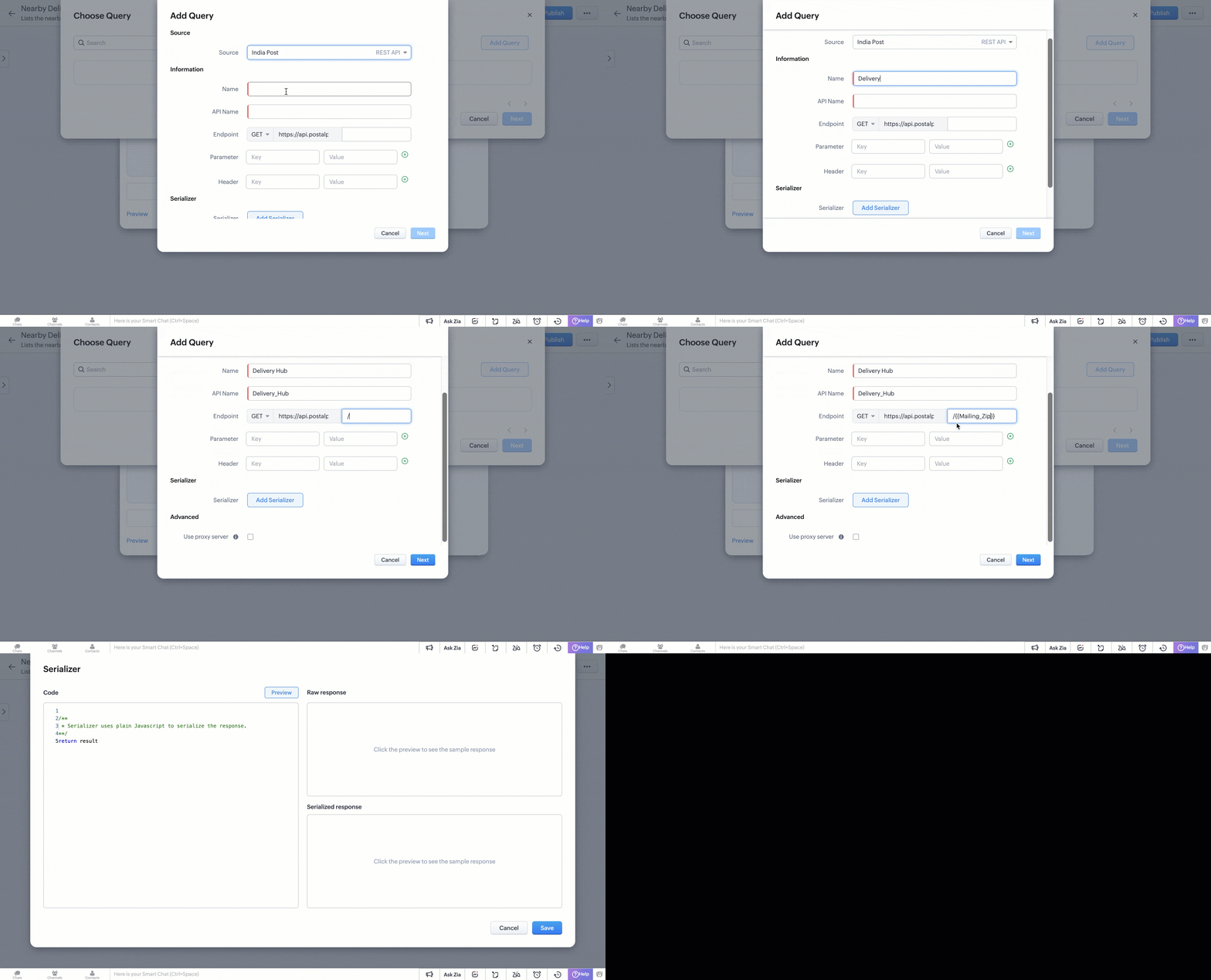
- You can test your serializer with the help of Preview. Once finished, provide a test value to the variable for generating Schema for the Query Response.
The test value you provide is temporary and not permanent. The value of a variable will be declared using merge fields when you associate the query with a component. Check Step 7 to know how it is used in our demo.
You can also manipulate the response by changing data types of keys in the raw response. To keep the demo simple, let's go with the raw response.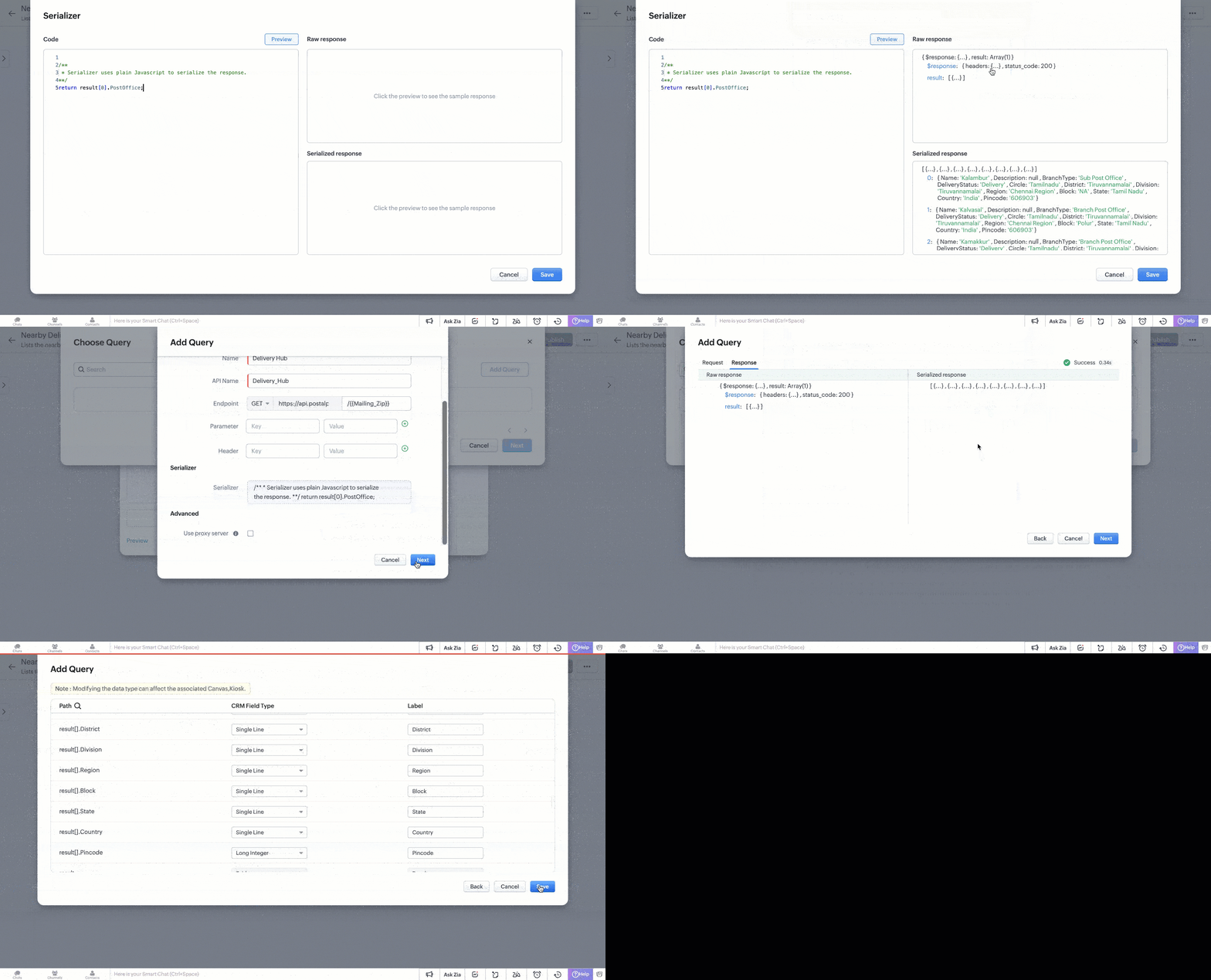
7. Link the Query to Kiosk
- Use Dynamic Parameters to map the variable to the Mailing Zip field from the Contact record. Enter # to merge the fields.
- In Choose Fields, select which data to display in the Kiosk.
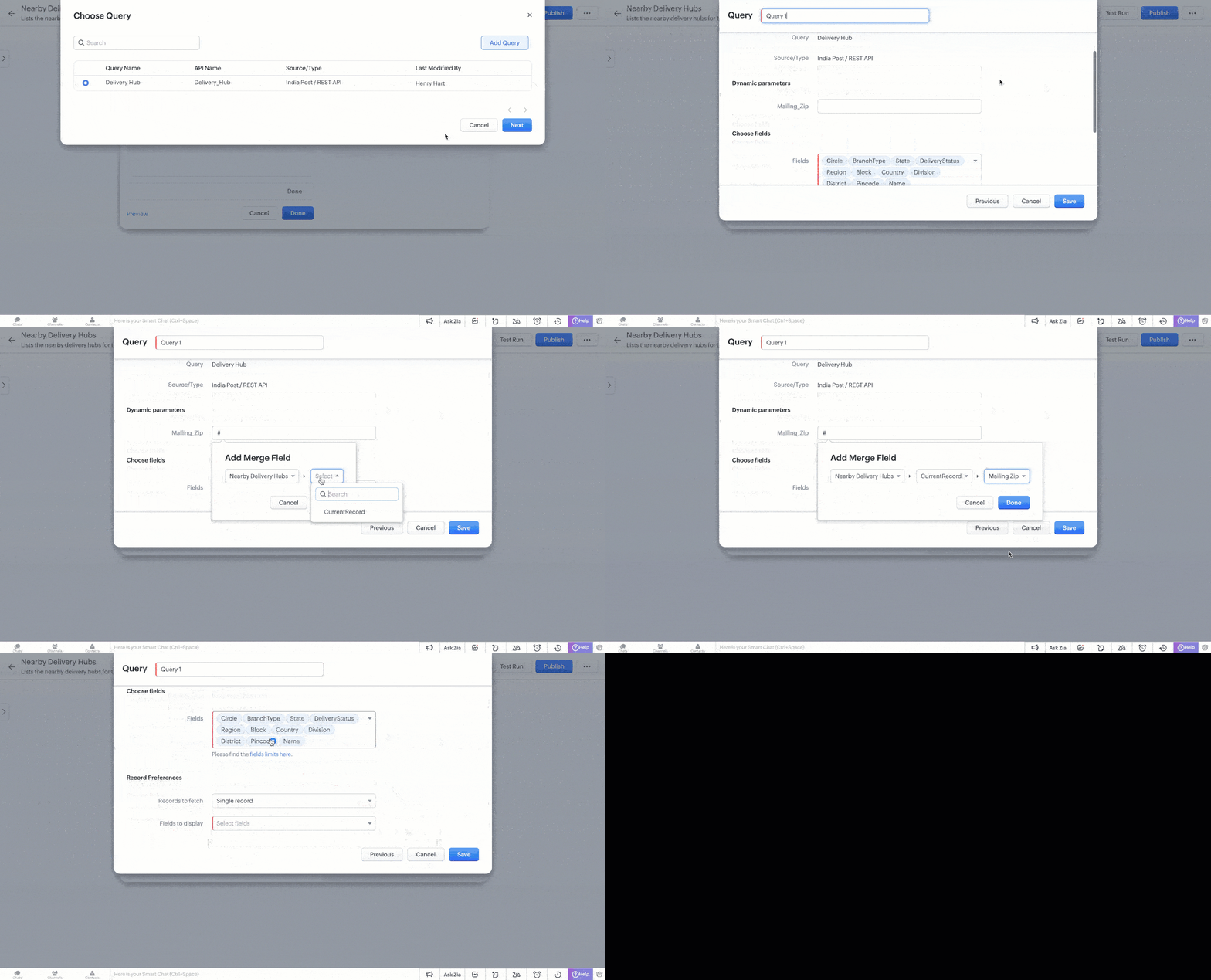
- You can further manipulate the query response in the Record Preferences section.
Select your preference to view the response as a Single Record or Multiple Records. - For Single Record, choose the data that has to be displayed from the query response and click Save.
- For Multiple Records, fill in the following details as shown in this image.
- The Selection Limit helps you with the maximum number of records that have to be chosen in the kiosk after publishing.
- Identifier field functions as the primary field to identify each record.
- In the fields section, choose the data that has to be displayed from the query response.
Customize the Kiosk button and click Done to save your configuration.

8. Test and Publish
Test the Kiosk using a sample Record ID from the Contacts module. If successful, the list of nearby post offices will display in an iframe as it would appear on the Contact detail page.
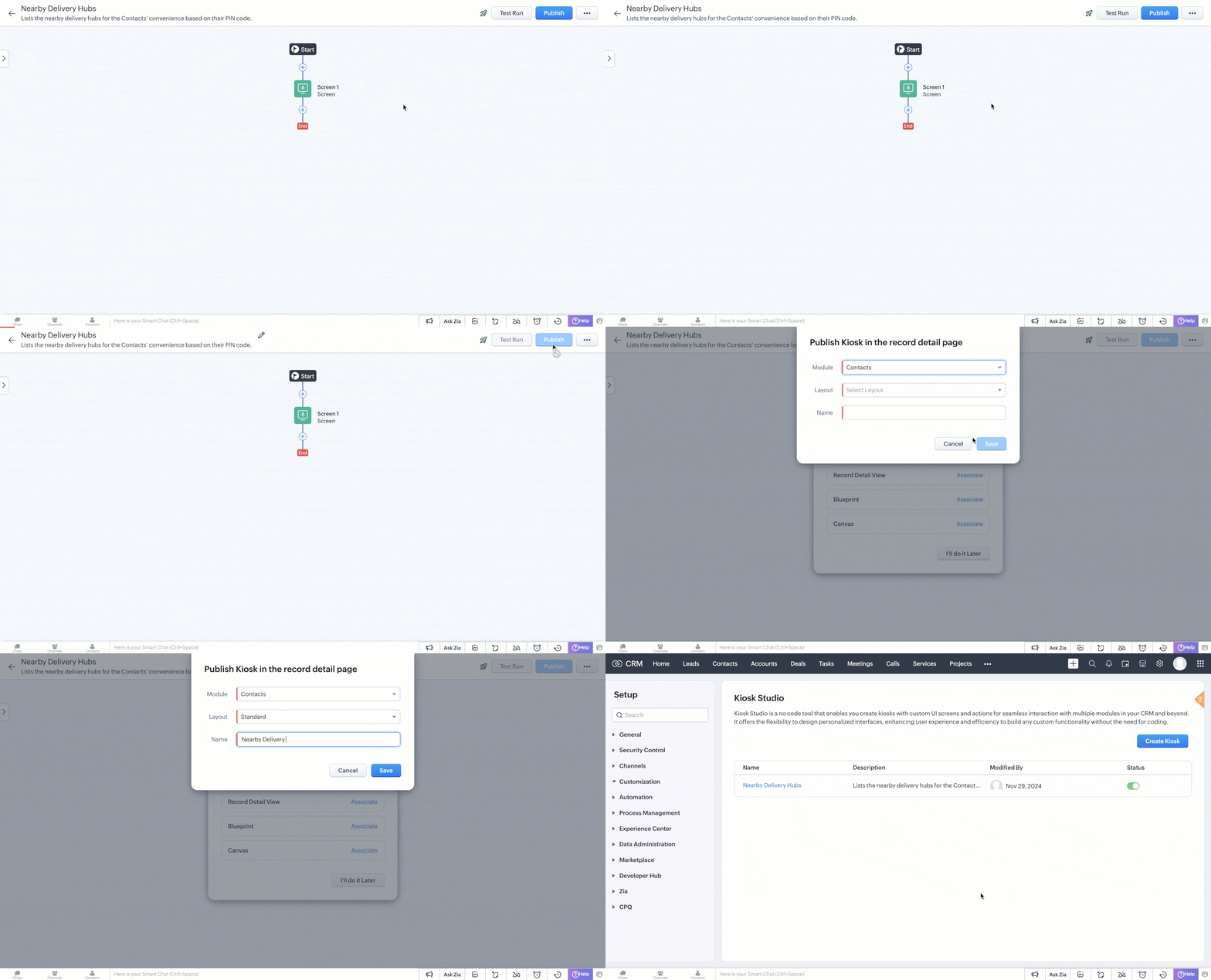
Once satisfied, publish the Kiosk to make it live.
Let us check the Kiosk from the Contacts detail page.

Example Scenarios
- Loan Approval: You can display a customer's CIBIL score using their Social Security Number (SSN) directly within a Canvas. The SSN serves as a runtime variable, allowing you to approve loans without manual data entry and shifting tabs.
- Customer Support: In a Records Detail View kiosk, display all high priority tickets linked to an account. The current account's ID acts as a runtime variable, ensuring that support agents have immediate access to relevant queries and resolve issues faster.
- Insurance Verification: In a Records Detail View kiosk, the customer's ID proof number can be used to verify their details on official government sites. The ID proof number dynamically functions as a variable, streamlining the insurance verification process.
We hope you found this post informative and beneficial.
If you have any queries or a topic to be discussed, reach out to us at support@zohocrm.com or drop your comments below.
Cheers!
---------------------------------------------------------------------------------------------------------

Previous Kaizen: Kaizen #165 - How to call Zoho CRM APIs using Client Script | Kaizen Collection: Directory
Topic Participants
Kiruthiga G
Piyush Goyal
Sticky Posts
Kaizen #152 - Client Script Support for the new Canvas Record Forms
Hello everyone! Have you ever wanted to trigger actions on click of a canvas button, icon, or text mandatory forms in Create/Edit and Clone Pages? Have you ever wanted to control how elements behave on the new Canvas Record Forms? This can be achievedKaizen #197: Frequently Asked Questions on GraphQL APIs
🎊 Nearing 200th Kaizen Post – We want to hear from you! Do you have any questions, suggestions, or topics you would like us to cover in future posts? Your insights and suggestions help us shape future content and make this series better for everyone.Kaizen #198: Using Client Script for Custom Validation in Blueprint
Nearing 200th Kaizen Post – 1 More to the Big Two-Oh-Oh! Do you have any questions, suggestions, or topics you would like us to cover in future posts? Your insights and suggestions help us shape future content and make this series better for everyone.Celebrating 200 posts of Kaizen! Share your ideas for the milestone post
Hello Developers, We launched the Kaizen series in 2019 to share helpful content to support your Zoho CRM development journey. Staying true to its spirit—Kaizen Series: Continuous Improvement for Developer Experience—we've shared everything from FAQsKaizen #193: Creating different fields in Zoho CRM through API
🎊 Nearing 200th Kaizen Post – We want to hear from you! Do you have any questions, suggestions, or topics you would like us to cover in future posts? Your insights and suggestions help us shape future content and make this series better for everyone.
Recent Topics
Calculate Number of Days Between Two Dates
Can someone help me with how to create a field using the formula function to calculate the number of dates between a campaign start date and end date? The closest I have gotten is using the "Datecomp" function but it gives you the dates in minutes, ratherZoho Writer Docx files not able to be converted into Google Docs
Since July 23rd, I've encountered an issue where DOCX files exported from Zoho Writer no longer convert properly into Google Docs when uploaded to Google Drive. My workflow relies on generating merged DOCX documents from Zoho Forms using Zoho Writer templates,Schedule Campaign - Recipients Time Zone
Something seems to be wrong with the scheduling feature for scheduling campaigns to be deployed at a specific time to the recipients time zone. I scheduled campaigns twice to be sent at the recipients time zone and the campaigns are deploying at the wrong time. When communicating with Zoho support they said to make sure it was scheduled at least 24 hours in advance so we did this with our last campaign and it was still deployed at the wrong time. Anyone else having this issue?Zoho Vault App for Windows
Hello, is there a Windows app that can be used to access the passwords saved in Zoho Vault? Thank youZoho Cursor Jumping
Hi, Zoho Support, We received the below email for a bug when using Zoho on Firefox. Please let us know if there is anything that can be done to solve this issue. Have any other Zoho Mail users reported issues the past few days with Zoho auto-saving draftstomorrow option within the due date section and drag and drop into calendar
Firstly, thank you for creating such a well-designed and user-friendly to-do list app. It’s almost perfect for my needs, but I wanted to offer a couple of suggestions that I believe could significantly enhance its usability, particularly for those wholow quality videos
when in puplish videos or reel in social media platforms it pulished in low qualityUsing Zoho Forms vs Zoho Survey
Hello - I'm looking for advice on whether to use Zoho Survey or Zoho Forms for our small non-profit. We have a Zoho One subscription, so have access to both. The main use case at the moment is application forms for our professional development programs.Kaizen #200 - Answering Your Questions | Authentication using Zoho CRM Python SDK
We’re incredibly excited to bring you the 200th post in our Kaizen series! This journey has been as much about listening as it has been about sharing. And today, we’re making both count. Over the past few weeks, we’ve collected your feedback through theZoho CRM sync
Just wondering if the plan is for the Zoho CRM implementation to always be just an import and not a sync? At the very least, a one-way sync that kept the data in Tables up-to-date would increase the amount of usecases, but ideally the option to two-wayAdd serial number in print page list
How can i add serial number in print page for every entries?Trying to Delete records from Creator not found in CRM
Hi, In the following script, I am trying to delete records from Creator not found in CRM, but I am getting the error message "Error at line number: 55 Improper Statement Error might be due to missing ';' at end of the line or incomplete expression". PleaseCan't login to Zoho mail
I'm logged into Zoho but when I try to go in zoho mail I get: Invalid request! The input passed is invalid or the URL is invoked without valid parameters. Please check your input and try again. I just set up my mx records and stuff with namecheap a fewREST API for Branch and Budget
Hi Team, Can you please guide me with the appropriate rest API documentation for fetching Branch and Budget details?STOP FRAUDULENT TRANSACTION IMMEDIATELY
I DID NOT AUTHORIZE THIS TRANSACTION OR RENEWAL, STOP IMMEDIATELY CHARGING MY CARD I CAN NOT CONTACT SUPPORT, NO ONE IS AVAILABLE ON CHAT PAYMENT ID RPCW2003260759193Best way to handle a credit card download fiasco
Hi there, hoping that someone knowledgable with book keeping can give me the answer here. One of my credit cards has been integrated with Zoho books and we have been downloading transactions with no issue. The credit card got compromised and was usedWhen Opening Zoho Mail I always get a Tab with an error (See attached image)
Everytime I open Zoho mail I get this. It is trying to open a deleted email. I already tried going to Settings > While Starting up Changed that option back and forth but this persists. Its annoying. Other than that I love this. Any help would be appreciated.Pre-Registration - Suggestion
Suggest to add a Pre-Registration feature for non-scheduled events. Scenario is that we have a training academy and would like to collect pre-registrants prior to an actual scheduled event so we can use this as a basis for demand management and scheduling of new events for those expressing interest.Not all messages showing in folders in iOS mail.app
I have a bunch of emails filed in various folders. Those folders are showing all of the emails in them on Zoho.com and in the Zoho Mail app on my iPhone and my iPad. They also all show up fine in Mail.app on my Mac. The problem is that certain (not all)Where do the 'Archived' mails go?
I have hit 'Archive' on quite some mails I still needed, but didn't want in my inbox anymore. I obviously thought 'Archive' is not the same as 'Delete', since they don't even pass the trash folder this way, and right now I was looking for one of thoseSignature image size changing on replied emails
Hi, Sometimes I see the size of the image I use as signature changes when I open replied emails. Do you know why is this happening? It doesn't seem to happen when I send emails to Gmail though. Signature should look like in attachment "Signature_normal.jpg"Não consigo enviar emails. "Razão:533"
Não consigo enviar emails. "Razão: 533 Relaying disallowed. Invalid Domain" aparece e me impede de enviar emails... Como resolver o problema?Error when setting up IMAP access in Gmail
Hi I set up POP3 access via Gmail for my Zoho-hosted domain email. I just tried to change it to IMAP access, however when inputting the settings I received the following error message from Gmail "Missing +OK response upon connecting to the server: * OKZoholics Europe 2025: Unlocking the Power of Zoho CRM : A Hands-On Workshop
Why should you attend? At Zoholics Europe 2025, Zoho’s official user conference, you’ll have the opportunity to connect directly with experts and explore powerful tools that help businesses elevate customer experiences. Be sure to attend one of the most"Wrong password or login" Problem to configure Zoho on MAIL App on my Macbook
Hi, I'm having problems to configure my e-mail on my MAIL App(Macbook pro). My e-mail is hari@trespontoum.net Actually was working perfectly, and still working on my Iphone. My MAIL App prompt me that my login or password is wrong. I tried to change 3How do I delte a mailbox alias
Hi everyome, I have created a mailbox alias on one of my accounts, but I can't figure out how to delete it again. When I go into the control panel on my super-admin account and click on user details and the settings for the user, I can see the mailboxAllowing vendors to Upload Purchase Invoices against Purchase Order
Work Flow: Once Project is executed, We send Purchase order to every Vendors asking them to Share the invoice against the same. Most of the time Vendors Send invoices through Mails but our Finance Team miss to book those Purchase Invoices in Zoho Books.Deluge - forward incoming email with original attachments and content but new subject
I'm working in ZohoMail with a 10GB paid account. Using a filter and a custom function, I can send a new mail with the original email content and a new subject, but I'm struggling to find how to attach the original attachment to a new mail - or even toError: "The conversation window has expired." on WhatsApp
Hello, I would like to know why this error appears in the messages within WhatsApp from the CRM: "The conversation window has expired." The question arises because a potential client sent us a message at 11:00 PM and we are responding the next day atHow to Sync Desk KB and Sales IQ KB?
Hi, we have just started to use Desk and are using the SalesIQ Chat. Ideally I'd like to use the 'FAQ' feature on chat (which uses SalesIQ KB) and also allow our customers to use the self-service KB that comes with Desk. Unfortunately they are two differentNeed help! Unable to send message; Reason: 554 5.1.8 Email Outgoing Blocked.
Hi Zoho team My account name is senpai.atelier, it’s been few days I can’t send Emails with the same error messages. I’ve raised the issue to support@zohomail.com that doesn’t respond to my query. I wonder if you may help troubleshooting soon.Zoho arrives to Spam on all Microsoft Accounts (Outlook, Hotmail, Microsoft 365)
I believe this is a very serious issue. All my email accounts in Zoho arrives straight to SPAM. Thing is, a lot of clients rely on email arriving to Inbox, specially on Microsoft Accounts since it is used a lot both for business and personal email sending.Registeration
I just added the TXT code. What next?Cannot receive password protected zip files
Hello, I cannot received a password protected attachments. Also all my members in the same domain has the same problems. Can you please help me? Best regradsERROR 554 5.1.8 Sender Address Blocked code(554)
We have an email with Zoho ( comercial@bruiser.com.br), but, when we try associate the account in GMAIL, the server shows this message: 554 5.1.8 Sender Address Blocked code(554) I see this error appear when the limits of returns exceded 10 messages,How do I associate pricebooks to a customer?
I setup a few pricebooks, that worked fine. But now the only thing I can do with it, when I enter a quote or sales order, I can select which pricebook to use, but I have to do this product by product every time I add one. Is there a way to connect a pricebookZoho mail stopped receiving emails
Our email are stopped to receive outsider email. i have checked the DSN, it's pointed to ZOho mail. Can anyone help me to fix this issue urgently? Thankssend email from web application
Hello, I'm experiencing an issue with sending emails from my web application. Here are the configuration parameters currently in use: ini Copia Modifica quarkus.mailer.from=noreply.sedis@mondonovo.net quarkus.mailer.host=smtp.zoho.com quarkus.mailer.port=465Custom CSS in Zoho Form
Hi, Please let me know, how we can add custom css in Zoho Form. ThanksZoho Recruit
Getting this issueNext Page