Event Management System using ZDK CLI

Event Management System using ZDK CLI


Hello Everyone,

Welcome back to yet another post in the Kaizen Series!

As you already may know, for the Kaizen #200 milestone, we asked for your feedback and many of you suggested topics for us to discuss. We have been writing on these topics over the past few weeks. One of the feedbacks asked us to cover "more on ZDK CLI". In this post, we will discuss building an Event Management System in Zoho CRM Using ZDK CLI.

Consider the case of Zenith, a Zoho CRM partner who is also partner for Zoho's competing products. Zenith is hosting a conference in which their representatives are inviting speakers from Zoho and also other competing products. The attendees of the conference will be either external attendees or leads or contacts of Zenith. For this purpose existing meetings module of Zoho CRM (previously called Events) can not be used as it is not a good fit for this case. Custom modules and fields are required for this. In this post, we’ll discuss how to create a Event Management System that is complimentary to Zoho CRM using ZDK CLI

Why Use ZDK CLI?
ZDK CLI allows developers to:
  1. Create and edit CRM metadata (modules, fields, roles, profiles, and widgets)
  2. Define relationships between modules (lookups, multi-select lookups)
  3. Push and sync metadata changes to sandbox.
  4. Resolve conflicts when multiple users work on the same metadata.

This makes it ideal for building reusable CRM systems such as event management.

Initial Setup

As the initial setup, initialize the ZDK CLI project directory using zdk init command and create a new ZDK Project folder "Zenith". 

     zdk init


Then, login to the sandbox environment for Zenith using zdk auth:login command. 

     zdk auth:login


When you execute zdk auth:login, you can either select any org that is already signed in or select NEW LOGIN to visit the login page and select the sandbox org you will be working on.


After logging in to Zoho select the sandbox environment and give required permissions.
Notes
For the current beta release, ZDK CLI is exclusively available for Sandbox environment and is not operational in Production environments. 


You will be redirected to the terminal after successful login and you can start working on ZDK CLI.


Notes
Change the api_version to 8 in zdk-project.json file.

Step 1: Define the Modules

For an event management use case, we will need the following custom modules:
  1. Conference – Stores details of each event.
  2. Attendees – Tracks participants, whether leads, contacts, or external.
  3. ConferenceAttendees (Linking Module, not created) – Connects conferences and attendees with registration status.
  4. Venues – Captures details of event locations.
  5. Speakers – Stores details of invited speakers.

This has been visualized in the data model below.


To create a module, use the command

     zdk meta:create modules


This creates the json file for module metadata : Conference.modules-meta.json  in the path Zenith/crm/meta/modules/Conference 

Conference.modules-meta.json content

{
    "singular_label": "Conference",
    "plural_label": "Conferences",
    "api_name": "Conference",
    "profiles": [
        {
            "api_name": "Administrator"
        }
    ],
    "display_field": {
        "api_name": "Conferences"
    },
    "show_as_tab": true
}

Similarly create modules Attendees , Venues, and Speakers modules

Step 2: Customize Fields

To create a field, use the command

     zdk meta:create fields

Conference module:

Conference modules's fields are:

  1. Attendees (multiselectlookup to Attendee module) 
  2. Speakers (multiselectlookup to Speakers module) 
  3. Venue (lookup to Venue module) 
  4. Date (datetime) 
  5. Duration(double) 
  6. Description (textarea) 
  7. Status (picklist: Planned, Ongoing, Completed)


Attendees field
Let us check how to create the field attendees of type multi-select lookup (to Attendee module)


The json file Attendees.fields-meta.json created in the path Zenith/crm/meta/modules/Conference/fields will look like this


To provide dependent details for the multi select lookup, add the multiselectlookup json object to the Attendees.fields-meta.json file as below:

{
    "field_label": "Attendees",
    "display_name": "Attendees",
    "api_name": "Attendees",
    "type": "used",
    "data_type": "multiselectlookup",
    "multiselectlookup": {
        "connected_details": {
            "module": {
                "api_name": "Attendee"
            },
            "field": {
                "field_label": "AttendingConference"
            }
        },
        "linking_details": {
            "module": {
                "plural_label": "Conferences_X_attendees"
            }
        }
 }
}

Speakers (multi-select lookup to Speakers module)
Similar to Attendees field, create Speakers field and modify the json file Speaker.fields-meta.json created in the path Zenith/crm/meta/modules/Conference/fields:

{
    "field_label": "Speaker",
    "display_name": "Speakers",
    "api_name": "Speakers",
    "type": "used",
    "data_type": "multiselectlookup",
    "multiselectlookup": {
        "connected_details": {
            "module": {
                "api_name": "Speaker"
            },
            "field": {
                "field_label": "AttendingConference"
            }
        },
        "linking_details": {
            "module": {
                "plural_label": "Speakers_X_attendees"
            }
        }
 }
}

Venue (lookup field to Venue module)
Similarly, create the Venue field with type as "lookup" The json file Venue.fields-meta.json created in the path Zenith/crm/meta/modules/Conference/fields will look like this


To provide dependent details for the lookup, add the lookup json object to the json as below.
{
    "field_label": "Venue",
    "display_name": "Venue",
    "api_name": "Venue",
    "type": "used",
    "data_type": "lookup"
    "lookup": {
        "display_label": "Venue",
        "api_name": "Venue",
        "module": {
          "api_name": "Venue"
        }
      }
}

Description (textarea)
After create a textarea field Description using zdk meta:create fields command, add textarea json object to the field meta json file as below :

{
        "field_label": "Description",
                "display_name": "Description",
                "api_name": "Description",
                "type": "used",
                "data_type": "textarea",
                "textarea": {
                        "type": "rich_text"
                }
}

The possible values for text area are small, large and rich_text.

Status (picklist)
After create a picklist field Status using zdk meta:create fields command, a
dd pick_list_values json array to the field meta json file as below:

{
    "field_label": "Status",
    "display_name": "Status",
    "api_name": "Status",
    "type": "used",
    "data_type": "picklist",
  "pick_list_values": [
    {
      "display_value": "Planned",
      "actual_value": "Planned"
    },
    {
      "display_value": "Ongoing",
      "actual_value": "Ongoing"
    },
    {
      "display_value": "Completed",
      "actual_value": "Completed"
    }
  ]
}

Date and duration fields of type datetime and double does not require any edits to the created meta.json file.


Attendees Module

Similarly, add fields for attendees modules
  1. Phone (phone)
  2. Company (text)
  3. EventsAttended (multi-select lookup to Conference module)
  4. Attendee Type (picklist with options Lead, Contact, External)
  5. Leads (lookup to Lead module)
  6. Contacts (lookup to Contact module

Venue Module

  1. Location (text)
  2. Capacity (integer)
  3. Contact erson (text)
  4. ContactNumber(phone)
  5. Description(textarea)

Speakers Module
  1. Phone (phone)
  2. Company (text)
  3. SpeakerStatus (picklist with options Confirmed, Pending, Canceled)

Step 3: Create a Custom Role


To create a field, use the command

     zdk meta:create roles


This ensures event managers have the right access without interfering with other CRM operations.

Pushing changes to the sandbox environment

Once all changes are done execute zdk org:push and zdk org:push result --{jobId} command to deploy the changes to the sandbox environment. Once the changes are verified in your sandbox environment you can deploy it to the production environment.

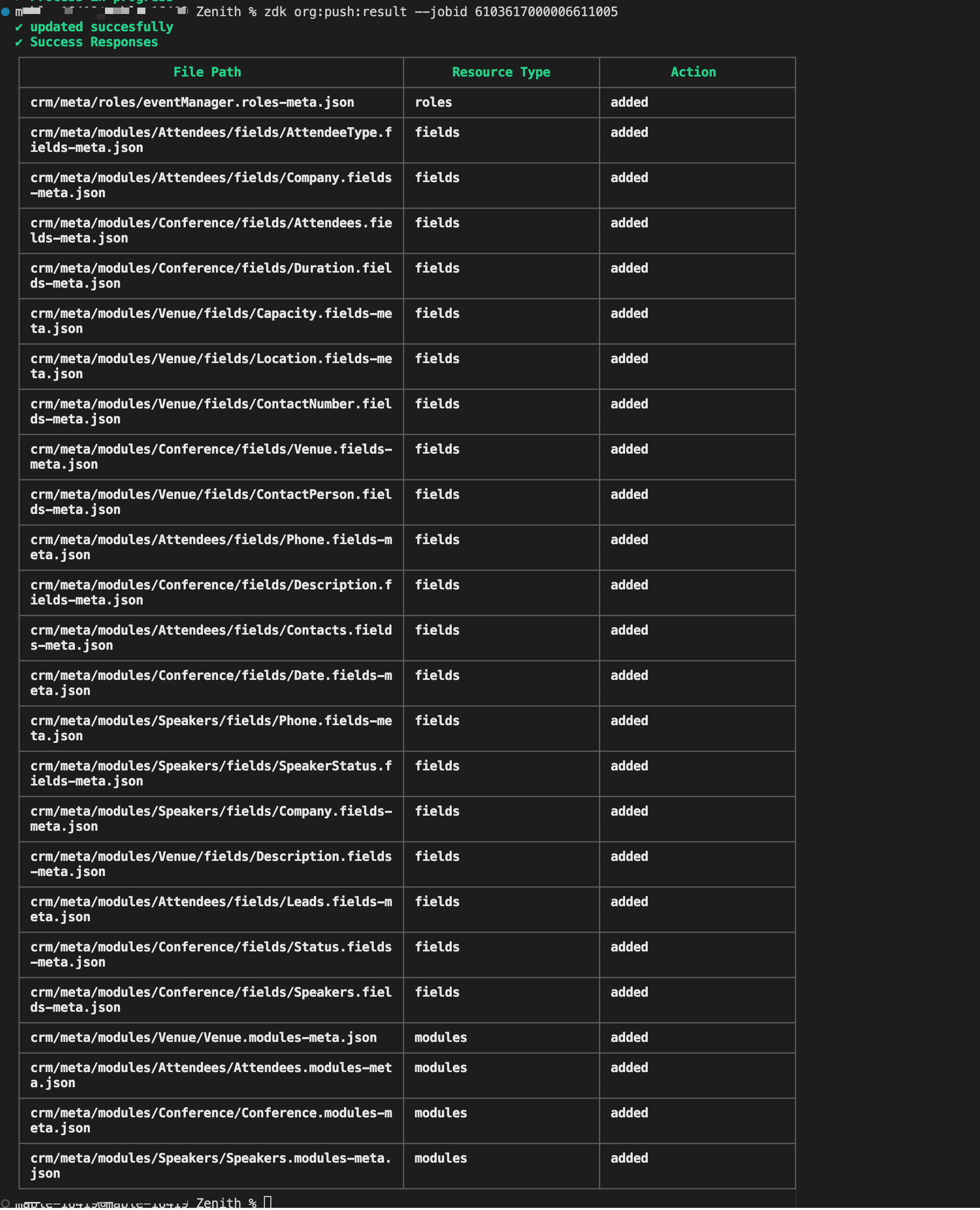


You can extract this metadata zip file, that is created using zdk org:export command to your own ZDK project directory and try pushing the changes to your sandbox environment.

Building the Event Management System for "Zenith" illustrates the core strength of ZDK CLI. It brings software engineering best practices to Zoho CRM customization. By defining modules/fields/roles as json files directly or creating them using the command, the source truth of the metadata is available in local system. The same can be tracked via version control systems like GIT for better collaboration among the team.
    • Recent Topics

    • Creating Email template that attaches file uploaded in specific field.

      If there's a way to do this using Zoho CRM's built-in features, then this has eluded me! I'm looking to create a workflow that automatically sends an email upon execution, and that email includes an attachment uploaded in a specific field. Email templates
    • Marketer’s Space - Automate a Personalized Holiday Workflow with Zoho Campaigns

      Hello marketers, Welcome back to another post in Marketer’s Space! From Thanksgiving through Christmas, you have a flurry of opportunities to connect with your audience. In this post, we’ll see how you can plan an entire month-long automated workflow
    • Items Below Reorder Point Report?

      Is there a way to run a report of Items that are below the Reorder Point? I don't see this as a specific report, nor can I figure out how to customize any of the other stock reports to give me this information. Please tell me I'm missing something s
    • Zoho Inventory Custom Field Update

      Hello All, In this post I am describing how can we Update the Custom Field Value in Zoho Inventory. // Get Org ID orgid = organization.get("organization_id"); // Field Value resvp = ifnull(item.get("purchase_rate"),null); // Record ID iid = item.get("item_id");
    • Sorting columns in Zoho Projects

      Hi, In project management best practice, sorting columns (ascending, descending) is an important tool. Sorting dates to see the order of tasks starting, sorting on priority or even on planned hours is a must for an efficient project control. Currently,
    • Zoho CRM - Calendar Cards View - Let Users Decide What Is Displayed On Calendar Entries

      Imagine planning your week of face-to-face meetings across three counties. You’re trying to group appointments by location to make the best use of your time, but Zoho CRM’s calendar doesn’t show where each meeting is happening. You’re left trying to remember
    • Explore the Redesigned Quotes Module in Zoho Billing

      Dear users, We’re excited to introduce a refreshed look for the Quotes details page in Zoho Billing! This update brings you a more efficient user interface experience without changing your existing workflow. We've enhanced layouts with organized tabs,
    • Updating custom fields in Zoho Projects

      Hi I am wondering if anyone has experience with custom fields in Zoho Projects. I am struggling to update the field using either deluge or the api endpoint. My code is: //custom_Map = map(); custom_Map = {"UDF_DOUBLE_1":"0.27"}; update_Map = map(); update_Map.put("custom_fields",custom_Map.toList());
    • Zoho Inventory - How to pay a supplier up front then receive multiple deliveries

      How do we manage situations where we pay a supplier up front, then the receive the products in increments? Example Workflow: Create Purchase Order > Receive Bill for full amount > Receive Items 2 or more deliveries. Currently, once a Bill is created against
    • Pin multiple columns and adjust column widths in CRM subforms

      Hello all, Subforms act as secondary forms or tables in which you can associate multiple line items to a primary record and thereby ensure more structured and comprehensive data organization. We've made some recent enhancements to subforms. Here's what's
    • Zoho Books | Product updates | November 2025

      Hello users, We’ve rolled out new features and enhancements in Zoho Books. From translating email notification templates to the new transaction locking restrictions, explore the updates designed to enhance your bookkeeping experience. Making Tax Digital
    • How can I add or change the active customer in Zoho Projects?

      I'm trying to change the customer in an active Zoho project. Is it possible to add or change the customer?
    • Good news! Calendar in Zoho CRM gets a face lift

      Dear Customers, We are delighted to unveil the revamped calendar UI in Zoho CRM. With a complete visual overhaul aligned with CRM for Everyone, the calendar now offers a more intuitive and flexible scheduling experience. What’s new? Distinguish activities
    • Item images

      Can we get an "On hover" expanded image for items please ?
    • Almacenamiento

      Hola, Quisiera saber como podría hacer para bajar el almacenamiento de 5gb a mis usuarios, en otras palabras los quiero ir limitando de la cuota real, y luego ir agregando poco a poco la cantidad hasta llegar a los 5gb que me dan en el plan free. 
    • What happens when someone clicks 'unsubscribe' in a zoho CRM email

      Hello, As per, i am going round in circles trying to find an answer to these 2 question. I have an email template that has an unsubscribe link in the footer in zoho CRM. First, what happens when someone clicks it - where does the contact get unsubscribed
    • Nimble enhancements to WhatsApp for Business integration in Zoho CRM: Enjoy context and clarity in business messaging

      Dear Customers, We hope you're well! WhatsApp for business is a renowned business messaging platform that takes your business closer to your customers; it gives your business the power of personalized outreach. Using the WhatsApp for Business integration
    • Zoho CRM - Scheduled Reports Which Contain Chart

      Hi Zoho CRM Team, I'm requesting that the Report Export and Scheduling feature be enhanced to include a chart, if one has been created on a report. At the moment I have a report which shows Sales This Week by Deal Owner and a pie chart at the top of the
    • Ability to Create and Manage YouTube Video Chapters in Zoho Social

      Hi Zoho Social Team, How are you? We would like to request an enhancement to Zoho Social that would allow users to create and manage YouTube video chapters directly within the platform. Currently, Zoho Social does not support manually adding chapters
    • Support Nested JavaScript Variables in PageSense Pop-up Targeting

      Hello Zoho PageSense Team, I hope you're doing well. I’d like to request a feature enhancement for the PageSense pop-up targeting functionality. Current Limitation: Currently, PageSense pop-ups can be triggered using simple JavaScript variables. However,
    • Can I add Conditional merge tags on my Templates?

      Hi I was wondering if I can use Conditional Mail Merge tags inside my Email templates/Quotes etc within the CRM? In spanish and in our business we use gender and academic degree salutations , ie: Dr., Dra., Sr., Srta., so the beginning of an email / letter
    • Cadences

      I have just started using Cadences for follow-up up email pipeline. Is it just me or do you find the functionality very basic? For example, it will tell me (if I go looking for it) if someone has replied to a follow-up and been unenrolled; but it won't
    • Canvas View in Zoho Recruit

      Is it possible or would it be possible to have the new 'Canvas View' in Zoho Recruit?
    • Zoho Inventory - Move Orders

      Quick question about Move Orders... Why is there no status to say something like "Draft", "In Progress" and "Completed", similar to Transfer Orders? I'm assuming that when something needs to be moved it should be planned in Inventory, executed and then
    • Kaizen #215 - Workflow APIs - Part 3 - Create and Update Workflow Rules

      Welcome back to another week of Kaizen! Over the last couple of weeks, we’ve joined Zylker Cloud Services as they review and improve their workflows. In Part 1, we discovered and audited their sprawling workflow landscape. In Part 2, we learned how to
    • DataPrep Bigquery Connection failed

      Hello everybody, I want to create a connnection beetwen Bigquery and Dataprep but when I try to connect my project I got this error Loading tables has failed. Table list fetched from the data source expired.
    • Issue in Zoho People Regularization – Incorrect Hour Calculation

      I have noticed that when applying attendance regularization in Zoho People for previous dates, the total working hours are not calculated correctly. For example, even if the check-in is 10:00 AM and check-out is 6:00 PM, the system shows an incorrect
    • "Authorize to Access Your Account"

      Hi, I'm trying to log into cliq on my phone but I can't. It says "Authorize to access your account - Verify your identity to access your account using oneAuth credentials", and asks for a password. I tried maybe 100 different passwords and nothing works.
    • Zoho Analytics Export API

      Hi Team, I’m working on some integration tasks and wanted to confirm if it’s possible to retrieve a Zoho Analytics table as JSON data using a Deluge script. I’ve already stored my custom data from multiple sources and combined it into a single source.
    • Free Webinar : Unlock AI driven business insights with Zoho Inventory + Zoho Analytics

      Are you tired of switching between apps and exporting data to build customized reports? Say hello to smarter & streamlined insights! Join us for this exclusive webinar where we explore the power of the Zoho Inventory–Zoho Analytics integration. Learn
    • Allow Multiple usage units to items while adding them to sales/purchase transactions

      The usage unit of items added in zoho books are static right now and can not be changed. But certain items are received or sold in multiple usage units. One example is fabric. It can be bought in Meters, inches, kgs or other units. Another example would
    • PO receive quantities

      At last, Zoho has finally got around to allowing us to receive a larger qty than recorded in the PO :-) Saves us all from editing the PO's before receiving larger quantities ( usual for us ) ! It's still in "beta" but available upon request, I've tested
    • Invalid URL error when embedded sending url into iframe for my website when using in another region

      Hi team, My site is currently working on integrating your signature feature as part of the system functionality, it's working great but recently there's been a problem like this: After successfully creating the document, i will embed a sending url into
    • Analytics : How to share to an external client ?

      We have a use case where a client wants a portal so that several of his users can view dashboards that we have created for them in Zoho Analytics. They are not part of our company or Zoho One account. The clients want the ability to have user specific,
    • Reference Deal Categories in Deluge

      Hello, Is there a way to reference Deal Category in deluge functions? So for our Deals, we have several different WON stages in a pipeline.  Rather than type each stage into our functions, we'd like to be able to reference the Deal Category.  Similar
    • Payroll In Canada

      Hi, When can we expect to have payroll in Canada with books 
    • Automatic Portal invite

      We have numerous customers we move through a blueprint in deals, when they get to a certain point we need to give them portal access, how can this be done through deluge or a workflow?
    • Users Name & Email in Reports

      Hi, I would like to show the Users Name from their Zoho Acount in All Entries/Reports as well as the current Account Email. Thanks Dan
    • Cliq iOS can't see shared screen

      Hello, I had this morning a video call with a colleague. She is using Cliq Desktop MacOS and wanted to share her screen with me. I'm on iPad. I noticed, while she shared her screen, I could only see her video, but not the shared screen... Does Cliq iOS is able to display shared screen, or is it somewhere else to be found ? Regards
    • Presenting ABM for Zoho CRM: Expand and retain your customers with precision

      Picture this scenario: You're a growing SaaS company ready to launch a powerful business suite, and are looking to gain traction and momentum. But as a business with a tight budget, you know acquiring new customers is slow, expensive, and often delivers
    • Next Page