Kaizen 241 - Automating Deal Risk Escalation Using Workflow APIs, Connected Workflows, and Functions

Kaizen 241 - Automating Deal Risk Escalation Using Workflow APIs, Connected Workflows, and Functions


Hello everyone!

Welcome to another Kaizen week.

In many organizations, sales teams work in Zoho CRM, finance teams manage invoices in Zoho Books, and support teams handle customer issues in Zoho Desk. Now consider this scenario:

A sales representative is working on a high-value upsell opportunity for an existing customer. The deal has reached the final negotiation stage and is ready to move forward. From the sales team’s perspective, everything looks fine. However, the finance team may know that the customer has unpaid invoices, while the support team may already be handling unresolved tickets for the same customer.

Sales teams typically do not verify these details manually every time a deal progresses, which can lead to risky business decisions.

In this post, we will build a cross-app risk validation flow for high-value deals in Zoho CRM. When a deal enters the Negotiation/Review stage, the automation checks for unpaid invoices in Zoho Books and open support tickets in Zoho Desk, updates risk fields in CRM, escalates risky deals into a connected review process, and resumes deal progression only after approval.

To implement this, we will use a combination of:

 Prerequisites 

Before implementing this flow, make sure the following are already available:

  • Zoho CRM with access to Workflows, Custom Functions, and Connected Workflows.

  • Zoho Books and Zoho Desk configured for the same business context, and integrated with Zoho CRM. Check these links for more details : CRM - Books integration help, CRM - Desk integration help.

  • Active connections from Zoho CRM to Zoho Books and Zoho Desk.

  • The Deals module in CRM.

  • A custom module called Risk Reviews.


NOTE: This implementation assumes that the Zoho Books and Zoho Desk integrations are already configured and CRM connections are available for use inside Deluge invokeurl calls. In the sample function, these are referenced as books_connection and desk_connection.

The connections must include the scopes required by the APIs used in the custom function:

  • the Zoho Books connection should include scope(s) to read invoices

  • the Zoho Desk connection should include scope(s) to read contacts and tickets

If these scopes are missing, the invokeurl calls in the custom function will fail even if the workflow and Deluge logic are configured correctly.

 CRM Setup   

 Fields to Add 

Add three fields to the Deals module:

  • Approval_Status : Tracks the validation/approval state (Picklist field : Pending Validation, Approved, Escalation Required)

  • Invoice_Risk_Count : Number of problematic invoices found (Number field)

  • Open_Ticket_Count : Number of open support tickets found (Number field)

 Risk Reviews Module 

Create a custom module called Risk Reviews to store escalation records for Deals. Each Risk Review record remains connected to the originating Deal so that the review process is traceable and the original Deal can be updated automatically after approval.

Include the following fields in the Risk Reviews module:

  • Review_Status (Picklist: Pending, Approved, Rejected, Needs Clarification)

  • Risk_Type (Multiselect Picklist: Invoice Risk, Support Risk, Both)

  • Deal (Lookup to Deals module)

  • Account (Lookup to Accounts module)

  • Deal_Amount (Currency)

  • Reviewer (User field)

  • Comments (Long Text)

  • Escalated_On (DateTime - auto-populated when created)

  • Reviewed_On (DateTime - populated when review is completed)

 Step 1: Create the workflow rule   

Whenever a deal enters the final negotiation stage, we want the system to validate whether the customer has any financial or support-related risks before allowing the deal to move forward.

Workflow Trigger Conditions:

  • Stage = Negotiation/Review

  • Deal Amount > threshold value. In this example, we use ₹250000 as the high-value threshold.

This ensures that only high-value deals go through this validation process.Create this using the Create Workflow Rule API. The workflow contains a single instant action: execute a custom function.

Find the Workflow Rule API input JSON here.


 Solution flow
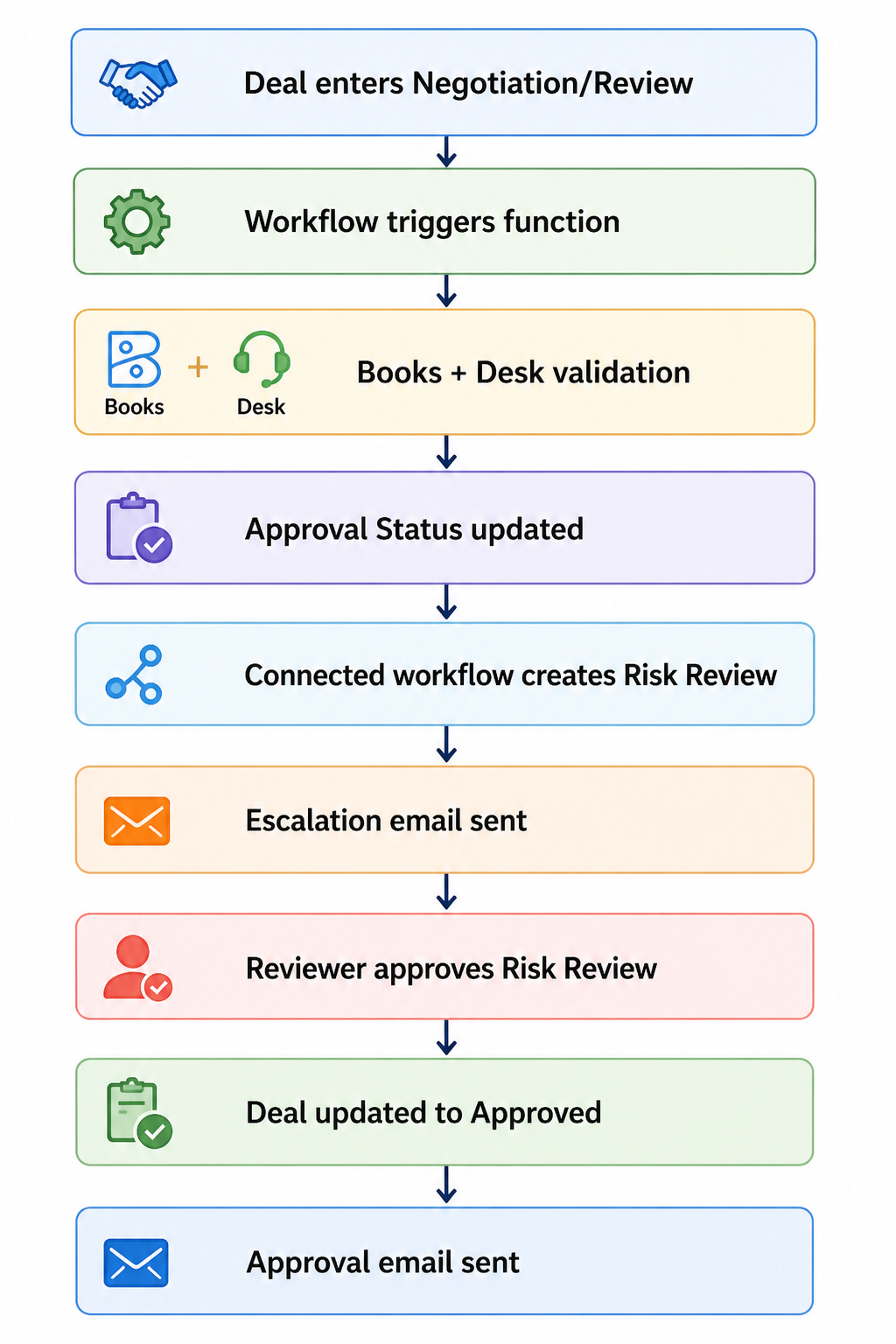

Custom Function 

Once triggered, the workflow executes a custom function.  The function accepts a single input parameter, dealId, from the workflow context and performs the validation logic in five steps.

 1. Fetch deal details from Zoho CRM   

It first fetches the deal record and extracts:

  • Deal stage

  • Deal amount

  • Current approval status

  • Account details

  • Contact details

These values are used both for qualification checks and for matching records across Zoho CRM, Zoho Books, and Zoho Desk.

 2. Check whether the deal qualifies for validation   

We do not want every deal to go through this process. The function exits if:

  • the deal is not in the Negotiation/Review stage

  • the deal amount is below ₹250000

This avoids unnecessary API calls and keeps the validation logic focused only on high-value deals. In a production implementation, this threshold can be moved into a configurable setting instead of being hard-coded in the function.

 3. Check invoice risk in Zoho Books   

The function fetches invoices using the configured Books connector and Zoho Books APIs. It then loops through the returned invoices and counts records where:

  • customer_name matches the CRM Account name

  • status is one of:

    • unpaid

    • overdue

    • draft

The count is stored in Invoice_Risk_Count.

In the current implementation, the CRM Account is matched to Zoho Books using the account display name. This works for simple cases, but according to your implementation,  it is better to match using a stable customer identifier instead of relying only on account names.


 4. Check support risk in Zoho Desk   

The function validates support risk in two stages.

First, it fetches Desk contacts using the configured desk_connection and identifies the matching contact by comparing the Desk contact email with the CRM Contact email.

Once a match is found, the function fetches Desk tickets and counts records where:

  • contactId matches the identified Desk contact

  • status = Open

The final count is stored in Open_Ticket_Count.

 5. Determine approval status   

Once both validations are complete, the function determines the new approval state:

  • if Invoice_Risk_Count > 0 or Open_Ticket_Count > 0, set Approval_Status to Escalation Required

  • otherwise, set Approval_Status to Approved

The function always refreshes:

  • Invoice_Risk_Count

  • Open_Ticket_Count

It updates Approval_Status only if the new value is different from the current one. This avoids unnecessary status updates while still keeping the numeric risk fields current.

Find the full Deluge function code here.

To make this automation safer in implementations, it is also a good idea to prevent duplicate escalations. For example, before creating or triggering a new review cycle, you can check whether an open Risk Review record already exists for the same Deal.  

Note: If you have high invoice volumes or large contact bases, extend this implementation with pagination, server-side filtering, and error handling.

Step 2: Create the Connected Workflow  

At this stage, the function has already identified whether the deal is risky.

If no risks are found, the Deal is approved and moves forward.

If risks are found, the process needs to do more: create a review record, notify stakeholders, wait for a human decision, and then update the original Deal once that decision is made. This kind of multi-record, multi-stage flow can technically be assembled using a combination of separate workflow rules and custom functions, each reacting to field changes across modules. But that means you are manually maintaining the relationships between those rules, keeping track of which record triggered what, and ensuring updates flow back correctly to the originating Deal.

Connected Workflows are built specifically for this pattern. They let you define the entire cross-record process in one place, where each stage is explicitly linked to the record that triggered it. The Risk Review stays connected to the Deal it came from, so when a reviewer approves it, the platform knows exactly which Deal to update, without you wiring that logic together separately.

This keeps the process traceable, reduces the number of moving parts you need to maintain, and makes the flow easier to extend later if you add outcomes like Rejected or Needs Clarification.

The first step is to create a Connected Workflow using the Create a Connected Workflow API, where you define the root node, name and description. After that, you can add rules using the Add a Rule to a Connected Workflow API.

Download the input JSON to create a Connected Workflow for Deals module here.

 First Connected Workflow Rule: Deal > Risk Review   

The first connected workflow rule runs when the Deal record gets updated by the function.

Trigger: Approval_Status = Escalation Required

When this happens, the rule performs two actions.

 Action 1: Create a connected record  

A connected Risk Review record gets created automatically.

Fields such as Deal name, Account, Deal amount, and risk-related details are mapped from the Deal. Additional fields such as Review_Status and Risk_Type are also populated so that reviewers can immediately understand why the Deal was escalated.

Action 2: Send escalation email  

Once the review record is created, an email notification is sent to the relevant stakeholders to inform them that the deal requires review before progressing further. This action is created using the Email Notifications API. Click here for the input JSON to create Email Notification Action request.
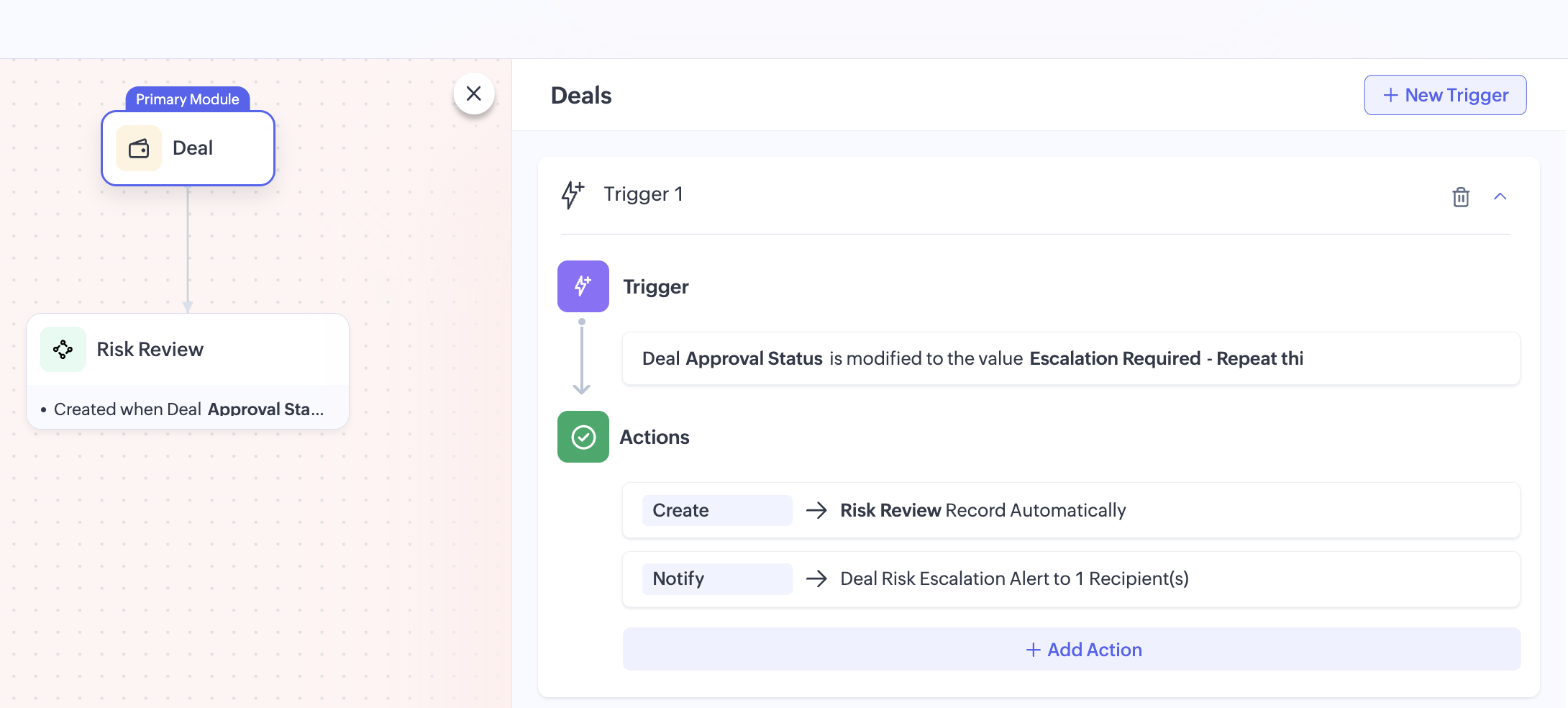

To download the input JSON for adding this rule to the Connected Workflow, click here.

 Second Connected Workflow Rule: Risk Review > Deal   

Once reviewers complete their review, the process should move back to the original Deal. This is handled by the second connected workflow rule.

Trigger: Review_Status = Approved

When the Risk Review record is updated to Approved, the rule performs two actions.

 Action 1: Update the Deal record   

The related Deal record gets automatically updated using a field update action. The Approval_Status will be updated to Approved, allowing the sales team to continue progressing the Deal. 

This action is created using the Create Field Update Action API. Click here to download the input JSON for this request.

 Action 2: Send approval email   

Once the Deal is approved, another email notification is sent.

This informs stakeholders that the review is complete, risks were addressed and the deal can now move forward. This action is created using the Create Email Notification API.

You can also extend this flow by defining additional outcomes such as Rejected or Needs Clarification, depending on your review process.

Attached files:
 

By combining Zoho CRM workflows, custom functions, Connected Workflows, and action APIs, we can turn a manual risk checkpoint into a structured and traceable approval process.

This pattern is useful whenever CRM decisions depend on data spread across multiple Zoho applications. By combining workflows, custom functions, and Connected Workflows, businesses can enforce validations, reduce manual checks, and create more reliable approval processes.

For production use, you can extend this implementation further by:

  • making the threshold configurable

  • storing stable cross-app identifiers for more reliable matching

  • preventing duplicate review creation

  • adding rejection or revalidation paths

  • logging integration failures for easier troubleshooting.

If your business process depends on data spread across multiple Zoho applications, this is a practical way to orchestrate that logic inside CRM.

You can find all the sample files used in this implementation, including the workflow JSONs, Connected Workflow configurations, email actions, field update actions, and Deluge function code here: Project files

We hope you found this useful. If you have any questions, feel free to leave a comment below or reach out to us at support@zohocrm.com


    • Sticky Posts

    • Announcing the new SKILL.md for Zoho CRM and the updated OAS repository!

      We are introducing a new zoho-crm skill to make working with Zoho CRM Developer tools (like APIs, functions, widgets, client scripts, queries etc) easier and faster, with the help of AI in your preferred AI harness like Claude Code, Codex, Cursor, VSCode
    • Kaizen #256 - Build an Arrival Readiness Web Tab in Zoho CRM

      Hi everyone! Welcome back to the Kaizen series! In the post, we discuss a use case in hospitality industry: how an Arrival Readiness web tab widget can be used to let reception staff identify and resolve issues before arrival of guests. Use case In the
    • Kaizen #198: Using Client Script for Custom Validation in Blueprint

      Nearing 200th Kaizen Post – 1 More to the Big Two-Oh-Oh! Do you have any questions, suggestions, or topics you would like us to cover in future posts? Your insights and suggestions help us shape future content and make this series better for everyone.
    • Kaizen #226: Using ZRC in Client Script

      Hello everyone! Welcome to another week of Kaizen. In today's post, lets see what is ZRC (Zoho Request Client) and how we can use ZRC methods in Client Script to get inputs from a Salesperson and update the Lead status with a single button click. In this
    • Kaizen #222 - Client Script Support for Notes Related List

      Hello everyone! Welcome to another week of Kaizen. The final Kaizen post of the year 2025 is here! With the new Client Script support for the Notes Related List, you can validate, enrich, and manage notes across modules. In this post, we’ll explore how
    • Recent Topics

    • 📣 And the Bigin Customer Award winners are...

      50+ entries. Customers from across the globe. So many great Bigin stories. And now, it's time to celebrate the people who stood out. We launched the Bigin Customer Awards to see how businesses are using Bigin in their own unique ways, and you did not
    • Report Configuration - Unable to select "File_Upload" under Supporting Document

      Good day everyone. I encounter this issue whereby i have difficulty to select "File_Upload" under Supporting Document when i configuring my report. Ps: I have create Supporting Document in Zoho creator form as subform and the add this "File Upload" inside
    • Zoho CRM Functions: Redesigned Interface, Rich Analytics, and Multi-Language Support

      Hello everyone! We have given Functions in Zoho CRM a major overhaul with a new interface that makes it easier to build, organize, monitor, and troubleshoot your functions throughout their lifecycle. As part of this revamp, we have also introduced a unified
    • Zoho Tables is now available in Zoho One!

      Hello Zoho One users, We’re excited to announce that Zoho Tables is now included as a part of Zoho One suite! As teams grow, managing projects, approvals, inventories, campaign trackers, and operational workflows across multiple spreadsheets become difficult.
    • Zoho CRM Multi-select values not translated

      Hello! I have some issue with translate custom multi-select fields in zoho CRM in other language. I download export file, but it has all my custom fields and picklist values exept multi-select fields picklist values.  Please, help me to undestand, is
    • Confused on how to make this work in zoho sales iq

      my question is we have zoho crm and zoho sales iq , there are basically 2 flows one is outbound and another is inbound i want to understand outbound is basically when we get a lead on crm i want crm to add a pre approved template message to customer and
    • Go Multilingual with Instant Bot Auto-Translation

      Imagine you run a travel company with customers across different regions. Your website chatbot helps visitors discover travel packages, answers questions, and makes bookings. As your business expands into new markets, you want to offer the same experience
    • Specific ListView Canvas on Canvas Home Page Always Loads Most Recent ListView, Not the One Specified

      I had mentioned this to ZOHO, but I mainly wanted to see if others in the Community are also facing this problem. I created a Canvas ListView for a Custom Module, and then created a Canvas Home page (technically on a tab item, but I'm not sure if that
    • Create Flexible Layouts with Layout Rules

      In a project, when a work moves from planning to execution, the information teams need can change at every stage. A project can need one set of details, a phase can need another, and a custom process may require an entirely different set of information.
    • Introducing Incentives for Zoho CRM: Build, automate, and track sales commissions

      Dear Customers, We are here with an amazing news! We built a direct solution to help manage your commission provisioning activity in your business. From creating commission plans to issuing payouts, this application leverages your sales reps’ performance
    • Zoho Sites after login page blank

      after i login to zoho sites, it stalls at a blank screen please help
    • Map My Client Locations for Zoho CRM Extension: Turn CRM Addresses Into Action

      Hello everyone, Your CRM knows who your customers are. Now, see where they are on the interactive map directly from Zoho CRM. Introducing Map My Client Locations for Zoho CRM, an extension built for businesses that rely on sales visits, field service,
    • Find the conversions hiding outside your funnel: User Journeys is now live in PageSense

      Hello Everyone, We are excited to announce that User Journeys is now live in Zoho PageSense. Here is what that means for you. Funnels are great for one thing. They tell you how the path you designed is performing. Homepage to product to cart to checkout,
    • Zoho CRM Error message #2 : Fixing [Invalid Credentials] and [Authentication Fail] while configuring IMAP

      Hi Everyone! As a part of our Zoho CRM Error messages series, we're going to focus on couple of error messages that you might encounter while configuring IMAP and ways to resolve them. These are: [Invalid Credentials] [Authentication Fail] The annoying
    • Zoho Community Digest - August 2026 | Part 4

      Hi everyone, and welcome back! We're closing out August with a strong final week, from Incentives for Zoho CRM bringing commission management inside the platform to Sequences in Bigin automating customer follow-ups end to end. There's also an IP allowlist
    • Related Lists: Consolidate cross-module data

      A new and efficient way to connect your project data across the boundaries of modules, entities, and applications. Introducing related lists to incorporate related records from any module, entity, or external source directly into the detail view of a
    • Zoho Workshops in Frankfurt a.M. | 07. & 08. Oktober 2026 | Nur noch 1 Monat

      Liebe deutschsprachige Zoho Community, Nur noch einen Monat bis zu den Zoho Workshops in Frankfurt! Am 7. und 8. Oktober ist es soweit: Die Zoho Workshops kehren zurück und finden dieses Mal im Radisson Blu Hotel, Frankfurt am Main, statt. Wenn Sie Ihre
    • Billing Status and WO Status Field Colors -

      Hello Team, I noticed that the colors of the Billing Status and WO Status fields in the WO module have been changed. (Org ID:170000078905) This is not urgent to correct, but I wanted to bring it to your attention so you can check whether this is a system
    • Need to set workflow or journey wait time (time delay) in minutes, not hours

      Minimum wait time for both Campaigns workflows and Marketing Automation journeys is one hour. I need one or the other to be set to several minutes (fraction of the hour). I tried to solve this by entering a fraction but the wait time data type is an integer
    • Zoho Forms Submission URL

      Hi Zoho, It would be great to have a URL which can take us to specific form entries. For example: https://forms.zoho.eu/ACCOUNTNAME/report/FORMNAME/records/UNIQUE-REF I currently have a use case where I want to use Zoho Flow to create a module entry in
    • Zoho Assist Remote Desktop on Android grey screen

      With Zoho Assist Remote Desktop for Android when I connect to an unattended device I see only a Grey Screen. It worked fine before. This is a recently issue. I tried to clean data and cache, reinstall app, try and old version... but nothing. Always grey
    • Integration Multiple WooCommerce Stores

      Currently, Zoho Marketing Automation supports connecting only one WooCommerce store per account. For businesses managing multiple brands or stores, this creates operational challenges, as they are forced to maintain separate accounts for each store. Suggested
    • Introducing Smart Fields in Zoho Forms

      Hello form builders! We are excited to introduce Smart Fields in Zoho Forms - a faster way to add calculations to your forms without writing formulas. Instead of creating multiple fields and configuring complex calculations yourself, you can now drag
    • Feature Request: Add Sort by Cell Color and Text Color functionality

      Hello Zoho Sheet Development Team, I am writing to suggest a feature enhancement for Zoho Sheet. Currently, the platform supports "Filter by Color," which is incredibly useful. However, there is no native option to "Sort by Color" (by cell fill or text
    • MCP for Zoho Sign is not working

      I'm using the mcp builder at mcp.zoho.com and selected Zoho Sign. I have created it 4 different times but my other mcp servers are working. However, mcp for zoho sign WILL NOT WORK. It throws a 400 error. I've checked everything. I tried with both Grok
    • Automating CRM backup storage?

      Hi there, We've recently set up automatic backups for our Zoho CRM account. We were hoping that the backup functionality would not require any manual work on our end, but it seems that we are always required to download the backups ourselves, store them,
    • Zoho ERP | Product updates | July 2026

      Hello users, We're back with another round of updates to help you streamline your operations. This month's release brings new features and enhancements designed to help you work more efficiently. Read on to discover everything that's new in Zoho ERP this
    • Android screen dissapeared

      While running assist on an android tablet, screen poofs out of existence, have to restart sharing.
    • Kaizen #229: Email-Deal Associations in Zoho CRM

      Hi All, Welcome back to another week of Kaizen! Emails are a core channel for customer communication in any CRM system. In Zoho CRM, emails can be associated with records across multiple modules. In this post, we will focus on email associations with
    • 📣 Ask the team behind Zoho SalesIQ: Summer '26 Q&A

      Hi everyone! Following our recent webinars, Summer '26 Release: What's New in Zoho SalesIQ—where we walked you through all the new features, what they do, and how they work—and Driving the AI Evolution: Building Smarter Customer Experiences with Zoho
    • Cross-application Deluge calls fail when application link name starts with a number

      I encountered an issue when calling a custom function in another Zoho Creator application within the same account. The target application’s URL/application link name began with a number, similar to: 27_example_application The following cross-application
    • Bank charges

      Hello, team zoho I have a difficulty, in the form to register the payment of the customer has a field "bank charges" more when registering an expense or payment to the supplier that field does not appear. And I think that's a mistake because in my account
    • Bank Feeds - Multiple Orgs / Multiple LLCs

      Hi, We are migrating our books over from another service, and trying to connect our bank feeds. We have 3 separate LLCs, and 3 separate orgs in Zoho Books. We want to connect the bank feeds for each entity to each org. However, when we connect the 2nd
    • WhatsApp Coexistence

      Hello, please implement WhatsApp Coexistence, we need to track staff whatsapp chats on their PC and they need to be able to use WhatsApp on their mobile in around the office and warehouse, as we video call customers and send them product pictures. Thank
    • WORK DRIVE CUSTOMIZATION

      WORK DRIVE CUSTOMIZATION Create folder for every Case by “Contact Name “in Work Drive under Associate Deals Folder Directory: User Work Drive Accounts: Route Directory Associate Cases Case Name, Case Number Client Upload- Shared with contact (for collaboration)
    • All new Address Field in Zoho CRM: maintain structured and accurate address inputs

      Availability Update: 29 September 2025: It's currently available for all new sign-ups and for existing Zoho CRM orgs which are in the Professional edition exclusively for IN DC users. 2 March 2026: Available to users in all DCs except US and EU DC. 24
    • Vendor payment unexpectedly routed through Prepaid Expenses instead of Accounts Payable

      Hello, We are investigating an unexpected accounting behavior in Zoho Books. We created vendor bills and vendor payments for two suppliers using what appears to be the same workflow, but the journal entries are different. Vendor 1 – UZ Store (works correctly)
    • CRM wants to access other apps and services on this device (Documents area)

      Did anyone else see this today? It only seemed to popup in the Documents area. Blocking it did not stop the ability to upload files there... Why is this coming up and what apps/services is it requesting in the background? Also, is it applicable elsewhere
    • BANK CHARGES

      When paying a supplier via credit card we are charged a fee. I process the payment through payments made and then enter the fees in bank charge. However i get this message :  Bank charges are applied. Please select a bank account. And it will not let
    • Programmatic Itemized Expenses?

      It does not appear that it is possible to create itemized expenses programmatically (via the API)? Is this correct, or am I misunderstanding the situation?
    • Next Page