Tip #24: Customizing Deal stages for your business
Hello folks,
 As part of our weekly Tips and Tricks series, we are back with a quick tip on customizing the Deal Stage pick-list values in your Zoho CRM account.
We have had many users ask us if they can edit the Deal Stage picklist values based on their exact requirement in Zoho CRM. The answer is yes, you can modify the stages based on your sales process.
We understand that every business is unique and involves a unique sales process. While the Deal stages that are listed by default in Zoho CRM broadly covers important stages in sales, you don't have to necessarily fit yours with what's already there.
For instance, if your process involves sending Contract and getting it approved to win the deal, you can edit your Deal stage picklist to include the same. And it doesn't end here. You can also edit the probability values for each stage based on which forecasting is done for your Deals.
Go to Setup>Customization>Modules and Fields. Choose the layout for which you want to modify the stages and in the Layout editor, click on Settings>Stage Probability Mapping.
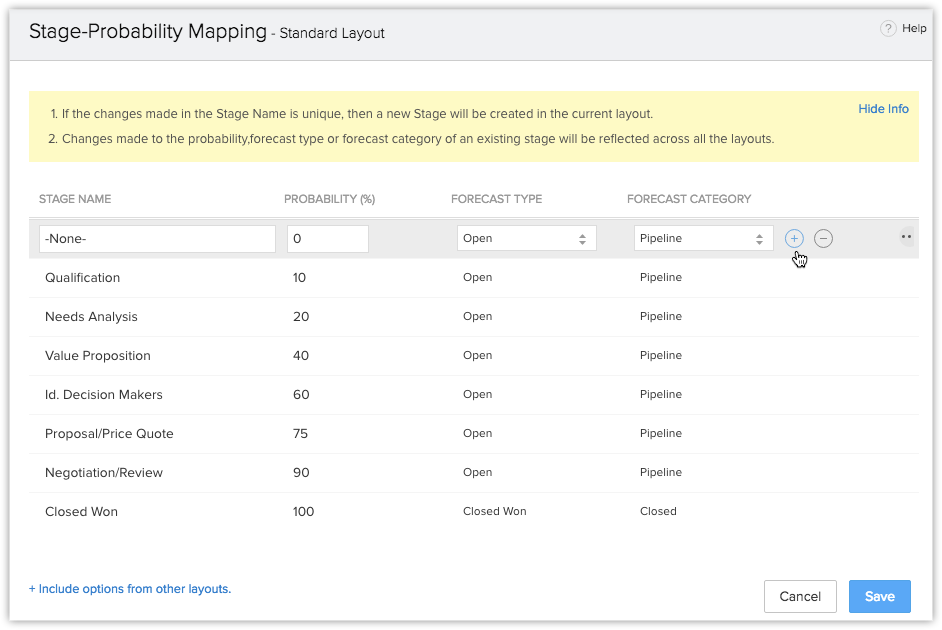
In the Stage Probability Mapping window, the default stages are listed with their respective probability, forecast type and category. You can simply add, modify or delete stages, and specify the probability accordingly. There you go!
We hope you found this tip useful.
We have had many users ask us if they can edit the Deal Stage picklist values based on their exact requirement in Zoho CRM. The answer is yes, you can modify the stages based on your sales process.
We understand that every business is unique and involves a unique sales process. While the Deal stages that are listed by default in Zoho CRM broadly covers important stages in sales, you don't have to necessarily fit yours with what's already there.
For instance, if your process involves sending Contract and getting it approved to win the deal, you can edit your Deal stage picklist to include the same. And it doesn't end here. You can also edit the probability values for each stage based on which forecasting is done for your Deals.
Go to Setup>Customization>Modules and Fields. Choose the layout for which you want to modify the stages and in the Layout editor, click on Settings>Stage Probability Mapping.
In the Stage Probability Mapping window, the default stages are listed with their respective probability, forecast type and category. You can simply add, modify or delete stages, and specify the probability accordingly. There you go!
We hope you found this tip useful.