Tips & Tricks #10 Automatiseren met Zoho Desk Deel 2
Zoho Forms integreren met Zoho Desk
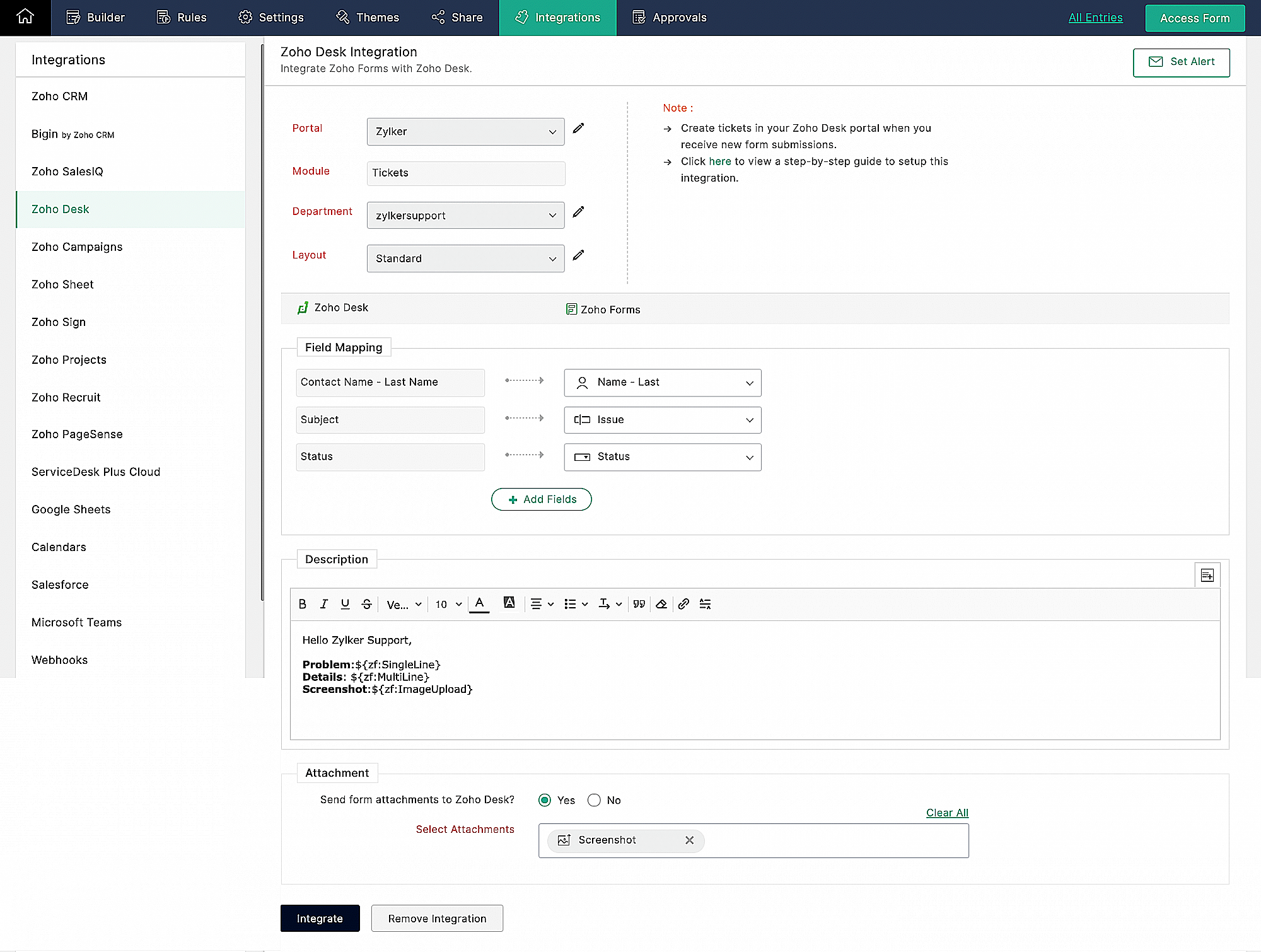
Wanneer je meerdere klantvragen en support verzoeken van huurders ontvangt, kan het handmatig aanmaken van support tickets in de helpdesk vervelend worden en veel tijd kosten, die anders gebruikt kan worden om je huurders te helpen. Als Zoho Desk wordt gebruikt om support tickets te beheren, kun je de Zoho Forms - Zoho Desk integratie gebruiken om de ingevoerde formulieren automatisch als support tickets naar je Desk portal te pushen. Je kunt een beschrijving toevoegen en door de huurders geüploade bestanden en afbeeldingen toevoegen aan de tickets die via deze integratie zijn aangemaakt.
Klachtenmanagement
Zoho Desk, een Omnichannel Customer Service Software, is de eerste contextbewuste helpdesk software die bedrijven helpt zich te focussen op de klant. Met Zoho Desk kun je eenvoudig helpdesk tickets toewijzen, volgen en meldingen instellen. Je kunt Zoho Desk aanpassen aan je behoeften en zorgen voor tevredenheid bij de support van je huurders.
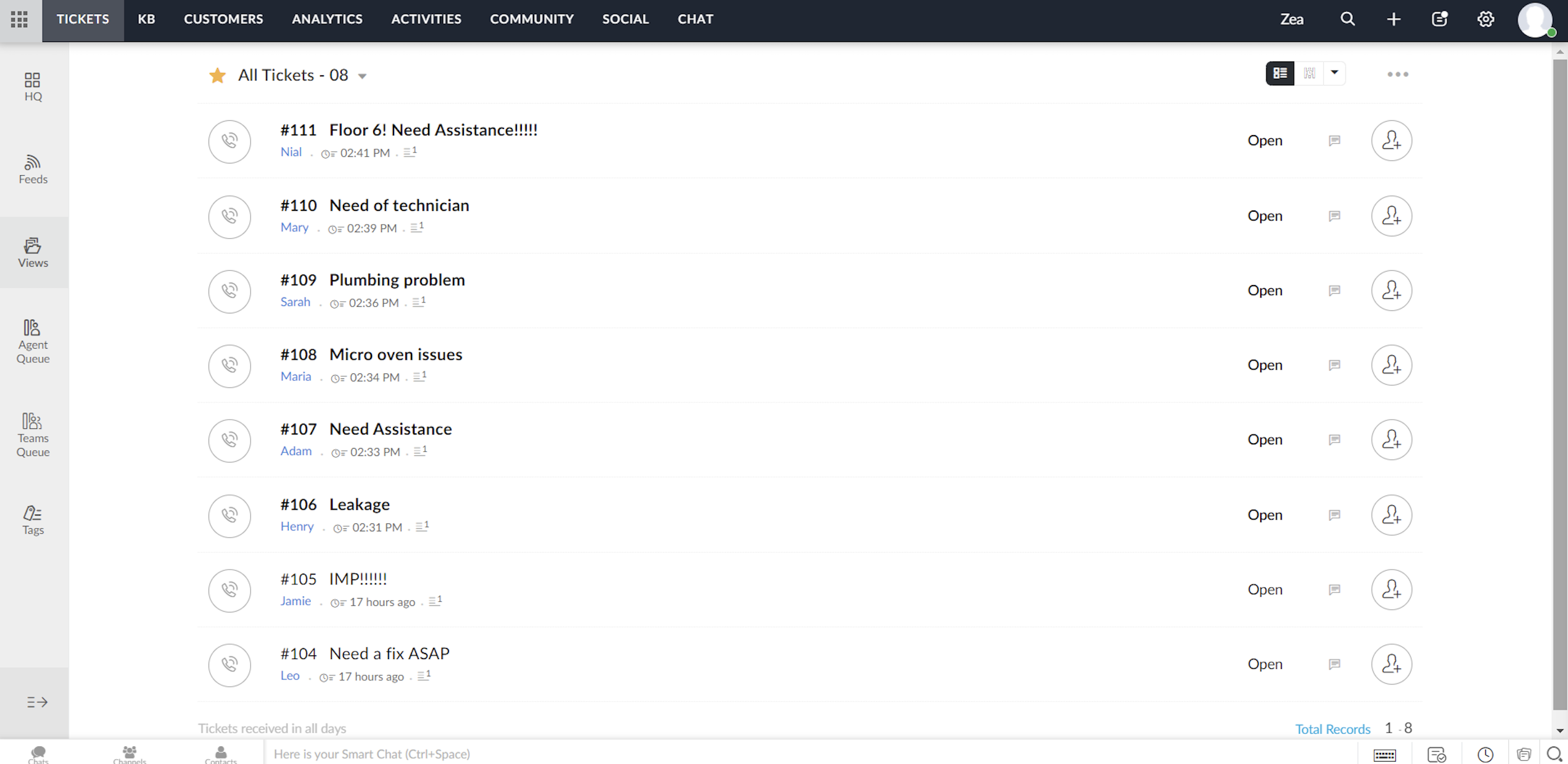
Elk ticket dat wordt ingediend door huurders die het klachtenformulier invullen, wordt toegewezen aan één van de agenten in Zoho Desk, waar het probleem wordt aangepakt en de nodige acties voor het probleem worden ondernomen.
Toewijzingsregel
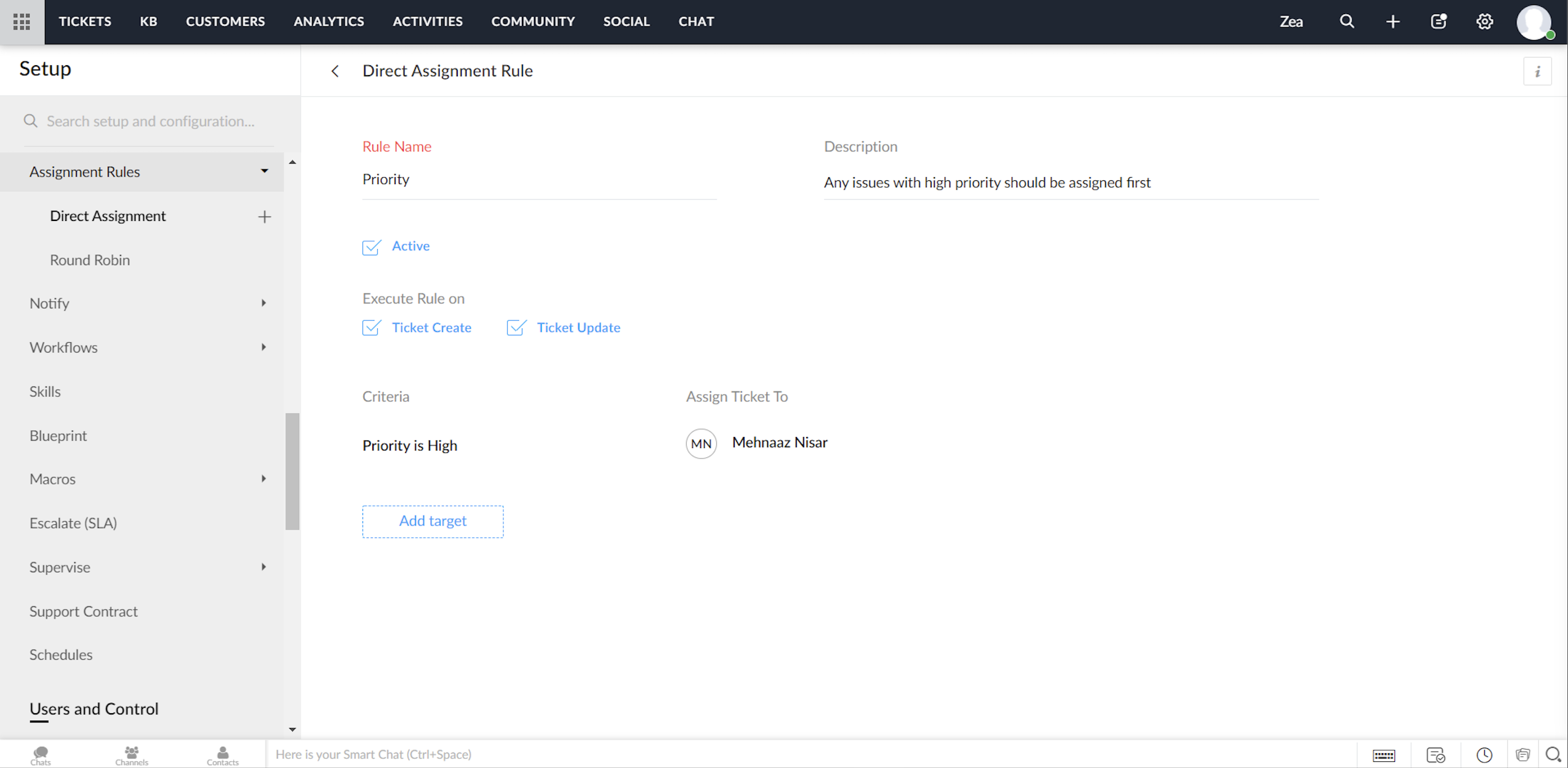
Ga tot in de fijnste details van ticketbeheer door, via het instellen van toewijzingsregels. Op deze manier hoef je niet elke keer dat er tickets binnenkomen handmatig tickets/klachten toe te wijzen aan agents. Het geeft je meer controle, en je team meer autonomie. Met behulp van toewijzingsregels wijs je automatisch de Tickets/Klachten toe die via Zoho Desk binnenkomen.
Directe toewijzing
De regel op basis van bepaalde gespecificeerde voorwaarden kan Tickets / Klachten naar de juiste afdeling leiden en er verder eigendomsrechten aan toekennen. Hoewel dit zinvol is voor nieuwe Tickets / Klachten, kun je ook een toewijzingsregel activeren wanneer Tickets / Klachten worden bijgewerkt in je helpdesk.
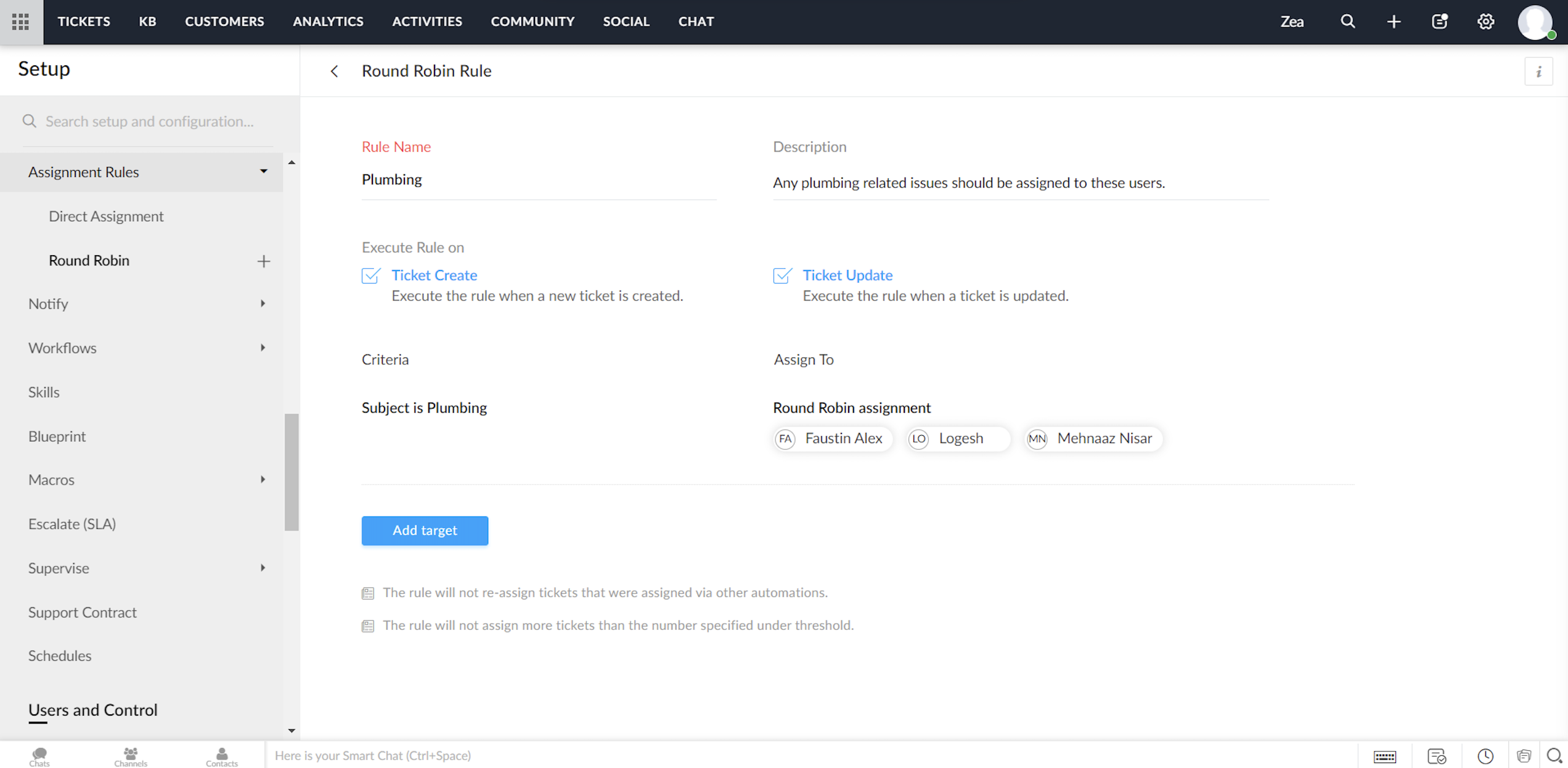
Round Robin
Round Robin is de eenvoudigste vorm van het automatisch toewijzen van tickets. Het verdeelt tickets/klachten gelijkmatig over al je agents op basis van het limiet dat je instelt. Met een minimale tussenkomst zorgt Round Robin ervoor dat geen enkel ticket niet wordt toegewezen. Ook zorgt de Round Robin regel ervoor dat de werkdruk van je agents in Zoho Desk in balans is. Dat wil zeggen, dat Tickets / Klachten eerst worden toegewezen aan de minst belaste agent.
Service Level Agreement (SLA)
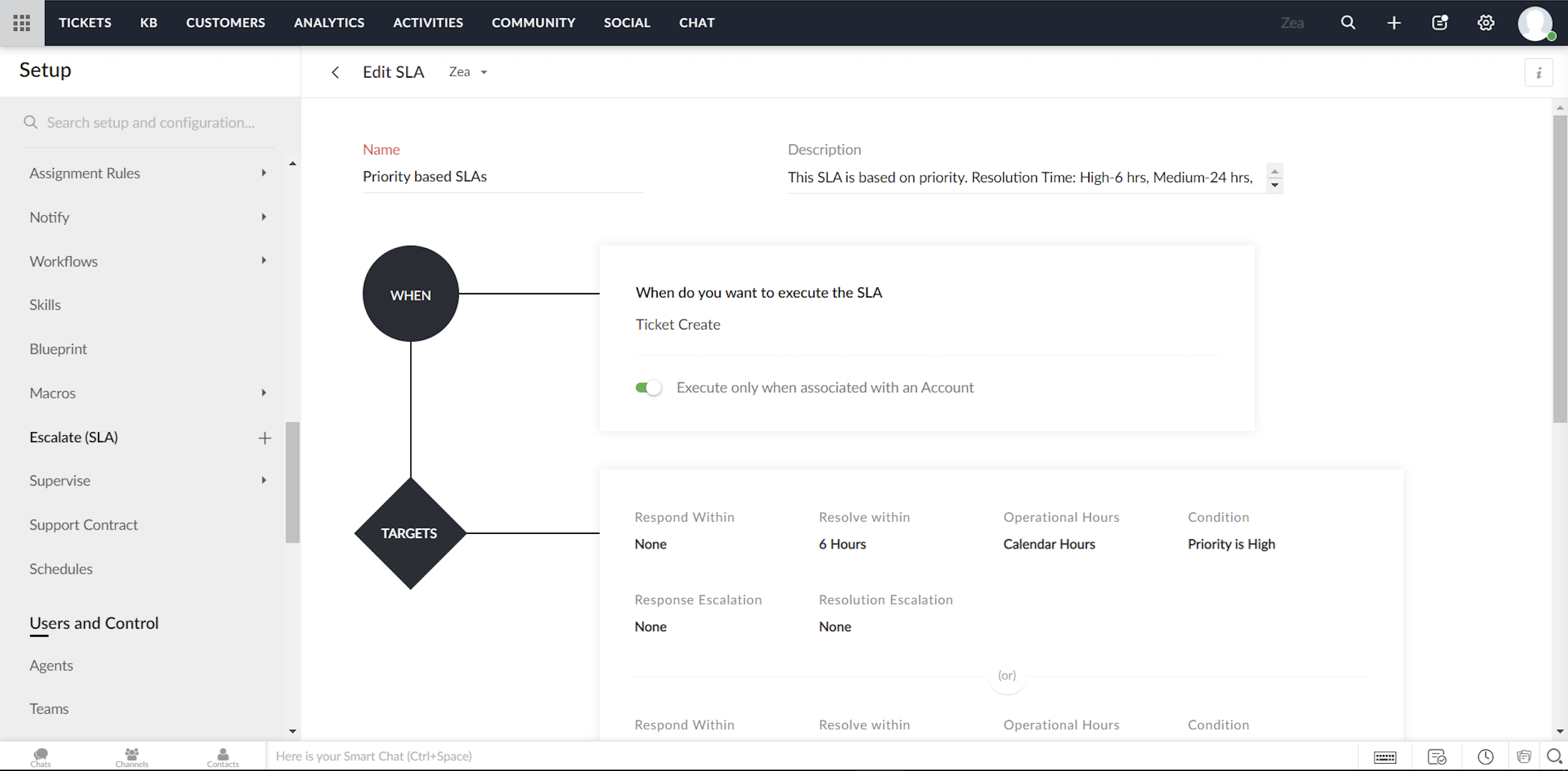
Een Service Level Agreement, of SLA, is de servicestandaard die je hebt afgesproken om aan je klanten te leveren. De serviceovereenkomst geeft de responstijden en de oplostijden weer die door je medewerkers worden aangeboden. Meestal bevat een SLA de uitvoeringscriteria en een reeks vooraf bepaalde voorwaarden of doelstellingen. Terwijl de uitvoeringscriteria bepalen wanneer een SLA moet worden geactiveerd, bevat het doel de acties die zullen worden uitgevoerd op de trigger. Je kunt acties configureren zoals reactietijd, oplostijd, het sturen van escalaties, het opnieuw toewijzen van Tickets/Klachten en het bijwerken van de prioriteit.
Om te beginnen kunt je met Zoho Desk twee modellen van service level agreements volgen:
Je kunt SLA's maken voor individuele accounts in Zoho Desk
Je kunt een aantal SLA's maken (zoals Standard Support en Priority Support etc.) en deze delen over meerdere accounts.
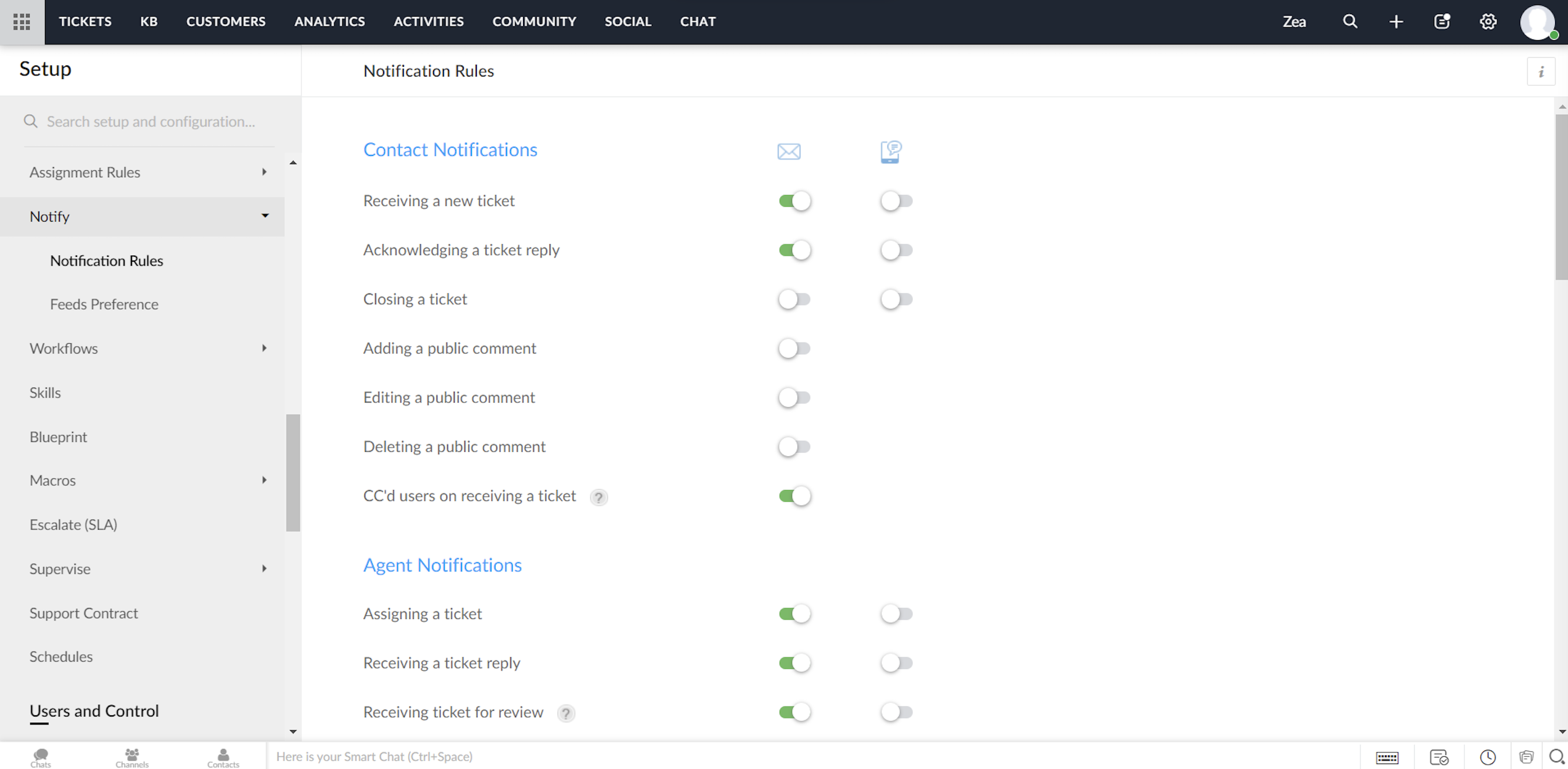
Zoho Desk biedt een standaardset meldingsregels die kunnen worden gebruikt om je klanten en agents te notificeren. Je kunt deze regels indien nodig activeren of deactiveren. Ook kunnen meldingen via e-mail of SMS worden verzonden.
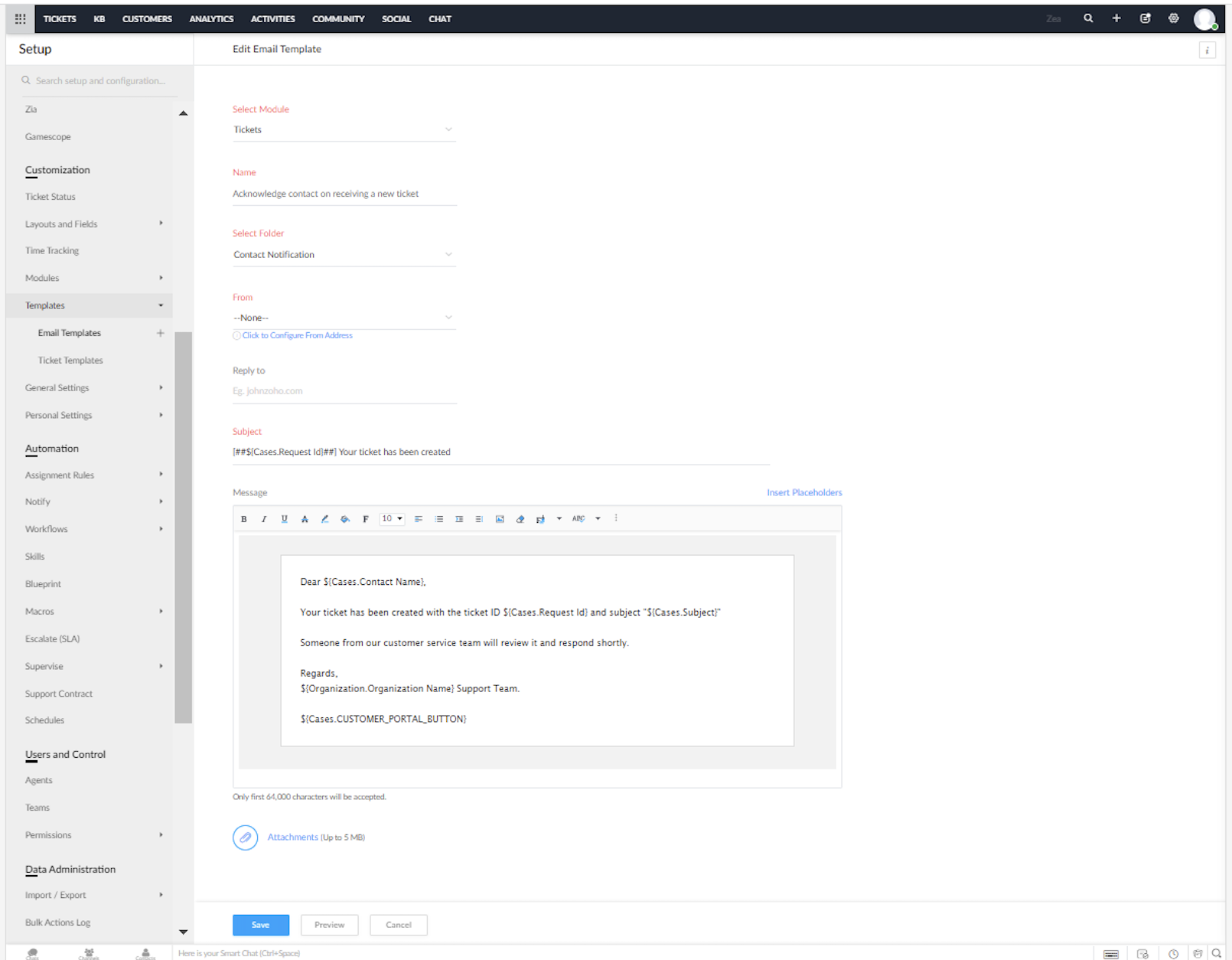
Je kunt de vooraf opgestelde e-mail en SMS sjablonen voor de meldingen in Zoho Desk aanpassen.
Heeft dit jou ook een beter beeld gegeven van het inzetten van Zoho Desk in combinatie met Zoho Forms? We lezen het graag in de opmerkingen hieronder.
Met vriendelijke groet,
Topic Participants
Sukhpreet Singh
Sticky Posts
Doe mee aan de Zoho Desk Meetup op 7 maart in Antwerpen
Beste Community leden, Wij nodigen jullie graag uit voor de Community Meetup van Zoho Desk! Op 7 maart komen we bij elkaar in Antwerpen, samen met een klant en de Zoho Experts van Brainsolutions. Onze experts zullen een live demo presenteren en jouw vragenDoe mee aan de Zoho Desk Meetup op 16 Februari in Utrecht
Beste Community leden, Wij nodigen jullie graag uit voor de Community Meetup voor Zoho Desk! Op 16 februari komen we bij elkaar in Utrecht, samen met Fleetkennis en de Zoho Expert van Mobile XL. Onze experts zullen een live demo presenteren en jouw vragenWat is er nieuw in Zoho Desk 2023
Beste Community leden, Hoeveel je ook van je klanten en je werk houdt, als klantenservice medewerker zul je zeker een aantal zware dagen tegenkomen. We hebben het dan over de dagen dat je een paar keer op de snooze-knop drukt, koffie morst op je favorieteTips & Tricks #10 Automatiseren met Zoho Desk Deel 2
In deel 1 van het automatiseren met Zoho Desk las je een use case over een probleem in een appartementencomplex en hoe dit door gebruik te maken van Zoho Forms en Zoho Desk kan worden opgelost. In deel 2 lees je meer over het integreren van Zoho FormsTips & Tricks #09 Automatiseren met Zoho Desk Deel 1
Beste Community leden, Zoals jullie weten hebben we in Nederland een woningtekort. Een oplossing hiervoor is de hoogbouw. Echter, om de de hoogte in te gaan moet er ook voor de juiste faciliteiten in flats worden gezorgd. Problemen kunnen we allemaal
Recent Topics
Kaizen #186 : Client Script Support for Subforms
Hello everyone! Welcome back to another exciting Kaizen post on Client Script! In this edition, we’re taking a closer look at Client Script Support for Subforms with the help of the following scenario. " Zylker, a manufacturing company, uses the "Orders"Unable to Assign Multiple Categories to a Single Product in Zoho Commerce
Hello Zoho Commerce Support Team, I am facing an issue while assigning categories to products in Zoho Commerce. I want to assign multiple categories to a single product, but in the Item edit page, the Category field allows selecting only one categoryオンライン勉強会のお知らせ Zoho ワークアウト (2/19 参加無料)
ユーザーの皆さま、こんにちは。コミュニティチームの中野です。 2月開催のZoho ワークアウトについてお知らせします。 今回はZoomにて、オンライン開催します。 ▶︎参加登録はこちら(無料) https://us02web.zoom.us/meeting/register/6AyVUxp6QDmMQiDGXGkxPA ━━━━━━━━━━━━━━━━━━━━━━━━ Zoho ワークアウトとは? Zoho ユーザー同士で交流しながら、サービスに関する疑問や不明点の解消を目指すイベント「Zohodoubts about customer happiness in zoho desk
Good afternoon, Desk community. The reason for my message is that I have a question regarding the customer satisfaction surveys we can ask our clients to rate our service. I know that in Desk, you can activate Customer Happiness to send a survey to theCOQL API in JS Widget only pulling 200 records
Hello! We've been building a custom homepage widget using the Zoho JS SDK, and it seems that this https://help.zwidgets.com/help/latest/ZOHO.CRM.API.html#.coql only allows 200 records. I thought the limit was 2000 for COQL queries, but am I mistaken?Standard Description Field - Can I change label or add dd tooltip
Is there a way fo you guys to allow the customer to change the label name for the description field in the customer portal when submitting tickets. Or at least allow us to add a tooltip to clarify what description we need from them. I know I can create my own separate multi line description field but if I do that, it doesn't have the nice toolbar with Bold, Italic, Underline, color, font, indent, etc. Can you please allow us to add a tooltip to the zoho standard description field?Introducing parent-child ticketing in Zoho Desk [Early access]
Hello Zoho Desk users! We have introduced the parent-child ticketing system to help customer service teams ensure efficient resolution of issues involving multiple, related tickets. You can now combine repetitive and interconnected tickets into parent-childAbility to CC on a mass email
Ability to CC someone on a mass email.Different Task Layouts for Subtasks
I was wondering how it would be possible for a subtask to have a different task layout to the parent task.Compensation | Salary Packages - Hourly Wage Needed
The US Bureau of Labor Statistics says 55.7% of all workers in the US are paid by the hour. I don't know how that compares to the rest of the world, but I would think that this alone would justify the need for having an hourly-based salary package option.Customizing Helpcenter texts
I’m customizing the Zoho Desk Help Center and I’d like to change the wording of the standard widgets – for example, the text in the “Submit Ticket” banner that appears in the footer, or other built-in widget labels and messages. So far, I haven’t foundAbility to Edit Ticket Subject when Splitting a Ticket
Often someone will make an additional or new request within an existing ticket that requires we split the ticket. The annoying part is that the new ticket maintains the subject of the original ticket after the split so when the new ticket email notificationAutomatically Update Form Attachment Service with Newly added Fields
Hi, When I have a Form Setup and connected to a 3rd Party Service such as OneDrive for Form Attachments, when I later add a new Upload Field I have to remove and redo the entire 3rd Party Setup from scratch. This needs to be improved, such as when newReopen ticket on specific date/time
Is there a way that we can close a ticket and setup a reopen of that ticket on a specific date and time? (without using the "on hold" ticket option)Column letter from number
Hello, I am trying to select a cell and i have the column number. How do i do this or is there a way of getting the letter from the number? Thank youAPI credit COQL COUNT
The docs describe API credits in COQL from the LIMIT perspective: https://www.zoho.com/crm/developer/docs/api/v8/COQL-Overview.html When using aggregate functions such as `COUNT` or `SUM`, is that billed as 1 API credit?Weekly Tips : Save Time with Saved Search
Let's assume your work requires you to regularly check emails from important clients that have attachments and were sent within a specific time period. Instead of entering the same conditions every time—like sender, date range, and attachments included—youRemove 'This is an automated mail from Zoho Sign' in footer
Hi there, Is it possible to remove or change the text under the e-mail templates? I can't figure out how to do that: Would love to hear from you. Kind regards, TristanOrganize and manage PDFs with Zoho PDF Editor's dashboard
Hello users, Zoho PDF Editor's dashboard is a one-stop place to upload, sort, share PDF files, and more. This article will explore the various capabilities that Zoho PDF Editor's dashboard offers. A few highlights of Zoho PDF Editor's dashboard: UploadCustom function return type
Hi, How do I create a custom deluge function in Zoho CRM that returns a string? e.g. Setup->Workflow->Custom Functions->Configure->Write own During create or edit of the function I don't see a way to change the default 'void' to anything else. AddingPassing Info from Function to Client Script
Hello, I have recently started making use of client script for buttons, allowing me to give the user information or warnings before they proceed. This is great. However, I have never quite managed to pass back any extra information from the function toDrag 'n' Drop Fields to a Sub-Form and "Move Field To" Option
Hi, I would like to be able to move fields from the Main Page to a Sub-Form or from a Sub-Form to either the Main Page or another Sub-Form. Today if you change the design you have to delete and recreate every field, not just move them. Would be nice toZoho Payroll for Canada
Is anyone else having problems getting setup for Canada?Passing the CRM
Hi, I am hoping someone can help. I have a zoho form that has a CRM lookup field. I was hoping to send this to my publicly to clients via a text message and the form then attaches the signed form back to the custom module. This work absolutely fine whenOne Contact with Multiple Accounts with Portal enabled
I have a contact that manages different accounts, so he needs to see the invoices of all the companies he manage in Portal but I found it not possible.. any idea? I tried to set different customers with the same email contact with the portal enabled andUser Automation: User based workflow rules & webhooks
User management is an undeniable part of project management and requires adequate monitoring. As teams grow and projects multiply, manual coordination for updating users & permissions becomes difficult and can give way to errors. User automation in ZohoDisable Zoho Contacts
We don't want to use this app... How can we disable it?Default Ticket View - Table?
Guys, We mostly use the table view to queue tickets. Maybe I am missing it - but how can I set that view as 'default" for all our agents? Thanks JVZoho One IS BUGGY
Here are some things that just don't work: - Disabling applications from certain Spaces - Adding users (probably only for me) - Renaming applications in Zoho One Portal (fixed by now) - Reordering applications in Spaces When I try to reorder: It feelsPaid Support Plans with Automated Billing
We (like many others, I'm sure) are designing or have paid support plans. Our design involves a given number of support hours in each plan. Here are my questions: 1) Are there any plans to add time-based plans in the Zoho Desk Support Plans feature? TheMerge Fields that previously worked are now giving an Error!
Saving a URL Link button on the Deal module. The below fields used to save without issue at all, but now produce an error of "URL contains unsupported merge field!" ${Contacts.Mailing Street} ${Contacts.Mailing City} ${Contacts.Mailing State} ${Contacts.MailingClarification on Zoho Forms 1-User Plan: Multiple Submitters and Approvers
Question Content (Copy–Paste Ready) Hello Zoho Team, I would like clarification regarding Zoho Forms pricing and user limits. I am planning to subscribe to the ₹700/month (1 user) plan. My use case is as follows: Only 1 person (myself) will create andCRM Cadences recognise auto-responses
I have leads in a Cadence. I get an auto-responder reply "I'm out of the office..." Normally Cadences seems to know that isn't a real reply and keeps the lead enrolled in the cadence. However, today, Cadences has UNENROLLED a Lead who sent an auto-reponseApp for Mac OS X please!
It would be awesome to have a mail app for Mac OS X that included all the cool features such as steams, calendar, tasks, contacts, etc. Most people prefer native apps, rather than running it through a web browser. I know that we can use the IMAP, CalDAV,Facing Issues with Sites Mobile font sizes
my page renediaz.com is facing issues mobile view, when i try to lower font sizes in home page, instead of changing the size, it changes the line spaceZoho Books Payroll
How am I supposed to do payroll and pay my employees with Zoho Books? I think it's pretty strange that an accounting software doesn't have the ability to perform one of the most common functions in business; paying your employees. Am I missing something,60 Days Into Zoho - Tiktok Branding Startup -7 Questions?!
Wsp Everybody I co-own a TikTok Branding / Consulting Startup & have been using Zoho for the past 60 days - Am now looking to make our overall operations & processes more Efficient & Effective! Curious to know how others are using the platform & what'sNotifications in Cliq client for Linux
If I got it right, Cliq desktop client for Linux does not use the generally accepted notification method via org.freedesktop.Notification interface. For this reason, Cliq notifications do not look and behave as all other notifications. Is it possibleCanvas templates can now be shared with different CRM organizations
----------------------------------------Moderated on 14th February, 2023------------------------------------------- Dear all, This feature is now open for all users in all DCs. To learn more about importing and exporting canvas templates, read our helpUnable to produce monthly P&L reports for previous years
My company just migrated to Books this year. We have 5+ years financial data and need to generate a monthly P&L for 2019 and a monthly P&L YTD for 2020. The latter is easy, but I'm VERY surprised to learn that default reports in Zoho Books cannot createNext Page