What's New in Zoho Billing - November 2023
Hello everyone,
This month's updates add more flexibility to collecting payments, along with improvements to reports and custom fields. Let's dive in!
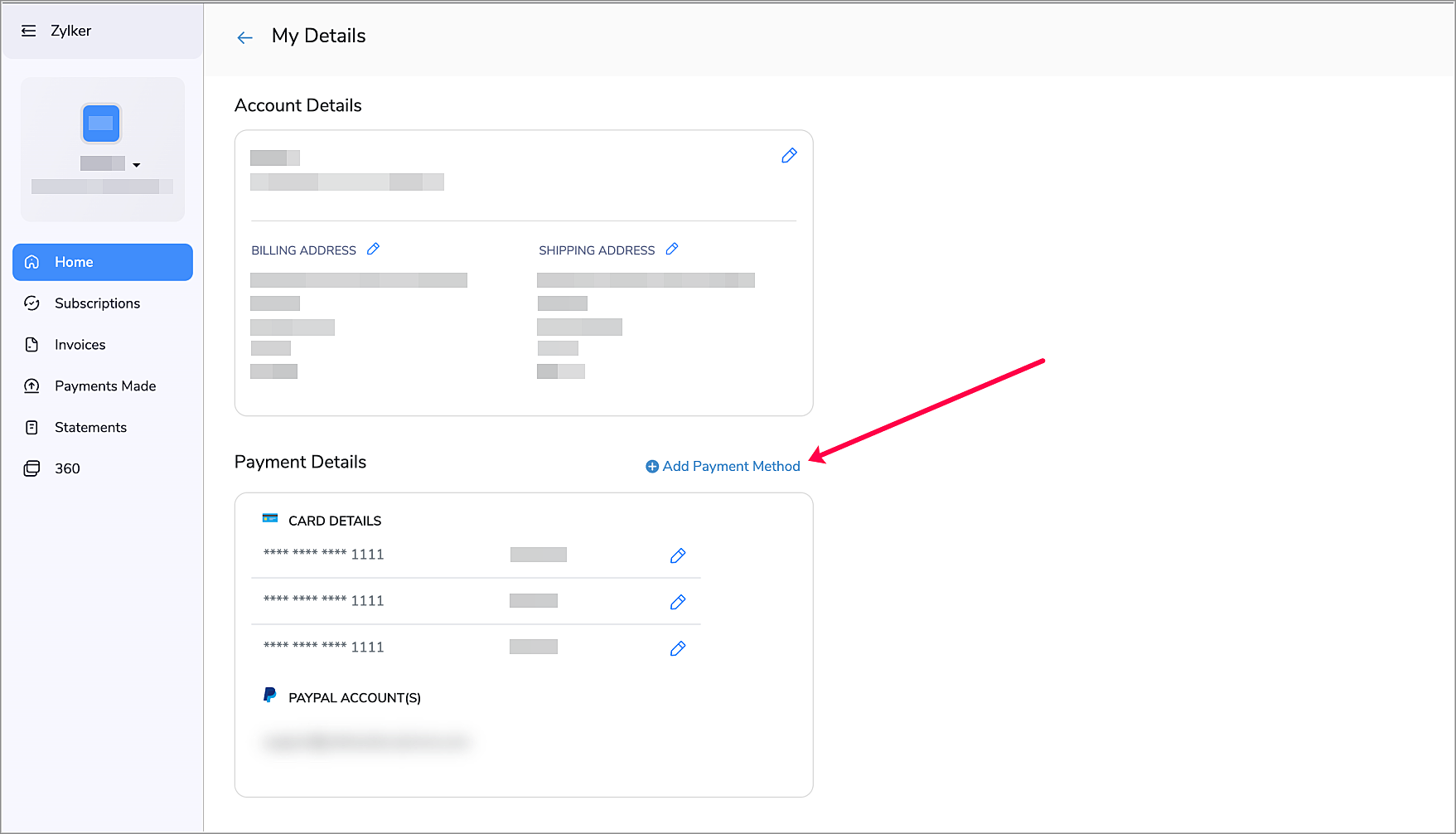
Add Payment Methods from the Customer Portal
Make the payment process more convenient for your customers by allowing them to add payment methods from the Customer Portal. This way, your customers can add new methods when their existing payment methods are about to expire, thus ensuring a smooth auto-charge experience. To enable this:
- Navigate to Settings > Customer Portal > General.
- Enable Allow customers to add payment methods.
Now, your customers will be able to add a new payment method by clicking + Add Payment Method from the Home Screen of their Customer Portal.
Revamped Net Revenue Report

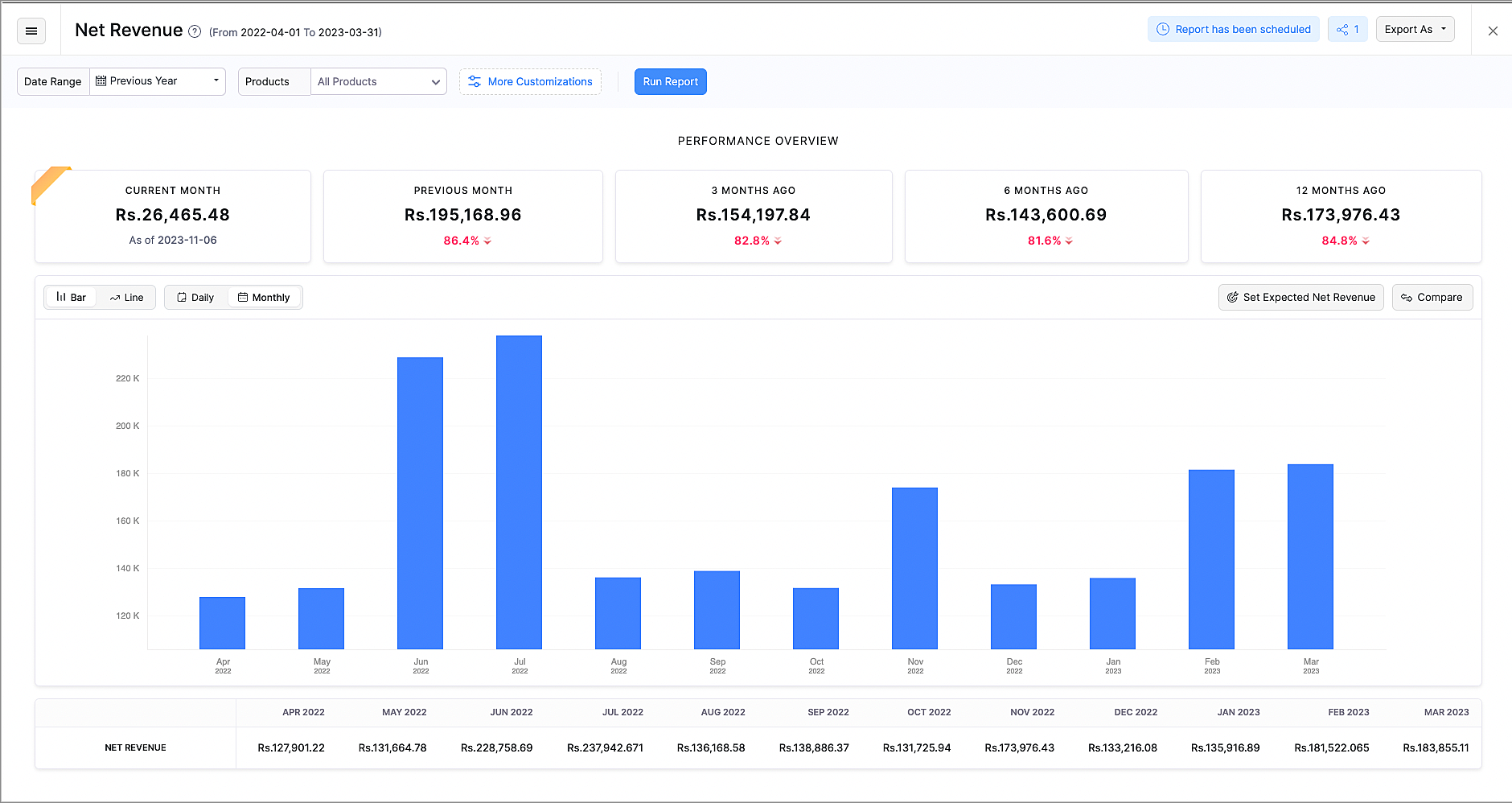
The revamped Net Revenue report gives you more insights about your organization's net revenue.
- The newly added Performance Overview section displays how your business is performing in the current month, compared to the previous months.
- The existing line chart can now also be viewed as a bar chart according to your preference.
- You can also view the data from the chart in the breakdown table below the chart.
- Customize this report with Advanced Filters, such as Country or Customer Name.
- Compare revenue based on products, plans, countries and dates to get further insights.
- You can now export this report as XLS and XLSX, along with CSV.
Make Payments Mandatory for Subscription Updates

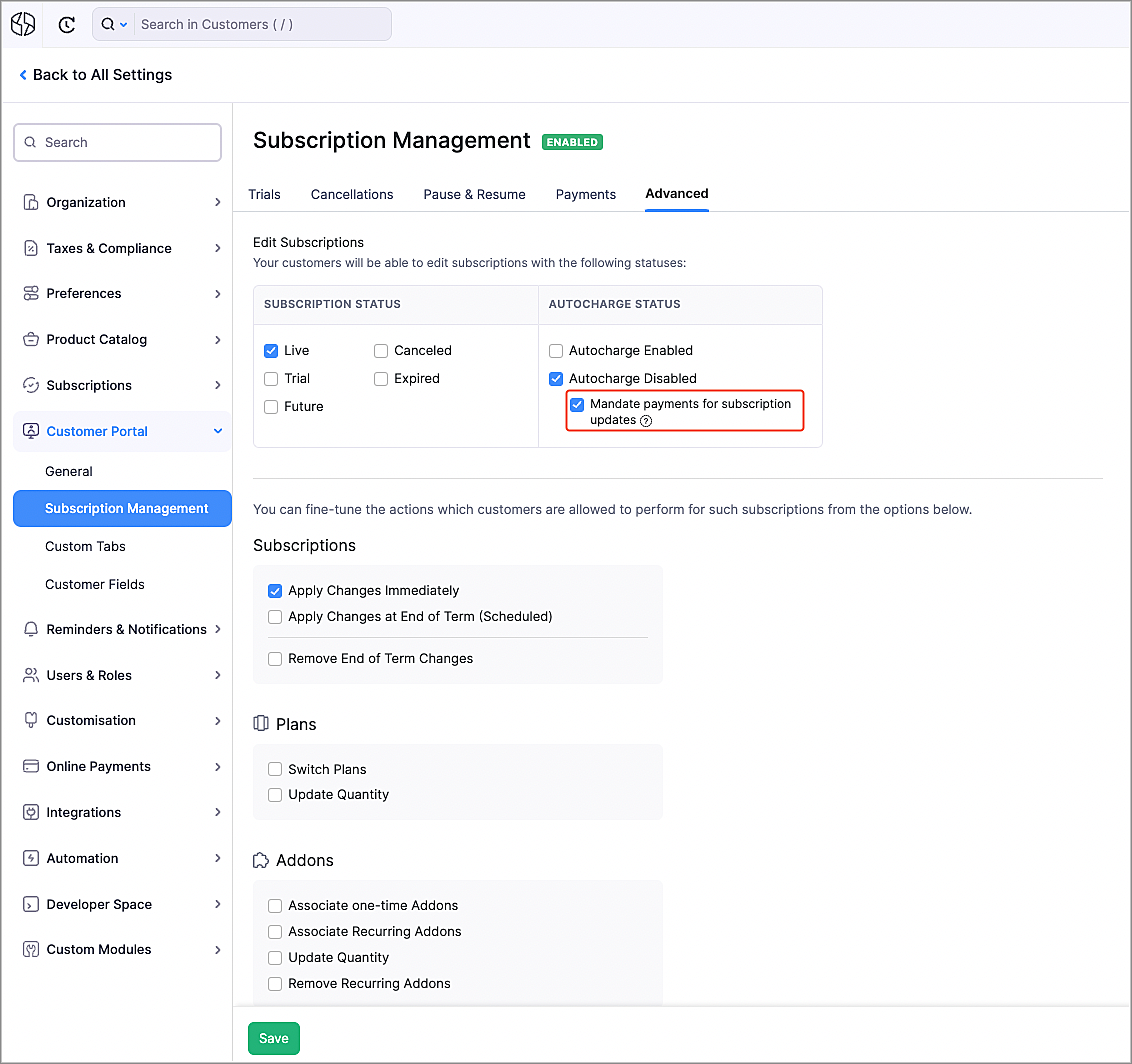
You can get more control over subscription updates in the Customer Portal by making payments mandatory. Once enabled, when your customers make changes to their subscriptions, such as upgrading plans or purchasing addons that would require additional payments, they would have to pay first. To enable this:
- Navigate to Settings > Customer Portal > Subscription Management.
- Go to the Advanced tab.
- Mark the Mandate payments for subscription updates option.
Note: The payment method that is used for such payments will be associated to the subscription. Autocharge will be enabled automatically for this subscription, if the updated payment method supports it.
Prevent Duplicate Values for Custom Fields
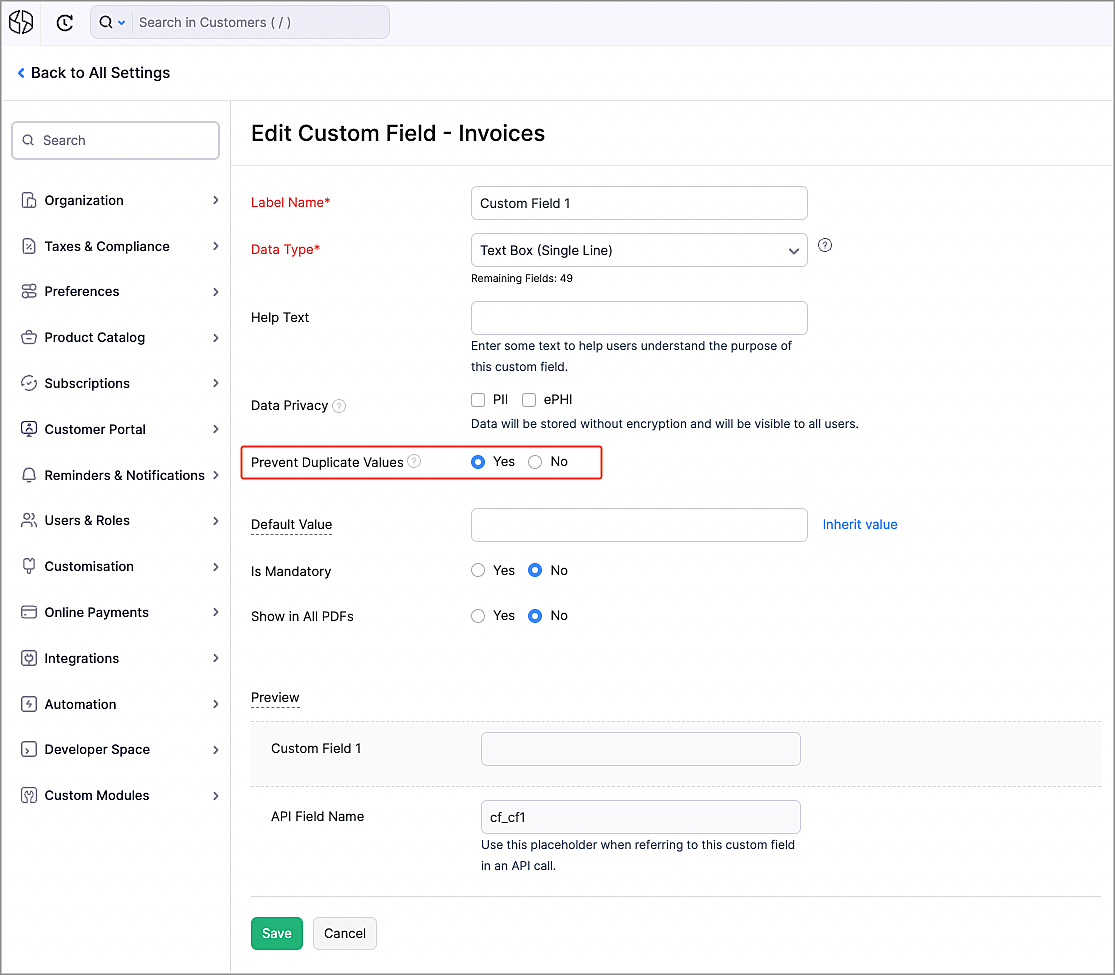
There might be scenarios where you might want unique data for certain custom fields, such as user names or license keys. Now, you can make sure that all the values for the custom fields are unique by selecting Yes next to Prevent Duplicate Values while creating or editing a custom field. Once enabled, when a duplicate value is entered for a custom field, an error will be shown, asking you to enter a unique value.
Zoho Notebook Integration

Zoho Notebook is a general purpose online note-taking app, that lets you organize notes and media in one place. You can now integrate with it to take notes, create checklists, upload images and attach documents to Zoho Notebook directly from Zoho Billing.
To integrate with Zoho Notebook:
- Navigate to Settings > Integrations > Zoho Apps.
- Click Install next to Zoho Notebook.
- Click Install in the popup that appears.
Now, you can add notes from Zoho Billing by clicking the Zoho Notebook icon on the right.

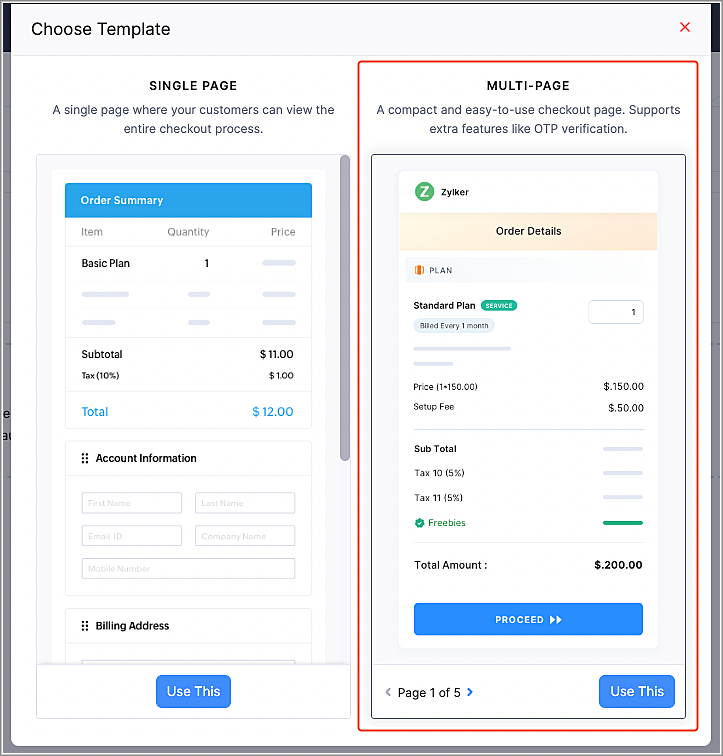
Multi-page Hosted Payment Pages
We have added a multi-page template for the Hosted Payment Pages to simplify your payment collection process.
- OTP Verification - You can now mandate your customers to go through OTP verification for their email address. This will help to identify returning customers, ensuring that their payments are processed for the correct customer, instead of creating a duplicate customer. The customer's details, such as their saved payment methods and addresses will also be filled automatically.
- Bite-Sized Pages - The checkout process has been split into multiple, neatly categorized steps, instead of all the information in one page.
- Switch Addresses - If your existing customers have multiple saved addresses, they can switch between them.
Note: You can enable multi-page templates for your organization from Settings > Customization > Hosted Payment Pages. For newly-created organizations, multi-page templates will be the default Hosted Payment Page type.
Hosted Payment Page Enhancements
We have enhanced our Hosted Payment Pages to give you more flexibility in your payment collection process.
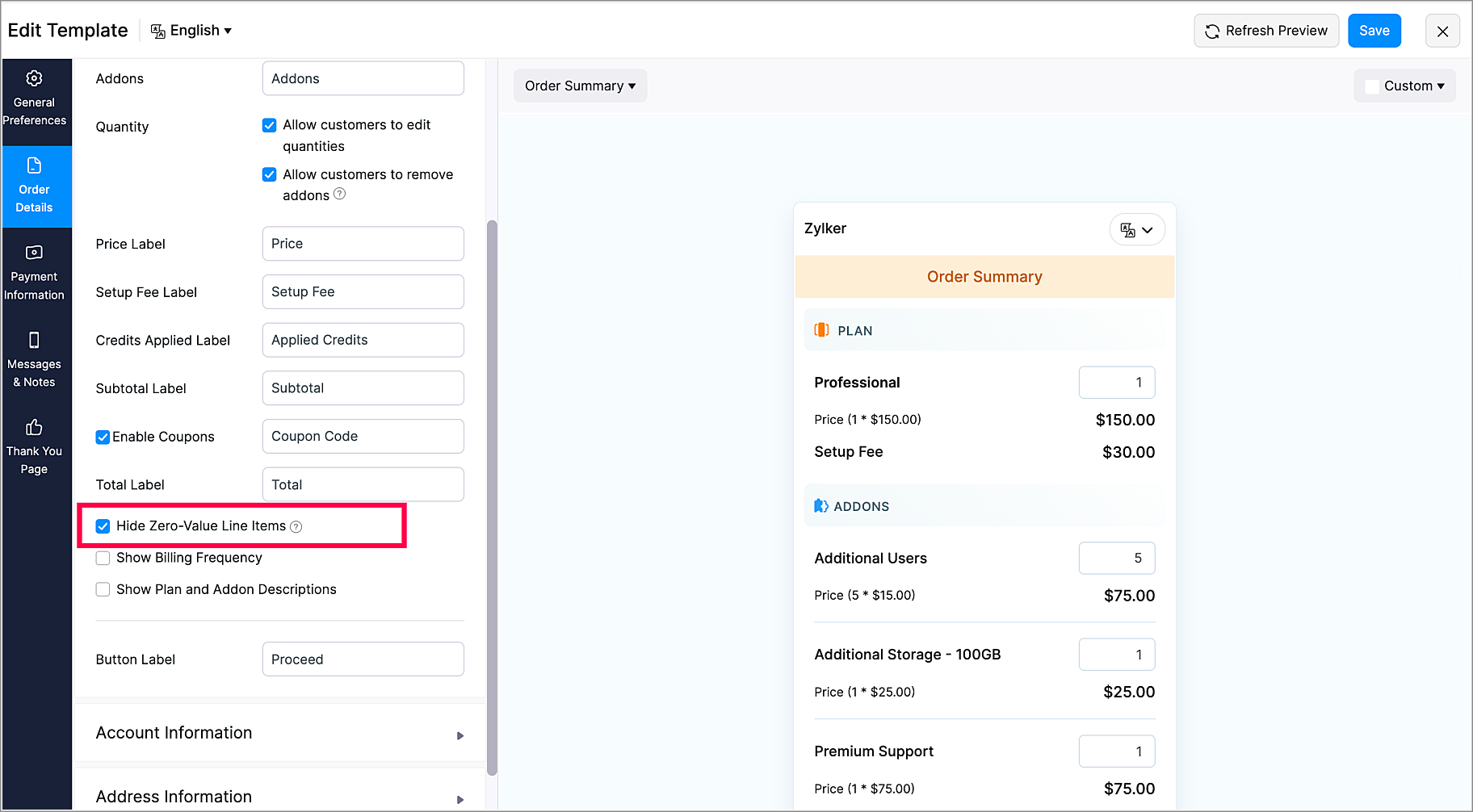
- Show/Hide Zero-Value Items - You can choose to display or hide zero-value plans/addons in the Hosted Payment Pages.
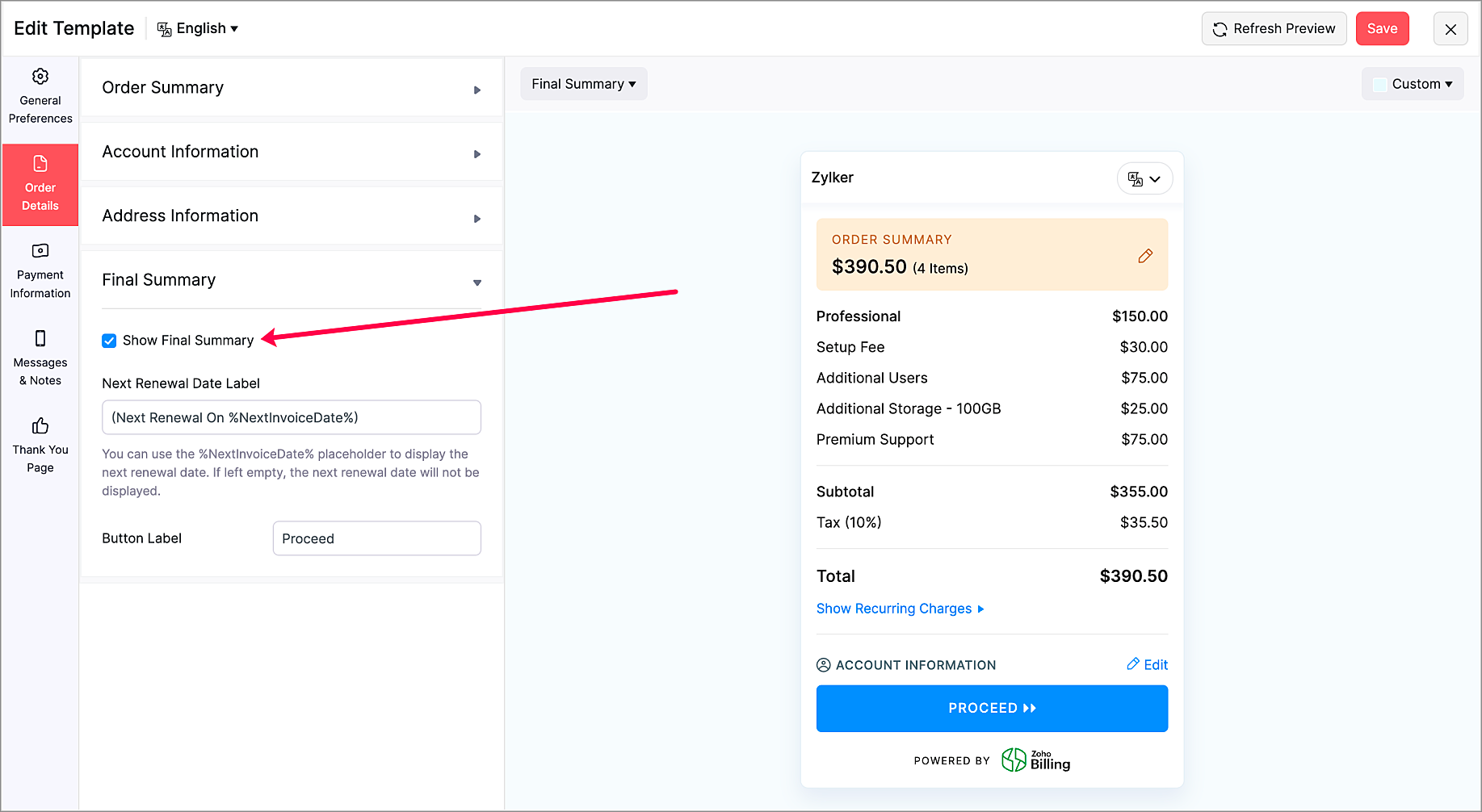
- Show/Hide Final Summary Section - Choose to display or hide the Final Summary section in the Order Details section. This is available only for multi-page Hosted Payment Pages.
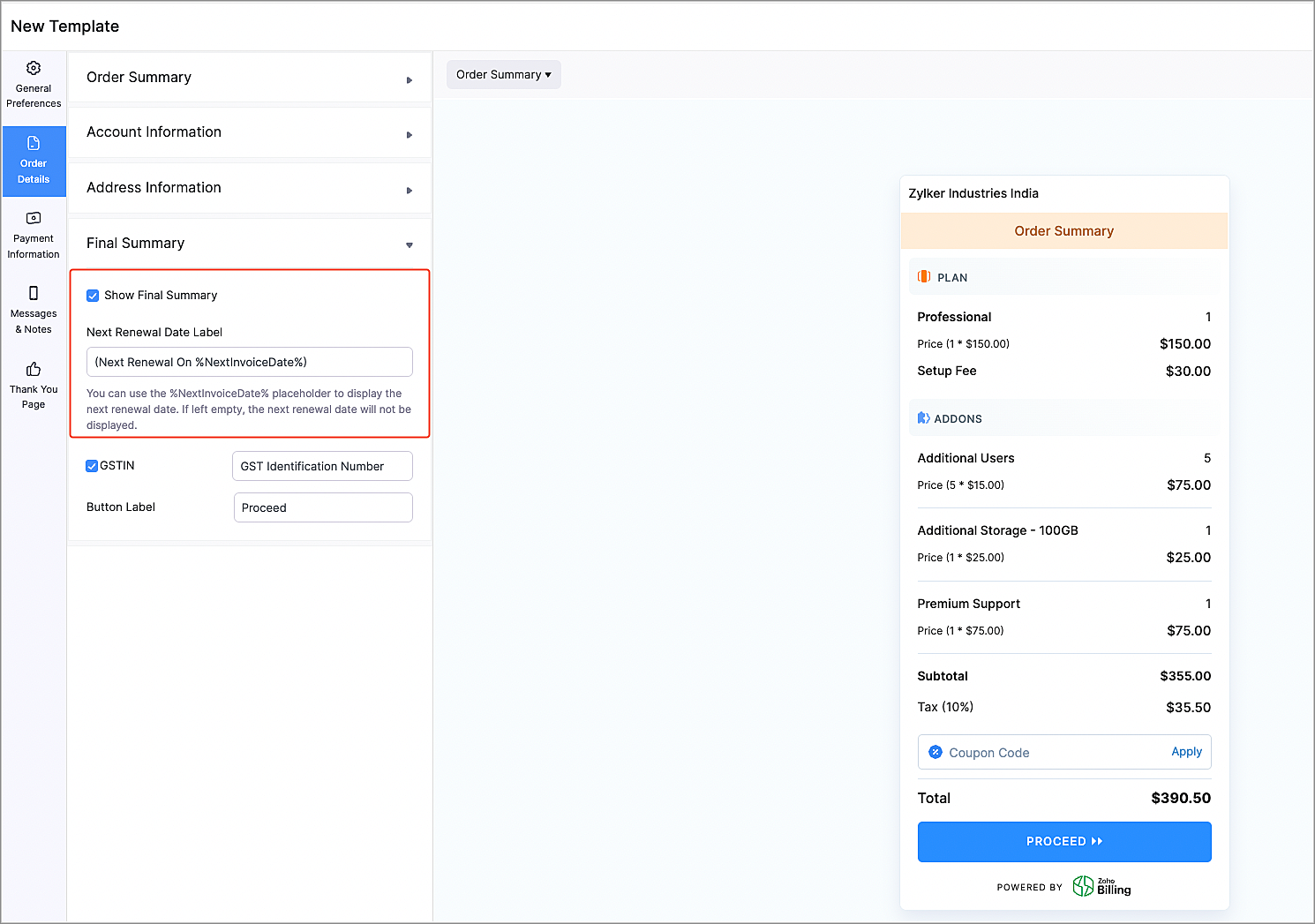
- Next Renewal Date Label Customization - Now, you can choose to display the next renewal date for the recurring charges in the Order Details section. You can also customize the label according to your preferences. This is available only for multi-page Hosted Payment Pages.
Marketplace Extensions
Zoho Cliq Extension
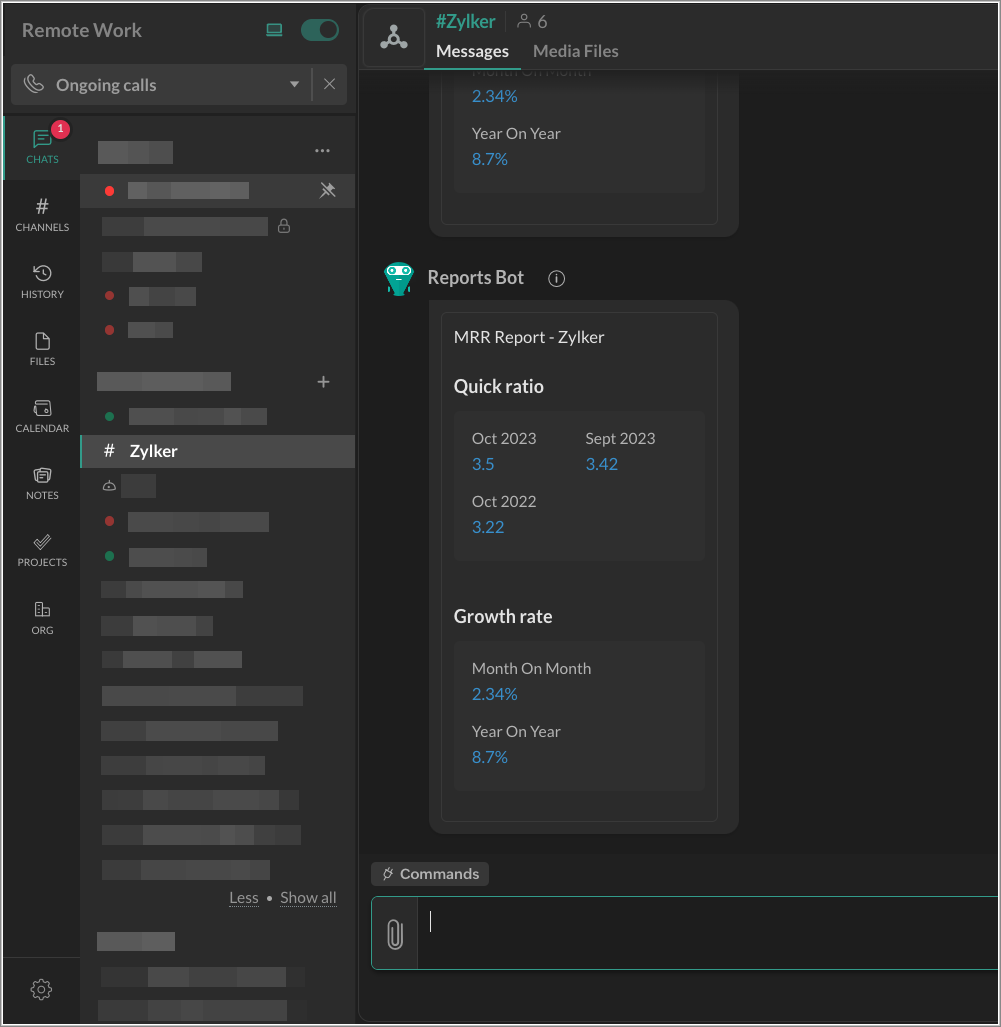
The Zoho Cliq extension for Zoho Billing can show you subscription summary reports for your products in a Cliq channel. Once enabled, you will receive daily notifications about your products' performance for the previous day. You will also receive a short summary of your organization's monthly recurring revenue on the first day of each month.
Telr Extension
Note: This extension was developed by Telr.
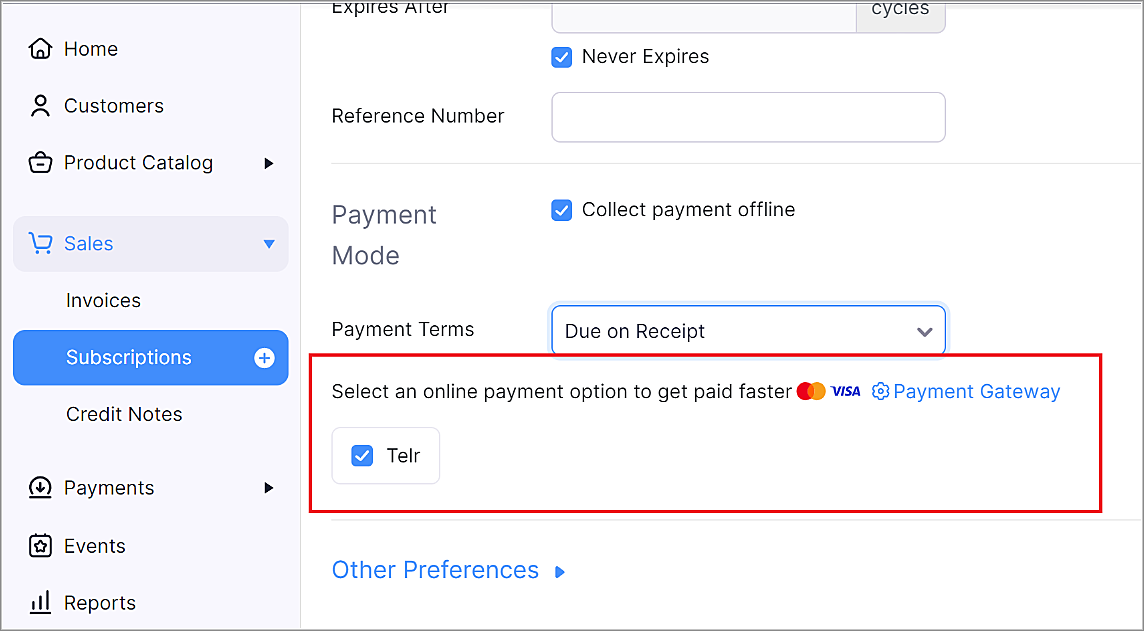
Telr is a payment gateway provider that helps businesses accept and manage online payments. Telr accepts many popular payment methods, such as Visa, MasterCard, American Express, JCB, UnionPay, MADA, STC pay, URPay, SADAD and many more.
Zoho Connect Extension
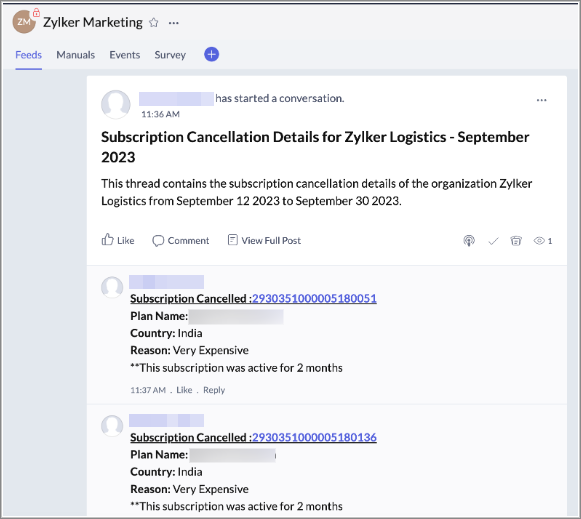
The Zoho Connect extension for Zoho Billing allows your business to track details of subscriptions that were cancelled by your customers in Zoho Connect. Once enabled, every time a subscription has been cancelled, details about it will be posted as a comment in a thread on Zoho Connect.
You can visit our What's New Timeline to view a list of all our previous updates.
We'd love to hear what you think about these features in the comments below. If you require any assistance, please write to our support team at support@zohobilling.com – we'd be happy to help!
Best regards,
The Zoho Billing Team
Topic Participants
Dwaipayan Bose
Mikhail Koval
Hari Hara Sudhan. S
Decorus-Pms
Sticky Posts
What's New in Zoho Billing - February 2024
Hello everyone, We are excited to share the first set of updates for Zoho Billing in 2024. Read along to know more about a wide range of updates, from the Aging Summary in customer statements to Apple Pay support in Stripe. One-Time Invoice with PlansZoho Finance Workshop 2023 is coming to the USA. Get exclusive training on Zoho Finance apps, one-on-ones, and more.
Hello all, We'd like to invite you to our biggest Zoho Finance workshop in the United States. After a brief break, we are excited to be back. This year, we're bringing together our customers and community members for two days of curated hands-on sessions,Zoho Subscriptions wins IDC's 2020 SaaS CSAT Award for Subscription Billing
Dear customers, We're excited to share that Zoho Subscriptions has won IDC's 2020 SaaS Customer Satisfaction Award! As a team, we cherish each and every milestone with our customer community. And this particular award, focusing on customer satisfaction,Introducing: SMS notifications via Zoho Subscriptions
Dear customers, We hope you are doing well! We are happy to announce that you can now send SMS notifications to your customers right from Zoho Subscriptions. To facilitate this, we've integrated with Twilio, a leader in the business communication space.What's new this December in Zoho Subscriptions
The year is almost over and we here at Zoho Subscriptions have released new features and updates on the month of November. Let's take a look at the features we have worked on in the past month. Zendesk Integration The Zoho Subscriptions app for Zendesk allows your customer support executive to access customer details in an instant. You will be able to view the customer information from Zoho Subscriptions right from your ticket view. On enabling the integration, you will be able to: Get your customer
Recent Topics
filter broke my data
I uploaded a file recently from Sheets and it has top 2 rows frozen, with table headers in second row and each one is filterable. somehow my first 2 columns became unfiltered and no matter what I do I cannot reapply the filter?? also didn't realize theyRequest to remove domain "greentechcoatings.vn" from previous Zoho account
Hello Zoho Support, I would like to register the domain "greentechcoatings.vn" in my new Zoho Mail account, but I receive the message "This domain is already associated with another account". Please remove the domain from any previous/unknown accountTrigger actions in third-party apps using Zoho Flow
Greetings, I hope you're all doing well. We're excited to share an enhancement to Bigin's workflow capabilities. Zoho Flow Actions are now available in Bigin, enabling you to automate tasks across third-party applications directly from your workflow andEnroll, Script, Win: Hackathon 2025!
Hello CRM Developers! Are you ready to create some magic with Client Script, Widgets and Functions in Zoho CRM? Let’s make Hackathon 2025 an unforgettable adventure! The Zoho Developer Community Hackathon 2025 is here, and it’s your time to shine! REGISTERZoho Help Desk - Not receiving emails
Hello… I am on your trial version of help desk… and I am having trouble getting emails from Zoho Help Desk to my MS Outlook Exchange Server… So when a customer sends ticket request I am not getting an email with a notification? I have read your articlesAlmost all Flows are being queued
A few days ago I saw one of my Flows status was Queued. This was the first time this had ever happened. Now, almost every Flow that triggers is Queued for at least a few minutes. If I re-trigger the Flow (which causes separate problems) they sometimesEmployment Contract / HRMS Documents - Zoho People
How do I create customized HR documents for disbursal from Zoho People ? Example, say offer letters ? appointment letters ? Memos ? We want to be able to preset these in one or ther other form and issue them to employees who are in Zoho People.Live webinar: Craft and deliver impactful slides with Show’s desktop apps
If you love the comfort of working on your desktop and want a setup that keeps you focused and uninterrupted, this session is made for you. We’re excited to invite you to our upcoming live webinar: "Craft and deliver impactful slides with Show's desktopEnhancements to Bigin's forms
Greetings, I hope all of you are doing well. We're happy to announce a few recent enhancements we've made to Bigin's forms. We'll go over each one in detail. Merge field support in auto-filled forms The auto-fill option in Bigin's forms lets you predefineTable dimensions
I try changing the dimensions of the table on my computer but it doesn't change. Do I have to be a premium member or does it only work on the app?Direct link to Record Summary
Hi everyone, In one of my reports, I have built a Record Summary template to display the details of one record. I would like to be able to link directly to this Record Summary once I submit a new record, without having to go to the list of records first and click on View. Is there a possibility to do so ? Should I use the URL by passing some parameters ? Thank you very much for your help ! GuillaumeVerifying Zoho Mail Functionality After Switching DNS from Cloudflare to Hosting Provider
I initially configured my domain's (https://roblaxmod.com/) email with Zoho Mail while using Cloudflare to manage my DNS records (MX, SPF, etc.). All services were working correctly. Recently, I have removed my site from Cloudflare and switched my domain'sAPI Support for Creating Invoices with Batch-Tracked Items
Hi Zoho Community, I am working on an integration where we create invoices in ERPNext and push them to Zoho Books. I need to send batch-tracked items (batch numbers) when creating invoices. I could not find any reference in the Zoho Books API documentation.Amendment effective date
Hi everyone, I noticed that the amendment effective date mentionned in my amendment is not right. Indeed, when a contract is amended several times, it states the previous amendment and their effective date. However, the effective date stated is alwaysSTOCK history in zohosheets
is it possible to get historical stock value using stock function in zoho sheets? i could not see from and to period in the helper document.Auto sync Photo storage
Hello I am new to Zoho Workdrive and was wondering if the is a way of automatically syncing photos on my Android phone to my workdrive as want to move away from Google? ThanksAgent password reset
Hi Zoho support, I would like to ask if there is a way the admin can reset a password of an agent? RegardsCan receive but not send messages in Zoho Mail
Hello! I was able to configure my email client successfully in that I can receive messages just fine. However, when I send messages out, they seem to go out fine (I don't receive any errors or anything), but the recipient does NOT receive those messages.Mail is sent twice!
Been using Zoho for a while now. Installed Zoho for someone else and some weird things are happening. Mails are being sent twice. He is using Thunderbird as an email client. I already read about email being duplicated in the sent folder. But in my caseCan't login IMAP suddenly
Since this evening I'm getting the error: You are yet to enable IMAP for your account. Please contact your administrator... IMAP always been enabled in my account and was workign fine for the past 7 years. Already tried turning IMAP off and on again.Sending of username did not succeed: Mail server pop.zoho.com responded: User already specified
I am having issues receiving emails from Zoho in Thunderbird. I am getting the above error. The first error tells me Authentication failed, and prompts me to enter in my password. Then I get the above error. I can receive emails when I log in online toBug tracking
Hi, does anyone know how to track errors during picking or packing? This way I can keep track and see how to improve and prevent errors in this area.Migration of corporate mail environment from Yandex 360 to Zoho mail
I have to migrate a corporate mail environment with an existing domain from Yandex 360 to Zoho mail. It is vital to migrate all users with all the data. I have read the article on this topic using MacMister Email Backup Software just now and have someI'm unable to send mail pthrough Zoho SMTP programmatically
This has been working for years, but today it's been offline all day long. I see nothing anywhere on your site about this. I'm not the only one experiencing this. Downdetector has a spike of reports todayCan no longer send email via Django site
This was working fine as of 11/7/25. Now I am unable to send user verification emails from a Django site on a AWS lightsail sever. When a user attempts to register the following error occurs. I have also attempted to send a test email via the shell andunable to send email but able to receive email
my email address is info@securityforceservices.caLogin to server failing
When trying to retrieve my mail, I am getting this error message -- Login to server pop.zoho.com with username (my email address) failed. It gives me the option to retry, enter password, or cancel. Then I get this message -- Sending of username did notConfiguration failed: 200 response not received for POST request.
Hello, I am trying to set up a webhook to connect with an Salesforce but I receive the following error from Zoho: Configuration failed: 200 response not received for POST request I have tried testing it on webhook.site as well and receive the same errorZoho Migration Assistant not working
Hello, I am trying to use you Migration assistant to migrate emails from Rediff to Zoho. I am stuck in the first step. After downloading the migration tool, I copied the link to verify user credentials, however, after pasting the link in the browser,Paid Support Plans with Automated Billing
We (like many others, I'm sure) are designing or have paid support plans. Our design involves a given number of support hours in each plan. Here are my questions: 1) Are there any plans to add time-based plans in the Zoho Desk Support Plans feature? TheScheduled Reports - Do not send empty report
Hello, We are intensively using reports in the CRM, especially for sales managers. When data is empty, they still receive an email. Can you add an option to avoid sending the report when data is empty?Contacts Missing — PeopleSync/Zoho Mail
English: In our company we use ManageEngine Mobile Device Manager (MDM), Free edition, to manage corporate mobile devices. Our usage policy does not allow personal Google accounts on these devices; therefore, Google account sync is blocked through MDM.Best way to integrate Zoho with mobile app for managing customer requests with real-time notifications?
Hello, I'm building a solution for a travel company where customers submit requests through a website, and the sales team manages these requests through a mobile app. The Requirement: Customers fill a form on the website (name, email, number of children,Kaizen #57 - Mass Update API in Zoho CRM
Hello everyone! Welcome back to yet another post in the Kaizen series. This week, we will discuss the Mass Update API in Zoho CRM. In this post, we will cover the following: 1. Introduction 2. Mass Update Records API 3. Schedule Update and Get StatusGetting Attachments in Zoho Desk via API
Is there a way to get attachments into Zoho Desk via an API? We have a process by which a zoho survey gets sent to the user as a link in a notification. The survey has several upload fields where they can upload pdf documents. I've createdMultiple currencies - doesn’t seem to work for site visitors / customers
I am trying to understand how the multiple currency feature works from the perspective of the website visitor who is shopping on my Zoho Commerce site. My site’s base currency is US Dollars (USD) but my store is for customers in Costa Rica and I wouldPincode based Product Restriction
we have different types of products. 1) Very bulky items like plywood. 2) Too delicate items like glass These type of products we want to sell to local customers. Other products we want to supply all over India. There should be an option to restrict productsCan multiple agents be assigned to one ticket on purpose?
Is it possible to assign one ticket to two or more agents at a time? I would like the option to have multiple people working on one ticket so that the same ticket is viewable for those agents on their list of pending tickets. Is something like this currentlyRelated Lists filter
I have Contacts showing in our Accounts module. I customized the Contacts module with an Employment Status field, with the following picklist options: "Primary Contact", "Secondary Contact", "Active Staff(not a main contact)", and "No longer employed".Standalone custom function not generating logs
Why dont't standalone custom functions generate logs when the're called from another function? I have some functions (workflow, buttons and blueprint) that have common parts, so I put that part in a standalone function which is called from the others.Next Page