Announcing Bigin's integration with Zoho Directory
As a Bigin admin, you play an important role in managing your organization's user accounts and ensuring secure access to important data. To streamline and enhance your user management operations, Zoho Directory can be a powerful tool. Zoho Directory offers a range of advanced features, including IP restriction, password policies, multi-factor authentication, and Active Directory sync. In this post, we'll discuss how you can leverage Zoho Directory to perform these operations effectively and secure your Bigin account.
1. IP restriction
With Zoho Directory, you can enforce IP restrictions to allow access to Bigin only from specific IP addresses or ranges. This helps protect your organization's data by ensuring that users can only access Bigin from approved locations. You can easily configure IP restrictions within Zoho Directory's user management settings, providing an additional layer of security.
2. Password policies
Implementing strong password policies is vital for maintaining the security of your Bigin accounts. Zoho Directory enables you to define and enforce password complexity rules, such as minimum length and character requirements. By configuring these policies, you can enhance the overall security posture of your organization and reduce the risk of unauthorized access.
3. Multi-factor authentication (MFA)
To add an extra layer of security to user logins, Zoho Directory supports multi-factor authentication. You can enable MFA for Bigin users, requiring them to verify their identities through a secondary method, such as the following options:
- Authenticating with our industry-standard authentication app, Zoho OneAuth
- Enabling hardware-based MFA with YubiKey
- Using authenticator apps like Google Authenticator or Authy
This significantly reduces the chances of unauthorized access, even if the user's password gets compromised.
4. Active Directory sync
You can synchronize user accounts, groups, and attributes between your existing LDAP and Zoho Directory, enabling centralized management across platforms. This integration ensures that changes made, such as user additions or modifications, are automatically reflected in Bigin, saving time and reducing administrative overhead.
5. Single sign-on
Zoho Directory supports single sign-on (SSO) integration, enabling seamless authentication and session management across multiple applications, including Bigin. By configuring SSO, users can log in once using their credentials and subsequently access Bigin and other integrated applications without needing to provide their login information again.
6. Web session management
Zoho Directory provides comprehensive session monitoring capabilities, such as the following:
- Session lifetime - Users will automatically be signed out of their accounts after the defined period.
- Session timeout - Users will signed out of their accounts if they stay inactive for longer than the defined period.
- Concurrent sessions - Users will be allowed only the chosen number of active sessions at a time.
7. User session history
Zoho Directory keeps a record of user session history, allowing you to track and review past sessions. This feature enables you to monitor user behavior, investigate any suspicious activities, and perform audit trails if required. By having visibility into past sessions, you can maintain accountability and identify any security incidents or policy violations.
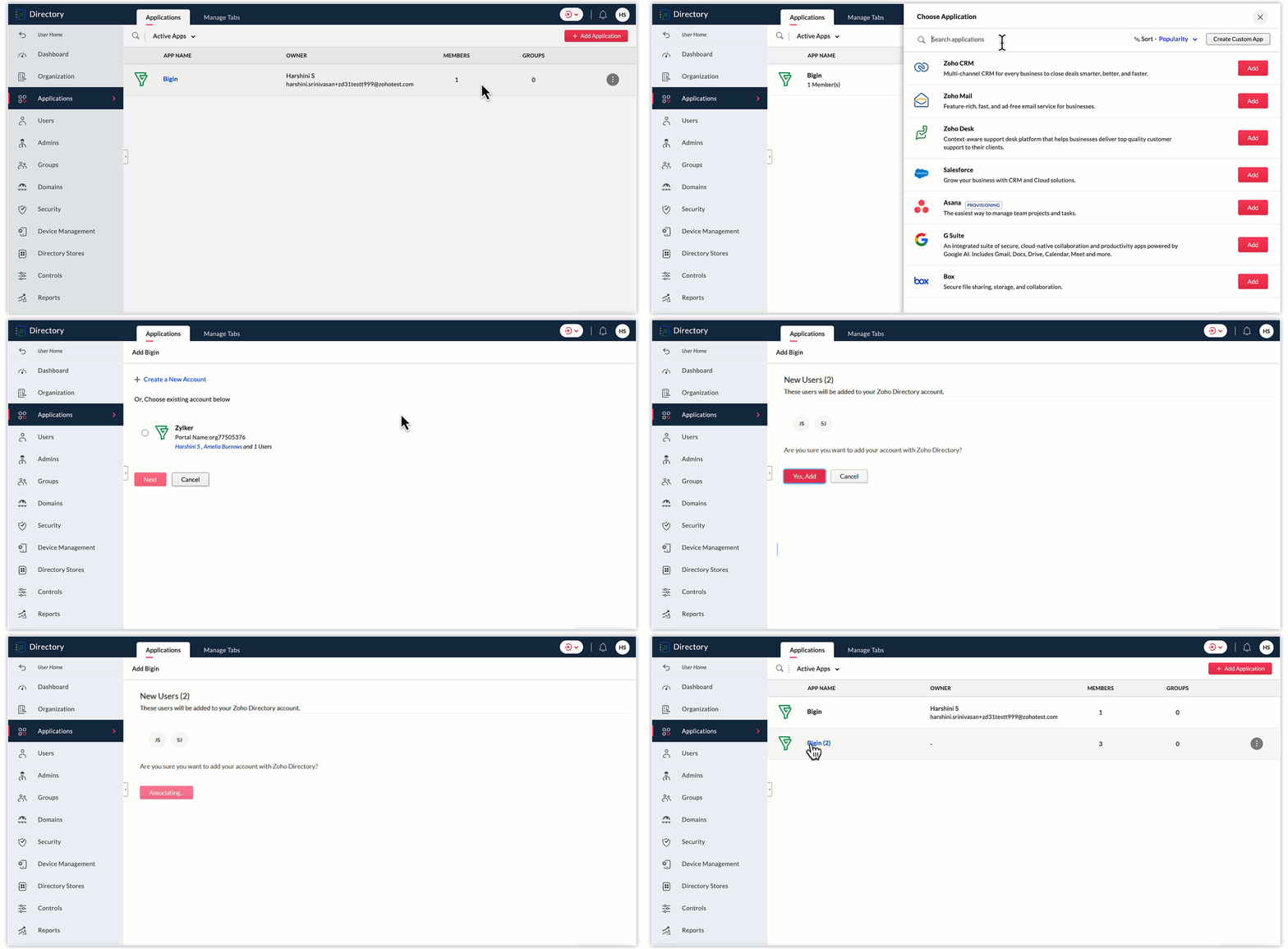
To add Bigin to Zoho Directory, follow these steps:
- Log in to your Zoho Directory account. Once logged in, navigate to the Zoho Directory Admin Panel.
- In the Admin Panel, look for the Applications section.
- Within the Applications section, search for "Bigin" and click on the Add button to initiate the process of adding Bigin to your Zoho Directory.
- Follow the on-screen instructions to configure the settings for the Bigin integration. Choose any of your Bigin accounts displayed, or create a new one. Click Next.
- In the next screen, select the Bigin users you wish to add to Zoho Directory, and click Yes, add.
- Once you've completed the configuration, Bigin will be added to your Zoho Directory.
- You can now manage user access and permissions for Bigin through the Zoho Directory Admin Panel. You can assign users to Bigin, control their roles and privileges, and ensure secure access to the application.
As a Bigin administrator, you can significantly improve the security and access management of your company's data by utilizing Zoho Directory's advanced user management features. From implementing IP restrictions and enforcing password policies to enabling multi-factor authentication and syncing with Active Directory, Zoho Directory provides comprehensive tools for effective user management. You can protect your organization's data, streamline user management, and ensure a positive user experience in Bigin.
Thank you,
Sai Shree | User Education
Sai Shree | User Education
Topic Participants
Saishree T K
Sticky Posts
Schedule mass emails, view mass emails status and more!
Hello everyone, Mass emails help you communicate with multiple customers in a couple of clicks. We have introduced a Mass Emails dashboard in Bigin so that users can see the status of the mass emails like how many emails were opened, clicked and bounced.Introducing Bigin 360: Our new pricing edition with increased feature limits and pre-installed toppings
Dear Biginners Club, Today, we're pleased to launch a brand-new pricing edition called Bigin 360, our highest pricing edition that will sit on top of Express and Premier editions. It's been over four years since our launch, and we're receiving some great[New] Create invoices and contracts in minutes with Zoho Writer's Merge Templates for Bigin!
Do you often find yourself manually entering customer information in your business documents like invoices and contracts? This can be a time-consuming process that can take up valuable time from your business operations. With Zoho Writer's Merge TemplatesAnnouncing #BiginnersClub meetups in US, Middle East, India & UK (Free Event)
Exciting news, Bigin enthusiasts! #BiginnersClub meetups are back, and we're hitting some major cities this time, starting from October. Here's what you can expect: Meet our experts face-to-face Deep dive into Bigin and its advanced features PersonalisedIntroducing Forms: Streamline data collection with Bigin's new form builder.
Hello everyone, Bigin's web forms just got a makeover! We are excited to introduce Forms: an online form builder designed to meet all your data collection need. This revamp was inspired by your feedback, resulting in an upgraded and versatile version
Recent Topics
Fields not coming through, not pulling data
Forgive the noviceness of my vocabulary. I am in Zoho flow connecting CRM and Projects. When an opportunity hits a certain stage, it will create the project in Projects, and bring in data from the opportunity. Everything is working, except for two fieldsSmartsheet Integration
Has any in the community been able to integrate Zoho Desk with Smartsheets using Zoho Flow? I am trying to get the Smartsheet Row ID based on ticket data and cannot find documentation on the Get Row function for Smartsheet. It is asking for a Query StringCRM Campaign - how to mass remove contacts?
Does anyone have a solution for removing all contacts from a CRM campaign. Seems that one by one is the only option.Send out follow-up email in the same thread (threaded conversations in individual emails) from Zoho CRM
Hi, I'm new to Zoho. I'm trying to send individual emails to my leads one by one. And I'll send out follow up email if I don't hear back from them later. However, instead of sending a new email, I want to reply in the same email thread so that the recipientsCadence Support in Zoho Vertical Studio
We would like to know whether it is possible to create and configure Cadences in Zoho Vertical Studio, similar to the Cadence feature available in Zoho CRM. Please confirm if Vertical Studio supports creating cadences for modules and users, and whetherRemoving "Products" as mandatory field from Sales Order creation page
Hello, friends According to our workflow, we should: 1) create Sales Order (Stage "New") 2) call and discuss the Products with a customer (Stage "Communication") 3) add the Products to the Sales Order during the call However, "Products" is mandatory toZoho Books says "The customer "Hakimuddin P A Ali" already exists. Please specify a different name.""
One of my transaction is not getting posted from Stripe to Zoho books. I already checked in Zoho books that there is no customer already present in Zoho books with the same name (as the error mentions) I already raised this complaint on Zoho flow portal,Is it possible to automate a file to be directly uploaded to a specific subfolder in Zoho Workdrive?
I am establishing a workflow so that when a new task is marked "complete", the document submitted in the task (under the "Documents" tab) is automatically uploaded to a specific subfolder in the associated WorkDrive for the project. However, the dilemmaSteuerberater der Zoho benutzt in Deutschland
I write in English because the issue is related to German regulations. Wir sind ein Unternehmen, welches aktuell keine Pflicht zur doppelten Buchführung hat. Aktuell bucht unser Steuerberater jeden Beleg, auch unsere Auslagen. Wir würden dies gerne selbstWhy are some folders not showing up as an action trigger in Zoho Flow?
I am currently working on a flow that automates the process of creating a folder in WorkDrive once a Task List is created. When I am selecting a destination for the folder, some projects are not showing up. I intend to create a folder within a specificGetting Date from PostgreSQL error
I am pulling data from PostgreSQL table into a CRM record via FLOW but the field is coming out empty. Need some suggestions: Field Type in CRM: Date/Time Field value in PostgreSQL: 2024-12-05 21:06:32.479 Field value in FLOW "Fetch Row": created : "2024-12-05T21:06:32.479382000",Zoho Flow to SendOwl API error
SendOwl is listed in the apps list of Zoho Flow. When trying to connect through the API with valid key and secret, the error given is: SendOwl says "HTTP Basic: Access denied" It seems Zoho doesn't connect via HTTPS. I've already tried using webhooks,decisions based on content of a ticket
Hi, I need to create a flow that sends automated email based on the content of a ticket in zoho desk. I have certain tickets that are formatted in a particular way, and contain certain keywords. How can I filter (based on decisions) the tickets basedNewline Character "\n" parsing problem in webhooks
Hi there, I am facing an issue in Zoho Flow (maybe a general issue or maybe only in Zoho Flow): I have this function: void sendListWebhook(string url, list array) { for each arrayElement in array { result = invokeurl [ url :url type :POST parameters:arrayElement.toString()One Company, multi branches, multi warehouses and I need to manage this in one organization
Dears, I'm a new user to zoho solutions, however I found a lot of persons giving a nice feedback about it also a lot of good reviews. I though why we try to move to it in our company. I'm not sure if Zoho could give me all what I need or not that's why I'm going to post in this topic most of the things I know about managing our business to let you ,as zoho experts, tell me if Zoho will meet my business requirements or not. First of all we are a flowers and landscaping company we have like 6 toMigration Evernote
Bonjour Apres plus d'une dizaine d'année passer avec evernote j'ai décidé de franchir le pas . J'ai débuté par migrer mes notes vers zoho et depuis la migration est bloquée. Impossible d'avoir un retour du support malgré plusieurs mails et tentative d'appelPushing GCLID info from Gravity Forms to ZohoCRM
We are switching to Gravity Forms from Zoho Forms and I cannot find any good info on how to make sure my GCLID tracking info is pushed through to the CRM through my new forms. There was an article in the documentation about placing something within theOn Zoho Flow, Record deleted trigger from Zoho Creator
On creating flow in Zoho Flow, when we select app Zoho created, it provides 3 trigger options - Record created, Record updated and Record created or updated We need trigger on "Record Delete" as well, We have a use case to fire our system api if recordZoho Flow Switch On Not Working
I have created a flow which is when the mailbox address received the email that meet the condition will auto fetch the contact, account and finally create the ticket by using Zoho Desk. When I do a test and debug on my flow it work well as what I expectMS Teams Flow Integration Question
Where can I find the chat ID for the "Post message to chat" target?Zoho Flow - Access denied to recover recording from call module - OpenAI
Hi, I am trying to build a Flow to recover recoding when a new call is saved in my CRM. I have integrated my CRM with ringcentral and the recordings are saved in the event. Trigger: When new module entry Step 2: Fetch module entry (Zoho CRM says "permissionUnable to send price in big commerce from zoho flow.
I am creating a flow from zoho flow to create a product in zoho inventory and sending this to big commerce. But the problem is like when ever i send the price its getting error. it require decimal format value if i am sending ${trigger.sales_rate} theNot sending mail to new lead in zoho flow
I have created a flow in zoho flow and triggered an action to send email notification when the new lead is created but even after user entering the mail id the email is not going to themAccess query string from incoming webhook URL in Zoho Flow
I have a fairly straightforward use case, but cannot find anything conclusive on this subject. How can I simply access the query string of the incoming webhook request in Zoho Flow? I am attaching the Deal ID to the end of the request like: https://flow.zoho.com/762439902/flow/webhook/incoming?zapikey=1001.0dec2d7dd15080c464a13925275f0129.448c23ee219c545c89f5a178456cfc8b&isdebug=false&dealID=${Deals.DealUnable to access my Zoho forms account
For some days now, I haven't had access to my Zoho Forms account. I keep getting an error that says, "You are an inactive user in your organization" via the mobile app and "You don't have permission to access this organization" via the web. I was removedIdentify Unused Deluge Functions in Zoho CRM
Hello Zoho Support Team, I would like to request a feature that helps administrators identify unused or rarely used Deluge functions in Zoho CRM. Currently, Deluge functions are distributed across different areas, and there is no centralized overviewUser Automation: User based workflow rules & webhooks
User management is an undeniable part of project management and requires adequate monitoring. As teams grow and projects multiply, manual coordination for updating users & permissions becomes difficult and can give way to errors. User automation in ZohoUpdate on V2 API End-of-Life Timeline
Dear Users, Earlier this year, we shared the launch of the V3 APIs and requested users to migrate from the older V2 APIs by December 2025. We have received valuable feedback from our users and partners regarding their migration timelines. We are happyRun a workflow after record merge
Hello, We are wondering if there is a way to trigger a workflow after two records are merged? We have a sms service that use to text back and forth with Prospects and Contacts. To make it easy for our users, we automatically create them in this otherLive webinar | The Evolution of Zoho Show: 2025 Feature Recap
2025 has been a year of exciting updates and features for Zoho Show. From advanced design and formatting tools to smarter presentation delivery, enhanced collaboration, and AI-powered features—along with the launch of our desktop apps, Show has continuedBatch Tracking custom function
Hi fellow zoho users, We have our ecommerce site setup to shopify. I have some products I want to add batch tracking too, my only issue is that it breaks our shopify workflow (create sales order, invoice, payment, package) because it requires us to manuallyIs it possible to setup bin locations WITHOUT mandating batch tracking?
Hi fellow zoho users, I'm wondering if anyone else has a similar issue to me? I only have some products batch tracked (items with shelf life expiry dates) but I am trying to setup bin locations for my entire inventory so we can do stock counting easier.Support “Other” Option with Free Text in Dropdown Fields
Hello Zoho Bookings Team, Greetings, We would like to request an enhancement to the registration form fields in Zoho Bookings, specifically for dropdown fields. Current Limitation: At the moment, dropdown fields do not support an “Other” option that allowsInclude Suggested Articles in New Ticket Email
When someone creates a new ticket, is there any way to include recommended knowledge base articles (like the ones Zia Suggests) in the email notification to the user? When they're waiting for a reply, it would be nice to have sent them some recommendedMapping a new Ticket in Zoho Desk to an Account or Deal in Zoho CRM manually
Is there any way for me to map an existing ticket in Zoho desk to an account or Deal within Zoho CRM? Sometimes people use different email to put in a ticket than the one that we have in the CRM, but it's still the same person. We would like to be ableItem Bulk Edit - Allow for Reorder Level
We're implementing a process for using the Reorder Level field for Items, and I have to go through and add this value to a huge chunk of our Items. It's driving me bonkers that I have to do this individually through the UI rather than bulk updating. ItSharing my portal URL with clients outside the project
Hi I need help making my project public for anyone to check on my task. I'm a freelance artist and I use trello to keep track on my client's projects however I wanted to do an upgrade. Went on here and so far I'm loving it. However, I'm having an issue sharing my url to those to see progress. They said they needed an account to access my project. How do I fix this? Without them needing an account.Zoho Flow + QuickBooks Estimates – Line items not created from CRM subform
Hi everyone, I’m trying to create QuickBooks Estimates from Zoho CRM Quotes using Zoho Flow. I’m aware that Zoho Flow’s native “Create Estimate” action does not support multiple line items, so I followed the community guidance for Invoices using a customSAP S/4 HANA Integration via ZOHO Flow
Hi How do I change the SAP Client ID while creating a new connection ? MY client ID is 421. I believe the client id should be an input field for length 3 numbers rather then a drop down to select from a fixed set of values. ThanksVLOOKUP FUNCTION PROBLEM
Hello, i have a problem with the VLOOKUP function in my sheet http://public.sheet.zoho.com/public/tonimoreno/indicemasacorporal2 in cell D2. This function doesn't work correctly and always returns the last content of the range. Can you help me?Next Page