Zoho One Tips & Tricks 02: Single Sign-On (SSO) in Zoho One

Sinds de uitbreiding van MarketPlace heb je nu de mogelijkheid om nóg meer apps toe te voegen aan Zoho One. Meer apps betekent echter ook meer inloggegevens die je moet opslaan en bijhouden. Zou het niet makkelijker zijn om vanuit één inlog-account toegang te krijgen tot je favoriete apps? Maar als je één credential gebruikt dan wordt je toch blootgesteld aan meerdere gevaren? Dat klopt, en hiervoor is er een oplossing. SSO, ofwel Single Sign On.
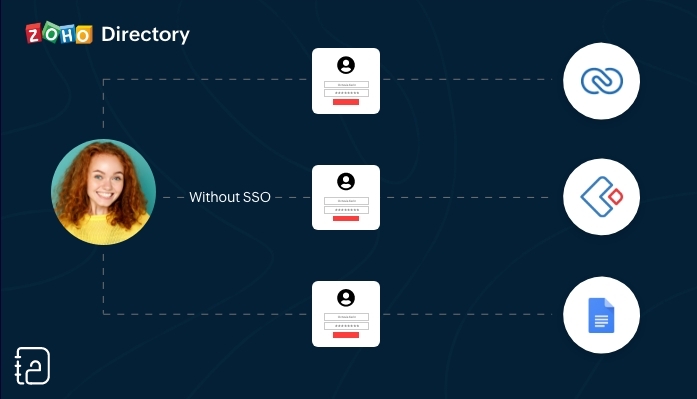 Zonder SSO
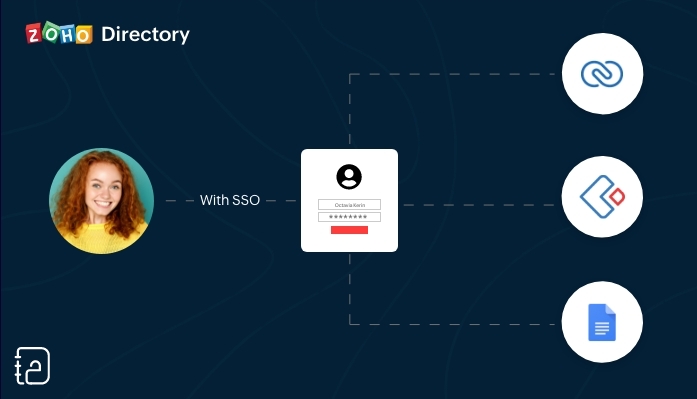 Met SSO
SSO (Single Sign On) is een authenticatiedienst die een gebruiker in staat stelt om op een veilige manier met één enkele aanmelding toegang te krijgen tot meerdere webapplicaties in verschillende domeinen en services. SSO gebruikt Security Assertion Markup Language (SAML)* voor de uitwisseling van authenticatie tussen de applicaties.
*SAML is een op XML gebaseerd framework voor het uitwisselen van informatie over gebruikersverificatie, -rechten en -kenmerken.
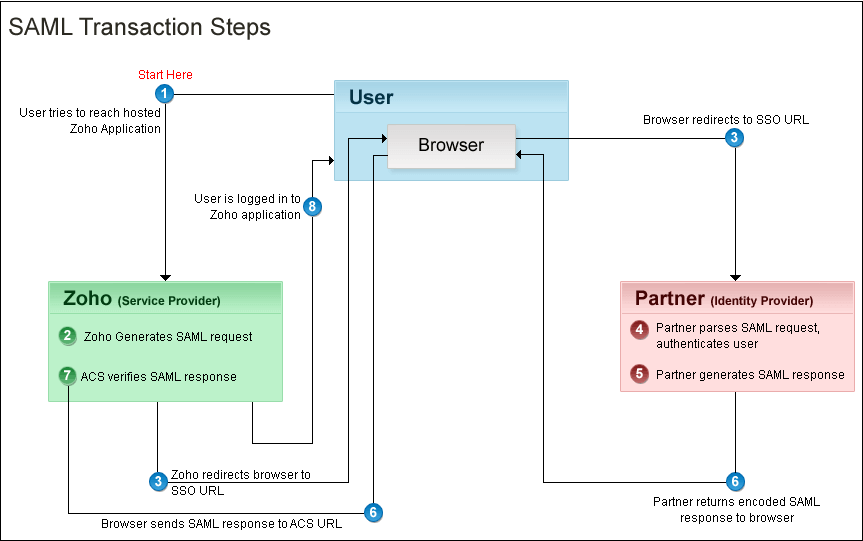
Kort samengevat. Vanuit je Zoho One Admin-paneel stel je een SAML-gebaseerde SSO-authenticatie in waardoor gebruikers de mogelijkheid hebben om vanuit Zoho One toegang te krijgen tot meerdere applicaties zonder dat je telkens opnieuw je wachtwoord moet zoeken en opnieuw moet inloggen. Hiermee automatiseer en verbeter je het beheer van je inloggevens.
Hoe werkt het?
Je gebruikers hoeven alleen hun e-mailadres in te voeren op de aanmeldingspagina van Zoho One en worden automatisch doorgestuurd naar jouw Identity Provider (IdP) voor verificatie. Als alternatief kunnen zij zich ook eerst aanmelden bij jouw IdP en van daaruit Zoho One benaderen. Aangepaste verificatie kan worden gebruikt met elke IdP die SAML ondersteunt.
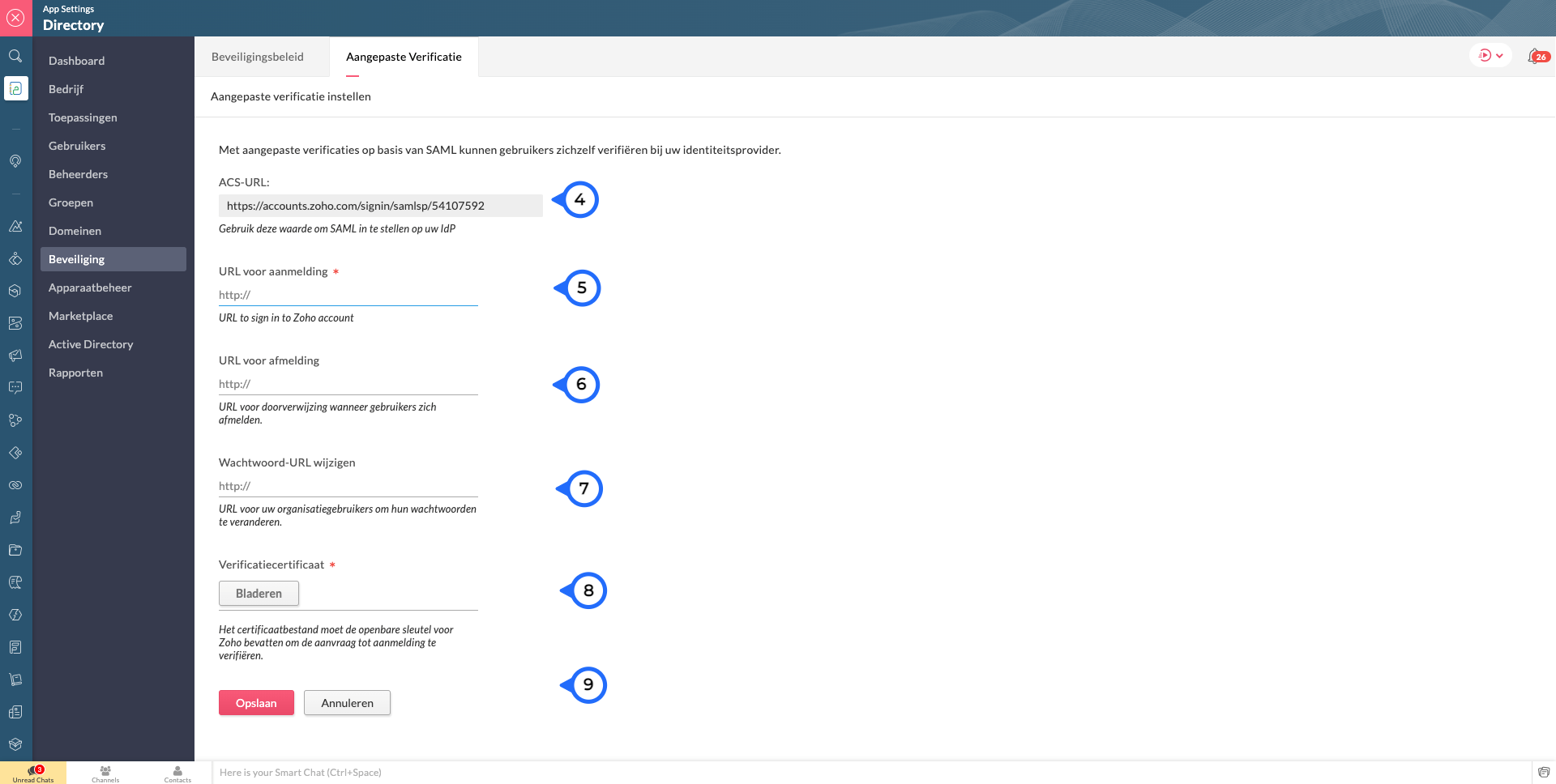
Wij raden je aan om de volgende stappen te ondernemen:
Log in op Zoho One, klik op "instellingen".
1. Ga naar "beveiliging"
2. Klik vervolgens op de Aangepaste Verificatie-tab.
3. Klik op "Aan de slag".
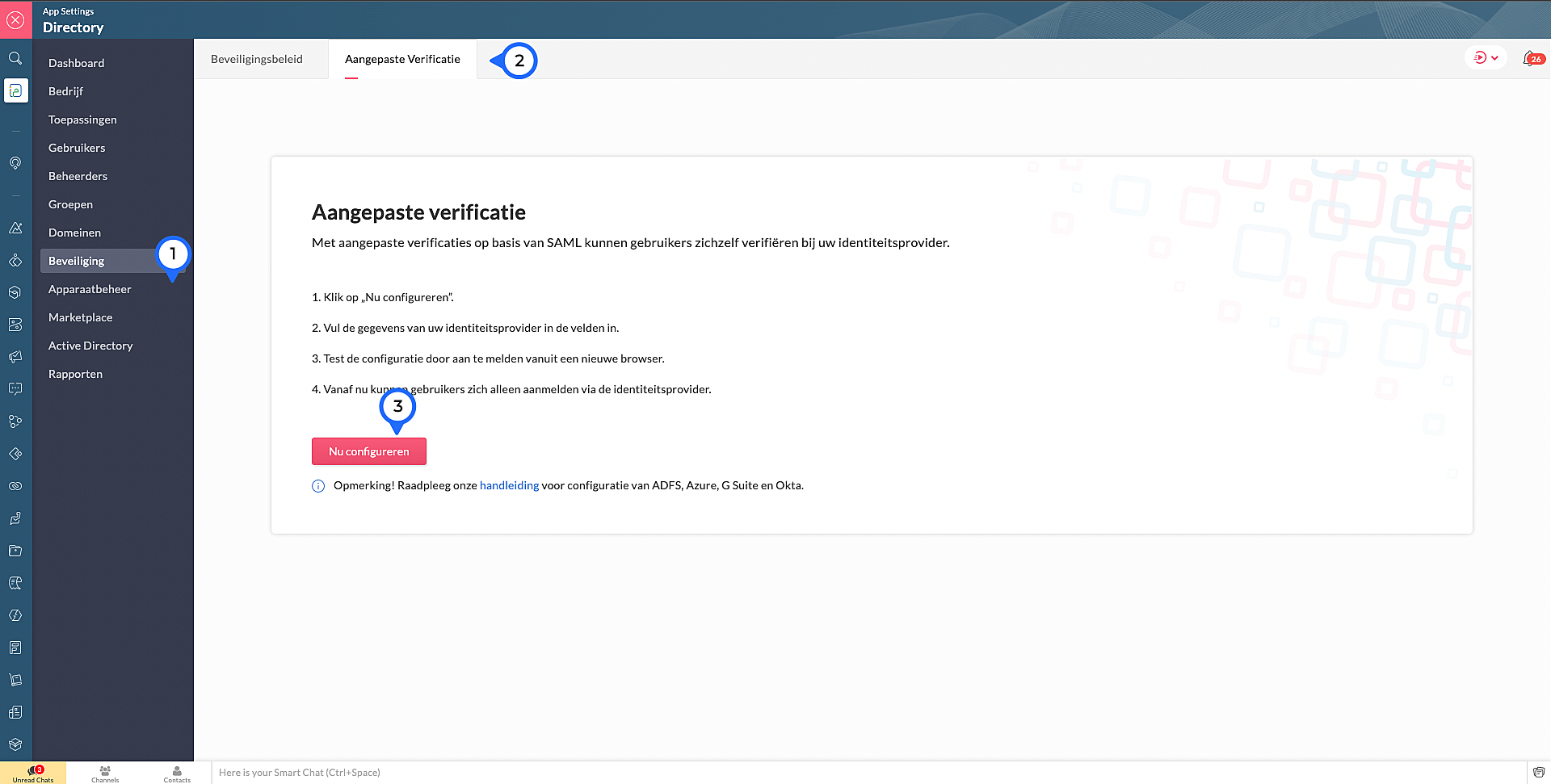
4. Kopieer de ACS Url.Waarschijnlijk heb je dit nodig om jouw IdP in te stellen.
Voer de volgende details in die je verzameld van je IdP:
5. Sign-in URL: De URL de gebruiker wordt doorgestuurd wanneer ze inloggen in Zoho
6. Sign-out URL. De URL de gebruiker wordt doorgestuurd wanneer ze uitloggen in Zoho
7. Wachtwoord URL wijzigen: De URL van de gebruiker wordt doorgestuurd wanneer ze hun wachtwoorden willen veranderen in hun Zoho accounts.
(Nb: Admins worden niet doorverwezen naar de IdP's Wachtoord URL wijzigen en kunnen hun wachtwoord in Zoho wijzigen)
8. Verificatiecertificaat: De certificaat met welke Zoho de digitale handtekening kan checken op de IdP's authenticatie.
(Alleen base-64 gecodeerd .CER, .CRT, .CERT of .PEM-bestanden worden geaccepteerd)
9. Klik op "Opslaan" en vervolgens bevestig je het.
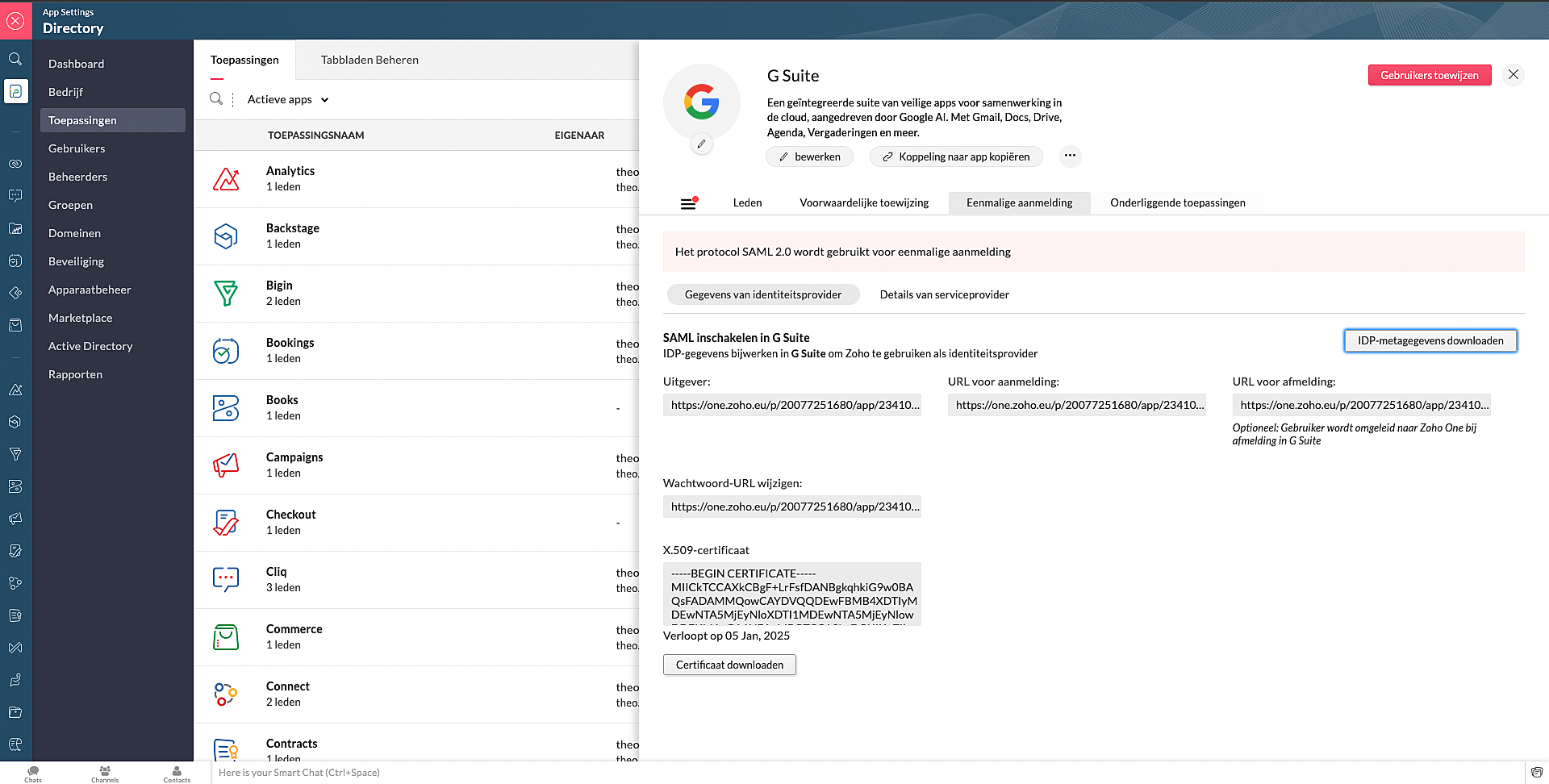
Marketplace:
Via Zoho Marketplace kan je ook makkelijk en snel de SSO instellen. Na installatie van de app via MarketPlace ga naar Eenmalige aanmelding en vul daar de nodige gegevens in.
Wil je lezen hoe je andere apps kan toevoegen aan Zoho One? Klik op deze link voor meer informatie.
SSO in OneAuth:
OneAuth is onze gratis multi-factor authenticatie (MFA) app ontwikkeld voor het beveiligen van uw Zoho-accounts en sociale accounts zoals Google, Facebook, en Twitter. Door MFA voor jouw online accounts te configureren, verhoog je de veiligheid en verminder je het risico op een inbreuk of ongeautoriseerde toegang tot jouw accounts. OneAuth is beschikbaar voor iOS-, Android- en Windows-platforms.
OneAuth biedt een echte single sign-on (SSO) ervaring. Zodra OneAuth voor jouw account is geconfigureerd, hoef je niet telkens je inloggegevens niet meer in te voeren wanneer je een nieuwe Zoho-app installeert. Meer informatie vind je hier. Om dit in te stellen dien je OneAuth te installeren en vervolgens te koppelen aan je Zoho One-account.
Wil je meer weten over SSO, lees dan dit artikel over waarom Single Sign-On belangrijk is voor jouw bedrijf. Heb je meer vragen laat een reactie achter.
Topic Participants
Theo Su
Sticky Posts
De nieuwe Zoho One is hier! Deel 1
Beste Community-leden, Zoho One, hét besturingssysteem voor bedrijven introduceert vandaag haar nieuwste update met maar liefst 5 nieuwe apps, 3 nieuwe services en 7 grote platform verbeteringen. Wij hebben gekeken naar hoe wij jullie verder kunnen helpen.Tips &Tricks: Jouw online boekingssysteem in 5 stappen!
1 Creëer een afsprakenkalender die past bij jouw branding Met Zoho Bookings behoud je de kleuren van jouw merk in alle applicaties. Je kan kiezen uit vier voorgedefinieerde thema's (Modern Web, Nieuwe Opmaak, Klassiek en Nieuw) met daarnaast opties omStart met Zoho One
Welkom op de community-pagina van Zoho One, hét besturingssysteem voor bedrijven. Op deze pagina geven wij een korte introductie over Zoho One. Daarnaast geven wij een aantal tips om te starten met deze besturingssysteem. Tegenwoordig zijn Cloud-oplossingen
Recent Topics
CRM function REST API response format
Is there a way to control the JSON response returned by the CRM function REST API? If I call a function using either OAuth or an API key it returns a 200 OK response with a string in the format shown below. I am using a particular feature of an externalAdd Employee Availability Functionality to Zoho People Shift Module
Hello Zoho People Product Team, Greetings and hope you are doing well. We would like to submit a feature request to enhance the Zoho People Shift module by adding employee availability management, similar to the functionality available in Zoho Shifts.Using MPN across multiple SKUs and inventory tracking
I have several different SKU's that share a common MPN and would like to track inventory by MPN. SKU1 has MPN1 assigned SKU2 has MPN1 assigned Here is an example If I start with 5 of MPN 1 in stock I want each SKU1 and SKU2 to show as 5 in stock, If IUnable to Access Application:
Whenever I try to access my application from the desktop, say I am editing it and want to test something in the desktop environment I get: An error has occurred. An internal error has occurred. Please check the URL , or try refreshing the page I can editCannot see Application from Lookup field
Hi all, I am trying to access data for an application on our account via a lookup field; however, the application doesn't appear in the dropdown at all. Can anyone shed any light on this, please? I have asked Zoho support; however, they're just as confused,Cannot see correct DNS config for mail after moving domain to another provider
I have moved my domain from one provider to another and after that zoho mail stopped working (expected). Problem is, zoho mail admin panel still shows (10 hours after move) that all records are correct while I haven't changed anything in my domain DNSZoho CRM Meetings Module Issues
We have a use-case that is very common in today's world, but won't work in Zoho CRM. We have an SDR (Sales Development Rep) who makes many calls per day to Leads and Contacts, and schedules meetings for our primary Sales Reps. He does this by loggingZoho Books integration sync from Zoho CRM does not work
Hi Zoho Community & Zoho Support We just tried to get a sync some products into Zoho Books from CRM using the native sync and we're getting an error: "It looks like some mandatory fields you're trying to map are empty. Please provide valid field namesP & L Sub-categorized accounts
How can I show sub-categorized Income and Expense accounts on the P & L report?Report showing Bill Details with Project and Sales Invoice Number
Hi There, I am hoping that someone can help, I am looking for report that can show the bill and expense details along with project its as assigned to and the invoice number that the sales has been raised in. The goal is I can filter a customer/projectAdvanced Payment for Inventory Items with serial numbers
Hello, We sell equipment that we track the unique serial numbers on using Sales Orders. We can charge the customers an advanced payment, then the balance on delivery. We cannot figure out a way to do this in Books/Inventory: - Cannot part invoice a SOIs it possible to restrict ZCRM user to see only custom views created by administrator
I have segmented data in my CRM and I want to allow different users to be able to see only parts of it based on some criteria. I've tried to create and share a custom view, but then there is always an option for user to see all open lead for example.Issues Logging into ZOHO
Hello, one of my coworkers is having issues logging into ZOHO, she has requested a code when entering and the email is correct but she has not received the code. can you help us with this?Google Fonts Integration in Pagesense Popup Editor
Hello Zoho Pagesense Team, We hope you're doing well. We’d like to submit a feature request to enhance Zoho Pagesense’s popup editor with Google Fonts support. Current Limitation: Currently, Pagesense offers a limited set of default fonts. Google FontsAdd Popup Rejection Metrics to Reports
Hello Zoho PageSense Team, We would like to request improved reporting for popup interactions. Current Limitation: PageSense currently provides conversion data, but there is no clear visibility into: Popup rejections Popup closes (✕ button clicks) DismissalsAbility to Reset / Reinitialize Popup Cookies
Hello Zoho PageSense Team, We would like to request the ability to manually reset popup cookies. Current Limitation: At the moment, it is not possible to initiate a new popup cookie from the our side. Visitors who rejected or closed a popup will not seeControl Popup Cookie Expiration Duration
Hello Zoho PageSense Team, We would like to request an enhancement related to popup cookie management. Current Limitation: Currently, PageSense popup cookies remain active for 365 days, and this duration cannot be modified by us. If a visitor closes orClone / Export Popup Design Across PageSense Projects
Hello Zoho PageSense Team, We hope you’re doing well. We would like to request an enhancement that allows popup designs to be reused across different PageSense projects. Problem Statement: Currently, Zoho PageSense allows popups to be duplicated onlyAre there settings for hyperlinks?
Clicking a hyperlinked cell in Sheet creates this little pop-up with the actual hyperlink inside. Is it possible to have a 1-click link where if you click the cell it opens the link directly with no pop-up?Automatically include all ticket attachments in the ticket resolution email
Hello Zoho Community, We are implementing Zoho Desk in a real customer-facing production environment and have run into a limitation that is becoming a blocking requirement for our clients. The problem When a ticket is closed or resolved, Zoho Desk sendsFinding text within a ticket: Expand All or Search this Ticket
The auto-collapse feature within a ticket is nice for screen scrolling, however it makes it difficult to find text within the ticket if the email is collapsed. In fact you cannot find text if it is collapsed. I would like to propose a feature that allowsBooks & Desk. Client mapping
Hi, I’ve been using Zoho Books for several years and am now looking to improve my customer service. I'm experimenting with Zoho Desk and want to sync and map my client data from Zoho Books. However, it seems that mapping requires both contacts to haveString handling
If I cut a currency string from a quote and try and paste it into the Deal "Amount", it will fail unless I manually delete any commas. Dollar signs are no problem, but comma's seem to fail. Please correct this Input Validation error.What's new in Zoho Sheet: Simplify data entry and collaboration
Hello, Zoho Sheet community! Last year, our team was focused on research and development so we could deliver updates that enhance your spreadsheet experience. This year, we’re excited to deliver those enhancements—but we'll be rolling them out incrementallyFeature Request - Allow Customers To Pick Meeting Duration
Hi Bookings Team, It would be great if there was an option to allow customers to pick a duration based on a max and minimum amount of time defined by me and in increments defined by me. For example, I have some slots which are available for customersSupport for Custom Fonts in Zoho Recruit Career Site and Candidate Portal
Dear Zoho Recruit Team, I hope you're doing well. We would like to request the ability to use custom fonts in the Zoho Recruit Career Site and Candidate Portal. Currently only the default fonts (Roboto, Lato, and Montserrat) are available. While theseYouTube Live streaming? how to? Zoom has this feature, built-in. Can't find it on zoho meetings.
YouTube Live streaming? how to? Zoom has this feature, built-in. Can't find it on zoho meetings.Feature Request - A Way To Search Item Groups
Hi Inventory Team, I can't find any way to filter or search by fields of Item Groups. It would be great to see that functionality added. I have a use case where a single product might come from 5 or more suppliers and each supplier's item is an Item inFeature Reqeust - Include MPN In Selectable FIelds
I have noticed that the MPN is not available to show in the list view of Items. Please consider adding it as EAN, UPC and ISBN are all available, so it doesn't make much sense to exclude this similar option. Thanks for considering my feedback.Feature Request - Option To Hide Default System Fields on Items
Hi Zoho Inventory Team, As far as I know it is not possible to hid some of the defult system fields on Items, such as UPC, MPN, EAN, ISBN. A good use case is that in many cases ISBN is not relevant and it would be an improved user experience if we couldMaking an email campaign into a Template
I used a Zoho Campaign Template to create an email. Now I want to use this email and make it a new template, but this seems to be not possible. Am I missing something?Campaigns does not work!
I am running into so many problems trying to use Zoho Campaigns, that I am seriously considering dropping the app from my (shrinking) list of Zoho applications I actually use. Apart from having to fight the software trying to create a design and email,Feature Request - Make Available "Alias Name" Field In Item List View
Hi Zoho Inventory Team, I have noticed that the "Alias Name" field does not appear on the list of selectable columns in the Customise Columns feature in the Items module. This would be very useful to see for businesses who are using the Alias Name fieldMarketing Automation
L.S. Marketing Automation is and has always been part of the Zoho One bundle - according to the information provided on the Zoho Website. Why when I open Marketing Automation do I get the following message?: "Your trial has expired. We hope you enjoyedCliq iOS can't see shared screen
Hello, I had this morning a video call with a colleague. She is using Cliq Desktop MacOS and wanted to share her screen with me. I'm on iPad. I noticed, while she shared her screen, I could only see her video, but not the shared screen... Does Cliq iOS is able to display shared screen, or is it somewhere else to be found ? RegardsBigin, more powerful than ever on iOS 26, iPadOS 26, macOS Tahoe, and watchOS 26.
Hot on the heels of Apple’s latest OS updates, we’ve rolled out several enhancements and features designed to help you get the most from your Apple devices. Enjoy a refined user experience with smoother navigation and a more content-focused Liquid Glassproject name field issue- n8n
Hey guys, I have a question. I want to create a new product using the workflow. The problem is with the product name field; I don't know how to fill it in. The workflow starts with retrieving information from the leads table, retrieving links to scrapeHow to filter Packages in zoho inventory api
Hi Team, I want to perform some tasks in a schedular on the packages which are in "Shipped" state. I tried to use filter_by in my api call but in return I get response as {"code":-1,"message":"Given filter is not configured"} My Api request is as followsCRM
Is anyone else experiencing this issue? Our company is not moving out of using Gmail's web app. It just has more features and is a better email program than Zoho Mail. Gmail has an extension (Zoho CRM for Gmail) that we're using but we've found some seriousZOHO add-in issue
I cannot connect ZOHO from my Outlook. I am getting this error.Next Page