A/B Testing Idea #1: Place irresistible and clear CTA buttons
Are you wasting much of your time and effort A/B testing every single idea that pops into your head, yet you're not generating sufficient traffic to your website? Don't worry—we've got you.
We'd like to introduce you to the A/B Testing Ideas learning series, a collection of easy-to-use design tips to A/B test your website pages. This series will include techniques to effectively optimize various elements on your website and boost conversion rates in a short time. These ideas can also give you a strong framework to start your conversion rate optimization and discover what design changes work best for your website. Do Follow the page and post your comments about the content shared in the comment box below.
So, here is our first post in the series: Place irresistible and clear CTA buttons
As we know, the basic intention of any website is to make somebody do something—for example, getting visitors to fill in a form, download a PDF, or purchase an item. And, of course, the best way to make visitors perform these actions is through the simple CTA (call-to-action) buttons placed on your web page, such as "Buy now", "Learn more", or "Sign up" links.
However, at times you might notice that your website is getting a good traffic but the conversions obtained on your CTA are poor. This is exactly when you need to A/B test your CTA buttons. In today’s post, we'll learn a few simple, yet powerful, CTA testing ideas to maximize conversions and recover those lost leads on your site.
So how do you create and test a persuasive CTA?
There are three parts to look at: the text, the position, and the graphical presentation of the CTA on your web page.
As we know, the basic intention of any website is to make somebody do something—for example, getting visitors to fill in a form, download a PDF, or purchase an item. And, of course, the best way to make visitors perform these actions is through the simple CTA (call-to-action) buttons placed on your web page, such as "Buy now", "Learn more", or "Sign up" links.
However, at times you might notice that your website is getting a good traffic but the conversions obtained on your CTA are poor. This is exactly when you need to A/B test your CTA buttons. In today’s post, we'll learn a few simple, yet powerful, CTA testing ideas to maximize conversions and recover those lost leads on your site.
So how do you create and test a persuasive CTA?
There are three parts to look at: the text, the position, and the graphical presentation of the CTA on your web page.
Testing the CTA words
Good CTA copy is more than just text. In general, CTA copy that speaks directly to your visitor outperforms generalized CTA copy. Here are a few points to consider while crafting your CTA copy:
Good CTA copy is more than just text. In general, CTA copy that speaks directly to your visitor outperforms generalized CTA copy. Here are a few points to consider while crafting your CTA copy:
- Decide what action you want your audience to take and describe what will happen next—for example, use text like “Subscribe to our blog " or "Request a product demo" and not "Subscribe" or "Register here." This will tell visitors what to expect by clicking on the CTA.
- Start with action-oriented words in your CTA like "read," "download," "call," and more. This can make your button stand out from the rest of the page content and convince visitors to click it instantly.
- Create a sense of urgency with words like “today,” “now,” or “in the next 24 hours” in your CTAs to garner those extra clicks with less effort.
Focusing on the above tips can help you kindle your audience’s emotion towards your products/services, build a sense of trust in your business, and eventually achieve your website goal.
A few examples of good CTA copy you can test out include:
A few examples of good CTA copy you can test out include:
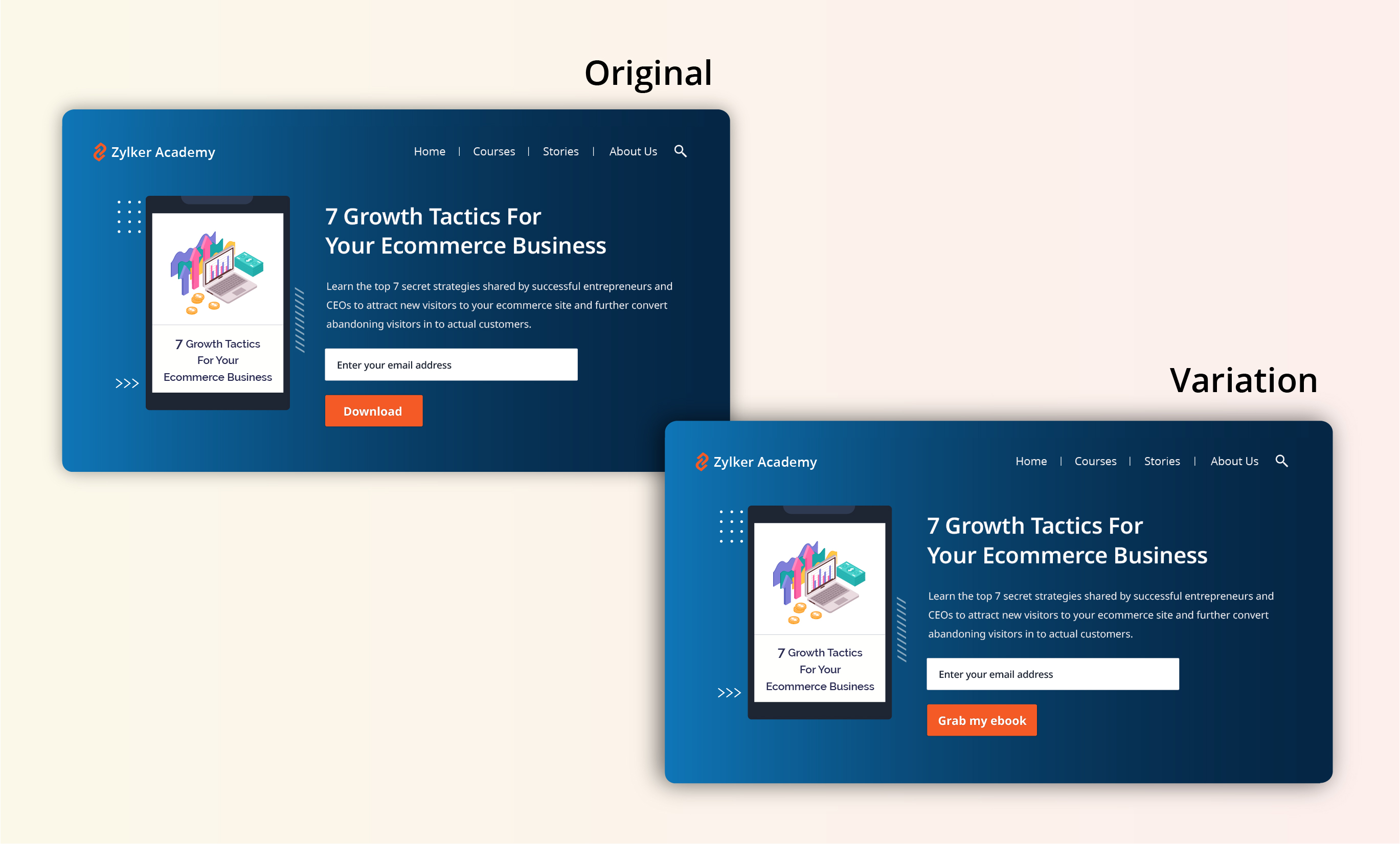
- Using a "Grab my ebook" CTA on the web page instead of a CTA that just instructs visitors to “Download.” This will create a more personal touch and draw interest towards the button.
- Using a "Access courses for free" CTA instead of an overused "Sign up" button to build connections and boost sign ups on your newly developed elearning website.
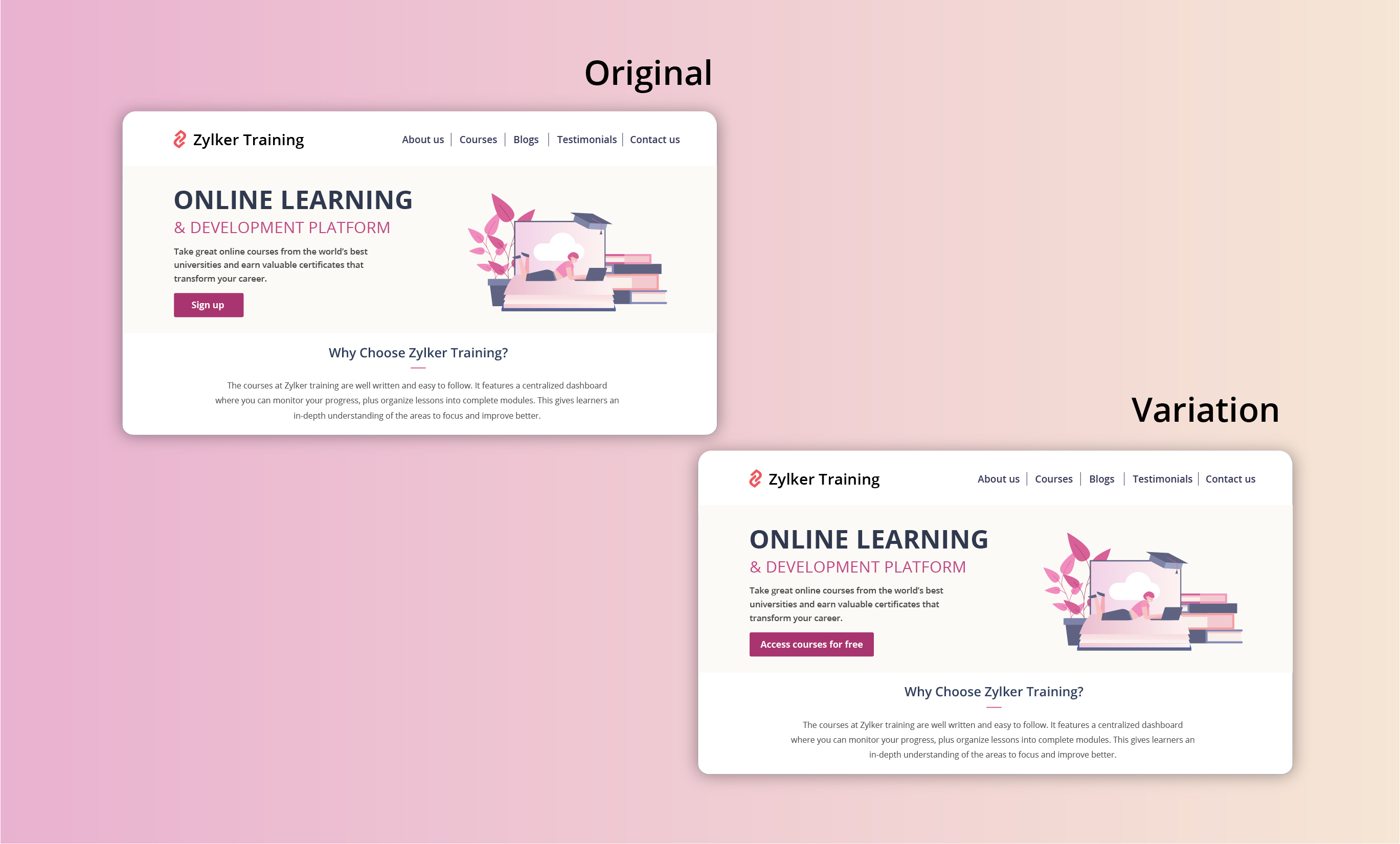
Extra tip: Your CTA buttons should always have a healthy chunk of white space surrounding them. White space helps instantly grab your visitors' attention and adds focus to your button.
Testing the CTA position
Strive to achieve CTA placement that is noticeable but not disruptive to your audience. If you place your CTA button in a spot where your users don’t naturally look, you’re going to lose conversions. There are generally two points to look at while testing CTA position:
- Identify and utilize smart button placement based on your visitors' natural reading flow (top to bottom and left to right or right to left) and behavior on your website. This includes the path users follow on your website to complete a process, the design elements they click on, and the barriers that prevent them from achieving their goal.
Tip: You can use Session Recordings in PageSense to see how and why users are interacting with your CTAs the way they are. - Place the CTA button above or below the average fold of your page depending on the length and complexity of the content. This could also be determined by how far down the page your visitors scroll on an average. However, adding your CTA above the fold is the most common placement choice used on homepage/landing page designs.
Tip: You can set up heatmaps, scroll maps, and attention maps in PageSense to determine whether people are responding to—or even seeing—your CTAs.
A few examples of good CTA placement you can test out include:
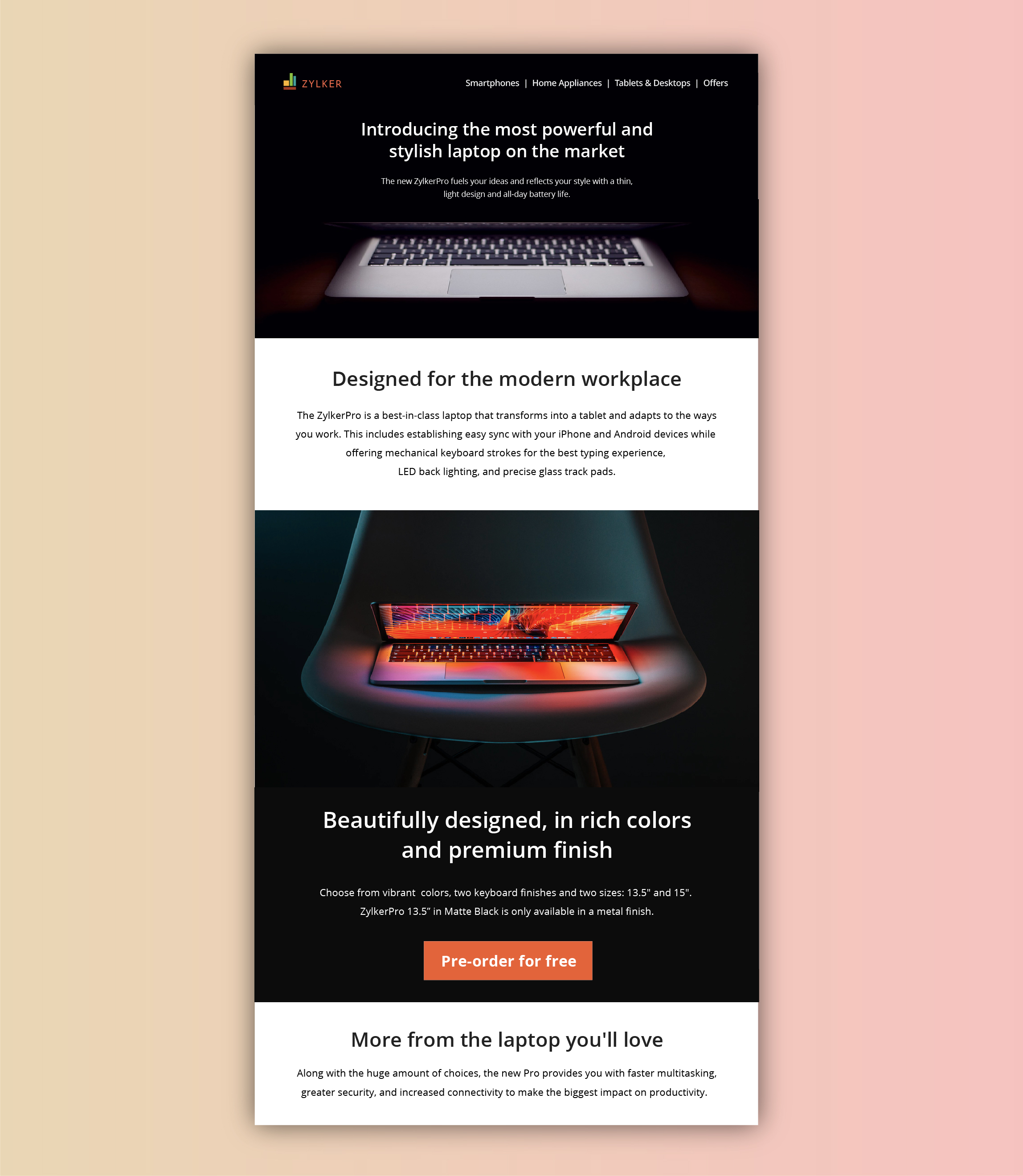
- Showing a glimpse of soon-to-be-released products with feature highlights, and then at the end placing "Pre-order for free" CTA on your digital store. This uses the below-the-fold area of your web page to catch the attention of the visitors first, even before redirecting visitors to the preferred page(s).
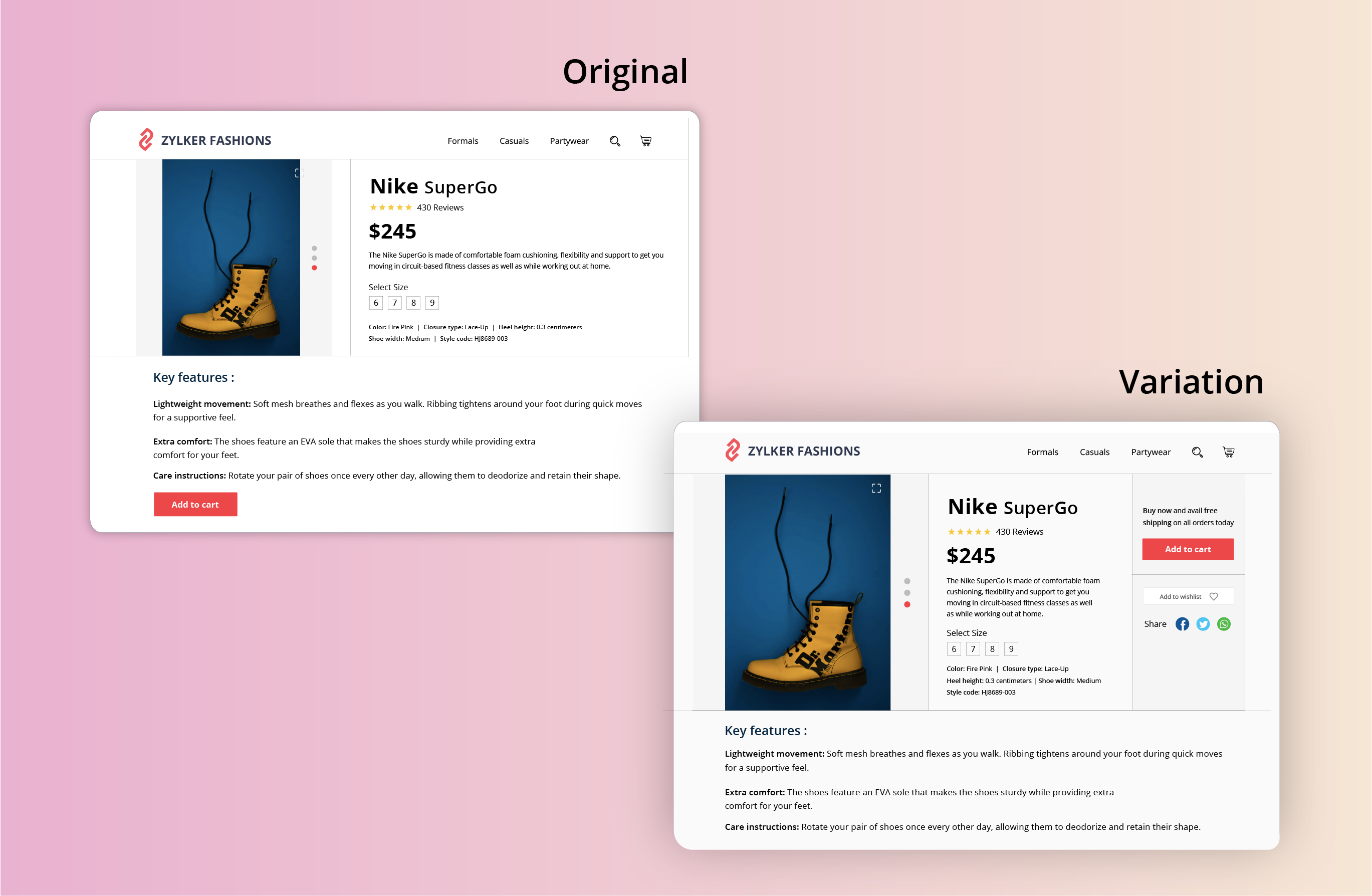
- Adding a “Buy Now” or "Add to Cart" button at the top-right section of the product page where a user would immediately click to buy after viewing your product offers page on the ecommerce site. This type of CTA placement adds visitors to your sales pipeline quickly by canceling extra steps like add to cart and check out.
Testing the CTA appearance
The color and appearance of your CTA button are the most important aspects while testing and optimizing your website. As humans, we always have a greater tendency to stick to information that looks bigger and brighter. Below are some practical tips on designing and testing an appealing CTA button:
- Add a bold, bright, and contrasting background color to CTAs. Give more important CTA buttons a brighter color and the less important functions a lighter color or simple text links.
- Have your CTA appear more clickable. This could be done by adding some visual effects such as a slight gradient or a small shadow to create that real push-button effect. However, if you think none of the effects will suit the chosen style of your website, add emphasis by applying rounded edges to the button.
- Size of the button is another crucial factor in designing an effective CTA button. Larger CTAs have a higher chance of being noticed and clicked by readers. It’s also common to arrange UI components according to their importance.
A few examples of good CTA appearance you can test out include:
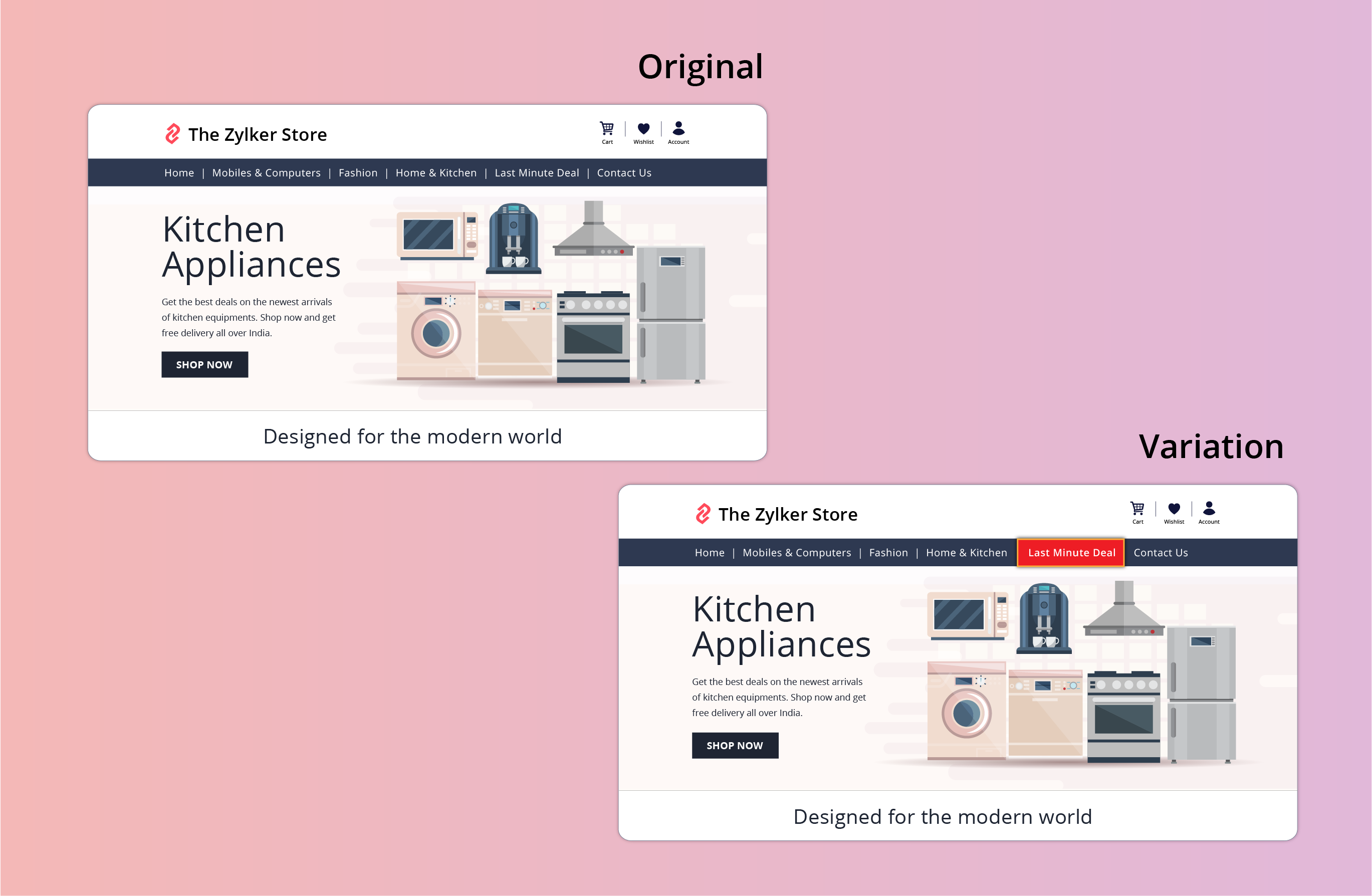
- Adding an attractive 3D or shadow effect to the "last minute deal" CTA button on your ecommerce site. This effect can spotlight the CTA, making it bright and prominent in comparison to other features like wish lists, view cart, or check out buttons.
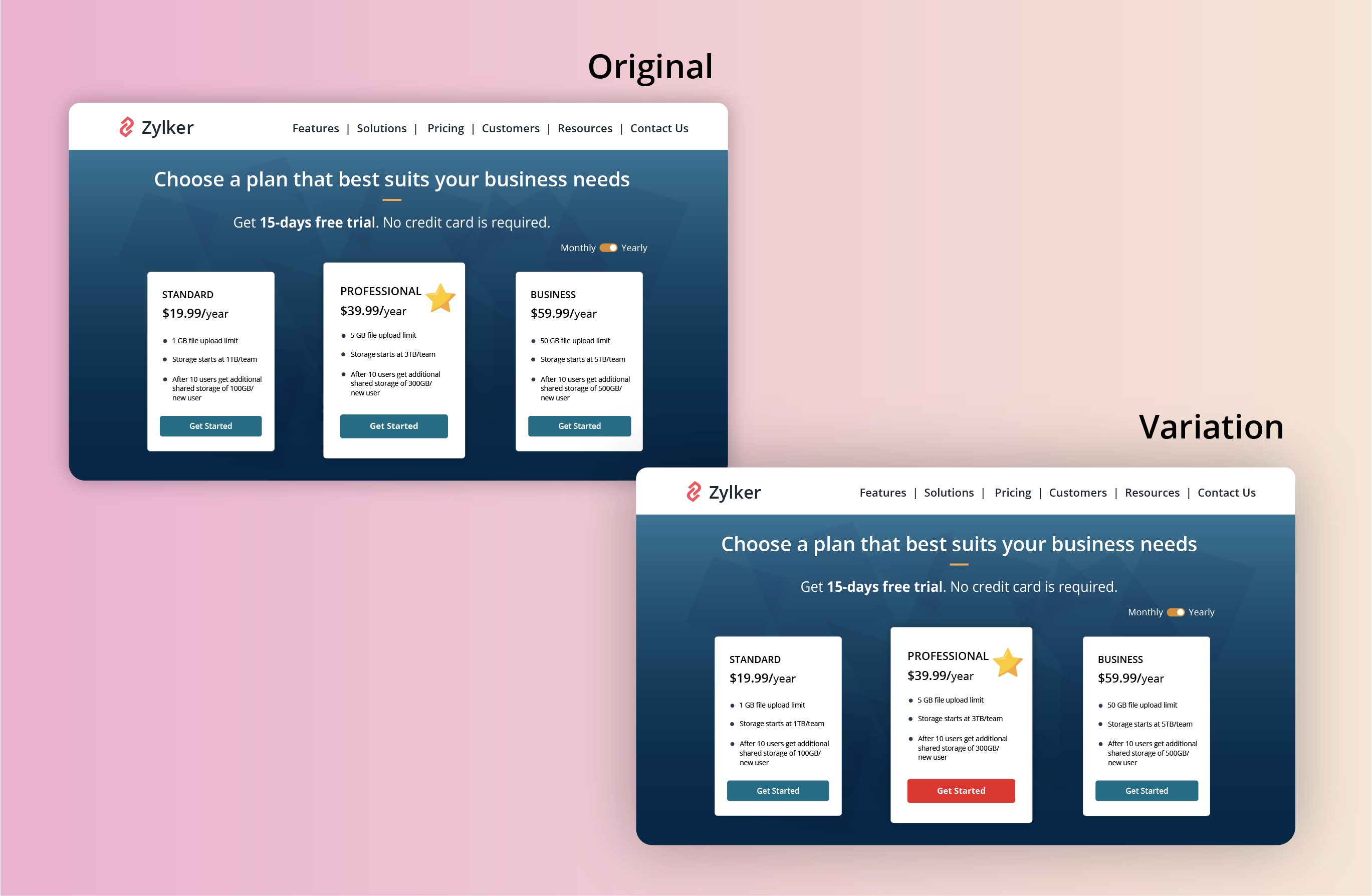
- Applying a bright color to the most recommended plan on your pricing page that you think will be a good fit for the majority of visitors. This might help highlight the best features in your product and avoid confusing buyers.
Found this useful? We would love to know what you think about this post. And, do you have any favorite A/B testing tricks or preferred approaches that you experiment on your website CTAs? Let us know in the comments below!
Happy testing. Happy converting!
Happy testing. Happy converting!
Topic Participants
Balarohini Paulraj
Sticky Posts
[Live Webinar] How to maximize your conversions using existing website traffic
Hello all, Did you know that on an average only 0.1% of your traffic converts? The rest are either heading towards your competitors or dropping off without being able to find what they came for. When you want to increase your conversions, it's naturalA/B Testing Idea #2: Make your headlines sound super cool.
Hello everyone, We're back with our second post in the CRO testing idea series. If you missed the first post, please check it out here: "Place irresistible and clear CTAs." In today's post, we'll look at how to effectively A/B test your headline content.A/B Testing Idea #1: Place irresistible and clear CTA buttons
Are you wasting much of your time and effort A/B testing every single idea that pops into your head, yet you're not generating sufficient traffic to your website? Don't worry—we've got you. We'd like to introduce you to the A/B Testing Ideas learningDid you know?#3: How to target and run your experiment based on custom audience segments in PageSense
Whatever kind of online business you're running, defining your target audience is the key factor to delivering relevant messages and further positioning your brand in the industry. Most marketing efforts revolve around this basic strategy of segmentingDid you know?#2: How to filter your report by custom date range in PageSense
Do you want to quickly view your experiment analysis or responses over different time periods? Want to effortlessly compare the performance of your website by specific weeks, months, or years? Also, see whether your new marketing strategies or efforts
Recent Topics
Can a default task Priority be set?
The "Priority" field in the Task layout does not allow a default to be set. Is there another way of doing it? Because the current default is "None" and the Zoho Kanban board design has selected this field as critical information to surface by includingAdding a threshold to a line chart based on date range
I have a line chart that is tracking a percentage over time. It also has a filter for 50 different clients. I would like to create a threshold that is based on a portion of the date range. As I understand it, this would be done by adding a column to theResize Signature field dynamically
On the tablet, it is perfect. But on smaller mobile devices and PCs, both web and application, it is too small for people to sign. Is there any plan to make the signature field size dynamically in the future update?Super Admin Logging in as another User
How can a Super Admin login as another user. For example, I have a sales rep that is having issues with their Accounts and I want to view their Zoho Account with out having to do a GTM and sharing screens. Moderation Update (8th Aug 2025): We are workingZoho Creator Application - New User Not able to access the application
In Zoho Creator, The newly added user not able to access the " Added Application" - User has received the Invitation Email, but while clicking "confirm Account" in the invitation Email, the following error message has appeared. "Sorry! you cannot acceptDeleting Salutation Field
We have updated our lead input screen and 'Salutation' has appeared. This is not visible in the 'Edit Pgae Layout' screen so cannot be moved to 'List of Removed Fields' Salutation is visible in the list in 'Customization - Fields' however I can only 'Edit' or 'Replace' I cannot delete and I do not need this field on my lead input screen. Please can you advise how to get rid of this. Screen shots can be provided if needed. Thank you TashaAuto-Generate & Update Asset Serial Numbers using a custom function (Assets Module)
Hello Team, I’ve been working on a script to automate one of our processes in Zoho FSM, and the core functionality has been successfully implemented. However, I’m encountering an issue related to serial number allocation, which is not working as expected.Partner with HDFC And Sbi Bank.
Hdfc and sbi both are very popular bank if zoho books become partner with this banks then many of the zoho books users will benefit premium features of partnered banks.Zoho Mail iOS app update: Access Delegated Mailbox.
Hello everyone! You can now access the delegated mailbox from within the iOS version of the Zoho Mail app. To access the delegated mailbox: Open the Zoho Mail app. Go on to the 'Email' module. Tap the profile picture. Choose the delegated mailbox PleaseHow to convert Lead's country field from Text to Pick List
Hi, I would like to change the default country field in ZCRM from text to pick list. It looks like not I can't delete default country field and recreate it as pick list nor can i create an new custom field country because such a label belong to default field. So what do I have to do? Any ideas? LHow create a draft via workflow?
I wish to create a workflow rule for specific emails that creates a draft response - not an automatic email reply, but just a draft with a set response ready to be verified by an agent who can then manually select recipients. Alternatively, the workflowNew feature: Invite additional guests for your bookings
Hello everyone, Greetings from Zoho Bookings! We are happy to announce the much-awaited feature Guest Invite, which enhances your booking experience like never before. This feature allows additional participants to be invited for the bookings to makeImproved Contact Sync flow in Google Integration with Zoho CRM
Hello Everyone, Your contact sync in Google integration just got revamped! We have redesigned the sync process to give users more control over what data flows into Google and ensure that this data flows effortlessly between Zoho CRM and Google. With thisImage field in custom module
Hi guy, Is there any hope of adding a custom image field in the custom module? We created a custom module to keep track of assets, and it would be helpful if we could attach an image to the record. Thanks RudyCannot reorder fields in Page Layout in Expenses and Purchase Requests
It is very inconvenient that the custom fields in Page Layout cannot be re-ordered. The only way is to remove the fields and re-create them; however, it is impractical. This would affect the reports and dashboards we are having. Not able to re-order theالخصم على مستوى فاتورة المبيعات
السلام عليكم ورحمة الله وبركاته مطلوب في إنشاء خصم على مستوى فاتورة المبيعات وليس على مستوى البند أريد معرفة الطريقة؟VAT and Taxes option not available
Dear ZOHO Team , The VAT and Taxes options in my ZOHO books account not available,I tried to find how to enable or check the way to use this option but unfortunately couldn't find it anywhere ,I'm in UAE ,kindly let me know what to do to solve this issueDefault Tagging on API-generated Transactions
If one assigns tags to an Item or Customer, those tags get auto-populated in each line item of an Invoice or Sales Order when one creates those documents. However, if one creates the Sales Order or Invoice via the API (either directly coding or usingDirect Feed (Bank)
Is Direct feed integration for AlRajhi and ADCB bank supported by Zoho Books in GCC/SaudiSales Order, Invoice and Payment numbers
Hi zoho friends, it is me again, the slow learner. I'm wondering if there is a way to have it so the Sales order, invoice and payment numbers are all the same? It would be easier for me if they were the same number so there is not so many reference numbersMS Teams for daily call operations
Hello all, Our most anticipated and crucial update is finally here! Organizations using Microsoft Teams phone system can now integrate it effectively with Zoho CRM for tasks like dialling numbers and logging calls. We are enhancing our MS Teams functionalityCustomer Satisfaction (CSAT) Report
From data to decisions: A deep dive into ticketing system reports The customer satisfaction (CSAT) report helps teams understand how customers feel about their support experience, identify service gaps, and continuously improve the help desk. It turnsTimeline Tracking Support for records updates via module import and bulk write api
Note: This update is currently available in Early Access and will soon be rolled out across all data centers (DCs) and for all editions of Zoho CRM. The update will be available to all users within your organization, regardless of their profiles or roles.Shifts in Zoho People vs Zoho Shifts?
Hello Zoho People Team, We hope you are doing well. We are evaluating the Shifts functionality within Zoho People and comparing it to the standalone Zoho Shifts product. We’ve encountered comments and discussions suggesting that the Shifts feature insideDisable fields in During action in Blueprint?
Hi there. I've tried field disable (setReadOnly(true)) using client script and the event is onMandatoryFormLoad on detail page, assuming it'll work on blueprint fields, but it bears no result. Is this the expected behaviour? That we can't do this yet?Develop and publish a Zoho Recruit extension on the marketplace
Hi, I'd like to develop a new extension for Zoho Recruit. I've started to use Zoho Developers creating a Zoho CRM extension. But when I try to create a new extension here https://sigma.zoho.com/workspace/testtesttestest/apps/new I d'ont see the option of Zoho Recruit (only CRM, Desk, Projects...). I do see extensions for Zoho Recruit in the marketplace. How would I go about to create one if the option is not available in sigma ? Cheers, Rémi.Best Email Backup Wizard in 2026
While searching for an email backup solution, my main hesitation was reliability. As a user, I had already seen many tools that looked promising but failed when handling large mailboxes, skipped folders, or caused authentication issues during the backupSubforms and automation
If a user updates a field how do we create an automation etc. We have a field for returned parts and i want to get an email when that field is ticked. How please as Zoho tells me no automation on subforms. The Reason- Why having waited for ever for FSMAllow Managers to Create Shifts for Their Departments in Zoho People
Hello Zoho People Product Team, Greetings and hope you are doing well. This feature request is related to Zoho People - please don't move it to zoho one! We would like to submit a feature request regarding shift management permissions in Zoho People.Zoho Learn and Zoho CRM integration
I would like to see an integration between Zoho Learn and Zoho CRM. 1. To be able to add articles in a related list in all modules 2. Zia to suggest related articles in a Deal or Case or Lead 3. Ability to read / search articles during a call / followMaintain steady traffic to your domain: How Domain Aliasing helps
Consider this scenario: An organization has its primary domain as administrator.com. Now it wants to shorten its domain to admin.com because it's simpler and easier to remember. However, changing the domain completely can cause the following problems:Why Sharing Rules do Not support relative date comparison???
I am creating a Sharing Rule and simply want to share where "Last Day of Coverage" (Date field) is Greater than TODAY (Starting Tomorrow). However, sharing rules don't have the option to compare a date field to a relative date (like today), only to StaticHow do I migrate OLM file to Gmail?
Migrating emails from Outlook for Mac to Gmail can be challenging because Gmail does not support OLM files directly. This limitation often causes confusion and delays, especially when users need quick access to important emails and mailbox data on a web-basedCRM x WorkDrive: File storage for new CRM signups is now powered by WorkDrive
Availability Editions: All DCs: All Release plan: Released for new signups in all DCs. It will be enabled for existing users in a phased manner in the upcoming months. Help documentation: Documents in Zoho CRM Manage folders in Documents tab Manage filesWorkflow rule only allows 10 workflow per module
Apparently a Zoho professional edition only allows 10 workflow rules per module. This makes workflow allocation literally impossible while allocating potential to different members of the team. I have 15 licenses. Is there a way in which related alerts can be varied? In other words, is it possible to have different related alerts be triggered with different rule criteria. so if I say, if potential is 'x' then trigger related alert 'x' and if potential is 'y' then trigger related alert 'y' Thanks,IF Statement in Zoho CRM Formula Field
Hi, I am attempting to write a formula field that will give me one result if one statement AND another statement are true, then a different value if the first statement AND a different statement are true, else 0. Stated differently: if account = destinationCRM Percent custom fields: When will it show the % symbol and behave like %?
1. Actually Percent custom fields fail to show the % symbol. 2. When in formulas Percent fields work like number: 100 x 5% = 5 ideal world 100 x 5% = 500 what happens actually 3. When importing Percent fields the % symbol has to be removed and the dataFree Webinar: Zoho Sign for Zoho Projects: Automate tasks and approvals with e-signatures
Hi there! Handling multiple projects at once? Zoho Projects is your solution for automated and streamlined project management, and with the Zoho Sign extension, you can sign, send, and manage digital paperwork directly from your project workspace. JoinAutomatically CC an address using Zoho CRM Email Templates
Hi all - have searched but can't see a definitive answer. We have built multiple email templates in CRM. Every time we send this we want it to CC a particular address (the same address for every email sent) so that it populates the reply back into ourEditing the Ticket Properties column
This is going to sound like a dumb question, but I cannot figure out how to configure/edit the sections (and their fields) in this column: For example, we have a custom "Resolution" field, which parked itself in the "Ticket Information" section of thisNext Page