Action Required: Update Microsoft SQL Server Security Settings Before February 2026

Action Required: Update Microsoft SQL Server Security Settings Before February 2026

Dear Users,

We recently deployed security updates in Zoho Analytics that inadvertently caused connection failures for a few customers using Microsoft (MS) SQL Server hosted on older Windows versions (Windows Server 2012, 2012 R2, and 2014).

To restore connectivity, we have temporarily reverted these updates. However, these security changes are mandatory for long-term protection and compliance, and they will be permanently enforced by the end of February 2026.

If you are using MS SQL Server on the affected Windows versions, action is required to ensure uninterrupted connectivity once the security standards are re-applied.

Who Is Affected

This applies only to customers who:

  • Use MS SQL Server as a data source in Zoho Analytics, and
  • Host MS SQL Server on:
    • Windows Server 2012
    • Windows Server 2012 R2
    • Windows Server 2014

If you are not using these operating systems, no action is required.

NotesNote: This update applies only to SQL Server Cloud DB imports.
It does not affect local database imports configured using Zoho Databridge.

Issue Description

When modern security standards are enforced, applications connecting to MS SQL Server hosted on older Operating Systems (Windows Server 2012 / 2012 R2 / 2014) will fail with the following error:

Info
"encrypt" property is set to "false" and "trustServerCertificate" property is set to "true" but the driver could not establish a secure connection to SQL Server by using Secure Sockets Layer (SSL) encryption: Error: SQL Server did not return a response.

Root Cause

  1. Upcoming Security Standard:
    Modern security protocols require Forward Secrecy. Legacy TLS_RSA cipher suites are being deprecated industry-wide.
  2. OS Limitation:
    Older Windows Servers rely on these deprecated ciphers by default. They do not offer modern Elliptic Curve (ECDHE) ciphers unless explicitly configured.
  3. The Impact:
    Without the configuration below, your database will reject secure connections once we re-enable the security update.

Required Configuration: Enabling Modern Cipher Suites

To maintain connectivity, you must configure your Windows Server to support modern cipher suites.

If this configuration is not feasible in your environment, upgrading the Windows Server to a newer supported version is an alternative option, as modern operating systems include these security protocols by default.

To prepare your server, you must add the following modern cipher suites to the TOP of your Windows Server's configuration.

Implementation Methods

You can use one of the following methods.

Option A: GUI Method (Recommended)

Step 1: Download the Tool

Download IIS Crypto (GUI) from Nartac Software.

NotesNote: This is a portable utility and does not require installation.

Step 2: Launch the Tool

  • Copy IISCrypto.exe to the database server.
  • Right-click the executable and select Run as Administrator.

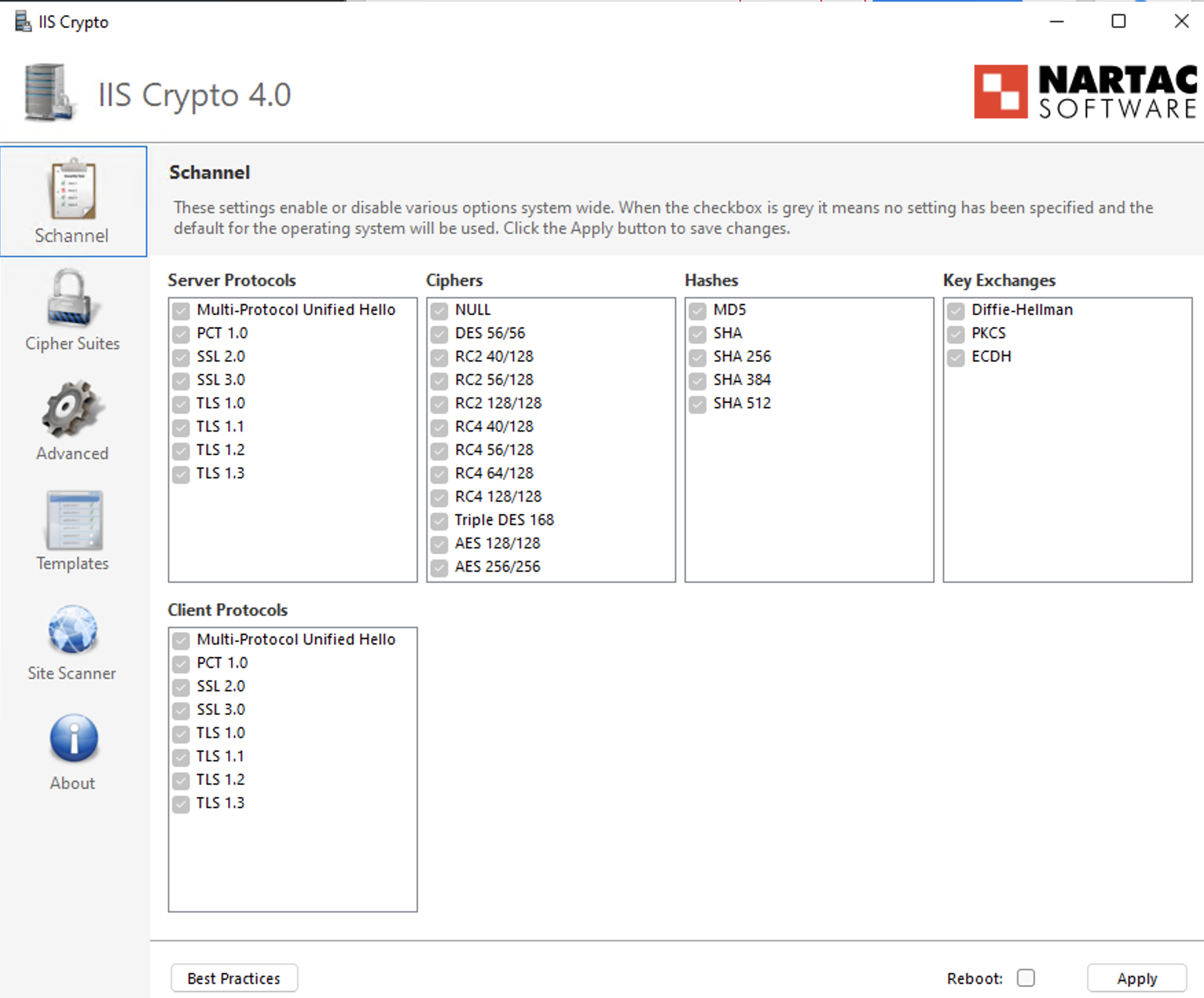
Step 3: Configure TLS Protocols

  • Open the Schannel tab.
  • Ensure TLS 1.2 is enabled (checked).
  • Verify that deprecated protocols (SSL, TLS 1.0, TLS 1.1) remain disabled in accordance with security policy.

Step 4: Prioritize Cipher Suites

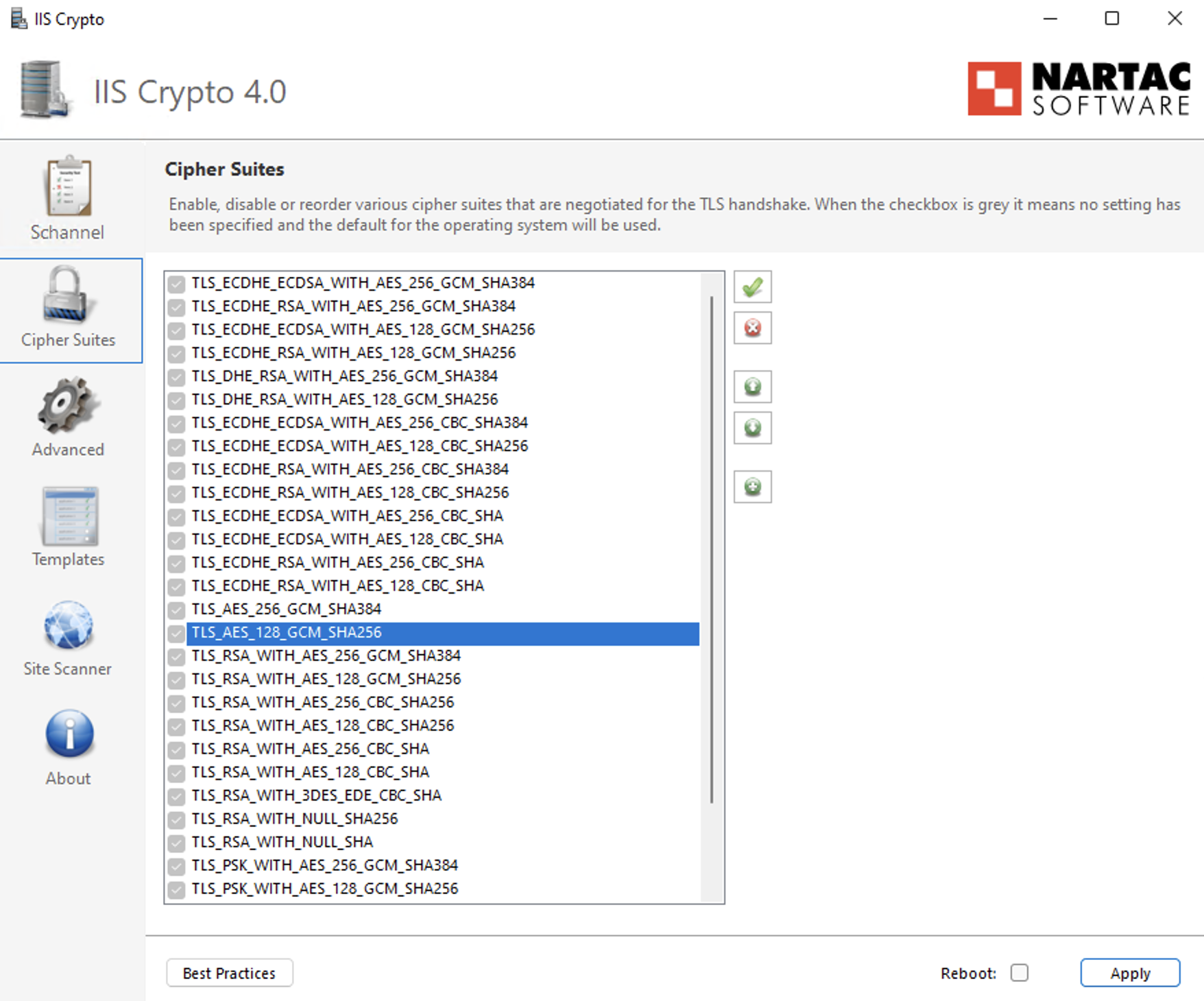
  • Navigate to the Cipher Suites list in the left-hand panel.
  • Identify the following ECDHE cipher suites:
    • TLS_ECDHE_RSA_WITH_AES_256_GCM_SHA384
    • TLS_ECDHE_RSA_WITH_AES_128_GCM_SHA256
    • TLS_ECDHE_RSA_WITH_AES_256_CBC_SHA384_P384
    • TLS_ECDHE_RSA_WITH_AES_128_CBC_SHA256_P256
    • TLS_ECDHE_RSA_WITH_AES_256_CBC_SHA_P384
    • TLS_ECDHE_RSA_WITH_AES_128_CBC_SHA_P256
  • Use the Up Arrow control to move these ECDHE cipher suites to the top of the list to ensure they are prioritized during TLS negotiation.
  • Ensure that older TLS_RSA_* cipher suites remain enabled only for backward compatibility and are positioned below the ECDHE cipher suites with the lowest priority.

Step 5: Apply Configuration

  • Click Apply to save the changes.

Step 6: Reboot

  • Restart the Windows Server to ensure the changes take effect.

Option B: Group Policy Method (Native Windows)

Step 1: Open Group Policy Editor

  • Press Win + R, type gpedit.msc, and press Enter.

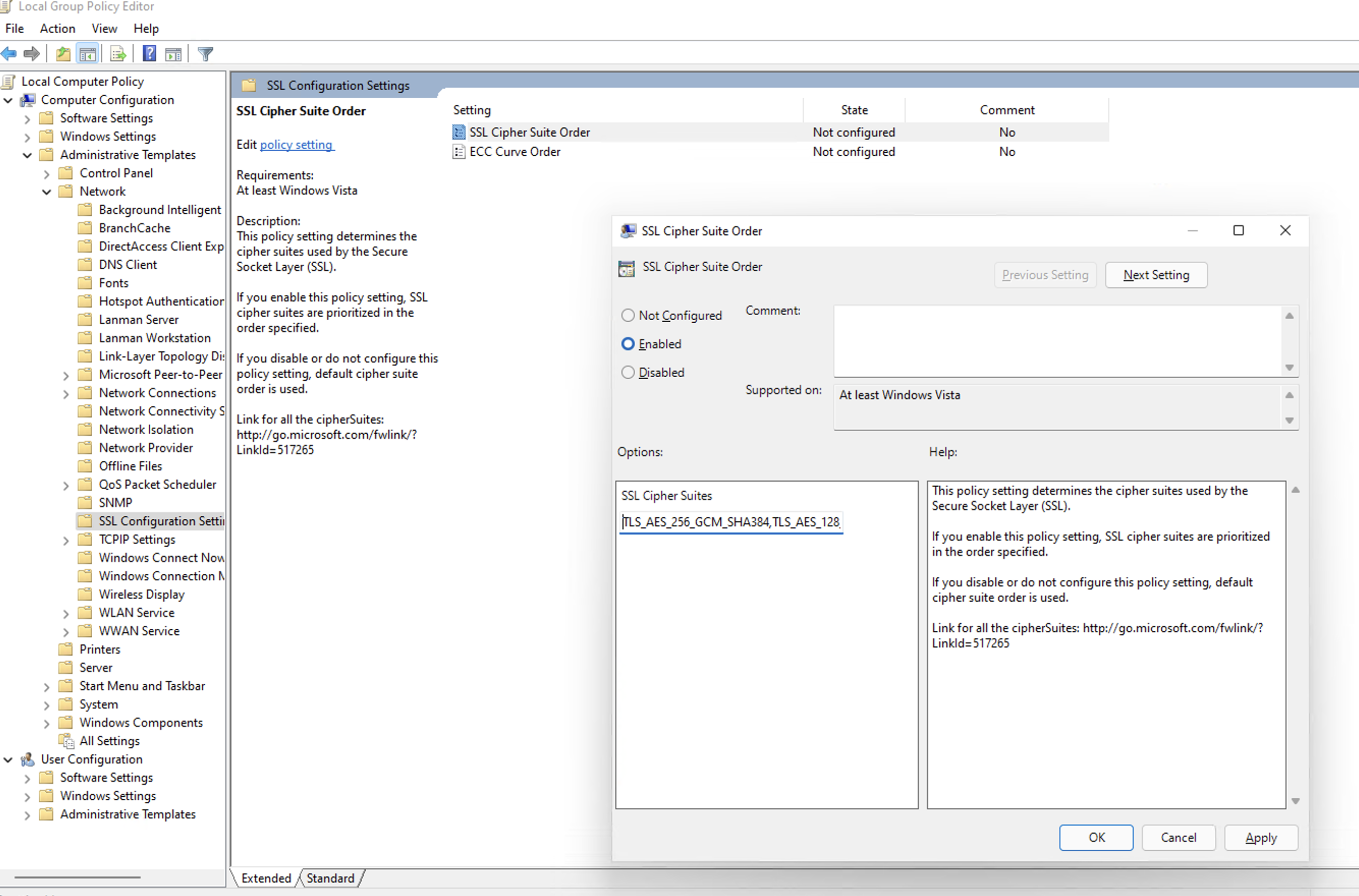
Step 2: Navigate to SSL Configuration Settings

Go to: Computer ConfigurationAdministrative TemplatesNetworkSSL Configuration Settings

Step 3: Edit Cipher Suite Order

  • Double-click SSL Cipher Suite Order.
  • Select Enabled.

Step 4: Prepend Secure Cipher Suites (Critical Step)

  • Locate the SSL Cipher Suites text box.
  • Do not delete the existing cipher list, as this may impact legacy application compatibility.
  • Place the cursor at the very beginning (far left) of the text box.
  • Paste the following cipher list before the existing entries:
    Info
    TLS_ECDHE_RSA_WITH_AES_256_GCM_SHA384,TLS_ECDHE_RSA_WITH_AES_128_GCM_SHA256,TLS_ECDHE_RSA_WITH_AES_256_CBC_SHA384_P384,TLS_ECDHE_RSA_WITH_AES_128_CBC_SHA256_P256,TLS_ECDHE_RSA_WITH_AES_256_CBC_SHA_P384,TLS_ECDHE_RSA_WITH_AES_128_CBC_SHA_P256,
  • Ensure there is a comma separating the newly added cipher block from the existing cipher list.

Step 5: Apply Configuration

Click OK to save the policy changes.

Step 6: Reboot

Restart the Windows Server for the Group Policy changes to take effect.

Verification: How to Install & Run Nmap

To confirm the server is ready for the future update, use the network scanning tool Nmap.

Step 1: Install Nmap

For Windows Users:

  1. Download the Latest Stable Installer (.exe) from the Official Nmap Download Page.
  2. Run the installer.
  3. Critical Step: During installation, check the box for Install Npcap. This driver is required for the scan to work.
  4. Finish the installation.

For Linux Users:

  • Ubuntu/Debian: Run "sudo apt-get install nmap -y"
  • RHEL/CentOS: Run "sudo yum install nmap -y"

Step 2: Run the Scan

Open your Command Prompt (Windows) or Terminal (Linux) and run:

Infonmap --script ssl-enum-ciphers -p 1433 <YOUR_DB_IP_ADDRESS>

(Replace 1433 with your specific SQL port if different).

Step 3: Interpret Results

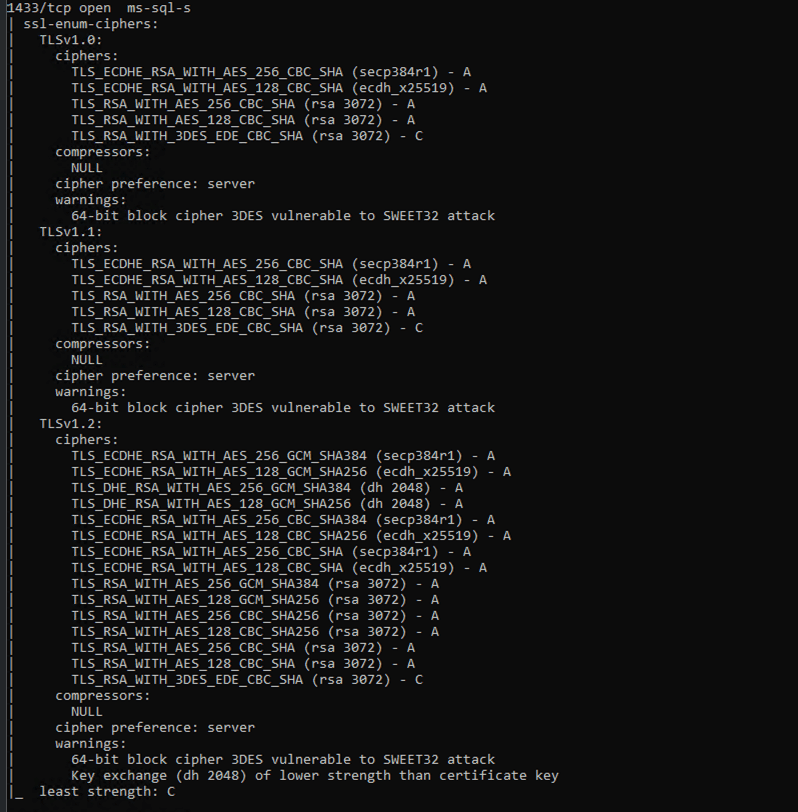
  • Look for the TLSv1.2 section in the output. Ensure TLS_ECDHE_... cipher suites appear at the top of the cipher list with Grade A.
  • TLS_RSA_... cipher suites must not be removed, but should be kept only as fallback and configured with the lowest priority to avoid regression after re-applying the update.

Example of Successful Output:

What Happens If You Skip This Configuration?

If modern ciphers are not enabled before the security update is permanently enforced:

  • Scheduled syncs will fail.
  • You won't be able to add or manage existing connections/sources/tables.

Enforcement Timeline

These security standards will be permanently enforced by the end of February 2026.

Servers that do not meet the required cipher configuration will experience connection failures once enforcement begins.

Need Assistance?

If you need help with the configuration, contact us at support@zohoanalytics.com.

To help us resolve your issue faster, include the following details in your email:

  • Windows Server version
  • SQL Server version
  • SQL port number
  • Nmap scan output (if available)
  • Screenshot of your cipher configuration (if applicable)

Providing this information upfront will help us diagnose and assist you more efficiently.


    • Sticky Posts

    • What's New in Zoho Analytics - February 2026

      Hello Users! We're back with another round of updates for Zoho Analytics. This month's release focuses on giving you greater flexibility in how you visualize, manage, and act on your data - with new features like custom visualizations, remote MCP server,
    • What's New in Zoho Analytics - January 2026

      Hello Users! We are starting the year with a strong lineup of updates, marking the beginning of many improvements planned to enhance your analytics experience. Explore the latest improvements built to boost performance, simplify analysis, and help you
    • What's New in Zoho Analytics - November 2025

      We're thrilled to announce a significant update focused on expanding your data connectivity, enhancing visualization capabilities, and delivering a more powerful, intuitive, and performant analytics experience. Here’s a look at what’s new. Explore What's
    • What's New in Zoho Analytics - October 2025

      Hello Users! We're are back with a fresh set of updates and enhancements to make data analysis faster and more insightful. Take a quick look at what’s new and see how these updates can power up your reports and dashboards. Explore What's New! Extreme
    • What’s New in Zoho Analytics – September 2025

      Hello Users!! In this month’s update, we’re raising the bar across multiple touchpoints, from how you bring in data, plan and track projects to how you design and brand your dashboards. We’ve added the all-new Gantt chart for project visualization, expanded
    • Recent Topics

    • Adjusting Physical Inventory

      Not getting very far with support on this one, they say they are going to fix it but nothings happened since November. Please give this a thumbs up if you would like to see this feature or comment if you have some insight. Use Case: Inventory set to be
    • Intergrating multi location Square account with Zoho Books

      Hi, I have one Square account but has multiple locations. I would like to integrate that account and show aggregated sales in zoho books. How can I do that? thanks.
    • Dynamic Remaining Quantity in Lookup During Allocation

      Hi everyone, From what I understand in Zoho Creator, lookup fields only display the stored value from the source record and do not dynamically update while a form is being filled. Because of this, showing a real-time updated remaining quantity inside
    • Is it possible to use HTML formatting in SMS messages sent from Zoho?

      Hi everyone, I have a question regarding sending SMS from Zoho When we send emails from Zoho, we can include HTML code to format the message (like adding links, styling, etc.). Is it possible to do something similar when sending SMS messages through Zoho
    • Important update: Migrate to the new SalesIQ live chat widget before April 14, 2026

      This is a final reminder to migrate to the new SalesIQ Live Chat Widget before April 14, 2026. The old live chat widget will be deprecated after this date. To continue providing a faster and more engaging chat experience, we recommend upgrading to the
    • If your IM chats aren’t auto-assigning, here’s what to check

      Hey everyone! We’ve been seeing quite a few questions around Instant Messaging (IM) Chat Routing in Zoho Desk, especially around how it actually behaves in real time. So I thought I’d share a practical breakdown of what’s happening behind the scenes.
    • connect zoho creator with google drive

      Hello everyone, I need to connect to a folder drive. The idea, is that google drive loads a text document with some data, I must read that text document to be able to autofill a form that I have in zoho creator with that data. I also attach PDFs and place
    • Uploaded files are not included when using "Include user submitted data" in Email Notification

      In Send Email notification workflow in Zoho Creator, there is an option called "Include user submitted data" which allows the email to contain all the form submission details. However, when this option is enabled, files or images uploaded through File
    • Extend Zoho Canvas Customization to Zoho Creator Forms and Reports

      Currently, Zoho Canvas allows users to design and customize the UI of Zoho CRM modules with a much better visual experience. This helps organizations create cleaner layouts, improve usability, and design interfaces that match their workflows. However,
    • Kanban View for Projects.

      At our organization, we describe active projects with various statuses like "In Proofing" or "Printing" or "Mailing". In the Projects view, one can set these project statuses by selecting from the appropriate drop-down. While this works, it's difficult to view and comprehend the progress of all of your projects relative to each other in a table. Creating a Kanban view for projects where I can move them from one status to another allows me to see where each project is in the order of our workflow.
    • Option to Automatically Publish Job Openings to the Career Website via API or Workflow

      Currently, when creating Job Openings using the Zoho Recruit API, the records are successfully inserted into the system. However, there is no way to automatically publish these Job Openings to the Career Website. In the Job Opening field data, there are
    • Auto-publish job openings on my Zoho Recruit Careers Website

      I have developed a script using the Zoho Recruit API that successfully inserts new jobOpening records to my Zoho Recruit website, but my goal is to auto-publish to the Careers Website. The jobOpening field data shows two possible candidates to make this
    • Request to Customize Module Bar Placement in New Zoho CRM UI

      Hello Support and Zoho Community, I've been exploring the new UI of Zoho CRM "For Everyone" and have noticed a potential concern for my users. We are accustomed to having the module names displayed across the top, which made navigation more intuitive
    • Button ''I'm Interested'' won't translate

      Since our main platform is in French, I would like to get this ''I'm Interested'' button translated to French ''Je suis intéressé''. We managed to translate the whole carreer site in French, except the button. How come ? We have a standard subscription,
    • Feature request - image resizing on sales orders

      I need to be able to show the items on the sales orders, currently the item image shows really small and no way to resize it, need the ability to make the image larger to showcase the product on the pdfs
    • ZOHO.CRM.UI.Record.open not working properly

      I have a Zoho CRM Widget and in it I have a block where it will open the blocks Meeting like below block.addEventListener("click", () => { ZOHO.CRM.UI.Record.open({ Entity: "Events", RecordID: meeting.id }).catch(err => { console.error("Open record failed:",
    • "Unlink" Advance from Bill without Deleting the Payment Record

      I am writing to highlight a significant workflow issue in Zoho Books (India Edition) regarding Vendor Advances and Bills. The Scenario: I recorded an Advance Payment to a vendor. I matched/reconciled this payment in the Banking module. I received a Bill
    • Email Parser Not Extracting Fields Correctly with Certain Label Formats

      I’ve been testing the Email Parser functionality in Zoho CRM to automatically extract data from incoming emails and map it to CRM fields. During testing, I noticed that parsing sometimes fails when the email contains field labels formatted like this:
    • Train Zoho Answer Bot Based on Customer

      Hi all, Is it currently possible to mark Help Centre articles to a specific customer, and restrict the answer bot to only use relevant information if it is either marked as "General", or tagged for the specific customer in question? We currently have
    • Introducing Built-in Telephony in Zoho Recruit

      We’re excited to introduce Built-in Telephony in Zoho Recruit, designed to make recruiter–candidate communication faster, simpler, and fully traceable. These capabilities help you reduce app switching, handle inbound calls efficiently, and keep every
    • Prevent tracking users from specific countries

      Currently, I’m receiving many bot visits from the United States and Malaysia. I would like these visits not to be recorded in SalesIQ. I already enabled the option to exclude traffic from cloud service providers, but I’m still receiving bot visits. Ideally,
    • Zoho CRM Community Digest - February 2026 | Part 1

      Hello Everyone! February has been off to a productive start in the Zoho CRM Community, with several thoughtful product enhancements and helpful technical discussions making their way into the forums. To help you stay up to speed, we’ve rounded up the
    • Nouvelle fonctionnalité : donnez du style à vos pages avec le Branding

      Que vous prépariez un webinaire important. Vous avez investi du temps dans votre contenu, invité des intervenants de qualité, et les inscriptions commencent à affluer. Mais votre page d’inscription ? Elle ressemble à toutes les autres : générique, sans
    • How to sync Zoho CRM Quotes with Zoho Books/Finance Estimates or Quotes

      Hi everyone, We’re building quotes in the Zoho CRM Quotes module because of its strong CPQ features and better communication options (multiple contacts, email customization, etc.). However, these don’t sync directly with Zoho Books/Finance for invoicing.
    • Marketing Tip #24: Encourage customers to leave reviews

      Reviews are one of the strongest trust signals in ecommerce. When shoppers see real feedback from other customers, they feel more confident about buying, especially when they’re choosing a brand for the first time. Not all reviews are equal. Detailed
    • Organization wide Account and Contacts Visibility/Sharing Capabilities?

      Has anyone figured out a way to make visibility or sharing of Accounts and Contacts to be available across the entire organization without having to have every individual user edit their Sharing permissions? For our sales folks they need to be able to
    • Introducing Bigin's all new integration with Microsoft Teams

      Picture this: You are on call with your team to discuss some important deals that need to be closed soon. While discussing each deal, your team has to switch back and forth between your Teams account and Bigin account to refer to details about the deal.
    • Ability to Attach Record-Specific Files Automatically in Workflow Email Templates

      Currently in Zoho CRM, email templates allow attachments to be added, but these attachments are static and remain the same for every recipient. There is no straightforward option to automatically attach a file that is stored within the specific CRM record
    • This version of app doesn't support this notecard type Error

      So this problem is happening for any notes created within the last week, as well as any note recently edited on Android. I can open them on my phone fine, but they don't open on the website version. They DO work on the desktop app version. It's just web
    • Issue with Picklist Dropdown Not Opening on Mobile

      Hello I am experiencing an issue with picklist values on mobile. While the arrow is visible, the dropdown to scroll through the available values often does not open. This issue occurs sporadically, it has worked occasionally, but it is very rare and quite
    • an issue in Zoho CRM where the workflow rule is not triggering

      H I’m currently facing an issue in Zoho CRM where the workflow rule is not triggering when a new lead is created through a webform. I’ve double-checked the criteria and field updates, everything seems fine but it still doesn’t fire. Has anyone faced this
    • {Action Required} Re-authenticate your Google Accounts to Continue Data Sync

      Hello Users! To align with Google’s latest updates on how apps access files in Google Drive, we’ve enhanced our integration to comply with the updated security and privacy standards, ensuring safer and more reliable access to your data. With this update,
    • Allocating inventory to specific SO's

      Is there a way that allocate inventory to a specific sales order? For example, let's say we have 90 items in stock. Customer 1 orders 100 items. This allocates all 90 items to their order, and they have a back order for the remaining 10 items which could
    • Automatically Update Ticket Status in Zoho Desk Based on Actions in Zoho Projects

      Hi Zoho Desk Team, Hope you’re doing well. We’re using the Zoho Desk–Zoho Projects integration to manage tasks related to customer tickets, and it works well for linking and tracking progress. However, there are a few important automation capabilities
    • Account Review Pending - Daily Limit 100

      Hi ZeptoMail Team, I'm writing to request a manual review of my account. I am currently stuck on the 100-email daily limit and cannot purchase credits. Status: My domain is already verified (DKIM/CNAME). Issue: The "Customer Validation" option is no longer
    • Is this a SCAM email or is it really Zoho?

      L.S. I received the following message. Is this from Zoho? I have had a Zoho One account for many years and my website has been online for years. If it is a scam, I think you should know about it.
    • How to close an estimate ?

      Hello, I have created estimates, and converted them to invoices to get 50% payment. Now I have 2 cases where the estimate stills shows status partially invoiced, however: 1. for one of them, project stopped half way, so the remaining part will never be
    • Updating Analytical Fields Data

      Dear Zoho team, I'm having an issue with the recently added fields in both Analytical Desk and Analytical. How can I generate the data in Analytical when new fields are added? https://analytics.zoho.com/workspace/2436819000000007005/edit/24368190000
    • Looking for Guidance on Building a Zoho Website

      I'm exploring the possibility of building a custom website with specific features using Zoho as an alternative platform. My goal is to create something similar to https://gtasandresapk.com , with the same kind of functionality and user experience. I'd
    • My Zoho mail stopped receiving or sending emails about 3 hours ago

      Its a pop 3 account. The emails get into the actual mailbox on the server and I can send emails directly from the server, but they are no longer in Zoho, in neither of my Zoho accounts. All green ticks under Mail Accounts under Settings
    • Next Page