We're excited to announce an enhancement to the integration between Zoho Recruit and Zoho People, designed to streamline your data management processes and boost efficiency across your recruitment and HR workflows.
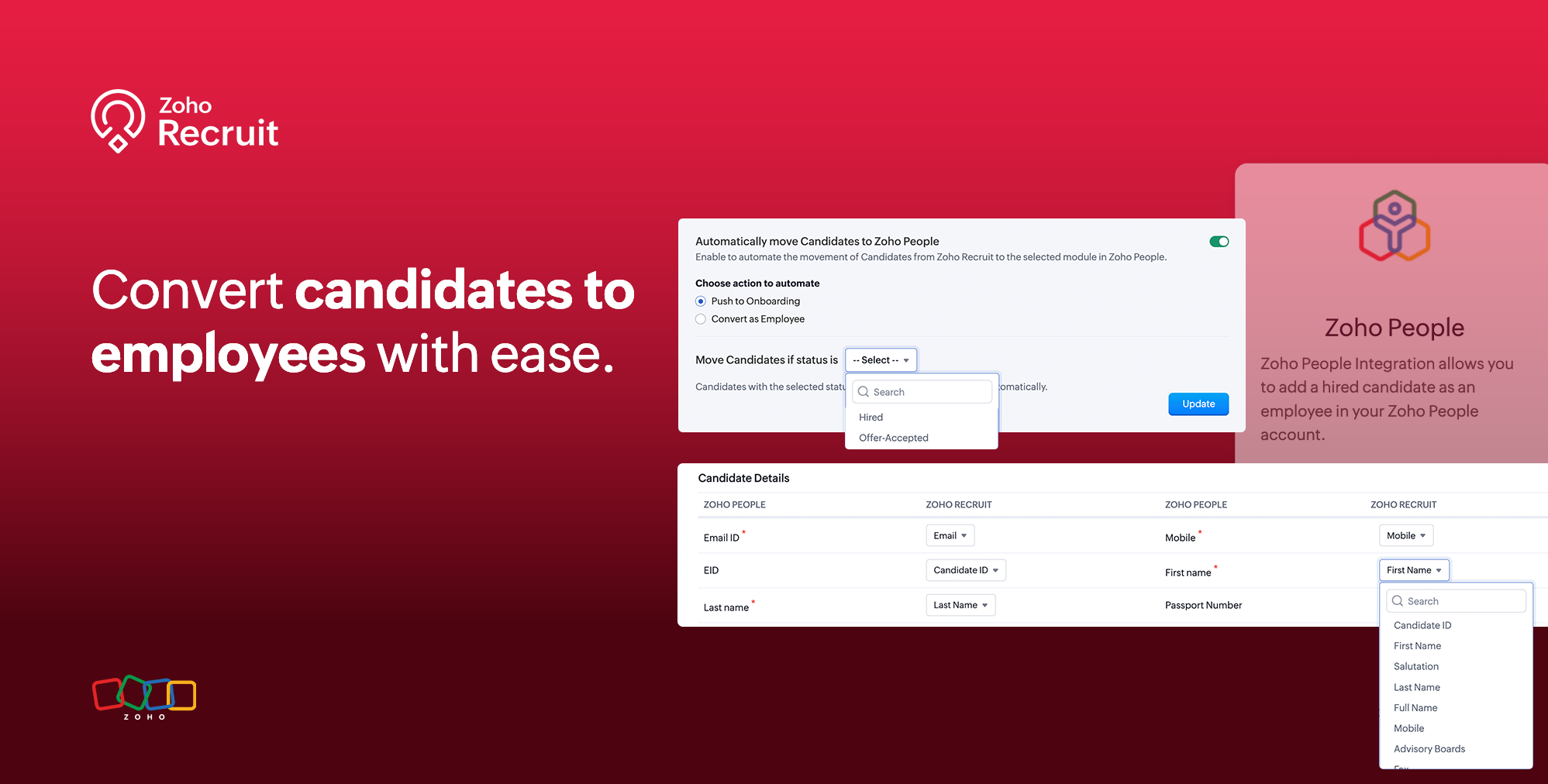
With this latest update, you can now map fields from Zoho People with their corresponding sections in Zoho Recruit, ensuring seamless data transfer and alignment between the two platforms. This configuration simplifies data management, minimizing redundant data entry, and enhancing accuracy throughout your recruitment lifecycle.
To enable the Zoho People integration, Navigate to Setup > Marketplace > Zoho > Zoho People.
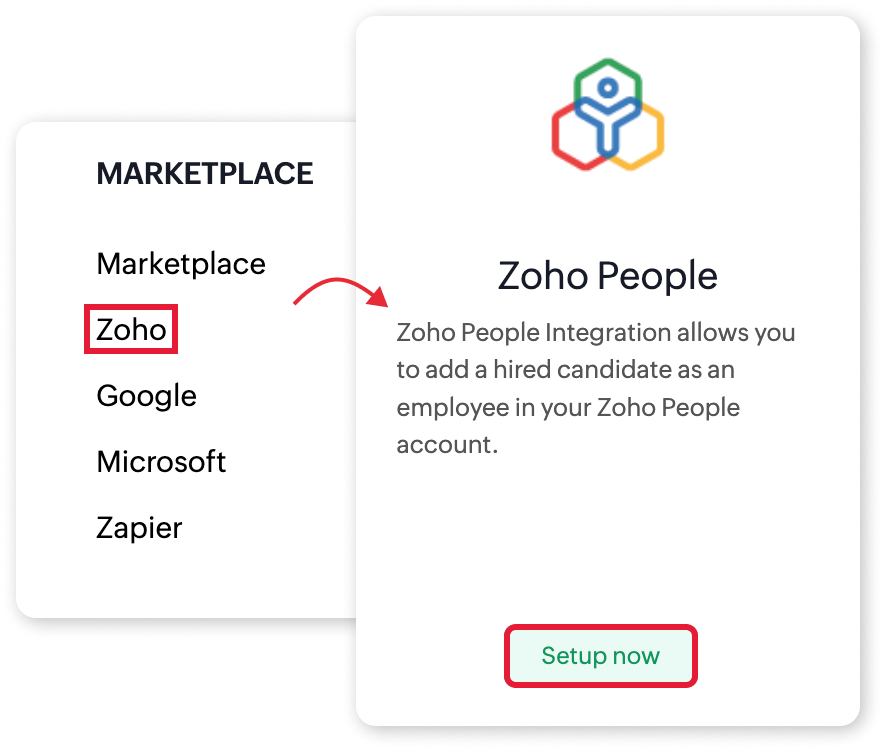
Key Features:
1. Field Mapping
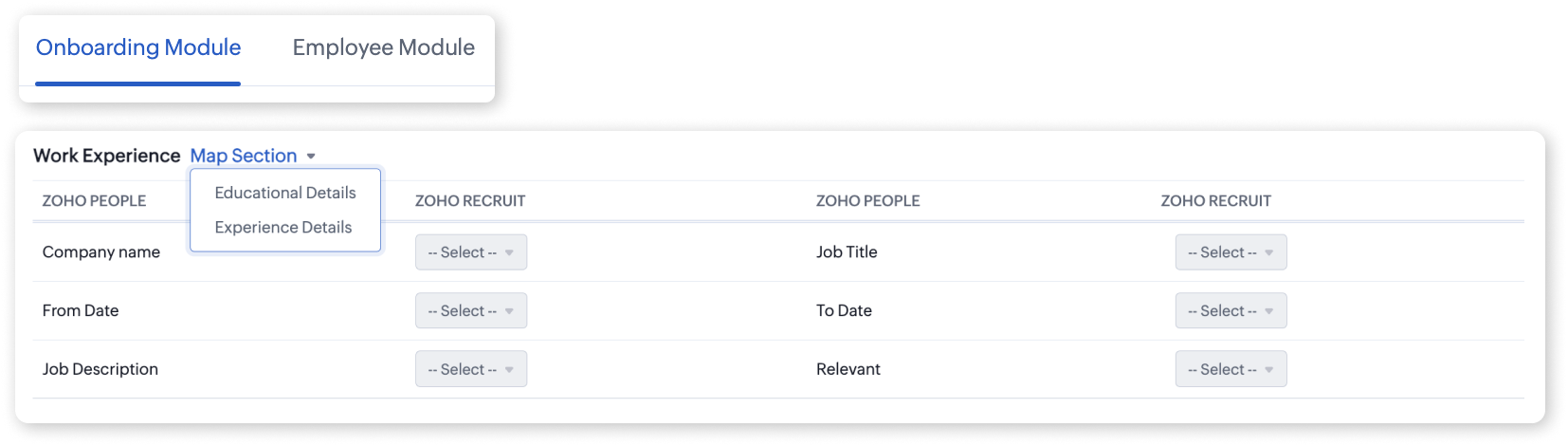
One of the key features of this enhancement is the ability to customize data mapping between Zoho Recruit and Zoho People modules. You can now map specific fields from Zoho People with their corresponding sections in Zoho Recruit, enabling accurate and efficient data transfer. This level of customization ensures that your data stays aligned and organized, eliminating the need for manual data entry and reducing the risk of errors.
2. Attachment Transfer
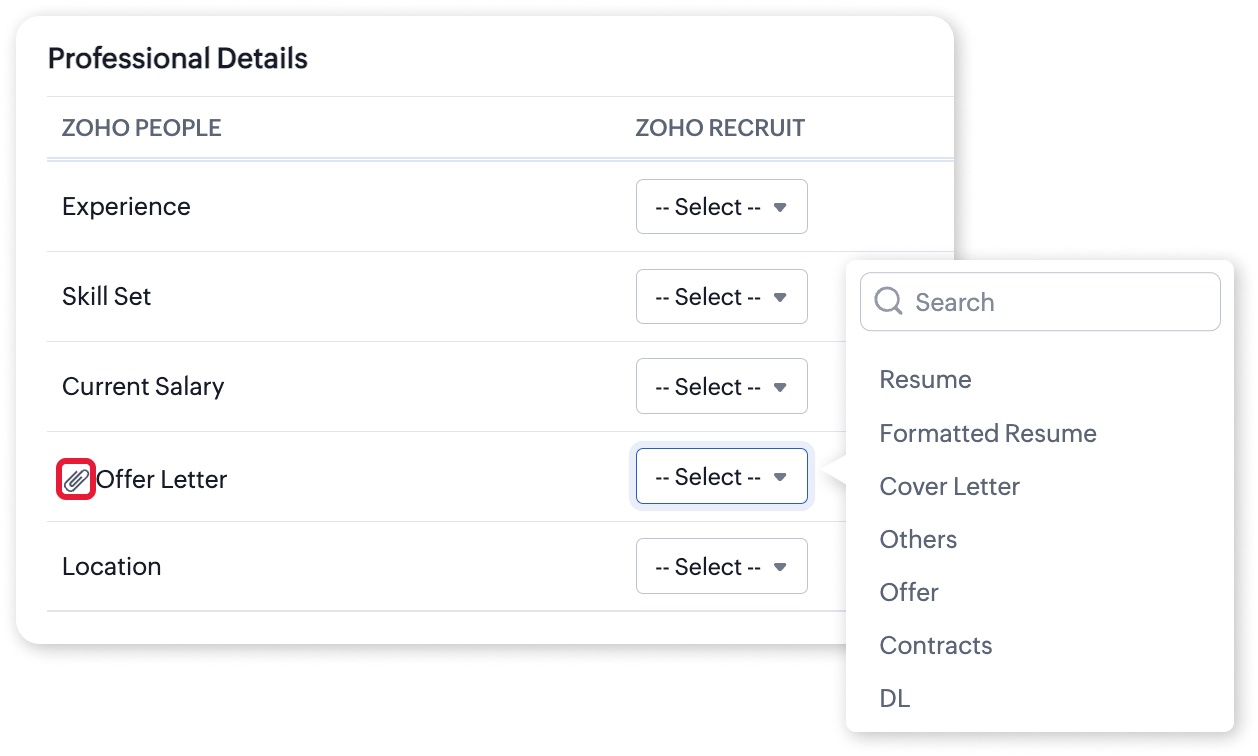
The integration now supports the automatic transfer of attachments from Zoho Recruit to Zoho People. When mapping fields between the two platforms, you can choose to link attachment categories from Zoho Recruit with the corresponding fields in Zoho People's Onboarding or Employees module. This feature ensures that all relevant attachments, such as resumes, cover letters, or any other supporting documents, are automatically moved to the candidate's profile in Zoho People, streamlining the onboarding process.
3. Auto-Push Applicant Data
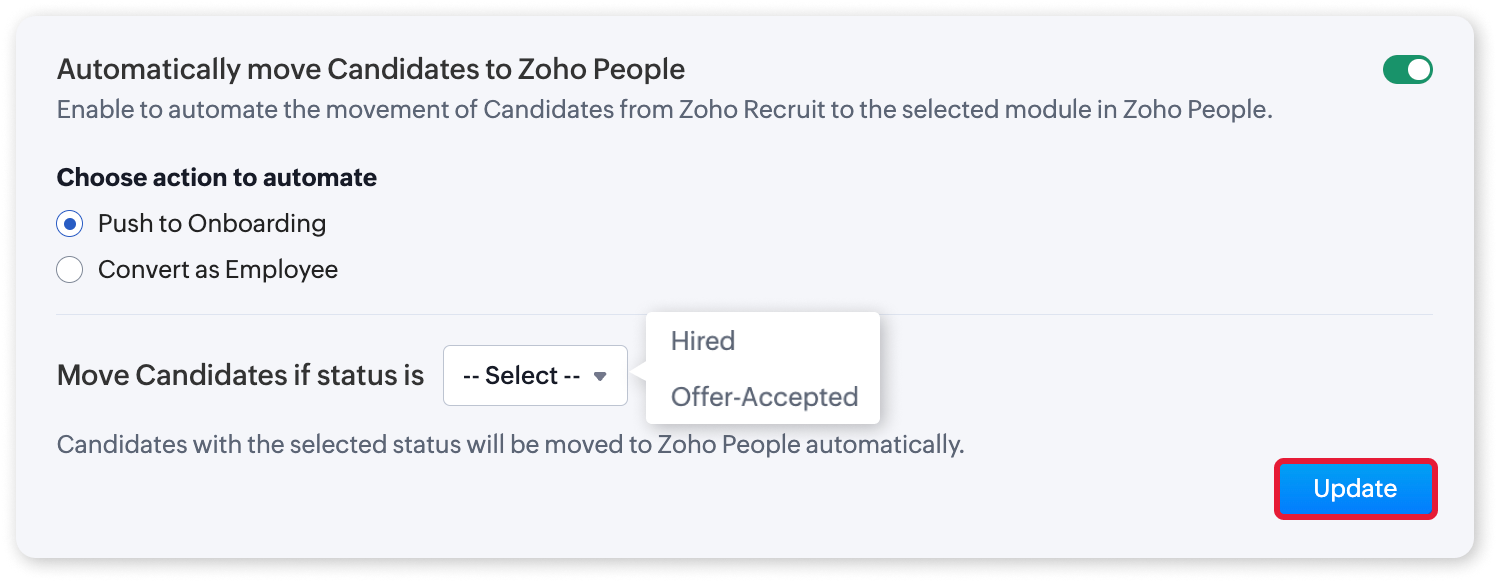
To enhance efficiency further, the integration now offers an auto-push feature, allowing you to automatically transfer applicant data from Zoho Recruit to the designated module within Zoho People based on specific candidate statuses. This automated data synchronization eliminates the need for manual intervention, saving you valuable time and effort. Streamline your process by enabling the auto-push feature, which facilitates the transfer of applicant data from Zoho Recruit to your designated module within Zoho People based on specific candidate status triggers.
4. Manual Actions
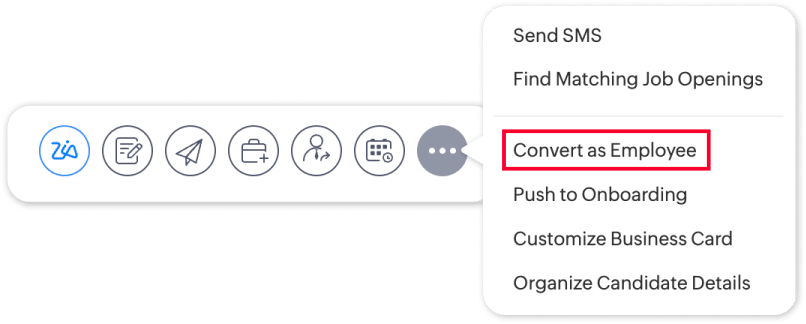
Lastly, the integration provides manual actions to convert successful candidates into employees or contractors directly from Zoho Recruit. With just a few clicks, you can update candidate details in Zoho People, ensuring a smooth transition from recruitment to onboarding and employee management. Leverage manual actions such as "Convert as Employee" and "Push to Onboarding" to transition successful candidates into employees seamlessly or initiate their onboarding journey within Zoho People.
Regards,
Team Zoho Recruit
Recent Topics
Bulk deleting Zoho CRM records using Deluge, COQL and CRM API
Hello everyone, During CRM implementations, data cleanup is a common task, especially after testing, migrations, imports, or integration development. I created a reusable Deluge function that performs bulk deletion using the Zoho CRM API. The approach:
Can't connect CalDAV
### Issue Summary Can't connect to my calendars using CalDAV and the URL `https://calendar.zoho.eu` ### Steps to Reproduce 1. Tried to connect on multiple devices, on multiple OS's (Android DAVx, Thunderbird, Gnome Calendar, Apple Caneldar). 2. When I
CRM x WorkDrive: We're rolling out the WorkDrive-powered file storage experience for existing users
Release plan: Gradual rollout to customers without file storage add-ons, in this order: 1. Standalone CRM 2. CRM Plus and Zoho One DCs: All | Editions: All Available now for: - Standalone CRM accounts in Free and Standard editions without file storage
Guide customers to the right booking page with routing forms
Greetings from the Zoho Bookings team! We're excited to introduce Routing Forms in Zoho Bookings. Routing forms let you collect information from customers before they schedule an appointment and automatically direct them to the most appropriate booking
Cannot receive emails
Sent one days ago still no feedbacks, cannot call customer services number
Email Password Reset - Vishal & shaik Vali Babu
Hi Team, The below-mentioned employees are unable to log in to their Gmail due to a password error. Kindly look into this on priority vishal.r@jumbotail.com shaik.babu@jumbotail.com
Live Chat
Is live chat inthe website in zoho desk?
Application-Level Save copy of sent emails
It would be really helpful to be able to turn on/off the Save copy of sent emails at a per application level, so some applications can save in the sent folder and others don't.
DKIM 2048 too long
I'm trying to add a DKIM TXT record for my domain in Zoho Mail but my DNS provider (Shopify) has a character limit on TXT record values. The 2048-bit DKIM key is too long to enter. Can anyone advise how to generate a shorter 1024-bit key instead, or another
Using IMAP configuration for shared email inboxes
Our customer service team utilizes shared email boxes to allow multiple people to view and handle incoming customer requests. For example, the customer sends an email to info@xxxx.com and multiple people can view it and handle the request. How can I configure
Technical personnel are required to assist in synchronizing license quotas and solving the problem of being unable to add users.
We are a cross-border jewelry e-commerce company and currently use Zoho Mail Lite corporate email service. I have paid to purchase 1 Mail Lite annual user license (order number 133627785, payment time 2026-06-29). It has been more than 12 hours since
non ricevo ne invio mail
non riesco ad inviare né ricevere posta. URGENTISSIMO
重要詢問:電子報回信沒有收到
我使用zoho作為寄電子報的mail, 但是我發現從電子報回信,完全都沒有收到!!!(包含垃圾郵件) kit那邊設定確定都沒有問題,請問這邊是哪裡設定有問題導致沒收到呢? (我確認過mail是一樣的)
Mail Id’s backup
Dear Zoho Team, Kindly share the backup of my all mail id’s associated with Zoho account. Thanks, Saurabh Sharma +91 8851066915
Feature Request - Option To Hide Default System Fields on Items
Hi Zoho Inventory Team, As far as I know it is not possible to hid some of the defult system fields on Items, such as UPC, MPN, EAN, ISBN. A good use case is that in many cases ISBN is not relevant and it would be an improved user experience if we could
Important update on our transition to the new video platform framework
As part of our ongoing platform changes, users in select regions, including the United States and other supported data center locations, have been migrated to our new video platform framework. Due to this migration, some participants may notice changes
Account review. Does anyone still work here?
Are accounts still being reviewed? Mine has been under review for over two weeks now. I also created a support ticket and reached out on Twitter but never received any kind of response. Is this company still alive?
Seamless and safe way to migrate all my hubspot forms to zoho forms?
Hi community! Our website (B2B consulting / market research), offers a wide variety of public report in PDF formats stored behind forms previously hosted via Hubspot. As we are migrating to Zoho Forms, I am facing an issue. Example: Form A (Report A),
E-Mail Distribution List
How do I create an e-mail distribution list in Zoho Mail?
Zoho Contacts *Web Interface Does Not Load* (Tested in Firefox, Safari)
When trying to load https://contacts.zoho.com the error shown in the console is: The resource from “https://static.zohocdn.com/zmail/zm/newContactsChange11/js/main.js” was blocked due to MIME type (“application/json”) mismatch (X-Content-Type-Options:
Automatically calculate and include tax on quotes
I've recently been VAT registered and now need to include VAT on my quotes. I have been able to set the tax label and amount but still need to click the tax link and select the tax I wish to include before it appears on the quote. Does anyone know of
Inspection Table
Hello Latha, We created a job sheet that includes the new table (Inspection Table) which was introduced recently. However, agents are not able to see the rows in the inspection table. Could you please investigate this issue and get back to us? Please
Zia Agents looks promising, but I still cannot deploy my first agent or connect WhatsApp after weeks of support tickets
Hi Everyone, I am posting here because I am stuck and need practical help from someone who has successfully deployed a Zia Agent with WhatsApp. Zia Agents looks like a very promising product. I have watched the platform expand quickly, and I have noticed
"code":3001 ["Failed to update data."]
I would like to seek your expertise - I might be wrong on my approach also.. I highly appreciate your advice. 1 problem remains is when a new row was added on the existing one [from another form that trigger upon Successful form submission ], it gets
Zoho Desk: Chromium (Google Chrome, Edge) filename issue when opening/download attachments in a ticket.
Hello Zoho Desk Team. When opening a PDF attachment in a ticket, Chromium-based browsers such as Google Chrome and Microsoft Edge display the file with the title “content” When the file is saved, it is downloaded as content.pdf instead of using the original
Subforms and automation
If a user updates a field how do we create an automation etc. We have a field for returned parts and i want to get an email when that field is ticked. How please as Zoho tells me no automation on subforms. The Reason- Why having waited for ever for FSM
WhatsApp conversations are no longer linked to existing threads after reconnecting the channel
Hi everyone, We have an existing WhatsApp channel in Zoho Desk. We temporarily disabled it, renamed it, and then re-enabled it while reassigning our bot. Since then, all previous WhatsApp conversations are still visible in the history, but we can no longer
crm to books
We currently sync CRM Contacts to Zoho Books Customers using two-way sync. We now wish to change to "Accounts & their Contacts". What happens to existing Books customers? Will they be merged with CRM Accounts, duplicated, left unchanged, or recreated?
Add a MATRIX field to the forms creation
Same as Zoho forms, we need a Matrix field in Zoho Creator forms, is very usefull
Cliq iOS can't see shared screen
Hello, I had this morning a video call with a colleague. She is using Cliq Desktop MacOS and wanted to share her screen with me. I'm on iPad. I noticed, while she shared her screen, I could only see her video, but not the shared screen... Does Cliq iOS is able to display shared screen, or is it somewhere else to be found ? Regards
Zoho Desk Community Module Reporting
I can't seem to find any reporting for the community module in Zoho Desk. Am I missing something or are there just no reports available?
Zia AI capabilities now available in all paid editions
Hello everyone, We are expanding the availability of AI-powered features in Desk to the other paid subscriptions from 7th July 2026. Right now, the following AI-based features are available for Enterprise edition users: Intelligence: Sentiment analysis,
Feature Request: Integración con la Lista del Artículo 69-B del SAT para Zoho Books México
Feature Request: Integración con la Lista del Artículo 69-B del SAT para Zoho Books México Hola equipo de Zoho, Durante los últimos meses he observado una necesidad recurrente entre varios clientes en México relacionada con el cumplimiento fiscal del
Alternate color rows
After I changed the background color to a dark gray and changed the alternate rows to a light gray. I have discovered that I can no longer change the text in the light gray rows to Bold.
Workflow Assistance in Zoho CRM
Our client's sales team visits customers on-site and currently fills a physical paper form to capture customer details, and then separately re-enters the same data into Zoho CRM via the mobile app — resulting in double data entry. We want the salesperson
Can we generate APK and IOS app?
Dears, I want to know the availability to develop the app on zoho and after that .. generate the APK or IOS app and after that I added them to play store or IOS store.. Is it possible to do this .. I want not to use zoho app or let my customers use it. thanks
Pricelists
So we have them in books but I cannot find them in commerce?
Collapsible Sections & Section Navigation Needed
The flexibility of Zoho CRM has expanded greatly in the last few years, to the point that a leads module is now permissible to contain up to 350 fields. We don't use that many, but we are using 168 fields which are broken apart into 18 different sections.
Zoho CRM Layout Rules: Nine New Actions, Profile-Based Execution, and Interactive Preview
Hello everyone, Availability: This feature is now available for customers in the JP and SA DCs. It is planned to be released for other customers in soon. We’re excited to announce powerful new enhancements to Layout Rules in Zoho CRM - a feature built
Validation Rule Not Working for Mandatory Field in Zoho Blueprint
As a Zoho user, we created a validation rule for a specific field. However, we noticed that when we made the same field mandatory within a Blueprint, the validation rule we defined did not work. When we reported this issue to Zoho Support, they stated
Next Page