We have an exciting enhancement coming your way. Pushing the perimeter has always been our thing, and we have come up with yet another enhancement for your Zoho SalesIQ live chat. Did you know your live chat can support more than chats and calls? That's right, you can integrate your Instant Messaging channels into your live chat widget, offering visitors the flexibility to choose their preferred communication platform.
Why is this a game-changer?
SalesIQ supports six Instant Messaging channels—Facebook, Instagram, WhatsApp, Line, WeChat, and Telegram. With this update, you can add these IM options to your widget using custom CSS. When users click on their preferred channel, they will be redirected to your page on the chosen IM channel and can initiate a chat, which will then appear as an incoming chat in SalesIQ.
If you have chatbots enabled in your channels, your bot (Zobot) will engage with visitors, providing instant responses, answering queries, and ensuring seamless interaction, significantly enhancing customer experience and reducing response times.
How does this benefit your customers?
-
All-in-one widget – Provide diverse communication options within a single SalesIQ live chat interface.
-
Enhanced customer experience – Give visitors the freedom to communicate on their preferred platform, improving engagement and satisfaction.
-
Effortless management – Handle all IM and website chat conversations from one centralized dashboard.
-
Automated conversation with Bots – Leverage Zobot to automate visitor interactions, provide instant responses, and improve efficiency.
Additionally, boost marketing and sales using personalized widgets to highlight offers, discounts, promotions, and upcoming product launches, driving customer engagement and conversions.
How to implement this?
First, add the CSS to the brand settings and update the installation script with additional code.
Adding CSS to the brand settings:
-
Navigate to Settings > Brands > Personalization > Chat Widget in your SalesIQ dashboard.
-
Scroll down to Upload custom CSS, click on New, and upload the downloaded file.
Note: The CSS file includes a background pattern. To customize the background, update the image URL in line #5 of the .css file.
Installation code changes:
-
Choose the IM channels you want to display [line #6-11]:
-
Choose your preferred display style [line #13]:
-
Update your widget code [line #41]:
-
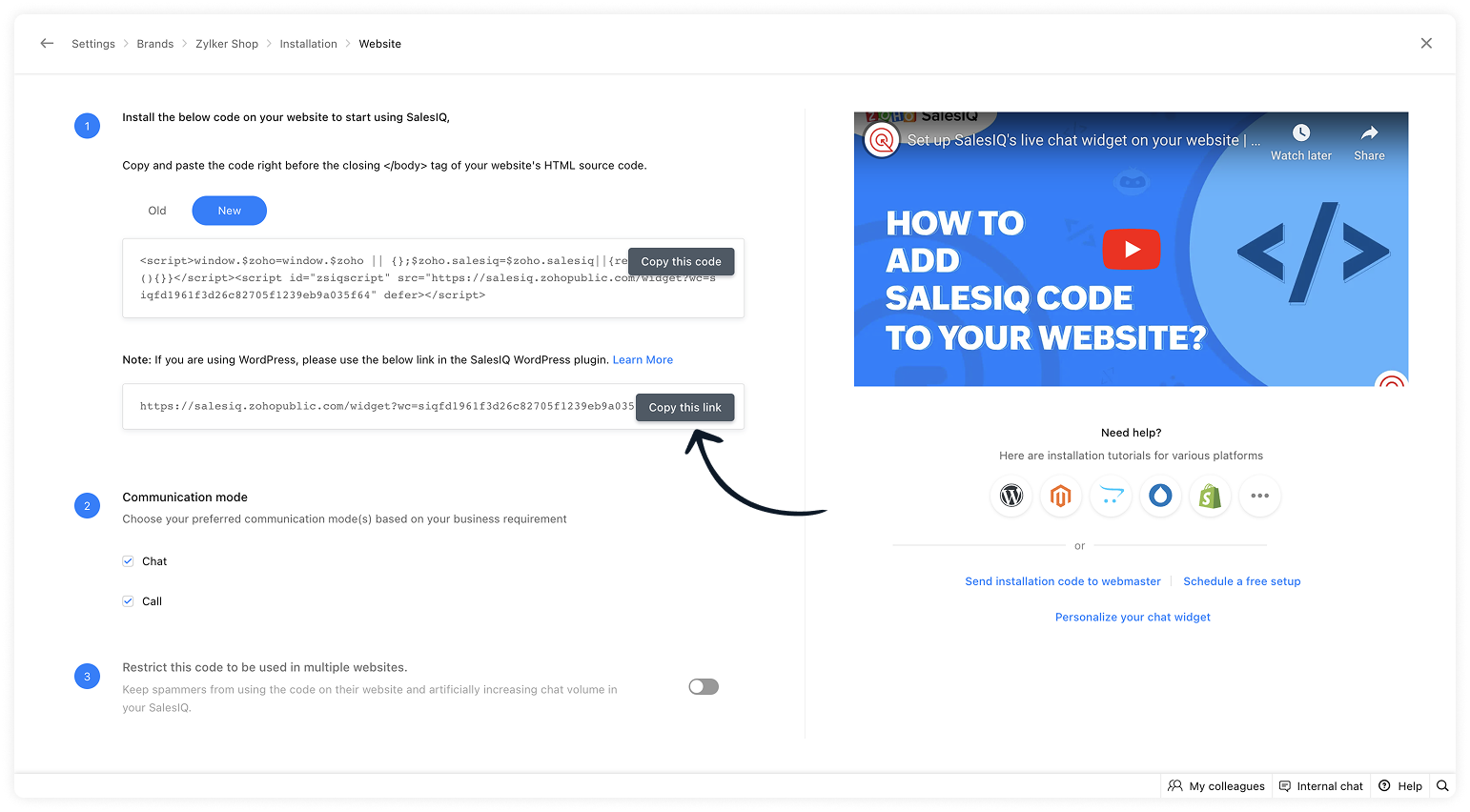
Navigate to Settings > Brands > Installation and copy the updated widget URL.
-
Paste the URL into the downloaded script and add it to your website's HTML source code, just as you did with the installation script earlier. Then, publish the changes.
Note: If you're using any
JavaScript APIs, add them to line #3 of the script.

Make your SalesIQ widget more powerful, interactive, and actionable with this enhancement! Don't miss out on this opportunity to enhance visitor engagement and streamline multi-channel communication.
We hope this helps! If you have any questions, feel free to drop a comment.
Recent Topics
Zoho Books - France
L’équipe de Zoho France reçoit régulièrement des questions sur la conformité de ses applications de finances (Zoho Books/ Zoho Invoice) pour le marché français. Voici quelques points pour clarifier la question : Zoho Books est un logiciel de comptabilité
Zoho Home Tasks View - any way to add conditional formatting?
Hello! Is there any way to add conditional formatting to the tasks window under Home Page? Id like tasks to be shown in green/yellow and red depending on its task date. I know Classic View shows colorfull icons: But its not possible to add any custom
User Name in Zoho Cliq Not Updating Across Apps?
We updated the name of a user in Zoho. (From Sue to Taylor) Her name has not been updated in Cliq on all apps. When in Zoho One, if I go to Cliq directly, it is correct, but if I am in another app, and the Cliq bar pops up on the bottom, it will be the
New Customization options in the module builder: Quick Create and Detail view
Hello everyone, We have introduced two new components to the module builder: Quick create and Detail view. The Quick Create Component It is a mini form used to create a record and associate it to the parent record from a lookup field. For example, if you have a Deals lookup in the Contacts module, then you can associate existing deals or create a deal and associate it with the contact. You can customize this Quick Create form by adding standard as well as custom fields. There is no limit to the number
Capture location upon submit
Hi guys, just got to know that zoho creator is now deprecated the Address Line 1 and Address Line 2 subfields from the Added Location and Modified Location. and i need the address 1 and 2 to know exactly where my employee submit the form (attendance). i used creator only for a year and i found they keep on removing good features which makes me think of migrate away from creator. anyway, any suggestion or workaround that i can do to get back the address 1 and address 2? thanks guys. Jeff
How do I automate my package and shipment process
Hey, I have a very basic problem regarding automating my package and shipment. My business does not require me to have those modules and manage them currently and since I'm new to zoho I want to start with just the basics. I just need to automatically
How to get the Geo Location i.e. Longitude and Latitude value in ZOHO Creator Application
How to get the Geo Location i.e. Longitude and Latitude value in ZOHO Creator Application.
Getting street address from GEO location system variable Added_Location
Currently, the only data you can get from the GEOCODE system variable Added_Location, is longitude & latitude, or district_city & state_province & County & postal_Code. However, what I really need is the street address. I can get this if I map the
How to take result of calculation in a form and subtract from a value in another form
I'm using the following code on successful form submission to perform a calculation and enter the result into a field a shown below input.Space_Used = ifNull(input.Area_In_Square_Meters,0) * ifNull(input.Total_Stock,0); I now need the result above, the
Missing Fields in Lead Conversion Mapping
I’ve been using Zoho CRM since 2013 to manage leads and convert them into contacts and jobs. When I convert a lead to a customer, I create a new contact and a job. Previously, this process automatically transferred key information from the lead to the
Mass email from Report output
Hi, I'd like to send a mass email based on a report output. The report is pulling multiple information from linked modules. Each line of the report ends up with a contact name, email and multiple field values pulled from the linked modules (some are custom
What's New in Zoho Analytics - February 2026
Hello Users! We're back with another round of updates for Zoho Analytics. This month's release focuses on giving you greater flexibility in how you visualize, manage, and act on your data - with new features like custom visualizations, remote MCP server,
Understanding tasks
So we have a module linked to contacts called Equipment and that in turn has a related module called service calls. Often on a service call we want add a task but we are not able. I think it needs a link to the contact. WE therefore tried to add tasks
Related Lists in Email Templates
Hi Zoho team, I would love to see a feature where related list information can easily be added to an email template (instead of mail merge). I have a client who books flights for their customers. They do this through a Flights module so all booked flights
Auto-sync field of lookup value
This feature has been requested many times in the discussion Field of Lookup Announcement and this post aims to track it separately. At the moment the value of a 'field of lookup' is a snapshot but once the parent lookup field is updated the values diverge.
need to add tax in servce and items
please give access to add gst or tac to add in service and parts
Blueprint transitions on locked records
We use the ability to automatically lock records (quotes, sales orders, etc.) based on criteria, such as stage. For instance, if a quote has been sent to a client, the quote is then locked for further edits. Our ideal quote stage process is: Draft>Sent>Won.
Lead Entry Strategy
Hi there. Was wondering if anybody could share their strategy around lead entry into Zoho CRM. One of the challenges with Zoho CRM is a lead requires a last name. We want to capture companies that operate within our addressable market, and we often don't
Social posts not saving as drafts or posting
Over the past two days, I have written and modified the same post for 5 different channels 4 different times. They will neither save as draft, nor go through and load in the scheduler, nor will they post when I try to push it live now. In every case,
Introducing user groups, roles, and profiles in Zoho Sign
Hello, Today, we're excited to unveil user groups, roles, and profiles to offer granular access controls in Zoho Sign. These help administrators manage document visibility and accessibility based on assigned user roles and permission sets. User groups:
Add org-specific data with Custom modules
Zoho Sprints offers a wide range of default modules designed to support agile project management. However, some projects or organizations may require additional modules to store project-specific or organization-specific data. To address this, Zoho Sprints
All new Address Field in Zoho CRM: maintain structured and accurate address inputs
Availability Update: 29 September 2025: It's currently available for all new sign-ups and for existing Zoho CRM orgs which are in the Professional edition exclusively for IN DC users. 2 March 2026: Available to users in all DCs except US and EU DC. 24
Give your organization a branded login experience with White Labeling
When users log in to their email, the URL they land on is often the first thing they notice. A generic login page can feel disconnected from your organization's identity, especially when you have already established a strong brand presence. For administrators,
Archive Option in Conversation View
Hello, I have a suggestion\request to add an "Archive Thread" button in conversation view of Zoho Mail. The best suggestion I have is to put an "Archive Thread" button next to the "Label Entire Thread" button in conversation view. Most users don't just
MCP > Creator connection failing with Claude
I'm trying to get claude to access any of my Zoho Creator apps and it keeps failing. I have enabled all tools for creator and ensured in claude settings that everything is authorised. Here is what claude says : Unfortunately, the error messages I'm receiving
Mail Merge in Zoho Desk
Hello Team, Do we have an option of mail merge within Zoho Desk like we have in Zoho CRM? We have a requirement to generate some pdf file in the form of mail merge doc from the ticket.
No DINAR (Serbia) in currency list
There is no Serbian Dinar listed in the currency list. Dinar is available in Books, Inventory, CRM, FSM. Please make it available in Desk as well. Without it, the integration with other apps is not possible.
Re-Apply SLA When Ticket Reopened from Closed Status?
If you have an SLA applied, timers are deactivated when going to "On Hold" status type and reactivated when going back to an Open status type. What we discovered is when a customer replies to a closed case and it reopens, the SLA is not applied and timers
Discussion Forum Categories and Forums
I'm prepping for a forum roll out and found that there isn't a lot of granularity of permissions on the forum level. It would be nice to see the settings from the category level of the forum available at the forum level, so you can assign who can post
Enable integration of CRM CPQ functionality for ZohoOne customers using Zoho Finance application
Hi there. I can't believe I'm needing to launch this idea as I would have thought this was a little obvious. Following a number of conversations with the technical team it's become evident that the CPQ functionality within CRM cannot integrate with Zoho
Copy Creator file field to CRM file field.
Hello, I am trying to transfer the content of a Zoho Creator record afer form submission to a new CRM deal record with a deluge form worklfow. I am trying to see of I can transfer the files fields. creationMap = Map(); if(Revendeur == "IEL Technologie
Is there a way to sync Tags between CRM and Campaigns/Marketing Hub?
I wonder if there is a way to synch the tags between CRM and Marketing-Hub / Campaigns?
Host not reachable when sending
For few partner that I send regular emails now got error and they don't receive emails Temporary failure fam-xxx.hr/185.xx.xx.xxx Host not reachable. Have more than 20 mails in https://mailadmin.zoho.eu/cpanel/home.do#mailSettings/retryEmail please
Negative Quantity on an Invoice
I need to be able to put a negative quantity on an invoice in books and inventory. Example, customer is buying part A, which has a removeable part, part B. Customer wants Part C which replaces Part B. We swap them for the customer. On an invoice we should
Button Duplication when emails forwarded or replied
When I create a new email template in campaigns and send it out it looks fine to all the users, however if that email is then on forwarded or replied to then all buttons within the email duplicate. See below The one on the left is the original one.
What's New in Zoho POS - March 2026
Hello everyone, Welcome to Zoho POS’s monthly update, where we share our latest feature updates, enhancements, events, and more. Let’s take a look at how March went. Zoho POS Android app with Arabic and RTL support for Saudi Arabia We have launched the
Zoho Projects Android and iOS app update: Custom modules
Hello everyone! We are excited to introduce the custom modules within the Zoho projects mobile app. Custom modules allow you to define your own entities with relevant fields, enabling you to capture and manage information specific to your workflows beyond
Zoho Projects iOS app update: Flag type(Internal/ External) information in Task list header
Hello everyone! We have now included the Flag(Internal/ External) type information on the Task list header within the Tasks listing screen of the Zoho Projects iOS app. This enhancement enables you to distinguish between the internal and external tasks
How to close an estimate ?
Hello, I have created estimates, and converted them to invoices to get 50% payment. Now I have 2 cases where the estimate stills shows status partially invoiced, however: 1. for one of them, project stopped half way, so the remaining part will never be
Will Zoho Search work with Zoho Learn
Currently, Zoho Search only works with Zoho Wiki which will be phased out. Moving forward, will Zoho Search be enabled for Zoho Learn? Thanks.
Next Page