Client Script | Update - Introducing ZRC: Simplified HTTP request library
Hello Developers!
Are you tired of juggling different methods to make API calls? Are you confused with multiple syntaxes and version restrictions? Have you ever wished for one simple way to make all API calls in CRM?
We heard you :)
Here comes ZRC (Zoho Request Client), the new way of making any API call in Client Script with one simple syntax!

What is ZRC?
ZRC (Zoho Request Client) is a built-in SDK that simplifies making API calls in Client Script. It uses one simple and consistent syntax to handle,
- CRM APIs
- Connection requests
- Public APIs .
There is no setup or configuration needed, making API calls hassle free.
ZRC is now available for use in Client Script, helping you build faster with less effort.
Why use ZRC ?
APIs serve as the backbone for customizing Zoho CRM, powering vital tasks like updating records, adding leads, and integrating with external services. For developers, working with these APIs has not always been simple. Each type of API, whether internal CRM APIs, Connection APIs, or external APIs, requires different methods and boilerplate codes, which creates friction and slows down building solutions. Here comes ZRC to address this by handling authentication, supporting all CRM API versions, and managing requests and responses automatically, so developers can focus on building meaningful solutions.
Here is why ZRC is a game changer for scripting in Zoho CRM:
Supports Any CRM API Version
With ZRC, you can use any version of the CRM APIs, even the latest ones like v7 and v8.
Self domain calls
For CRM API calls, ZRC requires only the API endpoint without specifying the domain. This enables usage across different domains and simplifies API calls.
Unified Syntax for All Calls
Whether it is a CRM API, a custom Connection, or an external public API, all calls follow the same simple syntax.

No Authentication Needed for Same CRM Org
You do not have to worry about tokens or domain configurations. Just pass the endpoint, ZRC takes care of authentication behind the scenes.
Smart JSON Handling
ZRC automatically handles JSON responses. There is no need to manually stringify or parse response objects.
Async/Await & Clean Code
Write clean, modern code with full support for async/await and promise chains using `.then().catch().`
Let us see how to use ZRC to make API calls for different scenarios.
Use Cases
1. CRM API Use Case - Create Task with one click
At Zylker, a custom button “Log Call Attempt” should prompt the user to enter call details, save them as a Note on the Lead, update the Lead_Status to “Contacted”, and create a follow-up task for the next day, streamlining the process and reducing errors.


Click here to view source code
2. Connection based Use Case - Export Subform Data to Zoho Sheet via API
At Zylker Finance, users maintain multiple loan options under each lead using a subform in Zoho CRM. The Admin requires the ability to export these subform rows to Zoho Sheet via API. This export should allow structured data transfer for further analysis, comparison, and reporting, all without manual copying or downloading.
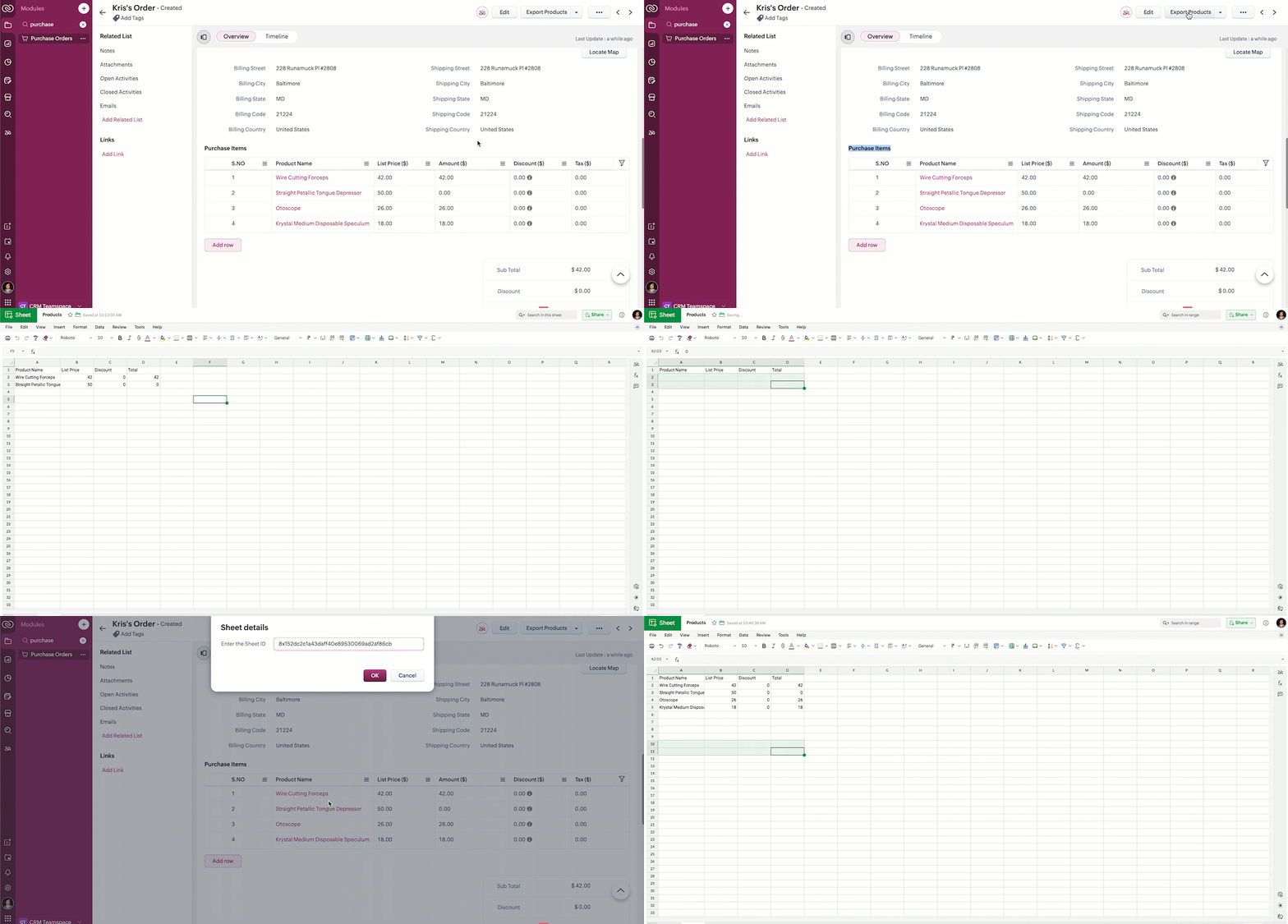

Click here to view source code.
3. Public API - Instantly retrieve real-time gold prices and perform currency conversions directly within the CRM interface
At Zylker, a gold jewelry company using Zoho CRM, the Admin needs the ability to instantly retrieve real time gold prices and perform currency conversions directly within the CRM interface without switching to external tools or websites.
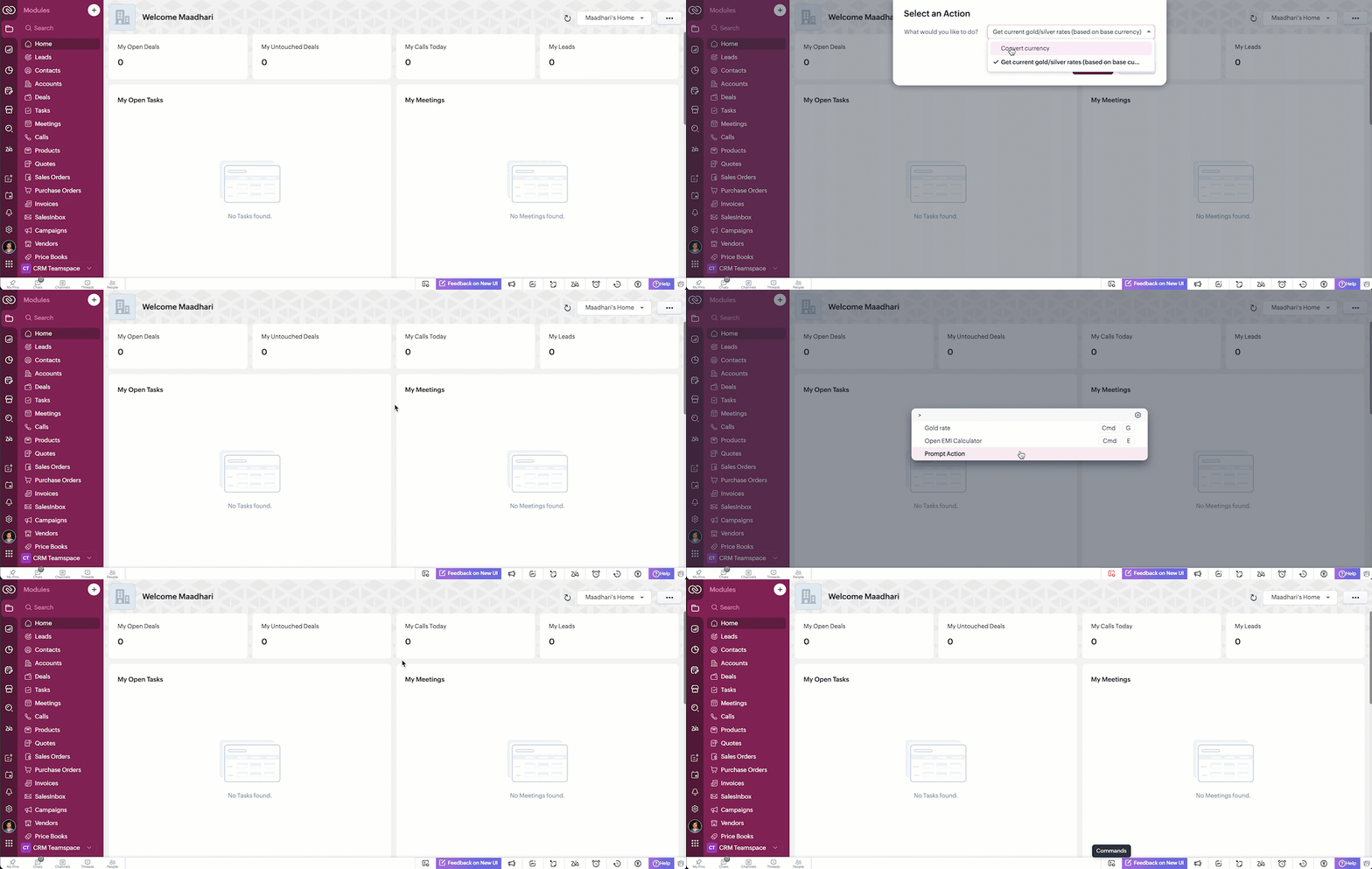

Click here to view source code.

Note :
- Now, all your API calls are made using one SDK, one format, and with full browser capabilities.
- No need to worry about authentication, domains, or response formats.
- Available now in Client Script. ZRC support in Mobile App will be available soon.
- Coming soon to Widgets
- Function Invoke APIs also follow the same fundamentals as ZRC.
From fetching CRM data to integrating with third-party tools, you can now achieve powerful customizations in Zoho CRM.
This feature is live across all DCs.
Go ahead. Try ZRC in your next Client Script, and feel the difference. Let us know your comments and feedback!
The help documentation of ZRC is available here.
Happy Coding!
Topic Participants
Maadhari M
Haiku Technical Support
Sticky Posts
Kaizen #198: Using Client Script for Custom Validation in Blueprint
Nearing 200th Kaizen Post – 1 More to the Big Two-Oh-Oh! Do you have any questions, suggestions, or topics you would like us to cover in future posts? Your insights and suggestions help us shape future content and make this series better for everyone.Kaizen #226: Using ZRC in Client Script
Hello everyone! Welcome to another week of Kaizen. In today's post, lets see what is ZRC (Zoho Request Client) and how we can use ZRC methods in Client Script to get inputs from a Salesperson and update the Lead status with a single button click. In thisKaizen #222 - Client Script Support for Notes Related List
Hello everyone! Welcome to another week of Kaizen. The final Kaizen post of the year 2025 is here! With the new Client Script support for the Notes Related List, you can validate, enrich, and manage notes across modules. In this post, we’ll explore howKaizen #217 - Actions APIs : Tasks
Welcome to another week of Kaizen! In last week's post we discussed Email Notifications APIs which act as the link between your Workflow automations and you. We have discussed how Zylker Cloud Services uses Email Notifications API in their custom dashboard.Kaizen #216 - Actions APIs : Email Notifications
Welcome to another week of Kaizen! For the last three weeks, we have been discussing Zylker's workflows. We successfully updated a dormant workflow, built a new one from the ground up and more. But our work is not finished—these automated processes are
Recent Topics
how to undoreconciled transaction
how to undo reconciled transactionChange eMail Template for Event-Invitations
Hello ZOHO-CRM Team How I can change the eMail Template for Event-Invitations? I work with the German Version of the Free Version. I know how I can modify eMail alerts or Signature Templates, but where I can other eMails modify you send out? Thank you for your answer. Regards, JuergService Title in Service Report Template Builder
I am currently working on the Service Report Template Builder in Zoho FSM. I have created three separate service report templates for different workflows: Preventive Maintenance Report Requested Service Report Installation Report My issue is that I cannotZoho Sign for Zoho Projects
Documents authorization and validation with signature is now easier in project management with Zoho Projects' Zoho Sign extension. Sign documents or send them for signatures directly from tasks and issues using Zoho Sign extension in Zoho Projects. ExtensionDeluge Learning Series – Best Practices in Deluge | December 2025
We’re excited to bring you the next session of the Deluge Learning Series, focused entirely on writing cleaner, faster, and more reliable Deluge code. In this edition, we’ll dive deep into the essential best practices every Deluge developer should followAssociate a Contact to a Campaign using deluge?
If I want to add one record to another related list, which zoho function do I use? zoho.updateRelatedRecord is not it I don't think. I simply want to take a "Contact" and associate it to a "Campaign" using deluge. Can anyone help? contactId = 5122008000000796037;Add "Groups" above "Users" in the Zoho Forms Left Menu
Hi, We have Groups but you have to go to a Form and Share or use the Directory App to manage them, please add "Groups" above "Users" in the Zoho Forms Left Menu so you can manage them in 1 place within Zoho Forms too. Thanks DanZoho Books | Product updates | October 2025
Hello users, We’ve rolled out new features and enhancements in Zoho Books. From iOS 26 updates to viewing reports as charts, explore the updates designed to enhance your bookkeeping experience. Zoho Books Updates for Apple Devices At WWDC 2025, AppleAdding Taxes to paid consultations in Zoho Bookings
I created a 'paid' consultation under Zoho Booking and integrated it with payment gateways for online/instant payment before a booking is done. How can I add 'taxes' to the price of consultation? I can add taxes to other Zoho apps (liks Books, Checkout,Zoho CRM Reports Module on Mobil App
I have the mobile app and the reports module doesn't appear in the sidebar for some reason. I saw a Youtube video where the user had the Reports module on mobile. Is there a setting to show it on mobile? Thanks.Inquiry on Help Centre Tab Customisation
Hi Zoho team, I’m wondering if it’s possible to further customise the Help Center tabs, specifically the descriptions under Knowledge Base, Community, and Tickets. While the current setup allows customising tab names, being able to tailor the descriptionsPassing a form object to a function
Suppose I have a sort_order field in multiple tables and I want to increment it by +1 onCreate of a new record. Is there a way to pass the form object as an argument into the function to keep things DRY? The following function from Zia works, but I'dCan you copy and paste a page within a form?
I have been looking at trying to copy/duplicate a whole page within a form. I can't see how I can do this without having to add all the data in again. This is very time consuming. Any help would be great.Unable to sort as Descending order
Trying to change the sort order for a lookup field (checkboxes) from Ascending to Descending and keep getting an error in Deluge that the order must be Ascending Did anyone ran into this? Thanks EyalHow do I copy an email message to one or more other folders?
I can move a message to another folder using the "move to" option but I can't figure out how to copy a message.New feature request: Allow copy of email message to another folder
Hello Zoho team, This is a suggested new feature to allow copy an email message to either another folder or the same folder. Within the same Zoho account. This is not a support request about "label". This is a suggested new feature to allow copies ofHotmail is blocking the zoho mail IP
Greetings, Since last Tuesday (5 days ago today) I wrote to Zoho support and I still haven't received a single response (Ticket ID: 2056917). Is this how you treat people who pay for your email service? I am making this public so that those who want toCreator Simplified #11: Create a custom button to download files
Hey there! This time, let's see how to create custom buttons to download the files uploaded in the file upload field. Sample use-case A training app has a module that provides the materials for all the available courses. Students can click on the correspondingHide horizontal lines at bottom of form
Hi I have a page with 3 forms embedded in html snippets. On each of the forms I can hide the submit button easily but I am left with the horizontal lines that bound that section and I cannot figure out to remove them (see below for the two sets of horizontalAutosaving of Form Field
HI can anyone suggest a way of autosaving or simulating an autosave function for a specific field in a form. The story is as follows. I have a bunch of technicians who write notes on how they do a repair. Sometimes they write for a couple of hours the troubleshooting process. If they click incorrectly, press ESC, Cancel or the browser crashes the information is lost which can be heartbreaking so my guys use notepad and then copy the information in. The only way around this is to click submit on theAsk the Experts 26: Brighten every customer interaction with Zoho Desk all year long
Hello everyone, Greetings and welcome to Ask the Experts 26. As we wrap up 2025, we are excited to invite you to the 26th episode of our Ask the Expert series. 🎄The Merry Metrics Edition = Best of Zoho Desk [Best Practices + Holiday Automation + Year-EndPricing calculator
Alright, so I'm trying to create a pricing calculator/pricing report generator to use in a cabinet shop. I did all the logic and such, and the calculator works. I have a few other things that I would need it to be able to do though, I'll do my best toBug Details
In the Bug detail the milestoneid is missingIs there a way to make a button scroll down?
Looking to have a button on a landing page scroll down to another section on the page. Any recomendations outside of coding?Stop completed task lists from disappearing?
Is there any way to stop projects from making tasks lists disappear when all the tasks in the list are completed? That's one of those little things where we're constantly fighting the product. For instance we have some projects which are ongoing - no start and end date. We use Kanban view to show the various task lists. We don't want the kanban list to disappear every time the items on it happen to be closed out. ThanksAllow customers to choose meeting venue and meeting duration on booking page
My business primarily involves one-to-one meetings with my clients. Given the hybrid-work world we now find ourselves in, these meetings can take several forms (which I think of as the meeting "venue"): In-person Zoom Phone call I currently handle theseBooking outside of scheduled availability
Is there a way for staff (such as the secretary) to book appointments outside of the scheduled availability? Right now to do this special hours must be set each time. There should be a quicker way. Am I missing something?Operation Questions.
Hello, I hope you are well. To explain a little, we are a company that sells services and products with a technical team responsible for installation and maintenance. Zoho FSM can be useful for the technical team, namely for the technical coordinatorUpdate date & time when a cell is edited
Hi All, I am desiring to have a cell update with the current date and time when another cell is edited. Any ideas? Thank youAdd "Groups" to "Share With" on Reports & All Entries
Hi, On Forms we can share Publicly, with Specific Users And/Or Specific Groups or All Users. With Reports and All Entries we lack the "Groups" option, please add this as with many users this saves a lot of work. Thanks DanAdd Pause / Resume Option to Zoho Quartz Recordings
Hi Zoho Team, We would like to request an enhancement to Zoho Quartz recordings: the ability to pause and resume an ongoing recording. Current Limitation: At the moment, when recording an issue with Zoho Quartz, the recording continues even when we areCustom Fields Not Showing Up in Invoice PDF Template Document Information
I have added 2 custom fields under Sales > Invoices > Manage Custom Fields. They are set to show in all PDFs. However when I am editing my Invoice PDF template, i do not see the custom fields under Document Information.ZOHO Books
Hi there, Why after I upgrade my Zoho invoice > Books then i wanted to add plugin which i cannot do. Please advise.How is Your eCommerce Experience w/Zoho Inventory?
First off, I'm SUPER grateful for the advent of Zoho Inventory and now the Zoho Commerce Suite. Overall, Inventory is a great product, especially for customers without an eCommerce presence. For eCommerce companies (especially those shipping more than ~10 packages/day), however, there are certain drawbacks that keep my clients from moving over to Zoho Inventory: Cons: 1. Invoice + Package Creation from Shopify/Other eCommerce Integrations: Zoho Inventory makes the somewhat perplexing decision toSimplify Mass Replies with Predefined Templates and Snippets
Hello everyone, We are happy to introduce a new enhancement to Mass Reply that helps agents respond to customers quickly and consistently. With the addition of Email Templates and Snippets in the reply window, agents can use predefined messages whileMapping custom fields from one module to another
I have a custom field, "Subscription Period" that appears as a required field in every Opportunity (Potential). I want that field to appear on any Quotes derived from that Opportunity (and have created a custom field of the same name in Quotes for thatThe Social Wall: November 2025
We’re nearing the end of the year, and the holiday season is officially kicking in! It’s that time when sales peak and your social media game needs to be stronger than ever. We’re back with exciting new updates across AI, analytics, and the mobile appItem name special charaters <>
Im trying to input speical characters such as < and > into item name and item description but comes up with following error: Invalid value passed for Item Name and Invalid value passed for Item Description How do i allow speical characters?How to update Multi File upload field
Assume that i have a multi file upload field,how can i update the same field again?Customer Address Not on Standard Invoice when Address is on Contact Record
Hi, I entered the customer billing and shipping address in Zoho CRM. I created an invoice in Zoho Books with the same customer contact. The contact is correctly in Zoho Books with the billing and shipping address. The invoice for the customer does notNext Page