Conditional branching in Zoho Desk with Automation Studio

Conditional branching in Zoho Desk with Automation Studio

Hello everyone,

We are introducing conditional branching that will allow businesses to manage complex, multi-condition workflows for customer service processes using Automation Studio.
The primary goal is to create multi-branched logic in a single rule.

Alert
We are opening Automation Studio on a request basis for Professional and Enterprise edition users across all DCs.

Kindly raise a request through this Early Access Form.

What is conditional branching?

Branched logic or conditional branching allows an automation rule to follow different execution paths according to data, events, business rules, or earlier outcomes. In branched logic the system evaluates a condition - such as amount > 10,000, country = "India", or approval_status = "rejected" and when either both or one of the conditions are met, it routes the work to the appropriate sequence of actions.

Businesses that require multi-step workflows with stricter logic-based rules to govern their processes would benefit from Zoho Desk's Automation Studio.

What is Automation Studio?

Automation Studio helps organizations build and manage complex workflows by connecting multiple conditions and actions in a single rule. Instead of creating several standalone rules, a single workflow can be triggered by an event and move ticket to subsequent steps such as assigning it, updating its status, automating notifications, and follow-ups at specific intervals.

Components in the Automation Studio Builder

An easy-to-use drag and drop builder makes the interface intuitive and user friendly. Building and customizing the rule requires the following components:

1. Triggers
Defines the event that initiates a workflow, such as ticket creation, task created, field updated, calls created, accounts created, or comments updated based on the module selected.


On selecting Field Updated, a criteria must be provided on when the rule must be triggered. For example, the rule must be triggered only when the Ticket Status is updated from Open to Escalated, this will prevent action from triggering whenever the status is updated. It will happen only when the status changes from open to escalated.


2. Criteria
Controls the flow and determines when specific actions should be executed. For example, when the trigger is set to Ticket Created, the rule is triggered every time a ticket is created.

However, if the rule must be triggered only when the Priority is High or Classification is Problem, these conditions can be specified as criteria. This ensures that the rule is not triggered for every ticket that is created, but only when either of the specified conditions is met.


3. Blocks
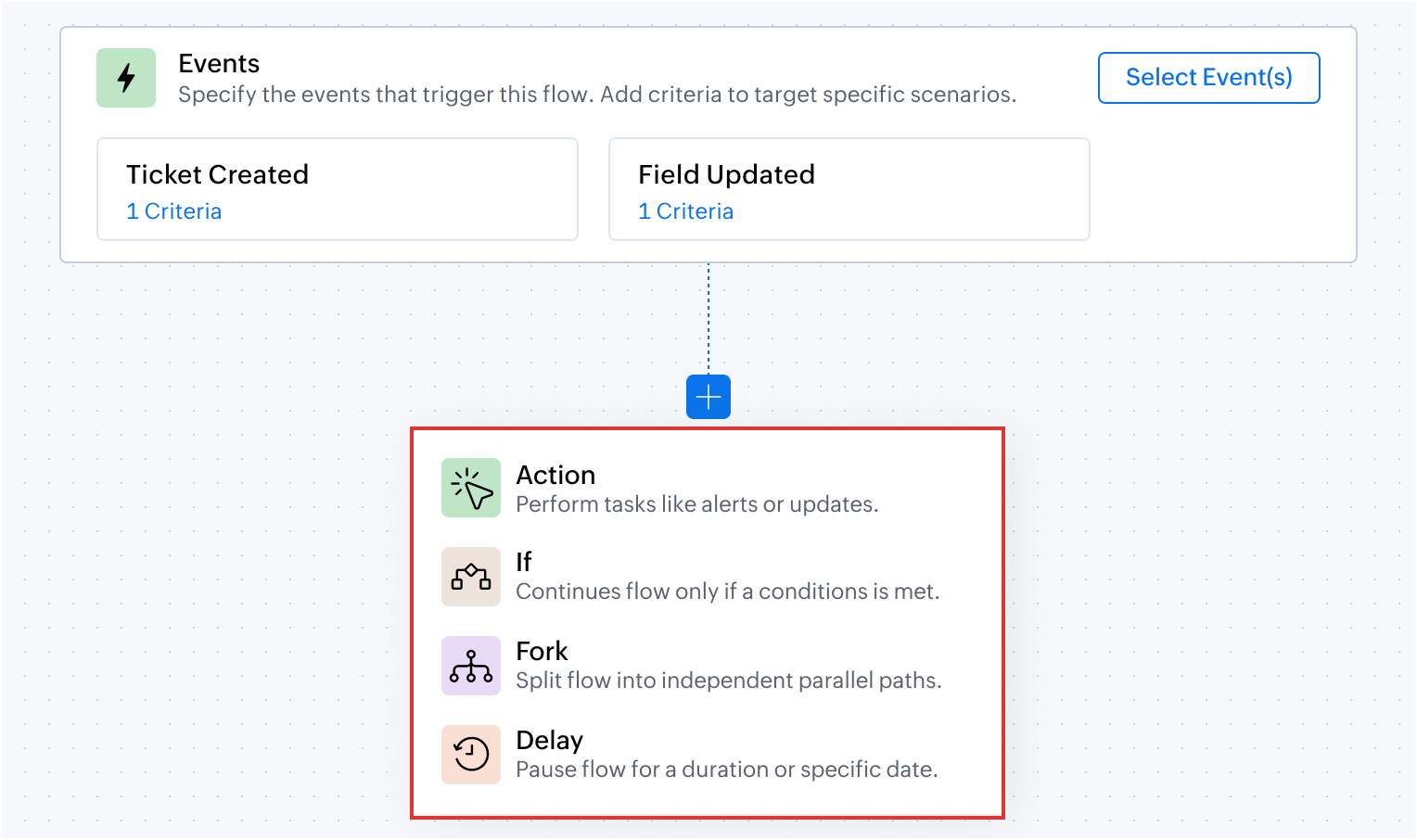
Defines conditional logic using one or a combination of pre-built blocks.
  1. Action block: Performs a specific action such as updating a field, assigning a ticket, sending an alert, sending an email, generate content using Zia, adding tags and followers, or notifying via IM. For example, when a ticket is created, the Assign ticket action will assign it to a team or a support representative based on the product type and send a WhatsApp message to the customer that the ticket is assigned to person 'X'
  2. If block: Defines conditions to determine which path the workflow should follow. Actions are executed only when the specified condition is met. For example, a ticket related to zPad is assigned to the zPad support team.
  3. Fork block: Creates multiple paths in a workflow to handle different conditions or outcomes. For example, when the customer requests for onboarding, they are assigned to the respective team based on their subscription plan: Standard, Advanced or Ultimate. Using the Fork block, separate paths with specific actions and conditions can be created for each plan.
  4. Delay block: Pauses the workflow for a specified duration before proceeding to the next step. For example, a support representative sends an email to the customer for additional information. But if there is no response for 3 days, a Delay block can automatically send a reminder email to follow-up with the customer on the 4th day. If there is no response for another 3 days, another reminder along with a WhatsApp message can be sent. Finally the ticket can be closed without manual decision-making, if there is no response from the customer after the 3rd reminder email.

4. Action chaining

Action chaining is the process of using one action's output as the next action's input. For example, if the first action generates a summary of a ticket conversation. The next Action can then use this generated summary (input) and add it as a comment to the ticket (output).


Output:


5. Dot walking

Dot walking allows to access and fetch fields from related modules while creating a rule, without requiring additional custom functions or actions.
For example, from a Ticket record, contact details such as the email address can be accessed during the configuration. This makes it easier to use related data in conditions, actions, and notifications without manually fetching records from another module.


Automation Studio in action: Use cases

Managing conditional requests in order returns and refunds

An e-commerce platform manages order returns through a dedicated Returns and Refunds module. Upon receiving a customer's email request for a return, a ticket is generated in the tickets module. If the email's subject or description includes an Order ID, the system automatically links this ticket to the relevant existing record in the Returns and Refunds module.

In the Returns and Refunds module, each request type is categorized differently for each ticket. For example, after validating the return request, the quality assurance team may approve the refund, reject it after inspection, or may need additional information from the customer on why they want to return the product.
Also, for the approved return requests, the organization waits for 3 days before closing the ticket, giving the customer time to respond if there are any issues with the refund.
The entire process of what happens next after approving or rejecting the return requests can be configured in Automation Studio.

Flow configuration


Dot walking: Using the Dot walking method, the associated record from the Tickets module is accessed and updated when changes occur in the Return Requests custom module, without using any custom function or query.

Action chaining: Using the Action Chaining method, once when the ticket status is changed to Refund Processing, the delay is added for three days.

Deliver personalized campaigns and onboarding plan based on Contact attributes

Businesses can send relevant campaigns and onboarding materials based on a contact's subscription plan, business vertical, and number of user licenses. For example, free and paid users can receive different communications, while larger teams can receive onboarding resources and session reminders based on their requirements. A prospect from financial institution can be sent specific use cases and case studies to impact lead conversion.

Another advantage of setting up multiple conditions in a single workflow, is that the system will pick the criteria and dynamically change the operation to suit the existing contact property. For example, if the free plan user moves to a paid plan the marketing collaterals sent henceforth will automatically pitch for the paid user without manual decision-making.

Likewise, onboarding journey for a team of 20 user licenses can be sent implementation guidelines and supporting materials along with weekly remote session reminders pre-designed to suit their business use case.

Flow configuration


AI-driven summarization and automated ticket routing based on product type

An e-commerce company can use Zia's Generate Content to summarize customer requests, send an acknowledgement based on the generated summary, and automatically route tickets to the appropriate support team based on the product involved.

Flow configuration


Prevent SLA breach with time sensitive escalations

An IT helpdesk team can identify unresolved tickets that are closer to the SLA due time and automatically escalate them by updating the ticket priority and notifying the appropriate team.

Flow configuration


The above use cases are some of the possibilities that you can get started with. We encourage you to try Automation Studio and share your use cases with us.

Here are the resources you would need to setup and understand the use cases where Automation Studio would be useful.
  1. Automation Studio - An Overview
  2. Building Blocks Using Automation Studio
  3. Creating a Rule using Automation Studio
To try the feature kindly raise a request using the Early Access form.

PM: @Akhil Vijayakumar 

Thanks and regards,
B. Akshaya | Zoho Desk - User Education
    • Sticky Posts

    • 2024 Email Authentication Standards: Elevating Security with Google and Yahoo

      In contemporary email communication, email authentication plays a pivotal role in mitigating email fraud, spam, and phishing attacks. Brace yourself for a new level of security. Starting February 2024, Gmail and Yahoo will be implementing robust email
    • Using Agent Email Address as From Address

      Currently, while replying to a ticket, it is possible for agents to choose their own email addresses as 'from' addresses. Although we built this just for that little extra flexibility, in hindsight, it hasn't figured much in conventional usage.  Almost all businesses prefer that responses to their customers' tickets be sent from the common support/service email address and NOT from those of individual agents. During personal interactions at events, some of you have even made passing mentions about
    • Edit and Delete options in Comments

      A lot of teams have been using ticket comments extensively to collaborate everyday. Notification Center further improved this experience by bringing real-time updates. As we continue to build more improvements to this experience, we've shipped a small-yet-important
    • Webinar 2: Supercharged customer support for growing business

      Join us for this webinar and learn how to step up your support game using a real-time communication platform to generate happier, more successful customers. In this live webinar, we will will discuss the importance of SalesIQ for your support team and how it can help you:  Understand your customers better and their journeys to proactively support and engage them even before they ask for help.  Integrating real time conversations into Zoho Desk’s Support, providing a conversational customer service
    • Customize Colors of your Customer Self Service Portal

      You asked for it. We heard you. We're happy to roll out the most sought after feature request, Customizing the Colors of your Customer Self-service Portal. Now you can set the color of your customer portal to mimic your company's web site, so that your customers visiting the portal will not feel alienated by the default theme.  Go ahead and configure the color of the header, tabs, fonts and background according to your needs. You can either choose between default color themes like Blue, Grey, Green
    • Recent Topics

    • Make Your Workflows Smarter with Zia Agents

      Hello, Enterprise Support Community, Workflow rules can now go beyond predefined actions. Zia Agents can now be invoked directly from workflow rules in Zoho CRM, allowing you to bring contextual, AI powered actions into your automated processes. Choose
    • How can I add a Custom Field (or Customer_name) to a picklist?

      Our workflow is Shopify-->SO -->Picklist-->Package-->Shipment. We would like to have the Picklist template to include a custom field "Customer_Notes" (we have created this field already). This way we get alerted when a customer has notes on their account.
    • DYK 14: Create Tasks with AI

      Did you know AI can suggest tasks within your Zoho Projects portal? Breaking a project into clear, actionable work items takes time and manual effort. Especially when the same team handles both planning and execution. AI task suggestions in Zoho Projects
    • Widget Height were destroyed

      All widget heights in the Details Canvas view are broken.
    • Task Module quick create settings

      Hello, requesting the Task module receive a quick create customization settings. We have added custom fields and have to select "More fields" at the bottom of the pop-up to access the custom fields.
    • Zoho Tables is now part of Zoho One!

      Hey everyone! We've got some exciting news to share. Zoho Tables is now included in your Zoho One subscription at no extra cost. If you're already on Zoho One, head to your app list, add Zoho Tables, and get started right away. You don't need a separate
    • #11 Nithya's First Overseas Client

      Nithya designs for clients in three countries and has never met any of them. Her first overseas invoice took a full evening. The second took four minutes. The difference was not a clever tax trick. She stopped treating every international customer as
    • Other languages in Schedulers (Zoho Books)

      Hello everyone, currently we have create functions in other languages, like nodejs etc but on schedulers we can use only deluge.. Are other languages on schedulers roll out? Kind regards, Sakis Oikonomou
    • New in Office Integrator: Extract data from images into your spreadsheet

      Hi users, We are pleased to introduce the Data from Picture feature in Zoho Office Integrator's spreadsheet editor. It intelligently detects and organizes text and numbers from any image into structured cells using OCR. With this feature, users can turn
    • Edit PDFs using Zoho PDF Editor

      Hello users, In a previous article, we covered the organizing capabilities of Zoho PDF Editor. Here, we'll provide a quick recap of its editing features, including a few new additions. A few highlights of Zoho PDF Editor's editing capabilities: Add and
    • Lookups and Custom Modules

      I created a Custom Module that I'm calling "Item Purchasing Group". This module will store information for groups of Items that must be purchased together (including minimum overall quantities and/or values, etc.). This will have a one-to-many relationship
    • Partner with HDFC And Sbi Bank.

      Hdfc and sbi both are very popular bank if zoho books become partner with this banks then many of the zoho books users will benefit premium features of partnered banks.
    • Solution to Import OST File into Office 365.

      In today’s digital workplace, organizations are rapidly moving toward cloud-based email systems for better flexibility, security, and collaboration. Microsoft 365 has become one of the most widely used platforms for business communication. A common requirement
    • Mail Merge templates in Sandbox

      Rolled out for all DCs Hello everyone, You can now create and test Mail Merge templates directly in Sandbox, making it easier to validate document generation without affecting your live organization. Why this matters Mail Merge templates are often used
    • Convert MBOX to PST File Using Free Methods

      MBOX is a mailbox format that is used by various email clients and services, such as Thunderbird, Apple Mail, Eudora, and Google Takeout. Yet, in order to be able to open your MBOX emails in Microsoft Outlook, you have to convert them from MBOX to PST
    • Zoho Books | Product updates | October 2026

      Hello users, October brings a range of new features and enhancements to Zoho Books, designed to simplify compliance, streamline accounting workflows, and improve inventory management. From the launch of the Nigeria Edition and France’s e-invoicing capabilities
    • Dashboard Table of “My New Work Orders” Changes View

      Hi FSM Team, We noticed an inconsistency with the Dashboard Table of “My New Work Orders.” Initially, the table is configured to use the “My New Work Orders” view. When we go to the Home page, the table displays a different set of records. When we return
    • Tips & Tricks #6 | Zoho Vault: Audita actividad, Gestiona accesos, Comparte credenciales & mucho más.

      ¿Sabías que Zoho Vault puede hacer mucho más por la seguridad de tu equipo? Las contraseñas forman parte del día a día de cualquier persona y organización. Aplicaciones, herramientas internas, cuentas de clientes, servicios externos, plataformas de marketing,
    • CRM Address Field - States with Countries in brackets

      Hi, Could you please remove the country in brackets from the Global State List, or at least allow us to edit these entries? It looks like the brackets were added during the initial data population, perhaps by someone building the list in a spreadsheet
    • Inquiry Regarding Customer Hierarchy & Sub-Customer Creation via Zoho API

      Dear Zoho Support Team, Our mutual client has requested support for implementing the Customer Hierarchy (Parent/Sub-Customer structure) within our existing workflow. At the moment, all invoices are being created in Zoho under the main (parent) customer
    • Which Zoho CRM tasks would you want an AI assistant to handle?

      I’ve started delegating my Zoho CRM work to AI – and many tasks now take me half the time. It has been so useful that we’re now working to make it available to everyone. Instead of clicking through records and tabs, I simply describe what needs to be
    • Introducing MCP for Zoho CommunitySpaces

      Hello everyone, Your AI assistant can now share the community workload with you. Zoho CommunitySpaces supports MCP (Model Context Protocol), so you can link an AI assistant like Claude, ChatGPT, or Cursor to your community and run it through plain language
    • CV-Library: The Newest Source Booster in Zoho Recruit!

      We’ve expanded your sourcing toolkit — CV-Library, one of the UK’s largest and most trusted online job boards, is now available as a Source Booster in Zoho Recruit. This gives recruiters instant access to millions of UK-based candidate profiles, all without
    • Tip 52#: Ways to improve data flexibility using related list

      A related list offers an ideal solution to string related data across entities together. It enables you to pull records from any module or external source and float them as a tab within your project, sprint, epic, work item, or release detail view layout.
    • Email Blast

      Hi, How do we send an email blast to thousands of customers? The email addresses are not yet saved in Zoho Desk.
    • Zoho ERP | Product updates | September 2026

      Hello users, A new month, a fresh set of updates in Zoho ERP. This month brings Netting, enhancements across our verticals, and more updates to help streamline your everyday work. Explore this month’s updates and see what’s new. Introducing Netting If
    • Introducing Zoho POS for Restaurants

      Hello Community, We’re thrilled to announce the launch of Zoho POS for Restaurants, unveiled at the 30th milestone edition of Zoholics India 2026. Running a restaurant involves multiple teams and workflows. A single table journey, from seating a guest
    • WhatsApp Business Message Pricing Update: Effective October 1, 2026

      Hi everyone, Starting October 1, 2026, Meta is updating how WhatsApp Business messages are charged. This guide explains the new per-message pricing model, how message categories work, and what changes for service messages specifically. How Meta charges
    • Zoho Calendar integration for Bigin

      Hello everyone, We're excited to introduce Zoho Calendar's integration in Bigin! For a while now, users have been able to sync events in Bigin with Google Calendar and Outlook Calendar - but with this new topping, it syncs with Zoho Calendar as well.
    • Does Updating Employee Names and Profile Pictures in Zoho One Automatically Sync Across All Zoho Applications?

      Hi Zoho Team, We are currently using Zoho One in our organization and want to centrally manage employee profile information. As a Zoho One Super Admin, if I update the employee name and profile picture for all users from the Zoho One Admin Panel, will
    • Enhanced shared mailboxes: Dedicated Sent folders, Run-through filters & fresh UI

      Hi everyone, Collaborative communication is the backbone of smooth operations; whether you are handling customer support queries, managing vendor requests, or tracking sales leads. Shared mailboxes in Zoho Mail ensure your team stays on the same page
    • How to Manage Two GST Numbers / Two Companies in a Single Zoho Inventory Organization?

      Hi Team, We currently have two separate legal entities: A Proprietorship Firm with its own GSTIN A Private Limited Company with a different GSTIN However, operationally, both companies deal with the same products, and we would like to manage the physical
    • 10/22 15時〜 オンラインもくもく会のお知らせ | Zoho ワークアウト

      ユーザーの皆さま、こんにちは。コミュニティグループの中野です。 10月22日(木)開催の「Zoho ワークアウト」をご案内します。 Zoho ワークアウトは、参加者それぞれが取り組みたいテーマを持ち寄り、ユーザー同士で交流しながら、 設定・検証・運用改善を進めるオンラインの「もくもく会」です。 「試してみたい設定があるけれど、なかなか時間を取れない」 「一人で進めていると、途中で手が止まってしまう」 「他のユーザーの活用方法や工夫を聞いてみたい」 そんな方は、Zoho ワークアウトで一緒に取り組んでみませんか?
    • Reporting tags associated to Project in Zoho books?

      Hi, I know you can add reporting tags to contact, articles and transactions. Is it possible to add reporting tags to Project. We Zoho reports I would be able to generate reports by tags. Sometimes tags for a contact is different for projects (ie Projects
    • Reporting Tags in Profit and Loss Reports Analysis

      Hello Community and Zoho Books Product Team, I would like to highlight a limitation I encountered with Reporting Tags in Zoho Books. Reporting Tags Not Applying to Automated Inventory Journal Postings from Product Invoices. For inventory product invoices,
    • Spam Quarantine: Manage suspicious emails in Zoho Mail

      When an email is quarantined by spam processing, it need not always be blocked right away. Some emails may be marked incorrectly, or may need to be reviewed before a final decision is made. The Spam Quarantine feature in the Zoho Mail Admin Console gives
    • What is the difference between "Reply" and "Public Comment" in a ticket?

      Hey, my company is thinking about switching to Zoho Desk but we do not understand the difference between the "Reply" and the "Public Comment" feature. When should we use which? And why? What is the difference between them? Thank you for your help! Kindest
    • Comments Vs. Replies

      I'm curious as to the difference between a "Reply" and a "Comment" on a ticket. It appears that "Replies" are what's used to determine response time SLA's and there are also used to automatically re-open tickets. I'm just trying to understand the key differences so I can educate both our clientele and our back-end users on which function/feature to use to better improve the ticket lifecycle. If anyone has any insight it would be appreciated. Thanks!
    • What's New in Zoho Inventory | July & August 2026

      Hello users, The July and August 2026 releases bring a range of new features and improvements across the product. From the Nigeria Edition and Super Admin enhancements to Sri Lanka IRD-compliant invoicing, Loyalty Program Management, and improvements
    • Forms data export bug

      The export csv with a password has changed for the worst. It is less secure by not allowing complex passwords. Just last week and the last year (at least) I was able to use a complex, secure password. Export CSV moreover doesn't even work if I use a simple
    • Next Page