CRM gets location smart with the all new Map View: visualize records, locate records within any radius, and more
Hello all,
We've introduced a new way to work with location data in Zoho CRM: the Map View. Instead of scrolling through endless lists, your records now appear as pins on a map.
Built on top of the all-new address field and powered by Mappls (MapMyIndia), the Map View turns your records into an interactive map for smarter planning, faster visits, and better field execution.
Why Map View?
Until now, even if addresses were stored in Zoho CRM, users had to search through lists manually or run broad filters to find location insights. There was no quick way to spot nearby leads, contacts, or other opportunities while traveling, or to plan visits efficiently.
Map View solves this by plotting records on an interactive map based on the coordinates available in the address field. You can zoom in, filter for records within a radius, sort by distance, and launch navigation—all without leaving the module.
You can enable Map View via Setup > Modules and Fields > Preferences.
Once enabled, Map View appears in the module's view selector.
What will this update offer?
1. Create, plot, and manage records with geographic coordinates
Map View plots every record with coordinates as a pin on the map. A quick glance shows you exactly where your customers, leads, or deals are.
Records without coordinates appear in the left pane, ready for updates.
You can add or correct coordinates in multiple ways, each designed to save time and improve accuracy:
- Type with auto-suggestions
Start entering an address and select from the suggestions provided. The system captures the complete address along with the coordinates in your address field, reducing the occurrence of typos and misplaced pins. - Drop a pin on the map
In cases when the exact address is unclear or unavailable, you can mark the correct spot directly, ensuring the record reflects the actual location without manual entry. - Import pre-mapped data
When large sets of records already contain latitude and longitude, importing them ensures pins are placed correctly at scale, avoiding the need for future manual updates. - Update through APIs
Integrations can keep coordinates in sync with external systems. This prevents mismatches and ensures map data remains reliable over time.
You can also move a pin to update only the geo-coordinates instead of the entire address.
These controls keep both the visual map and the address field aligned, and reduce the need for users to manually rearrange pins later.
2. Apply nearby filters and sort by distance
Custom views and smart filters now include a "nearby" condition that helps narrow down records based on proximity. You can instantly focus on the records that matter most.
Simply choose your reference location and then set a radius (preset or custom).
You can choose the reference point in different ways:
- Current device location
Use your live position to see which records are closest while you're on the move—say, when you're traveling between meetings and client visits. This makes it easy to fit in additional visits without backtracking. - Typed address
Enter a specific location to filter around. This is useful for planning ahead from the office or targeting records near a branch, warehouse, or event venue. - Point on the map
Select any location directly on the map and set a radius. This provides flexibility in targeting areas without formal street addresses, like localities or industrial zones.
When a nearby filter is applied, a radius circle appears on the map, and a distance column is added in the list view. You can also choose to display this distance on map pin cards. These details help prioritize visits, deliveries, or follow-ups based on how far records are from your chosen point.
3. Customize the view for quick decisions
You can decide which fields are shown both in the left pane and on the map pins. This ensures the most useful information is always visible at a glance.
- Left pane highlights
Along with the primary field, you can choose two additional fields. This makes it easier to scan records in the list to spot deal value, industry, or upcoming activities without opening each record. - Map pin card details
Each pin can display one field from the layout. Showing a critical value directly on the map—such as deal size—helps you decide which locations to prioritize during a route. - Clustering records at the same address
If you have multiple records at the same address—like clients from the same company or businesses located at the same IT park—they'll be clustered into a single pin. Upon clicking on the clustered pin, you can see the list of available contacts (or records).
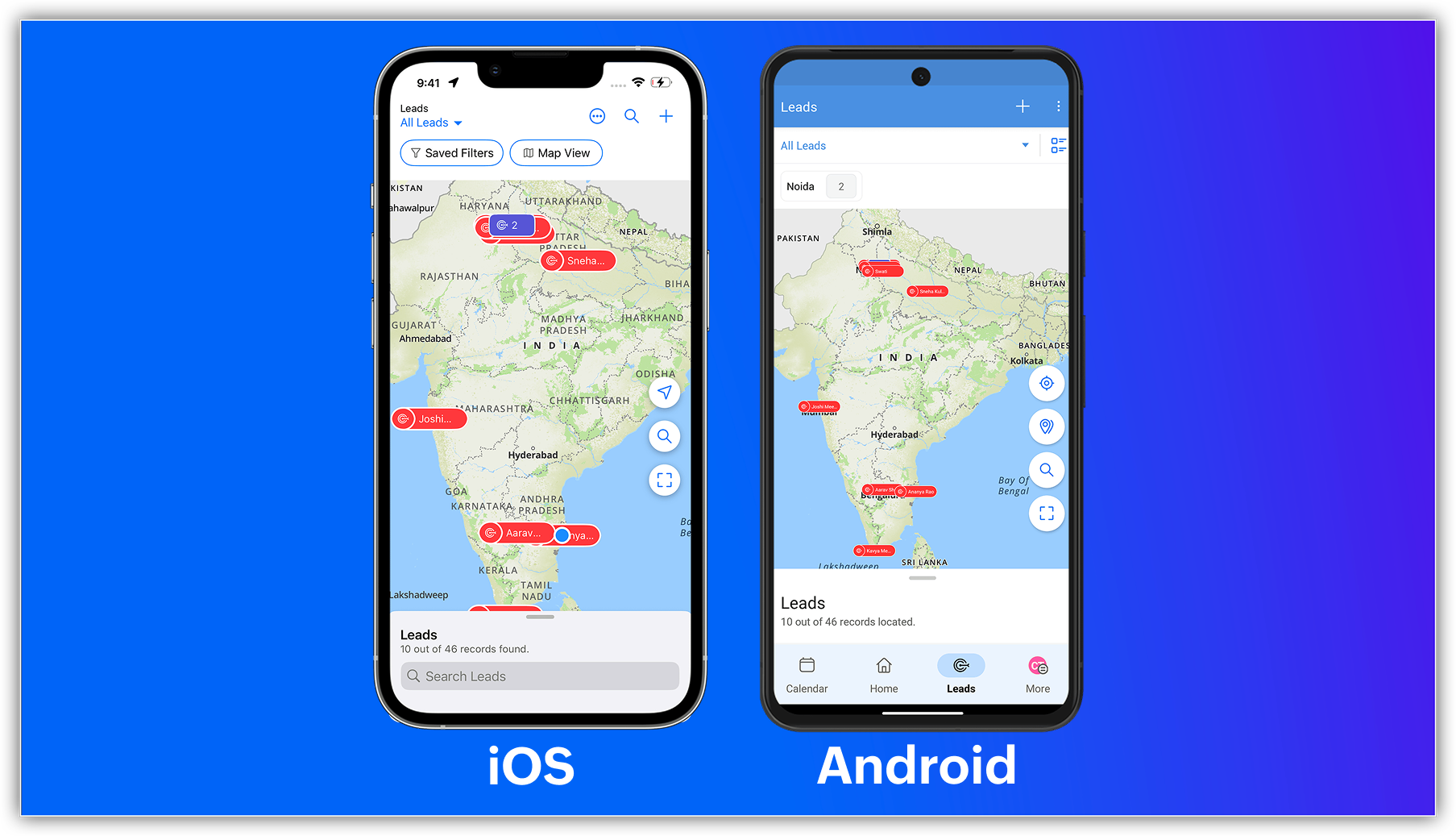
New map view in mobile apps
The capabilities of Zoho CRM's all-new address field and map view aren't just limited to your web app; they're now supported in the mobile app as well.
Previously, you could use the Near Me mobile feature in the map view, which uses Google Maps (Android and iOS) or Apple Maps (iOS) to show records within a 100 KM radius of your current location or a custom location.
With the latest enhancements, you can now access the Mappls-powered map view in Zoho CRM's mobile app. Simply enable the map view and address suggestions for the address field in the web app, and turn on the in-app map view from the app's map settings.
Once enabled, you can:
- View your record's location as a pin on the map.
- Group pins (available for Android).
- See location suggestions while searching.

Feature availability and limits
- Editions supported: All paid editions.
- Modules supported: Any module with at least one address field.
- Availability: Only the IN DC.

Resources: Help Documentation (CRM New UI)
 P.S. Map View is currently available for users in the IN DC.
Topic Participants
Nizamuddin Sohel SK
Nathan Carpenter
Scott Elliott
Toca Travel
Sunderjan Siddharth
Sticky Posts
Introducing Multiple Sandbox Types and Support for Module's Data Population
Register here for the upcoming Focus Group webinar on Multiple Sandbox | Help documentation to learn more about the new enhancements Hello everyone, Sandbox in CRM is a testing environment for users to create and test new configurations like workflowGood news! Calendar in Zoho CRM gets a face lift
Dear Customers, We are delighted to unveil the revamped calendar UI in Zoho CRM. With a complete visual overhaul aligned with CRM for Everyone, the calendar now offers a more intuitive and flexible scheduling experience. What’s new? Distinguish activitiesVoC in Zoho CRM is now data savvy: Explore response drilldown, summary components and participation in CRM criteria
VoC has all the goods when it comes to customer intelligence—which is why we're constantly enhancing it. We recently added the following: A customer drilldown component that shows you the list of prospects and customers behind a chart's attribute ExpandedWrapping up 2025 on a high note: CRM Release Highlights of the year
Dear Customers, 2025 was an eventful year for us at Zoho CRM. We’ve had releases of all sizes and impact, and we are excited to look back, break it down, and rediscover them with you! Before we rewind—we’d like to take a minute and sincerely thank youPresenting ABM for Zoho CRM: Expand and retain your customers with precision
Picture this scenario: You're a growing SaaS company ready to launch a powerful business suite, and are looking to gain traction and momentum. But as a business with a tight budget, you know acquiring new customers is slow, expensive, and often delivers
Recent Topics
Python - code studio
Hi, I see the code studio is "coming soon". We have some files that will require some more complex transformation, is this feature far off? It appears to have been released in Zoho Analytics alreadyIssue with open-rate reporting in Zoho Campaigns
Hello, Since yesterday I’ve been experiencing an issue with the open-rate reports in Zoho Campaigns. The campaigns I send appear in the reports as if none of the emails have been opened, even though I know they have. To verify this, I replicated the campaignBest practices for managing Project Charters, Business Case and RAID logs within Zoho?
Hello everyone, I’m currently refining our PMO setup within Zoho Projects and I’m curious how others are handling high-level governance documentation. We’ve been using the standardized Project Charter, Business Case and RAID frameworks from projectmanagertemplate.comIs It Possible to Convert a Custom Module to a Quote?
I recently created a custom module in our CRM environment for RFQs so that our sales team can submit quote requests directly in Zoho rather than by email/phone. This allows for a cleaner overall process, minimizing potential errors and potentially encouragingProposal: Actionable API Error Messages to Reduce Support Ticket Volume
I've encountered a long-standing frustration with how Zoho Creator's API communicates errors to developers, and I'm hoping the Zoho team can address this in a future update. This issue has persisted for over 9 years based on community discussions, andAllocating inventory to specific SO's
Is there a way that allocate inventory to a specific sales order? For example, let's say we have 90 items in stock. Customer 1 orders 100 items. This allocates all 90 items to their order, and they have a back order for the remaining 10 items which couldClosing the Loop: Why Lookup Asymmetry is Harming Data Integrity in Creator
TL;DR: Lookup fields allow users to add new related records inline via the "+" icon, but there's no equivalent ability to edit an existing related record without navigating away and losing form context. Adding a native "Edit" icon—with automatic UserAdd the ability to Hide Pages in Page Rules
Hi, We have Field Rules to show and hide fields and we have page Rules, but we can't hide a page in Page Rules so it isn't completed before the previous page (And then have the Deny Rules to prevent submitting without both pages completed), we can onlyusing the Client script on the load of the form if service no is empty means then i want to make issue relate to is Service
using the Client script on the load of the form if service no is empty means then i want to make issue relate to field is Service if Purchae no is empty means then i want to make issue relate to is PurchaseChanges to the send mail Deluge task in Zoho CRM
Hello everyone, At Zoho, we continuously enhance our security measures to ensure a safer experience for all users. As part of our ongoing security enhancements, we're making an important update on using the send mail Deluge task in Zoho CRM. What's changing?Work Order wont mark as Completed
I have a couple of work orders that won't mark as completed even when I've marked the Service Appointments as completed fully.Item name special charaters <>
Im trying to input speical characters such as < and > into item name and item description but comes up with following error: Invalid value passed for Item Name and Invalid value passed for Item Description How do i allow speical characters?Zoho Analytics Dashboard - How to hide the user filter
I am using the same dashboard template across different external clients and applying a user filter to the data by site URL. How can I hide the user filter in View Mode so the external client won't see the list of other clients in the drop-down menu?Customer Parent Account or Sub-Customer Account
Some of clients as they have 50 to 300 branches, they required separate account statement with outlet name and number; which means we have to open new account for each branch individually. However, the main issue is that, when they make a payment, theyKaizen #229: Email-Deal Associations in Zoho CRM
Hi All, Welcome back to another week of Kaizen! Emails are a core channel for customer communication in any CRM system. In Zoho CRM, emails can be associated with records across multiple modules. In this post, we will focus on email associations withAction Required: Update Microsoft SQL Server Security Settings Before February 2026
Dear Users, We recently deployed security updates in Zoho Analytics that inadvertently caused connection failures for a few customers using Microsoft (MS) SQL Server hosted on older Windows versions (Windows Server 2012, 2012 R2, and 2014). To restoreContacts limit in basic vs standard - what counts? Are customers contacts?
I’ve been using books for a number years for my small business. I only ever work with 20 clients at any given time. I do purchase services from a number of vendors to run my business, so there are some comtacts there too. I used to use the basic package,Saving issue
First problem I opened a MS word file in writer. after the work is done, it does not save instantly, I waited for like 10min and it still did not save. second problem When I save a file, then file gets saved as another copy. I just did save, not saveAutomating Employee Birthday Notifications in Zoho Cliq
Have you ever missed a birthday and felt like the office Grinch? Fear not, the Cliq Developer Platform has got your back! With Zoho Cliq's Schedulers, you can be the office party-cipant who never forgets a single cake, balloon, or awkward rendition ofCreate Tasklist with Tasklist Template using API v3
In the old API, we could mention the parameter 'task_template_id' when creating a tasklist via API to apply a tasklist template: https://www.zoho.com/projects/help/rest-api/tasklists-api.html#create-tasklist In API v3 there does not seem to be a way toAbility to Set a Unified Tab Order/View for All Users in Zoho Projects
Hello Zoho Projects Team, We hope you are doing well. We would like to submit a feature request regarding tab/menu organization in Zoho Projects. Current Behavior: The tab (module) order in Zoho Projects is user-specific. Each user (internal or external)Task Order
Hello! I've recently switched to Zoho Projects and a long time user of MS Project, Asana and LiquidPlanner (which has recently been purchased) and I'm running into a frustration I'm hoping someone can assist with. It has to do with how tasks are orderedAutomating CRM backup storage?
Hi there, We've recently set up automatic backups for our Zoho CRM account. We were hoping that the backup functionality would not require any manual work on our end, but it seems that we are always required to download the backups ourselves, store them,2026 Product Roadmap and Upcoming Features
This is your guide to what is coming in Zoho Vertical Studio throughout 2026. We’ll update this post throughout the year as items move from development to release, and as and when new initiatives are added. Once a feature is released, it will be reflectedVendor legal and DBA names for USA users
I would like to hear how Zoho Books users are handling DBA names in the vendor profile. If the Company name in the vendor profile has to be the legal name (line 1 of the W-9), whare are you entering the DBA name (the name that checks are made out to)Zoho Books API invoice email bouncing with 'relaying-issues' error
I have waited over 30 days for zoho books uk to assist with the following and i have had no replies or tickets erronously closed. The service has been terrible - very unlike zoho! So i am raising this here hoping that a community member can assist: Hello,Stop the Workarounds: We Need Native Multi-Step Forms
After over 17 years of community requests, I'm hoping the Zoho team can finally address the lack of native multi-page form support in Zoho Creator. This has been one of the longest-standing feature requests in the community, with threads spanning nearlyProduct Updates in Zoho Workplace applications | January 2026
Hello Workplace Community, Let’s take a look at the new features and enhancements that went live across all Workplace applications for the month of January. Zoho Mail Zoho People Notifications preview in Zoho Mail Notification emails from Zoho PeopleHow do i setup default values for few fields
We have few fields in CRM like rate of return, type etc - they can be picklist and standard inut fields. picklist we have choice to set default value. but how do we default some value in input type of fields?We know the company but not the contact
We are fairly new to Zoho, part of our marketing stack is we use products like lead feeder to identify which companies are visiting our site. We are able to match this data to salesiq but cannot find a way to add a company name to the salesiq visitorCustomize Calendar view in Teamspaces Settings
Right now every customization that happens inside of the calendar view inside of CRM is only visible for the specific user. We want to be able to set up calendar views as an admin for specific roles. I would suggest to do that inside of the settings ofHow to filter subform report based upon main form report in dashboard
Hi Team, I am creating a dashboard in Zoho Analytics. I want to have a main form report and below I want to show subform report of main form. If I filter the main form with date then I want to show subform records based upon main form. how can I achieveusing the Client script I want to Hide Show the Fields
if Related to service means some of the field like service no want to shoe and hide Amc no , purchase no how i achive this let issu = ZDK.Page.getField('Issue_Related_To').getValue(); if (issu == 'Service') { var field_obj = ZDK.Page.getField('Warranty_Cases');Ask the Expert – Zoho One Admin Track : une session dédiée aux administrateurs Zoho One
Vous administrez Zoho One et vous vous posez des questions sur la configuration, la gestion des utilisateurs, la sécurité ou encore l’optimisation de votre back-office ? Bonne nouvelle : une session Ask the Expert – Zoho One Admin Track arrive bientôt,Write-Off multiple invoices and tax calculation
Good evening, I have many invoices which are long overdue and I do not expect them to be paid. I believe I should write them off. I did some tests and I have some questions: - I cannot find a way to write off several invoices together. How can I do that,Kaizen #210 - Answering your Questions | Event Management System using ZDK CLI
Hello Everyone, Welcome back to yet another post in the Kaizen Series! As you already may know, for the Kaizen #200 milestone, we asked for your feedback and many of you suggested topics for us to discuss. We have been writing on these topics over thevendors / customers with 2 different address and gst no
Why can't we have option for more than one address and depending on the state option for more than 1 GST no. ? We have customers / vendors PAN india with different addresses and GST no. for different states.Recurring Automated Reminders
Hi, The reminders feature in Zoho Books is a really helpful feature to automate reminders for invoices. However, currently we can set reminders based on number of days before/after the invoice date. It would be really helpful if a recurring reminder featureFail to send Email by deluge
Hi, today I gonna update some email include details in deluge, while this msg pops up and restrict me to save but my rules has run for one year. can you tell me how to use one of our admin account or super admin account to send the email? I tried to updateTransitions do not update fields until the record moves to next stage
We have a blueprint where a couple of stages have multiple transitions. If only some of the transitions are completed, but not all, Zoho does not update any of the fields impacted by the completed transitions. Is there any way Zoho can udate the fieldsNext Page