Introducing edition-wise Data Storage limits in Zoho CRM

Last modified on September 25, 2024:
Here’s the latest storage availability for Zoho CRM editions. To learn more about managing your data storage space, click here.
Here’s the latest storage availability for Zoho CRM editions. To learn more about managing your data storage space, click here.
Edition | Base Storage for an Org (<200 users)* | Base Storage for an Org (>200 users)* | Additional Storage for an Org** | Maximum Additional Storage |
Free | 5,000 records | 5,000 records | You cannot purchase additional user licenses in the Free edition. | - |
Standard | 100,000 records | 100,000 records | NA | - |
Professional | 10 GB | 10 GB | 20 MB | 5 GB |
Enterprise | 10 GB | 15 GB | 50 MB | 10 GB |
Ultimate | 10 GB (5 million records) | 30 GB | 100 MB | 10 GB |
*(approximate values)
**(based on each user license purchased)

Moderation Update:
We are locking the post as the storage limits shared in the original post are no longer valid. Please feel free to start a new post for any questions on the new storage limits.
Hello everyone,
The storage space in CRM will now be divided into two categories: Data storage and File storage, both will have edition-wise limitations of their own.
The edition-wise availability of data storage space
(there are no changes in the file storage limitations)
| Edition | Base Storage for an Org (approximate values) | Additional Storage for an Org (based on each user license purchased) | Maximum Additional Storage |
| Free | 5,000 records (10MB) | You cannot purchase additional user licenses in Free edition. | - |
| Starter | 10,000 records (20MB) | NA (purchasing user licenses will not increase the base storage limit) | - |
| Standard | 100,000 records (200 MB) | NA (purchasing user licenses will not increase the base storage limit) | - |
| Professional | 5 GB (2.5 million records) | 10 MB | 5 GB |
| Enterprise | 10 GB (5 million records) | 20 MB | 10 GB |
| CRM Plus | 10 GB | 20 MB | 10 GB |
| Zoho One | 10 GB | 20 MB | 10 GB |
| Ultimate | 10 GB | 100 MB (50,000 records) | 10 GB |
What is Data Storage?
It is the total space occupied by the records in the standard and custom module, which is inclusive of the notes that are added to the records. It also includes the space occupied by the data in your recycle bin.
How will we calculate the data storage?
Data storage is calculated by taking the size of the records that you store in every module, the notes added to the records, and the data stored in the recycle bin.
(These are approximate values that are arrived based on average consumption of a user)
| Modules | Size |
System defined modules (Leads, Contacts, Accounts, Deals, Campaigns, Products, Vendors, Quotes, Purchase Orders, Invoices, Sales Orders, Cases, Price Books, Visits, Tasks, Calls, and Events) | 2 KB |
| Custom Modules | 2 KB |
| Linking Modules | 1 KB |
| Notes | 1 KB |
| Emails (each records in the email related list) | 1 KB |
| Recycle Bin | Size for each component will be same as above |
How will it affect the existing customers?
The customers who have exceeded their data limits and the ones who are nearing their data limits will be sent an email notification with the details. In order to ensure that businesses do not get affected by this change, we are providing a minimum grace period of 3 months to manage their data effectively.
Apart from the default storage space that is provided with the subscribed edition (refer to the table below), you can purchase additional data storage. However, there are few details you need to note about purchasing additional storage space before and after the storage limitations are effective.
Before the data storage limitations are implemented:
Additional Data storage at USD 5/100 MB/month (approximately 5000 records)- This is currently an offline purchase only (it is yet to be mentioned under Manage subscriptions).
Currently we will let you know your data storage usage. In case you are going to reach or you have reached your storage, you can proactively make a purchase.
After the data storage limitations are implemented:
There will be an option for in-app purchase of data storage. This will be available in manage subscriptions at the time of implementing the data restrictions
You will be entitled for default storage space based on the Zoho CRM subscription you purchase.
Why is Data and File storage separated?
The data that you store in CRM are used by the system to generate meaningful insights. For example, the leads details are processed by CRM to generate reports, dashboards, make predictions, give recommendations, and in creating custom analysis. In order to churn useful and actionable information, the system has to perform numerous operations on the stored data.
In addition, if unchecked and limitless data is stored over a long period it becomes difficult to make meaningful analyses and the results may be skewed. Therefore, it is essential to keep a check on the data that is entering and stored in your org's CRM account, also it is instrumental in maintaining a clean database.
What are the components in Data Storage?
Data storage is classified into storage and usage details to give a clearer picture.
In storage details you can see:
- the total space allocated for the ascribed subscription.
- used data storage
- remaining storage space (we calculate the remaining space periodically).
In usage details you can view the total space occupied by the data in each module, that is inclusive of all the records and notes. 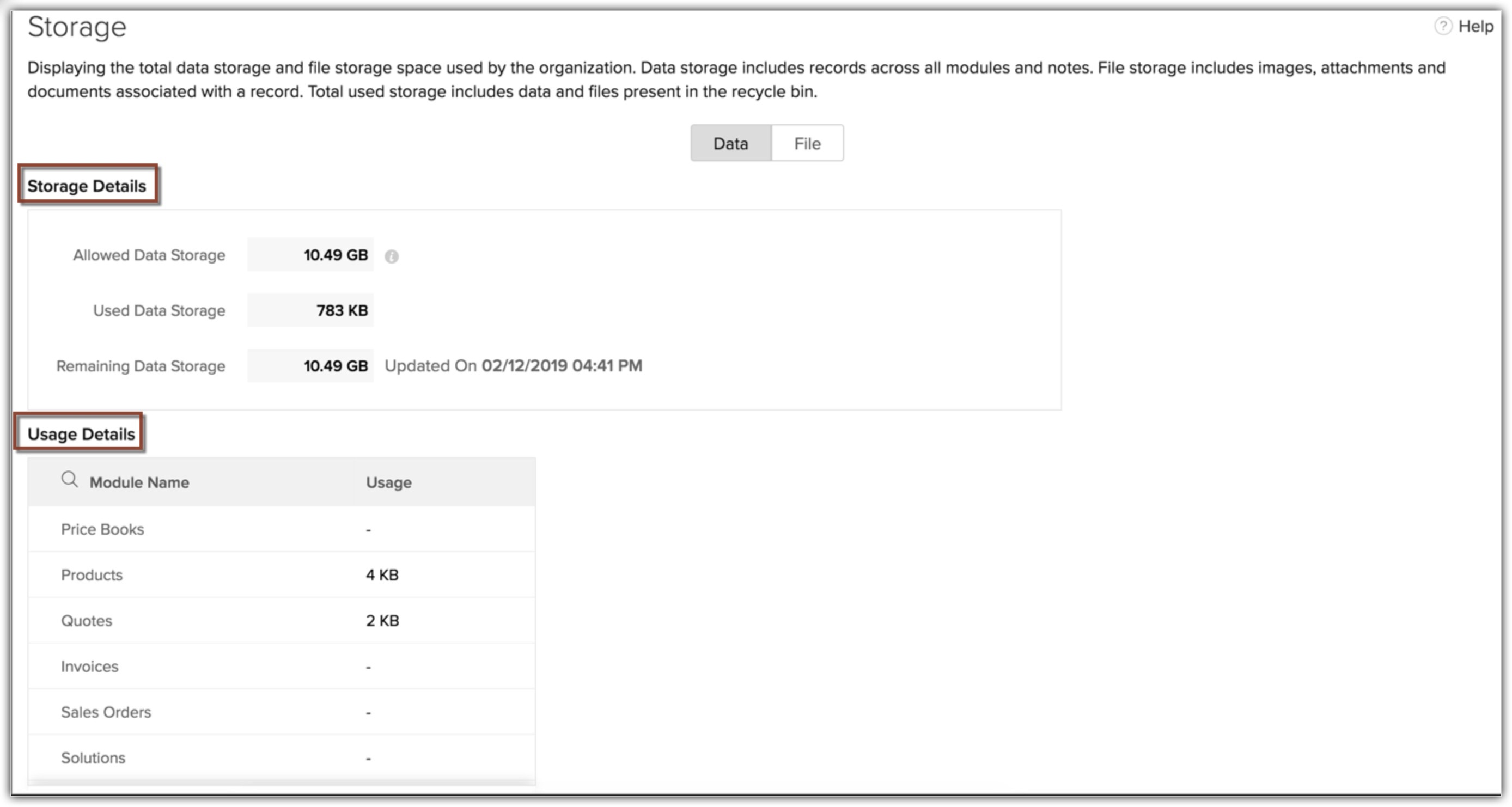
Regards,
Anumita
Topic Participants
Anumita Gupta
Vignesh
Heather Shoup
Senthil DEV
Juan
Sticky Posts
Elevate your CX delivery using CommandCenter 2.0: Simplified builder; seamless orchestration
Most businesses want to create memorable customer experiences—but they often find it hard to keep them smooth, especially as they grow. To achieve a state of flow across their processes, teams often stitch together a series of automations using WorkflowPresenting ABM for Zoho CRM: Expand and retain your customers with precision
Picture this scenario: You're a growing SaaS company ready to launch a powerful business suite, and are looking to gain traction and momentum. But as a business with a tight budget, you know acquiring new customers is slow, expensive, and often deliversNimble enhancements to WhatsApp for Business integration in Zoho CRM: Enjoy context and clarity in business messaging
Dear Customers, We hope you're well! WhatsApp for business is a renowned business messaging platform that takes your business closer to your customers; it gives your business the power of personalized outreach. Using the WhatsApp for Business integrationZoho CRM: Sales Rep Professional Certification Program on Coursera
We are happy to share that we have published the Zoho Sales Representative Professional Certificate in partnership with Coursera, a leading platform for online learning and career development that offers access to courses and degrees from leading universitiesEnhancements to the formula field in Zoho CRM: Auto-refresh formulas with the "Now" function, stop formula executions based on criteria, and include formulas within formulas
Dear Customers, We hope you're well! By their nature, modern businesses rely every day on computations, whether it's to calculate the price of a product, assess ROI, evaluate the lifetime value of a customer, or even determine the age of a record. With
Recent Topics
how to use validation rules in subform
Is it possible to use validation rules for subforms? I tried the following code: entityMap = crmAPIRequest.toMap().get("record"); sum = 0; direct_billing = entityMap.get("direct_billing_details"); response = Map(); for each i in direct_billing { if(i.get("type")Notes Issues
Been having issues with Notes in the CRM. Yesterday it wasn't showing the notes, but it got resolved after a few minutes., Now I have been having a hard time saving notes the whole day. Notes can't be saved by the save button. it's grayed out or not grayedHow to disable user entry on Answer Bot in Zobot
Hi, I have an Answer Bot in my Zobot, here is the configuration: I only want the user to choose 1 of the 4 the options I have provided: When no answer found, user chooses 'I'll rephrase the question' or 'Ask a different question When answer is found,More admin control over user profiles
It's important for our company, and I'm sure many others, to keep our users inline with our branding and professional appearance. It would be useful for administrators to have more control over profile aspects such as: Profile image User names Email signaturesPlease Make Zoho CRM Cadences Flexible: Allow Inserting and Reordering Follow-Up Steps
Sales processes are not static. We test, learn, and adapt as customers respond differently than expected. Right now, Zoho Cadences do not support inserting a new step between existing follow-ups or changing the type of an existing primary step. If I realizeChanging the Default Search Criteria for Finding Duplicates
Hey everyone, is it possible to adjust the default search criteria for finding and merging duplicate records? Right now, CRM uses some (in my opinion nonsensical) fields as search criteria for duplicate records which do nothing except dilute the results.Cant update image field after uploading image to ZFS
Hello i recently made an application in zoho creator for customer service where customers could upload their complaints every field has been mapped from creator into crm and works fine except for the image upload field i have tried every method to makeClear Tag & Linking Between Quotes and Sales Orders
Hi Zoho Team, In Zoho Books, when a quote is converted into a sales order, it would be extremely useful to have: A clear tag/indicator on the quote showing that it has been converted into a sales order. A direct link in the sales order back to the originatingZoho CRM Inventroy Management
What’s the difference between Zoho CRM’s inventory management features and Zoho Inventory? When is it better to use each one?Zoho Books Sandbox environment
Hello. Is there a free sandbox environment for the developers using Zoho Books API? I am working on the Zoho Books add-on and currently not ready to buy a premium service - maybe later when my add-on will start to bring money. Right now I just need aAdd Direct Ticket Link to Zoho Help Center Portal in Email Replies
Hi Zoho Support Team, We hope you're doing well. We’d like to request a small but valuable improvement to enhance the usability of the Zoho Help Center portal (https://help.zoho.com/portal/en/myarea). Currently, when someone from Zoho replies to a support[Webinar] Deluge Learning Series - AI-Powered Automation using Zoho Deluge and Gemini
We’re excited to invite you to an exclusive 1-hour webinar where we’ll demonstrate how to bring the power of Google’s Gemini AI into your Zoho ecosystem using Deluge scripting. Whether you're looking to automate data extraction from PDFs or dynamicallyConnecting Zoho Inventory to ShipStation
we are looking for someone to help connect via API shipStation with Zoho inventory. Any ideas? Thanks. UriSubform edits don't appear in parent record timeline?
Is it possible to have subform edits (like add row/delete row) appear in the Timeline for parent records? A user can edit a record, only edit the subform, and it doesn't appear in the timeline. Is there a workaround or way that we can show when a userNew in Cadences: Option to Resume or Restart follow-ups when re-enrolling records into a Cadence, and specify custom un-enrollment criteria
Managing follow-ups effectively involves understanding the appropriate timing for reaching out, as well as knowing when to take a break and resume later, or deciding if it's necessary to start the follow-up process anew. With two significant enhancementsIm Stuck in an EDIT ONLY WITH WIZARD issue
So I found Wizards to be a really helpful tool in minimizing the exposure of redundant, superfluous fields to staff that would never otherwise have to edit those fields. My issue is, that when the record (in this case a lead) is created with a wizard,Account upgrade
Good evening, I upgraded my account and paid for it. From standard to professional. Unfortunately after the paiment my account was not upgraded. Please your advise. Best Regards Erik van StaverdenHow to set ALL default dates of my organization to DD-MM-YYYY format?
All replies to this question comes from a time where the UI was different. It's extremely frustrating not being able to find how to do this simple setting change. I want everything and everyone in my organizations to have DD-MM-YYYY date format by default.How can I sync from Zoho Projects into an existing Zoho Sprints project?
Hi I have managed to integrate Zoho Projects with Zoho Sprints and I can see that the integration works as a project was created in Zoho Sprints. But, what I would like to do is to sync into an existing Zoho Sprints project. Is there a way to make thatMeet Canvas' Grid component: Your easiest way to build responsive record templates
Visual design can be exciting—until you're knee-deep in the details. Whether it's aligning text boxes to prevent overlaps, fixing negative space, or simply making sure the right data stands out, just ironing out inconsistencies takes a lot of moving parts.Zoho Subform Workflows onAdd of Row
Suppose I have a form with attached workflows onLoad. If I use the form as a subform, will it inherit the workflows or do I need to create new ones onAdd of row?Super Admin removal
I brought a sub, and I gave the Super admin rights to a person who is no longer with us, so I need to change, and I need to make myself the Super adminEmployees in Leave Policy exceptions
In the Leave Policies we should be able to add specific employees to the exception list So it will be like All Employees except A,B,C in the exception list, currently we can only add departments etcBetter Notes Commenting
Hi, I'd like to suggest better collaboration tools for NOTES. The current notes section for Accounts, Contacts and Deals is not ideally suitable for any degree of communication or collaboration. When responding to a note, there is no ability to leaveFormula field with IF statement based on picklist field and string output to copy/paste in multi-line field via function
Hello there, I am working on a formula field based on a 3-item picklist field (i.e. *empty value*, 'Progress payment', 'Letter of credit'). Depending on the picked item, the formula field shall give a specific multi-line string (say 'XXX' in case of 'ProgressExporting Templates
I have just spent 2 hours creating a project template for a Netsuite configuration, and want to share it with other Zoho Projects users - who have a different account. Is there any way to do this?Power of Automation:: Streamline Associated Teams based on the Task Owner update.
Hello Everyone, A Custom function is a user-written set of code to achieve a specific requirement. Set the required conditions needed as when to trigger using the Workflow rules (be it Tasks / Project) and associate the custom function to it. Requirement:No Response from Zoho Support in 8 Days - Typical?
I have a couple of issues I'm trying to work through. Initially, I was getting support from support@zohofsm.com, but I have not received a response in 8 days (11 on another question). Is this typical? Can I pay for support? For context, I am not spammingAdd QUOTE OWNER profile image to a Quote Template
I can add their email address.. phone number, DOB. I need to add a users profile picture so when they assign a template to a quote they own it adds their picture to the cover page. I've tried hacking a solution together but there has to be an easier way.Email Integration - Zoho CRM - OAuth and IMAP
Hello, We are attempting to integrate our Microsoft 365 email with Zoho CRM. We are using the documentation at Email Configuration for IMAP and POP3 (zoho.com) We use Microsoft 365 and per their recommendations (and requirements) for secure email we haveElevate your CX delivery using CommandCenter 2.0: Simplified builder; seamless orchestration
Most businesses want to create memorable customer experiences—but they often find it hard to keep them smooth, especially as they grow. To achieve a state of flow across their processes, teams often stitch together a series of automations using WorkflowZoho Connections Desk API relative URL PATTERN_NOT_MATCHED
While i am trying to do this: async function fetchTicketsFromDesk(timeFilter = 'current_month') { try { const response = await ZOHO.CRM.CONNECTION.invoke("desk_connection", { url: "/api/v1/tickets", method: "GET", }); const data = response.details ? JSON.parse(response.details)Zoho CRM - Custom Views for Portal Users
I'm looking for an option to customise custom views for portal users in CRM. It would be great if "portal user" was a permission on custom views.【参加無料】10/17(金) 東京 ユーザ交流会 Vol.3 参加登録 受付開始!
ユーザーの皆さま、こんにちは。コミュニティチームの藤澤です。 10/17(金)に、東京・新橋で「東京 ユーザー交流会 Vol.3」を開催します! 今回のユーザー事例セッションのテーマは、「Zoho Flowを活用した他社の決済サービスとの連携事例」です。 さらに、Zoho Flowに限らず、Analytics や Campaigns などの多彩なZohoサービスの活用方法について、豊富なご経験をもとにご紹介いただきます。 また、Zoho社員セッションでは、Zoho CRMを活用して日々の営業業務を効率化する具体的な事例をお話しします。業界を問わず、幅広い方にご参考いただける内容となっています!Zoho Meeting Plug compatibility with newer versions of Outlook
Documentation states that the zoho meeting plug in for outlook is only compatible with versions up to Outlook 2019 What is available to users of more up to date versions of outlook/office 365?Getting Attachments in Zoho Desk via API
Is there a way to get attachments into Zoho Desk via an API? We have a process by which a zoho survey gets sent to the user as a link in a notification. The survey has several upload fields where they can upload pdf documents. I've createdIntroducing Zoho's own SMS gateway
We're thrilled to announce the launch of our own SMS gateway feature within Zoho Marketing Automation! This new feature enables seamless SMS campaign management alongside your email marketing initiatives, providing a more integrated and efficient wayEmbedding in Desk articles
We would like to embed documents in our Desk articles. When we use an iframe for the embed, we get scrollbars and a frame border. Neither of those is acceptable. I've spoken with the Desk Support team about what we want and they tell me that it cannotZoho CRM button to download images from image upload field
Hello, I am trying to create a button in Zoho CRM that I can place in my record details view for each record and use it to download all images in the image upload fields. I tried deluge, client scripts and even with a widget, but feel lost, could notMass Update Contacts In Zoho Campaigns
Is there a way to mass update contacts in zoho campaigns? I want to be able to change the content of a field for a few hundred contacts, and can't go through all of them individually.Next Page