Kaizen #125 Manipulating Multi-Select Lookup fields (MxN) using Zoho CRM APIs
Hello everyone!
Welcome back to another week of Kaizen. In last week's post in the Kaizen series, we discussed how subforms work in Zoho CRM and how to manipulate subform data using Zoho CRM APIs.
In this post, we will discuss how to manipulate a multi-select lookup fields using Zoho CRM APIs.
Multi-select lookup field
The Multi-Select Lookup Field enables you to establish a many-to-many relationship between two different modules in CRM. It allows you to associate multiple records with each other, from two different modules.
These associations are stored in an individual module called "Linking Module". Consider there are two modules, Employees and Skills. The Employees module contains details regarding Zylker's workforce, and the Skills module contains details regarding various skills like Social Media Marketing and Content Marketing.
We want to associate multiple skills to an employee. So, a multi-select lookup can be created in the Employees module. When doing so, similar multi-select lookup field will be automatically created in the Skills module, along with the EmpXSkills linking module by Zoho CRM. The underlying data model is described in the below image.
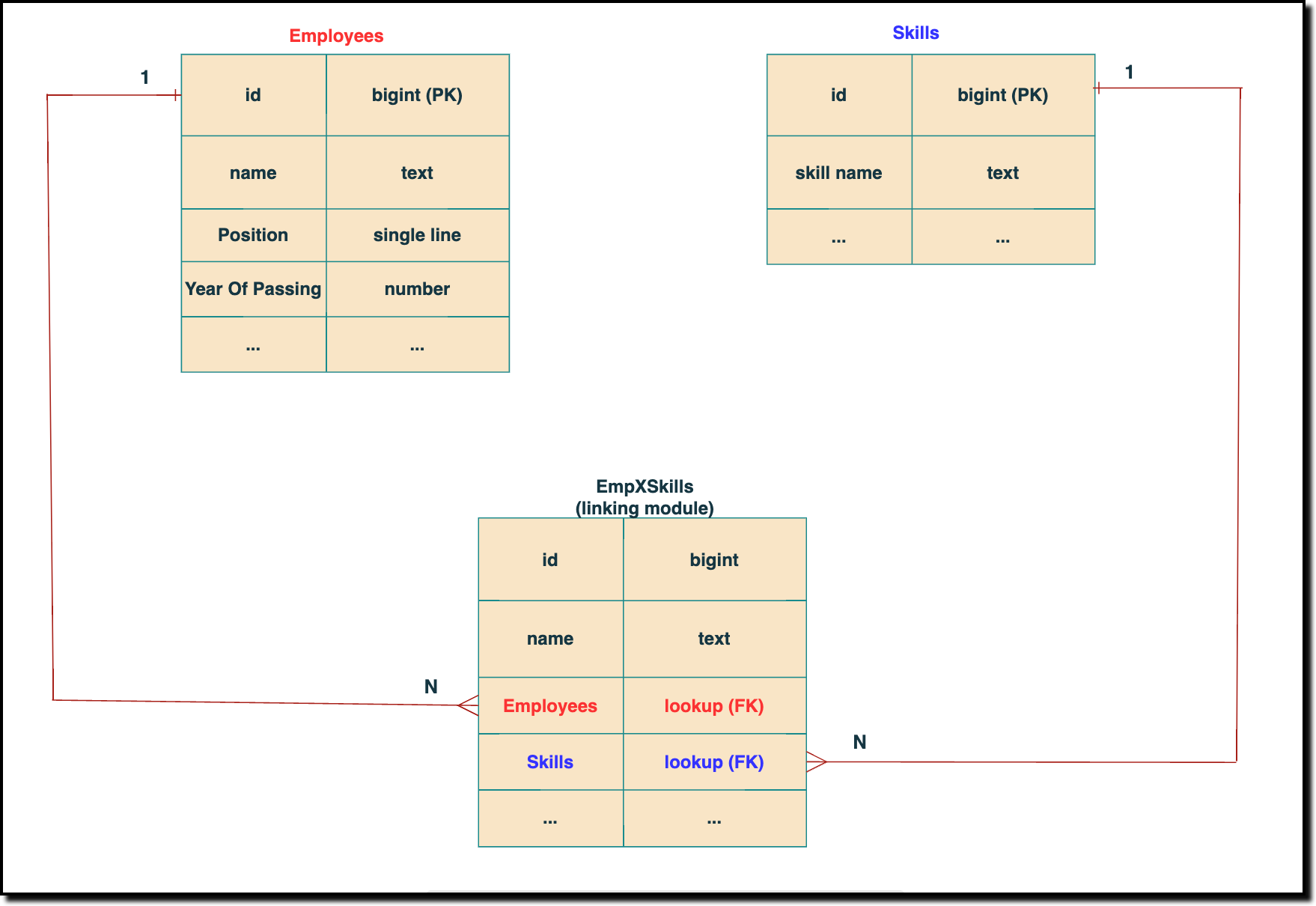 The above chart shows the data model representation when you create a multi-select lookup field in a module. Here, there are two lookup fields—one pointing to the Employees module and the other pointing to the Skills module.
 In the linking module, two lookup fields (lookup fields with api names - Employees and Skills) will be created. The lookup fields, one pointing to Employees and the other pointing to Skills from the linking module, establish a connection between the linking module and its associated module.
How to associate an employee's skills while creating an Employee record through the Insert Records API
API names you need before invoking the API
- The API name of the multi-select lookup field in the modules you want to insert data.
- API names of the lookup fields in the linking module. Eg: here the API Name of the linking module is "EmpXSkills" and the corresponding lookup field api names are "Employees" & "Skills". You can use the Fields Metadata API for Employees and Skills to get these details.
Step 1
Know the API name of the multi-select lookup field in the module (In our case, Skills is the multi-select lookup field in the Employees module)
To know the API names of the multi-select lookup fields, make a GET - Fields Metadata API call. Among all the Employee's fields, multi-select lookup field can be identified by the json key data_type with the value multiselectlookup. The corresponding connected module can be found from the json connected_module. Below is the API call & response for such a multi-select lookup field.
Request URL : {api-domain}/crm/v6/settings/fields?module=Employees
Request Method: GET
Sample Response:
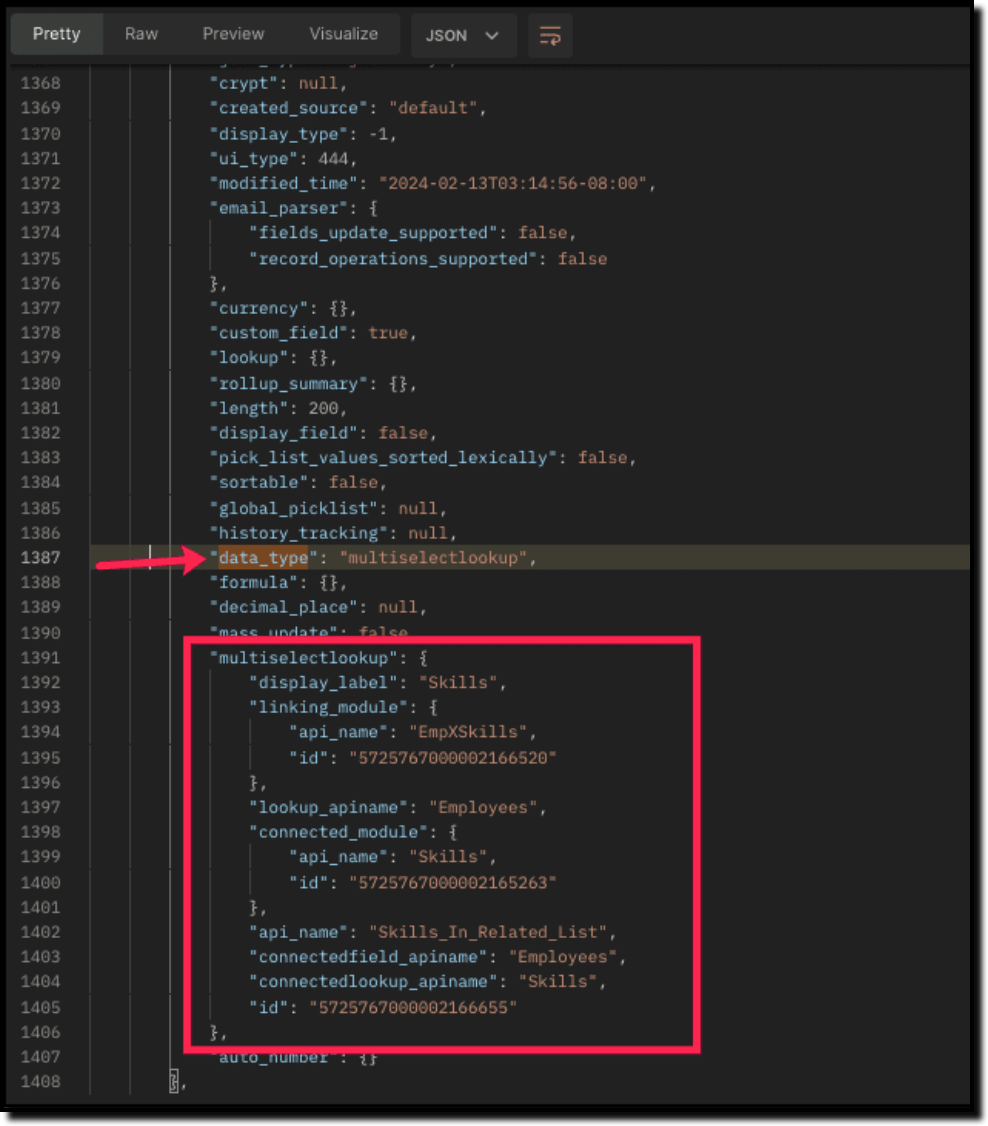
The above highlighted keys are the details of the Multi select lookup field. The corresponding keys are explained below:
"multiselectlookup": { "display_label": "Skills", //Display label of the MxN field in the Employees module "linking_module": { "api_name": "EmpXSkills", //API name of the linking module "id": "5725767000002166520" ... "lookup_apiname": "Employees", //API name of the Employee lookup field in the linking module "connected_module": { "api_name": "Skills", //API name of the connected module "id": "5725767000002165263" }, "api_name": "Skills_In_Related_List", //API of the related list of the connected module Skills in the Employees module. "connectedfield_apiname": "Employees", //API Name of the multi-select lookup field in the connected module (Skills) "connectedlookup_apiname": "Skills", //API name of the Skills module lookup field in the linking module. "id": "5725767000002166655" //Related List ID }, ... |
Step 2
Using the api_name of the linking module, make a GET Fields metadata API call to get the list of fields (along with their api_name) present in it. It lists all fields of the linking module in the response.
Sample Request and Response
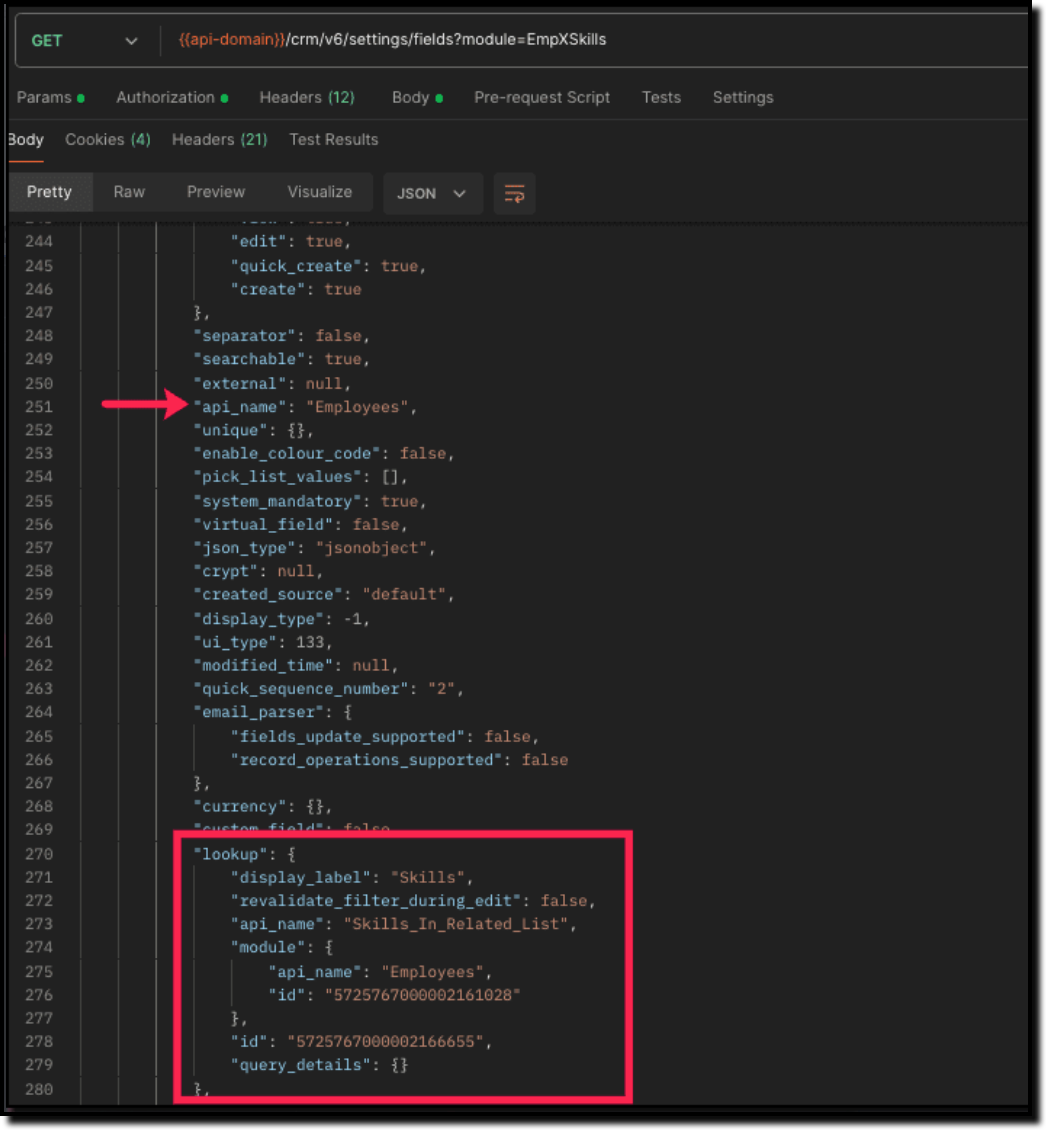
Search for the "data_type": "lookup" in the response. The lookup fields represent the connected modules in association with the linking module.
For example, in our case, the response will have two lookup fields. One of the lookup fields (with api name Employees) points to the Employees module, and the other one (with api name Skills) points to the Skills module.
Step 3
Associate records via the Multi-select lookup field using the Insert Records API
To associate records via the MxN field, you need to know the IDs of the records in the Skills module. Here is the input body to insert the skills in the Employee module with the multi-select lookup field Skills.
Here is the input body to insert a new Employee record and associate a Skills record to it using the MxN field.
Request URL: {{api-domain}}/crm/v6/Employees
Request Method: POST
Sample Input:
{ "data": [ { "Name": "Patricia", "Email": "patricia@mail.com", "Position": "Marketing Specialist", "Year_of_Experience": 5, "Skills": [ //API name of the multi-select lookup field in Employee module { "Skills": { //API Name of the lookup field pointing to the Skills module in the linking module "name": "Marketing", "id": "5725767000002149427" //Record ID in the Skills module } }, { "Skills": { "name": "Social Media Marketing", "id": "5725767000002149476" } } ] } ] } |
How to disassociate an employee & skills relation while updating an Employee record through the Update Records API
Request URL: {{api-domain}}/crm/v6/Employees
Request Method: PUT
Sample Input:
{ "data": [ { "id": "7890710000097291", "Name": "Patricia", "Email": "patricia@mail.com", "Position": "Marketing Specialist", "Year_of_Experience": 5, "Skills": [ { "_delete": null, //This association in the linking module will be deleted "id": "5725767000008126002" //Record created in the linking module } ] } ] } |
Sending _delete:null will cause delinking of the association.
How to associate an employee's skills via "Linking Module"
You can associate the relationship between Employees and Skills module by creating records in the Linking module (EmpXSkills). Use the API names for the corresponding lookup fields, Employee (API Name: Employees) and Skills (API Name: Skills) in the input body.
Request URL: {{api-domain}}/crm/v6/EmpXSkills
Request Method: POST
Sample Response
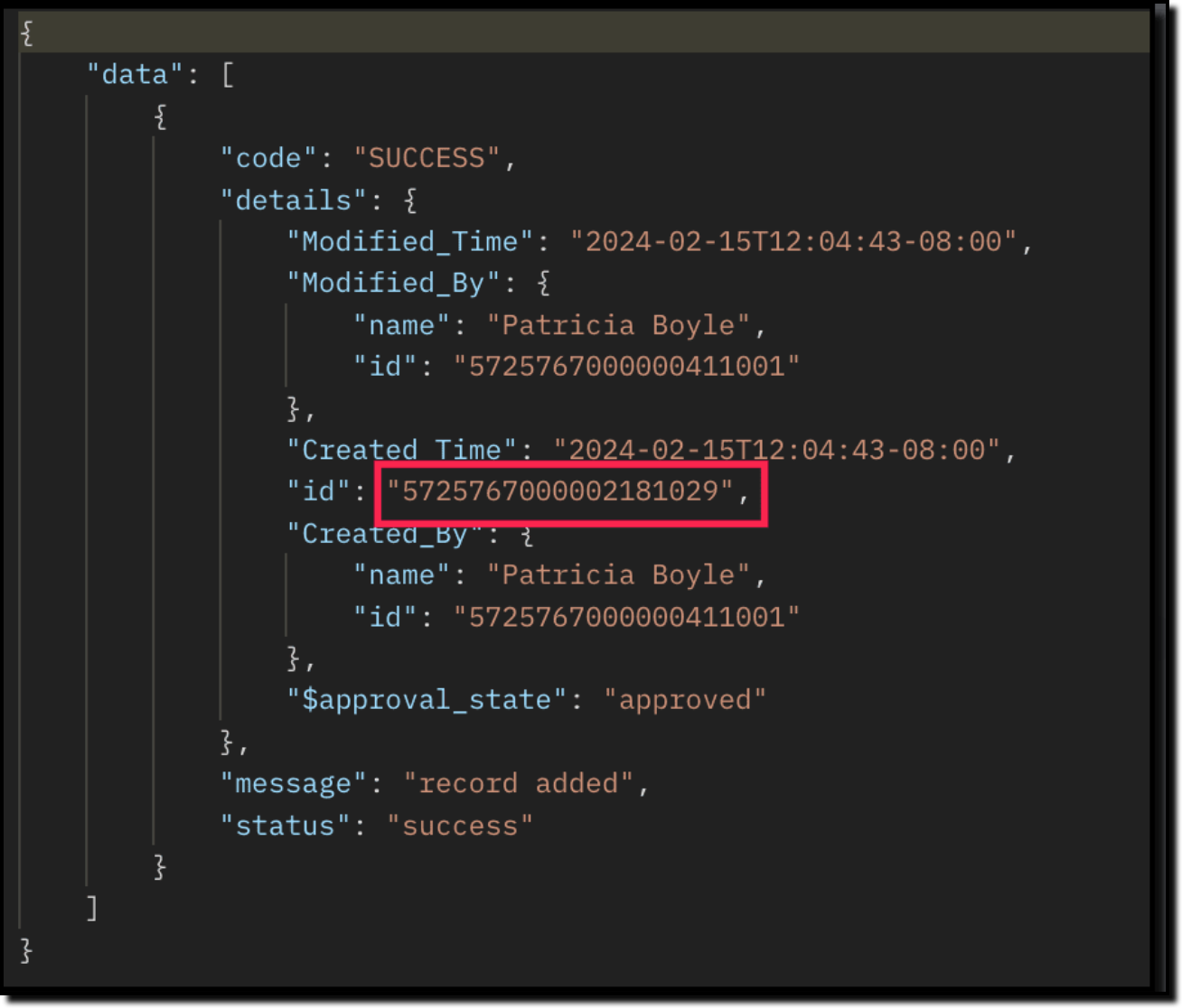
The id in the above response is the Primary Key ID of an Employee-Skill association record in the linking module. This ID can later be used to do specific operations like association update or deletion via API.
How to disassociate an employee & skills relationship via "Linking Module"
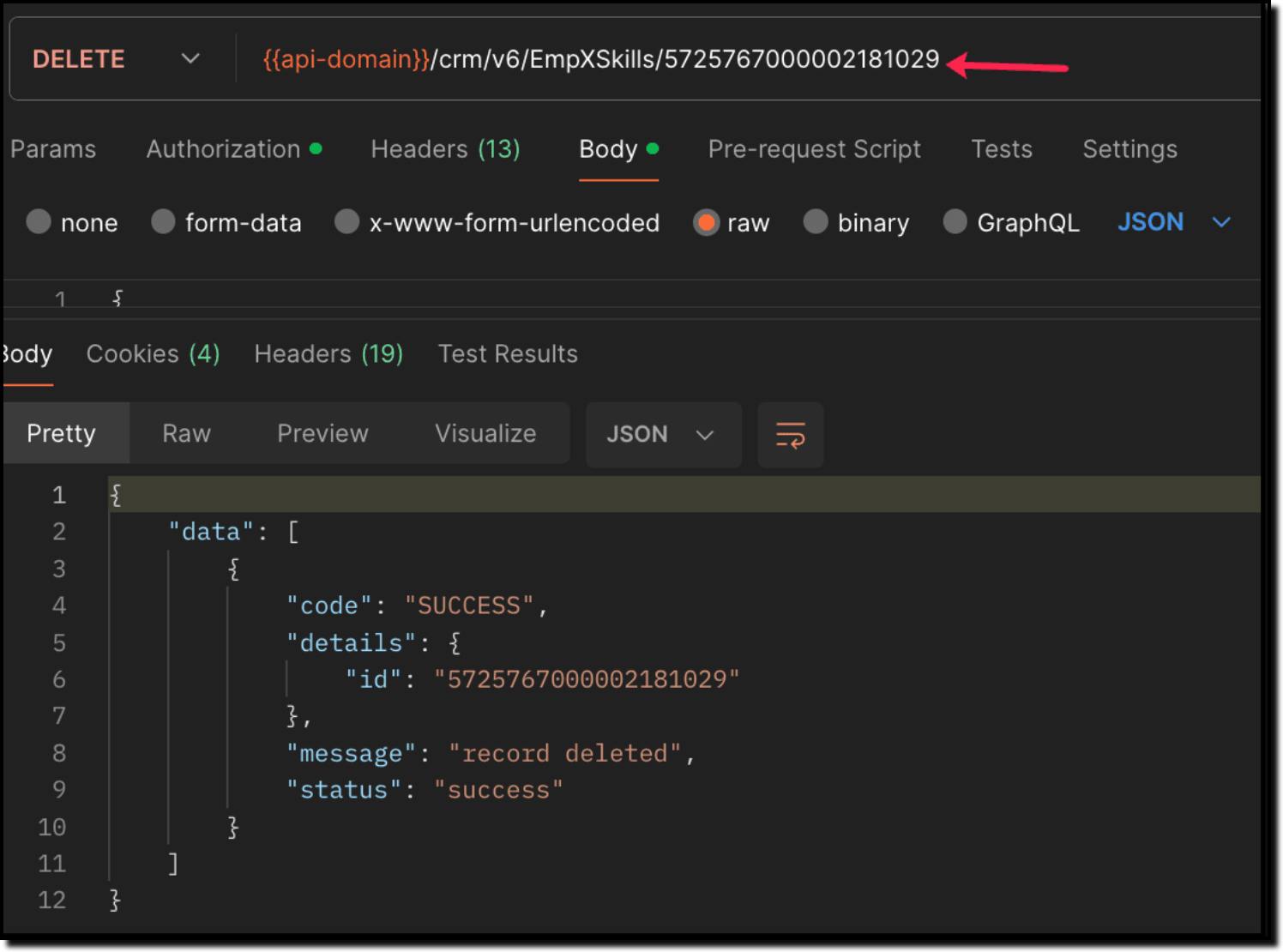
Use the Delete Records API to delete the record which corresponds to the specific relation between Employee and Skills module in the EmpXSkills module. You can get the record ID for the specific association using the Get Records API for the linking module.
Use the Delete Record API to delete the specific record, thereby deleting the specific association between the Employee and Skills record. Please note that only the association is removed, and not the individual records.
Sample Request and Response
When to use create/update operation in Employees/EmpXSkills module?
Use "Employees" module: When you want to create/update records in the Employees module, and associate the record with a Skills record in a single API call.
Use "EmpXSkills" module: When you want to associate/disassociate the relationship between existing Employees and Skills records.
Retrieve data via COQL API and Bulk Read API
There may be situations where you need to fetch records based upon certain conditions.
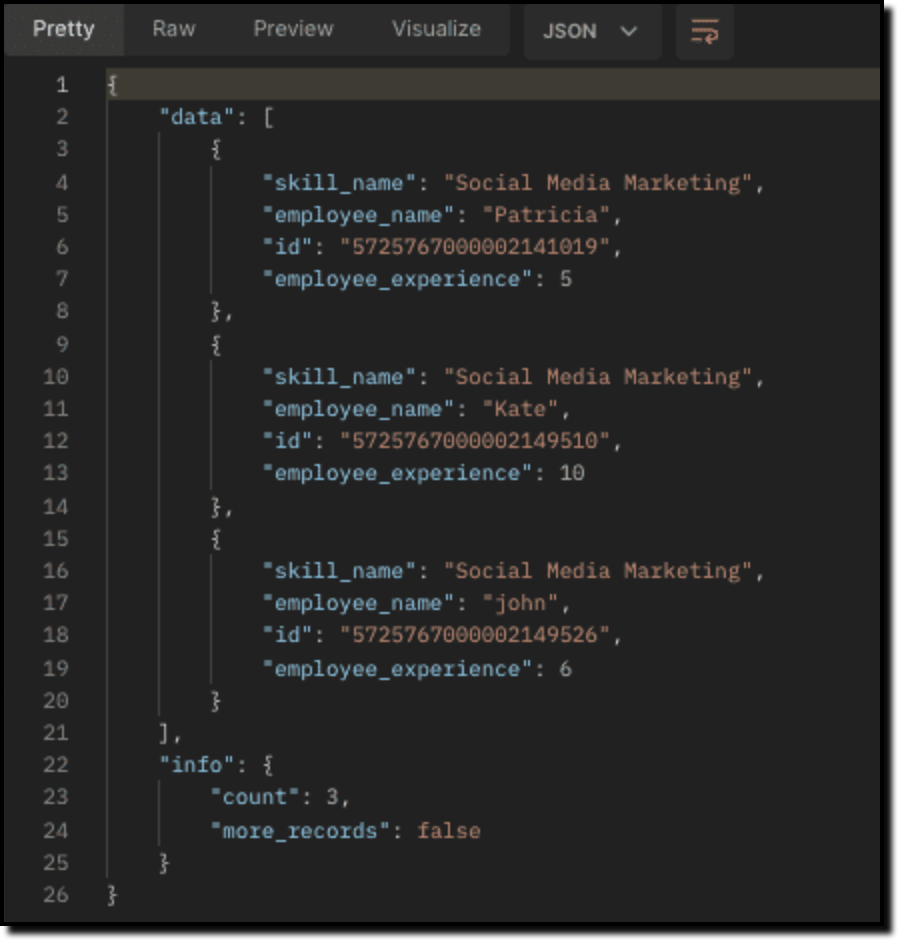
For example, Zylker's HR team wants to retrieve the list of employees having more than 4 years of experience and are experts in Social media marketing. In this case, they can use Zoho CRM's COQL API or Bulk Read API. Let's see how to achieve this.
Retrieving MxN data via COQL API
We know that both the Employees and Skills modules' association data is maintained in the linking module. In order to retrieve data from the linking module, query using the API name of the lookup fields in the linking module.
Request URL: {{api-domain}}/crm/v6/coql
Request Method: POST
Sample Input:
{ "select_query" : "select Employees.Name as employee_name, Employees.Year_of_Experience as employee_experience, Skills.Name as skill_name from EmpXSkills where Employees.Year_of_Experience > 4 and Skills.Name like '%Social%'" } |
From the SQL perspective, above COQL can be interpreted as
select emp.Name as employee_name, emp.Year_of_Experience as employee_experience, skill.Name as skill_name from EmpXSkills left join Employees as emp on EmpXSkills.Employees = emp.id left join Skills as ski on EmpXSkills.Skills = ski.id where emp.Year_of_Experience > 4 and ski.Name like '%Social%' |
Sample Response
Retrieving MxN data via Bulk Read API
Bulk Read API allows you to fetch a large set of data i.e., you can fetch a maximum of 200,000 records in a single API call.
To export linking module records, use its API name.
Request URL: https://www.zohoapis.com/crm/bulk/v6/read
Request Method: POST
Sample input to export linking module's records:
{ "callback": { "method": "post" }, "query": { "module": { "api_name": "EmpXSkills" //API name of the linking module }, "file_type": "csv" } } |
Export linking module records that meet the specified criteria
To export linking module's records based on the given criteria above (similar to the COQL API).
{ "callback": { "method": "post" }, "query": { "module": { "api_name": "EmpXSkills" }, "fields": [ "Employees.Name", "Employees.Year_of_Experience", "Skills.Name" ], "criteria": { "group": [ { "field": { "api_name": "Employees.Year_of_Experience" }, "comparator": "greater_than", "value": "4" }, { "field": { "api_name": "Skills.Name" }, "comparator": "contains", "value": "Social" } ], "group_operator": "AND" } } } |
As the API is an asynchronous API, the response will not be available instantly; the bulk read job is scheduled, and the status can be checked. Once the job is completed, you will be notified in the callback URL. The records are available in a downloadable CSV file or ICS file (for events). See the Bulk Read API document to know how to view the status of the scheduled job and download the file, along with more sample requests and responses.
We trust that this post meets your needs and is helpful. Let us know your thoughts in the comment section or reach out to us at support@zohocrm.com
Stay tuned for more insights in our upcoming Kaizen posts!
------------------------------------------------------------------------------------------------------------------------------
Previous Kaizen Post : Kaizen #124 - Manipulating Subform using Zoho CRM APIs
-------------------------------------------------------------------------------------------------------------------------------
Cheers!
Additional Reading:
Kaizen Posts:
- Kaizen #26 - Linking module and Multi-select Lookup fields
- Kaizen #77 - Multi-select Lookup Fields in API V4
- Kaizen #80 - COQL API - Part I
- Kaizen #81 - COQL API - Part II
API Documentation - Linking Module APIs
Topic Participants
Subramanian K
Andres
Haiku Technical Support
Sticky Posts
Kaizen #217 - Actions APIs : Tasks
Welcome to another week of Kaizen! In last week's post we discussed Email Notifications APIs which act as the link between your Workflow automations and you. We have discussed how Zylker Cloud Services uses Email Notifications API in their custom dashboard.Kaizen #216 - Actions APIs : Email Notifications
Welcome to another week of Kaizen! For the last three weeks, we have been discussing Zylker's workflows. We successfully updated a dormant workflow, built a new one from the ground up and more. But our work is not finished—these automated processes areKaizen #152 - Client Script Support for the new Canvas Record Forms
Hello everyone! Have you ever wanted to trigger actions on click of a canvas button, icon, or text mandatory forms in Create/Edit and Clone Pages? Have you ever wanted to control how elements behave on the new Canvas Record Forms? This can be achievedKaizen #142: How to Navigate to Another Page in Zoho CRM using Client Script
Hello everyone! Welcome back to another exciting Kaizen post. In this post, let us see how you can you navigate to different Pages using Client Script. In this Kaizen post, Need to Navigate to different Pages Client Script ZDKs related to navigation A.Kaizen #210 - Answering your Questions | Event Management System using ZDK CLI
Hello Everyone, Welcome back to yet another post in the Kaizen Series! As you already may know, for the Kaizen #200 milestone, we asked for your feedback and many of you suggested topics for us to discuss. We have been writing on these topics over the
Recent Topics
Zoho Books Extension: What Happens If Custom Fields Already Exist?
When developing Zoho Books extensions, what happens if the target Zoho Books organization already has a custom field with the same API name as one defined in the extension? I’m asking because we originally created an on-Books version of this functionality,Zoho Books Extension: What Happens If Custom Fields Already Exist?
When developing Zoho Books extensions, what happens if the target Zoho Books organization already has a custom field with the same API name as one defined in the extension? I’m asking because we originally created an on-Books version of this functionality,Pricing Strategies: #3 Services never Stop with just Plans
"Hey, while you're here, could you also take a look at the vegetable patch?" Aaron hears that line almost every week. He runs a small gardening service, the kind where customers subscribe to a simple monthly plan that includes basic maintenance, mowing,Cropping Photos for Zoho Sites
Hi, I'm wondering if there is a built in crop tool for zoho sites for my photos so I can crop them and see what the crop looks like on the site?Deluge scripts
Why is there not a search function to make it easier to find the script of interest when modifications are required.bulk edit records and run internal logic
hi there is few logics in manner "it this than that" logics work well when i edit entry openning it one by one (via workflow "on add/edit - on success" , for custom field "on update/on user input") but when i try bulk edit records - logic does not work. how can i turn on logic to work as programmed - for mass editing records via bulk edit?WebDAV / FTP / SFTP protocols for syncing
I believe the Zoho for Desktop app is built using a proprietary protocol. For the growing number of people using services such as odrive to sync multiple accounts from various providers (Google, Dropbox, Box, OneDrive, etc.) it would be really helpfulPossible for first Signer of Sign Form to specify the next signer in the sequence
We have many use cases where multiple signers need sign the same document. We'd love to be able to use sign forms, where the a signer who uses the Sign Form link can specify the name and email address for the next person in the sequence.BUG: Can't copy-paste data outside Sheet
Currently I can't paste data copied from inside any of my Zoho Sheet files to any other app. Copy-paste works inside the sheet It does NOT work between two different sheets These sheets are built from automation templates Everything works fine if I createZoho CRM Community Digest - November 2025 | Part 1
Hello Everyone! Here’s what came through in the first half of November: new updates and a few helpful community discussions with real, notable solutions. Product Updates: Android App Update: Inctroducing Swipe Actions You can now swipe left or right onUpload own Background Image and set Camera to 16:9
Hi, in all known online meeting tools, I can set up a background image reflecting our corporate design. This doesn't work in Cliq. Additionally, Cliq detects our cameras as 4:3, showing black bars on the right and left sides during the meeting. WhereTruesync for Linux
Is Truesync available on linux ?Question about upgrade and storage space Zoho Notebook
After upgarding my Zoho Notebook plan, I am running into the following issue. I just upgraded from a free Zoho Notebook subscription to Pro Lite after I got a notification in my Window Zoho Notebook desktop app saying that I had run out of space. However,Hidding/excluding specific picklist options from filter
Hi. Is it possible to hide/exclude specific picklist options from this filter? I don't want them to be shown when someone tries to filter in the leads module"Wrong password or login" Problem to configure Zoho on MAIL App on my Macbook
Hi, I'm having problems to configure my e-mail on my MAIL App(Macbook pro). My e-mail is hari@trespontoum.net Actually was working perfectly, and still working on my Iphone. My MAIL App prompt me that my login or password is wrong. I tried to change 3Subforms to Capture Multi-Row Data in Job Sheets
Subforms transform your job sheets from simple checklists to powerful, data-rich forms. In field service work — whether maintenance, inspection, installation, or repair — a single job can involve multiple repeatable entries: readings, parts used, activitiesAdd "Fetch Composite Item" Action for Inventory
I want to make a Flow that uses information returned in the GET call for Composite Items, and it's not currently available in Zoho Flow. Please consider adding this functionality.Adress Labels for sending of the oder und barcode
We want to print with my address labels to stick on the order of the ware can. there are these options?printing individual labels - Dymo LabelWriter
I am trying to print individual labels to my Dymo LabelWriter - has anyone done this? Latest Update (December 2025): The Canvas Print View is now available! We encourage you all to try it out and share your feedback with us. Learn more here: Zoho CRMZoho Creator for Agriculture
Greetings, I am starting to work on Zoho Creator specifically for the agricultural field, any recommendations, tips or ideas that might be helpful ? Also, if you are interested by any means in working on such project, kindly contact me. The project isCustom Print Layout
I would like to create a custom print layout of a Lead or Contact. Is there a way to do that? What I mean is that if I'm viewing a specific lead or contact I'd like to be able to print or export that lead/contact and only print and/or export certain information.Print View
Nothing happens when I'm in a module , ie; Contacts, and I hit the Print View Button. Even when it does come up and say "loading", nothing loadsGet Holiday ready with Zoho Mail's Offline mode
With the holiday season right around the corner, this is the perfect time to get ready to unplug, relax, and enjoy a well-deserved break. In addition to preparing yourself, you can also make sure your organization members are set for their time away fromSolution to Import PST File into Office 365.
MailsDaddy OST to Office 365 Migration Tool is an outstanding solution to recover OST files and migrate them into Office 365 without any hassle. Using this software users can multiple OST files into Office 365 with complete data security. It offers usersZoho CRM Kiosk issues
Firstly this is for a system on the AU servers if that makes a difference. Issues are as follows (For Kiosk): 1. Re-ordering fields in the screen builder is broken. The fields seem to be re-ordering themselves, unless you order everything by moving theZoho Books emails suddenly going to Spam since 11 Nov 2025 (Gmail + now Outlook) — anyone else?
Hi everyone, We migrated to Zoho Books in July 2025 and everything worked fine until 11 Nov 2025. Since then, Zoho Books system emails are landing in customers’ Spam (first Gmail, and now we’re seeing Outlook/Office 365 also starting to spam them). ImpactedEmail Template Edits Not Saving
I can make an edit, click save, and see the blue bar annimation at the top, but the edits don't actually save. Important, because my email templates are now broken and clients are receiving bad emails. Tried on Chrome, Firefox and IE.Default Ticket View - Table?
Guys, We mostly use the table view to queue tickets. Maybe I am missing it - but how can I set that view as 'default" for all our agents? Thanks JVCan I have different users see different pick list values for Potential Stage?
We have some users focusing on new business and others focusing on existing business, and they follow different sales processes/cycles, so we would like them to see different pick list values for Stage (eventually leading up to Closed Won/Lost in both cases). And just to keep it interesting - some of these users will of course do a combination, so would need to see one pick list for their New business potentials and a different pick list for their Existing business ones. Salesforce does thisTracking Snippet not working in Zoho Marketing Automation!
First off, the fact that you have to wait about 12-24 hours for every response is terrible. How are we supposed to conduct business? Second, we have been trying for several days to get the Tracking Code Snippet in marketing automation to work, to no avail.Is there any way to send an Excel received by email to Dataprep?
Every day I receive an email alert with an Excel file that I want to process through a Dataprep pipeline. To do this, I need to: -Save the file to disk -Open the pipeline -Run the pipeline -Update the source -Several clicks to select and open the savedRead webpage - MSXML2.ServerXMLHTTP
I have the following VBA script, put together from various sources (mainly zoho forum/help/support, so it once worked, I guess): private Sub GetListOfSheets() Dim url As String Dim xmlhttp As Object Dim parameters As String Dim html As String range("B1").valueZoho Creator Form Search
I'm new to Zoho Creator and so far i do like it but im shocked there seems to be no easy way to add a search function and/or navigation to there forms as this readily available in every platform i have used in the past. Anyway i have a form which i haveHow to setup DKIM / SPF in Zoho Mail
Hello there! I'm having a hard time understanding how to setup the TXT records for SPF and DKIM with Zoho Mail. I'm following the instructions here: https://www.zoho.com/campaigns/help/setup-spf-dkim.html Specifically, when it comes to the value for theMass update cant trigger a workflow?
Hello there, Is this a normal Creator behaviour? In a report, if I manually edit each data row, it will pass those changes to all other reports. However, if I perform a Mass Update on a few data rows at once, the new data is not pushed to other reports.search and Smart Bar both missing in Mail
One of the users on my account does not have the search bar at the top right or the Smart Bar at the bottom left of the desktop Mail app. Any ideas how to get those back?Remote Control Functionality During Screen Sharing in Zoho Cliq
Hello Zoho Cliq Team, We would like to request the addition of remote control functionality during screen sharing sessions in Zoho Cliq. Currently, while screen sharing in Cliq is very useful, it lacks the ability for another participant to take controlLet us add Lookup fields in the Blueprint Transitions
We are unable to add Lookup Fields in the blueprint transitions in Zoho Desk, we wanted to make it a requirement for our workflow but since it's not available in the transition we cannot. The lookup field exists in the Layout: But it cannot be added/selectedZoho Projects API Scope for Issue Attachments
I try to download issue attachments via the API, unfortunately I always get the following error code when trying to download the file from the supplied URL: {"ERROR_MESSAGE":"INVALID_OAUTHSCOPE","ERROR_CODE":401} indicating an auth scope error. I've triedHow to fetch custom fields for time entries in Zoho Project API v3
In the previous Zoho Projects REST API, we were able to retrieve custom field details for time entries, including picklist options, using the endpoint: GET /restapi/portal/[PORTAL_ID]/timesheetcustomfields In the new Zoho Projects API v3, we tried usingNext Page