Kaizen #129 : Client Script Support for Blueprints

Kaizen #129 : Client Script Support for Blueprints

Hello everyone!

Welcome to another week of Kaizen. Today, let us discuss about how you can use Client Script during a Blueprint transtion to meet your requirements. This Kaizen post will provide solution for the post - Need non-mandatory fields in blueprint pop-up using Client Script.


In this Kaizen post,
  1. What is a Blueprint?
  2. Blueprint event in Client Script
  3. ZDKs and methods available in Client Script related to Blueprint
  4. Use Case - During a blueprint transition, show a pop up with fields that are not mandatory
  5. Solution
  6. Summary
  7. Related Links
  8. Kaizen Collection


1. What is a Blueprint?

Blueprint is an online replica of a business process. For instance, leads generation and follow-up, deals closure and order management. Each of these processes has several stages, and different teams may be responsible to complete each stage. At this point, one needs to take a moment to see if the CRM dictates how these processes should be executed. It captures every detail of your entire offline process within the software. Click here to know more about Blueprint in Zoho CRM.

Moving from one stage of a blueprint to the next stage  is called as Blueprint transition.

2. Blueprint event in Client Script

Whenever you want to meet your custom requirements in Zoho CRM before a Blueprint transition happens, you can use the beforeTransition event type available in Client Script. This event occurs before the transitions occur, as per the process flow designed in the Blueprint. You can add the "return false" statement at the end of the script to prevent the blueprint transition. Click here to know more about the events in Client Script.

3. ZDKs and methods available in Client Script related to Blueprint

Here is the list of ZDKs and methods using which you can code in Client Script.

ZDK.Page.getBlueprintTransitionByID()    -       You can get the blueprint transition by id.

ZDK.Page.getBlueprintTransitions().          -       You can get all the blueprint transitions in page.

getId()                                                            -       You can get the id of transition using Blueprint transition object.

getName()                                                     -        Get the name of transition using Blueprint transition object.

initiate()                                                         -        Initiate the transition using Blueprint transition object.


Click here to view the detailed documentation of ZDKs and methods related to Blueprint in Client Script.

4. Use Case

Zylker is a manufacturing organisation which uses Blueprint to manage the various updates in the status of Leads. Below is the blueprint configuration. For the transition "Gather details", the field  "Alternate Number" will be prompted as mandatory. Without entering this detail, the transition cannot proceed.
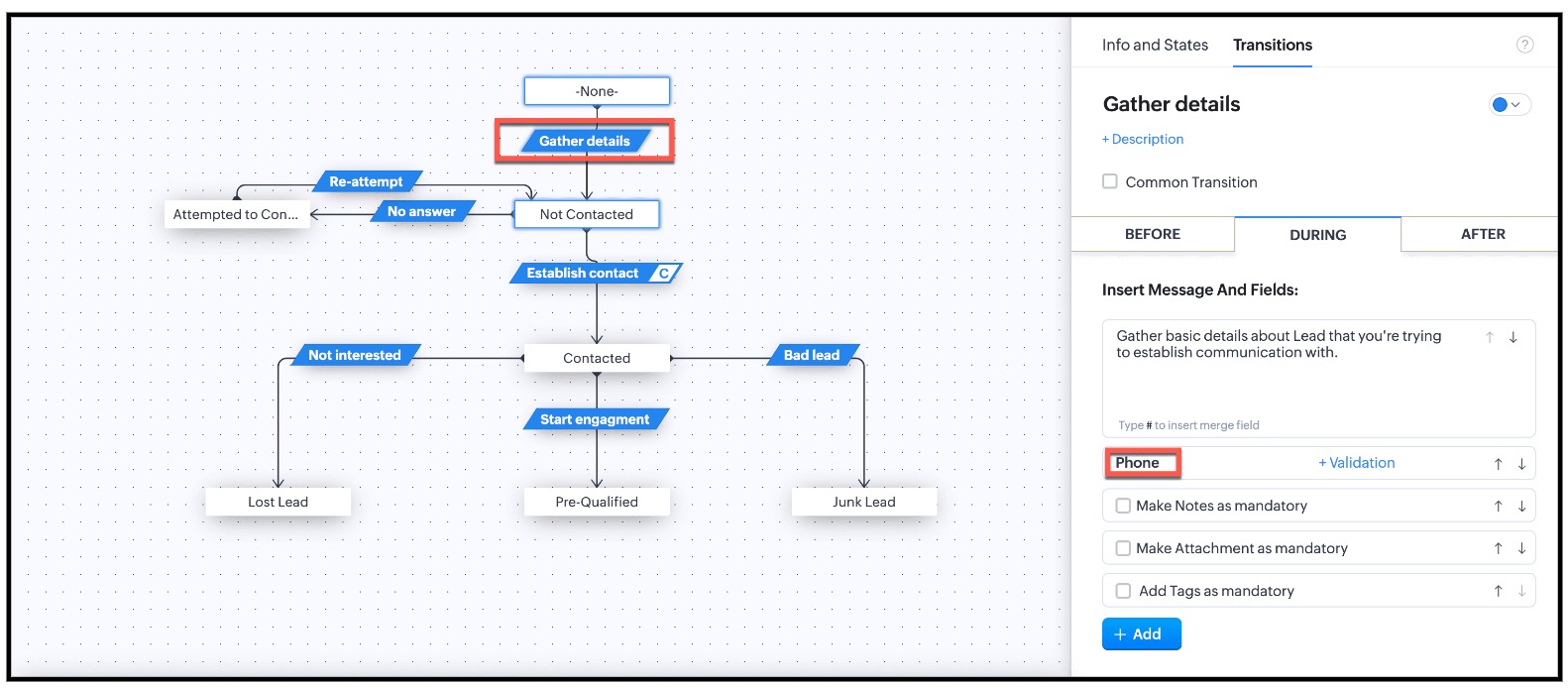


This is the existing Blueprint.
Now, the Admin wants to prompt the user to enter a value for the Alternate Number, but it should not be mandatory for the transition "Gather Details".

4. Solution

Currently in Blueprint the fields in the pop-up are mandatory. You can achieve non-mandatory fields in a pop-up using Client Script and update the values to that record. However you should not add the fields in the "During" phase of the "Gather Details" transition in Blueprint, to achieve this non-mandatory pop-up using Client Script. This solution will work for the requirement raised in this post.

For this,  you need to create a Client Script and use the "Before Transition" type of "Blueprint" Event.  
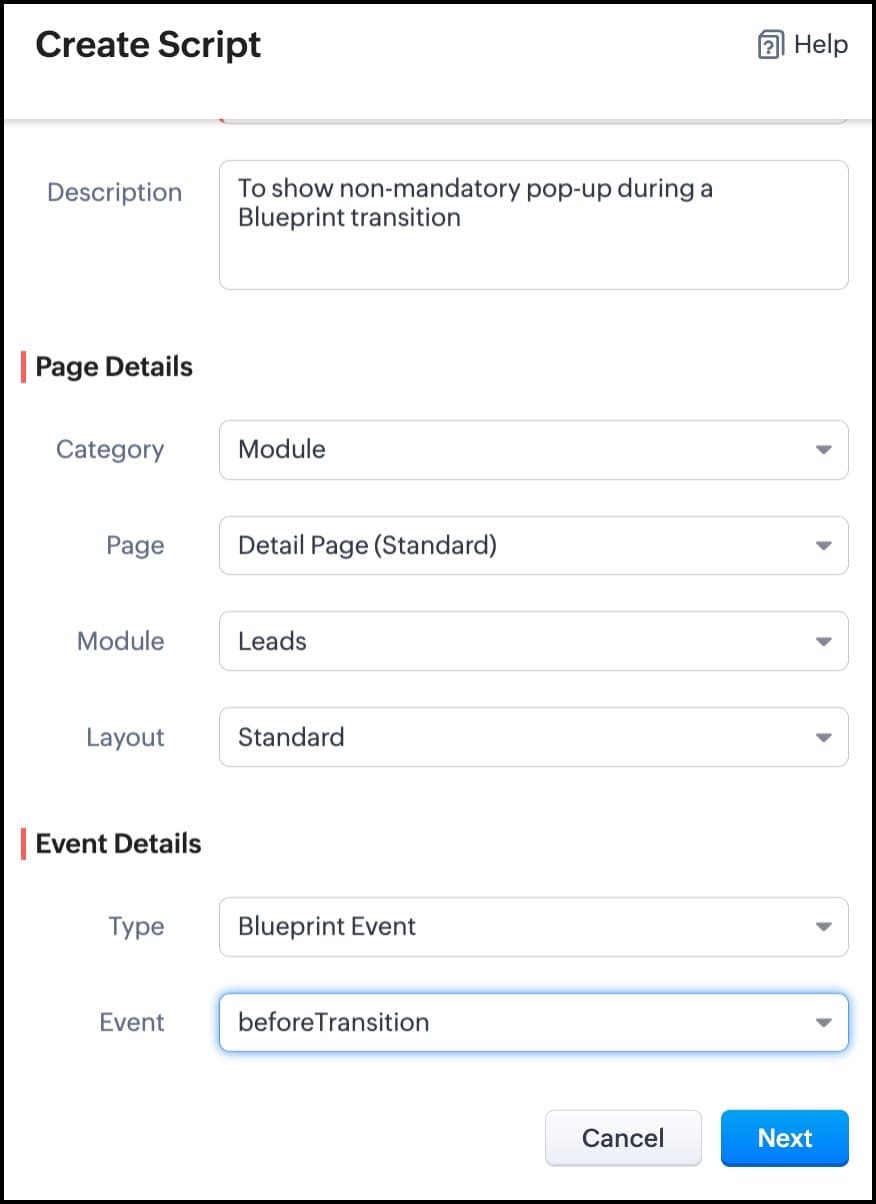


For more details on how to configure a Client Script, click here. Once you give the module and event details, you can see the Client Script IDE's Editor.
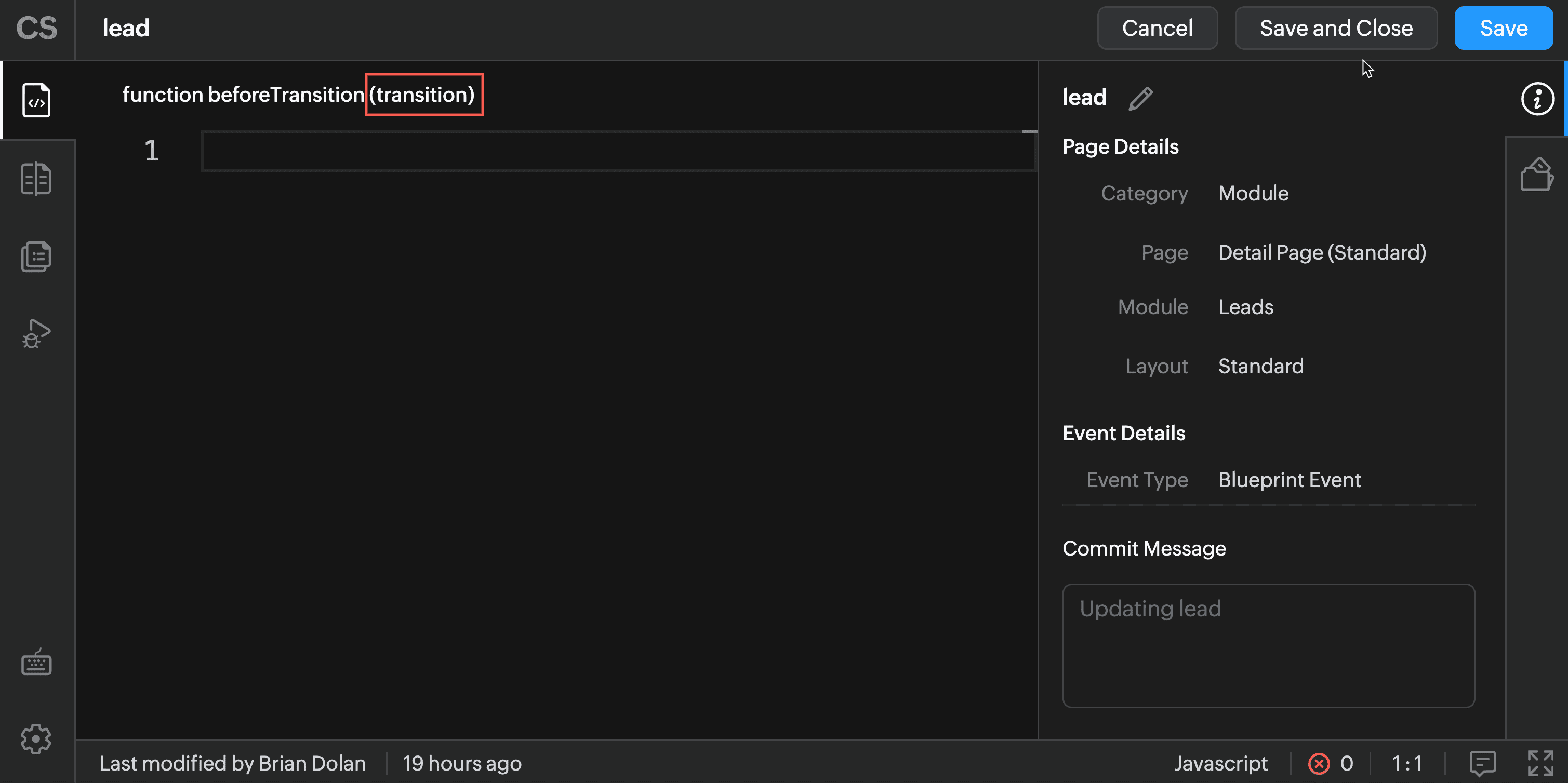


The argument "transition" will hold the the details of current Blueprint transition.

In the Client Script IDE, type the below script and click Save.

 if (transition.name == 'Gather details') {
// To show pop up and get the Alternate Number and update the 
//record's Alternate Number 
var var_alt = ZDK.Client.getInput([{ type: 'text', label: Alternate Number}], 'Give these details', 'OK', 'Cancel');

    if (var_alt != null) {

        var lead = ZDK.Apps.CRM.Leads.fetchById($Page.record_id);
        lead.alternate_number = var_phone.toString();
        var response = lead.__update();
    }

    else {

        ZDK.Client.showMessage('Details have been gathered successfully' });

    }

 
   $Client.refresh();// to refresh the page

}

The above script will get executed before every transition happens in the Blueprint. So, in the script, the code is added based on the transition name. As per the requirement, when the transition name is "Gather details" , you can show the pop-up through Client Script's getInput() function. Once you capture this value you can update the alternate number using the CRM API ZDKs. $Page.record_id will return the id of the current Lead record.

Here is how the Client Script works.
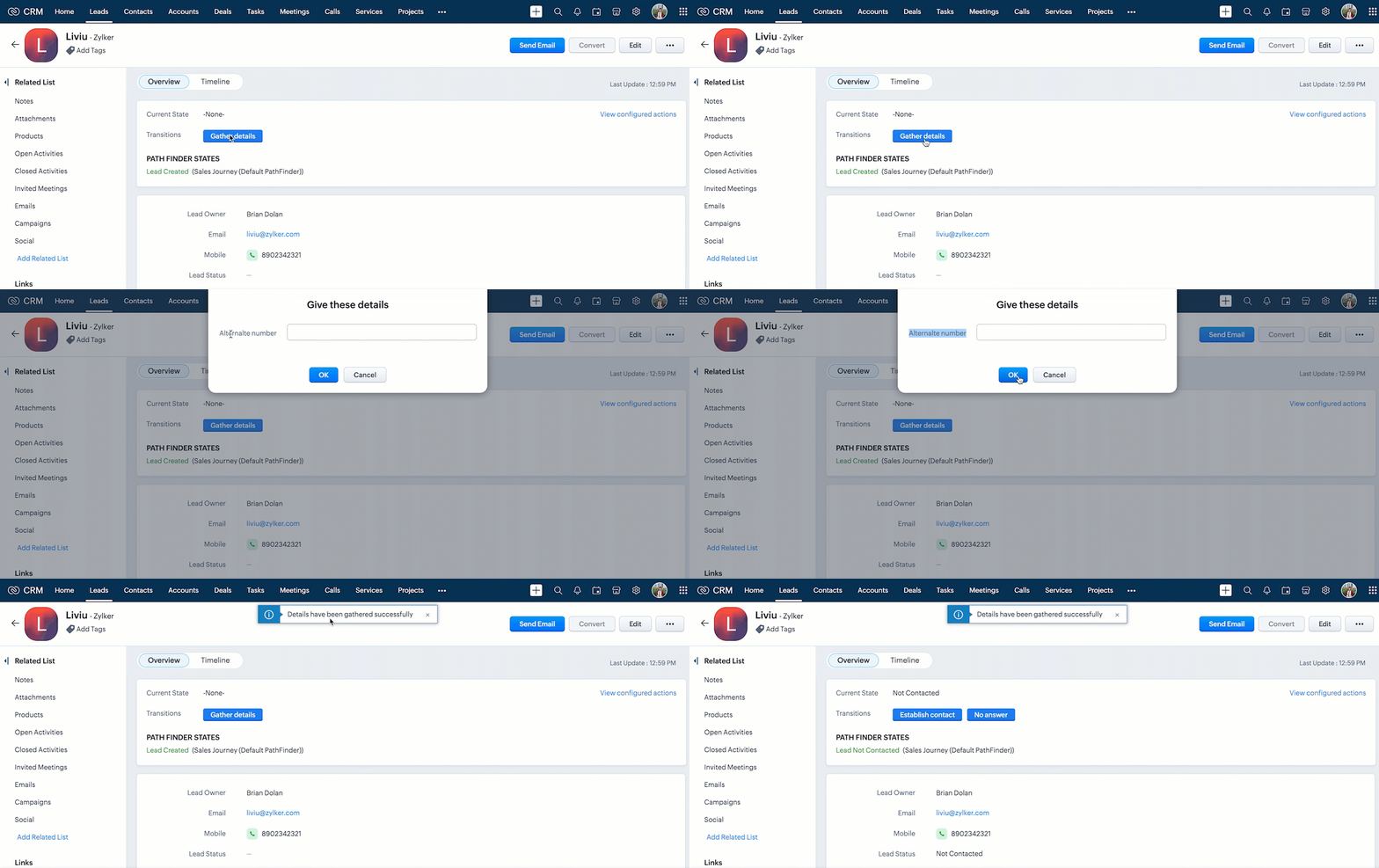


You can see that the transition happens even after the "Alternate Number" field is not filled by the user.


Note : 

1.  If you want to prevent a Blueprint Transition you need to add "return false" statement in the Script.      

2.  The blueprint event and the related ZDKs are  available only for Detail(Standard) Page and Detail(Canvas) Page
5. Summary

In this post, we have discussed,
  • About Blueprint events in Client Script.
  • The ZDKs and methods related to Blueprint.
  • How to configure a Client Script to trigger before a Blueprint transition
  • How to open a non - mandatory fields pop up before a blueprint transition
  • How to update current record using Update Records API through Client Script
  • How to refresh a page using Client Script
  • How to prevent a Blueprint Transition
6. Related Links
Kaizen Collection : 


Cheers!
Maadhari M


    • Sticky Posts

    • Kaizen #198: Using Client Script for Custom Validation in Blueprint

      Nearing 200th Kaizen Post – 1 More to the Big Two-Oh-Oh! Do you have any questions, suggestions, or topics you would like us to cover in future posts? Your insights and suggestions help us shape future content and make this series better for everyone.
    • Kaizen #226: Using ZRC in Client Script

      Hello everyone! Welcome to another week of Kaizen. In today's post, lets see what is ZRC (Zoho Request Client) and how we can use ZRC methods in Client Script to get inputs from a Salesperson and update the Lead status with a single button click. In this
    • Kaizen #222 - Client Script Support for Notes Related List

      Hello everyone! Welcome to another week of Kaizen. The final Kaizen post of the year 2025 is here! With the new Client Script support for the Notes Related List, you can validate, enrich, and manage notes across modules. In this post, we’ll explore how
    • Kaizen #217 - Actions APIs : Tasks

      Welcome to another week of Kaizen! In last week's post we discussed Email Notifications APIs which act as the link between your Workflow automations and you. We have discussed how Zylker Cloud Services uses Email Notifications API in their custom dashboard.
    • Kaizen #216 - Actions APIs : Email Notifications

      Welcome to another week of Kaizen! For the last three weeks, we have been discussing Zylker's workflows. We successfully updated a dormant workflow, built a new one from the ground up and more. But our work is not finished—these automated processes are
    • Recent Topics

    • How do I delete all my leads so I can start again?

      How do I delete all my leads at one time so I can start again?
    • Le cauchemar de PEPPOL avec Zoho Books

      Après de longues hésitations — car je défends toujours les produits Zoho malgré leurs imperfections —, je me suis décidé à poster cet avis sur ce forum. En effet, depuis plus de 5 mois, les nombreux soucis relatifs à la facturation par PEPPOL semblent
    • What is a realistic turnaround time for account review for ZeptoMail?

      On signing up it said 2-3 business days. I am on business-day 6 and have had zero contact of any kind. No follow-up questions, no approval or decline. Attempts to "leave a message" or use the "Contact Us" form have just vanished without a trace. It still
    • number auto generate

      There is a basic need for a function to auto generate numbers. Presently the help pages layout several confusing and non-working ideas. You will not get my subscription without a simple auto number function.
    • Mailbox delegation - A secure way to enable collaboration

      Admins often encounter scenarios where a user needs another team member to access and manage their mailbox during extended leave, role transitions, or while handling high email volumes. In such situations, ensuring business continuity without sharing
    • Service currently unavailable

      The Zoho Mail Webmail is working, the Mail Admin Console is not: "Our service is temporarily unavailable, please try after sometime." How long must I wait to retry? edit: To add to this, the Webmail is not working 100% - I can open mail in the inbox,
    • Email Opt Out Question

      Has the problem where if a customer is emailed opt out prevents you sending standard emails? For me this feature is simply to stop any email marketing and should not block people from receiving emails via Zoho mobile, which makes no sense.
    • Rich-text fields in Zoho CRM

      Moderation Update: During the initial release of Rich Text fields, it was supported only in the Enterprise and Ultimate editions. We have gradually extended Rich Text fields to all the paid editions of Zoho CRM. Hello everyone, We're thrilled to announce
    • incoming mails not received

      incoming mails not received
    • Power up your Kiosk Studio with Real-Time Data Capture, Client Scripts & More!

      Hello Everyone, We’re thrilled to announce a powerful set of enhancements to Kiosk Studio in Zoho CRM. These new updates give you more flexibility, faster record handling, and real-time data capture, making your Kiosk flows smarter and more efficient
    • FSM- are we getting there

      We have now tried the FSM a couple of times. We have been defeated on the offline access. As you can imagine the enginner needs to know the customers details, the job and the equipment. This needs to be cache. Is it yet? Plus Our engineers do multiple
    • Agents in Homepage

      Hello all, Your agents do useful work. They find things like important leads, deals, and updates for you. But until now, you could not see any of this on your Home page. To check what an agent had found, you had to open the agent on its own, away from
    • How can I get quantity number for each item from collection ?

      How can I get quantity from sub form in another form when I fetch data get it in collection  ​
    • Updates on Report Panel Selection Customization

      Zoho Dev Team, I would like to check if we have updates on Search Panel selection list. And if we can finally select a few instead of going to the list.
    • Global search

      Hi! I think it would be great to have a global search that would give you results from all records of a database, no only for a single field of a single form as we have now. Thanks!
    • Lightbox Pop-up form

      I would like to embed my form using the lightbox pop up. I don't want it to load automatically. I want it to load when some clicks the button. I can see this option, however when I use the "show pop-up launch button" on the website, the button automatically
    • Format print pos

      can anyone help me create a format to print in thermal pos format as epson t20ii printer
    • Getting the Record ID of a form once it is submitted - so that form can be edited later

      In Zoho Forms, where can I access the record ID of a form once the form is submitted? - Record ID is not available in webhook payloads - It is not available to form fields, including in formulas - It is not available as a parameter in a thankyou page
    • Tip#51: Use Nested Picklists for cleaner forms

      Are you looking for a dropdown field that branches out with multiple child options? Zoho Sprints supports Nested Picklist where you can create a parent-child relationship to navigate the users seamlessly with the required options. This ensures that the
    • #19 The Easier It is to Pay, the Faster You Get Paid

      In our previous post, we looked at recording offline payments to keep your books accurate. But what if you could eliminate that manual step altogether? Imagine sending an invoice where your customer doesn't have to copy your bank details, switch between
    • All new Address Field in Zoho CRM: maintain structured and accurate address inputs

      Availability Update: 29 September 2025: It's currently available for all new sign-ups and for existing Zoho CRM orgs which are in the Professional edition exclusively for IN DC users. 2 March 2026: Available to users in all DCs except US and EU DC. 24
    • Mass Email: Individual or Bulk?

      Can anyone confirm that the mass email feature sends as an individual email or as bulk? I'm curious to know what a mass email header looks like.
    • How do I add our corporate fonts to campaign template?

      We have developed a custom campaign template in Zoho Campaigns. Unfortunately there is such a small option of fonts by Zoho default. We need to add our 2 corporate fonts so that our campaigns are in line with our brand. How do we do this?
    • Export current view on timesheet bug?

      When you export current view on timesheet, which is a welcome change, it states: Only the current view with its visible columns will be exported from Zoho Books in CSV or XLS format.". However when this is done, the current view is not fully exported.
    • What's New in Zoho Invoice | April – June 2026

      Hello everyone! We're back with the latest updates and enhancements we've rolled out in Zoho Invoice from April to June 2026. Here's what's new this quarter: Connect Zoho Invoice to AI Using Zoho MCP Customize Accessibility Preferences Attach Annexure
    • Marketing Tip #38: Increase order value with free shipping thresholds

      Free shipping is one of the easiest ways to nudge customers to spend a little more. Instead of offering free shipping on every order, set a minimum order value customers need to reach. This encourages shoppers to add one more item to their cart, which
    • Integration between Zoho Creator & Zoho Projects?

      Hie , Integration between Zoho Creator & Zoho Projects? Is that possible if yes then How??
    • Zoho CRM's Old User Interface is set for EOL - Deadline and What to Expect

      Hello Everyone, We are nearing the completion of enabling the Next Gen UI for users as announced in this post. The Next Gen UI introduces CRM For everyone with an improved workspace experience housing features like Teamspaces, Team Modules, enhanced views,
    • Error AS101 when adding new email alias

      Hi, I am trying to add apple@(mydomain).com The error AS101 is shown while I try to add the alias.
    • Improved Email Management: More control over outgoing email delivery in Zoho Creator

      Hello everyone, Managing how your Zoho Creator applications send emails just got a whole lot more powerful. We've completely revamped the Email Management feature to give you greater flexibility, better deliverability, and deeper control over your outgoing
    • Send a converted Contact or Deal back to Leads using the Restore Lead extension for Zoho CRM

      Hello everyone, This comes up more than people expect: a Lead gets converted into a Contact, and sometimes a Deal along with it, because at the time it looked ready. Then the situation changes the opportunity turns out to be much further off than expected,
    • Marketer's Space: Make your emails more engaging with polls and surveys

      Hello Marketers! Welcome back to Marketer's Space. This week, we're looking at two features that can turn a one-way email blast into an actual conversation: polls and surveys. Why to use polls and surveys? Most emails go out and you hear nothing back.
    • DYK 9: Dependent Layout Rules

      Did you know that you can configure dependent fields in Task and Issue Layouts? In a project, tasks and issues vary in nature and so do the fields needed for each. Displaying relevant fields and values keeps the layout organised and ensures necessary
    • Error when connecting zoho projects mcp to Claude

      When trying to connect zoho projects mcp through cloude, I am redirected to zoho login page, and then after adding my registered email I receive this error: Error while Initiating OAuth Invalid server url. Kindly re-verify oauth url from metadata and
    • Item image on document

      I know what I am asking may not be possible, but I will ask anyway, maybe I will get lucky, and someone else is doing it. My business is based on special orders only from various online stores. When I send a quote to a client, I generate a separate quote
    • Cash Recipt

      You can not receive cash more than 10000 from one party in a day and two lakh in a year. In statement you can't differentiate cash or bank receipt. zoho does not support this
    • MCP > Creator connection failing with Claude

      I'm trying to get claude to access any of my Zoho Creator apps and it keeps failing. I have enabled all tools for creator and ensured in claude settings that everything is authorised. Here is what claude says : Unfortunately, the error messages I'm receiving
    • Zoho Analytics Aggregates

      I have the attached report that lists Jobs and I want to aggregate the totals of Total Budgets, Total Bills and Difference for each Construction Stage. Can anyone tell me how I aggregate them?
    • Customer/Vendor Portal session duration - can it be extended?

      Hi all, We'd like to know how long the login session lasts for the Customer/Vendor Portal in Zoho Books, and whether there's any way to extend it (either through settings or via support/API). Right now this is causing a pretty poor experience for our
    • is it possible to adjust the date field to show Monday as a first day

      Hi, Is it possible to adjust somewhere the date field, so the first day of the week is Monday (instead of Sunday)? Thank you! Ferenc
    • Next Page