Kaizen #199: FAQs on Multi-Select Lookup (MxN) Field in Zoho CRM
Nearing 200th Kaizen Post – We want to hear from you!
Do you have any questions, suggestions, or topics you would like us to cover in future posts? Your insights and suggestions help us shape future content and make this series better for everyone.
Hey everybody!!!
Welcome back to another post in the Kaizen series!
In this post, we will address some of the most frequently asked questions about the Multi-Select Lookup(MxN) field from the Zoho CRM developer community forum.
1. What is a Multi-select lookup field?
A multi-select lookup field in Zoho CRM lets you create a many-to-many relationship between two modules. This means a record in one module can be linked to multiple records in another module and vice versa.
For example, using an multi-select lookup field, you can associate multiple skills with an employee.
2. How does the Mutli-Select Lookup relationship work?
When you create a Multi-Select Lookup between two modules, for example, Employees and Skills, Zoho CRM automatically creates a hidden linking module, which is also known as an MxN module. This module stores the associations between records in the two modules, enabling you to track and manage many-to-many relationships.
For instance, if you link Employees and Skills, a linking module named EmpXSkills will be created.
This linking module is accessible only via API.
Backend Flow of multi-select lookup Relationship
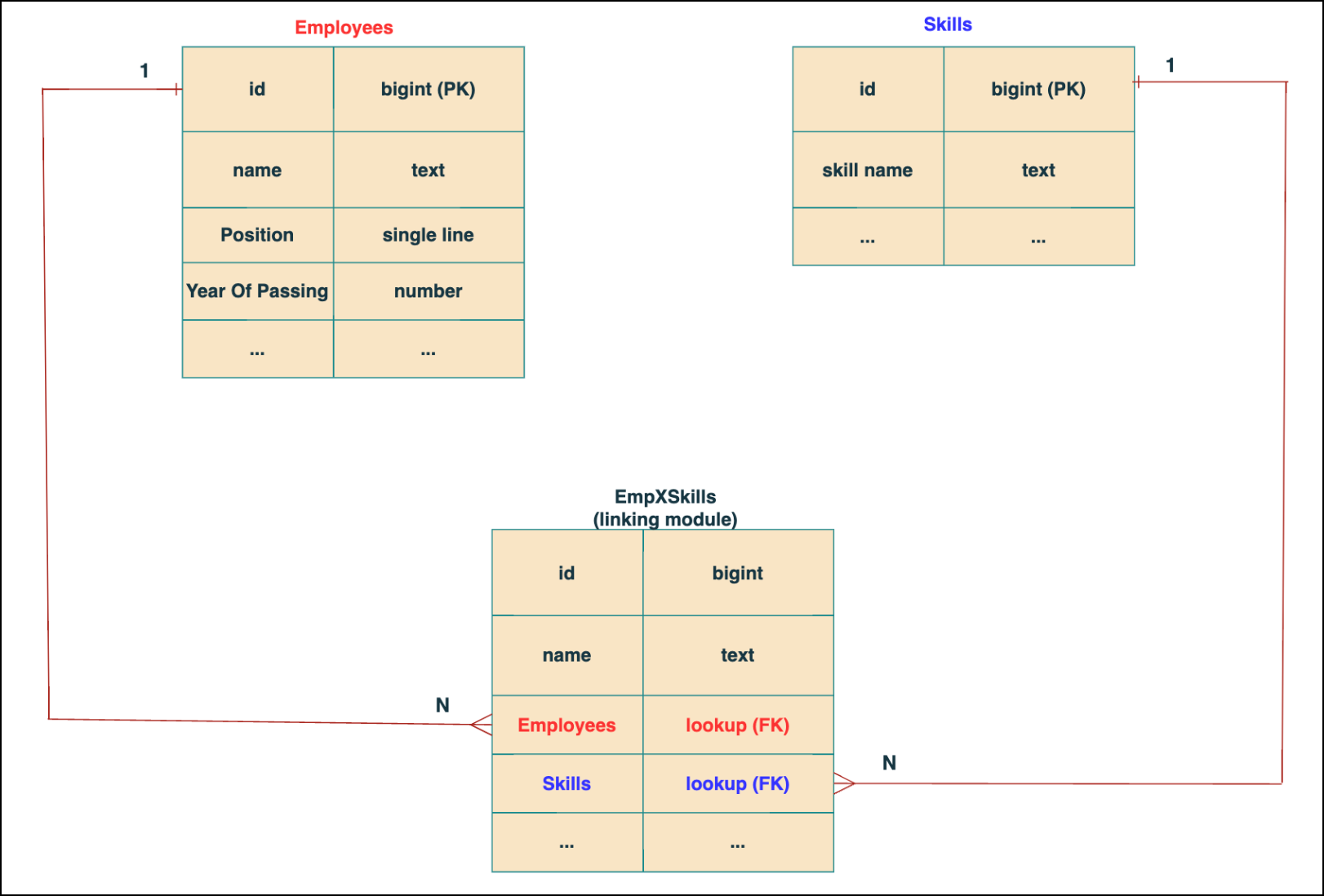
In the linking module, two lookup fields (lookup fields with api names - Employees and Skills) will be created. The lookup fields, one pointing to Employees and the other pointing to Skills from the linking module, establish a connection between the linking module and its associated module.
Why you cannot use a lookup field for this use case?
In Zoho CRM, a lookup field creates a one-to-many relationship between two modules i.e. one record in the source module can be linked to only one record in the target module.
Example :
If you create a lookup field for Skills in the Employees module, each employee can be linked to only one skill. So, use a multi-select lookup field instead of a lookup field when you need to represent complex relationships like one employee - many skills and one skill - many employees.
3. How to create a multi-select Lookup field using Zoho CRM APIs?
To create a Multi-Select lookup field between two modules using Zoho CRM APIs, follow these steps:
Step 1: Identify the Module API Name
Before creating the field, you should know the API names of the Employees and Skills modules. For that, use the Get Module Metadata API.
Request URL : {{api-domain}}/crm/v8/settings/modules
Request method : GET
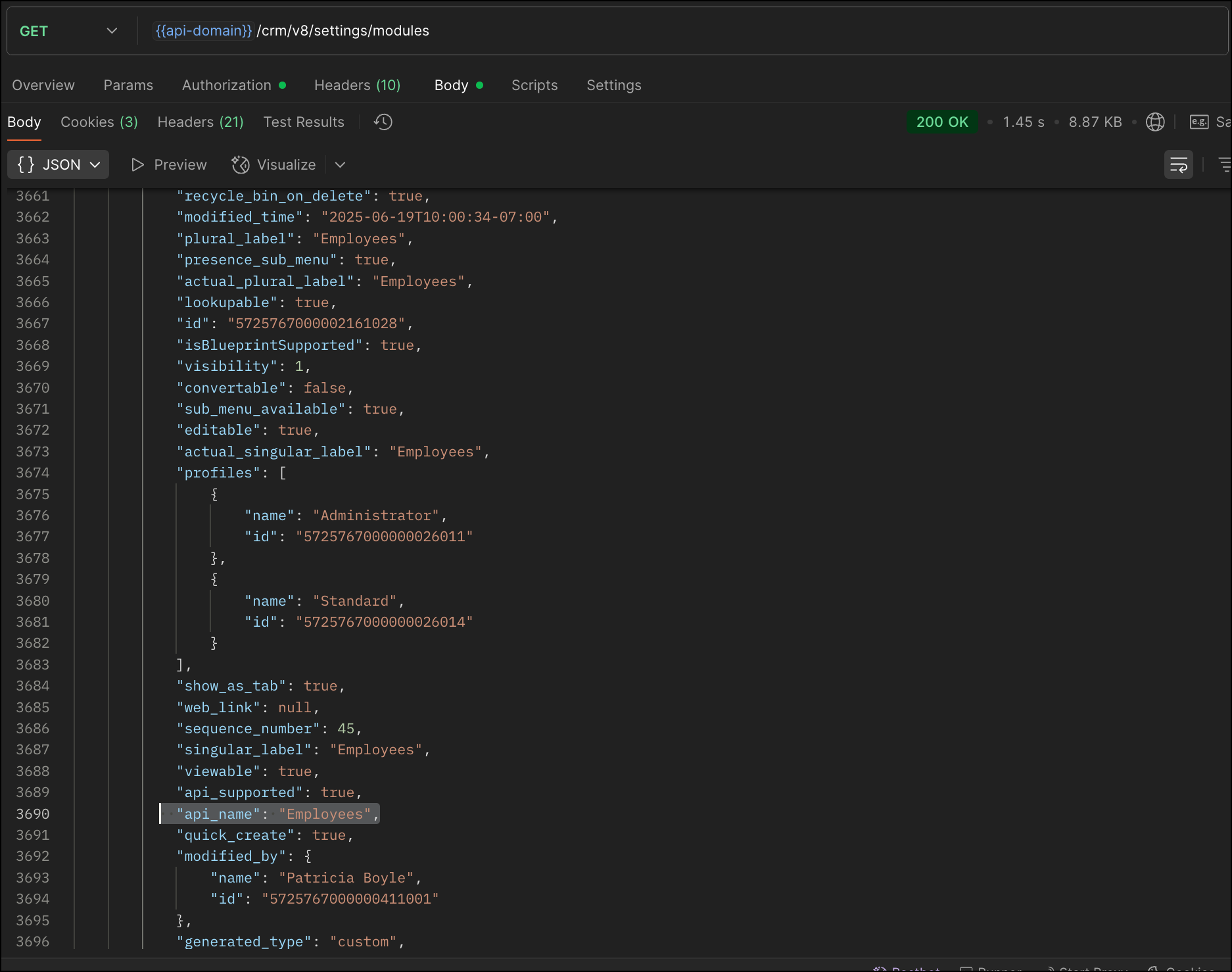
Now, search for the Employees module in the response and note its API name.
Step 2: Use the Create Custom Fields API
To establish a many-to-many relationship between two modules, in our case, Employees and Skills, you need to create a custom field of type multi-select lookup in the Employees module (parent module). Here, we will associate multiple skills to an employee.
This custom field requires:
- The related module you want to link to - Skills.
- A display field from the related module
- The linking module (EmpXSkills), which stores the actual associations.
Use the Create Custom Fields API to create custom fields.
Request URL : {{api_domain}}/crm/v8/settings/fields?module=Employees
Request method : POST
Sample input :
|
{
"fields": [
{
"field_label": "Skills", //Name of the field in your module
"data_type": "multiselectlookup", //Type of the field
"multiselectlookup": { //This JSON object contains the multi-select lookup relationship details
"connected_details": { //Details about the module and field you want to link
"module": {
"api_name": "Skills" //API name of the related module
},
"field": {
"field_label": "Skills" //The field in the related module to display
}
},
"linking_details": { //Details about the junction or linking module that manages the many-to-many relationship
"module": {
"plural_label": "EmpXSkills" //Plural label of the junction module
}
}
}
}
]
}
|
4. How Do You Find the Linking Module and Field API Names?
To know the API name of the linking module:
Use the Get Modules API and search for "generated_type" : "linking" in the response to identify MxN modules. In our case, EmpXSkills.
Request URL : {{api_domain}}/crm/v8/settings/modules
Request method : GET
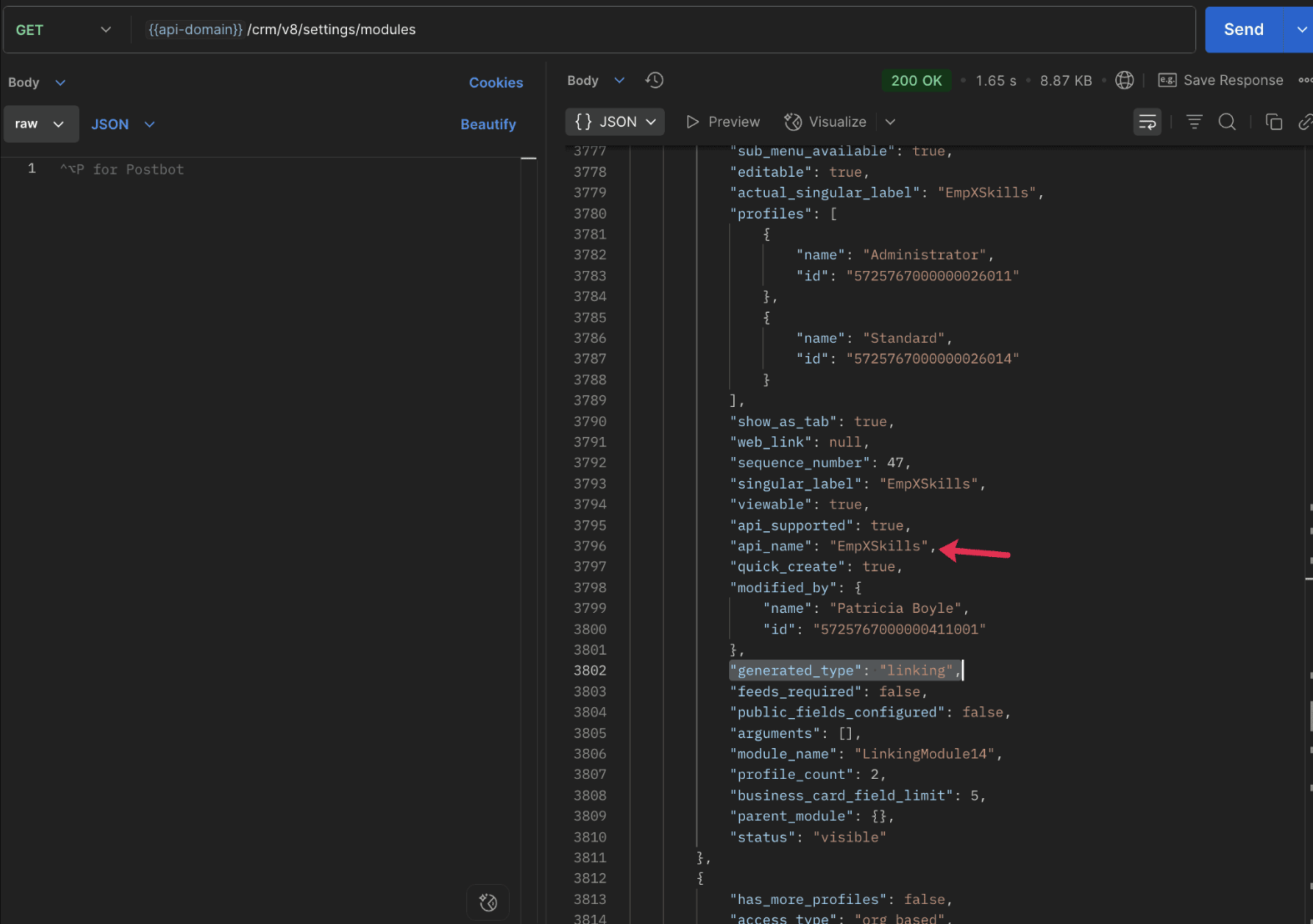
To know the field API names in the linking module:
Use the Get Fields Metadata API to retrieve the API names of lookup fields within the linking module.
Request URL : {{api_domain}}/crm/v8/settings/fields?module=EmpXSkills
Request method : GET
5. How do I associate records via a multi-select lookup field using the Insert Records API in Zoho CRM?
To associate records using a multi-select lookup field, you must provide the record IDs from the related module. The association is made through the linking module.
Example :
Associating multiple skills with an employee using the multi-select lookup field.
Request URL : {{api-domain}}/crm/v8/Employees
Request method : POST
Sample input :
|
{
"data": [
{
"Name": "Patricia",
"Email": "patricia@mail.com",
"Position": "Marketing Specialist",
"Year_of_Experience": 5,
"Skills": [ // API name of the multi-select lookup field in the Employees module
{
"Skills": { // API name of the lookup field in the linking module pointing to the Skills module
"name": "Marketing",
"id": "5725767000002149427" //ID from the Skills module are mandatory to establish the link
}
},
{
"Skills": {
"name": "Social Media Marketing",
"id": "5725767000002149476"
}
}
]
}
]
}
|
6. How do I associate an Employee's skills using the linking module in Zoho CRM?
To establish a relationship between the Employees and Skills modules through the linking module, use the Insert Records API to create a record in the linking module, EmpXSkills.
To do this,
- Use the appropriate lookup field API names to reference the parent module.
- You must need the record IDs from both the Employees and Skills modules to create the associations.
Request URL : {{api-domain}}/crm/v8/EmpXSkills
Request method : POST
Sample input :
|
{
"data": [
{
"Name": "Patricia",
"Employees": {
"id": "5725767000002161001" // Record ID from the Employees module
},
"Skills": {
"id": "5725767000002149476" // Record ID from the Skills module
}
}
]
}
|
7. When should I use create/update operations in the Employees module vs the EmpXSkills module?
|
Employees Module |
EmpXSkills (linking) Module |
|
Use when you want to create or update an Employee and associate Skills using the Multi-select Lookup field. |
Use when you want to create or remove associations between existing Employee and Skill records without modifying the actual Employee or Skill data. |
|
Creating a new employee and assigning their skills at once. |
Managing relationships between existing records i.e., linking and unlinking skills to employees. |
8. How to update a record in the linking module?
To update a record in the linking module, use the Update Records API.
Request URL : {{api-domain}}/crm/v8/EmpXSkills/5725767000006269044
Request method : PUT
Sample input :
|
{
"data": [
{
"Skills": {
"name": "Marketing",
"id": "5725767000002170035" //Associating another skill with the employee
}
}
]
} |
In the above sample, we have replaced an existing skill associated with an employee with another Skill in the linking module.This is done by updating the Skills lookup field in the EmpXSkills record.
Please note that in the linking module, Skills is a lookup field, so you can associate only one skill per linking record. But in the Employees module, Skills is a multi-select lookup field, so an employee can be associated with multiple skills.
9. How to unlink records from the parent module as well as the linking module?
Unlink the associated records from the parent module:
Using the Update records API, you can remove an associated skill from an employee, use the "_delete": null key within the multi-select lookup field in the Employee record update.
Request URL : {{api-domain}}/crm/v8/Employees/5725767000006269044
Request method : PUT
Sample input :
|
{
"data": [
{
"Skills": [
{
"Skills": {
"name": "Marketing",
"id": "5725767000002170035" // The Skill record you want to unlink
},
"id": "5725767000007228047", //record ID - The record created in the linking module for the employee with the Marketing skill
"_delete" : null
}
]
}
]
}
|
Replace an associated record from the linking module:
Use the Update Records API to replace an existing association in the linking module.
Request URL : {{api-domain}}/crm/v8/EmpXSkills/5725767000007228035
Request method : PUT
Sample input :
|
{
"data": [
{
"Skills": {
"name": "Java",
"id": "5725767000005259075" //replacing a new skill
}
}
]
}
|
In the above sample, we have replaced the existing skill with Java.
10. Why am I seeing the error "DUPLICATE_LINKING_DATA" in the Update Records API?
This error occurs when you try to associate records with the parent record that are already linked with the Multi-select lookup field. To resolve this, check the records you are trying to link and make sure your association is only with records that are not already linked.
Know your existing linked records:
Before the Update Records API, use the Get Related Records Data API and search for the multi-select lookup field. In our case, Skills is the multi-select lookup field created in the Employees module. This will return all records already associated.
Example :
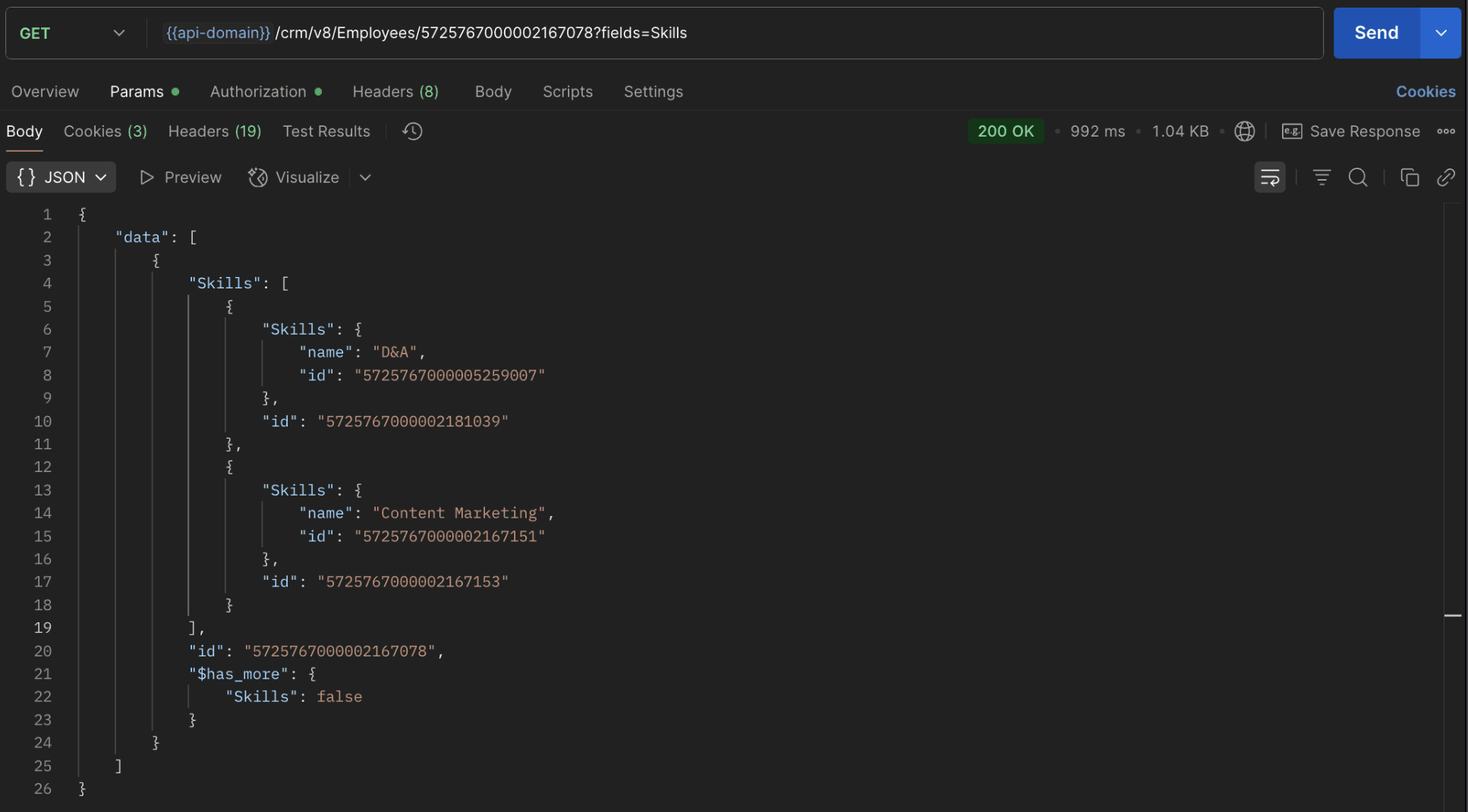
The response returns all Skills already linked with that Employee.
Using this way, compare the IDs from the API response with the new records you are about to link, and only proceed with non-duplicate IDs. This avoids duplicate entries and prevents the "DUPLICATE_LINKING_DATA" error.
11. What happens if I delete a record in the linking module?
When you delete a record in the linking module, it only removes the association between the related records in the Employees and Skills modules.
Note :
- Deleting a linking module record removes only the relationship between two records from the Employees and Skills modules.
- Deleting an Employee or Skill record deletes all corresponding entries in the linking module as well.
12. How do I query linked records?
Use the COQL API to query multi-select lookup data by specifying the corresponding linking module's API name directly in your query. The linking module is treated as a separate module in Zoho CRM, so you can retrieve associated records by querying it like any other module.
Sample query :
|
{
"select_query": "select Skills.Name as skill, Employees.Name as employee from EmpXSkills where Skills.Name like '%Marketing%'"
}
|
Use the Get Module Metadata API to know the linking module's API name.
13. How do I export multi-select lookup records using the Bulk Read API?
To export multi-select lookup data, linking module records efficiently, use the Bulk Read API with the linking module’s API name.
Request URL : https://www.zohoapis.com/crm/bulk/v8/read
Request method : POST
Sample Request :
|
{
"callback": {
"method": "post"
},
"query": {
"module": {
"api_name": "EmpXSkills" //API name of the linking module
},
"fields": [
"Employees.Name",
"Employees.Year_of_Experience",
"Skills.Name"
],
"criteria": {
"group": [
{
"field": {
"api_name": "Employees.Year_of_Experience"
},
"comparator": "greater_than",
"value": "4"
},
{
"field": {
"api_name": "Skills.Name"
},
"comparator": "contains",
"value": "Social"
}
],
"group_operator": "AND"
}
}
}
|
14. Can I import my linking module's data using the Bulk Write API?
Yes. Like the Leads and Contacts modules, you can also import linking module's data into Zoho CRM using the Bulk Write API by directly specifying the linking module’s API name.
If you are importing data that involves both a parent module, Employees and its associated MxN linking module, follow these steps:
1. Create separate CSV files:
- One for the parent module - Employees
- One for the linking module - EmpXSkills
2. Zip the files into a single ZIP file.
3. Upload the ZIP in a single Bulk Write API request.
4. Ensure accurate field mappings are provided in the API request body.
Refer to Kaizen #131 - Bulk Write for parent-child records using Scala SDK for more details on handling parent-child records.
15. Can I receive notifications if a multi-select lookup field in a module is modified or updated?
Yes, you can receive notifications when a MxN field is updated using the Notification API. To enable instant notifications for actions performed in a module, use the respective API names of the linking module in the input body.
Request URL : https://www.zohoapis.com/crm/bulk/v8/actions/watch
Request method : POST
Sample input :
|
{
"watch": [
{
"channel_id": "10000",
"events": [
"EmpXSkills.all" //EmpXSkills represents the API name of the linking module
],
"notify_url": "https://webhook.site/9f5ba227-ce5a-4709-814d-b044c003d605",
"return_affected_field_values": true
}
]
}
|
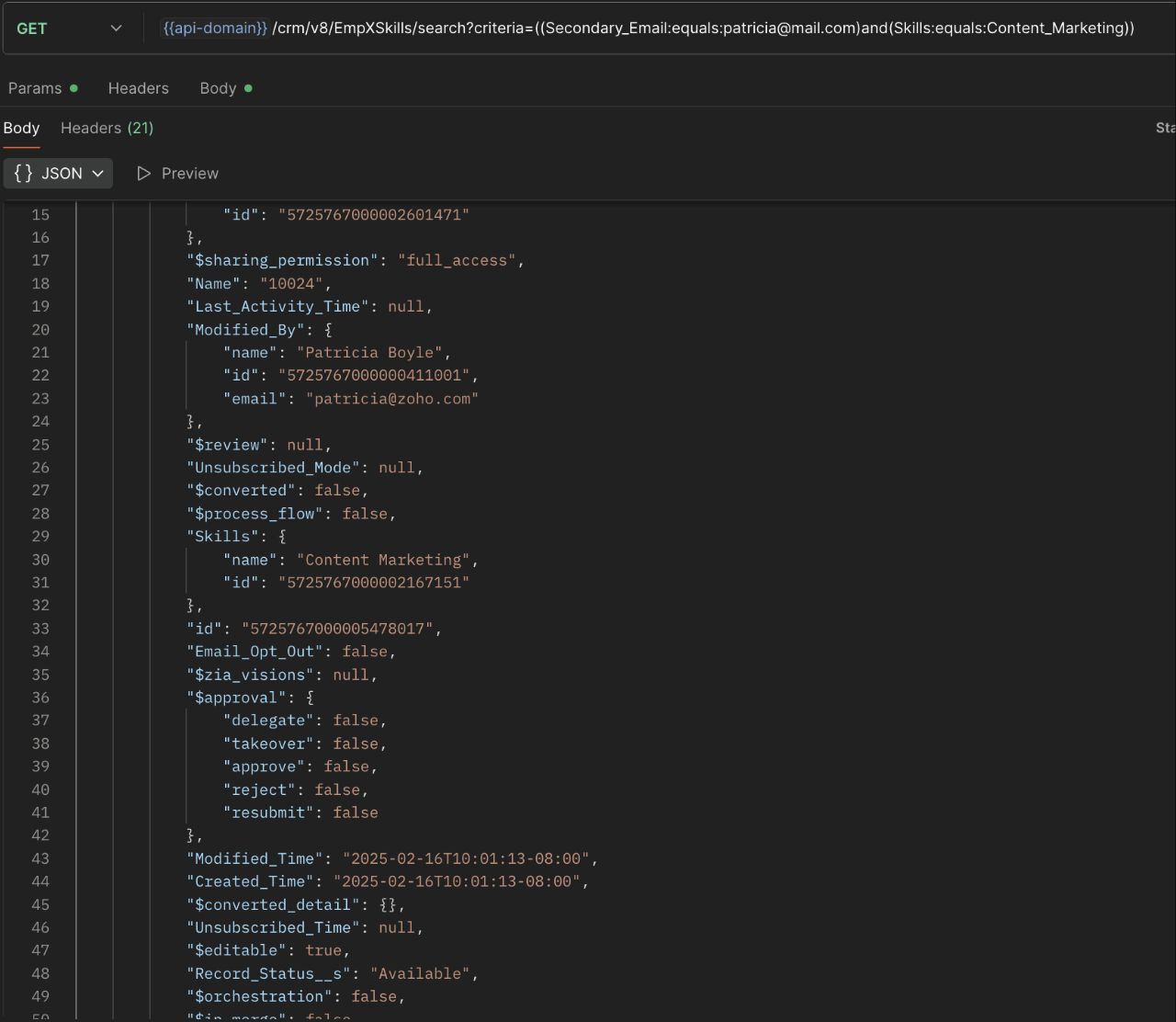
16. Can I use criteria-based filtering when accessing multi-select lookup data using the Search API?
Yes, you can filter multi-select lookup data using the criteria parameter in the Search API's URL.
Here is an example that fetches records from the EmpXSkills linking module.
Request URL : {{api-name}}/crm/v8/EmpXSkills/search?criteria=((Secondary_Email:equals:patricia@mail.com)and(Skills:equals:Content_Marketing))
Request method : GET
Sample response :
x-----------------------------x
We trust that this post meets your needs and is helpful. Let us know your thoughts in the comment section or reach out to us at support@zohocrm.com
Stay tuned for more insights in our upcoming Kaizen posts!

Previous Kaizen Post : Kaizen #198: Using Client Script for Custom Validation in Blueprint | Kaizen Directory
Other FAQs in the Kaizen series :
- Kaizen#75 - Frequently Asked Questions on Client Script
- Kaizen #147 - Frequently Asked Questions on Zoho CRM Widgets
- Kaizen #155 - Frequently Asked Questions on Subforms
- Kaizen #170 - Frequently Asked Questions on Notification APIs
- Kaizen #195: Frequently Asked Questions on Bulk Read API and Bulk Write API
Topic Participants
Subramanian K
Sticky Posts
Kaizen #198: Using Client Script for Custom Validation in Blueprint
Nearing 200th Kaizen Post – 1 More to the Big Two-Oh-Oh! Do you have any questions, suggestions, or topics you would like us to cover in future posts? Your insights and suggestions help us shape future content and make this series better for everyone.Kaizen #226: Using ZRC in Client Script
Hello everyone! Welcome to another week of Kaizen. In today's post, lets see what is ZRC (Zoho Request Client) and how we can use ZRC methods in Client Script to get inputs from a Salesperson and update the Lead status with a single button click. In thisKaizen #222 - Client Script Support for Notes Related List
Hello everyone! Welcome to another week of Kaizen. The final Kaizen post of the year 2025 is here! With the new Client Script support for the Notes Related List, you can validate, enrich, and manage notes across modules. In this post, we’ll explore howKaizen #217 - Actions APIs : Tasks
Welcome to another week of Kaizen! In last week's post we discussed Email Notifications APIs which act as the link between your Workflow automations and you. We have discussed how Zylker Cloud Services uses Email Notifications API in their custom dashboard.Kaizen #216 - Actions APIs : Email Notifications
Welcome to another week of Kaizen! For the last three weeks, we have been discussing Zylker's workflows. We successfully updated a dormant workflow, built a new one from the ground up and more. But our work is not finished—these automated processes are
Recent Topics
Injecting CSS into ZML pages
Is there a way to inject CSS into ZML pages? Use case: 1. Dashboard displays 'Recent Activities' card displaying a list of newly added records 2. Each item in list links to the record onClick 3. When a user points the cursor over an item in the list,Power of Automation :: Automated Weekly Notifications for Unapproved Timesheets
Hello Everyone, A custom function is a software code that can be used to automate a process and this allows you to automate a notification, call a webhook, or perform logic immediately after a workflow rule is triggered. This feature helps to automateExtracting Data from Sitelink APIs
Hi All, I'm working to pull data on Sitelink using API calls but i can't seem to extract it. If you click expand, you will see it has a lot of data in it. I tried extracting from the map but it's not giving me anything. Is there a workaround on this orExport a list of fields for all modules in a spreadsheet with specific field data
Many of my clients are using spreadsheets to create lists of fields for all modules when starting a new implementation or when updating an existing setup. This is a useful process but also a very time consuming one. It would be good a list of fields could[Important announcement] Zoho Writer will mandate DKIM configuration for automation users
Hi all, Effective Dec. 31, 2024, configuring DKIM for From addresses will be mandatory to send emails via Zoho Writer. DKIM configuration allows recipient email servers to identify your emails as valid and not spam. Emails sent from domains without DKIM【Zoho Backstage】2025年7月のアップデート紹介
本投稿は、本社のZoho Desk コミュニティに投稿された以下の記事を翻訳し、一部抜粋したものです。 What's New - July 2025 | Zoho Backstage ユーザーの皆さま、こんにちは。コミュニティチームの中野です。 本投稿では、Zoho Backstage の直近のアップデートを3点抜粋して、ご紹介します。 目次 1.参加可否の確認:RSVP 2.証明書作成ツール:Certificate Builder 3.登録の承認 :Registration Approval 1.参加可否の確認:RSVPCan we have Backorder Management ?
Can we have Backorder Management ?Display a field of an Account on the Ticket view
Hi there, We would like to display of the Account of the user submitting a ticket on the ticket view. See for example: How can this be achieved? It doesn't really matter where it will be placed as long as it is shown there. Thanks, SnirInsurance Agencies
I am reaching out to see if anyone has any experience in the Insurance Agency world with using Zoho exclusively for the CRM and commissions side of things. Lots of strong features like drip campaigns, meeting, calendars, emails, can all be found in here.Problem with Egyptian internet ISP
Dears, We have problem with our ADSL internet SP, That your site not working with. So, we contact them and they asking us to contact you to solve this problem. The problem that when we are connecting to Tedata ADSL your website not working (Business Email). BR,, Mohamed OmarMail Not Showing In Inbox or Sent Box
Hi, there are mails that are not displaying in both my inbox and sent box. I just tried the iPad app and it is the same but there is a blank field where a mail should be and it refers to a server error. Please fix this.Marketing Automation List Entry Criteria is no longer an option
For a couple of years now we have used the "List Entry Criteria" option to filter our Journey recipient list. All of a suddent the option no longer exists for New Lists and I can only delete the option from existing lists but can no longer edit it. AnyoneGCLID arrives not in CRM with iframe integrated ZOHO Form
Hello amazing community, I enabled Adwords integration in ZOHO CRM. I have a ZOHO Form integrated in a wordpress. I tested iframe and Javascript. I enabled the "handover" GCLID in the ZOHO Form. When I add a GLID with http://www.example.com/?gclid=TeSter-123.Bidirectional sync between Zoho Bookings and Zoho CRM - Part 1
Hey, community members! The default integration between Zoho CRM and Zoho Bookings is unidirectional, which means that any appointments booked, rescheduled, or deleted in Zoho Bookings will be reflected in Zoho CRM. However, any modifications made toIs it possible to edit placeholder text?
In the master slides I want to make sure my templates have more meaning for the users and want to replace the standard placeholder text with something more instructional. Instead of "Click to edit Mast subtitle styles" I want to have "Click to enter reportingHow to allow download of a file AFTER information is collected?
I can't find this anywhere. Can someone help with what seems to be a pretty basic web function today? - File is stored in Workdrive - Prospect goes to a URL where the file is located - System requests prospect to enter "Name" and "Email" - An email isAdd Baseline methods to API
There are no API methods for creating or querying baselines, Use case: Customer is notified of the current project start date according to plan via another product/integration. We would like to auto create a baseline (Automated via API) at the pointFixed Assets beg balance
Hello, I trust you are well I'm a new zoho books user and I find it difficult to plug in the fixed assets balance and here's what I have done: 1- I imported the fixed assets data into the fixed assets module as per the instructions 2- the import processCRM Deluge how can link attach file with workdrive file.
Hi, We have create file at workdrive and would like to link to attachment at crm module by deluge. Right now can only upload it to attachment but can not link the file from workdrive. Thank youFeature announcement: AI-powered document generator in Zoho Sign
Hi there! We recently announced manual document creation by offering an editor within Zoho Sign. Today, we are excited to announce AI-powered document generation to help you draft agreements, purchase orders, and other important business documents inPermanently deleted files
Is there a way to get back permanently deleted files from your account if they were accidentally deleted and no longer recoverable from the recycling bin? I know I am probably screwed but I just figured I would ask.Shared Mailbox in iOS app
Hi, On the desktop I am using a Shared mailbox for our company's general mailbox that somebody else should be able to view. In the iOS app however I can't find it? Old sources on the internet says this isn't possible but that can't be right? SomebodyTip #41- Simplify Compliance and Efficiency with Zoho Assist’s Data Cleanup Feature- 'Insider Insights'
Managing device data efficiently is just as important as securing remote access. With Zoho Assist’s Data Cleanup feature, admins can easily remove outdated or unnecessary device records, keeping the console organized and secure. This action is carriedRevenue Management: #6 Revenue Recognition in Professional Services Industry
If you run a consulting firm, agency, or any service-based business, you have a situation where you have signed the contract, maybe even sent the invoice, and have received some initial payments. So, can you consider this as revenue? What if the projectZoho fsm scheduled maintenance dispatch
Hi, I'm reaching out regarding an issue I'm encountering with the Scheduled Maintenance feature in Zoho FSM. I’m trying to configure it so that it automatically dispatches all maintenance jobs scheduled within the next 150 days, starting from today. However,zoho.inventory.getRecords returns no records
I running a custom function (Deluge) in Zoho Flow with a connection to Zoho Inventory. To debug the problem, I created the test function below. It returns "Number of contacts fetched: 0". This confirms that there's no issue with the org ID or connectionFeature announcement - Simplifying document creation with Zoho Sign
Hi there, We are pleased to announce the release of our document creation feature, enabling you to create, edit, and finalize documents like agreements, purchase orders, and contracts without relying on external tools or applications. <br> ThisIntegrating File Attachments in Zoho Flow Email Notifications
Hi, I would like to be able to send an email once an entry is made in a form, and in this email, I would like to attach a file that has been added to the form using the ImageUpload (or FileUpload) widget. So, I started by creating a flow that will triggerZoho project purchases
Hi Folks, I think having a purchase module in projects will help in putting together a project p and L. Project wise purchases and expenses. Do let me know your thoughts.How can I restore all the deleted Time entries of a Task in Zoho Projects
How can I restore all the deleted Time entries of a Task in Zoho Projects? Query: In Zoho Projects, I cloned a task and deleted the time entries from the cloned task. However, this also deleted the time entries from the original task. How can I restoreIs there a way to make an account inactive in ZoHo Desk
We have a few Clients "Accounts" that we no longer do business with. It would be beneficial for them to not show up in lists. However, we want to go back and view tickets, time, etc.How to set the value of the Phone field importing contacts in Zoho Desk
Hi everyone, i'm new in Zoho Desk, we're setting up the environment and i'm importing contacts from another CRM using a file CSV and i'm getting a problem with phone numbers (italian): the leading zero is cut away, also if the value is inside double quotes.How to center a field inside a section?
I’ve been trying to center a field inside a section in Zoho Canvas. When I align it visually, it looks centered in the editor, but after clicking Save, the field appears misaligned on the actual canvas. I also tried setting the field to full width, butKaizen #192 - Implementing Custom Token Persistence in Python SDK
Welcome back to another week of Kaizen! Last week, we discussed how to implement Login with Zoho using OAuth 2.0 and saw how to bring it to life in a real-world application with the Zoho CRM Python SDK. We also discussed how Zylker Academy built a customShowing the map along with mileage expense
When you use the GPS to track mileage, it shows you the map of the actual path travelled. It would be very useful and practical to save that map with the mileage expense, so that when the report is created, it provides a map of each mileage expense associatedEnable Validation Rule for Multi-Select Picklist Field
Zoho, Please allow validation rules for multi-select fields.File Upload field not showing in workflow
Hi, I have added a field on Zoho CRM. I want to use it in a workflow where that particular field is updated based on another field, however it is not showing up in the field list to select it in the workflow. Why is this please?CRM Custom function updating a module record shows the Super Admin user as the record modifier
Dear Zoho CRM Team, Is there any way to update this so that when a custom function has updated a record the Super Admin user doesn't become the modifier? This happens on the record as a modifier and shows up in the audit logs. It would be more usefulBest way to fetch employee names from Zoho People into Zoho Creator Inventory Stock Form field Employee Name Lookup
Hi Team, I have a requirement in my Zoho Creator application (Inventory Stock Adjustment) where I need to fetch employee names from Zoho People and use them as a lookup in a form. Currently, I am considering using an integration field to fetch this dataget file api is returning Junk data
I am working on extension development where at one point I need to retrieve attachments on records I found out I can use only invokeconnection and not invokeurl in extension development The invoke connection returns the image in raw binary format. WhenNext Page