Kaizen#76 - Using ZDK CRM APIs in Client Script
Welcome to another week of Kaizen! In this post, let us discuss about the ZDK CRM APIs in Client Script.
Client Script provides us the flexibility to use its collection of ZDK Client APIs and ZDK CRM APIs. The ZDK CRM APIs invoke the Zoho CRM APIs.
Here is the documentation on the available list of ZDK CRM APIs.
Note:
Every execution of a ZDK CRM API affects your API Credits, as it implicitly calls the Zoho CRM API.
Let us see a few sample Use Cases where ZDK CRM APIs are used.
Use Case:
ABC is a hardware manufacturing company. Consider that you want to achieve the following using Client Script in Detail Page (Canvas) of a custom module named Orders.
- The field Status should be editable only for the profiles "Salesperson" and "Administrator" and should be read-only for all other profiles.
- When the field Status is changed to "Dispatched" , send an email to the customer saying "Your order has been dispatched" and display a message that the email is sent.
- Add a tag "Delivered" to an order when the order status is changed to "Delivered".
Solution using Client Script
In order to send email, add tag and get user details through Client Script, you need to use the appropriate ZDK from the list of ZDK CRM APIs.
To accomplish this requirement, create two Client Scripts as follows.
- Client Script for Detail Page (Canvas) onLoad (for requirement - 1)
- Client Script for Detail Page (Canvas) onChange of field Status (for requirements 2 and 3)
1. Client script for Detail Page (Canvas) onLoad (for requirement - 1)
- Go to Setup > Developer Space > Client Script. Click +New Script.
- Specify the details to create a script and click Next.

Enter the following script and click Save.
var user = ZDK.Apps.CRM.Users.fetchById($Crm.user.id); log(user.profile.name); if (user.profile.name != "Salesperson")&&(user.profile.name != "Administrator") { ZDK.Page.getField("Status").setReadOnly(true); } |
Using ZDK.Apps.CRM.Users.fetchById(), you will be able to fetch the details of the current user. The current user ID is captured using the Client Script Constant $Crm.user.id. So the above script will make the field "Status" a read-only field for all profiles other than Salesperson and Administrator. This ZDK CRM API calls the Get Records API to get the user information.
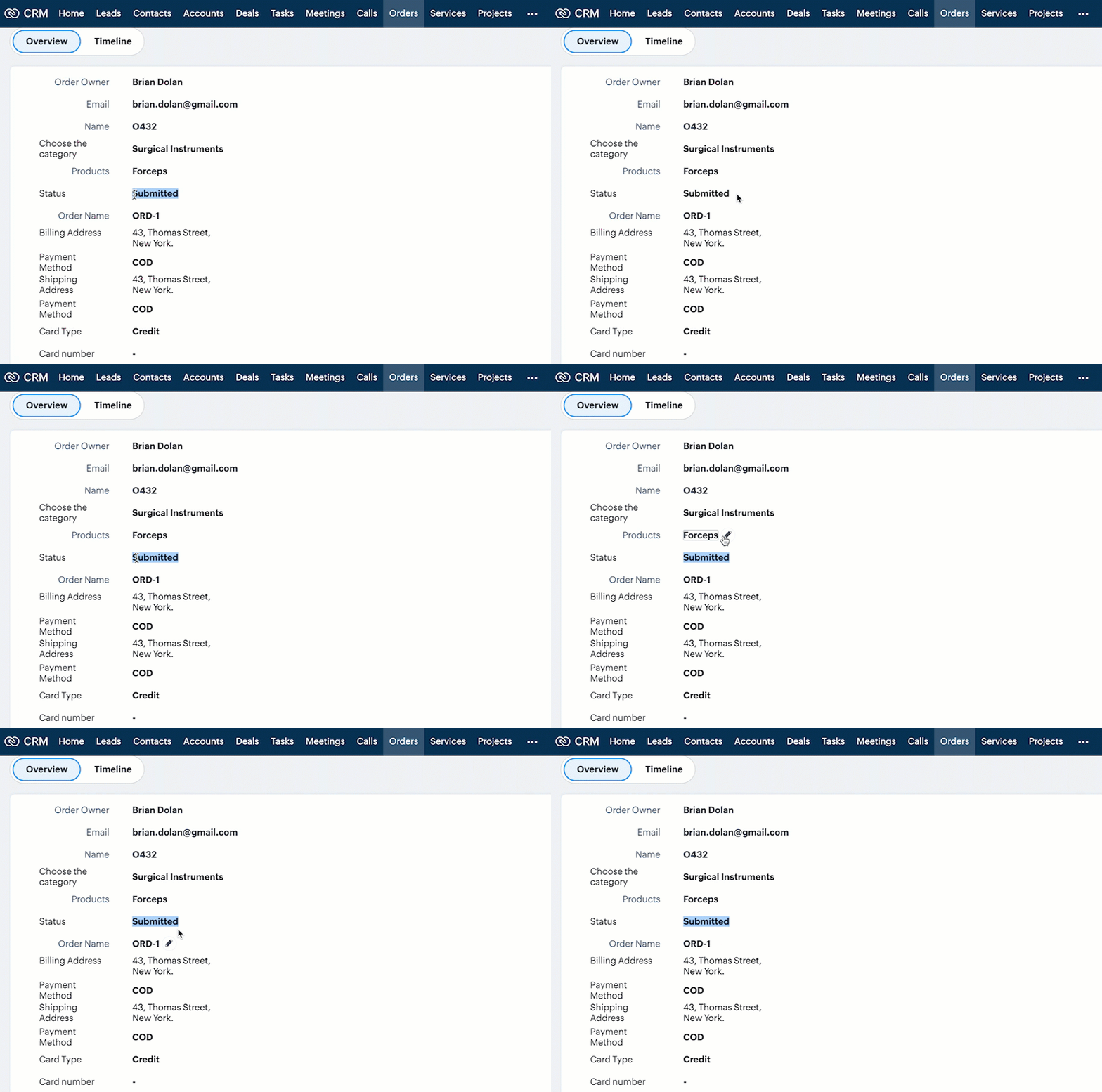
Here is how the Client Script works for Salesperson Profile users.

Here is how the Client Script works for other Profile users.
2. Client script for Detail Page (Canvas) onChange of field Status (for requirements 2 and 3)
- Go to Setup > Developer Space > Client Script. Click +New Script.
- Specify the details to create a script and click Next.
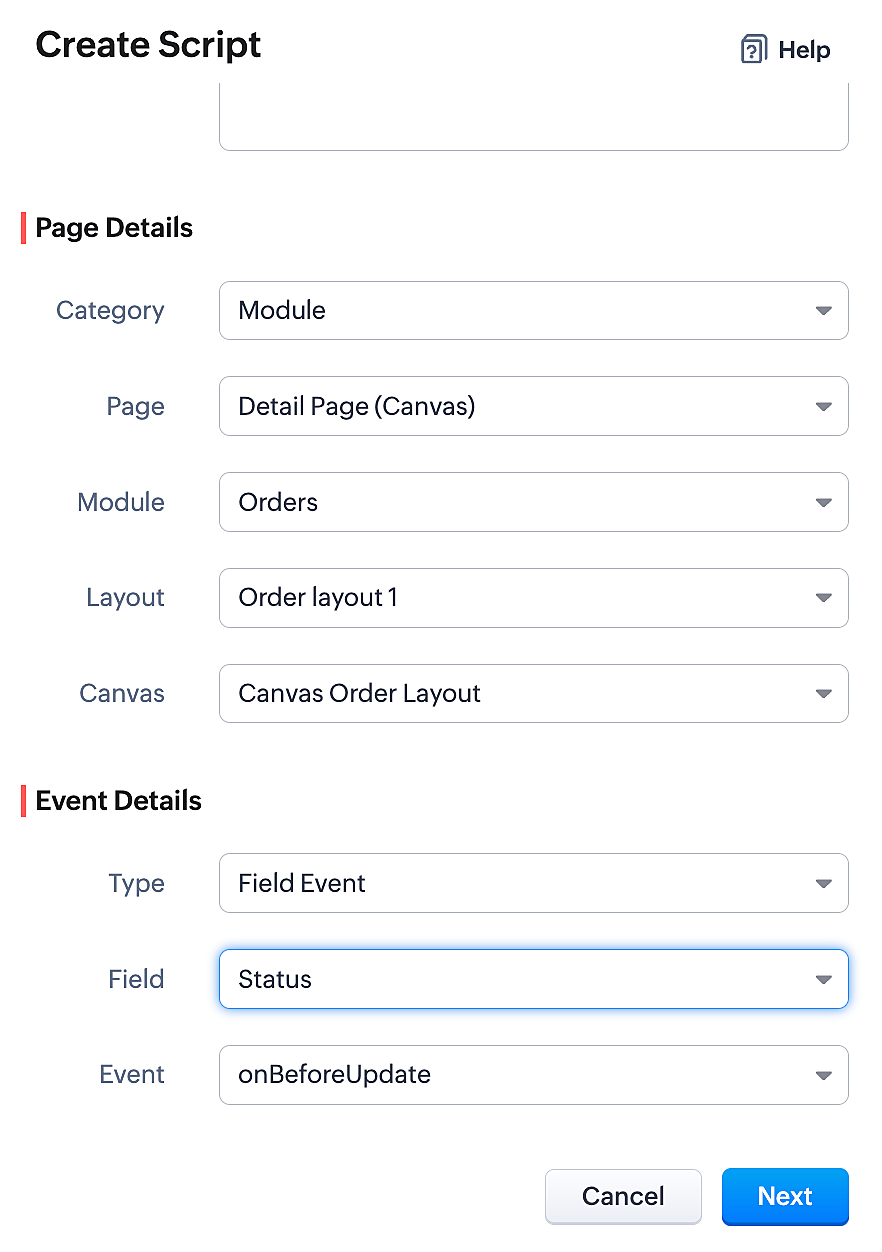
- Enter the following script and click Save.
var user = ZDK.Apps.CRM.Users.fetchById($Crm.user.id); var record = $Page.record_id; // send email when the order status is "Dispatched" if (value == "Dispatched") { var mail = new ZDK.Apps.CRM.__Actions.Models.Mail(); mail.from = { "user_name": "ABC Industries", "email": "ABCIndustries@ABC.com" }; mail.to = [{ "user_name": user.first_name + " " + user.last_name, "email": user.email }]; mail.subject = "You order has been " + value; mail.content = "Hello" + " " + user.first_name + " " + user.last_name + ", " + "We are glad to let you know that your order has been dispatched"; mail.mail_format = "text"; var response = ZDK.Apps.CRM.Orders.sendMail(mail, recordrecord); ZDK.Client.showMessage("Sent mail to notify that the order dispatch is done.", { type: 'success' }); } // Add tag when the order status is "Delivered" if (value == "Delivered") { var Order = ZDK.Apps.CRM.Orders.fetchById(record); var response = Order.__addTags(["Delivered"]); } |
- Here, sendMail(mail_object, record_id) is the ZDK CRM API that internally calls the Send Mail API and __addTags(arrayOfTagNames) is the ZDK CRM API that internally calls the Add Tags to Records. To capture the current record id, $Page.record_id is used and to fetch the current user details, the constant $Crm.user is used.
- Here is how the Client Script works.

- When the status is updated as "delivered" the tag will be added as shown in the following image.

- When the status is updated as "delivered" the tag will be added as shown in the following image.
We hope you found this post useful. We will meet you next week with another interesting topic!
If you have any questions let us know in the comment section.
Cheers!
Topic Participants
Maadhari M
Sticky Posts
Kaizen #226: Using ZRC in Client Script
Hello everyone! Welcome to another week of Kaizen. In today's post, lets see what is ZRC (Zoho Request Client) and how we can use ZRC methods in Client Script to get inputs from a Salesperson and update the Lead status with a single button click. In thisKaizen #222 - Client Script Support for Notes Related List
Hello everyone! Welcome to another week of Kaizen. The final Kaizen post of the year 2025 is here! With the new Client Script support for the Notes Related List, you can validate, enrich, and manage notes across modules. In this post, we’ll explore howKaizen #217 - Actions APIs : Tasks
Welcome to another week of Kaizen! In last week's post we discussed Email Notifications APIs which act as the link between your Workflow automations and you. We have discussed how Zylker Cloud Services uses Email Notifications API in their custom dashboard.Kaizen #216 - Actions APIs : Email Notifications
Welcome to another week of Kaizen! For the last three weeks, we have been discussing Zylker's workflows. We successfully updated a dormant workflow, built a new one from the ground up and more. But our work is not finished—these automated processes areKaizen #152 - Client Script Support for the new Canvas Record Forms
Hello everyone! Have you ever wanted to trigger actions on click of a canvas button, icon, or text mandatory forms in Create/Edit and Clone Pages? Have you ever wanted to control how elements behave on the new Canvas Record Forms? This can be achieved
Recent Topics
How to Print the Data Model Zoho CRM
I have created the data model in Zoho CRM and I want the ability to Print this. How do we do this please? I want the diagram exported to a PDF. There doesnt appear to be an option to do this. Thanks AndrewSetting certian items to be pickup only
How do we have some items that are pickup only? I have several items in my item's list that I do not ship. But they need to be on the website to be sold, and picked up in store. Need to be able to do this as one of these products is a major seller forUsing gift vouchers
We would like to be able to offer a limited number of gift vouchers, of varying values, to our customers, and are looking for the best way to do this. We have looked at Coupons and Gift Certificates, but neither seem to fit the bill perfectly. Coupons:Automatically updating field(s) of lookup module
I have a lookup field, which also pulls through the Status field from the linked record. When the lookup is first done, the Status is pulled through - this works perfectly. If that Status is later updated, the lookup field does not update as well. AsZoho Commerce and Third-party shipping (MachShip) API integration
We are implementing a third-party shipping (MachShip) API integration for our Zoho Commerce store and have made significant progress. However, we need guidance on a specific technical challenge. Current Challenge: We need to get the customer input toAdding custom "lookup" fields in Zoho Customization
How can I add a second “lookup” field in Zoho? I’m trying to create another lookup that pulls from my Contacts, but the option doesn’t appear in the module customization sidebar. In many cases, a single work order involves multiple contacts. Ideally,Can you import projects into Zoho Projects yet?
I see some very old posts asking about importing project records into Zoho Projects. But I can't find anything up to date about the topic. Has this functionality been added? Importing tasks is helpful. But we do have a project where importing projectsOutlook - Zoho CRM Calendar Integration
I'm facing an issue integrating Outlook with Zoho CRM. Has anyone successfully connected their Outlook to Zoho, and are all your meetings and emails being captured correctly in the CRM? Any insights or troubleshooting tips would be appreciatedAllocating inventory to specific SO's
Is there a way that allocate inventory to a specific sales order? For example, let's say we have 90 items in stock. Customer 1 orders 100 items. This allocates all 90 items to their order, and they have a back order for the remaining 10 items which couldIntroducing Workqueue: your all-in-one view to manage daily work
Hello all, We’re excited to introduce a major productivity boost to your CRM experience: Workqueue, a dynamic, all-in-one workspace that brings every important sales activity, approval, and follow-up right to your fingertips. What is Workqueue? SalesZoho Inventory. Preventing Negative Stock in Sales Orders – Best Practices?
Dear Zoho Inventory Community, We’re a small business using Zoho Inventory with a team of sales managers. Unfortunately, some employees occasionally overlook stock levels during order processing, leading to negative inventory issues. Is there a way toAutomation #10 - Auto Assign Ticket based on Keywords
This is a monthly series designed to help you get the best out of Desk. We take our cue from what's being discussed or asked about the most in our community. Then we find the right use cases that specifically highlight solutions, ideas and tips on optimizingAutomate attendance tracking with Zoho Cliq Developer Platform
I wish remote work were permanently mandated so we could join work calls from a movie theatre or even while skydiving! But wait, it's time to wake up! The alarm has snoozed twice, and your team has already logged on for the day. Keeping tabs on attendanceTracking Emails sent through Outlook
All of our sales team have their Outlook 365 accounts setup with IMAP integration. We're trying to track their email activity that occurs outside the CRM. I can see the email exchanges between the sales people and the clients in the contact module. ButReusable Custom Functions Across Department Workflows
Dear Zoho Desk Team, We appreciate the powerful workflow automation capabilities in Zoho Desk, particularly the ability to create and use custom functions within workflows. However, we have encountered a limitation that impacts efficiency and maintainability.Contact data removes Account data when creating a quote
Hi, Our customer has address fields in their quote layout which should be the address of the Account. They prefill the information, adding the account name - the address data is populated as per what is in the account - great. However when they then addFeature Request - Gift Cards or Gift Voucher Capability in Zoho Commerce
Hi Zoho Commerce team, I'm comming accross more and more retail businesses who sell gift cards. As there is currently no way to manage this in Zoho Commerce, it is a blocker to addoption. This is particularly popular in Europe and North America. I recentlyDon't Allow Customer to Edit Values After Submitting Ticket
After a customer submits a ticket through the customer portal, they can go into the ticket and see some of the values from the questions they answered in the sidebar. Currently, a customer can edit these values even after they submitted them. This makes no sense. We ask very specific questions that we don't want customers to later change! Please disable the ability for customers to edit the values to their submission questions in the portal. Screenshot attached.Analytics <-> Invoice Connection DELETED by Zoho
Hi All, I am reaching out today because of a big issue we have at the moment with Zoho Analytics and Zoho Invoice. Our organization relies on Zoho Analytics for most of our reporting (operationnal teams). A few days ago we observed a sync issue with thetext length in list report mobile/tablet
Is there a way to make the full text of a text field appear in the list report on mobile and tablet? With custom layouts, the text is always truncated after a certain number of characters.Automation #4 - Auto Delete Tickets based on Rules
This is a monthly series in which we pick some common use cases that have been either discussed or most asked about in our community and explain how they can be achieved using one of the automation capabilities in Zoho Desk. Unwanted tickets spammingAutomation #3 - Auto-sync email attachments to tickets
This is a monthly series where we pick some common use cases that have been either discussed or most asked about in our community and explain how they can be achieved using one of the automation capabilities in Zoho Desk. Most of our customers use emailAutomation #11 - Auto Update Custom Fields with Values from Emails
This is a monthly series designed to help you get the best out of Desk. We take our cue from what's being discussed or asked about the most in our community. Then we find the right use cases that specifically highlight solutions, ideas and tips to optimizeAutomation #13 - Auto assign tickets based on agent shift time
This is a monthly series designed to help you get the best out of Desk. We take our cue from what's being discussed or asked about the most in our community. Then we find the right use cases that specifically highlight solutions, ideas and tips to optimizeAutomation #14: Capture Jira Issue Key/ID in a Ticket Custom Field
Hello Everyone! This month's edition brings you a custom function to consolidate your records associated with Jira integration. Jira integration enables support engineers and R&D units to collaborate seamlessly on feature development, product improvement,Automation #16: Automate Ticket Reopening on Scheduled Timestamp
Hello Everyone! This edition uncovers the option to schedule reopening a ticket automatically. Zylker Finance tracks insurance policyholder activities through Zoho Desk. For policyholders who pay monthly premiums, tickets are closed upon payment completion.Automation#19:Auto-Close Tickets Upon Task Completion
Hello Everyone! We’re excited to bring you another custom function this week. In this edition, we’ll show you how to automatically close tickets when all associated tasks are marked as completed. Let’s see how ZylkaPure, a leading water filter company,Automation #15: Automatically Adding Static Secondary Contacts
Rockel is a top-tier client of Zylker traders. Marcus handles communications with Rockel and would like to add Terence, the CTO of Zylker traders to the email conversations. In this case, the emails coming from user address rockel.com should have TerenceHow to apply customized Zoho Crm Home Page to all users?
I have tried to study manuals and play with Zoho CRM but haven't found a way how to apply customized Zoho CRM Home Page as a (default) home page for other CRM users.. How that can be done, if possible? - kipi Moderation Update: Currently, each user hasAdd an background image to an email template in CRM
Hi all, We wants to put an background image behind all our email templates. Is there a way to import this thru html. If i put the option background image in <body style="background-image:...</body> and i look to the preview it shows our background, butCity field suggestion in Zoho Books
Hi team, We are using Customers module in Zoho Books. In the Address section, we want to understand whether the City field can show suggestions while typing using any API or built-in feature. For example, if a user types “Mum”, can the system suggestImproved UX design for Projects CRM integration
The current integration embeds the entier projects inteface into the CRM this is confusing and allows users to get lost. For example as a user i navigate to an account and go down to the related projects list and want to get information about a specificLink Purchase Order to Deal
Zoho Books directly syncs with contacts, vendors and products in Zoho CRM including field mapping. Is there any way to associate vendor purchase orders with deals, so that we can calculate our profit margin for each deal with connected sales invoicesTransformer vos stocks en décisions intelligentes avec Zoho Inventory et Zoho Analytics
Zoho Inventory permet de suivre facilement les niveaux de stock et d’anticiper les restockages. Pour de nombreuses entreprises, cela suffit à gérer les opérations au quotidien. Mais à mesure que l’activité se développe, cette clarté peut commencer à montrerWorkDrive Download Issue
My client has been sending me files via WorkDrive, which generally has worked fine. Recently files won't download at all. If you try and individually select and download a file, a popup will appear in the bottom right saying it's preparing and then itZoho Commerce - Poor Features Set for Blogging
Hi Zoho Commerce team, I'm sure you will have noticed that I have been asking many questions about the Blogs feature in Commerce. I thought that it would be useful if I share my feedback in a constructive way, to highlight the areas which I feel needSecurity Enhancements | Migrate to the Updated Policies
Hello everyone, Zoho Directory's security policies have been updated and reorganized into three new policies with features that enhance the overall organization security. These policies provide a stronger and more secure sign-in methods and improve theBring Zoho Shifts Capabilities into Zoho People Shift Module
Hello Zoho People Product Team, After a deep review of the Zoho People Shift module and a direct comparison with Zoho Shifts, we would like to raise a feature request and serious concern regarding the current state of shift management in Zoho People.Quick Create needs Client Script support
As per the title. We need client scripts to apply at a Quick Create level. We enforce logic on the form to ensure data quality, automate field values, etc. However, all this is lost when a user attempts a "Quick Create". It is disappointing because, fromHow to block a WhatsApp user for sending spam
Is there a way to block those whatsapp users that just come to play and annoy our service, they also spam us. We have a waba service with sales iqNext Page