Email notifications are one of the most versatile tools in Zoho Bookings.
We've beautified and translated them. Now, let's see what other steps we can take to further stretch their use.
In this guide, we'll use email notifications to:
- Create product awareness
- Market other services
- Show social proof
- Thank customers
- Collect feedback
- Win repeat business and more
Check out the table below to see how you can pack more value into your outgoing emails.
Email Notifications
| Booked
| Rescheduled
| Canceled
| Completed
| No-show
| Reminders
|
Agenda and meeting prerequisites
| ✓
| ✓
|
|
|
| ✓
|
Case studies
| ✓
|
|
|
| ✓
| ✓
|
Customer testimonials
| ✓
|
|
|
| ✓
| ✓
|
Staff credentials
| ✓
|
|
|
| ✓
| ✓
|
Post-appointment instructions
|
|
|
| ✓
|
|
|
Data gathering
|
|
| ✓
| ✓
| ✓
|
|
"Book another appointment" button
|
|
| ✓
| ✓
| ✓
|
|
Service promotions
|
|
|
| ✓
| ✓
|
|
Yes, customer testimonials, case studies, and other value additions can be shared through social media. But think about this: Brands spend billions of dollars for customer attention, whereas on the other end, customers are overloaded with information. It's difficult to reach your customers amidst this chaos.
Even if you pack valuable content into your social posts, your customers are likely distracted and their attention fragmented.
But when you leverage email notifications in Zoho Bookings, you get more targeted customer attention with very little effort from your side. Above all, it is FREE.How?
Because even when faced with hundreds of emails, customers will open Zoho Bookings messages to view valuable information like appointment times and meeting links.
Plus, as customers often forget these details, they're likely to open your email notifications more than once. This means you get a customer's undivided attention on a recurring basis.
So why not leverage this?
You can double-down on the value you deliver to your customers during this attention window and let customers know more about what you have to offer.
This reinforces brand recall, strengthens customer trust, and increases repeat bookings, eventually leading to a boost in revenue.
Sending value packed emails
Let's explore different ways to deliver value to your customers.
1. Agenda and prerequisites
An agenda helps you set clear expectations by giving a preview of the session. This way, customers can prepare for what's to come.
Prerequisites are beneficial for both you and the customer. Say, for example, you teach students programming languages online. Your prerequisites might be a laptop, a GitHub account, and an integrated development environment such as Visual Studio.
This helps your students prepare and makes your class time more effective. It's a win-win situation.
Two ways to send an agenda and prerequisites to your customers include visuals and text.
Visuals
For more detailed agendas, you can create a private page on your website with stunning designs and include the page's hyperlink in your email. This is easily done by creating a share link through Zoho WorkDrive or Google Drive.
Here's what a hyperlinked agenda will look like:
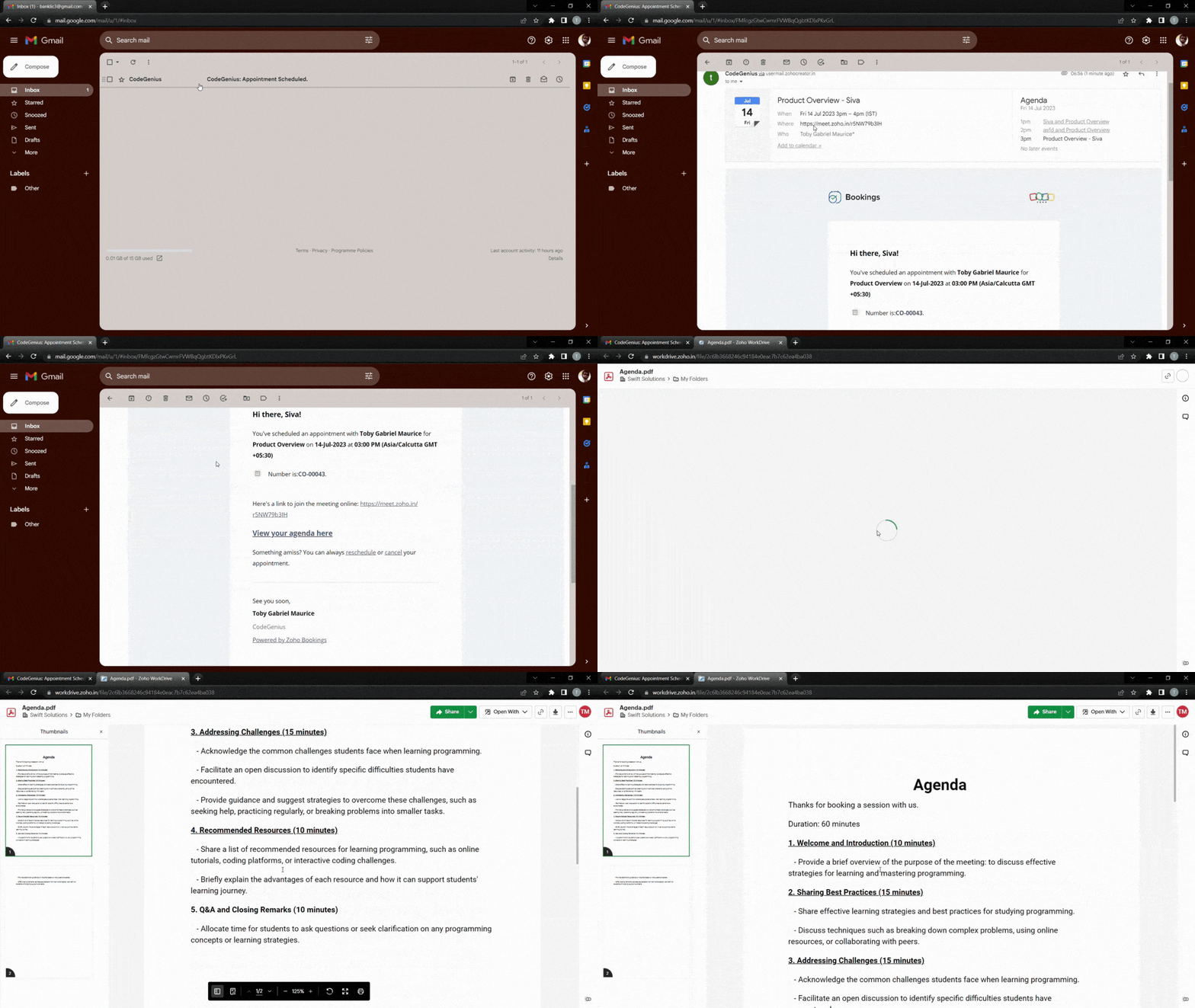
To make things even easier for customers, you can hyperlink a downloadable agenda. The following video demonstrates how to add a downloadable file to your outgoing emails.
Text
If your agenda is short, you can write it out using bullet points directly within your emails. We recommend having no more than six points to keep the message as concise as possible.
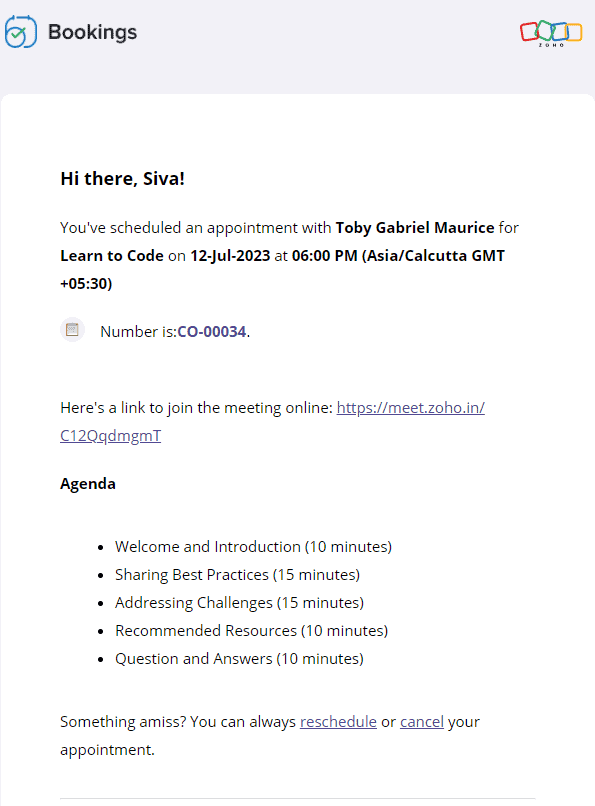
Text-based agenda
Text-based prerequisites
The following video shows how to add text-based agendas and pre-requisites to your emails.
2. Customer testimonials, case studies, and more
Customer testimonials and case studies help you showcase your credibility and gain trust. When your potential customers see highly rated testimonials and successful case studies, they'll put their faith in you.
It's also important to note that customers might have second thoughts about their appointment if it is far in advance. Sending these testimonials eliminates any such thought and reduces the possibility of a no-show.
Let's dive into some of the ways that you can send positive customer feedback along with your emails.
Landing pages and blog posts
Sometimes, the real estate in an email isn't sufficient enough. In those cases, you can hyperlink your testimonials or include buttons that lead to customer feedback forms.
Here's what the output will look like.
And here's how to add a button that links to any content of your choice.
Copy and paste the following code from the below snippet to add a button to your emails. In place of the blue "Button Text Here," you can add the text that you wish to see on your buttons.
- <button style="padding: 16px 32px; text-align: center; display: inline-block; font-size: 16px; margin: 4px 2px; background-color: rgb(80, 73, 127)">
- <a href="https://www.zoho.com/bookings/customers/loanstreet.html" style="color: white; text-decoration: none">
- <!-- Button Text Here -->
- </a>
- </button>
Videos
You can also embed your YouTube thumbnails as images in your emails and hyperlink them to the corresponding videos. We embed thumbnails rather than videos because most email clients cannot read video embeds.
We can use online image editors like Canva to create engaging thumbnails. This method intrigues your clients, increases click through rates, and enhances brand recall.
The following GIF shows how the output will look like:
Using the same technique, you can record videos of your staff speaking on camera about:
- The agenda, to give a preview of the session
- Any prerequisites, to prepare your customers for an engaging session
- Their own experience in the industry, to assure customers that they're under the guidance of an expert
Check out the following video to embed YouTube thumbnails in your outgoing emails.
4. Adding value after an appointment
It's best to go the extra mile and send thank you emails to your customers post-appointment. You can also send resources that may be helpful to them.
For example, a marketing team that does product demos could send out a PDF that contains help documents, support contacts, and other useful details. A solopreneur who teaches programming languages online might send a study plan and some words of encouragement.
All these steps show that you care about your customer's progress. This leads to increased trust, recurring bookings, and growth in revenue.
Depending upon the size of these instructions, you can choose to include them in the body of the email itself, or within a downloadable PDF, videos, hyperlink, or a button.
5. Collecting feedback
Both satisfied and dissatisfied customers add value to a business, and forms work well when you wish to gather their feedback. This comes in handy for cancellation and no-show emails as well because it allows us to find out why our customers have cancelled. You can also send forms along with your completed emails to find out what went well.
Here's what a hyperlinked form will look like:
Notes
1. Zoho Bookings offers five types of email notifications and three types of reminders. Not all content works with every email, and our table at the beginning of the article can help you decide on which to use. Depending upon your businesses, you can choose to stick with one or more value additions.
2. Be sure that your reminders are spaced out well. For example, if you have an appointment scheduled two weeks from now, you can send three reminders. However, if the appointment were just two days away, you would likely just want to send one reminder. This will also vary depending upon the industry you're in, so we recommend you use your best judgment.
Suggested flow ideas
So far, we've seen the content that works for different types of emails. But what should your ideal flow be?
Don't worry, we've got your back.
Here are some sample flows that you could emulate.
- Marketing team that offers product demo calls
- Booked email + agenda
- Reminder 1 + staff experience
- Reminder 2 + customer testimonial
- Completed email + post-appointment instructions
- Solopreneur who teaches programming languages
- Booked email + pre-requisites
- Reminder 1 + staff experience
- Reminder 2 + agenda
- Reminder 3 + case study
- Completed email + post-appointment instructions
In this article, we've pushed the boundaries of email templates in Zoho Bookings. We've also discussed different ways that we can group together email notifications and create flows that maximize value for your audience.
If you have any questions, drop them in the comments or email us at
hello@zohobookings.com. We'll be happy to help you out.
Recent Topics
Send Automated WhatsApp Messages and Leverage the Improved WhatsApp Templates
Greetings, I hope all of you are doing well. We're excited to announce a major upgrade to Bigin's WhatsApp integration that brings more flexibility, interactivity, and automation to your customer messaging. WhatsApp message automation You can now use
Jobs at multiple locations
Hi A lot of times we have same job open at multiple locations. So I would like an option where we can create a job and choose multiple locations. Currently we have to create individual jobs for each location. If we can create one job and mention multiple
From Zoho CRM to Paper : Design & Print Data Directly using Canvas Print View
Hello Everyone, We are excited to announce a new addition to your Canvas in Zoho CRM - Print View. Canvas print view helps you transform your custom CRM layouts into print-ready documents, so you can bring your digital data to the physical world with
Passing the CRM
Hi, I am hoping someone can help. I have a zoho form that has a CRM lookup field. I was hoping to send this to my publicly to clients via a text message and the form then attaches the signed form back to the custom module. This work absolutely fine when
Tag Adding Option in Kanban Card Customization Bigin CRM Mobile App
I would like to request an option to add and display tags on Kanban cards in the Bigin CRM mobile app. This feature would make it easier to categorize deals and quickly identify priorities while working on the go.
Empowered Custom Views: Cross-Module Criteria Now Supported in Zoho CRM
Hello everyone, We’re excited to introduce cross-module criteria support in custom views! Custom views provide personalized perspectives on your data and that you can save for future use. You can share these views with all users or specific individuals
WhatsApp Voice Message Sending Option in Bigin CRM
I would like to request a feature that allows users to send WhatsApp voice messages directly from Bigin CRM. This would help improve communication efficiency and make it easier for teams to respond quickly to customer inquiries.
CRM: hosting a single html file in Zoho and displaying it as a widget
I have seen that CRM offers the option of uploading a web project to Zoho itself and displaying it as a widget in CRM. The instructions then talk about setting a development environment with Node and developing an application to upload to Zoho. But I
Synchronise item image between Zoho Commerce and Zoho Books/Inventory/CRM
Here is a blindingly simple idea to tie several Zoho products together. Zoho - please include a method to synchronise the item image (or images) from one Zoho application to another. For example, if you upload an item image in Zoho Inventory, a user should
How to change position button transtition of Blueprint?
Hi Everyone, Look at my screenshoot, it is possible move the reject button to the right? I couldn't find that setting in the blueprint. Thank you.
Marketer’s Space - WhatsApp Pricing Update: What Marketers Need to Know and Do
Hello Marketers, Welcome back to Marketer’s Space! WhatsApp made changes to their pricing model on July 1, 2025, moving from conversation-based pricing to a per-message pricing model. This week’s post focuses on what these changes mean for your WhatsApp
Multi file upload
Hi, I just wonder if one could upload multiple files in one shot, say between one and three files, without adding multiple File Upload fields? Thanks, Alalbany
Sorting Descending in a lookup
I have a case number lookup on multiple forms. I need the most recent added to appear at the top of the lookup or as the list of cases grom it's too much to scroll. Is there a way to have a look up sort descending?
Importing customer comments and multiple shipto addresses
I am evaluating Zoho Books and have most of my data imported with two exceptions: (1) Import customer comments - in my current system I have several comments of different types, and I need to bring these into Zoho. Preferably Books customer records, but
Can we add custom fields to portal community profiles?
How do we add custom fields to our profile pages in our portal community? If we have the ability to add custom fields, will we be able to access those fields via API? We want to use our Desk community in our help portal as our primary community and would
Auto-upload Creator Files to WorkDrive
Hi everyone, I’m working on a workflow that uploads files from Zoho Creator to specific subfolders in Zoho WorkDrive, as illustrated in the attached diagram. My Creator application form has two multi-file upload fields, and I want—on successful form submission—to
Asap Widget 2.0
Where's the documentation for the new ASAP widget? https://www.zoho.com/desk/developers/asap/#introduction this one is outdated How can we dynamically navigate between different views? How can we prefill ticket forms using ASAP 2.0?
Update date & time when a cell is edited
Hi All, I am desiring to have a cell update with the current date and time when another cell is edited. Any ideas? Thank you
CRM x WorkDrive: File storage for new CRM signups is now powered by WorkDrive
Availability Editions: All DCs: All Release plan: Released for new signups in all DCs. It will be enabled for existing users in a phased manner in the upcoming months. Help documentation: Documents in Zoho CRM Manage folders in Documents tab Manage files
Can the Trigger be changed?
I'm afraid I already know the answer, but here goes... After activating a workflow (under Campaigns > Automations), Then later choosing to Edit the workflow, Can the Workflow's Trigger be changed? Currently the entire Trigger section + options are gone
Marketer's Space: Proven tips to improve open rates – I
Hello Marketers! Welcome back to another post in Marketer's Space! In this week's post, we'll discuss the ever-important concept of open rates. This will be a multi-part series, as we have a range of topics to cover. Open rates—which measure the percentage
Holidays
Hi; For defining Holidays, you need to add logic to handle the year as well as the month & day. We need to be able to enter Holidays for the next year. I need to add a holiday for January 2, 2017, but I can't until January 1st, which is a Sunday and we
Creating Custom PDF Template from Form
I am trying to create a custom PDF from form submissions. I have the standard subscription and it indicates that PDF forms are included. I cannot find anywhere to create PDF forms. I try to follow the instructions from here: https://help.zoho.com/portal/en/kb/forms/form-settings/pdf-settings/pdf-editor/articles/creating-your-own-pdf-template#Creating_your_template_from_the_scratch
Important Update: Facebook Metrics Deprecation & Impact on Zoho Analytics
Dear Zoho Analytics users, Facebook has deprecated a set of metrics from the Facebook Pages Insights API, effective November 15, 2025. As a result, these changes will affect any reports and dashboards in Zoho Analytics that rely on Facebook Pages data.
Quick Copy Column Name
Please add the ability to quickly copy the name of a column in a Table or Query View. When you right-click the column there should be an option to copy the name, or if you left-click the column and use the Ctrl+C keyboard shortcut it should copy the
Conditional Field Visibility in Bigin CRM
I would like to request support for conditional field visibility within Bigin CRM. This feature should allow administrators to configure show/hide rules for fields based on predefined criteria (e.g., field values, picklist selections, stage changes,
Introducing Zoho MCP for Bigin
Hello Biginners! We're excited to introduce Zoho MCP for Bigin, a completely new way of interacting with Bigin data using AI. With Zoho MCP, you can securely connect your Bigin account with popular AI agents like Claude, Cursor, Windsurf, and VS Code,
Introducing the Zoho Projects Learning Space
Every product has its learning curve, and sometimes having a guided path makes the learning experience smoother. With that goal, we introduce a dedicated learning space for Zoho Projects, a platform where you can explore lessons, learn at your own pace,
MCP > Creator connection failing with Claude
I'm trying to get claude to access any of my Zoho Creator apps and it keeps failing. I have enabled all tools for creator and ensured in claude settings that everything is authorised. Here is what claude says : Unfortunately, the error messages I'm receiving
Is it possible to sync data every 5–10 minutes in Zoho Analytics (CRM or Excel imports)?
Hello Team, I want to know if Zoho Analytics supports near real-time syncing of data from different sources. My requirements: I am importing data from Zoho CRM → Zoho Analytics I also have some datasets maintained in Excel/CSV I want both data sources
Feature Request: Dynamic Dimension Control for zc_LoadIn Popups
As detailed in this community discussion, Zoho Creator's zc_LoadIn parameter is a vital tool for opening components (forms, reports, or pages) in modal dialogs via HTML snippets, Notes, or Rich Text Fields. While powerful, this feature suffers from a
Subforms in stateless forms
I think the title says it all. We need to be able to add subforms to stateless forms. Currently the only workaround is to create a Form and delete each record upon submission of the form. I need to build an interface to update our inventory. Basically
Text wrap column headers in reports?
Is it possible to auto wrap column headers so that a longer multi-word header displays as two lines when the column is narrower than the width of the header title?
What’s New in Zoho Inventory — Latest Features, Integrations & Updates | December 2025
Zoho Inventory has evolved significantly over the past months, bringing you smarter, faster, and more connected tools to streamline your operations. Whether you’re managing multichannel sales, complex fulfillment workflows, or fast-moving stock, our newest
Marketer’s Space - Multi-Channel Campaigns for the Biggest Shopping Week with Zoho Marketing Automation
Hello marketers, Welcome back to another post in Marketers Space! The biggest shopping week of the year is almost here, and it’s your moment to shine without the stress. With Black Friday and Cyber Monday just around the corner, being present across email,
Auto-Invite Users to Portals in Zoho CRM based on Conditions
Hello Everyone, You can now automate portal invitations in Zoho CRM with the new Auto-Invite users feature in Portal management. No more manually enabling portal access one by one. With this enhancement, you can automatically send invites for users to
Pricing Strategies: #5 Stay local, Price & Sell Global
Arun had always dreamed of taking his handmade craft business beyond his hometown. For years, he sold locally. Most of his customers are familiar faces, in our usual currency and with the exact expectations. But one day, a traveller visited his workshop
Best practice to structure reporting to include events covering multiple months / quarters.
Hi, I'm new to Zoho, have some experience of more "enterprise" tools, looking for some input from the community. I'm looking to create a report that includes events that cover a long period, each event has a start / end date and I'm struggling undertanding
Incorrect Email Notifications for Product Reviews
Dear Zoho Commerce Support Team, I am writing to report a technical issue that occurs frequently on our platform. Problem Description: We regularly receive email notifications informing us of new product reviews awaiting approval. However, when we access
Zoho CRM for Everyone's NextGen UI Gets an Upgrade
Hello Everyone We've made improvements to Zoho CRM for Everyone's Nextgen UI. These changes are the result of valuable feedback from you where we’ve focused on improving usability, providing wider screen space, and making navigation smoother so everything
Next Page