Making the most of email notifications in Zoho Bookings
Email notifications are one of the most versatile tools in Zoho Bookings.
We've beautified and translated them. Now, let's see what other steps we can take to further stretch their use.
In this guide, we'll use email notifications to:
- Create product awareness
- Market other services
- Show social proof
- Thank customers
- Collect feedback
- Win repeat business and more
Check out the table below to see how you can pack more value into your outgoing emails.
Email Notifications
Booked | Rescheduled | Canceled | Completed | No-show | Reminders | |
| Agenda and meeting prerequisites | ✓ | ✓ | ✓ | |||
Case studies | ✓ | ✓ | ✓ | |||
Customer testimonials | ✓ | ✓ | ✓ | |||
Staff credentials | ✓ | ✓ | ✓ | |||
Post-appointment instructions | ✓ | |||||
Data gathering | ✓ | ✓ | ✓ | |||
"Book another appointment" button | ✓ | ✓ | ✓ | |||
Service promotions | ✓ | ✓ |
Yes, customer testimonials, case studies, and other value additions can be shared through social media. But think about this: Brands spend billions of dollars for customer attention, whereas on the other end, customers are overloaded with information. It's difficult to reach your customers amidst this chaos.
Even if you pack valuable content into your social posts, your customers are likely distracted and their attention fragmented.

But when you leverage email notifications in Zoho Bookings, you get more targeted customer attention with very little effort from your side. Above all, it is FREE.How?
Because even when faced with hundreds of emails, customers will open Zoho Bookings messages to view valuable information like appointment times and meeting links.

Plus, as customers often forget these details, they're likely to open your email notifications more than once. This means you get a customer's undivided attention on a recurring basis.
So why not leverage this?
You can double-down on the value you deliver to your customers during this attention window and let customers know more about what you have to offer.
This reinforces brand recall, strengthens customer trust, and increases repeat bookings, eventually leading to a boost in revenue.
Sending value packed emails
Let's explore different ways to deliver value to your customers.1. Agenda and prerequisites
An agenda helps you set clear expectations by giving a preview of the session. This way, customers can prepare for what's to come.
Prerequisites are beneficial for both you and the customer. Say, for example, you teach students programming languages online. Your prerequisites might be a laptop, a GitHub account, and an integrated development environment such as Visual Studio.
This helps your students prepare and makes your class time more effective. It's a win-win situation.
Two ways to send an agenda and prerequisites to your customers include visuals and text.
Visuals
For more detailed agendas, you can create a private page on your website with stunning designs and include the page's hyperlink in your email. This is easily done by creating a share link through Zoho WorkDrive or Google Drive.
Here's what a hyperlinked agenda will look like:
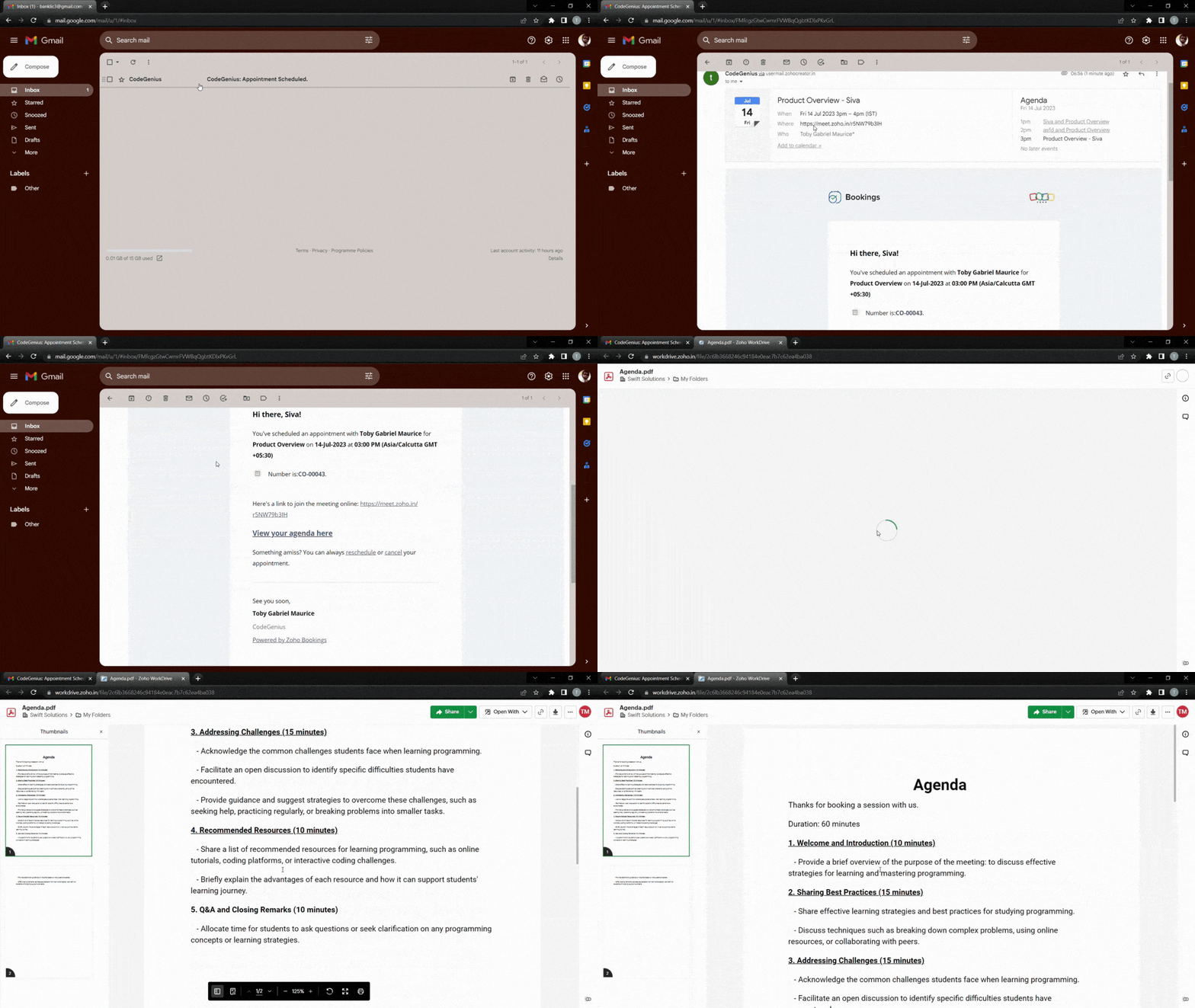
To make things even easier for customers, you can hyperlink a downloadable agenda. The following video demonstrates how to add a downloadable file to your outgoing emails.
Text
If your agenda is short, you can write it out using bullet points directly within your emails. We recommend having no more than six points to keep the message as concise as possible.
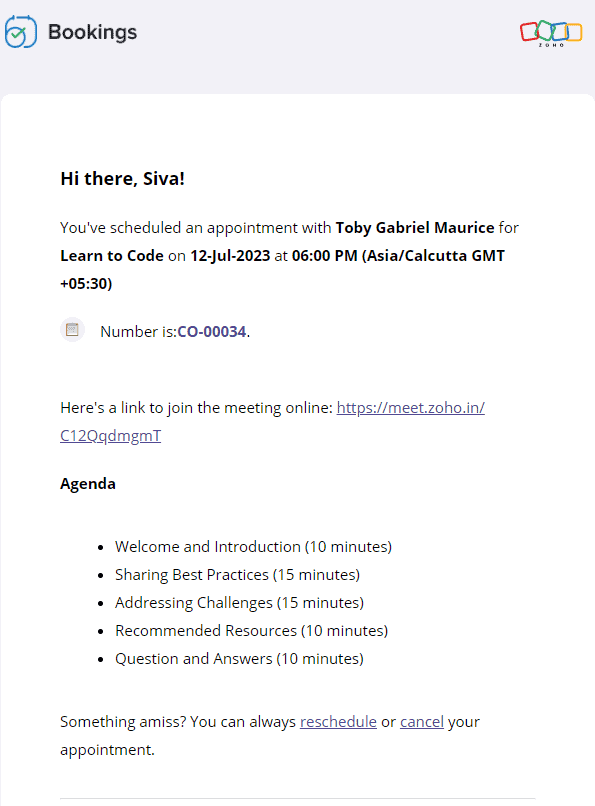
Text-based agenda

Text-based prerequisites
The following video shows how to add text-based agendas and pre-requisites to your emails.
2. Customer testimonials, case studies, and more
Customer testimonials and case studies help you showcase your credibility and gain trust. When your potential customers see highly rated testimonials and successful case studies, they'll put their faith in you.
It's also important to note that customers might have second thoughts about their appointment if it is far in advance. Sending these testimonials eliminates any such thought and reduces the possibility of a no-show.
Let's dive into some of the ways that you can send positive customer feedback along with your emails.
Landing pages and blog posts
Sometimes, the real estate in an email isn't sufficient enough. In those cases, you can hyperlink your testimonials or include buttons that lead to customer feedback forms.
Here's what the output will look like.
And here's how to add a button that links to any content of your choice.
Copy and paste the following code from the below snippet to add a button to your emails. In place of the blue "Button Text Here," you can add the text that you wish to see on your buttons.
- <button style="padding: 16px 32px; text-align: center; display: inline-block; font-size: 16px; margin: 4px 2px; background-color: rgb(80, 73, 127)">
- <a href="https://www.zoho.com/bookings/customers/loanstreet.html" style="color: white; text-decoration: none">
- <!-- Button Text Here -->
- </a>
- </button>
Videos
You can also embed your YouTube thumbnails as images in your emails and hyperlink them to the corresponding videos. We embed thumbnails rather than videos because most email clients cannot read video embeds.
We can use online image editors like Canva to create engaging thumbnails. This method intrigues your clients, increases click through rates, and enhances brand recall.
The following GIF shows how the output will look like:

Using the same technique, you can record videos of your staff speaking on camera about:
- The agenda, to give a preview of the session
- Any prerequisites, to prepare your customers for an engaging session
- Their own experience in the industry, to assure customers that they're under the guidance of an expert
Check out the following video to embed YouTube thumbnails in your outgoing emails.
- <a href="https://www.zoho.com/bookings/">
- <img src="https://i.imgur.com/JieK.png" alt="HTML tutorial" style="width:400px;height:250px;">
- </a>
4. Adding value after an appointment
It's best to go the extra mile and send thank you emails to your customers post-appointment. You can also send resources that may be helpful to them.
For example, a marketing team that does product demos could send out a PDF that contains help documents, support contacts, and other useful details. A solopreneur who teaches programming languages online might send a study plan and some words of encouragement.

All these steps show that you care about your customer's progress. This leads to increased trust, recurring bookings, and growth in revenue.
Depending upon the size of these instructions, you can choose to include them in the body of the email itself, or within a downloadable PDF, videos, hyperlink, or a button.
5. Collecting feedback
Both satisfied and dissatisfied customers add value to a business, and forms work well when you wish to gather their feedback. This comes in handy for cancellation and no-show emails as well because it allows us to find out why our customers have cancelled. You can also send forms along with your completed emails to find out what went well.
Here's what a hyperlinked form will look like:

Notes
1. Zoho Bookings offers five types of email notifications and three types of reminders. Not all content works with every email, and our table at the beginning of the article can help you decide on which to use. Depending upon your businesses, you can choose to stick with one or more value additions.
2. Be sure that your reminders are spaced out well. For example, if you have an appointment scheduled two weeks from now, you can send three reminders. However, if the appointment were just two days away, you would likely just want to send one reminder. This will also vary depending upon the industry you're in, so we recommend you use your best judgment.
Suggested flow ideas
So far, we've seen the content that works for different types of emails. But what should your ideal flow be?
Don't worry, we've got your back.
Here are some sample flows that you could emulate.
- Marketing team that offers product demo calls
- Booked email + agenda
- Reminder 1 + staff experience
- Reminder 2 + customer testimonial
- Completed email + post-appointment instructions
- Solopreneur who teaches programming languages
- Booked email + pre-requisites
- Reminder 1 + staff experience
- Reminder 2 + agenda
- Reminder 3 + case study
- Completed email + post-appointment instructions
In this article, we've pushed the boundaries of email templates in Zoho Bookings. We've also discussed different ways that we can group together email notifications and create flows that maximize value for your audience.
If you have any questions, drop them in the comments or email us at hello@zohobookings.com. We'll be happy to help you out.
Topic Participants
Siva
Sticky Posts
Zoho Bookings know-how: A hands-on workshop series
Hello! We’re conducting a hands-on workshop series to help simplify appointment scheduling for your business with Zoho Bookings. We’ll be covering various functionalities and showing how you can leverage them for your business across five different sessions.Announcing: custom color palette + free workshop
Hello everyone, We're excited to share new feature in Zoho Bookings—a color palette within booking page themes. You'll find this option under Manage Bookings > Workspaces > Booking Page Themes. You can customize the color of every element in your booking page and even alter the transparency of your background image. Please note that this is a paid feature included in the Basic and Premium plans. At the moment, it's available only under the Modern Web theme. This means you can create billions (7,Complete walk-through of Zoho Bookings (video)
Save time for both you and your customers. Use Zoho Bookings, the appointment scheduling app from Zoho, to free yourself from email and paper-based scheduling. Zoho Bookings can give you a common calendar by syncing multiple calendars, including yours and your staff's. Your customers can book a time convenient for them, and pay for services, through your website or the customizable webpage features available in Zoho Bookings. They'll also get emails reminding them about their appointments and anyNew Features: Service Availability and staff booking page themes!
Dear All, Want a dedicated schedule for your one-on-one services? How would it feel to have one-on-one services open for consultations only during certain times? You need a superpower to make that happen and we give it to you - Service Availability isZoho Bookings has a new pricing - Pay per user
Dear customers, Businesses around the world use Zoho Bookings. Customers have booked 1.5 million appointments and over 200K online meetings using Bookings. We are only set to cross more milestones, thanks to your support. We are excited to introduce to
Recent Topics
Free Training - Explore What’s New in Zoho One 2025
Greetings! We hope you have all had a chance by now to get hands-on with the new features and updates released as part of ZO25. Yes, we understand that you may have questions and feedback. To ensure you gain a comprehensive understanding of these updates,Quick way to add a field in Chat Window
I want to add Company Field in chat window to lessen the irrelevant users in sending chat and set them in mind that we are dealing with companies. I request that it will be as easy as possible like just ticking it then typing the label then connectingHow to create a two way Sync with CRM Contacts Module?
Newbie creator here (but not to Zoho CRM). I want to create an app that operates on a sub-set of CRM Contacts - only those with a specific tag. I want the app records to mirror the tagged contacts in CRM. I would like it to update when the Creator appZoho Sheet for Desktop
Does Zoho plans to develop a Desktop version of Sheet that installs on the computer like was done with Writer?How to import data from PDF into Zoho Sheet
I am looking to import Consolidated Account Statement (https://www.camsonline.com/Investors/Statements/Consolidated-Account-Statement) into zoho sheet. Any help is appreciated. The pdf is received as attachment in the email, this document is passwordTrigger Workflow, Approval Process, Blueprint by Deluge in Zoho CRM
#Tips & Trick If you intend to activate your Workflow, Approval Process, or Blueprint through either the deluge script or Zoho CRM API during the creation, updating, or deletion of a record Try this Script mp = Map(); trigger = List(); // Workflow trigger.add("workflow");Zoho Projects Android app: Integration with Microsoft Intune
Hello everyone! We’re excited to announce that Zoho Projects now integrates with Microsoft Intune, enabling enhanced security and enterprise app management. We have now added support for Microsoft Intune Mobile Application Management (MAM) policies throughCant't update custom field when custom field is external lookup in Zoho Books
Hello I use that : po = zoho.books.updateRecord("purchaseorders",XXXX,purchaseorder_id,updateCustomFieldseMap,"el_books_connection"); c_f_Map2 = Map(); c_f_Map2.put("label","EL ORDER ID"); c_f_Map2.put("value",el_order_id); c_f_List.add(c_f_Map2); updateCustomFieldseMapAdmin asked me for Backend Details when I wanted to verify my ZeptoMail Account
Please provide the backend details where you will be adding the SMTP/API information of ZeptoMail Who knows what this means?Kaizen #223 - File Manager in CRM Widget Using ZRC Methods
Hello, CRM Wizards! Here is what we are improving this week with Kaizen. we will explore the new ZRC (Zoho Request Client) introduced in Widget SDK v1.5, and learn how to use it to build a Related List Widget that integrates with Zoho WorkDrive. It helpsSet connection link name from variable in invokeurl
Hi, guys. How to set in parameter "connection" a variable, instead of a string. connectionLinkName = manager.get('connectionLinkName').toString(); response = invokeurl [ url :"https://www.googleapis.com/calendar/v3/freeBusy" type :POST parameters:requestParams.toString()Possible to connect Zoho CRM's Sandbox with Zoho Creator's Sandbox?
We are making some big changes on our CRM so we are testing it out in CRM's Sandbox. We also have a Zoho Creator app that we need to test. Is it possible to connect Zoho CRM's Sandbox to Zoho Creator's Sandbox so that I can perform those tests?I Need Help Verifying Ownership of My Zoho Help Desk on Google Search Console
I added my Zoho desk portal to Google Search Console, but since i do not have access to the html code of my theme, i could not verify ownership of my portal on Google search console. I want you to help me place the html code given to me from Google searchTimeline Tracker
Hi Team, I am currently using Zoho Creator – Blueprint Workflows, and I would like to know if there is a way to track a timeline of the approval process within a Blueprint. Specifically, I am looking for details such as: Who submitted the record Who clickedPrimary / Other Billing Contacts
If you add an additional contact to a Zoho Billing Customer record, and then mark this new contact as the primary contact, will both the new primary and old primary still receive notifications? Can you stop notifications from going to the additional contactsIs it possible to enforce a single default task for all users in a Zoho Projects ?
In Zoho Projects, the Tasks module provides multiple views, including List, Gantt, and Kanban. Additionally, users can create and switch to their own custom views. During project review meetings, this flexibility creates confusion because different users[Free Webinar] Zoho Creator webinars - Learning Table and Creator Tech Connect Series in 2026
Hello everyone, Wishing you all a wonderful new year! May 2026 and the years ahead bring more opportunities, growth, and learning your way 🙂 We’re excited to kick off the 2026 edition of the Learning Table Series and Creator Tech Connect Series ! LearningReply and react to comments
Hi everyone! We're excited to bring to you a couple of new features that'll make your sprint process simpler. A cloud application brings with it an array of social media features that can be efficiently used in your organizational setup. As an agile scrumModule Customisation - Lookup function not available
Good evening, Within my business, I can have multiple customers, who have multiple mobile assets. When I set these assets up, I enter information such as vehicle registration, Vehicle identification number (VIN), Unit number, YOM, in addition to others.zoho click, and nord VPN
Unfortunately, we've been having problems with Zoho Click, where essentially the line cuts off after about a minute's worth of conversation every time we are on VPN. Is there a way we can change this within the settings so it does not cut the line offZoho Calender
a) does the clanender in zoho project allow you to see the name of the event in the celnder view, it currently says either "Task (1) or "Milestoen (1)" b) Alternatively does the calender in Zoho project integrate with zoho calender?Matching ZOHO Payments in Banking
Our company has recently integrated ZOHO Payments into our system. This seemed really convenient at first because our customers could pay their account balance by clicking on a link imbedded in the emailed invoice. Unfortunately, we can't figure out howNew Enhancements to Zoho CRM and Zoho Creator Integration
Hello Everyone, We’ve rolled out enhancements to the Zoho Creator and Zoho CRM integration to align with recent updates made to the Zoho Creator platform. With enhancements to both the UI and functionality, This update also tightens access control byWork Type - Limitation
Hello, I'm setting up work types and have noticed, a limitation on the parts area to 10 lines. Can this be increased to 20 or greater? In addition to this, when I attempt to add the work type to a work order, the correct labour hours doesn't flow through.Locked out of MFA due to changing phones
I have been locked out of my Zoho Books account since i changed my mobile phone over. I can get the OTP through the ZOHO Books software but i cant confirm using my phone app as nothing appears to authorise. I need to know how to register/set up my newEmails sent through Bigin are not posting in IMAP Sent folder
I have set up my email to work from within Bigin using IMAP. I am using IMAP so I can sync my email across multiple devices - phone / laptop / desktop / iPad / etc. I want all my emails to populate my email client (outlook & iphone email) whether orTurning the page for Zoho SalesIQ: 2025 to 2026
As we wrap up 2025, we would like to take a moment to reflect on what we set out to achieve this year, what we’ve delivered, and where we’re headed next. What we focused on in 2025 This year was all about strengthening the core of engagement and AI, makingTemporary Outage in Zoho Cliq Affecting US Users – July 23, 2025
We experienced a service disruption in Zoho Cliq that impacted core functionality for users in the US region. The issue occurred between Jul 23, 2025, 06:54:00 PM IST and 07:13:13 PM IST, lasting approximately 19 minutes. To restore service stability,Zoho Cliq not working on airplanes
Hi, My team and I have been having this constant issue of cliq not working when connected to an airplane's wifi. Is there a reason for this? We have tried on different Airlines and it doesn't work on any of them. We need assistance here since we are constantlyCreate an Eye-Catching Announcement Widget for Your Help Center
Hello Everyone! In this week’s edition, let’s explore how to keep your customers updated with exciting news in the Help Center. See how ZylkerMobile wowed their customers by bringing updates right to their portal. ZylkerMobile, the renowned brand forCustomer Management: #6 Common Mistakes in Customer Handling
Managing customers doesn't usually fall apart overnight. More often, slight gaps in the process slowly become bigger problems. Incidents like missed follow-ups, billing confusion, and unhappy customers will lead to revenue loss. Many businesses don'tZoho Desk iOS app update: UI enhancement of picklist and multi picklist fields
Hello everyone! We have enhanced the UI of the picklist and multiselect picklist fields on the Zoho Desk iOS app to provide a more refined, efficient, and user-friendly experience. We have now supported an option to Search within the picklist and multiselectZoho Desk iOS app update: Revamped scribbles with Apple pencil kit
Hello everyone! We’re excited to introduce a revamped Scribble experience, rebuilt from the ground up using Apple PencilKit for smooth strokes, proper scaling, and seamless image uploads. Please update the app to the latest version directly from the AppZoho Desk Android app update: Norwegian language support
Hello everyone! In the most recent Android version of the Zoho Desk app update, we have brought in support to access the app in Norwegian language. We have introduced the Norwegian language on the IM module of the Zoho Desk app as well. Please updatePayment Vouchers
Is there any Payment Vouchers in Zoho? How can we create payment for non-trade vendors, i.e. professional fees, rent, and payment to commissioner income tax?When I click on PDF/PRINT it makes the invoice half size
When I click PDF / Print for my invoice in Zoho Books, the generated PDF appears at half size — everything is scaled down, including the logo, text, and layout. The content does not fill the page as it should. Could someone advise what causes Zoho BooksSearch by contain letter in a column
Hello, everyone I need a filter function that searches by letter in a cell, and it should be a macro. To clarify further, if I have a column with several names and I chose a search cell and what I want is search by a single letter, for example, "a" thenEnrich your contact and company details automatically using the Data Enrichment topping
Greetings, I hope you're all doing well. We're happy to announce the latest topping we've added to Bigin: The Data Enrichment topping, powered by WebAmigo. This topping helps you automatically enhance your contact and company records in Bigin. By leveragingCan add a colum to the left of the item in Zoho Books?
I would need to add a column to the left of the item column in Books. When i create custom fields, i can only display them to the right of the item.Verifying Zoho Mail Functionality After Switching DNS from Cloudflare to Hosting Provider
I initially configured my domain's (https://roblaxmod.com/) email with Zoho Mail while using Cloudflare to manage my DNS records (MX, SPF, etc.). All services were working correctly. Recently, I have removed my site from Cloudflare and switched my domain'sNext Page