Hello Everyone,
We’re thrilled to announce a powerful set of enhancements to Kiosk Studio in Zoho CRM. These new updates give you more flexibility, faster record handling, and real-time data capture, making your Kiosk flows smarter and more efficient than ever.
What's New?
- Launch Kiosks Anywhere with Client Script Support (Phase 1)
- Capture data live during Kiosk execution
- GetRecords Screen Enhancements :
- Fetch all records from a module
- View more records with pagination
- Find records faster with the new Search & Filters
- Select more records at a time with increased selection limits
- GetRecords first screen loads Instantly with no refresh needed
- Kiosk Studio now available in the Standard Edition
Let's dive into the details below:
Launch Kiosks anywhere with Client Script Support
The first phase of Client Script support for Kiosk is here. Now users can open a Kiosk directly through scripts anywhere within Zoho CRM.
As part of this update, there’s an important change to note. We’ve introduced a Unified API Name which is a unique identifier that stays consistent across all versions of the Kiosk. While creating Kiosks, users must now also add this API name so it will be easier to manage and track Kiosks while ensuring smooth integration with scripts.
To use client scripts :
First create the command to open kiosks from anywhere in the CRM by navigating to Settings < Developer hub < Client Script < Command. Next you can open the command from the Command Palette or use keyboard shortcuts to from any module in your CRM account to open Kiosks.
This is just the beginning! Phase 1 lays the foundation for deeper client script integrations coming soon.
Some of the upcoming client script support enhancements include :
- Allow users to add clients scripts for a screen from both a screen in Kiosk or from a command in Client Script.
- Add multiple client scripts for a Kiosk screen,
- Invoke responses from a Kiosk for a call back function from Client Script.
Capture data live during Kiosk Execution with new create record actions
1 - Predefined Configuration (Existing Action)
The current create record action will be retained and renamed as 'Predefined Configuration'.
Records will be created automatically during the execution of a Kiosk. They require you to add pre-defined values either as static values or data from previous screens. This is ideal for predefined updates or recurring tasks where information is known in advance.
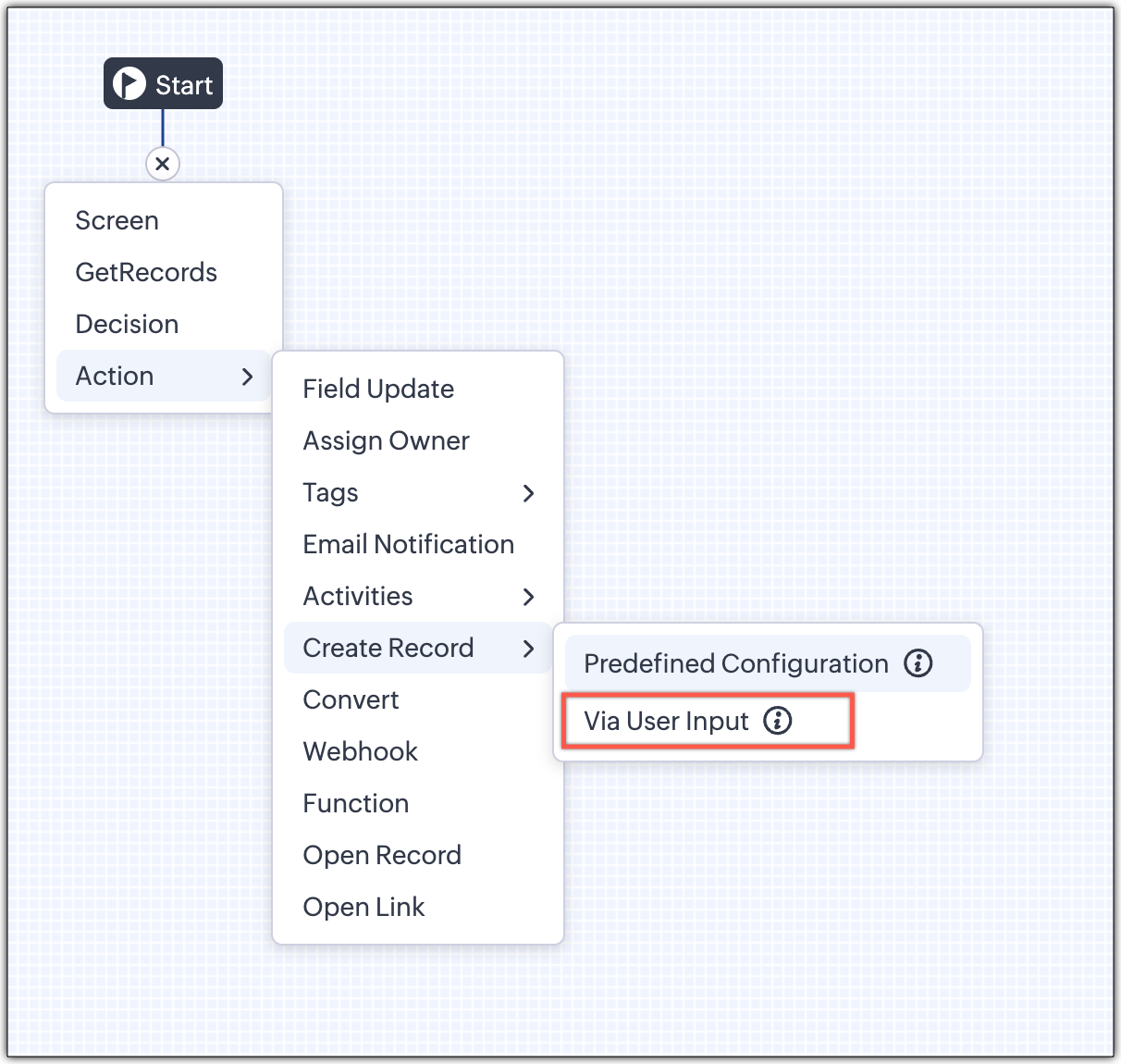
2 - Via User Input (New Action)
The key advantage of this update is that it simplifies how admins configure record creation in Kiosk Studio. Earlier, admins had to manually create a separate screen replicating all the fields of a module and then map them in the Create Record action. Moreover, if there were changes made to the fields in the module, the admin would have to edit the Kiosk and add/map the new field. All this was time-consuming and complex to setup.
Now, admins can choose to allow records to be created during the Kiosk's execution and eliminate the need to replicate, map and merge fields to save time and effort through the use of Quick Create pop-up.
Through this enhancement, real-time record creation is possible during live Kiosk execution. Users can input values in the Quick create layout that would pop-up during execution to create new records in a module. Perfect for real-world scenarios, the exact information needed to create a record only becomes available during the live execution of the Kiosk.
Real-time scenarios
Let's say you run a Kiosk for your sales team. During a call, a customer requests a product demo and shares their availability Or, your support team receives a call and has to log the customer’s issue details or updated contact info.
With this enhancement, the sales rep or support executive can create records instantly while the Kiosk is running, to input the information they get during their call to provide a smooth customer experience.
How does it work?
- While setting up the Kiosk, select Create Record > Via User Input.
- Enter Action Name, then choose the Module and Layout.
- During execution, the Quick Create layout for the selected module appears.
- There is an option to pre-fill frequently used field values during configuration.
- Now, users can enter details directly while the Kiosk is being executed.
- Note: If a user lacks Create permission for a module, this step is skipped, and related values will show as null.
Take a look at the GIF below to understand how this action can be setup and executed.
GetRecords just got smarter with these new enhancements
Fetch All Records from a module to your GetRecords Screen
You can now choose to fetch all records from a module to be displayed in your GetRecords Screen.
Previously, you could select a single record or multiple records based on the limit set for record preferences. Now, we've given you a choice to be able to select Some Records or All records. This is useful in scenarios when users need to view or act on a complete set of records in a module rather than on a limited number of them.
New pagination making easier to navigate records
We’ve added pagination to the GetRecords screen, making it easier to navigate and locate specific records quickly, even when dealing with large data sets.
Search or filter records in GetRecord screen s
Quickly find records in GetRecords screens with this new addition to Kiosk.
Increased selection limit to select more records
We have increased the GetRecord selection limit from 10 to 100.
GetRecords First-Screen Loads Instantly - No Refresh Needed
Currently, only Kiosks opened through user actions (like Blueprint or Custom Buttons) loaded records directly, while others showed a 'Refresh to load' button.
Now, every Kiosk auto-loads the first-screen of GetRecords without the need to manually refresh. When a Kiosk opens with GetRecords on the first screen, records now load instantly, regardless of whether it’s on the Home Page, Canvas, Record Detail View, Blueprint, or a Custom Button.
Kiosk Studio Added to the Standard Edition
We have extended the ability to create Kiosks to all paid editions in Zoho CRM including the Standard Edition. We aim to allow more users to create and manage Kiosks for their business processes. Take a look at the table below to know Kiosk creation limits for each Zoho CRM edition.
| Standard | Professional | Enterprise | Ultimate / CRMPlus / ZohoOne |
Number of Kiosks | 2 | 7 | 25 | 50 |

As of Jan 14th, 2026 :
- User Input through Quick Create and GetRecords enhancements is released for all data centers except IN DC.
- Client-script support for Kiosk is enabled for AU, CN, CA, SA, EU, UAE, JP data centers. It will be made available for the remaining DCs soon.
- The remaining feature enhancements are already available for partner accounts and internal accounts. Also, for users of the US, EU, AU and IN DCs.
Start exploring these new features today and experience a faster, smarter, and easier way to capture data with Kiosk Studio.
Stay tuned for even more exciting enhancements coming your way!
Regards,
Serena Woolridge
Recent Topics
Product Updates in Zoho Workplace applications | December 2025
Hello Workplace Community, Let’s take a look at the new features and enhancements that went live across all Workplace applications this December. Zoho Mail Block emails without notifying the sender Block emails without sending a rejection notification
Zoho CRM for Gmail Extension Not Working in Brave Browser?
Is anyone able to get the Zoho CRM Chrome Extension working in the Brave browser? They're both built on the Chromium platform and every other Chrome Extension works with the exception of Zoho CRM for Gmail so any ideas here?
Set Frozen Cells in the Report Settings
Hi, It would be nice to be able to set the frozen cells in the report Settings, and have an option if this is fixed or can be changed after loading (On the next load it still goes back to the Settings). Thanks Dan
Microsoft Teams now available as an online meeting provider
Hello everyone, We're pleased to announce that Zoho CRM now supports Microsoft Teams as an online meeting provider—alongside the other providers already available. Admins can enable Microsoft Teams directly from the Preferences tab under the Meetings
Tip of the week #26: Import/ Export calendars in Zoho Calendar.
Any calendar on the web or calendars that you create in any other calendar application can be imported in to Zoho Calendar. This will help you to add the events from the calendars that you import to your Zoho Calendar. You also have the option to export
Add Zoho Forms to Zoho CRM Plus bundle
Great Zoho apps like CRM and Desk have very limited form builders when it comes to form and field rules, design, integration and deployment options. Many of my clients who use Zoho CRM Plus often hit limitations with the built in forms in CRM or Desk and are then disappointed to hear that they have to additionally pay for Zoho Forms to get all these great forms functionalities. Please consider adding Zoho Forms in the Zoho CRM Plus bundle. Best regards, Mladen Svraka Zoho Certified Consultant and
Blocklist candidates in Zoho Recruit
We’re introducing Block Candidate, which helps recruiters to permanently restrict a candidate from applying to current/future job openings. Once the candidate is blocked, they will no longer be able to participate in the recruitment process. This will
What is the safest way to convert OST to PST files?
The safest way to convert OST to PST files is by using a reliable and professional OST to PST Converter tool. Manual methods often risk data loss, corruption, or dependency on Exchange Server connectivity. A trusted converter Aryson OST to PST Converter
Zoho CRM for Everyone's NextGen UI Gets an Upgrade
Hello Everyone We've made improvements to Zoho CRM for Everyone's Nextgen UI. These changes are the result of valuable feedback from you where we’ve focused on improving usability, providing wider screen space, and making navigation smoother so everything
Social icons, open in new tab?
Hello, I have two social icons on my footer, Facebook and Psychology Today. Clicking on the Facebook icon opens a new tab, the Psychology Today icon does not. I would like them both to open a new tab. Am I missing a setting somewhere?
Introducing Connected Records to bring business context to every aspect of your work in Zoho CRM for Everyone
Hello Everyone, We are excited to unveil phase one of a powerful enhancement to CRM for Everyone - Connected Records, available only in CRM's Nextgen UI. With CRM for Everyone, businesses can onboard all customer-facing teams onto the CRM platform to
Real-Time Screen Annotation During Zoho Cliq Screen Sharing
Hi Zoho Support Team, Hope you're doing well. We’d like to request the addition of real-time screen annotation tools during screen sharing sessions in Zoho Cliq video calls. 🔍 What We're Looking For: The ability for the presenter—and optionally, other
encountering an error when attempting to associate an email with a Deal using the Zoho CRM extension in Zoho Mail.
When I click "Yes, associate," the system displays an "Oops!! Something went wrong" error message. I have attached a screenshot of the issue for reference.
Autofill address using smart fields mapped over the pdf document
Hi, I'm using mail merge to map smart fields onto PDF documents I plan to distribute for signing. I already have a Zoho Sign subscription. When mapping smart fields from the Employee form, I only see the permanent and current addresses which include the
Live Chat for user
Hi everyone, I’m new to Zoho Creator and wanted to ask if it’s possible to add a live chat option for all logged-in portal users so they can chat internally. I’m trying to create a customer portal similar to a service desk, but for vehicle breakdowns,
How do I cap employee leave accrual
HI there, How do I cap an employee's leave accrual? The policy is that you accrue 15 days leave annually (1.25 days a month) and once you reach 15 days, you wont accrue more until you take leave. Thank you!
Open sub form from a button as a popup form
Is there a way within a form to use similar code as below to show a button in the form when clicked opens the subform for data to be added to the record being viewed in the form OpenUrl("#Form:<Customer_Delivery_Address>?<Delivery_Address>=" + input.ID,"popup
Dont have backup option in setting
Hi guys. I started using zoho book a week ago. I bought premium package yet I don't have backup option in setting. I hope anyone can help me find a solution. Thanks in advance
Making Tags Mandatory
When creating an expense, is it possible to make the Tags field mandatory? I see the option in settings to make other fields mandatory, like Merchant, Description, Customer, etc, but nothing about Tags. Thanks! Kevin
Is there a plan to integrate zoho voice with zoho books?
Hello, Is there a plan to integrate zoho voice with zoho books? Right now we are using the Twilio SMS integration into zoho books, but have recently decided to switch to zoho voice for calls and sms. Is there a plan to integrate zoho voice natively into
Pass variables to Zoho Desk via URL to create a fast new ticket landing page
We are integrating our phone system into Zoho Desk. Currently when a helpdesk agent answers the phone, a soft client opens a new tab with zoho desk at the new case page. https://desk.zoho.com/support/companyname/ShowHomePage.do#Cases/new We would like
Zoho Books Extension: What Happens If Custom Fields Already Exist?
When developing Zoho Books extensions, what happens if the target Zoho Books organization already has a custom field with the same API name as one defined in the extension? I’m asking because we originally created an on-Books version of this functionality,
Modular Permission Levels
We need more modular Permissions per module in Books we have 2 use cases that are creating problems We need per module export permission we have a use case where users should be able to view the sales orders but not export it, but they can export other
¡Vuelven los Workshops Certificados de Zoho a España!
¡Hola usuarios de Español Zoho Community! Hace ya unos días que hemos dado la bienvenida al 2026, y promete ser un año de lo más emocionante. Y es que nos gustaría haceros nuestro particular regalo de Reyes, aunque lleguemos un poco tarde. 🎁 ¡Nos gustaría
Free Webinar on 21 January: Looking back at Zoho Mail in 2025
Hello Zoho Community! Curious about how Zoho Mail evolved in 2025? Wondering how these updates can make your everyday email work simpler? We’ve got a session you won’t want to miss. In our Zoho Mail 2025 recap webinar, we’ll walk you through the key features
Delay in rendering Zoho Recruit - Careers in the ZappyWorks
I click on the Careers link (https://zappyworks.zohorecruit.com/jobs/Careers) on the ZappyWorks website expecting to see the job openings. The site redirects me to Zoho Recruit, but after the redirect, the page just stays blank for several seconds. I'm
Cliq Networks users can see all other network users contact information
Is there a way to hide user contact information from each user in networks? I would only like the users to see the admin's contact information, not other users. Network users information shared by default
Zoho Sheet - Printing - Page Breaks and Printing Customization
I think the title is descriptive enough in that I cannot find help documentation on a simple task of adding in page brakes for separating pages on print. Thanks
Missing the "Find & Merge Duplicates" choice
Hi, I am missing the "Find & Merge Duplicates" choice. I looked under the "More Actions" menu in Contacts, Accounts, Vendors, and Leads and it is not there. I have full permissions. Please assist me on finding this feature. Thanks!
OAuth integration issues
I'm experiencing persistent OAuth errors when trying to connect Make with Zoho API. I've tried multiple approaches but keep encountering the following issues: First error: 'Invalid Redirect Uri - Redirect URI passed does not match with the one configured'
Marketing Tip #16: Ideal sizes and formats for adding images to your online store
Images can make (or break) your storefront experience. When your banners and product photos follow the right sizes and aspect ratios, your store looks cleaner, loads faster, and feels more trustworthy—especially on mobile. Here are recommended image sizes
Improve WhatsApp Module in Zoho CRM
The current WhatsApp module UI in Zoho CRM feels cluttered and complex, especially when handling high volumes of conversations. It would be great to enhance the WhatsApp module UI/UX by adopting a clean and simplified interface similar to Bigin CRM’s
Blueprint transitions on locked records
We use the ability to automatically lock records (quotes, sales orders, etc.) based on criteria, such as stage. For instance, if a quote has been sent to a client, the quote is then locked for further edits. Our ideal quote stage process is: Draft>Sent>Won.
Enhance productivity with the revamped Zoho Sheet View
Hello folks, For some time now, you've been able to use the Zoho Sheet View to quickly edit multiple records or to insert a batch of new records. Its tabular interface allows users to engage in these tasks productively. Despite this, the existing Sheet
No OR Filter for Views with a Related Modules Criteria
We would like to create a Deal View where the User can see all their deals. For that, we would need an OR to connect the criteria. One of the Fields is a "multiselect User", these (Related Modules Criteria) can only be Filter with an AND. Even between
Good news! Calendar in Zoho CRM gets a face lift
Dear Customers, We are delighted to unveil the revamped calendar UI in Zoho CRM. With a complete visual overhaul aligned with CRM for Everyone, the calendar now offers a more intuitive and flexible scheduling experience. What’s new? Distinguish activities
Limit maximum entries for subform - depending on fields entry
Hi Zoho! I have a form with a subform in it. I'd like to have limitation for the row number depending on an entry in a drop-down field in the main form (If the field in the main form is marked "Answer1" - Limit the entries to 1 row, if the field is "Answer2" to have 2 rows limitation, "Answer3" = no limitation at all) Can this be done? Thanks Ravid
Save HTML Snippet Page as PDF with Dynamic Data in Zoho Creator (Working Solution)
Hi Zoho Creator Community 👋, I faced a common challenge while working with HTML Snippet Pages — I needed to generate a PDF with dynamic data and save it back into the record automatically. Here’s the working solution that might help others. Use Case
Make Camera Overlay & Recording Controls Visible in All Screen-Sharing Options
Hi Zoho WorkDrive Team, Hope you are doing well. We would like to request an improvement to the screen-recording experience in Zoho WorkDrive. Current Limitation: At the moment the recording controls are visible only inside the Zoho WorkDrive tab. When
Cannot connect to imap.zoho.eu on iOS26
Hey, I recently migrated to another iPhone and since then use iOS26. Every since then, I was not able to connect to "imap.zoho.eu" from Apple Mail. I tried deleting the account and adding it again, did not work. I tried creating an app password, didn't
Next Page