Spotlight 34: Handle event engagement in one space
Having one place where you can run sessions, promote networking, and drive attention to exhibitor booths can help increase engagement at events.
In Zoho Backstage's Virtual Space, you can provide event participants with a unified experience to join sessions, participate in discussions using networking tables, and interact with exhibitors, all from one place.
Set up the Virtual Space
Every time you open a session, visit a booth, or join a networking table, you will be redirected to the Virtual Space. Once you have entered the Virtual Space through any of the above options, you can easily switch between these options inside the Virtual Space itself. Event participants also get to experience the same thing when they do this from the event microsite.
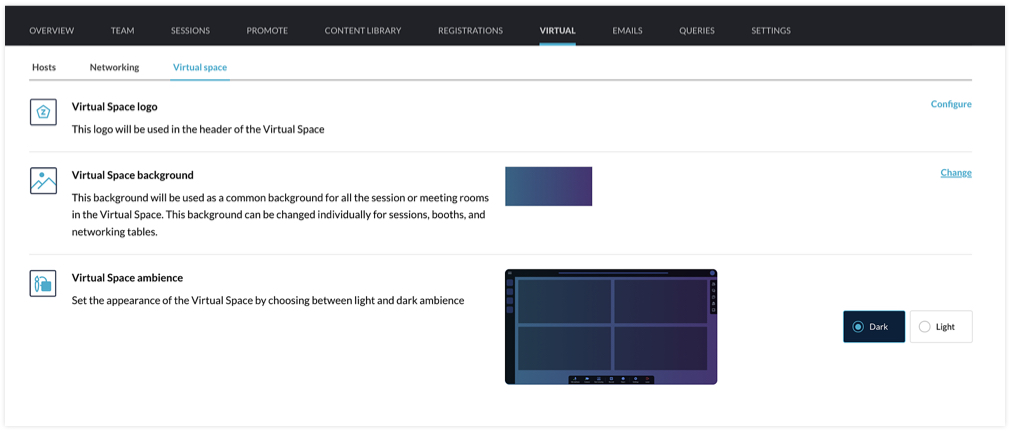
You can customize the Virtual Space to reflect your brand or event's theme by choosing a logo, a background, and the ambience. The logo you've set for the event will be chosen for the Virtual Space by default, but you can select a different one if needed. For the background, the option that you choose will be applied for all sessions, tables, and meeting rooms in exhibitor booths. You can even modify the background scheme at a granular level by selecting a different background for individual booths, sessions, or tables. The Virtual Space ambience can either be set to Dark or Light.
Set the stage for sessions
When hosting a session, you can go to the event microsite and visit the Agenda page. There you can click the Start session button. Alternatively, you can also do this from Backstage. Go to the Conduct Dashboard and click the Present sessions tab. Next, click a session in the timeline on the left and click the Start session button. You can then broadcast the session with the help of the webcasting service that you've selected.
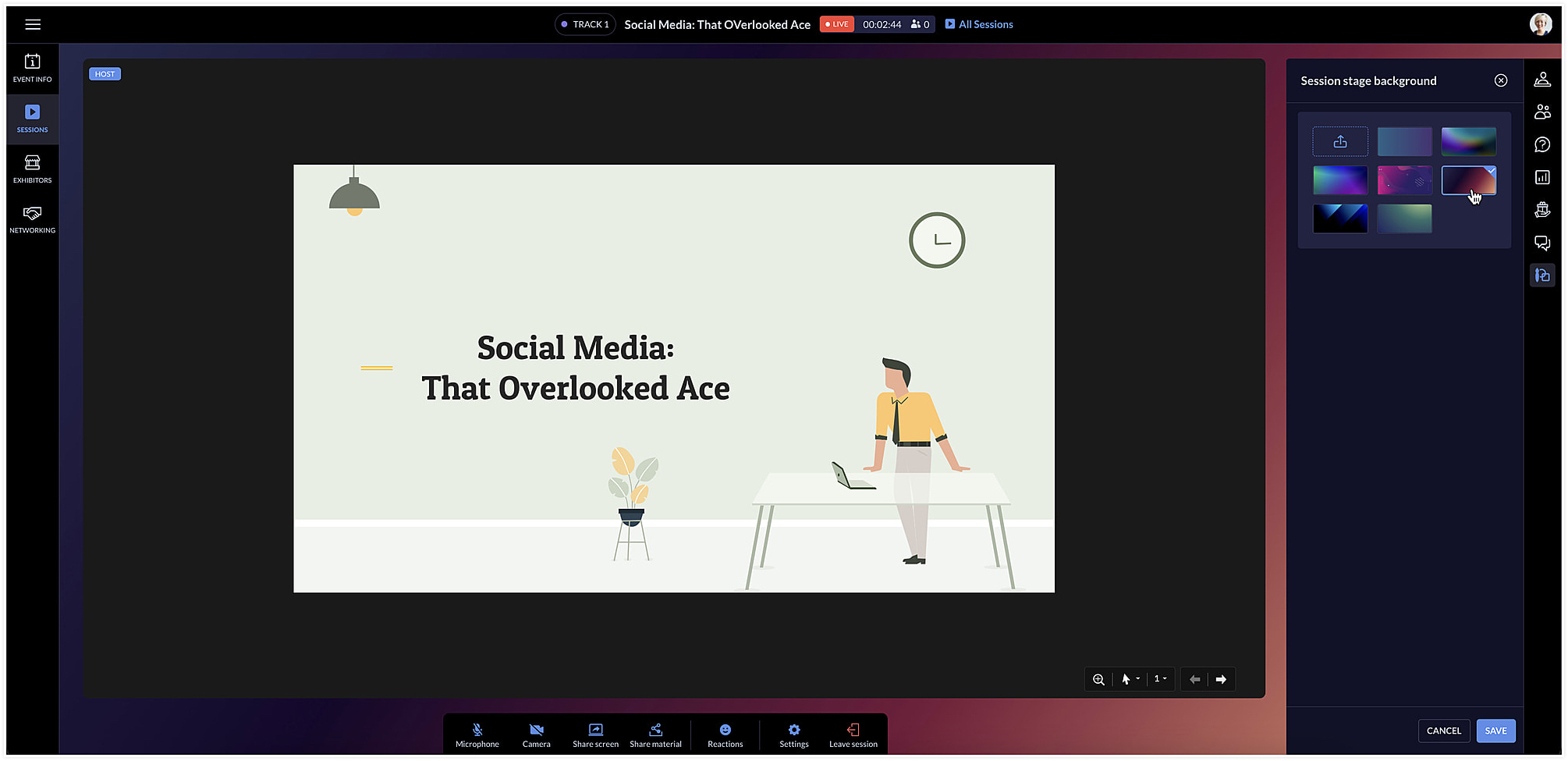
The session area will be designed based on the Virtual Space settings you've chosen. To change the background color for a specific session, click the Session stage background icon [ ] at the right and choose a background option from the list.
] at the right and choose a background option from the list.Facilitate communication with networking tables
Networking tables can be an opportunity for event participants to make important connections. Think of them as similar to round table discussions that take place at a physical event. Attendees can take a seat at a virtual networking table and interact with others there. Networking tables can be used by anyone who is a part of the event such as speakers, attendees, sponsors, or event exhibitors.
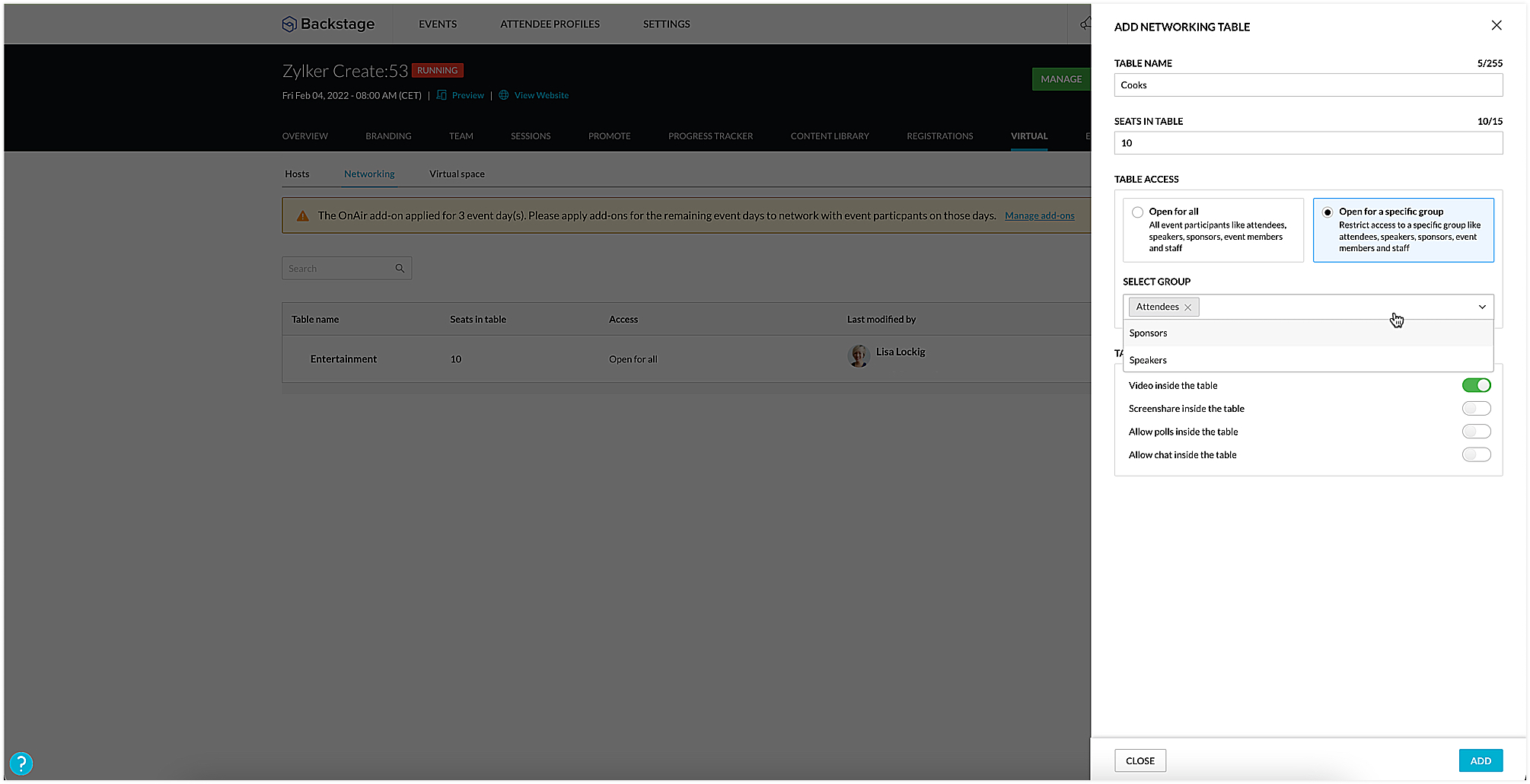
To create a networking table, go to the Manage Dashboard and click the Virtual tab, then click the Networking tab. Here you can say how many seats must be available and enable options such as chat, video stream, polls, or screen sharing for everyone at the table, if necessary. You could also choose to make tables exclusive so that they will be available only to certain participants. To do this, select the Open for a specific group radio button, and select the group you want to make them available to.
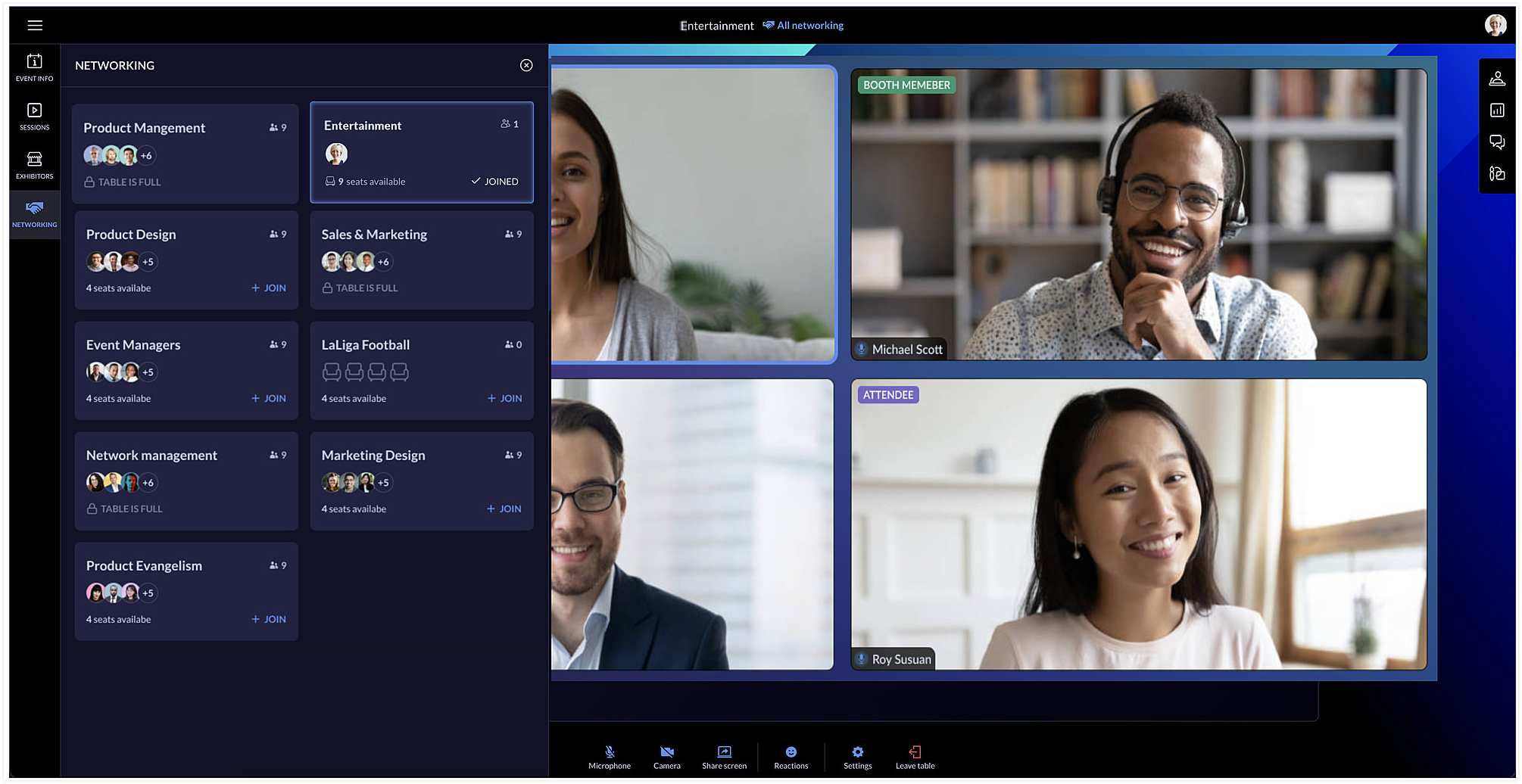
Event team members can join networking tables to take part in the discussion or just observe the conversation. Event members who join networking tables can manage ongoing interactions by muting or unmuting the mics or pausing the video stream of participants.
Each table can have a background of its own too. You can do this by clicking the Networking tab in the Virtual Space and clicking the Table background icon [ ].
].
].Showcase exhibitors to interest attendees
The Virtual Space also includes the Exhibitors tab, which lists all the exhibitors who are associated with your event. Exhibitors can send a request to the event team through the event microsite. Once the request is approved, they can conduct meetings with interested booth visitors during the virtual event.
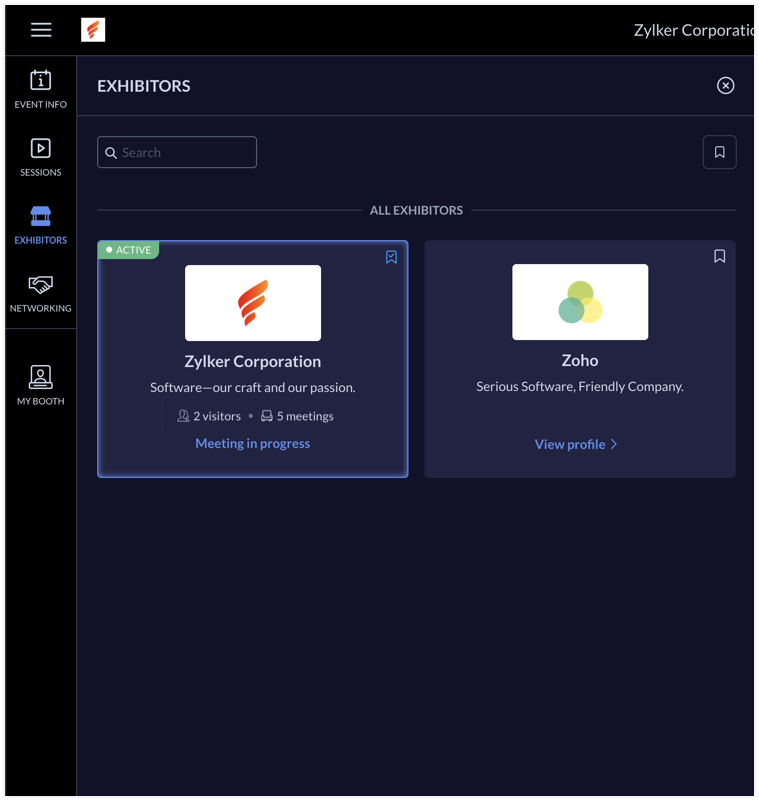
Exhibitors can use the rehearsal option before the event to practice meeting flow with test participants. During the event, the My Booth tab in the Virtual Space gives an overview of the exhibitor's information and also the members who are available in the booth. The number of ongoing meetings and visitors who are in the waiting room will be visible here. An exhibitor's booth background scheme can also be modified in the Virtual Space using the Expo meeting background icon [ ].
].
].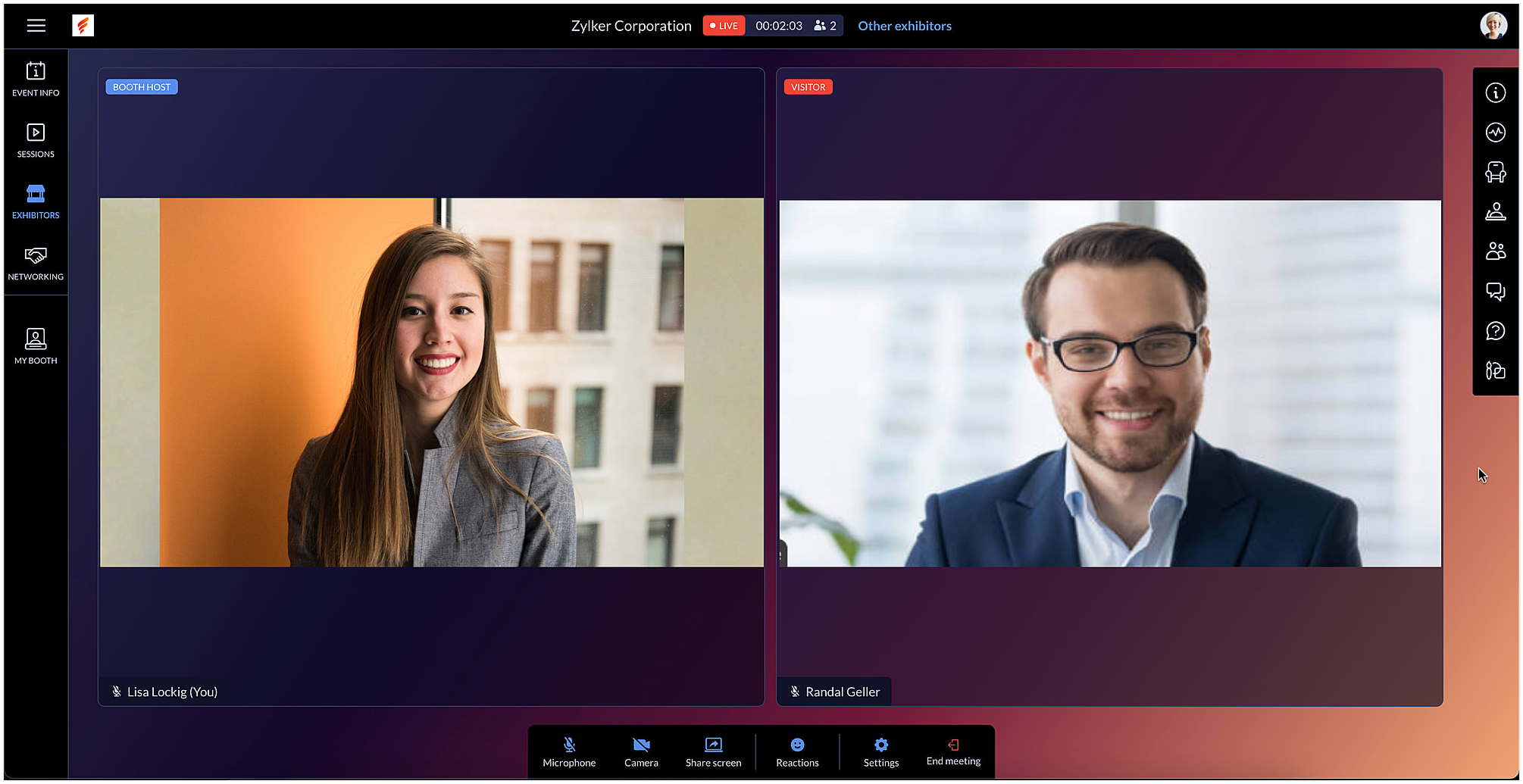
Exhibitors can also use the chat and questions option to interact with visitors when meeting with them. When viewing information for other exhibitors in the Exhibitors tab, you can do this without leaving an ongoing meeting, if you're a part of one.
After the event is over, exhibitors can export chat messages from the event microsite and, based on the permission given, they can also view and export the lead list from the Leads tab.
In Backstage, you can see an overview for details regarding exhibitors and their booths. To view this, go to the Overview tab in the Manage Dashboard and click the Exhibitors tile. Here you can keep track of booth purchases, view the sales overview for booths, and also examine analytics for meetings in booths.
Engage event participants in the Virtual Space and customize it to match your event's style. You can also start a discussion about this in our community or write to us at support@zohobackstage.com with your thoughts or questions.
Happy organizing!
Topic Participants
Tina Samuel
Sticky Posts
Spotlight 26: Host interactive virtual sessions with Backstage OnAir
According to a recent survey by Markletic, two of the biggest challenges organizers face when hosting online events are attendee engagement and interaction. Where in-person events bank on the impact of face-to-face communication to engage attendees, virtual
Recent Topics
Track Zoho Campaign and Workflow sales impact
I am attempting to measure the performance of our marketing workflows and campaigns by comparing the date each campaign was sent to a contact with the purchase date of the contact. For example, if Contact A was sent Email A on 9/1 and made a purchaseWhat is a line break code for zoho?
Hi, I am archiving data by adding values from a single line field from one form to a multi-line field in another form. So I need a code/function that starts a new line on that multi-line field so it does not just keep adding it on the same line. Example, doing something like this means that it will be on a same line. archive.field1 = archive.field1 + input.Field1 I need a code so the input.Field1 can just start on the next line. Instead of "value 1, 2,3,4,5" It will be: "1 2 3 4 etc.". somethingAutomatic Project Owner change
Is there a way to change Project Owner automatically once a specific Milestone in a project is marked as completed. Different Teams are working on projects in our Org, they have their own Milestones to complete and so we transfer the project from teamButton to add product to cart
Is there a way to have a button on a page, that when clicked, will add Qty 1 of a product to the cart?Problem with Submit Button Design
I have made a template to apply to my forms and under the button controls, I have it set to "standard" and yet it's still filling the container. This is super frustrating and looks weird. Why do we not have full control over button size? How can I fixZoho CRM- Authorize your Microsoft Teams account issue
Hi, I tried to link Zoho CRM with Teams and I got the following message: Clicking "Authorize now" sent me to the following page, Microsoft tried to start a session but, after 3 seconds the page closed and nothing happened. I get the same message eachIs there a way to associate an email in ZOHO Main to a Vendor record in ZOHO CRM
My situation is as below, I have a vendor in ZOHO CRM lets say "Vend A" and an associated contact, "Cont A" If Cont A sends me an email using the email I've registered in the contact record the standard OOTB email sync will work. But the vendor has someKaizen #207 - Answering your Questions | Advanced Queries using COQL API
Hi everyone, and welcome to another Kaizen week! As part of Kaizen #200 milestone, many of you shared topics you would like us to cover, and we have been addressing them one by one over the past few weeks. Today, we are picking up one of those requestsPrésentation de SecureForms dans Zoho Vault
Soyons francs : demander à quelqu’un de transmettre un mot de passe ou des informations sensibles n’est jamais une tâche facile. On attend, on relance, parfois de nombreuses fois. Et quand l’information arrive, elle se retrouve souvent dispersée dansGranular Email Forwarding Controls in Zoho Mail (Admin Console and Zoho One)
Hello Zoho Mail Team, How are you? At present, the Zoho Mail Admin Console allows administrators to configure email forwarding for an entire mailbox, forwarding all incoming emails to another address. This is helpful for delegation or backup purposes,Kaizen #190 - Queries in Custom Related Lists
Hello everyone! Welcome back to another week of Kaizen! This week, we will discuss yet another interesting enhancement to Queries. As you all know, Queries allow you to dynamically retrieve data from CRM as well as third-party services directly withinNeed the ability to have read only fields on a form.
There needs to be functionality in Creator that allows a field on a form to be read only. Most screen building software applications have this capability. I know you can hide certain fields from specific users and that you can also make the whole form read only but that's not the functionality I need. I want to be able to create a form where certain fields are editable and other are for display purposes only (read only). For example if the form was displaying information on an item that the userReverse payment on accidentally closed invoice.
An invoice was closed accidentally with the full payment added. However, only partial payment was paid. How can I reopen the invoice and reverse this to update it to show partial payment?New integration: Track booking page appointments in Google Analytics 4
Hello all, Greetings from the Zoho Bookings team! We’re excited to introduce our new Google Analytics 4 (GA4) integration designed to help you track booking activity, understand customer behavior, and measure marketing performance, all in one place. WhatHow to list emails in a folder, e.g. Inbox, on multiple pages when using Zoho mail webpage?
Something as shown in the figure. There are totally 50 emails in Sent folder. If "Mail per page" equals 20, then the Sent folder is split into 3 pages. When I wander through Sent folder, I can just select a specific page to jump to. BTW, it seems thatZoho Calendar soft bounce on @hotmail.com and @yahoo.com email addresses
Hello, our Zoho calendar recently does not send the calendar invites to emails with hotmail and yahoo domains and comes back with a "soft bounce". other domains like Gmail works fine. Also sending "email" to the same emails to the above domains work wellERROR CODE :512 - 5.4.4 DNS error:NXDOMAIN.
Suddenly we cant send mail, we are getting this error for all outbound mail to multiple domains.Unveiling Cadences: Redefining CRM interactions with automated sequential follow-ups
Last modified on 01/04/2024: Cadences is now available for all Zoho CRM users in all data centres (DCs). Note that it was previously an early access feature, available only upon request, and was also known as Cadences Studio. As of April 1, 2024, it'scustomer data security
We are exploring ways to enhance our within Zoho CRM. Our Goal: We want to fully integrate RingCentral with Zoho CRM to enable click-to-call functionality for our sales team. However, to comply with data privacy regulations and protect customer contactSync CRM inventory data with Zoho Books
I just switched everything over to ZoHo books, but I am trying to find out why the CRM Estimates, Invoices, and Sales Orders created in ZoHo CRM are not then duplicated in ZoHo Books? I had Quickbooks before, and had to do everything twice, I thoughtmask Customer phone number and agents cant see customer phone number
Is there any way we can integrate Zoom Phone with Zoho CRM while ensuring that customer phone numbers remain masked? We need a solution where agents can make outbound calls but cannot see customer phone numbers. Please let us know if there is any solutionEmail Reminders on Shared Calendars
How do we turn off the setting that emails reminders to everyone who has accepted or declined a calendar invite? If 8 of us have been invited to the same meeting, we receive 8 notifications for every step of the process, from invitation to decision.How to refresh a ticket view ?
I am doing a widget where I send a rest api call to make a new draft to the ticket I am viewing. The issue is sometimes it refresh a ticket view and I can see inserted draft right away, but sometimes I do not see it even if it is inserted correctly andUgh! - Text Box (Single Line) Not Enough - Text Box (Multi-line) Unavailable in PDF!
I provide services, I do not sell items. In each estimate I send I provide a customized job description. A two or three sentence summary of the job to be performed. I need to be able to include this job description on each estimate I send as it's a criticalSupervisor Rules - Zoho Desk
Hi, I have set up a Supervisor Rule in Zoho Desk to send an email alert when a ticket has been on hold for 48 hours. Is there a way to change it so that the alert only sends once and not on an hourly basis? Thank you LauraResponseCode 421, 4.7.0 [TSS04] Messages from 136.143.188.51 temporarily deferred due to user complaints
Had email bounce. Let me know if you can fix this. Thanks. MichaelNew Zoho triggers Google Dangerous flag due toabnormal charcters
Just signed up and doing my first email test. I sent it to my google email account but it got flagged as Dangerous" due abnormal characters. My DNS setup looks ok. Page snips attached Help Please Thanks, Rick DC PowerWorldIs there a API to fetch tasks in a Board/Section
I am writing a scheduled function that retrieves all the tasks and send an reminder on cliq. I cannot seem to find a API to fetch tasks (by user / board / section) What are the way to fetch tasks?Having trouble fetching contents of Zoho Connect Feeds using the API, requesting alternative API documentation.
I'm trying to retrieve feed/post data from Zoho Connect using the API but facing challenges with the current documentation. What I've tried: OAuth authentication is working correctly (getting 200 OK responses) Tested multiple endpoints: /pulse/nativeapi/v2/feeds,Adding an Account Name to Tasks/Reminders
Does anyone know how to add the related account name to a task? When we look at the list of activities and when the reminders pop up, there is no way of quickly seeing who the account is.Triggering Zoho Flow on Workdrive File Label
Right now Im trying to have a zoho flow trigger on the labeling/classification of a file in a folder. Looking at the trigger options they arent great for something like this. File event occurred is probably the most applicable, but the events it has arentSendMail to multiple recipients
Hi, I'm trying to send an email to a list of recipients. Right now the "to" field is directed to a string variable. (List variables won't work here). In the string variable, how can I make it work? trying "user@app.com;user2@app.com" or "user@app.com; user2@app.com" just failed to send the emails. RavidPopulate drop down field from another form's subform
Hello, I found how to do that, but not in case of a subform. I have a Product form that has a subform for unit and prices. A product might have more than one unit. For example, the product "Brocoli" can be sold in unit at 3$ or in box of 10 at 25 $. BothUsar o Inventory ou módulo customizado no CRM para Gestão de Estoque ?
Minha maior dor hoje em usar o zoho é a gestão do meu estoque. Sou uma empresa de varejo e essa gestão é fundamental pra mim. Obviamente preciso que esse estoque seja visível no CRM, Inicialmente fiz através de módulos personalizados no próprio Zoho CRM,Signup forms behaviour : Same email & multiple submissions
My use case is that I have a signup form (FormA) that I use in several places on my website, with a hidden field so I can see where the contact has been made from. I also have a couple of other signup forms (FormB and FormC) that slight differences. Allgetting error in project users api
Hello, I'm getting a "Given URL is wrong" error when trying to use the Zoho Projects V3 API endpoint for adding users to a project. The URL I'm using is https://projectsapi.zoho.com/api/v3/portal/{portalid}/projects/{projectid}/projectusers/ and it'sChange total display format in weekly time logs
Hi! Would it be possible to display the total of the value entered in the weekly time log in the same format that the user input? This could be an option in the general settings -> display daily timesheet total in XX.XX format or XX:XX.How to display historical ticket information of the total time spent in each status
Hi All, Hoping someone can help me, as I am new to Zoho Analytics, and I am a little stuck. I am looking to create a bar chart that looks back over tickets raised in the previous month and displays how much time was spent in each status (With Customer,Zoho Community Weekend Maintenance: 13–15 Sep 2025
Hi everyone, We wanted to give you a heads-up that Zoho Community will undergo scheduled maintenance this weekend. During this period, some community features will be temporarily unavailable, while others will be in read-only mode. Maintenance Window:Agent Performance Report
From data to decisions: A deep dive into ticketing system reports An agent performance report in a ticketing system provides a comprehensive view of how support agents manage customer tickets. It measures efficiency and quality by tracking key performanceNext Page