Spotlight 34: Handle event engagement in one space
Having one place where you can run sessions, promote networking, and drive attention to exhibitor booths can help increase engagement at events.
In Zoho Backstage's Virtual Space, you can provide event participants with a unified experience to join sessions, participate in discussions using networking tables, and interact with exhibitors, all from one place.
Set up the Virtual Space
Every time you open a session, visit a booth, or join a networking table, you will be redirected to the Virtual Space. Once you have entered the Virtual Space through any of the above options, you can easily switch between these options inside the Virtual Space itself. Event participants also get to experience the same thing when they do this from the event microsite.
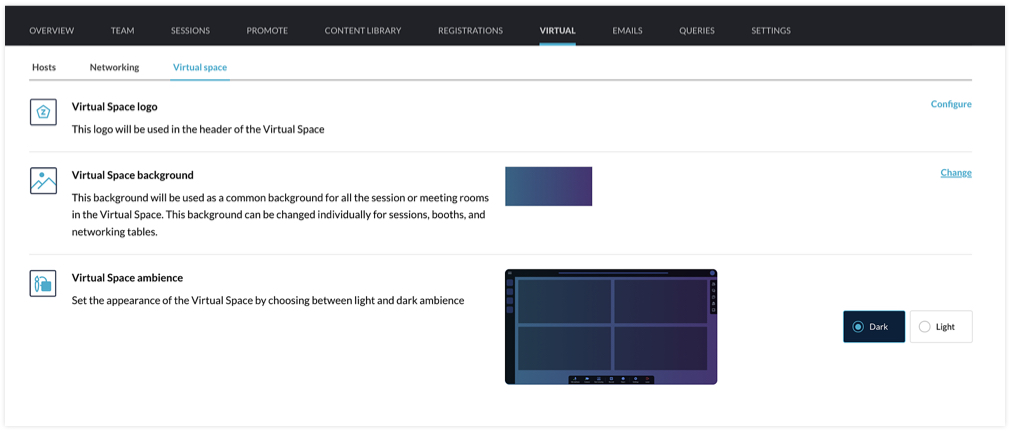
You can customize the Virtual Space to reflect your brand or event's theme by choosing a logo, a background, and the ambience. The logo you've set for the event will be chosen for the Virtual Space by default, but you can select a different one if needed. For the background, the option that you choose will be applied for all sessions, tables, and meeting rooms in exhibitor booths. You can even modify the background scheme at a granular level by selecting a different background for individual booths, sessions, or tables. The Virtual Space ambience can either be set to Dark or Light.
Set the stage for sessions
When hosting a session, you can go to the event microsite and visit the Agenda page. There you can click the Start session button. Alternatively, you can also do this from Backstage. Go to the Conduct Dashboard and click the Present sessions tab. Next, click a session in the timeline on the left and click the Start session button. You can then broadcast the session with the help of the webcasting service that you've selected.
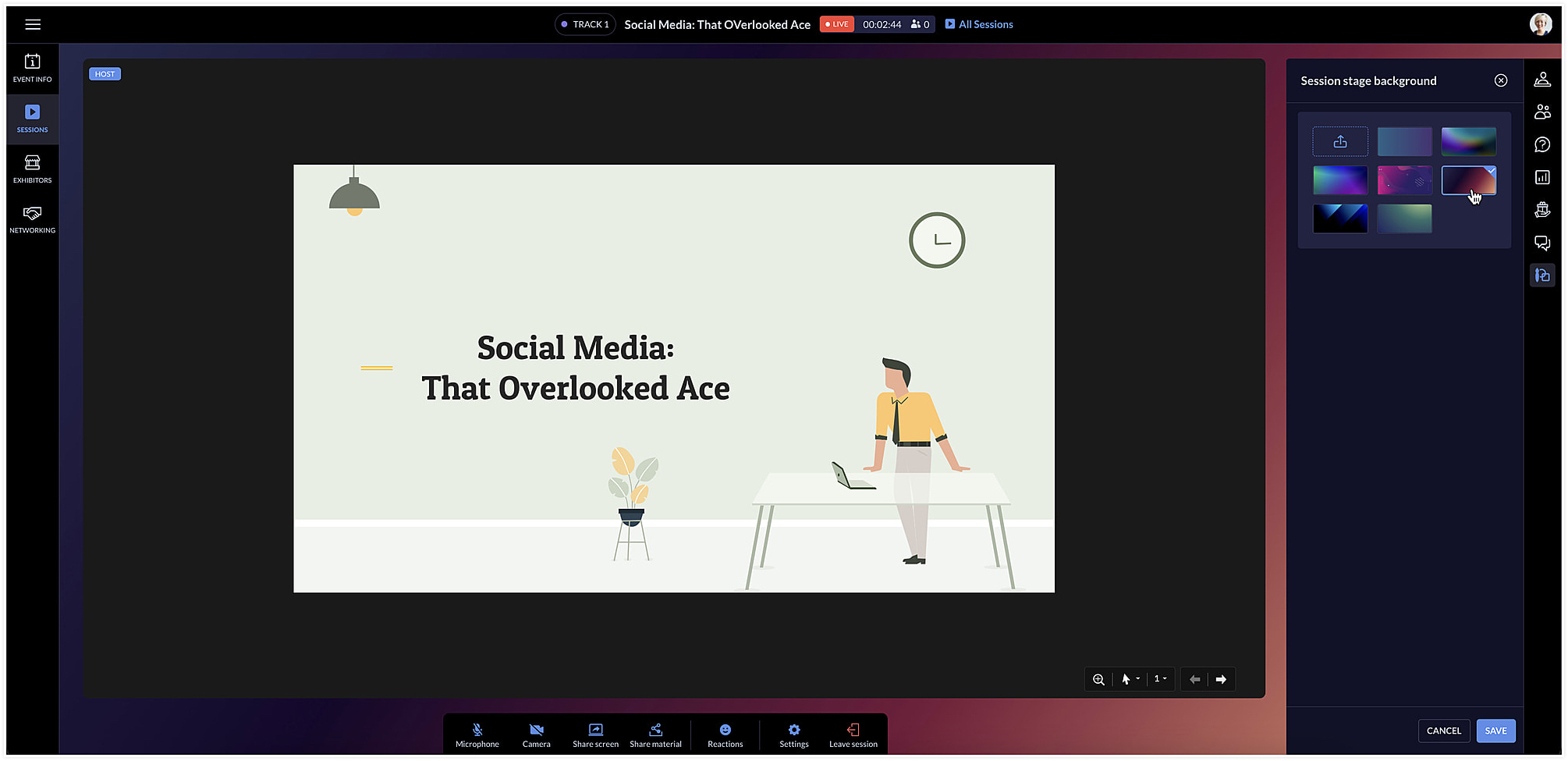
The session area will be designed based on the Virtual Space settings you've chosen. To change the background color for a specific session, click the Session stage background icon [ ] at the right and choose a background option from the list.
] at the right and choose a background option from the list.Facilitate communication with networking tables
Networking tables can be an opportunity for event participants to make important connections. Think of them as similar to round table discussions that take place at a physical event. Attendees can take a seat at a virtual networking table and interact with others there. Networking tables can be used by anyone who is a part of the event such as speakers, attendees, sponsors, or event exhibitors.
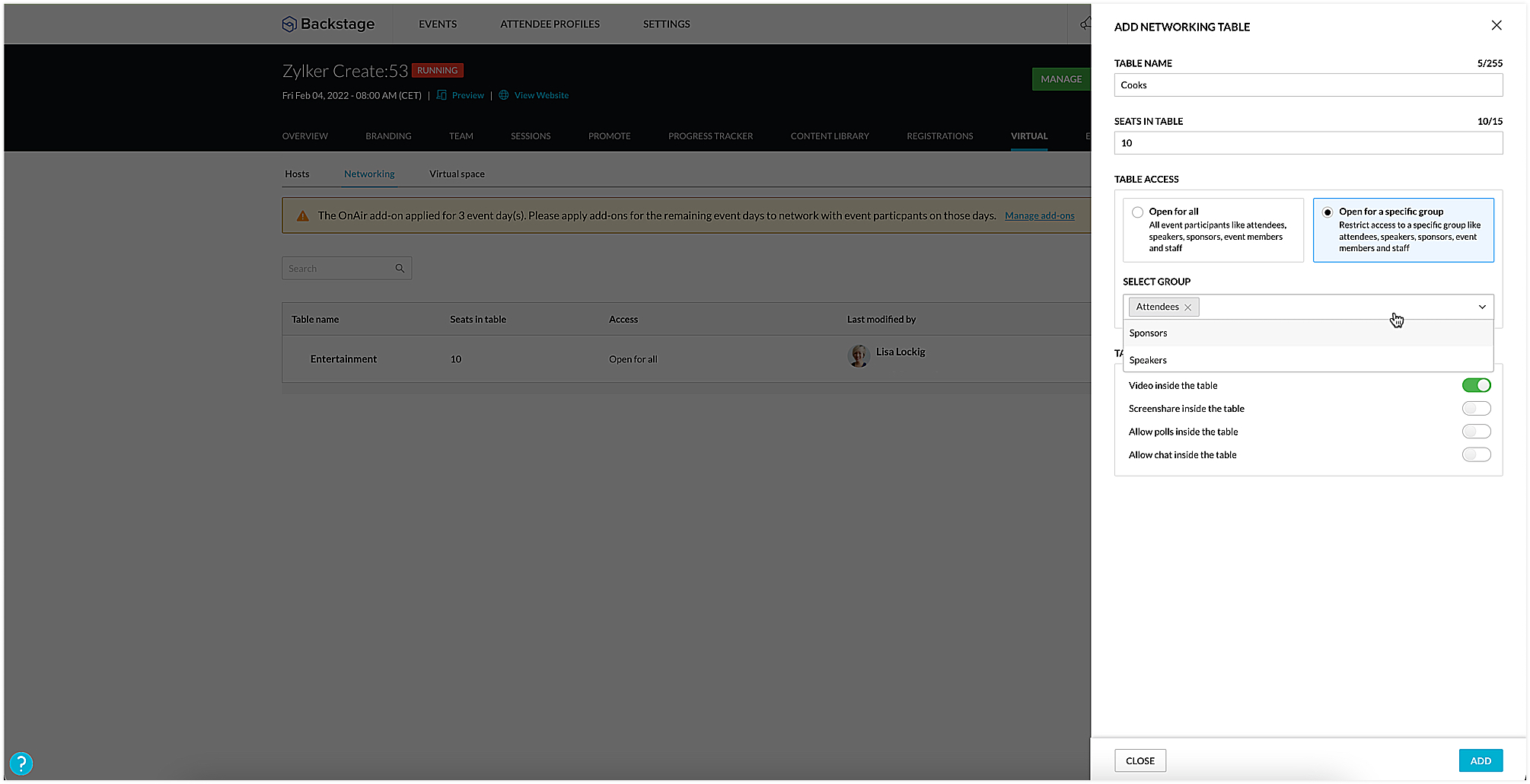
To create a networking table, go to the Manage Dashboard and click the Virtual tab, then click the Networking tab. Here you can say how many seats must be available and enable options such as chat, video stream, polls, or screen sharing for everyone at the table, if necessary. You could also choose to make tables exclusive so that they will be available only to certain participants. To do this, select the Open for a specific group radio button, and select the group you want to make them available to.
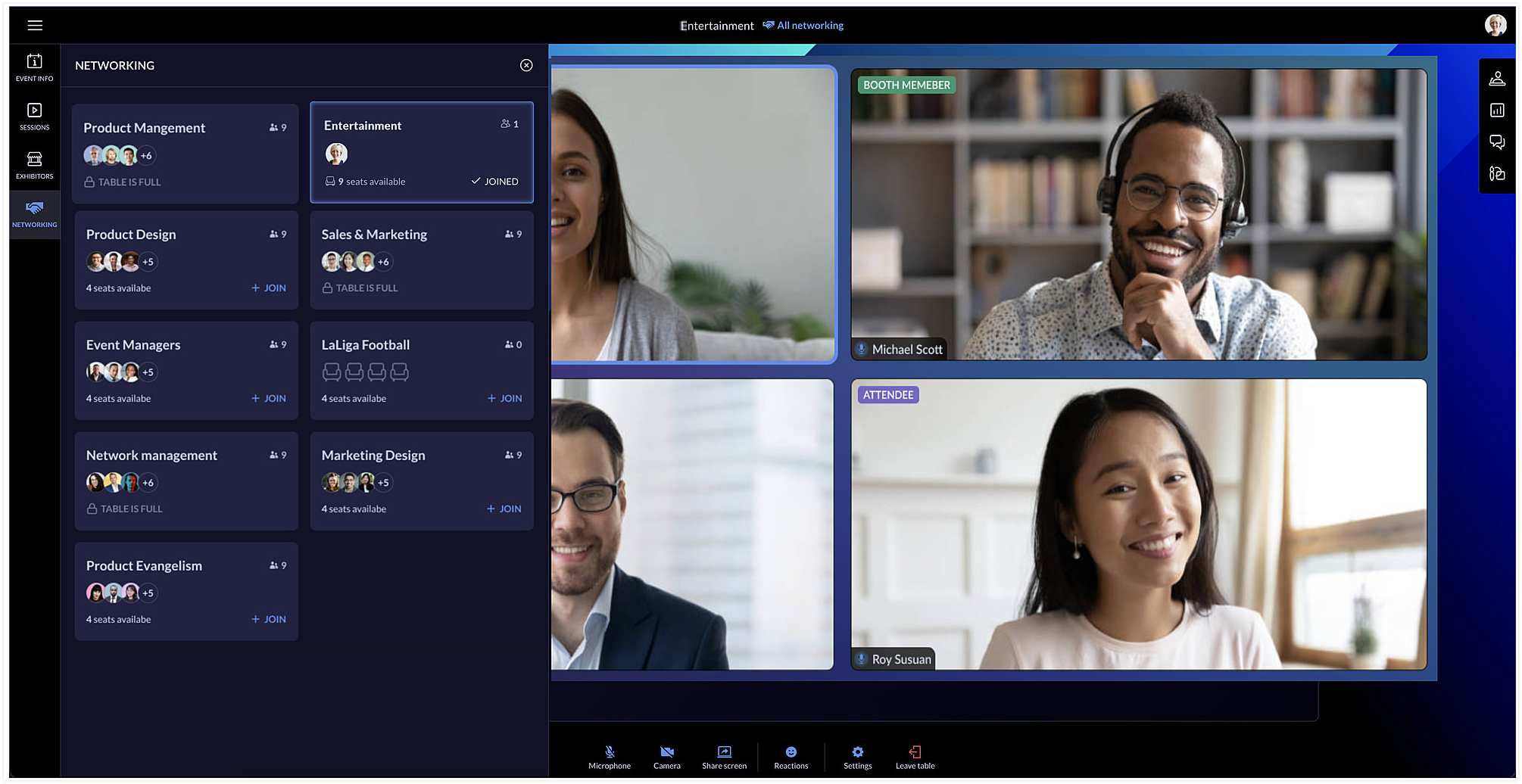
Event team members can join networking tables to take part in the discussion or just observe the conversation. Event members who join networking tables can manage ongoing interactions by muting or unmuting the mics or pausing the video stream of participants.
Each table can have a background of its own too. You can do this by clicking the Networking tab in the Virtual Space and clicking the Table background icon [ ].
].
].Showcase exhibitors to interest attendees
The Virtual Space also includes the Exhibitors tab, which lists all the exhibitors who are associated with your event. Exhibitors can send a request to the event team through the event microsite. Once the request is approved, they can conduct meetings with interested booth visitors during the virtual event.
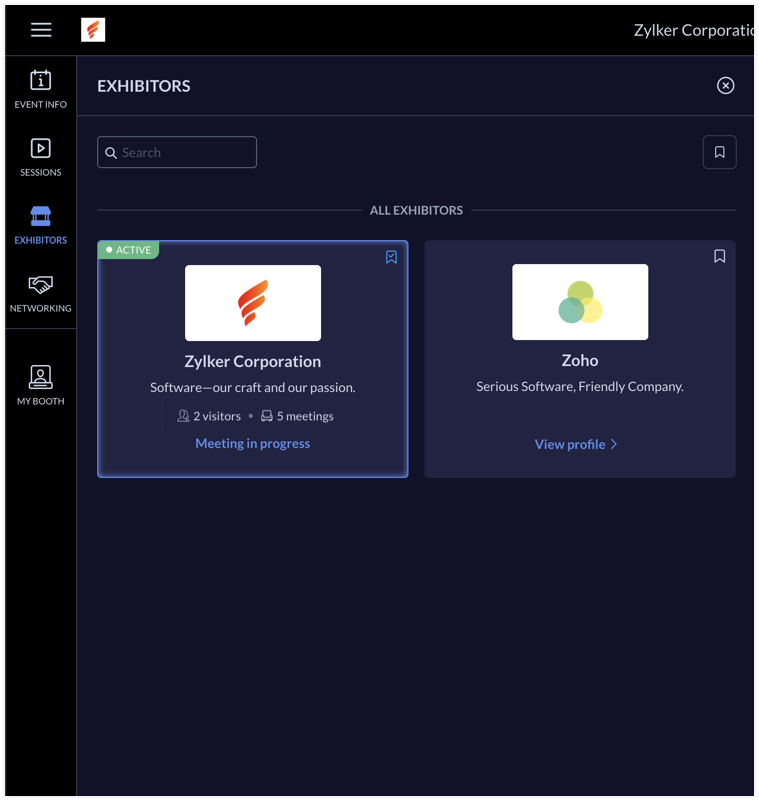
Exhibitors can use the rehearsal option before the event to practice meeting flow with test participants. During the event, the My Booth tab in the Virtual Space gives an overview of the exhibitor's information and also the members who are available in the booth. The number of ongoing meetings and visitors who are in the waiting room will be visible here. An exhibitor's booth background scheme can also be modified in the Virtual Space using the Expo meeting background icon [ ].
].
].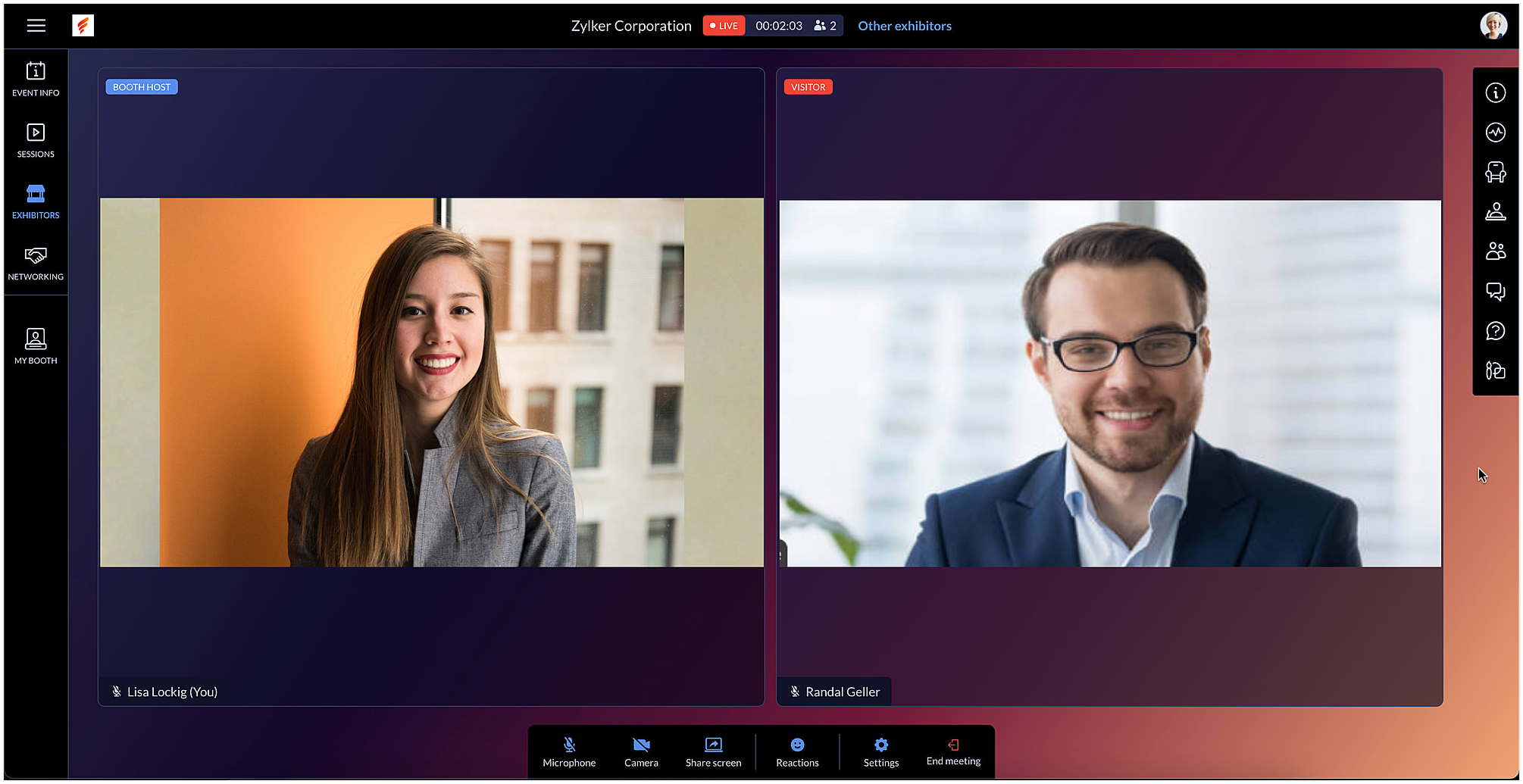
Exhibitors can also use the chat and questions option to interact with visitors when meeting with them. When viewing information for other exhibitors in the Exhibitors tab, you can do this without leaving an ongoing meeting, if you're a part of one.
After the event is over, exhibitors can export chat messages from the event microsite and, based on the permission given, they can also view and export the lead list from the Leads tab.
In Backstage, you can see an overview for details regarding exhibitors and their booths. To view this, go to the Overview tab in the Manage Dashboard and click the Exhibitors tile. Here you can keep track of booth purchases, view the sales overview for booths, and also examine analytics for meetings in booths.
Engage event participants in the Virtual Space and customize it to match your event's style. You can also start a discussion about this in our community or write to us at support@zohobackstage.com with your thoughts or questions.
Happy organizing!
Topic Participants
Tina Samuel
Sticky Posts
Spotlight 26: Host interactive virtual sessions with Backstage OnAir
According to a recent survey by Markletic, two of the biggest challenges organizers face when hosting online events are attendee engagement and interaction. Where in-person events bank on the impact of face-to-face communication to engage attendees, virtual
Recent Topics
Marketing Automation List Entry Criteria is no longer an option
For a couple of years now we have used the "List Entry Criteria" option to filter our Journey recipient list. All of a suddent the option no longer exists for New Lists and I can only delete the option from existing lists but can no longer edit it. AnyoneGCLID arrives not in CRM with iframe integrated ZOHO Form
Hello amazing community, I enabled Adwords integration in ZOHO CRM. I have a ZOHO Form integrated in a wordpress. I tested iframe and Javascript. I enabled the "handover" GCLID in the ZOHO Form. When I add a GLID with http://www.example.com/?gclid=TeSter-123.Bidirectional sync between Zoho Bookings and Zoho CRM - Part 1
Hey, community members! The default integration between Zoho CRM and Zoho Bookings is unidirectional, which means that any appointments booked, rescheduled, or deleted in Zoho Bookings will be reflected in Zoho CRM. However, any modifications made toIs it possible to edit placeholder text?
In the master slides I want to make sure my templates have more meaning for the users and want to replace the standard placeholder text with something more instructional. Instead of "Click to edit Mast subtitle styles" I want to have "Click to enter reportingHow to allow download of a file AFTER information is collected?
I can't find this anywhere. Can someone help with what seems to be a pretty basic web function today? - File is stored in Workdrive - Prospect goes to a URL where the file is located - System requests prospect to enter "Name" and "Email" - An email isAdd Baseline methods to API
There are no API methods for creating or querying baselines, Use case: Customer is notified of the current project start date according to plan via another product/integration. We would like to auto create a baseline (Automated via API) at the pointFixed Assets beg balance
Hello, I trust you are well I'm a new zoho books user and I find it difficult to plug in the fixed assets balance and here's what I have done: 1- I imported the fixed assets data into the fixed assets module as per the instructions 2- the import processCRM Deluge how can link attach file with workdrive file.
Hi, We have create file at workdrive and would like to link to attachment at crm module by deluge. Right now can only upload it to attachment but can not link the file from workdrive. Thank youFeature announcement: AI-powered document generator in Zoho Sign
Hi there! We recently announced manual document creation by offering an editor within Zoho Sign. Today, we are excited to announce AI-powered document generation to help you draft agreements, purchase orders, and other important business documents inPermanently deleted files
Is there a way to get back permanently deleted files from your account if they were accidentally deleted and no longer recoverable from the recycling bin? I know I am probably screwed but I just figured I would ask.Shared Mailbox in iOS app
Hi, On the desktop I am using a Shared mailbox for our company's general mailbox that somebody else should be able to view. In the iOS app however I can't find it? Old sources on the internet says this isn't possible but that can't be right? SomebodyTip #41- Simplify Compliance and Efficiency with Zoho Assist’s Data Cleanup Feature- 'Insider Insights'
Managing device data efficiently is just as important as securing remote access. With Zoho Assist’s Data Cleanup feature, admins can easily remove outdated or unnecessary device records, keeping the console organized and secure. This action is carriedRevenue Management: #6 Revenue Recognition in Professional Services Industry
If you run a consulting firm, agency, or any service-based business, you have a situation where you have signed the contract, maybe even sent the invoice, and have received some initial payments. So, can you consider this as revenue? What if the projectZoho fsm scheduled maintenance dispatch
Hi, I'm reaching out regarding an issue I'm encountering with the Scheduled Maintenance feature in Zoho FSM. I’m trying to configure it so that it automatically dispatches all maintenance jobs scheduled within the next 150 days, starting from today. However,zoho.inventory.getRecords returns no records
I running a custom function (Deluge) in Zoho Flow with a connection to Zoho Inventory. To debug the problem, I created the test function below. It returns "Number of contacts fetched: 0". This confirms that there's no issue with the org ID or connectionFeature announcement - Simplifying document creation with Zoho Sign
Hi there, We are pleased to announce the release of our document creation feature, enabling you to create, edit, and finalize documents like agreements, purchase orders, and contracts without relying on external tools or applications. <br> ThisIntegrating File Attachments in Zoho Flow Email Notifications
Hi, I would like to be able to send an email once an entry is made in a form, and in this email, I would like to attach a file that has been added to the form using the ImageUpload (or FileUpload) widget. So, I started by creating a flow that will triggerZoho project purchases
Hi Folks, I think having a purchase module in projects will help in putting together a project p and L. Project wise purchases and expenses. Do let me know your thoughts.How can I restore all the deleted Time entries of a Task in Zoho Projects
How can I restore all the deleted Time entries of a Task in Zoho Projects? Query: In Zoho Projects, I cloned a task and deleted the time entries from the cloned task. However, this also deleted the time entries from the original task. How can I restoreIs there a way to make an account inactive in ZoHo Desk
We have a few Clients "Accounts" that we no longer do business with. It would be beneficial for them to not show up in lists. However, we want to go back and view tickets, time, etc.How to set the value of the Phone field importing contacts in Zoho Desk
Hi everyone, i'm new in Zoho Desk, we're setting up the environment and i'm importing contacts from another CRM using a file CSV and i'm getting a problem with phone numbers (italian): the leading zero is cut away, also if the value is inside double quotes.How to center a field inside a section?
I’ve been trying to center a field inside a section in Zoho Canvas. When I align it visually, it looks centered in the editor, but after clicking Save, the field appears misaligned on the actual canvas. I also tried setting the field to full width, butKaizen #192 - Implementing Custom Token Persistence in Python SDK
Welcome back to another week of Kaizen! Last week, we discussed how to implement Login with Zoho using OAuth 2.0 and saw how to bring it to life in a real-world application with the Zoho CRM Python SDK. We also discussed how Zylker Academy built a customShowing the map along with mileage expense
When you use the GPS to track mileage, it shows you the map of the actual path travelled. It would be very useful and practical to save that map with the mileage expense, so that when the report is created, it provides a map of each mileage expense associatedEnable Validation Rule for Multi-Select Picklist Field
Zoho, Please allow validation rules for multi-select fields.File Upload field not showing in workflow
Hi, I have added a field on Zoho CRM. I want to use it in a workflow where that particular field is updated based on another field, however it is not showing up in the field list to select it in the workflow. Why is this please?CRM Custom function updating a module record shows the Super Admin user as the record modifier
Dear Zoho CRM Team, Is there any way to update this so that when a custom function has updated a record the Super Admin user doesn't become the modifier? This happens on the record as a modifier and shows up in the audit logs. It would be more usefulBest way to fetch employee names from Zoho People into Zoho Creator Inventory Stock Form field Employee Name Lookup
Hi Team, I have a requirement in my Zoho Creator application (Inventory Stock Adjustment) where I need to fetch employee names from Zoho People and use them as a lookup in a form. Currently, I am considering using an integration field to fetch this dataget file api is returning Junk data
I am working on extension development where at one point I need to retrieve attachments on records I found out I can use only invokeconnection and not invokeurl in extension development The invoke connection returns the image in raw binary format. WhenNeed help with message box
End user updates many records at once. Each have unique serial number. They want a confirmation box that says starting number, ending number and qty. Is there any way to do this? I been searching and asking support but seems like no great solution.[Webinar] The Transformative Power of Gen BI
Traditional decision-making tools are no longer enough. The integration of generative AI into business intelligence (BI) is proving to be a true game changer—enabling businesses to make faster, smarter, and better informed decisions. Early adopters ofBackorder process review - Automating Removal of Sales Order from "On Hold" When PO is Received
Hello Zoho Inventory Team, Currently, sales orders in On Hold status are released only when the bill for the purchase order is created. In our workflow, it would be much more efficient if the sales order could automatically move out of On Hold as soonHow to access the saved Query using API?
I have created a query in setting. Is it possible to access it from a API? What's the endpoint? I tried /v8/queries/important_deals but didnt' work.création d'une base de données
base de donnee d'un lycéeUser Session variables to recall after form submit & redirect to menu
Hey, Forgive me if this is a simple answer I have overlooked. I have built a big onboarding process for my SAAS platform which is built and managed by an external Dev team. I am hoping to embed my new creator app on the SAAS platform. I have a menu pageZoho Writer Merge Template with data from Zoho Analytics Views
Hello, Is there any way to pull information from Zoho Analytics and put it into a Merge Template? I am trying to create a bulk export of one report that filters on a field to create a single document for each of the filter fields.Having to enter bill before stock shows as available.
Hi, Am I right in thinking you must create a bill from the purchase order receipt before the goods are available for shipping?Agent Availability Report
From data to decisions: A deep dive into ticketing system reports Businesses need to track when their support agents check in and check out from work. This report, titled Agent Availability, is one of the static reports that helps managers track the numberAI-driven construction analytics using Zoho Projects Plus
Construction projects thrive on timelines; if a project is completed on or before the expected time, it makes headlines, but if it gets delayed, the company’s credibility will be at risk. Such projects require precise planning and constant monitoring,Canadian payroll
Hello ZOHO, is any updates on when payroll for Canada will be available?Next Page