Spotlight 34: Handle event engagement in one space
Having one place where you can run sessions, promote networking, and drive attention to exhibitor booths can help increase engagement at events.
In Zoho Backstage's Virtual Space, you can provide event participants with a unified experience to join sessions, participate in discussions using networking tables, and interact with exhibitors, all from one place.
Set up the Virtual Space
Every time you open a session, visit a booth, or join a networking table, you will be redirected to the Virtual Space. Once you have entered the Virtual Space through any of the above options, you can easily switch between these options inside the Virtual Space itself. Event participants also get to experience the same thing when they do this from the event microsite.
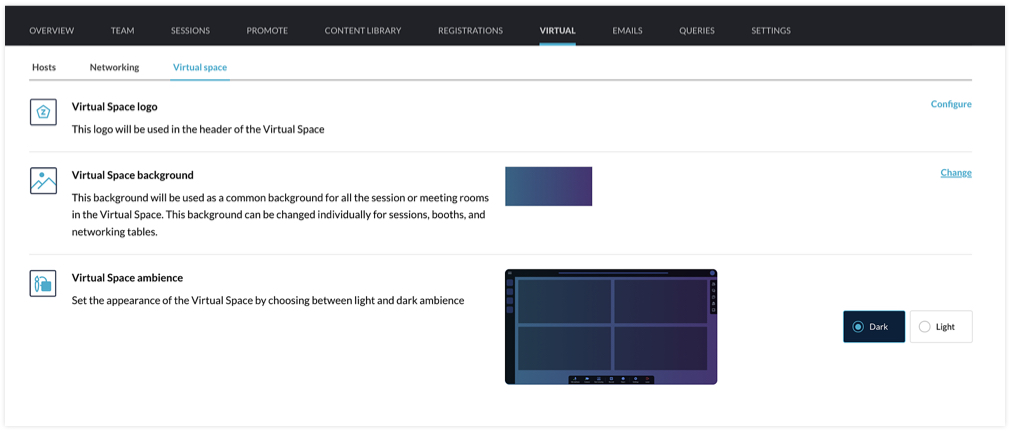
You can customize the Virtual Space to reflect your brand or event's theme by choosing a logo, a background, and the ambience. The logo you've set for the event will be chosen for the Virtual Space by default, but you can select a different one if needed. For the background, the option that you choose will be applied for all sessions, tables, and meeting rooms in exhibitor booths. You can even modify the background scheme at a granular level by selecting a different background for individual booths, sessions, or tables. The Virtual Space ambience can either be set to Dark or Light.
Set the stage for sessions
When hosting a session, you can go to the event microsite and visit the Agenda page. There you can click the Start session button. Alternatively, you can also do this from Backstage. Go to the Conduct Dashboard and click the Present sessions tab. Next, click a session in the timeline on the left and click the Start session button. You can then broadcast the session with the help of the webcasting service that you've selected.
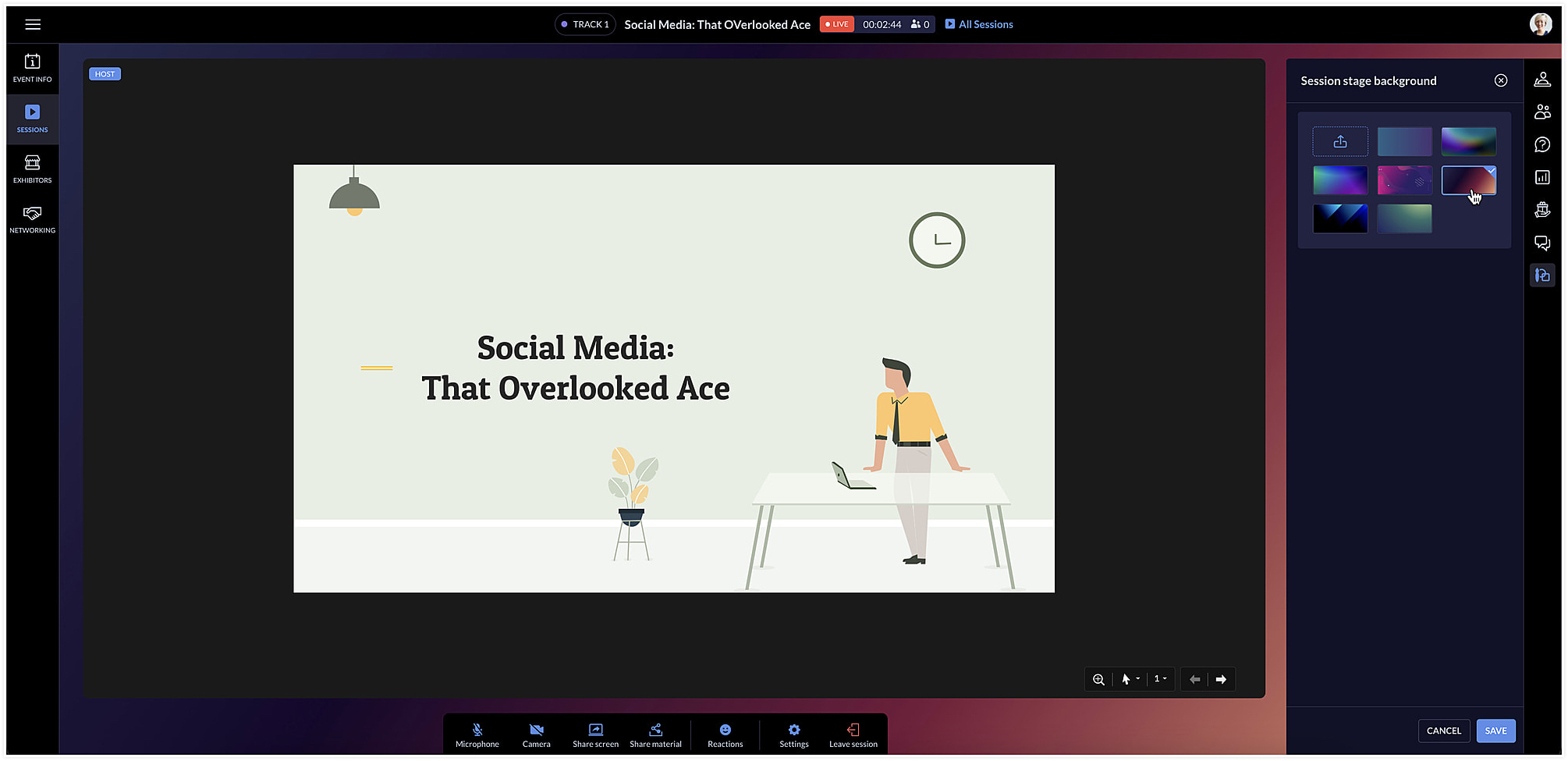
The session area will be designed based on the Virtual Space settings you've chosen. To change the background color for a specific session, click the Session stage background icon [ ] at the right and choose a background option from the list.
] at the right and choose a background option from the list.Facilitate communication with networking tables
Networking tables can be an opportunity for event participants to make important connections. Think of them as similar to round table discussions that take place at a physical event. Attendees can take a seat at a virtual networking table and interact with others there. Networking tables can be used by anyone who is a part of the event such as speakers, attendees, sponsors, or event exhibitors.
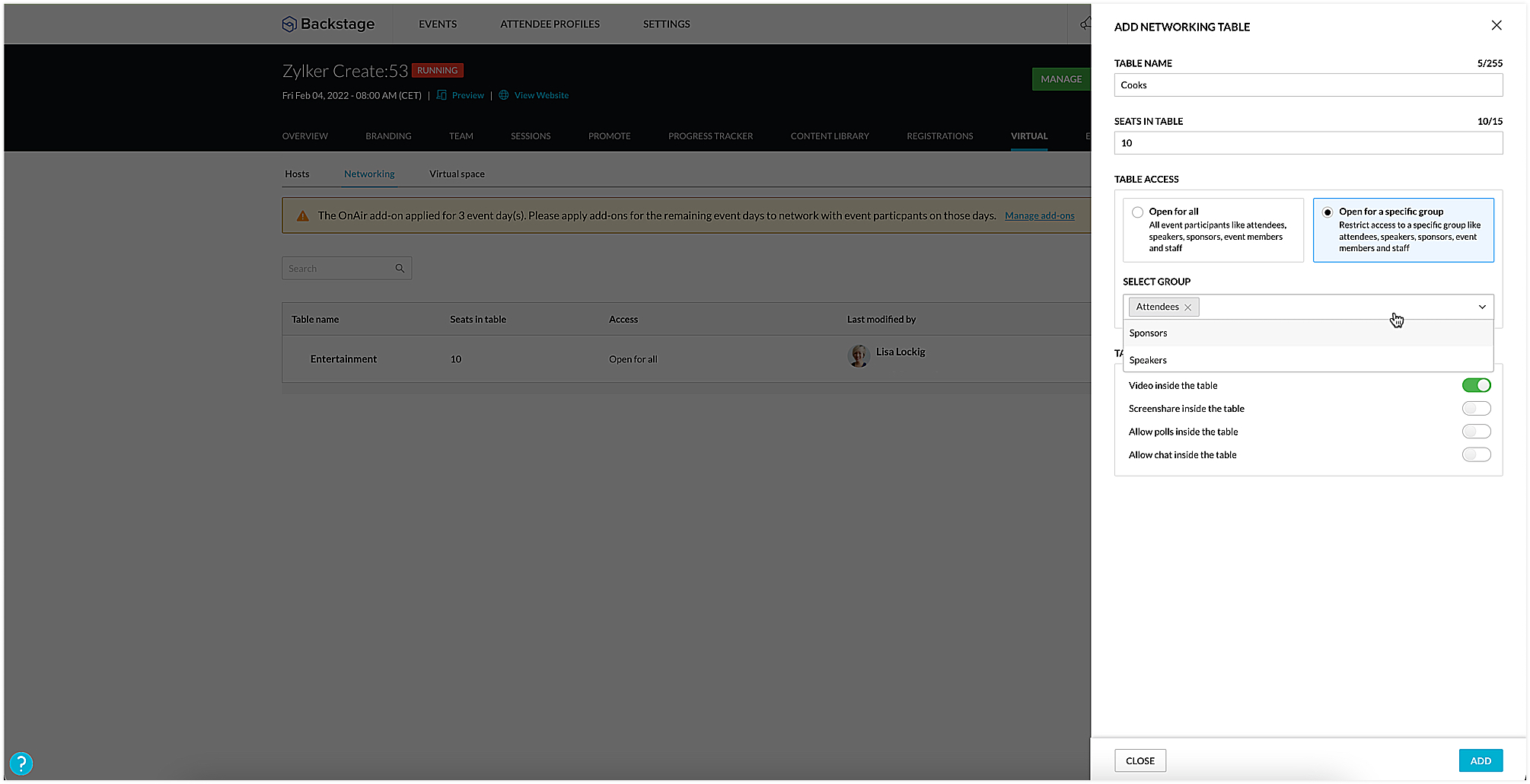
To create a networking table, go to the Manage Dashboard and click the Virtual tab, then click the Networking tab. Here you can say how many seats must be available and enable options such as chat, video stream, polls, or screen sharing for everyone at the table, if necessary. You could also choose to make tables exclusive so that they will be available only to certain participants. To do this, select the Open for a specific group radio button, and select the group you want to make them available to.
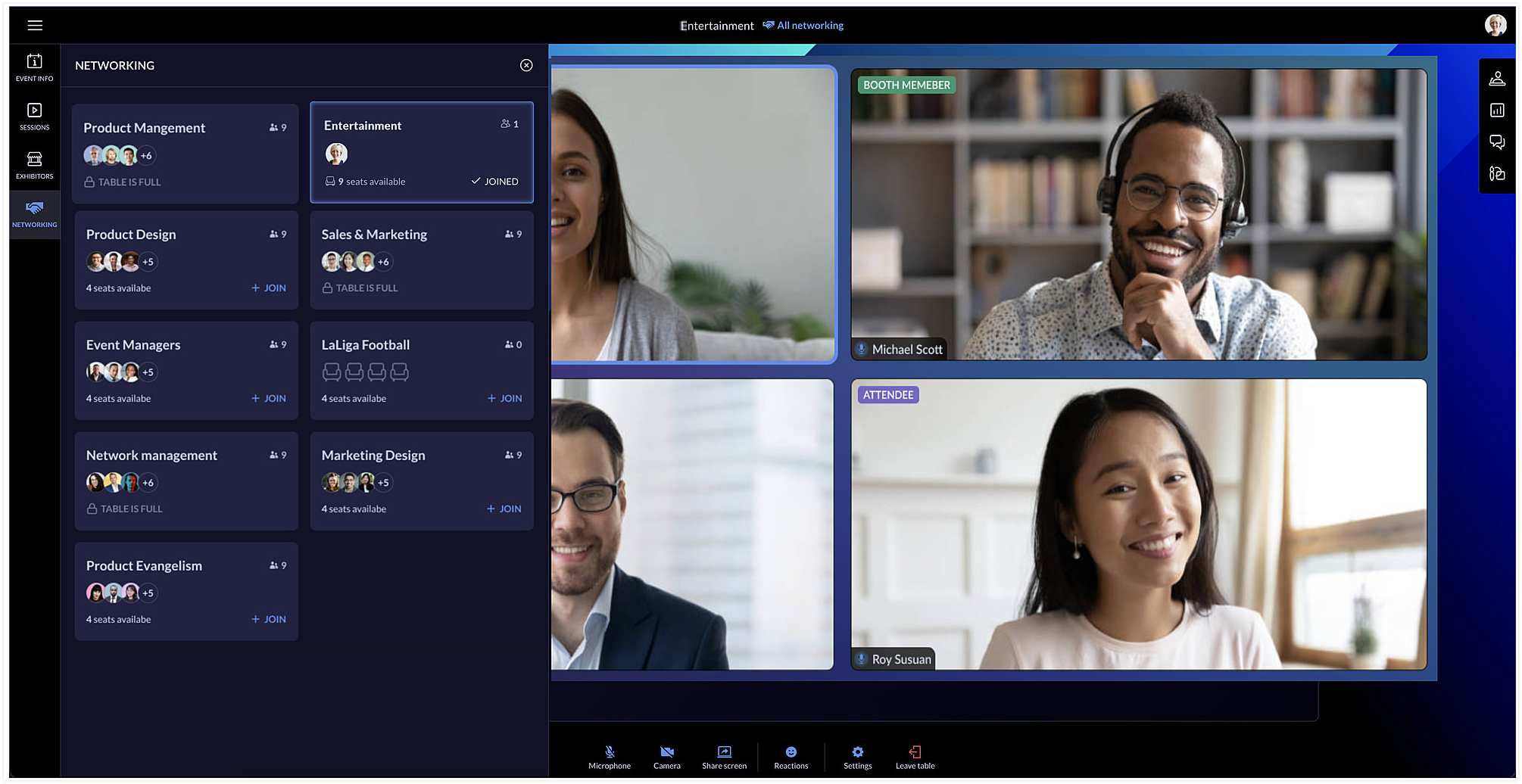
Event team members can join networking tables to take part in the discussion or just observe the conversation. Event members who join networking tables can manage ongoing interactions by muting or unmuting the mics or pausing the video stream of participants.
Each table can have a background of its own too. You can do this by clicking the Networking tab in the Virtual Space and clicking the Table background icon [ ].
].
].Showcase exhibitors to interest attendees
The Virtual Space also includes the Exhibitors tab, which lists all the exhibitors who are associated with your event. Exhibitors can send a request to the event team through the event microsite. Once the request is approved, they can conduct meetings with interested booth visitors during the virtual event.
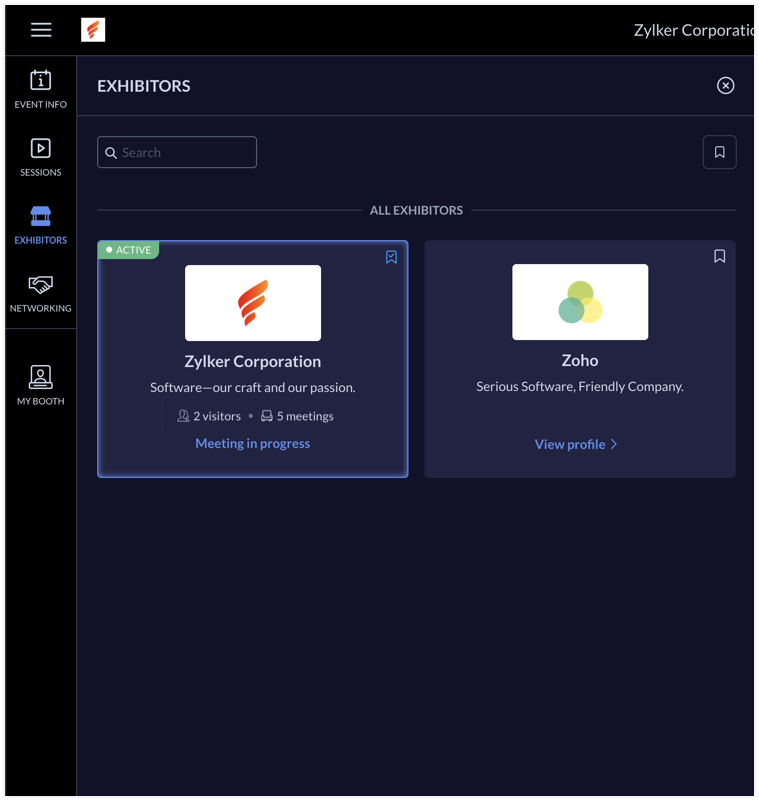
Exhibitors can use the rehearsal option before the event to practice meeting flow with test participants. During the event, the My Booth tab in the Virtual Space gives an overview of the exhibitor's information and also the members who are available in the booth. The number of ongoing meetings and visitors who are in the waiting room will be visible here. An exhibitor's booth background scheme can also be modified in the Virtual Space using the Expo meeting background icon [ ].
].
].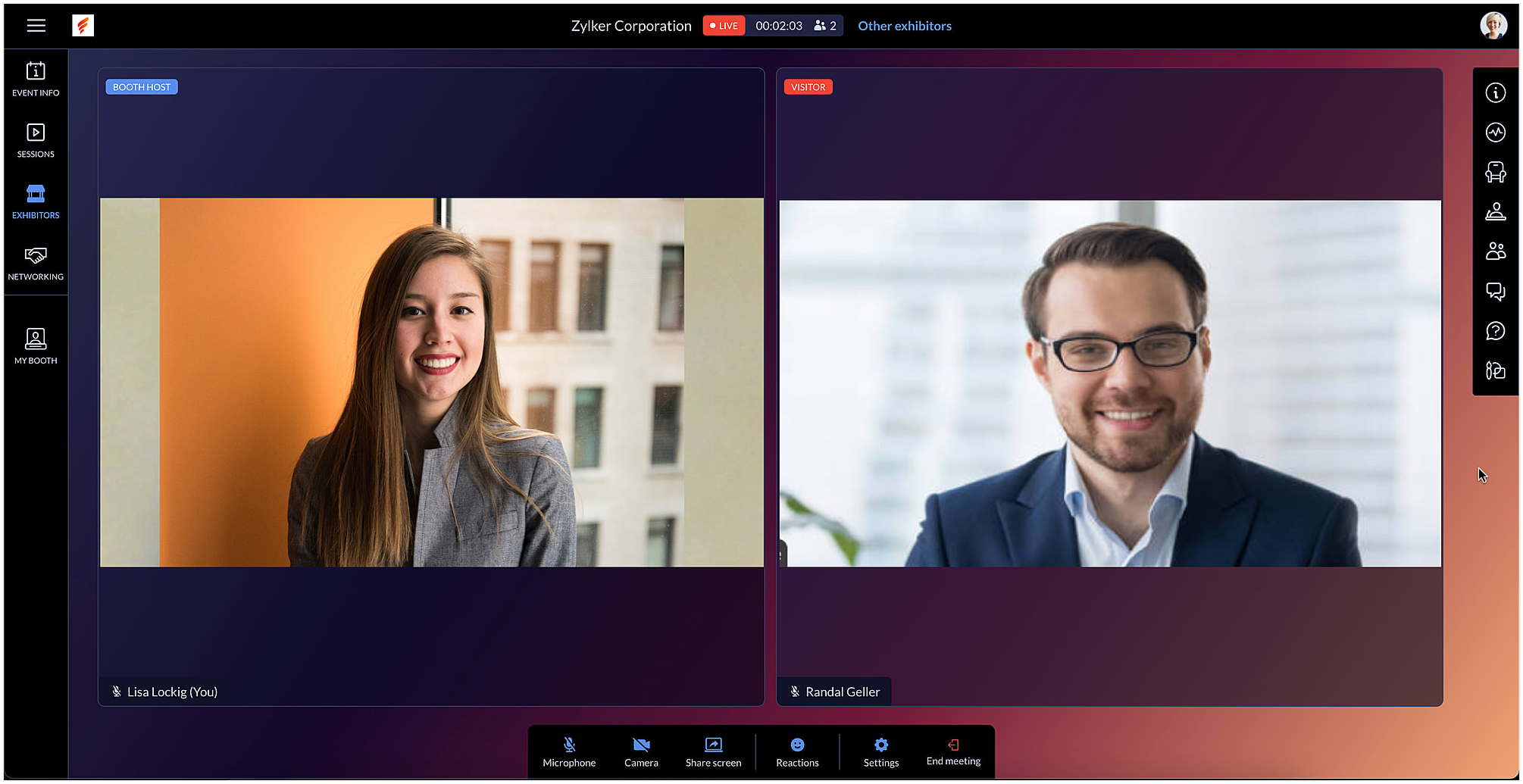
Exhibitors can also use the chat and questions option to interact with visitors when meeting with them. When viewing information for other exhibitors in the Exhibitors tab, you can do this without leaving an ongoing meeting, if you're a part of one.
After the event is over, exhibitors can export chat messages from the event microsite and, based on the permission given, they can also view and export the lead list from the Leads tab.
In Backstage, you can see an overview for details regarding exhibitors and their booths. To view this, go to the Overview tab in the Manage Dashboard and click the Exhibitors tile. Here you can keep track of booth purchases, view the sales overview for booths, and also examine analytics for meetings in booths.
Engage event participants in the Virtual Space and customize it to match your event's style. You can also start a discussion about this in our community or write to us at support@zohobackstage.com with your thoughts or questions.
Happy organizing!
Topic Participants
Tina Samuel
Sticky Posts
Spotlight 26: Host interactive virtual sessions with Backstage OnAir
According to a recent survey by Markletic, two of the biggest challenges organizers face when hosting online events are attendee engagement and interaction. Where in-person events bank on the impact of face-to-face communication to engage attendees, virtual
Recent Topics
Zoho webinar--hard for agencies
So, this is just a dive into our use case, and why we've been disappointed in Zoho webinar. We are a small marketing agency, and we wanted to add webinars to the services we provide, as many of our clients want to learn to use them as part of their contentCelebrating Raksha Bandhan with Zoho Desk: A Bond of Trust, Protection, and Service
Raksha Bandhan, celebrated across India, symbolizes the sacred bond of protection and affection between siblings. “Raksha” means protection, “Bandhan” means bond or knot: together, it represents a knot of care and security. On this occasion, we'd likeBanking > Import statements with a csv file
Good morning, I am regularly using the "import statement" option to match my transactions. I've been using csv files produced by my bank online and was able to import my transactions. Until now. Thank you for your help for fixing this ! Alex.Has anyone successfully added Microsoft Graph API Oauth2 as a connection?
I'm having trouble getting Microsoft Graph API created as a connection in zoho crm. Has anyone successfully added Microsoft Graph API Oauth2 as a connection? My issue is not necessarily on the Zoho side, but understanding how to set up the Microsoft sideSyncing Timesheets between Projects and Desk
All users able to see their own timelog entries from all apps in one place, synced immediately. All managers able to view total/all time entries from one place. This is something that has come up for us and multiple clients. Example: we have a clientSpell Check default language
Hello All, Is it possible to set the Spell Check default language? I can't find it in the settings. Thanks a lot! LeventeZoho Backstage 3.0 - Boostez vos événements avec des outils malins
Zoho Backstage vous accompagne dans l’organisation d’événements réussis, avec des outils qui simplifient la planification, optimisent l’exécution et renforcent la connexion avec votre public. La version 2.0 a apporté une nouvelle interface, plus de flexibilitéPortal user activity reporting
Aside from the metrics section in the admin dashboard, is there a way to view/create reports for portal user activity? Im looking for a more granular option to see exactly what users are utilizing the portal. Thanks!Admins to set Agents Picture
Admins should not have to rely on agents to set a nice profile picture for them. Admins get the headshot pictures from HR and should be able to upload and set their picture, not rely on them to: 1) upload a picture at all 2) upload a good picture 3) uploadTime Tracking Reporting and Billing
I wish for the time tracking module to be enhanced further. Currently it is independent of Support Plans and Contracts. Support Plans and Contracts are also mostly separate. We need a better dashboard of this with the ability to natively mark billed orEnhanced Email Signature Folding
We have departmental signatures setup which are great, however, when viewing ticket details, it gets very overwhelming when scrolling though threads and conversations where you scroll past ten different signatures of your own team, then ten signaturesHow to add formatting in zoho.cliq.postToUser(...) message?
In a CRM Deluge function, I'm trying to use the message formatting guidelines given here: https://www.zoho.com/deluge/help/cliq/posting-to-zoho-cliq.html#message-formats My message is: message: #Title text. The result in Cliq is: #Title text. (no largeHow to add line breaks in zoho.cliq.postToUser(...) message?
In a CRM function using Deluge I'm sending this message and attempting to add some line breaks but they are ignored. Is there another way to add these breaks? My message: message: New urgent task\nDescription \nThis is a fake description.\n A new line?Zia Agents/End of Day Reports
As a manager or owner it would be nice if Zia analyzed today's (or this week's tickets) and gave an end of the day report to management team. - what important tickets were worked on or submitted today? - what agents were unproductive today and answeredProject Cost Tracking
I see there are questions/concerns that Zoho doesn't track costs to a tasks in a project. We are a manufacturer and are in the early stages of tracking costs to project. I would like to expand out the COGS Chart of accounts in Books and record costs viaHow to record if the payment made is return due to transaction failed.
So there is Bill of $2000, and a payments made transaction to clear the bill. The amount is actually deducted from bank account. However, a few days later, I found the bank returned only $1750 cause there are $250 bank service charge for this failed transaction.Help Center Customization UI
The customization screens for the help center needs the UI improved. It looks straight out of 2004. The Zoho Desk normal UI is great. All it takes is uniform fonts and colors across all parts of the tool... I compare this to Zendesk Guide.Este domínio já está associado a esta conta
Fui fazer meu cadastro na zoho e quando digitei meu domínio recebi essa mensagem que meu domínio estava associado a uma conta que eu nem faço idéia de quem seja. Como que faço pra resolver isso? Atenciosamente, Anderson Souza.I need some help in Expenses Per Diem Policy
this is my script written for restricting the PerDiem Components. Say if Lodging and Per Day Allowance both is selected from Per Diem Page then the report should gets auto rejected. When Im trying to executing it says the following error {"code":11,"message":"TheAdding Photos to Dashboards on Zoho Analytics
I am creating a dashboard to showcase data from survey results from focus groups. I am creating a focus group participant profile tab where it is filtered by the name of the participant and showcases information about them using KPI widgets. I am runningWhat is the difference between Retainer invoice and Advance Payments?
Retainer invoice seem like they are just advance payments with extra details. Instead of creating a Sales Order with order details, a retainer is created. It feels like they are a workaround to link advance payments with sales orders. Is there any advantageExporting record notes in bulk
Hi team, Is it possible to bulk export the notes attached to a record? i.e to a CSV file or otherwise. Our use case is exporting all notes for our lead/account/Deal records. We have another system we'd like to import these notes to but I can't seem toField customization
Hi Team Good day! I am a commission agent who sell and purchase goods from vendors, while in purchasing invoices I am not able to deduct the expenses such as commission and other expenses on actual amount. Kindly help me to customize the invoice basedError: Invalid Element gst_no, Invalid Element gst_treatment, Invalid Element place_of_contact
so i am creating a new contact post request and i want add gst infomation when amount is above 50000 and if pass gst info in request body then i get this errors > Error: Invalid Element gst_no, Invalid Element gst_treatment, Invalid Element place_of_contactAdd multiple Billing Addresses under one GST number
My client owns multiple businesses in various locations but they all come under one GST. Is there a way to add multiple billing addresses for the same GST? Managing this by adding multiple Shipping addresses is not an option. The client wants the GSTZoho Mail API - Upload Attachment
https://www.zoho.com/mail/help/api/post-upload-attachments.html I followed the steps from the API documentation and wrote a backend in JavaScript to send emails. Normal emails are sent without any problems. However, I can’t send emails with attachments.Unable to create custom fields for shipment order
I'm unable to create custom fields for shipment orders, even though the custom fields are set up correctly. A request to the following endpoint: https://www.zohoapis.com/inventory/v1/settings/preferences/customfields?organization_id=${ZOHO_ORGANIZATION_ID}&entity=shipment_orderKaizen #202 - Answering Your Questions | Testing and Using REST APIs in Widgets
Hello Developers! Welcome back to a fresh week of Kaizen! Thank you for your active participation in sharing feedback and queries for the 200th milestone. This week, we will look at the following queries related to widget: Widget Testing Using REST APIIntroducing the 'Send as Email' option on the Zoho Desk iOS mobile app
Hello everyone! In the latest version(v2.10.2) of the Zoho Desk iOS app, we have brought in support for the 'Send as Email' option while creating a ticket. This feature enables you to reach out to the customers by sending outbound emails. The emails areZoho Forms Not Loading on Website – DNS Resolution Error
Dear Zoho Support Team, User ID : 20069458731 We are experiencing an issue with the Zoho Form embedded on our website (https://vitel.com.tr/satis-destek-formu/). The form is not loading, and the following error message appears in the browser: “forms.zohopublic.euData backup retention question/
My zohocrm subscription gives me 2 full data backups per month. I have a scheduled backup configured to run twice a month. I just went to download my backup and i can't find it, it ran about 9 days ago... From what i can tell with google zoho only keepsBasic Apple Watch App
Sometimes I leave my phone behind. I will get push notifications that tickets are updated etc.. It would be nice to at least view them and do a few basic functions. reassign. public reply. private comment.Look and Feel Uniformity
Someone needs to go through the mobile app and match the look and feel of the web version. For example, it is global standard to highlight private notes as yellow background hue. Desk does that on web, but not on mobile. Mobile also has an odd blue iconManaging two books in Zoho Books
is it possible to effectively manage two separate books within Zoho Books? My organization is considering handling accounting for two distinct subsidiaries, and we would like to understand the best way to achieve this within the Zoho Books.Display All Custom Buttons Without Dropdown on Record Page
In my org's workflow we usually want to do some kind of quick action off of an individual record - i.e. of an individual contact, or individual deal. What we have always found a hindrance is the location of all custom buttons being in the drop down onZoho Sales Team - Extremely Slow Response Times
Hi everyone, Has anyone else experienced unusually slow response times from Zoho’s sales team? I sent an email last night, and it’s been nearly 24 hours with no reply. While I understand delays can happen, this seems longer than expected for a sales inquiry.Yodlee Bank Feeds
I'm well aware of the many bank feed issues out there that haven't been resolved, but I'm looking for information on Rules in relation to bank feeds. U.S based, Bank of America user and prior to Yodlee all of my banking feeds and Rules worked seamlessly.Unable to create custom function
Unable to create custom function - Please check the screenshot for the details HERE IS THE FUNCTION!! try { // 1. Fetch the details of the approved Bill using its ID billDetails = zoho.books.getRecordById("Bills", organization.get("organization_id"),Need a feature which can validate PAN from Income Tax Portal
Hello Zoho, We need a feature which can help us validate PAN which is being entered in AR/AP Profiles to check if it is valid and display the name as per Income Tax so as to get rid of incorrect PAN into the systems. Please do the needful ThanksPAN - Aadhar Link Status
Can Zohobooks also get latest PAN-Aadhar Linking Status from Income Tax Portal ?Next Page