Spotlight 34: Handle event engagement in one space
Having one place where you can run sessions, promote networking, and drive attention to exhibitor booths can help increase engagement at events.
In Zoho Backstage's Virtual Space, you can provide event participants with a unified experience to join sessions, participate in discussions using networking tables, and interact with exhibitors, all from one place.
Set up the Virtual Space
Every time you open a session, visit a booth, or join a networking table, you will be redirected to the Virtual Space. Once you have entered the Virtual Space through any of the above options, you can easily switch between these options inside the Virtual Space itself. Event participants also get to experience the same thing when they do this from the event microsite.
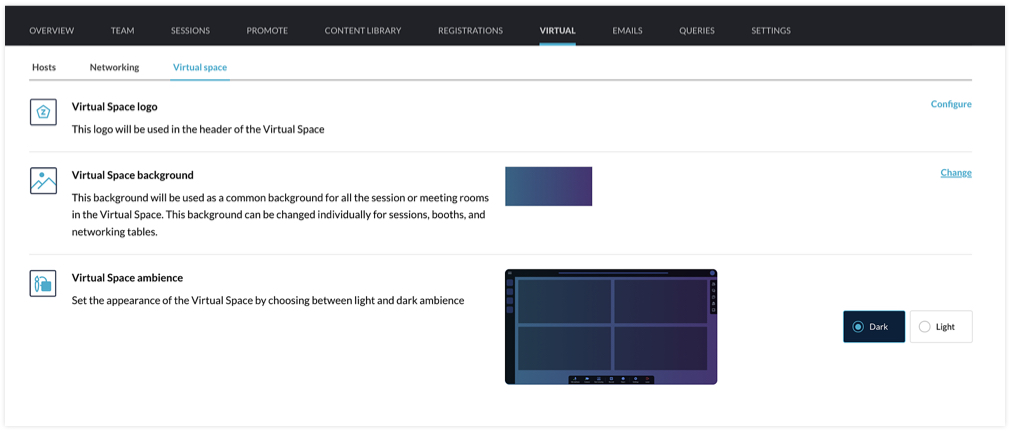
You can customize the Virtual Space to reflect your brand or event's theme by choosing a logo, a background, and the ambience. The logo you've set for the event will be chosen for the Virtual Space by default, but you can select a different one if needed. For the background, the option that you choose will be applied for all sessions, tables, and meeting rooms in exhibitor booths. You can even modify the background scheme at a granular level by selecting a different background for individual booths, sessions, or tables. The Virtual Space ambience can either be set to Dark or Light.
Set the stage for sessions
When hosting a session, you can go to the event microsite and visit the Agenda page. There you can click the Start session button. Alternatively, you can also do this from Backstage. Go to the Conduct Dashboard and click the Present sessions tab. Next, click a session in the timeline on the left and click the Start session button. You can then broadcast the session with the help of the webcasting service that you've selected.
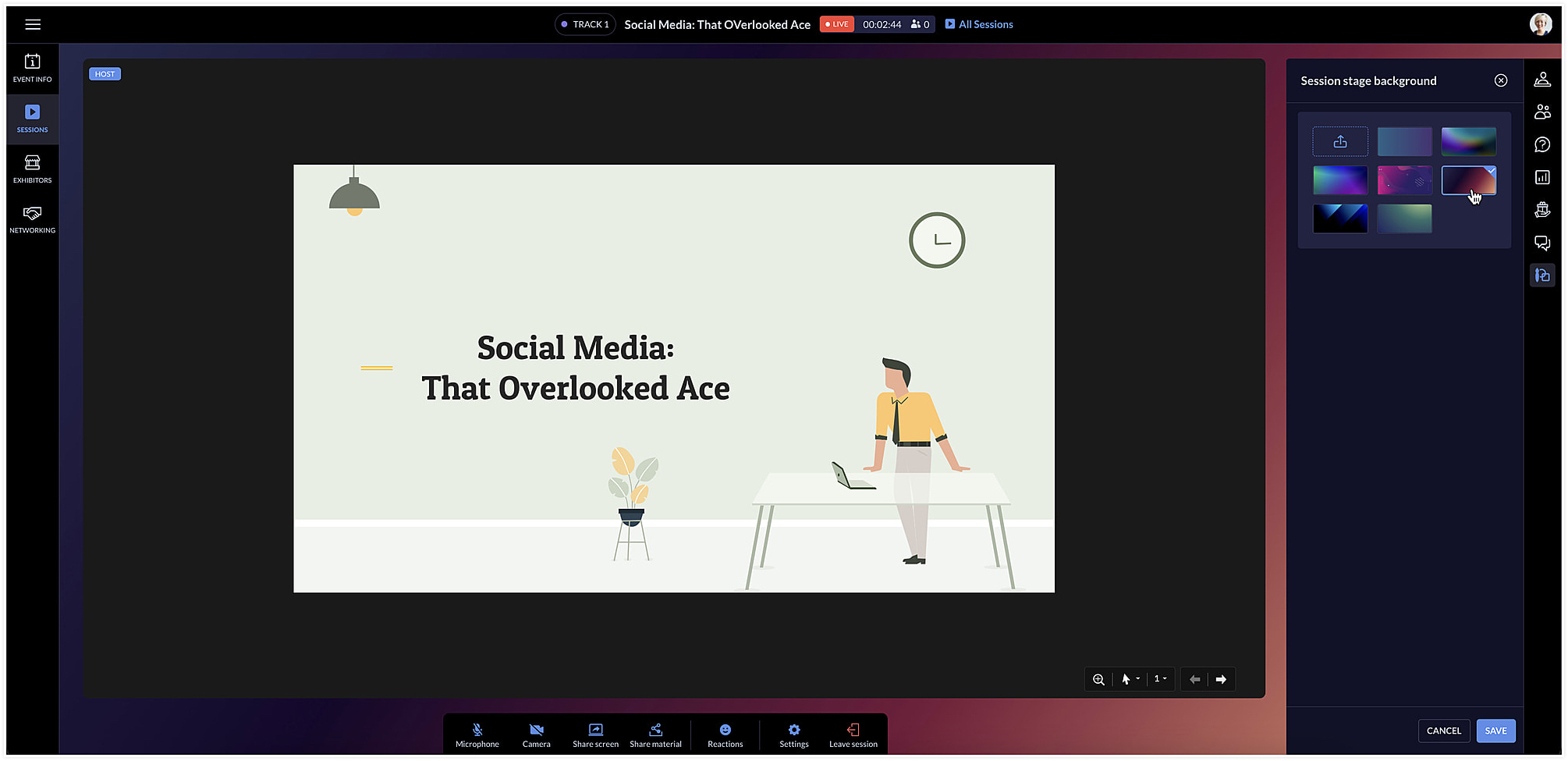
The session area will be designed based on the Virtual Space settings you've chosen. To change the background color for a specific session, click the Session stage background icon [ ] at the right and choose a background option from the list.
] at the right and choose a background option from the list.Facilitate communication with networking tables
Networking tables can be an opportunity for event participants to make important connections. Think of them as similar to round table discussions that take place at a physical event. Attendees can take a seat at a virtual networking table and interact with others there. Networking tables can be used by anyone who is a part of the event such as speakers, attendees, sponsors, or event exhibitors.
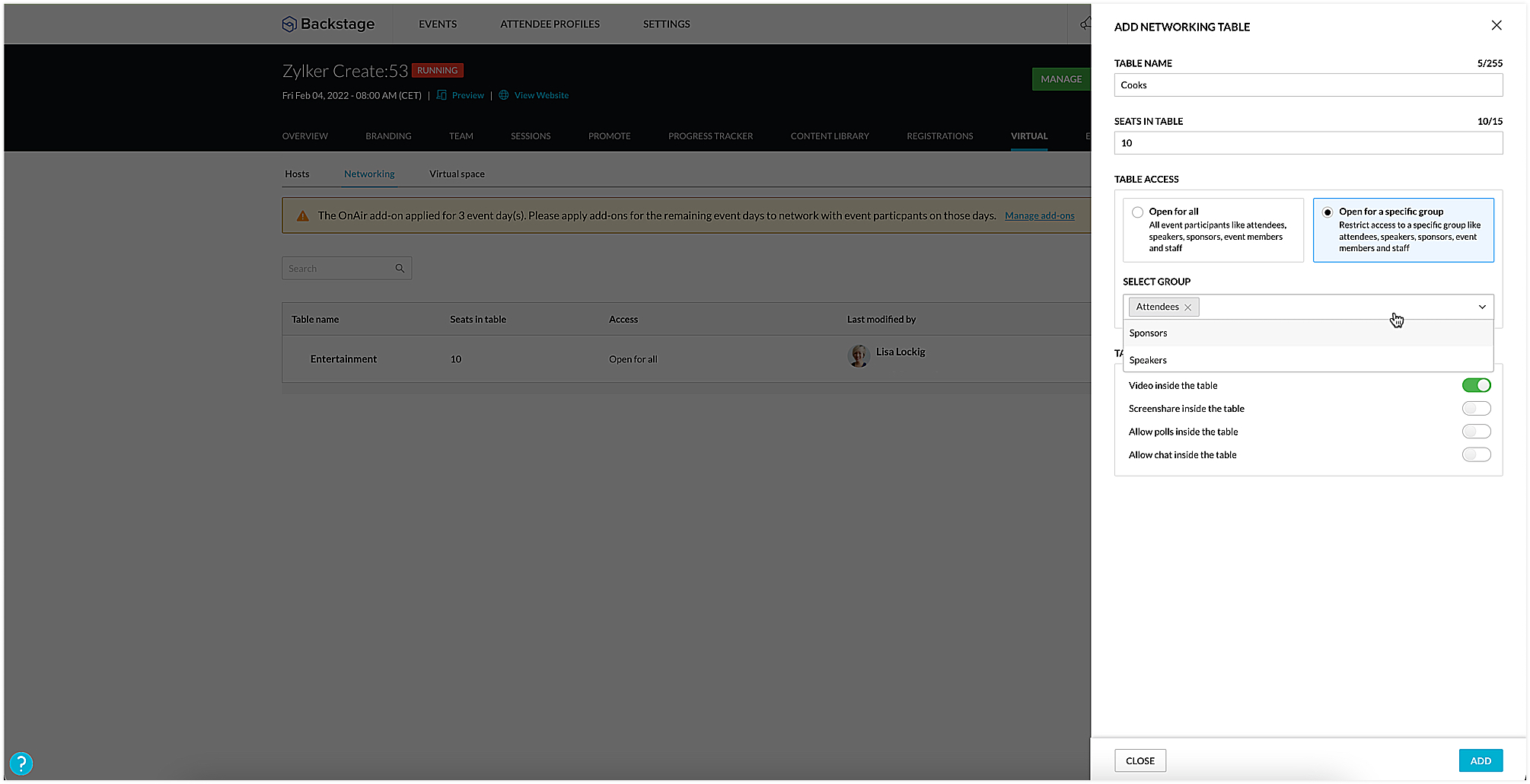
To create a networking table, go to the Manage Dashboard and click the Virtual tab, then click the Networking tab. Here you can say how many seats must be available and enable options such as chat, video stream, polls, or screen sharing for everyone at the table, if necessary. You could also choose to make tables exclusive so that they will be available only to certain participants. To do this, select the Open for a specific group radio button, and select the group you want to make them available to.
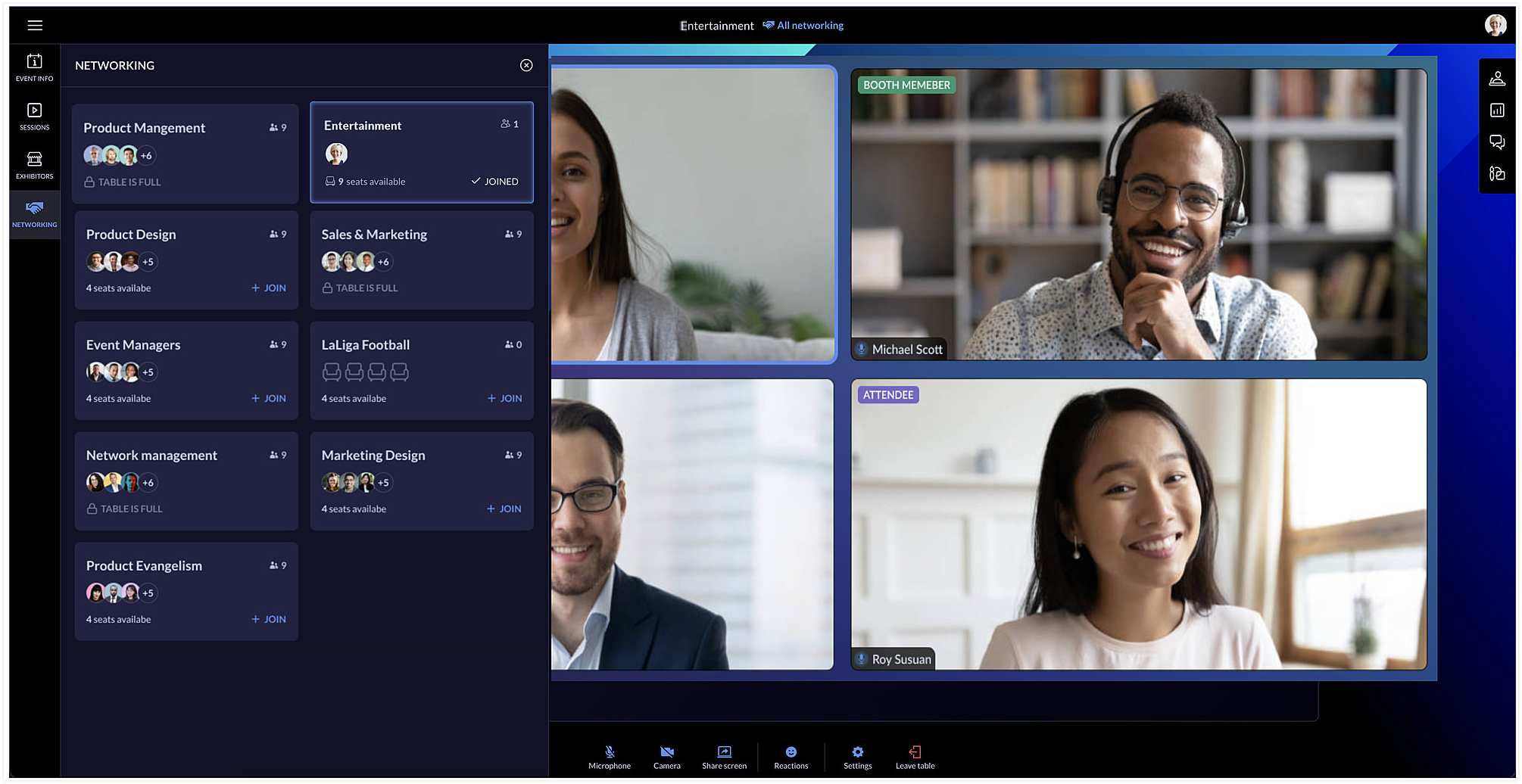
Event team members can join networking tables to take part in the discussion or just observe the conversation. Event members who join networking tables can manage ongoing interactions by muting or unmuting the mics or pausing the video stream of participants.
Each table can have a background of its own too. You can do this by clicking the Networking tab in the Virtual Space and clicking the Table background icon [ ].
].
].Showcase exhibitors to interest attendees
The Virtual Space also includes the Exhibitors tab, which lists all the exhibitors who are associated with your event. Exhibitors can send a request to the event team through the event microsite. Once the request is approved, they can conduct meetings with interested booth visitors during the virtual event.
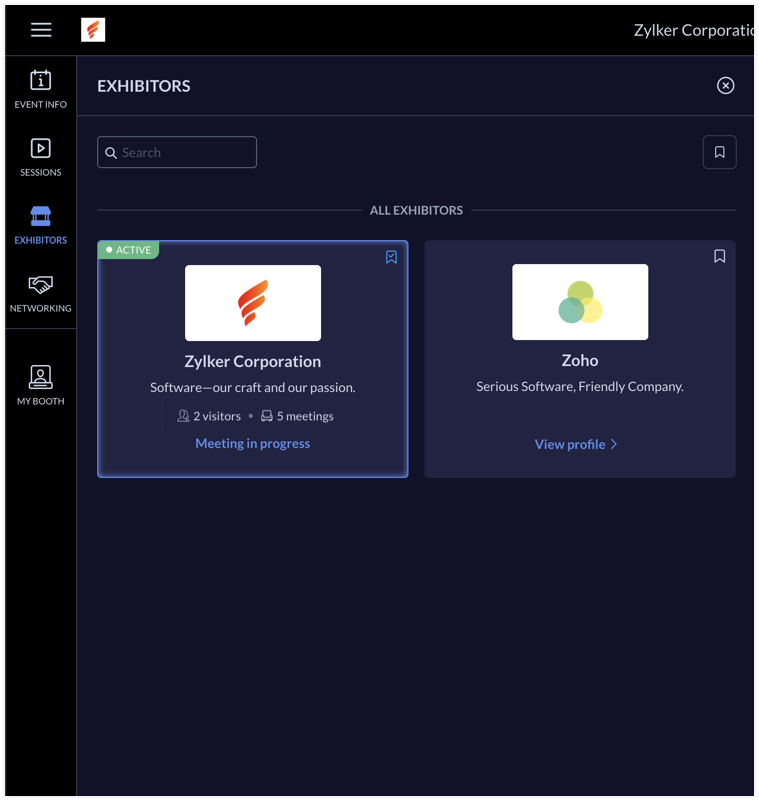
Exhibitors can use the rehearsal option before the event to practice meeting flow with test participants. During the event, the My Booth tab in the Virtual Space gives an overview of the exhibitor's information and also the members who are available in the booth. The number of ongoing meetings and visitors who are in the waiting room will be visible here. An exhibitor's booth background scheme can also be modified in the Virtual Space using the Expo meeting background icon [ ].
].
].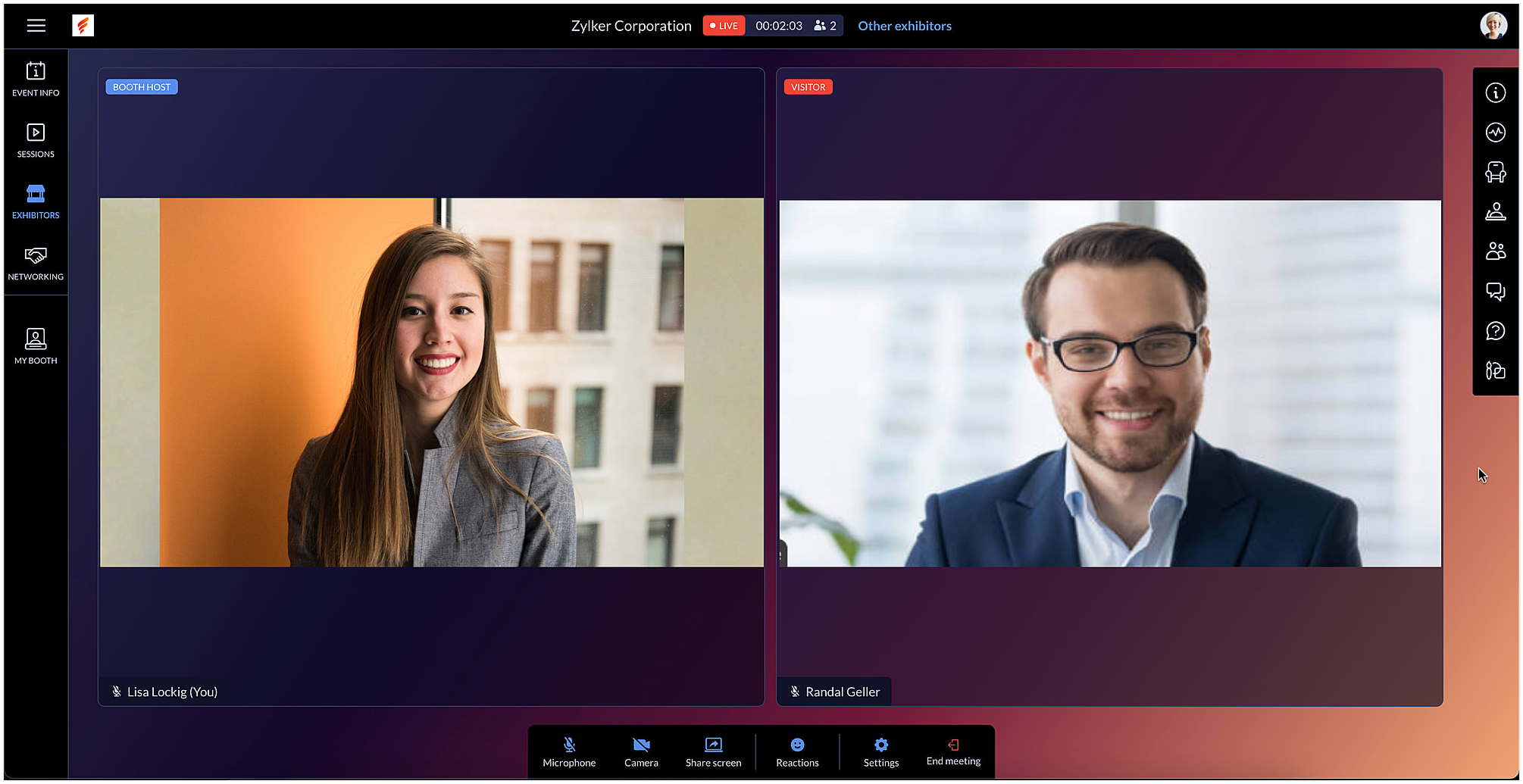
Exhibitors can also use the chat and questions option to interact with visitors when meeting with them. When viewing information for other exhibitors in the Exhibitors tab, you can do this without leaving an ongoing meeting, if you're a part of one.
After the event is over, exhibitors can export chat messages from the event microsite and, based on the permission given, they can also view and export the lead list from the Leads tab.
In Backstage, you can see an overview for details regarding exhibitors and their booths. To view this, go to the Overview tab in the Manage Dashboard and click the Exhibitors tile. Here you can keep track of booth purchases, view the sales overview for booths, and also examine analytics for meetings in booths.
Engage event participants in the Virtual Space and customize it to match your event's style. You can also start a discussion about this in our community or write to us at support@zohobackstage.com with your thoughts or questions.
Happy organizing!
Topic Participants
Tina Samuel
Sticky Posts
Spotlight 26: Host interactive virtual sessions with Backstage OnAir
According to a recent survey by Markletic, two of the biggest challenges organizers face when hosting online events are attendee engagement and interaction. Where in-person events bank on the impact of face-to-face communication to engage attendees, virtual
Recent Topics
Recurring Supervisor Rule Reminders for Open/In-Progress Tickets
Hello Zoho Support Team, I would like to suggest a potential improvement regarding reminders for tickets and activities in Zoho Desk. Currently, it is possible to set reminders only once. In the Supervisor Rules section, it is possible to configure remindersTemplate usage
Hi, We are using some templates as a response to customer questions. Is it possible to analyze the usage of these templates? We want to know if the use of our templates has increased over timeTicket Status Colors
Can i change the colors of Ticket Status in the admin panel? Or even change the background of the entire cell of a Critical ticket? This way its easy for my agents to see a urgent ticket when it comes in. Right now everything is black text. Here RightSync Lookup Fields from Zoho CRM
HI Team, I have synced a lookup field from my CRM data to Campaigns. When I view the synced data the field appears to display a Zoho CRM record ID rather than the text value. Is it possible to get the sync to import the text value rather than the CRMNew From Address cannot verify
I have created a new From Address, which is the support@ address for my domain, that forwards to the default support mailbox. Presumably then, the verification email that is sent, should turn up as a ticket, but it does not. How can I verify my from address so that I can use my own domain?issue with image thumbnails not showing in Image Selector
We have been using Zoho Campaigns for over a year, maybe close to two years, and this issue just started happening in the last month. I wanted to wait to see if it would resolve on it's own, and it doesn't seem to be. The thumbnail images for all newDeluge Script for adding tag
Trying to create a custom function where a tag is added to a record - but for the life of me, I cannot figure out how. Help please! Moderation Update: Adding the help doc and sample to add Tags to records via deluge here for everyone's benefit. tag1 =Unlock your Zoho Vault with OneAuth, Windows Hello, TouchID, YubiKey, and many more!
Hello everyone, We are thrilled to introduce one of the most highly requested features – the ability to unlock your Zoho Vault using various authenticators. The primary purpose of a password manager is to remember just one master password and securelyCreator roadmap for the rest of 2022
Hi everyone, Hope you're all good! Thanks for continuing to make this community engaging and informative. Today we'd like to share with you our plans for the near future of Creator. We always strive to strike a good balance of features and enhancementsHow can I get base64 string from filecontent in widget
Hi, I have a react js widget which has the signature pad. Now, I am saving the signature in signature field in zoho creator form. If I open the edit report record in widget then I want to display the Signature back in signature field. I am using readFileAdd Setting Values to the Rules
Hi, It would be great to use the rules to set values in fields for submission, such as if a Type is X then set the Field Y to 10. Thanks DanSo we ran with it for the week
In our company i bit the bullet and ran with FSM for a whole week. Service calls, deliveries and surveys. Covering about 30-120 miles a day to domestic properties. Loved the appointment list and satnav integration. Loved the timer to measure the appointments.Is there a way to set Document Owner/Sender via the API
When sending requests for zoho sign, it would seem zoho uses the id of the person that created the zoho api cred to determine the owner_id, is there a way to set a default for this?What's New - September 2025 | Zoho Backstage
September has been a different month for Zoho Backstage. Instead of rolling out a long list of new features, we focused on something just as important: Performance, reliability, and stability The event season is in full swing, and organizers are runningPrevent stripping of custom CSS when creating an email template?
Anyone have a workaround for this? Zoho really needs to hire new designers - templates are terrible. A custom template has been created, but every time we try to use it, it strips out all the CSS from the head. IE, we'll define the styles right in the <head> (simple example below) and everything gets stripped (initially, it saves fine, but when you browse away and come back to the template, all the custom css is removed). <style type="text/css"> .footerContent a{display:block !important;} </style>Stock Quotes/Spreadsheet
It would be nice if we could download security and mutual fund prices from Yahoo Finance (or?) in order to maintain an up to date investment portfolio on Zoho. Any chance?link to any Belgian bookkeeping software?
Hello, Does anyone on this Forum can help me with the question whether the ZOHO CRM (Invoices) or ZOHO Book can be linked to software that is used for Belgian Bookkeeping/accountancy? By linking, I mean either with the help of a middleware program or either by the ability to export the custom made reports as CSV-files... If someone has an experience with online CRM-Accountancy in Belgium, with ZOHO (or other), it would be great to read it... Thank youmarketing automation
wants to know about the zoho marketing automationProblems with email templates (HTML - Outlook)
Hi there, I've been trying to create a newsletter from the template "Business 4". Everything looks great in the preview, but when I send it to my Outlook inbox, the layout doesn't seems to stick. More particularly: - The line-height is way more reduced, even though I used the line-height tool from the template - Columns but they are sometimes misaligned - Font size is not always the one I've selected. Could you help? Thanks!How to create a drop down menu in Zoho Sheets
I am trying to find out, how do I create a drop down option in Zoho sheet. I tried Data--> Data Validation --> Criteria --> Text --> Contains. But that is not working, is there any other way to do it. Thanks in Advance.Introducing Keyboard Shortcuts for Zoho CRM
Dear Customers, We're happy to introduce keyboard shortcuts for Zoho CRM features! Until now, you might have been navigating to modules manually using the mouse, and at times, it could be tedious, especially when you had to search for specific modulesZoho CRM's custom views are now deployable from sandboxes
This feature is now available for users in the AU, JP, and CN DCs. This feature is now available for users in CA and SA DCs. New update: This feature is now available for users in all DCs. Hello everyone, We're excited to announce that you can now deployZoho One - Syncing Merchants and Vendors Between Zoho Expense and Zoho Books
Hi, I'm exploring the features of Zoho One under the trial subscription and have encountered an issue with syncing Merchant information between Zoho Expense and Zoho Books. While utilizing Zoho Expense to capture receipts, I noticed that when I submitLimit in number of records for subforms and multi-select lookup fields
It is my understanding that a maximum of 100 items can be selected in a multi-select lookup field, and that a total of 200 items can be selected in total between both subforms in a given module. Are there any ways to work around this limitation if weKaizen #136 - Zoho CRM Widgets using ReactJS
Hey there! Welcome back to yet another insightful post in our Kaizen series! In this post, let's explore how to use ReactJS for Zoho CRM widgets. We will utilize the sample widget from one of our previous posts - Geocoding Leads' Addresses in ZOHO CRMGetting Permission denied to access this portal.
We have one user that can't login to projects even though access has been granted. This user can login to accounts.zoho.com but when login to https://projects.zoho.com/portals.do we get this error: Unauthorized login to this portal Permission denied to access this portal. Check your portal URL again. Sometimes we also get "server too busy". We have tried killing sessions (in accounts.zoho.com) and we have deleted cookies; and tried different computers and still the same problem. All others use canDoes Zoho Docs have a Line Number function ?
Hi, when collaborating with coding tasks, I need an online real time share document that shows line numbers. Does Zoho's docs offer this feature ? If yes, how can I show them ? Regards, FrankSetting Default Views for Custom, List and Detail Views
Hey, Is it possible to set a default custom view, list view and detail view for a module for every user? We are onboarding a lot of non technical people that struggle with these things. Setting the views as default would really help. Btw: also settingFilter Based API request in Zoho Books using POSTMAN
How do I GET only specified CONTACTS based on created time or modified time in Zoho Books using POSTMAN. In the api documentation, it is written we can apply filters but I need a sample request.URL validation
We use an internal intranet site which has a short DNS name which Zoho CRM will not accept. When attempting to update the field it says "Please enter a valid URL". The URL I am trying to set is http://intranet/pm/ Our intranet is not currently setup with a full DNS name and given the amount of links using the shortname probably isn't a feasible change for us.Has anyone been experiencing slow issues?
Dear all, I just want to ask if anyone has been experiencing slow issues with Zoho Creator in the past two weeks? I worked with the ISP to improve network quality by changing routes and upgrading bandwidth, but nothing changed. I am in Vietnam.Zoho Projects Roadshows 2025 - USA
Dear Users, After an amazing response to our roadshows in 2024, we are excited to be back for the second year in a row! Join our team of experts as they walk you through the most-used features in Zoho Projects, explore powerful automation capabilities,Billing Management: #6 Usage Billing in SaaS
Imagine a customer shuffling across multiple subscriptions, a streaming service, a music app, cloud storage, and a design tool. Each one charges a flat monthly fee, regardless of how much or how little they use. Some months, the customer barely opensIs there anyone who has been experiencing issues regarding the Zoho Creator Certification Website in the past 2 weeks?
Dear all , I just wanted to ask is there anyone who was planning on taking the Zoho Creator Developer Certification Test in the past 2 weeks and have been facing errors stating that the website is under maintennance and also not allowed to access theAllow syncing Activities from other applications
Marketing Automation could be a much more powerful platform if you were able to sync activities into the platform (e.g. purchase, donation, etc) outside of a user doing something on your website. I'd love it if you could sync Custom CRM Modules as activities,Global Sets for Multi-Select pick lists
When is this feature coming to Zoho CRM? It would be very useful now we have got used to having it for the normal pick lists.Integración Books para cumplir la ley Crea y Crece y Ley Antifraude (VeriFactu)
Hola: En principio, en julio de 2025, entra en vigor la ley Crea y Crece y Ley Antifraude (VeriFactu). ¿Sabéis si Zoho va a cumplir con la ley para cumplir con la facturación electrónica conectada a Hacienda? GraciasAsk the Experts #1
Hello everyone! It’s time to transform how you manage projects. Define the processes. Automate the tasks. Streamline the workflows. Let us dive into automation in Zoho Projects — from configuring workflows and custom functions to building triggers, usingHow to overcome Zoho Deluge's time limit?
I have built a function according to the following scheme: pages = {1,2,3,4,5,6,7,8,9,10}; for each page in pages { entriesPerPage = zoho.crm.getRecords("Accounts",page,200); for each entry in entriesPerPage { … } } Unfortunately, we have too many entriesChecking if Creator has Change History
Like zForms - whenever an entry was updated there's an option to attached change history to email notif. Trigger -> Successful form submissionNext Page