Tip #17: Easily share spreadsheets with non-Zoho account users
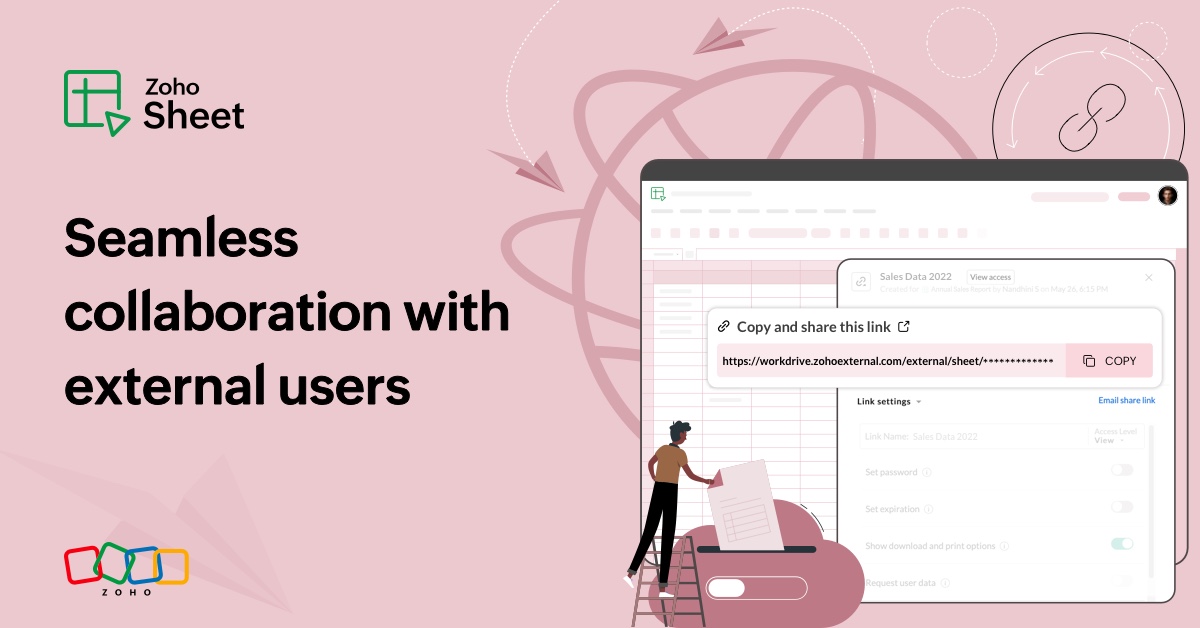
With efficient, collaboration-friendly options, Zoho Sheet is a popular choice among users. Sheet's external share links help you collaborate more effectively by sharing your spreadsheets with anyone outside your organization, including users who do not have a Zoho account.
Say you run a wholesale ecommerce business and need to share your inventory data with your retailers. You want your retailers to view and edit the spreadsheet, make updates, and track inventory. Thanks to external share links, it's not necessary for your retailers, or anyone outside your business, to maintain a Zoho account. Simply use your external share links to share your sales data and facilitate seamless collaboration.
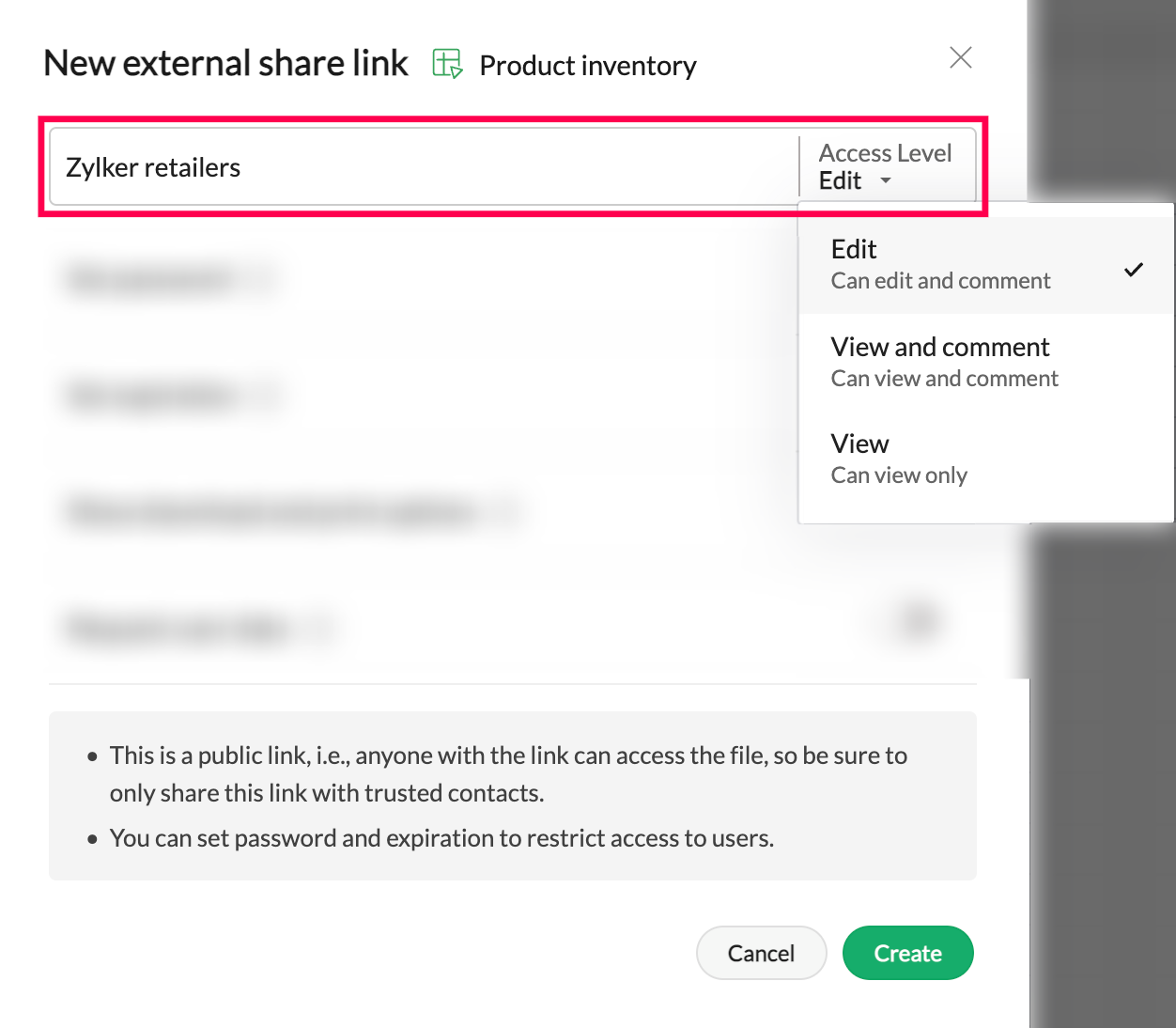
Set access limits
Zoho Sheet allows you to create multiple external share links for the same spreadsheet. You can set your preferred access settings for each link before sharing it with your collaborators.
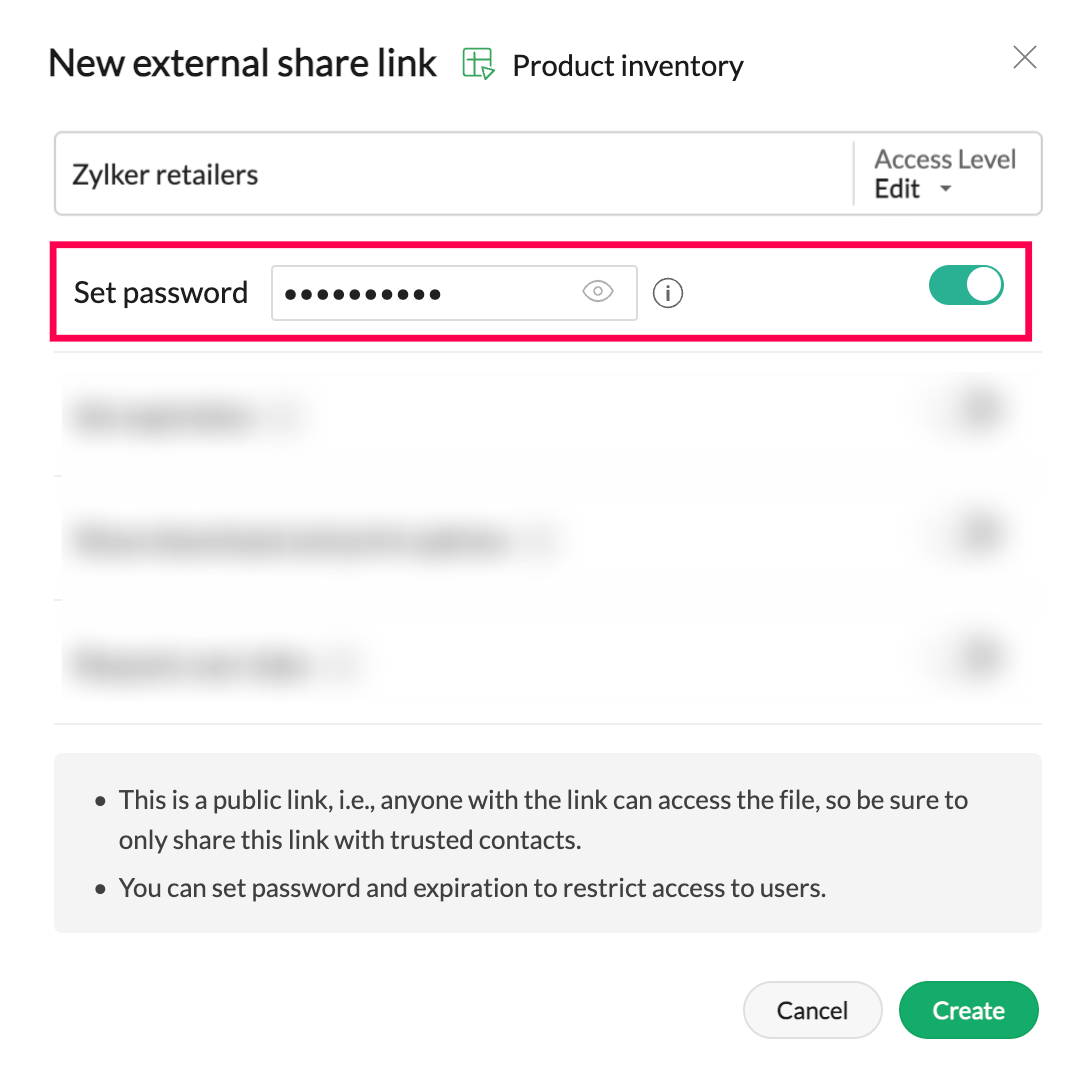
Protect your file with a password
Password protection is highly recommended to prevent unauthorized users from accessing your file through external share links. This is crucial if you are sharing sensitive spreadsheet data with your collaborators.
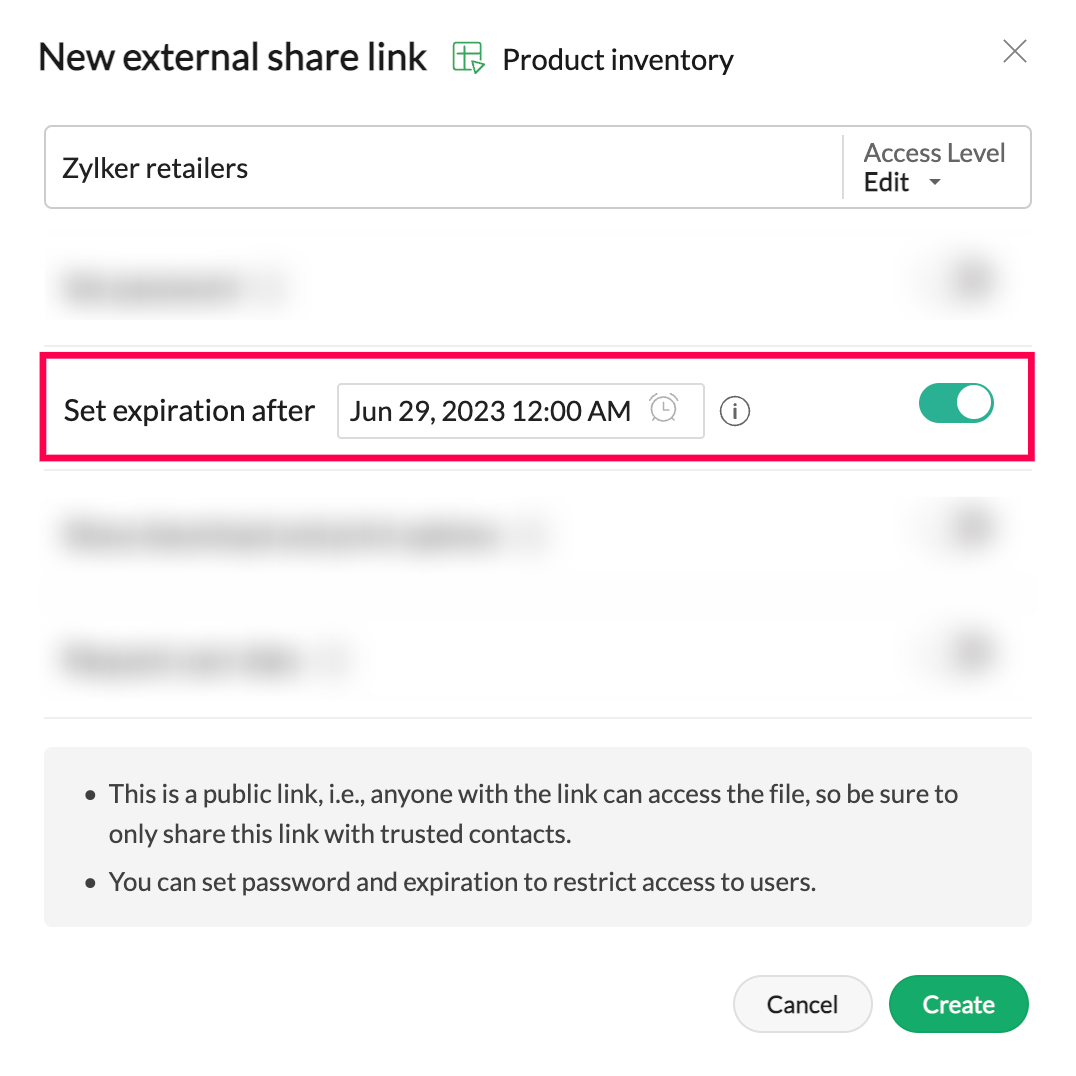
Deactivate your external share link
You may need to collaborate with external business users temporarily. In that instance, you can specify a date and time when the external share link will be automatically disabled.
Gather client details
The external share link settings come with an option to collect basic client details, like name, email address, and phone number. Clients must share the details in order to access the spreadsheet.
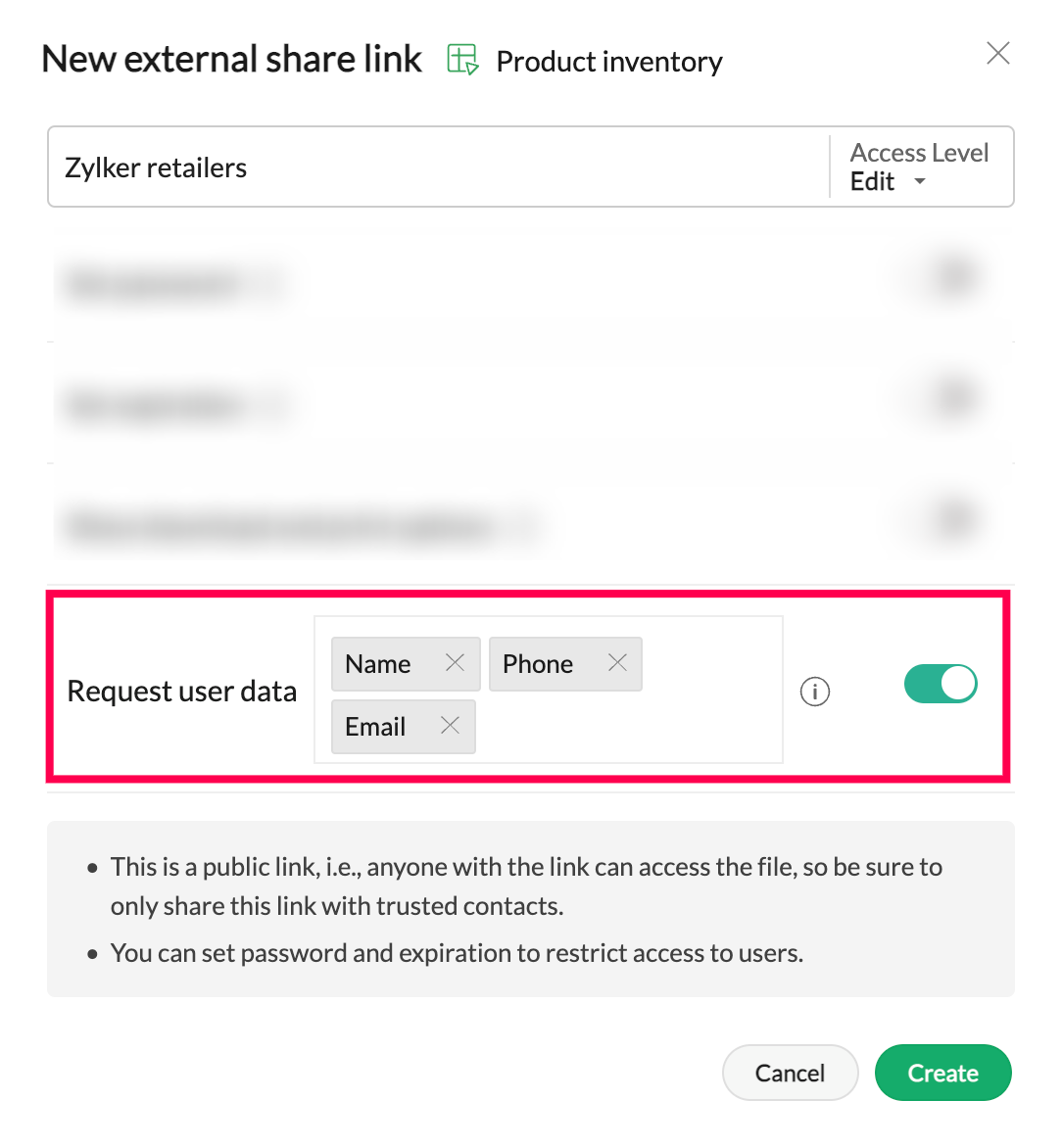
Note: If you don't wish to collect client details, they will be considered "guest" users and will be referenced as such in the spreadsheet's audit trail and other collaboration tools.
In tandem with the above-discussed external share link settings, you can allow/restrict spreadsheet downloads. You can also change the link settings and add new collaborators anytime.
If you want your audience to view and interact with spreadsheet data, while keeping the source data intact, use the Publish option to publish the entire spreadsheet, a specific worksheet, or a cell range within your organization or externally.
Explore the tips on internal collaboration features available in Zoho Sheet here.
Follow our Tips and Tricks forum to discover ways to leverage Zoho Sheet for your business. Also, join our Zoho Sheet community to stay updated with the latest product announcements and engage with other users.
Topic Participants
Subashree Ramamurthy
Aashok Kumar Sharma
Sticky Posts
Tip #20 - Three things you probably didn't know you can do with picklists
Hello Zoho Sheet users! We’re back with another quick tip to help you make your spreadsheets smarter. Picklists are a great tool to maintain consistency in your spreadsheet. Manually entering data is time-consuming and often leaves typos and irregularTip #22 Three ways you can split your text into columns
When you're working with large datasets, you often have the problem of messy, inconsistent formatting, which makes analysis difficult. This is especially true when the data is being collected elsewhere and then imported to the spreadsheet, which can resultTip #18: 6 Trendlines and when to use them in your spreadsheet data?
Charts are a great tool for visualizing and interpreting large chunks of data in spreadsheets. Zoho Sheet offers you 35+ chart options, along with AI-powered chart recommendations based on the data set you select. There are various chart elements thatTip #17: Easily share spreadsheets with non-Zoho account users
With efficient, collaboration-friendly options, Zoho Sheet is a popular choice among users. Sheet's external share links help you collaborate more effectively by sharing your spreadsheets with anyone outside your organization, including users who do notTip #16: Ask Zia your data-related questions and get powerful insights
Zoho Sheet provides a variety of tools and functionalities to help you analyze your data from end to end. But what if you could analyze all your data sets with a single AI-powered tool? Meet Zia, our smart virtual assistant who will answer all your data-related
Recent Topics
Domain Suspension Due to Verification Emails Not Received, Admin Console Limitations
Hello, My custom domain caincodes.com has been suspended because I am unable to receive the registrant verification email. I purchased this domain directly through Zoho Mail. I have spent over a week trying to resolve this, but standard support ticketsAuto-fill Contacts in Zoho Mail not working for me
We just switched to Zoho Mail for our company, and I am noticing that the "auto fill" feature when composing an email -- where the "to" field is autofilled (like in the attachment) from Contatcts works for everyone except me. Any way I might have madeWhy there is no Copy and Paste in email?
in other emails, I normally can type elsewhere and then copy into the email. it is much easier to type in a word then copy in an email, instead of writing at email directly. but I found that it seems not possible for me to paste into zoho email-writing.Tip #94 – Resolve Zendesk tickets faster with remote support from Zoho Assist – 'Insider Insights'
Hello Zoho Assist Community! A customer raises a Zendesk ticket about an issue that's hard to explain and even harder to fix over messages. The agent asks for screenshots, the customer sends a few, and the replies go back and forth across hours. The ticketHow Can Real-Time Messaging Improve Team Collaboration in CRM Systems?
The Real-time messaging can make it easier for teams to communicate and work together without constantly switching between different tools. In a CRM, sales, marketing, and support teams can use chat to share updates, discuss customer needs, and solvePrint a price list or price book
Hi Community. Am I right in concluding that Zoho has no functionality to print a price list from either Zoho CRM, Zoho Inventory or Zoho Books? I won't get stuck on the fact that Zoho doesn't sync price books between Zoho CRM and Books/Inventory (moreEdit a previous reconciliation
I realized that during my March bank reconciliation, I chose the wrong check to reconcile (they were for the same amount on the same date, I just chose the wrong check to reconcile). So now, the incorrect check is showing as un-reconciled. Is there any way I can edit a previous reconciliation (this is 7 months ago) so I can adjust the check that was reconciled? The amounts are exactly the same and it won't change my ending balance.Announcing Zoho DataPrep 3.0: Agentic Al-powered ETL
Building a data pipeline often means spelling out every step: import data, clean duplicates, join datasets, apply transformations, and export the results. What if you could describe the outcome you want and let AI work out the steps? With Zoho DataPrepDYK 15: Compare Baseline
Did you know you can spot the exact task which can affect your project's timeline? Yes, project baseline comparison in Zoho Projects helps you do that. A baseline is a snapshot of your current project schedule. Projects and tasks have fixed start andZohoBooks - "Account transactions" report doesn't have any "Desciptions"
Hi, I'd like to push for this to be included in ZohoBooks: In a "account transactions" report all the numbers are right, but I'd really like to see the "Description" as part of this report, i.e. the line-item-description as I would see it in the bank statement. Essentially all you see is a list of numbers adding up to the total. It is very difficult to see if things are right without being able to see what exactly each transaction refers to. Going into each transaction one-by-one is not a workableHow to reorder Kanban View Columns in All Layouts?
How to reorder Kanban View Columns in All Layouts? The picklist values are in another order than visible in this view, which is the same for both layouts.Super Admin Access to All Courses and Spaces in Zoho Learn
Dear Zoho Learn Team, We hope this message finds you well. We are using Zoho Learn extensively for internal and agent training. While managing our courses and spaces, we encountered a significant limitation regarding admin access and course management.Inventory <--> Workdrive Integration
Proposal - Zoho should implement some sort of official integration between Inventory and Workdrive for easy uploading, storing, and accessing of files associated with products from the Inventory UI. Use Cases - Product manuals, technical drawings, vendorResume search down for 3 weeks
Is anyone else having issues with resume search? I opened a ticket at the end of September. I can see individual contacts and their resumes, but neither basic nor advanced search will pick up any keywords. This is the crown jewels of my business and IE-invoicing setup not completed in Zoho Books
My status on the EmaraTax portal appears as linked with Zoho. However, when I try to complete the setup on the E-invoicing tab in Zoho Books settings, I receive an error saying: "E-Invoicing could not be enabled as the FTA portal is currently unreachable.Stock Count
The stock count is a nice new feature, but we cannot figure out how to: 1. Use it without assigning to a person, we have a team or one of multiple do stock counts as do most any company. 2. Add any extra fields to what the "counter" sees. The most importantSales orders with back ordered PO
Hmmmmmm !!!! OK - please tell me how to overcome this ..... Sales order | create back order PO ... Sales order is auto marked "On hold" ... Try edit sales order to change shipping date... Almost there, but... Sales orders that have been shipped or on hold cannot be updated.So is NOT shipped ... back ordered PO Received... Try edit sales order to change shipping date... Almost there, but... Sales orders that have been shipped or on hold cannot be updated.SO is NOT shipped ... PO is received ... EnterRetail Payment Receipt
Hi, So "payment receipts" have a "Retail" template for thermal printers, but the template is configured at A4 paper size!!! How is this retail guys? On the other hand, Invoices have 3 Retail templates which have 3 and 4 inch paper size, perfectly fittingSetting to turn off Paying for all invoices in customer portal
We enable our invoices to be paid via authorize.net. When a customer gets an email of an invoice and clicks on the link to view/pay for it, if he/she has other outstanding invoices that were enabled for online payments, there will be a banner that saysZoho Books API Error 41029 – Signed QR Code Rejected
Hello Team, We are integrating our ERP with Zoho Books. Our ERP generates invoices and registers them with the Indian GST Invoice Registration Portal (IRP). We then create the corresponding invoices in Zoho Books and manually associate the existing e-invoiceZoho CRM still doesn't let you manage timezones (yearly reminder)
This is something I have asked repeatedly. I'll ask once again. Suppose that you work in France. Next month you have a trip to Guatemala. You call a contact there, close a meeting, record that meeting in CRM. On the phone, your contact said: "meet meEmail Alerts added on the ticket as the user that created the alert
I created some alerts to e-mail the contact when the ticket is waiting for client response after X amount of days. The rules and alerts are working fine. The problem is, since I was the one that created the rule, alert and/or e-mail template, every timeMultiple Pricing for single item
We are doing billing based on batch number. We required multiple Price for an Single Item based on Batch. While billing the POS should fetch the price based on batch. Whether this could be done ?Changing default tax rule?
Hi guys I'm in Canada. I have 2 companies associated with my Zoho Invoice login. The first account is able to modify the default tax rules. The second, is not. They are all locked with the small lock icons. The default tax rule it is using is "Canada"Free webinar: Zoho Vault browser extension for Chrome, Safari, and more
Hi everyone! Today, 85% of work happens in the browser, making it one of the most critical and least governed parts of your security stack. And when employees switch to their phones or desktop apps, the risk follows them. Without centralized control,Need help with importing expenses
I'm using the template downloaded from the application. When I try to import my expenses, I get the message: Duplicate entry in the Expense Date column. Ensure it contains unique values. None of the rows will import. There are duplicate dates, but theyHow to send a PDF report directly to a third-party API using Zoho Deluge?
I am looking for a way to generate a PDF from a report template and send it directly to an external API endpoint using invokeUrl. Currently, I can download the PDF manually, but I need a fully automated workflow that captures the file object and postsEmoji support in email template subject fields
Can you add support for emojis in the subject line of email templates? Use case: Live is more fun with emojis !! 🪅🎉🥳🍹 But on a serious note, they grab attention and can help make emails appear more engaging. Thanks Olly 🥸Vault Entries Not Updating Correctly
I am experiencing an issue with Zoho Vault where changes I make to a password entry do not always appear immediately after saving. The updated information sometimes shows the previous value when I reopen the entry. I have tried refreshing the Vault pageShare passwords/secrets and folders/chambers with external users
Currently you allow sharing passwords with internal users, internal user groups, and third parties. The third party feature gives temporary access of 30 minutes and it does not have any sign up. What we really need is to properly share secrets/passwords (and ideally folders/chambers) with Zoho Vault users that are not part of our organisation - even if they are on the free plan. If they accept the share, the password would be stored in their Zoho Vault as long as I maintain the share. If I revokeIntroducing Enhanced Zia Matches in Zoho Recruit
Finding suitable candidates for job openings or identifying relevant job opportunities for candidates is an important part of recruitment. Accurate matching helps recruiters identify profiles that align with job requirements and focus on the most relevantZoho Writer Label Template Merge/Print Via API/Webhook/Flow
Short version of goal: To be able to kick off a Zoho Writer Label Template Document via API or Webhook or even using Zoho Flow. As of right now I have been unable to figure out a way to do that. Long version of goal: We would like to press a button (runAdd a proper “Split Sales Order” function
Currently the only workaround is to clone an order and manually delete items from each order. A simple split function would allow users to choose lines or quantities and move them into a new sales order. Examples: Customer wants available stock shipped#16 Raising the Invoice on the Day of Delivery
Ravi runs a catering business. A customer confirms an order on Monday for delivery on Thursday. Ravi wants the invoice to go out as soon as the food is handed over, not three hours later when he gets back to his laptop. There is one more complication.Showcasing a free browser life-sim game on Zoho Sites - best embed options?
Hi everyone, I run a small indie project called Project Moon Life - a free, unlimited browser-based urban life simulator (no sign-in, progress saves locally). I am planning a proper landing page for it and I am exploring Zoho Sites for the first time.Converting a sales order to Invoice, but changing the customer on the invoice
Hello! My quotes and sales orders are usually recorded to the end-user account. some times I need to invoice a different entity. I would rather not have to change the "Account" on the sales order because that info gives me actual purchase history. AccountingNew in Cadences: Option to Resume or Restart follow-ups when re-enrolling records into a Cadence, and specify custom un-enrollment criteria
Managing follow-ups effectively involves understanding the appropriate timing for reaching out, as well as knowing when to take a break and resume later, or deciding if it's necessary to start the follow-up process anew. With two significant enhancementsConditional branching in Zoho Desk with Automation Studio
Edited on 27th October 2026: Automation Studio is available for all Professional and Enterprise edition users in the SA and UAE DCs. Hello everyone, We are introducing conditional branching that will allow businesses to manage complex, multi-conditionInterview Insights now supports live video interviews
Reviewing long interview recordings can be time-consuming for recruiters. Identifying key discussion points, revisiting specific answers, and distinguishing between the interviewer's questions and the candidate's responses often means replaying portionsWorkdrive and ChatGPT Team Synced Connectors
Hi, we want to be able to integrate Zoho Workdrive with OpenAI’s ChatGPT Team plan. Google Drive and OneDrive both offer this, zoho please catch up asap. We dont want to have to put our company files in google drive, we want to allow chatgpt Team editionNext Page