How to use Twilio to send appointment notification and reminder SMS in Zoho Bookings
Hit no-shows out of the ballpark by combining Zoho Bookings and SMS providers.
SMS notifications help you remind customers of their appointments and reduce no-shows by reaching out where they are.
In this guide, we'll configure an SMS provider called Twilio.
Prerequisites
- A Premium Plan of Zoho Bookings - Pricing Page.
- A Twilio Subscription
- You need at least one number to send messages from. It can be a short code, your personal number, a local number, or anything else. Twilio charges monthly for phone numbers. Check out Twilio's pricing page for more details.
- Since Twilio uses a pay-as-you-go model, there are no monthly commitments (except the sender number). The minimum recharge value is $20, and you can use it until the credits expire - Learn more about Twilio's pricing model here.
Things to Know Before Using Twilio
- You can share your Twilio subscription amongst multiple admins (if required).
- Twilio is responsible for everything except configuring SMS text (You can configure this inside Zoho Bookings).
- Both single and dual way communication is possible with Twilio
- Using Twilio, you can send messages across borders.
- Case 1: When you send messages from a US number to an Indian number, sender IDs might change. It ensures the deliverability of messages.
- However, reply messages from those recipients will not be routed back to your Twilio Number. You can read more about it here.
- Case 2: SenderIDs don't change when the sender and the recipient numbers belong to the same country.
- Twilio charges for text messages on a segment basis. (1 segment = 160 Characters). For instance, if you send an SMS with 200 characters, you'll be charged for two SMS credits - Learn more about it here.
- To find the number of SMS you'll be able to send with your top-up, use this formula:
- Number of SMS that can be sent = (Top Up Value - Phone Number Price)/ Message Per SMS
- Let's assume you belong to the US and recharge for $20. You've also opted for a long code that costs $1.16 (with carrier fees), the equation would look like
- Number of SMS that can be sent* = ($20 - $1.16)/ ($0.0079) = 2200.
- You'll be able to send approximately 2200+ SMS with this. (If you don't buy additional phone numbers in the US)
- Note - The calculation is only an approximate estimation of the number of messages that you can send. This is because factors like carrier fees, and per-message rate change often and vary widely across different service providers.
- Twilio credits are one-off amounts that don't expire until you use them.
- Your Twilio account will get suspended once your account balance reaches zero. To avoid this, Twilio sends a notification to your email requesting you to refill your funds when the balance hits $5.
- Another way to prevent your account from hitting zero you can set up an auto-recharge trigger for a minimum of $10. When your balance hits $10, you can automatically set it up to top up your account. Check out this page for setting up automatic payment triggers.
A2P 10 DLC Registration (only if you wish to send messages to the US)
Note - This is only necessary if you send messages to the United States. (Regardless of where you send your messages from - inside or outside the US)
- If you send messages to the US, you should register for A2P 10 DLC. (Application to Person 10 Digit Long Code messaging protocol)
- A2P 10DLC is a secure way to communicate with businesses and ensures that the messages are relevant to the recipients. We highly advise you to register for A2P 10 DLC Protocol as numbers without it will incur higher fees and even service disruptions from June 1, 2023. This is to comply with US messaging regulations. You can learn more about it here.
- This registration will cost a one-time fee - Read more about it here.
- A2P 10 DLC registration is only possible with a Twilio premium subscription and not for trial accounts.
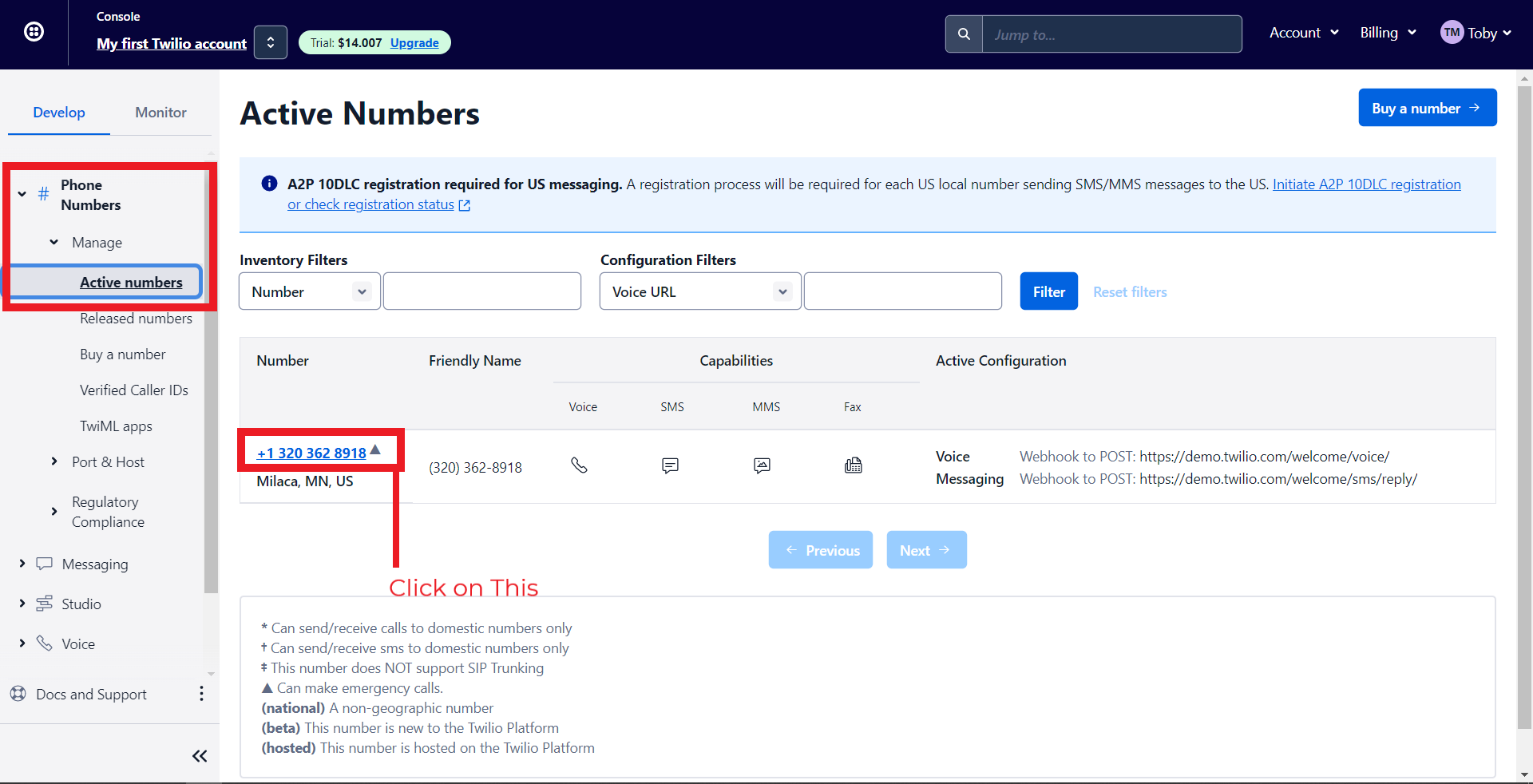
- To do this, navigate to Phone Numbers > Manage > Active Numbers > Click on a Number.
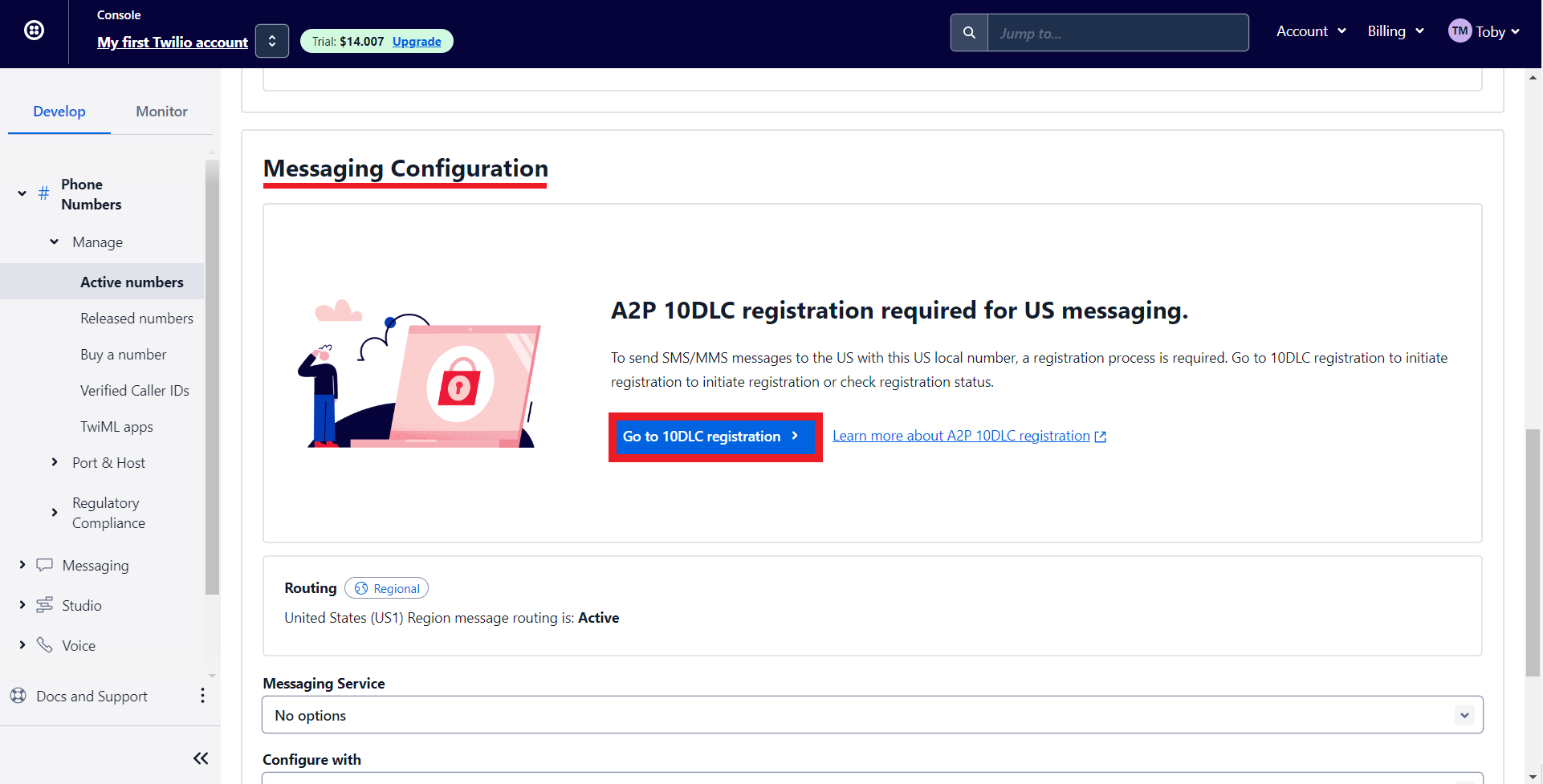
- Under Messaging Configuration, click on 'Go to 10DLC registration.'
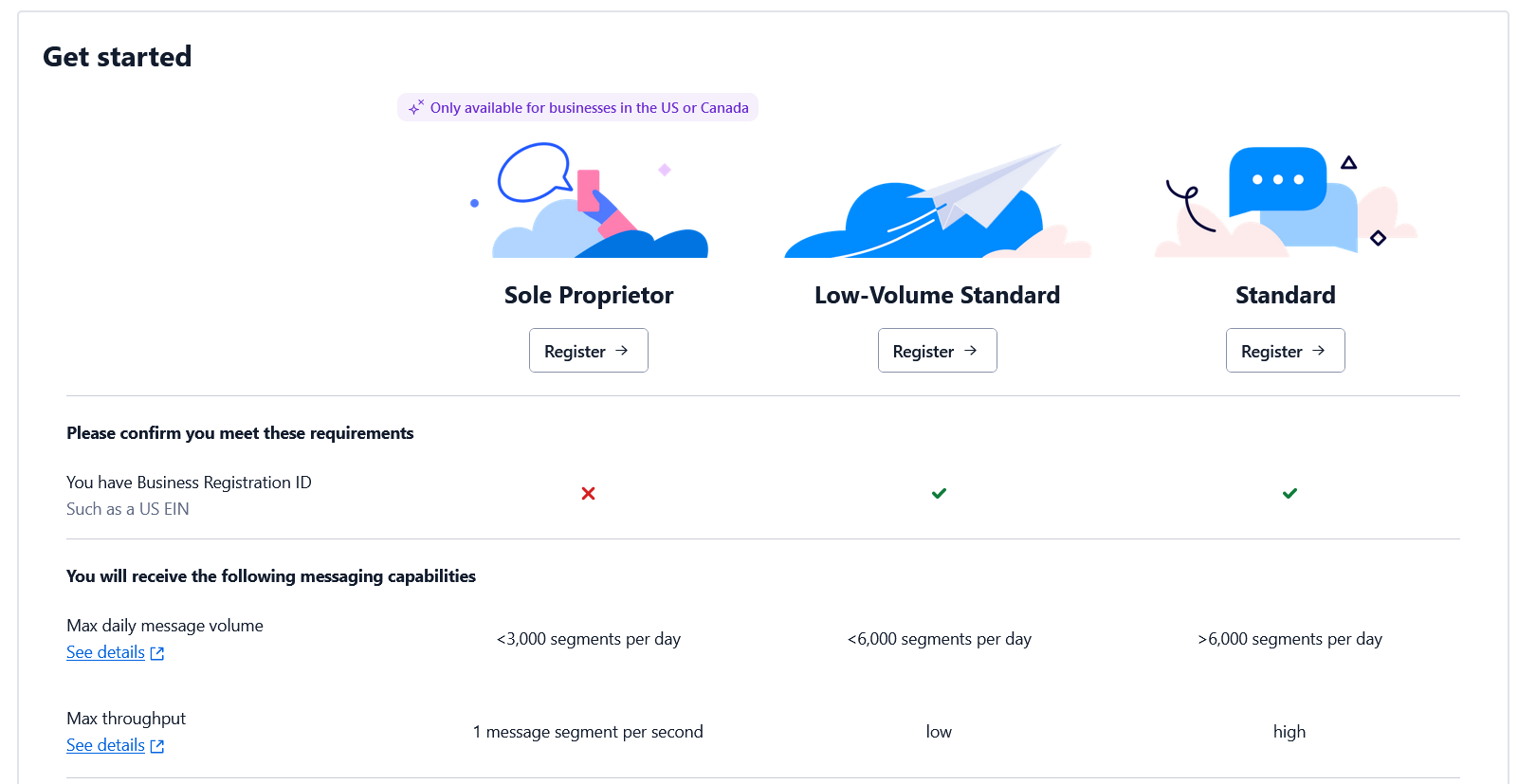
- Depending on whether you have an EIN (Tax ID) or not, you can register for the corresponding option. Check out this page for more details.
Note - You cannot integrate multiple SMS providers to Zoho Bookings simultaneously.
Configuring Twilio with Zoho Bookings
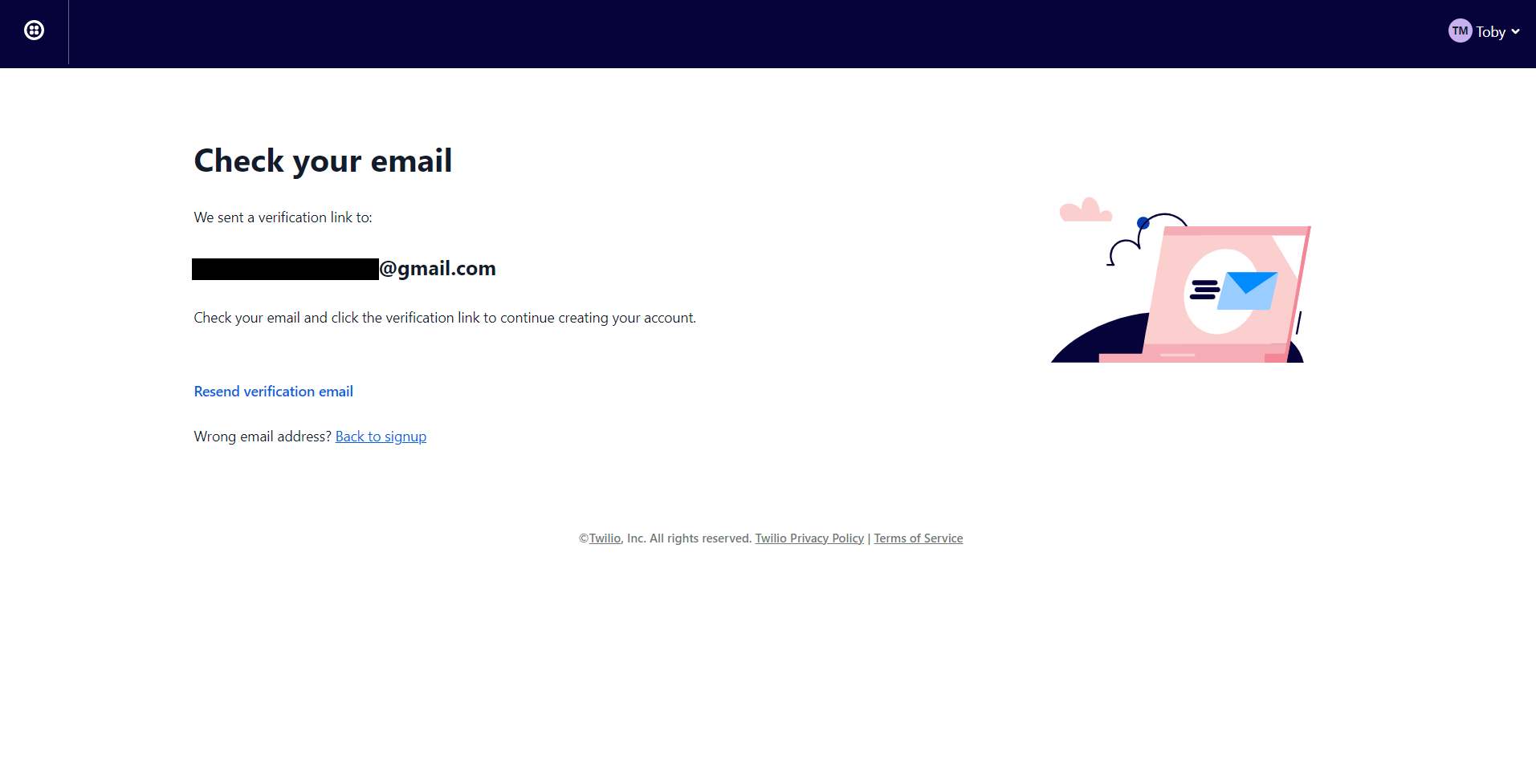
2. You'll be redirected to the following screen once you've signed up. Check your mail inbox.
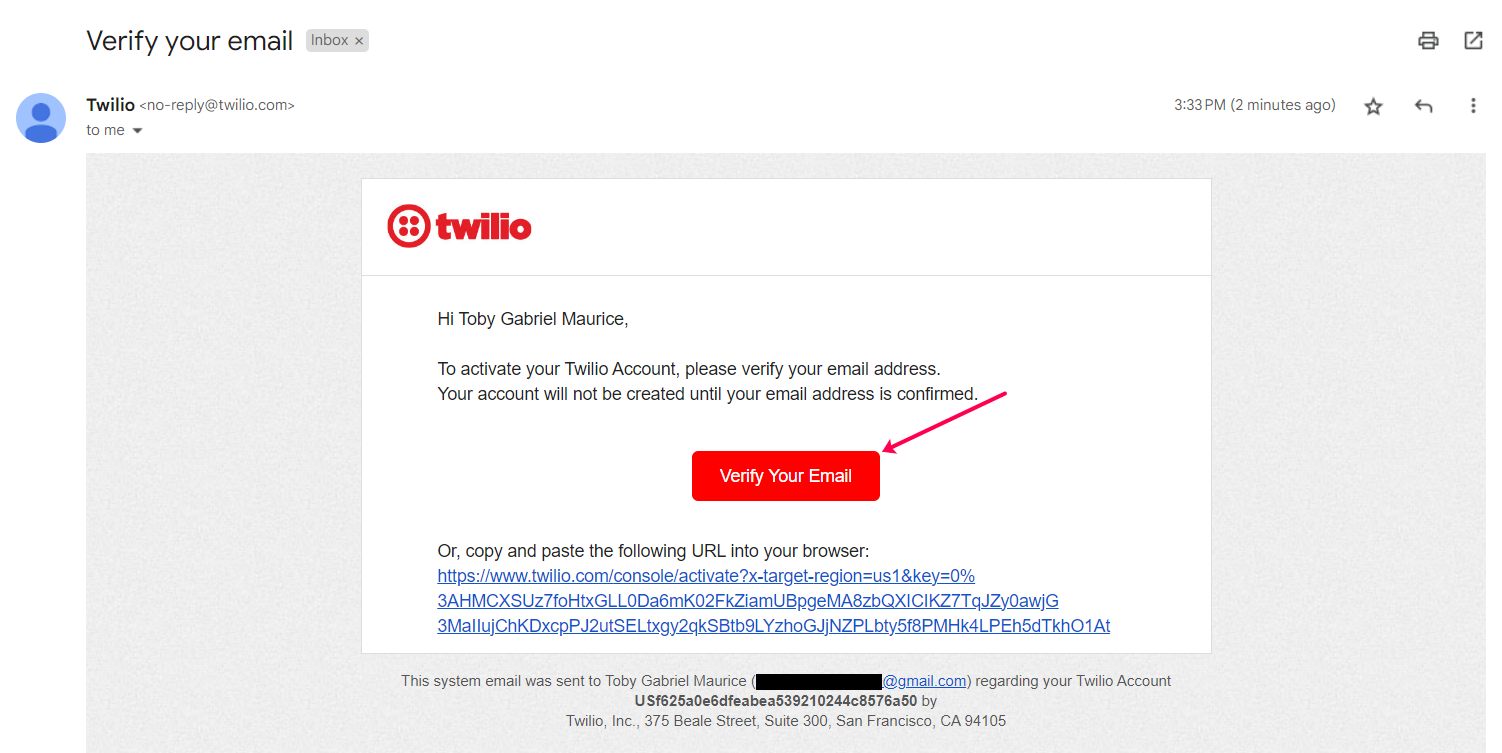
3. Your email would look like this. Confirm your account.
4. Twilio asks you to secure your account with a phone number. Enter your number and click on Send verification code/Get code via phone call depending on your choice.

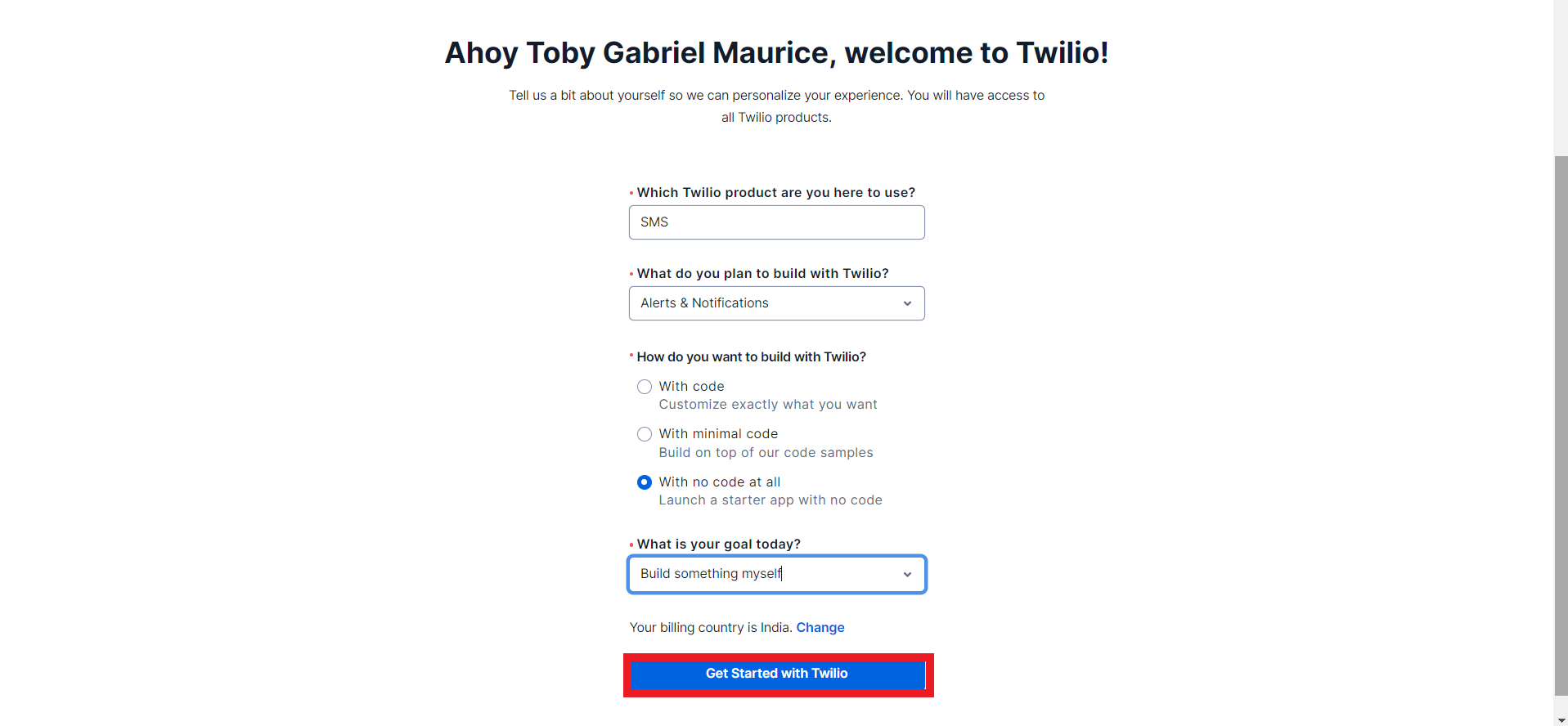
5. Once you've confirmed your phone number you can fill in the onboarding form and click on get started with Twilio.
6. You'll be redirected to the Twilio dashboard.
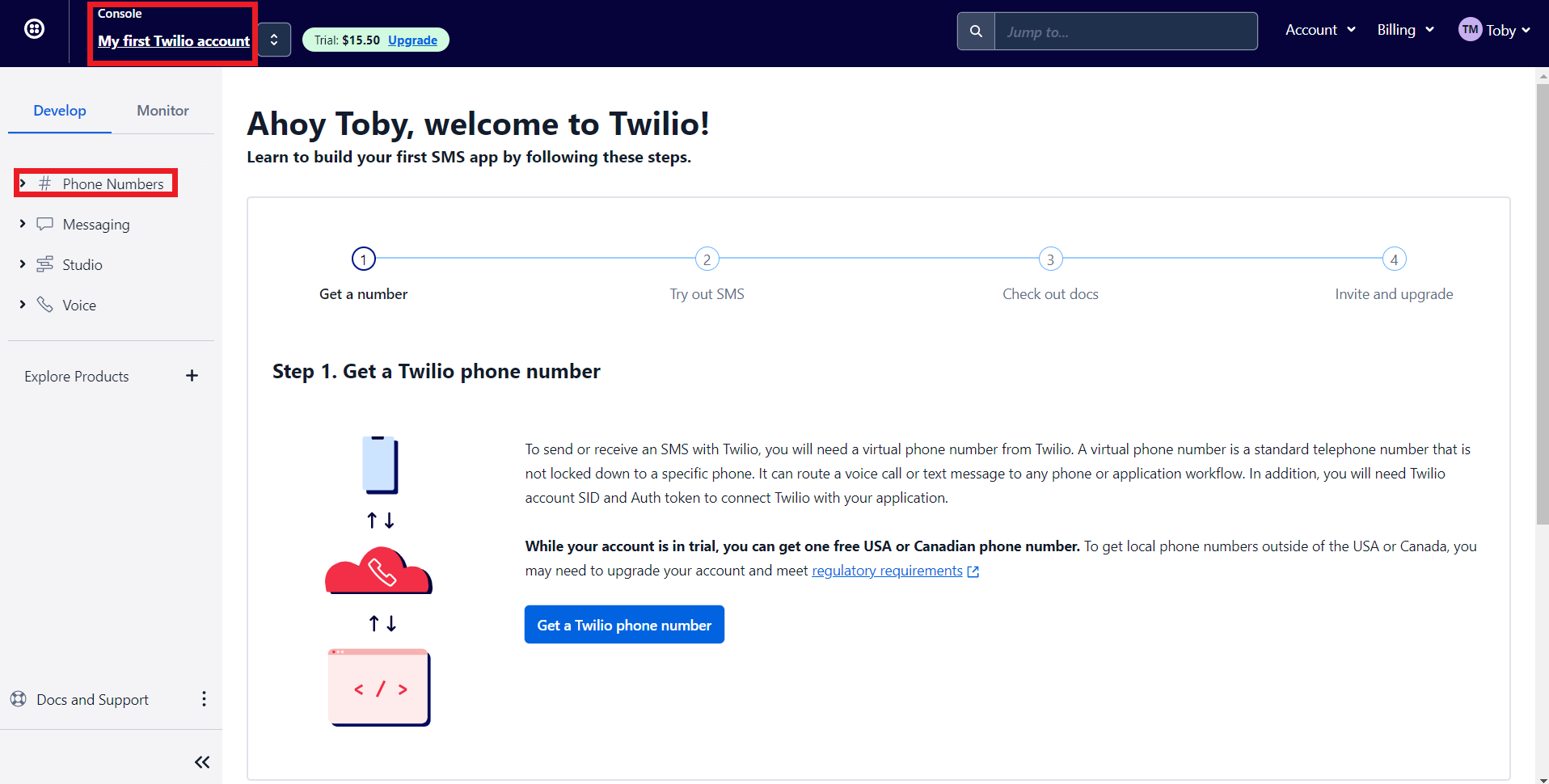
- 'My first Twilio account' is the account name of your Twilio SMS account. If you have multiple Twilio SMS accounts you can navigate it from here
- The Phone numbers tab helps you to
- Manage all your Phone numbers
- Buy new Numbers
- Release a Phone number
- When you sign up for a Twilio account, you'll get $15.50. You can get a trial number using this to test their configurations before opting for a premium plan.
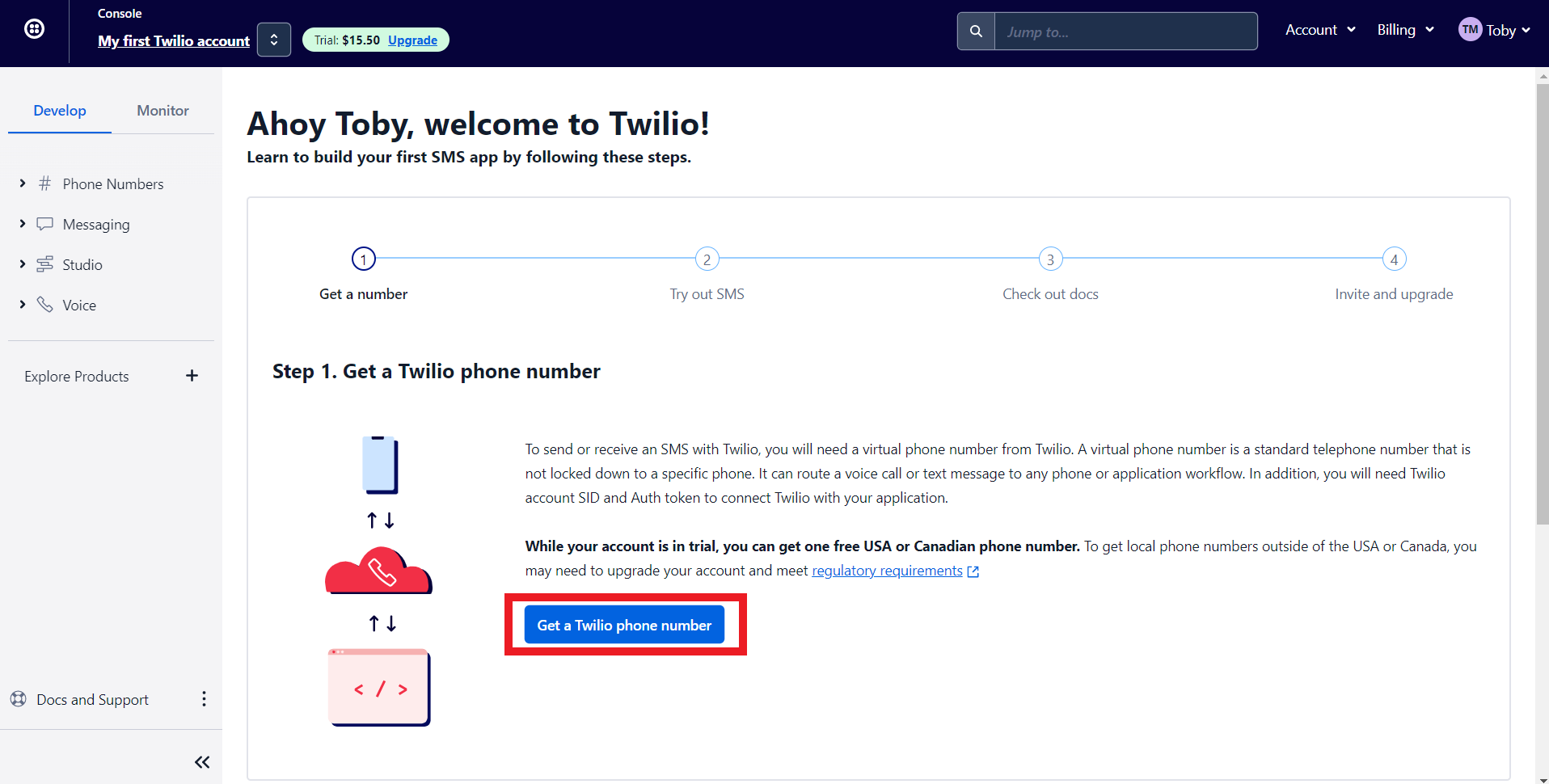
7. Let's get a phone number from Twilio. Click on 'Get a Twilio Phone Number.'
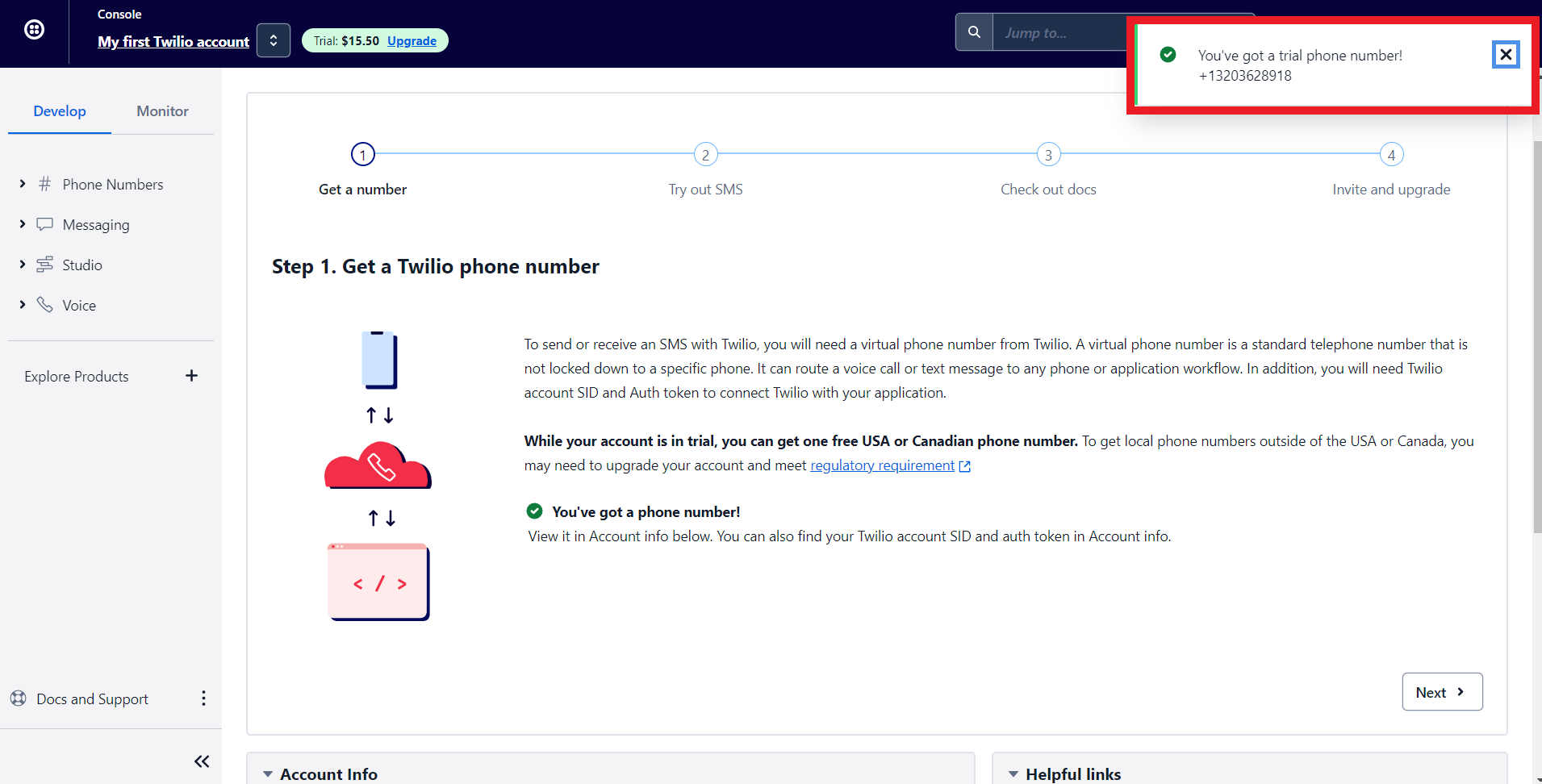
8. Twilio will assign you a phone number. Now let's configure Twilio with Zoho Bookings.
Note - To get a premium number, navigate to Phone numbers > Manage > Buy a Number
Choose which country's number you wish to get, SMS (as capability), and click search. You can click on buy to obtain the number.
Choose which country's number you wish to get, SMS (as capability), and click search. You can click on buy to obtain the number.

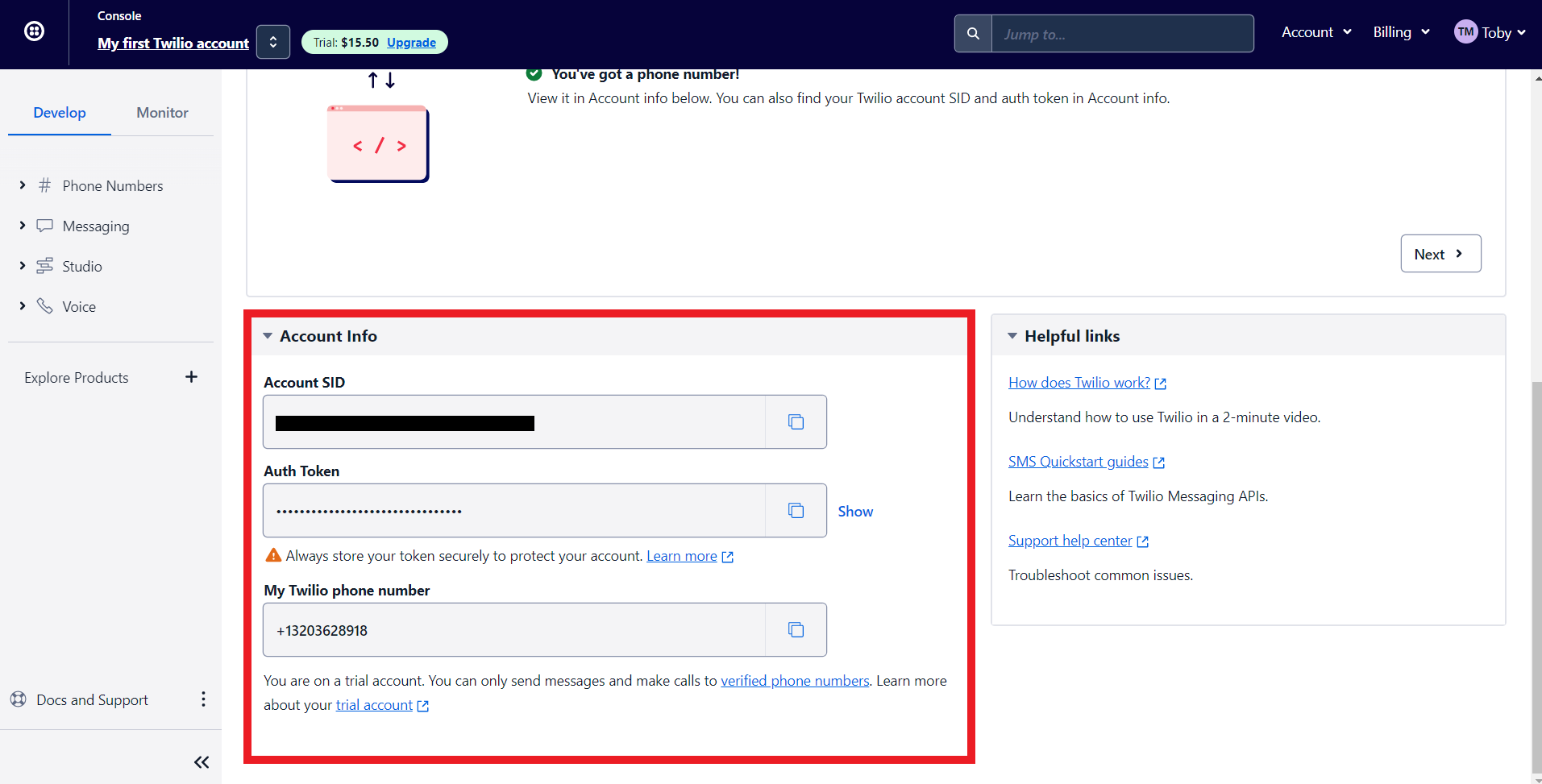
9. Scroll to the bottom of Twilio's main dashboard. You'll find three fields here, Auth Token, Account SID, and your Phone number. We'll paste all this data to integrate Zoho Bookings and Twilio.'
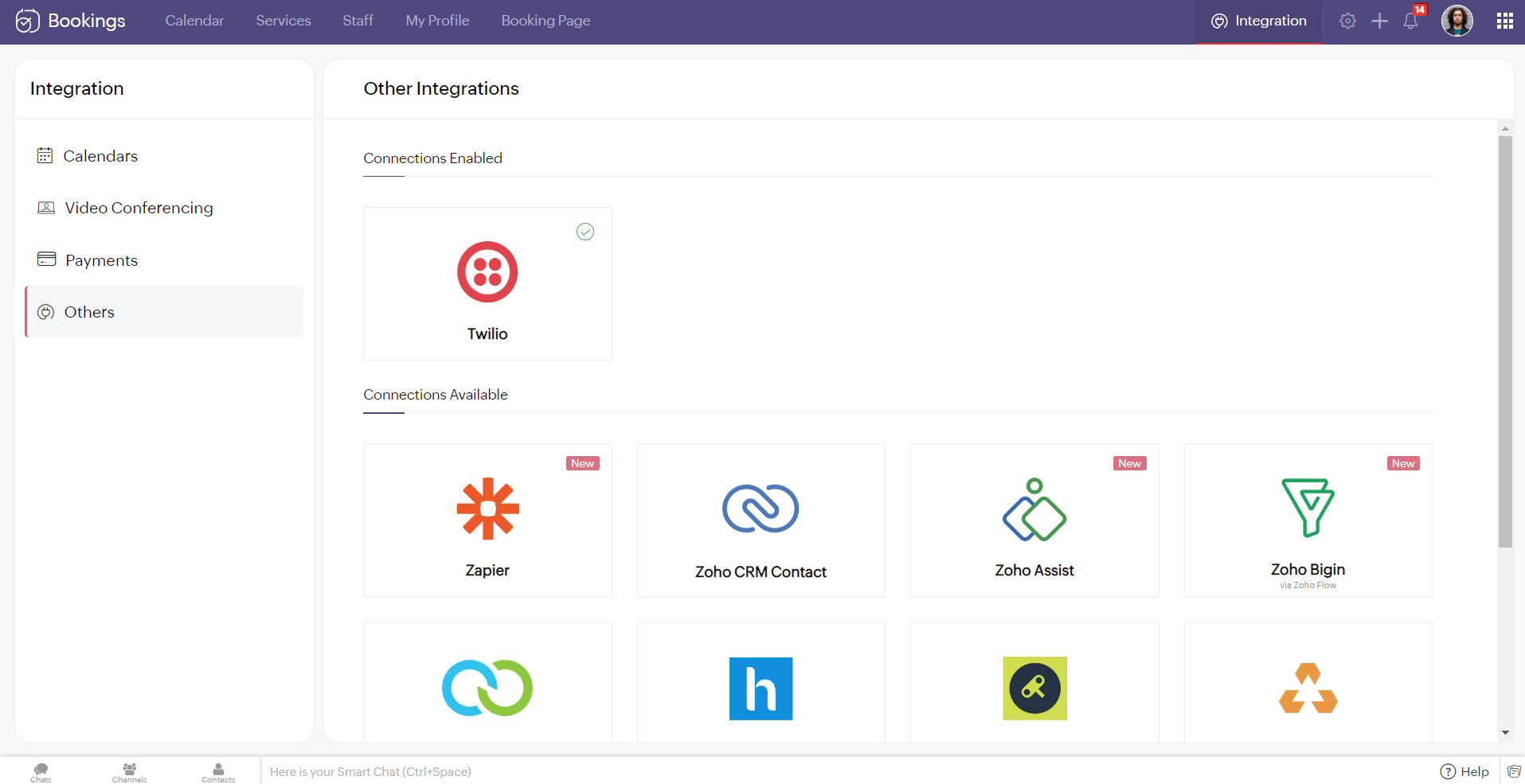
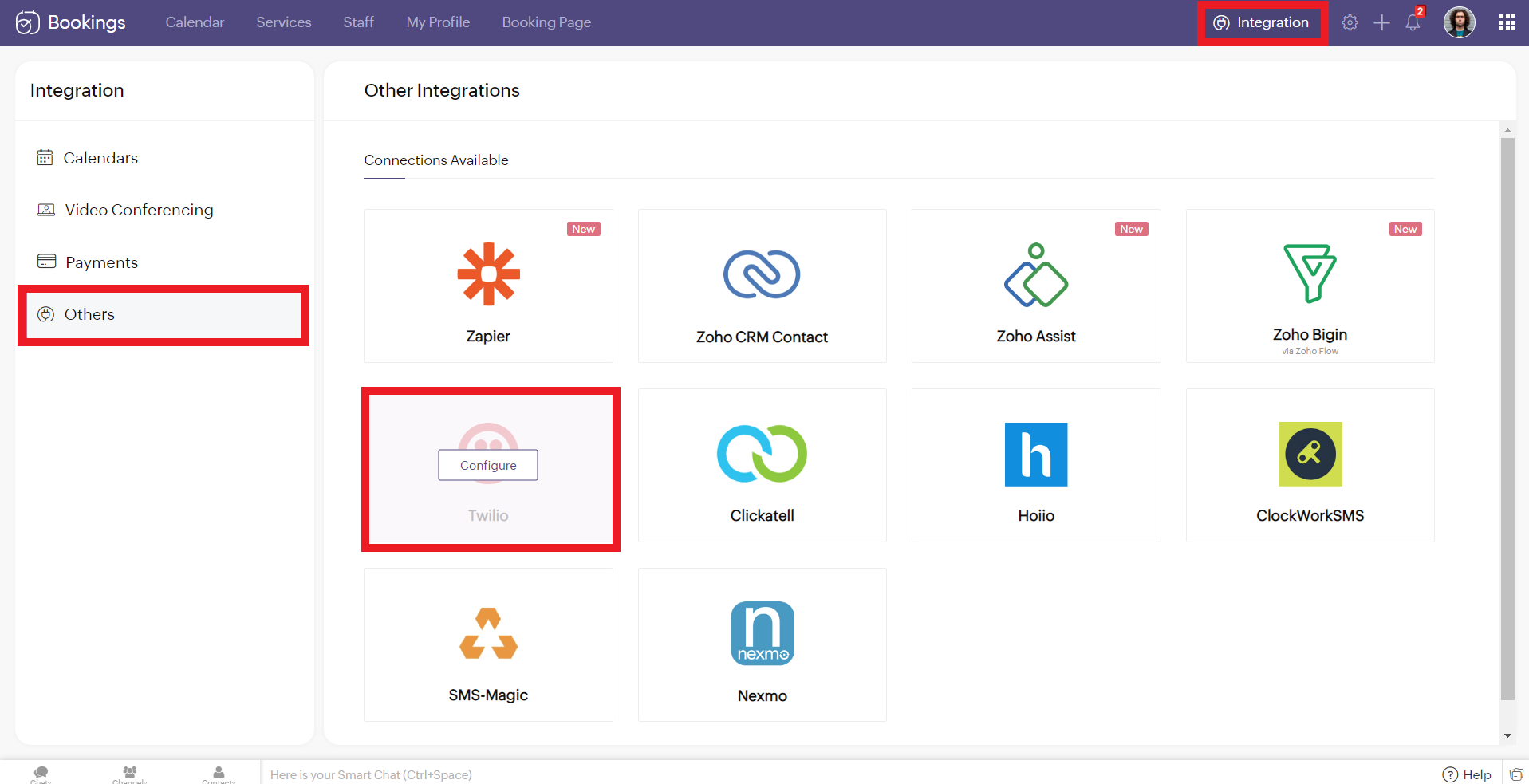
10. Now log in to your Zoho Bookings Dashboard. Navigate to Integrations > Others > Twilio. Hover over Twilio and click on Configure.
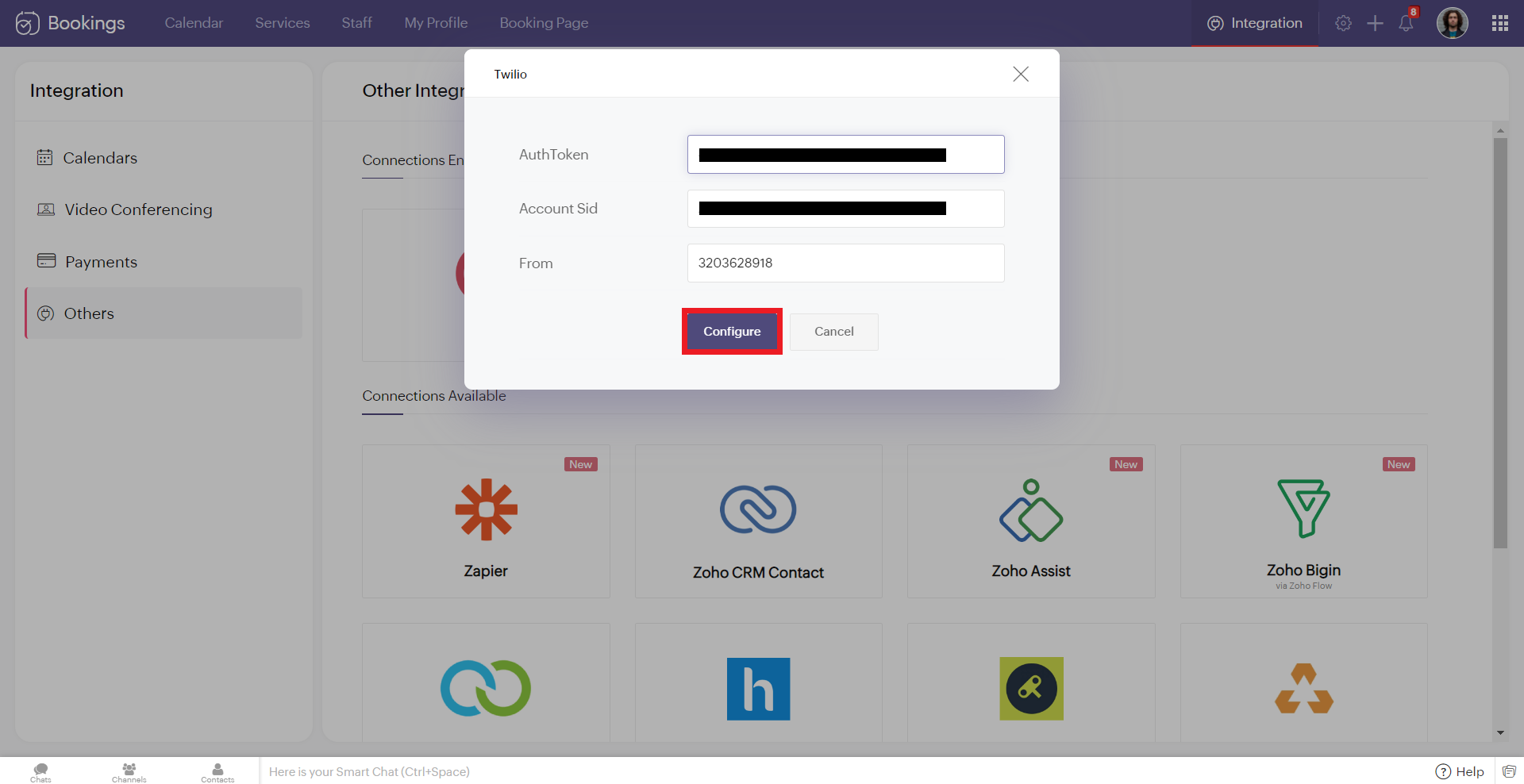
11. Copy and paste the details from Twilio to the corresponding fields in Zoho Bookings. Once you have pasted the details, click 'Configure.'
Note: While pasting the phone number, remove the country calling code. In this case, my phone number was +13203628918. '+1' is the country calling code. Remove it and paste the rest (i.e., 3203628918 without any spaces/symbols in between)
Note: While pasting the phone number, remove the country calling code. In this case, my phone number was +13203628918. '+1' is the country calling code. Remove it and paste the rest (i.e., 3203628918 without any spaces/symbols in between)
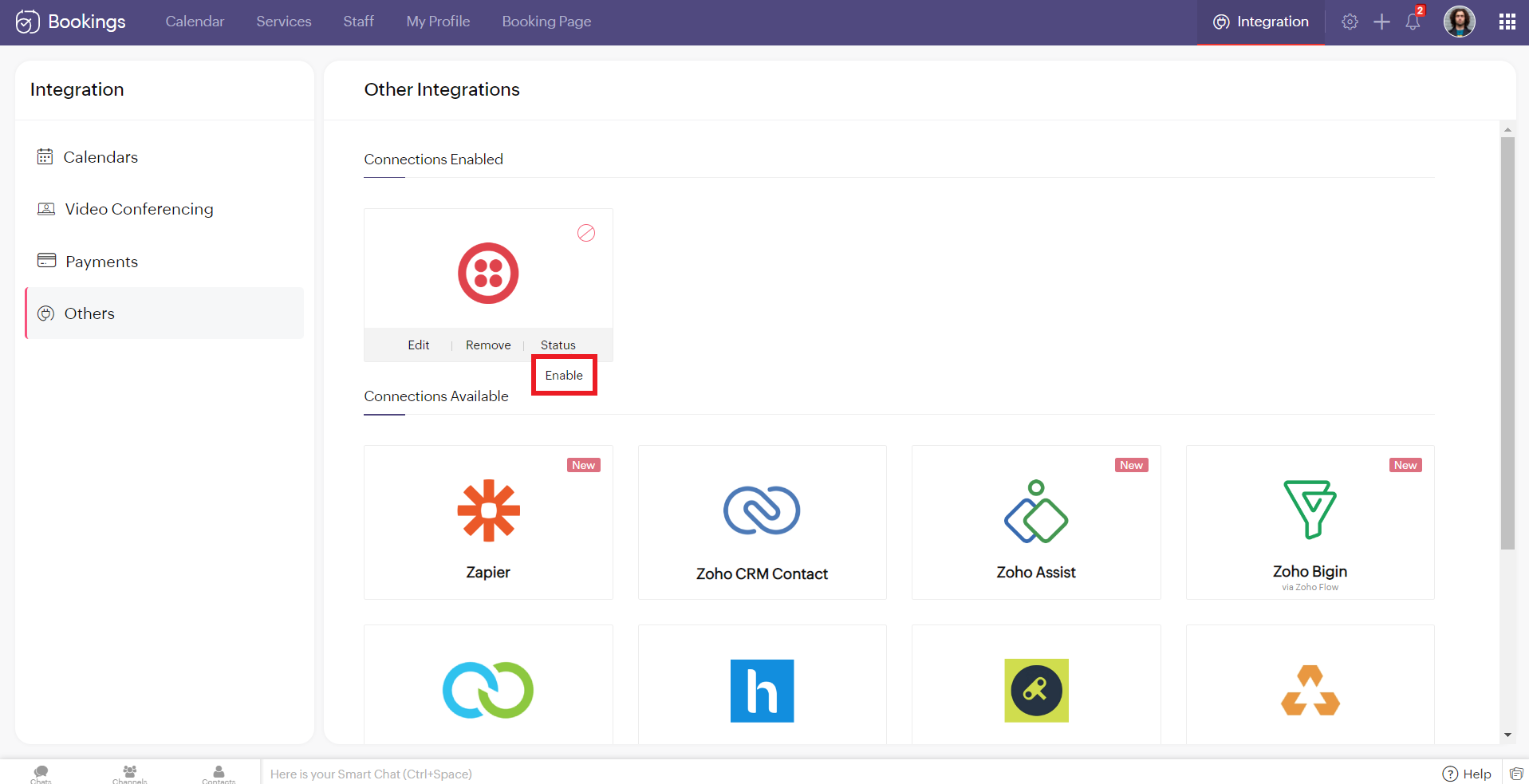
12. Hover over the created Twilio connection and click enable. Reload the page if the connection is still not active. You've successfully integrated Twilio with Zoho Bookings.
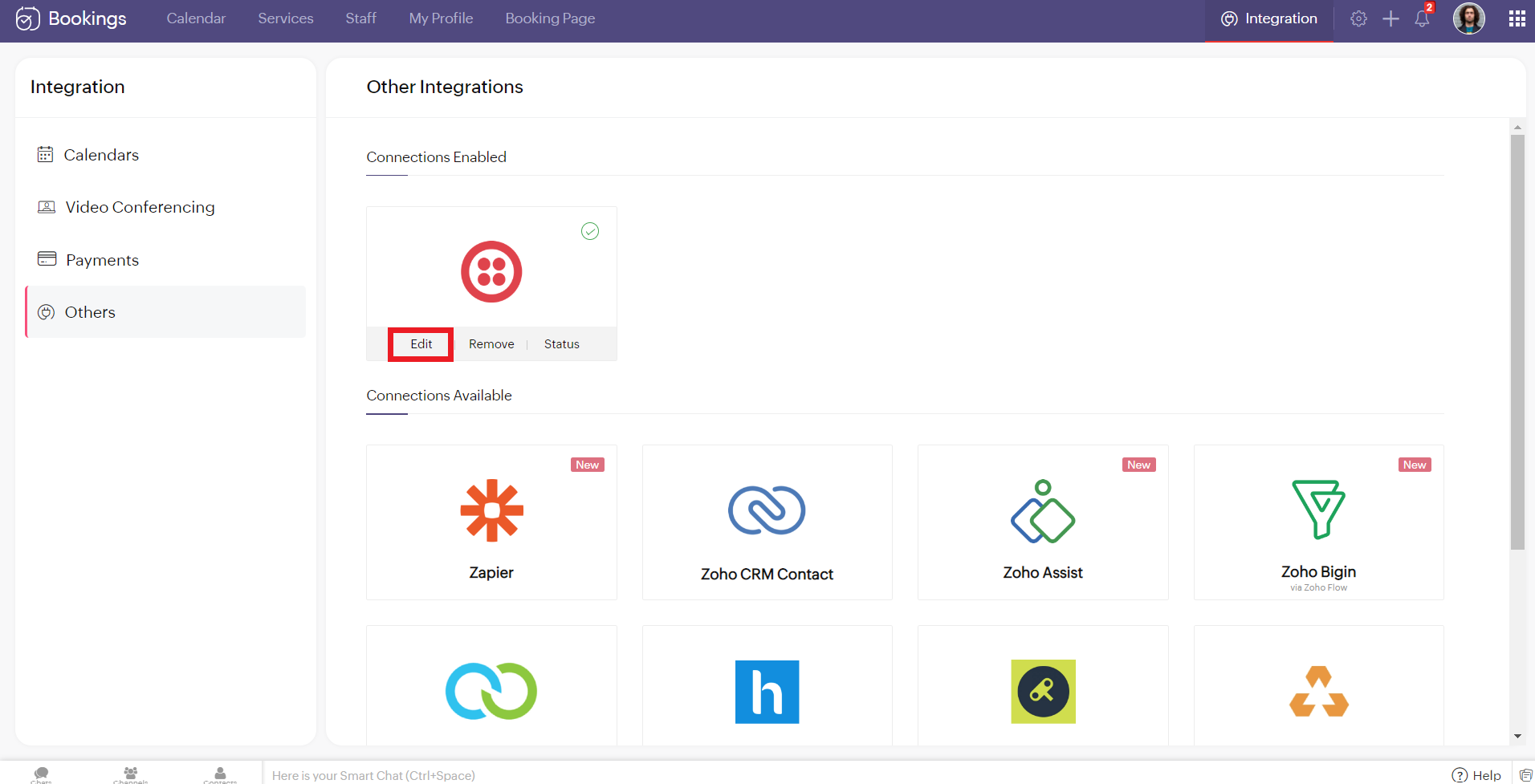
Editing Your Twilio Connection
To edit your Twilio connection, hover over the Twilio integration and click on edit. Once you've made the changes, click Configure.
If you wish to remove your Twilio connection, hover over the Twilio integration and click remove.

A pop-up appears asking you to confirm. Click 'Proceed' to delete your Twilio connection.
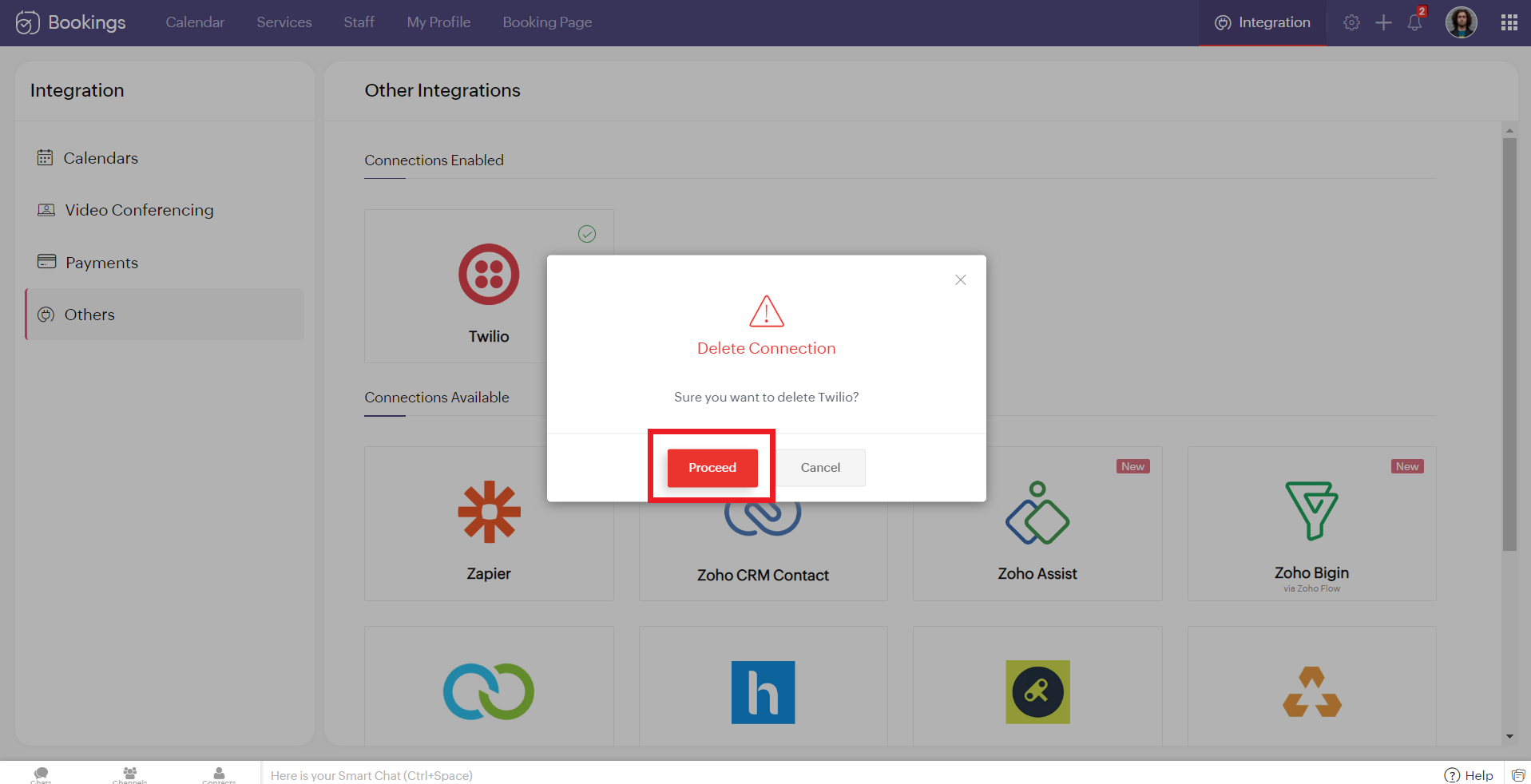
Note - While Editing or Removing your Twilio connections, if the changes don't reflect immediately, reload the page for the changes to reflect.
Configuring SMS Notifications
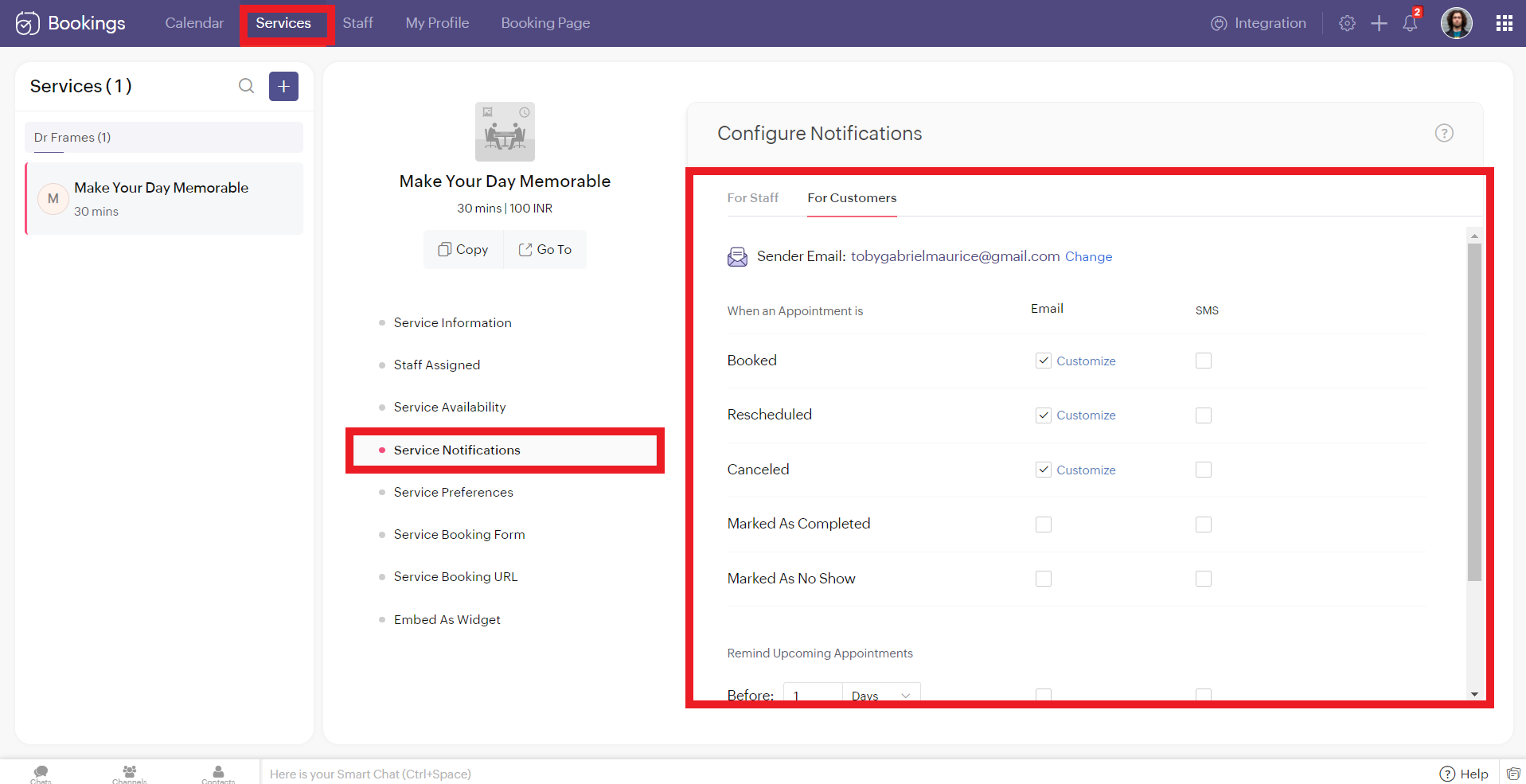
To configure SMS notifications for one on one bookings, navigate to services > service notification.
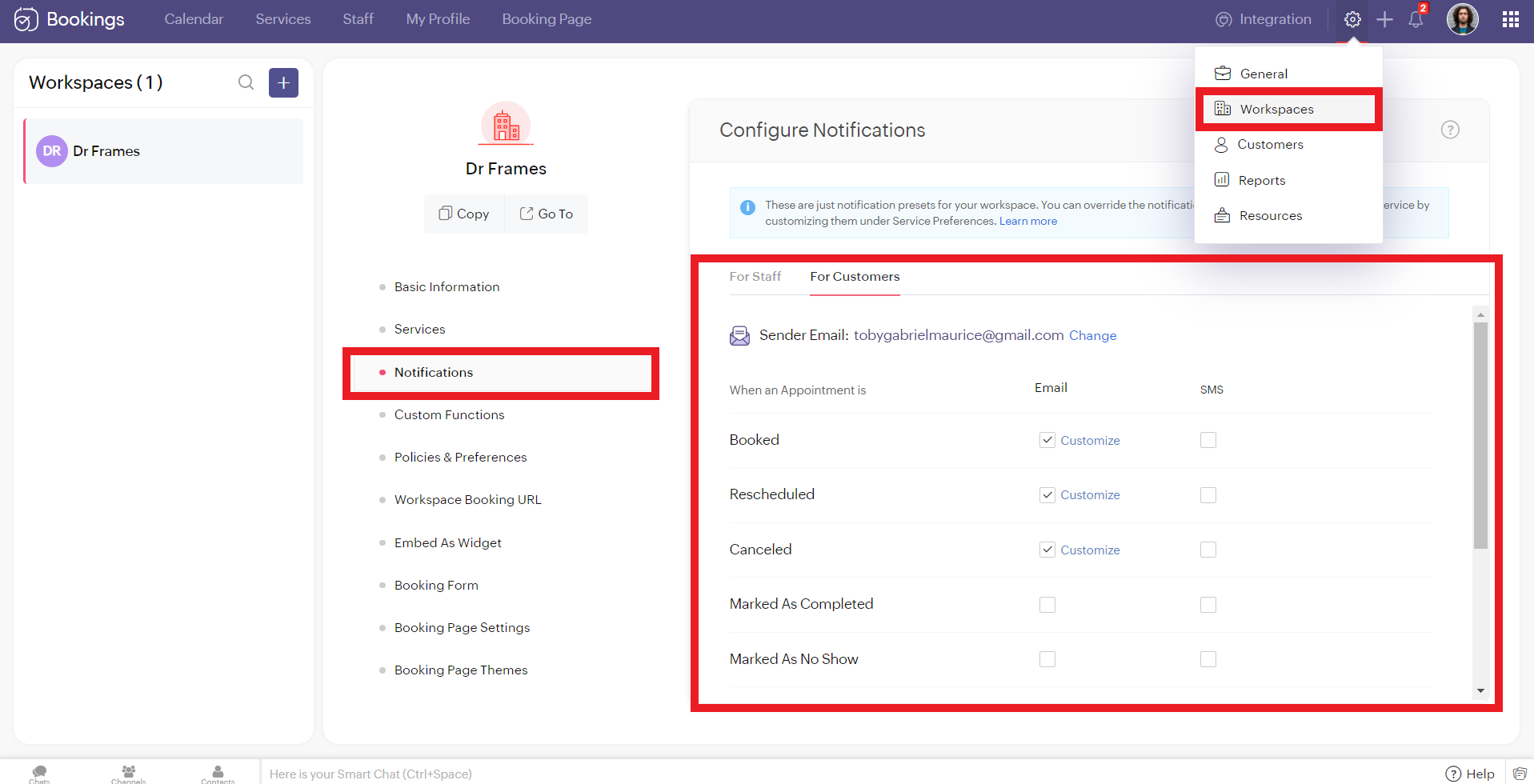
To configure SMS notifications for group/ resource bookings, navigate to settings > workspaces > notifications.
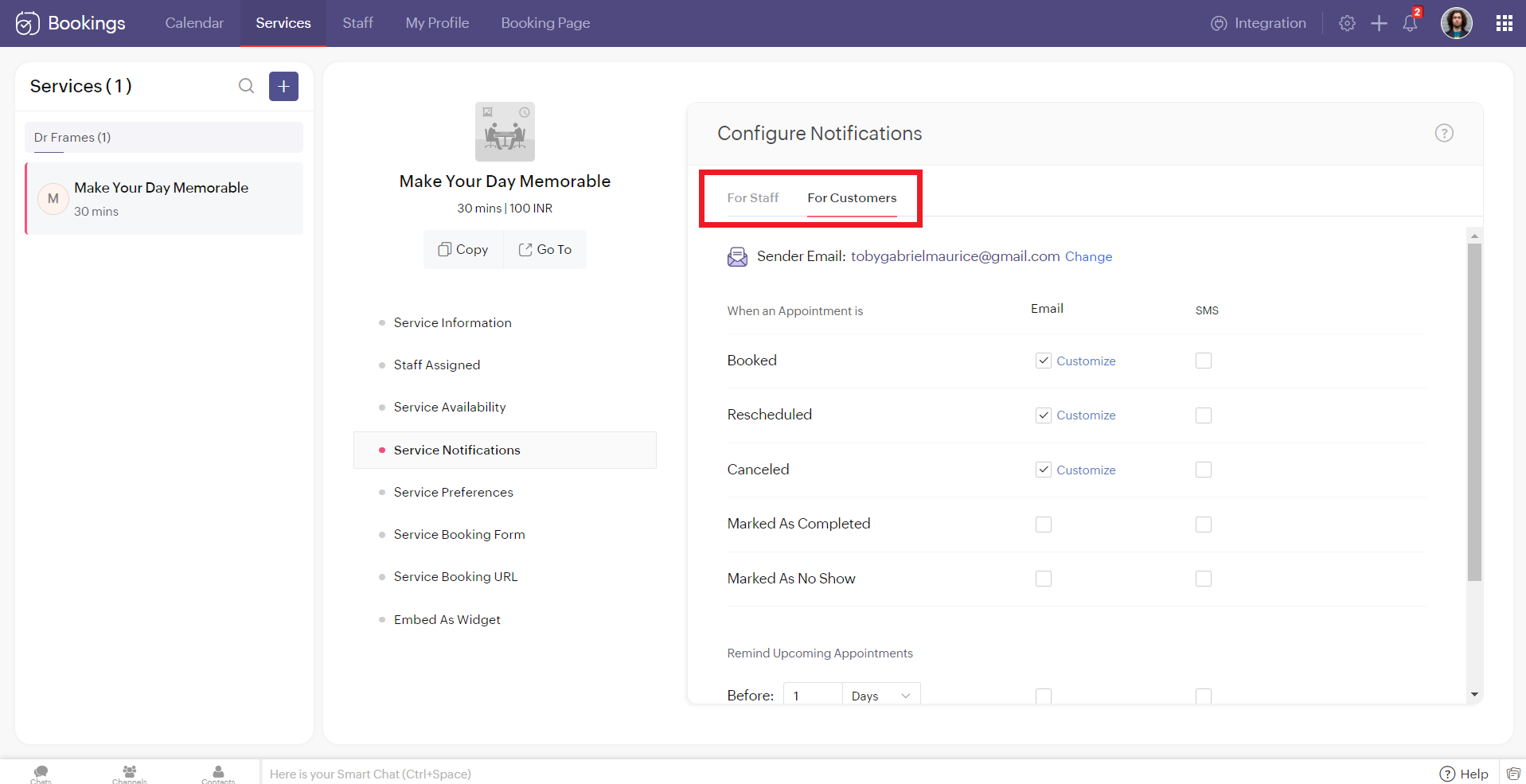
You'll see two tabs here. 'For Staff' and 'For Customers.' Zoho Bookings allows you to send eight different types of SMS under each tab.
You can configure Zoho Bookings to send SMS using Twilio when you change the appointment status to
- Booked
- Rescheduled
- Canceled
- Marked As Completed
- Marked As No Show
Alternatively, you can set up to three reminders before your appointment time.

Illustration: Let's send SMS notifications to a customer when an appointment(one-on-one) is booked.
- Make sure that the checkbox is enabled corresponding to the booked notification in the customer tab. It ensures that the customer receives an SMS notification when an appointment is booked.
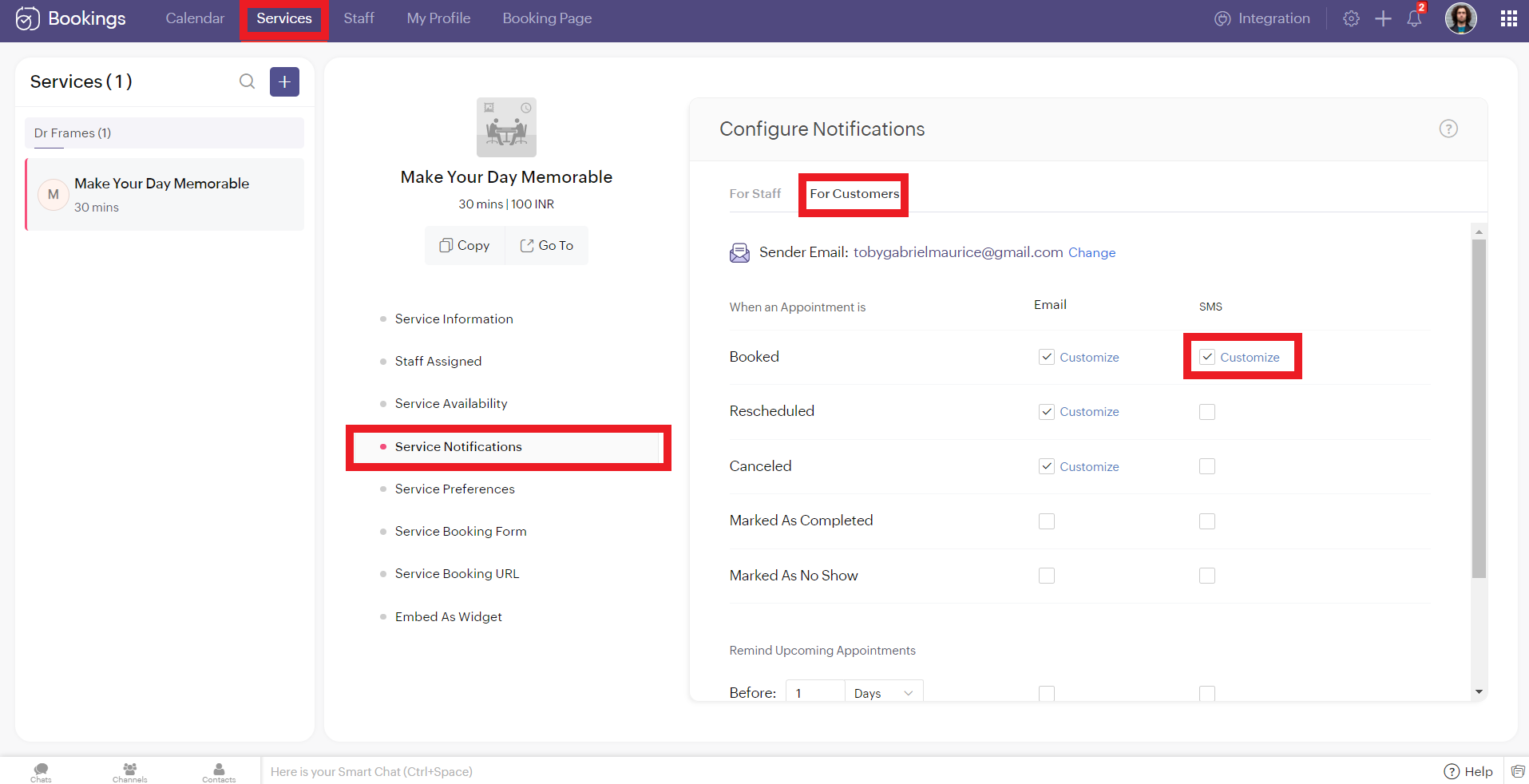
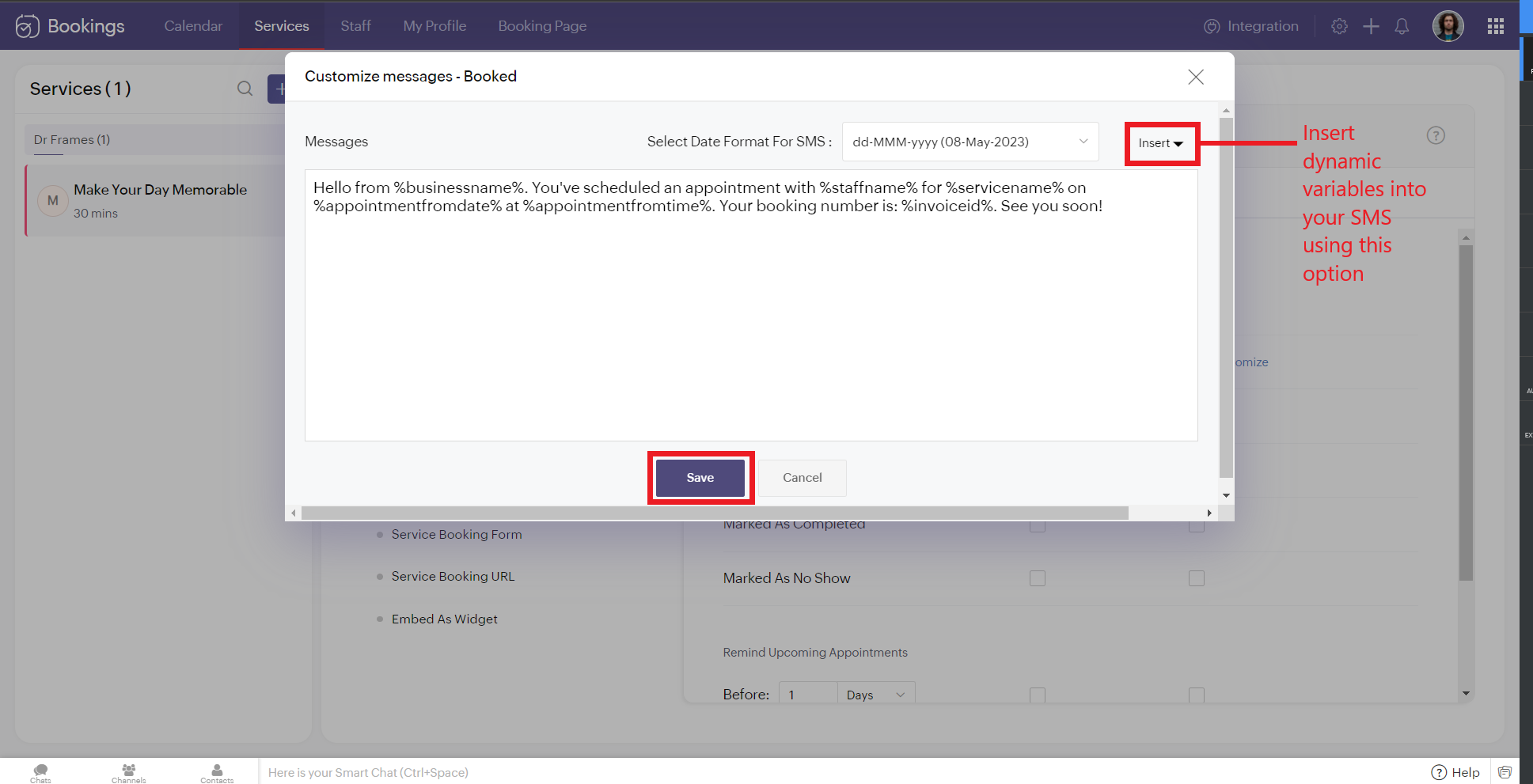
2. To customize the messages that will be sent, click on customize. You can change the message and insert dynamic variables like meeting info, customer name, meeting date, and more into your outgoing messages. Click 'Save' once you are done with the changes.
The customer receives the following message when an appointment is made.
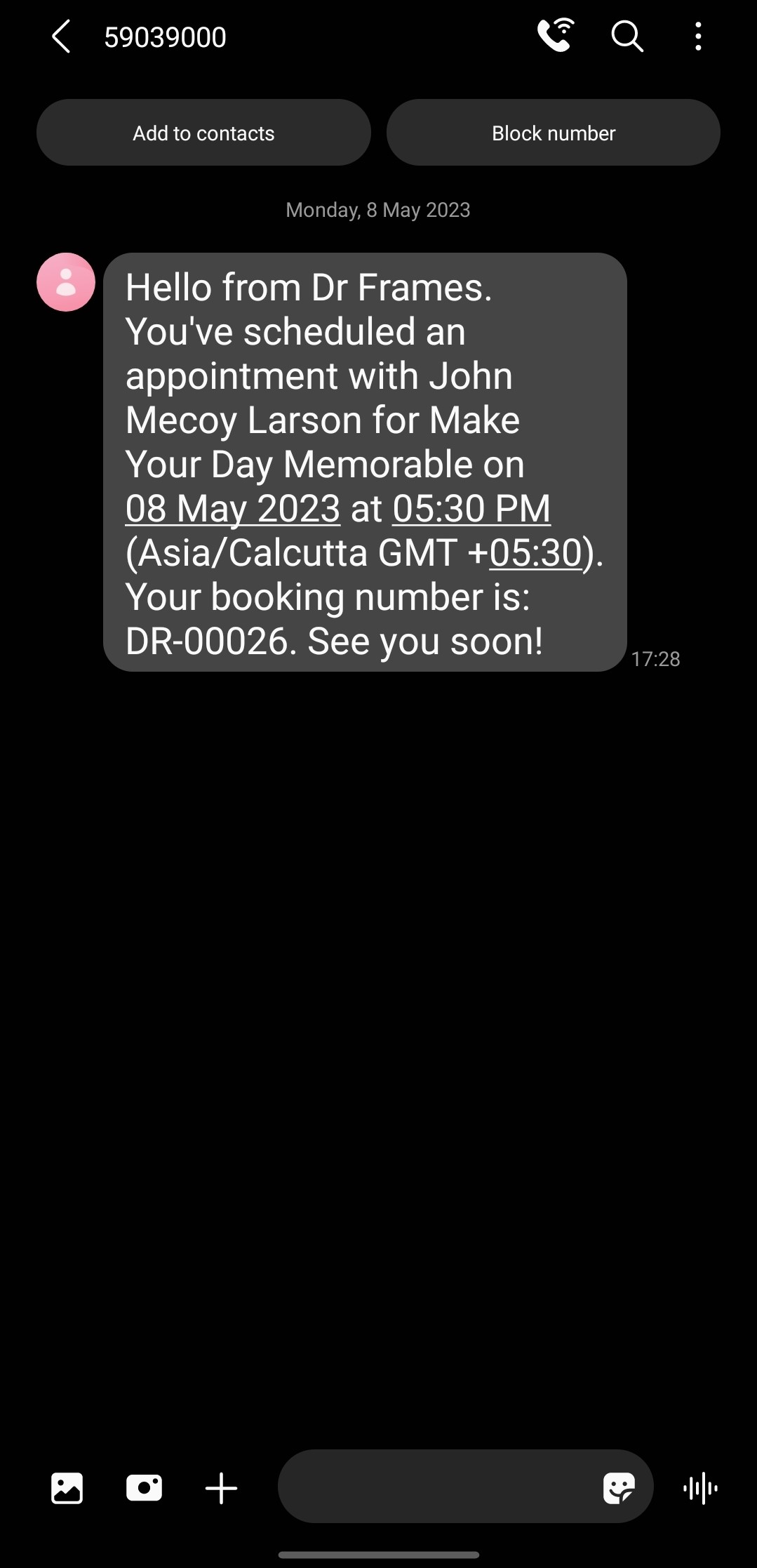
Note that the message is from the number '59039000' and not my original phone number. This is because the message is sent from a US number to an Indian Number. So the original long code is replaced with this number to ensure seamless deliverability.
If the sender and recipient belong to the same country, then the SenderID (i.e., your phone number) doesn't change.
There are cases where you might want to block incoming messages. For example, customers might reply to your SMS notifications requesting a reschedule or cancellation. This breaks the flow of Zoho Bookings and introduces unnecessary manual work. If that's the case, check out this document to block all incoming messaging.
If the sender and recipient belong to the same country, then the SenderID (i.e., your phone number) doesn't change.
There are cases where you might want to block incoming messages. For example, customers might reply to your SMS notifications requesting a reschedule or cancellation. This breaks the flow of Zoho Bookings and introduces unnecessary manual work. If that's the case, check out this document to block all incoming messaging.
SMS Customization Recommendations
- Since each message can accommodate only 160 characters, we recommend keeping your message crisp. Include vital info like appointment date, time, and business name.
- Avoid using emojis in your sms. As a single emoji consumes a lot of characters.
- We recommend you have your entire message length from 160 to 320 characters (i.e., 1 to 2 messages per message) to avoid consuming too many message credits for a single SMS.
Zoho Bookings Plans supporting this feature
Applicable in |
Premium |
If you want to start a trial of the Zoho Bookings Premium plan, please send an email to support@zohobookings.com including the word 'Twilio' in the subject line.
Topic Participants
Siva
Spencer Schmerling
Warren Krige
Recent Topics
Zoho → ShipStation Integration – Sales Order–Driven Fulfilment Workflow
Hello All, I’m reaching out to explore the best way to integrate a shipping tool into our inventory which will speed our process up. We are looking to integrate ShipStation into our existing order-to-fulfilment workflow, as we’re keen to standardise onIA ou je peux trouver comment utiliser IA
Je voudrais utiliser IA dans l'interface zoho pour m'aider quand j'ai des questions de rôle partage ou autre configuration d'automatisation, j'utiliser ChatGPT externe mais il ne connait pas toujours l'interface zoho et les réponses sont parfois longueData Processing Basis
Hi, Is there a way to automate the data processing for a candidate every time an application arrives from job boards, without requiring manual intervention? That is, to automatically acquire consent for data processing. I've seen a workflow that allowsDisable Zoho Inventory Tracking / Delink Zoho Books & Inventory
We have integrated zoho inventory with zoho books? Now after a long time, we want to disable inventory tracking and delink these 2 modules. Zoho says we cant do it. Anybody else going thru the same ? Any possibility at all? Why does zoho not allow toZoho vault instal on windows
I am trying to use Zoho Vault Desktop for Windows, but I am unable to complete the sign-in process. Problem description After logging in to my Zoho account and clicking Accept on the authorization page, nothing happens. The application does not proceedZOHO GLITCHES
Ok, you guys have done a great job at building a platform that has the potential to surmount the competition but these glitches are becoming more than frustrating! This is beyond annoying, I'm trying draft lawsuits and type up privacy and refund policiesPlease, make writer into a content creation tool
I'm tired of relying on Google Docs. I'm actually considering moving to ClickUp, but if Writer were a good content creation tool instead of just a word processor, I would finally be able to move all my development within the Zoho ecosystem, rather thanNotification to customers when I use a Zoho function
Hi all, I tried searching the community but couldn't find anything about it. I noticed that the customer receives the notification of reopening the old ticket but does not receive the notification of opening a new ticket when I use the function: "separateDate Filters in Zoho Desk Dashboard
Hello Team, Currently, in the Zoho Desk dashboard, the date filter is available only for daily, weekly, and monthly views. Could we also add a yearly date filter to allow filtering by an entire year? Additionally, in the custom date filter, it is currentlyMobile app - offline
If I made a couple of forms and my field guys had the mobile app and were somewhere without signal, could they open the app, complete and sumbit a form and have it upload when they are back in signal (we need different info at different jobs and I'm tryingZoho Survey reminder settings are extremely confusing
Hi, I just want to set 3 reminders, one week apart from the first email out. Your form is too confusing and I don't understand. Can you simplify and be more specific regarding the language used on the form ?Zobot drop down list
Hi, I am trying to create a drop down list in Zobot by creating a plug. I think I am close but I just can't get it over the line and was hoping that someone could help me. I had a little bit of help getting the script started (hence the comments) // DelugeHow to compare a subform lookup field that allows multiple entries when edited
I have a form with a subform with multiple fields. One of the fields is a lookup field that allows a multi select. On edit validation, I want a workflow to execute only when the entries in that subform field has changed. The old. function is not workingTranslation of Tooltip Messages
The descriptive help messages should be available to provide translations for.Business Day Logic Update: More Accurate Scheduling for Your Workflows
Hello everyone, We’re improving how business-day calculations work in workflows, especially when triggers happen on weekends. This update ensures that offsets like +0, +1, and +2 business days behave exactly as intended, giving you clearer and more predictableLead Blueprint transition in custom list view
Hi, Is It possible to insert the Blueprint transition label in a custom Canvas list view? I am using Lead module. I see the status, but it would be great if our users could execute the Blueprint right from the list view without having to enter the detailedEmail Notifications not pushing through
Hi, Notifications from CRM are not reaching my users as they trigger. We have several workflow triggers set up that send emails to staff as well as the notifications users get when a task is created for them or a user is tagged in the notes. For the past 6 days these haven't been coming through in real time, instead users are receiving 30-40 notifications in one push several hours later. This is beginning to impact our daily usage of CRM and is having a negative effect on our productivity becauseDebit opening balances of vendors
Dear colleagues: I am looking at the trial balance as on 31st March 2024, and punching opening balances (1st April 2024) in Zoho Books. Vendors have credit balances, by its nature, but some of our vendors have debit balances as well (e.g., we have paidIs there an equivalent to the radius search in RECRUIT available in the CRM
We have a need to find all Leads and/or Contacts within a given radius of a given location (most likely postcode) but also possibly an address. I was wondering whether anyone has found a way to achieve this in the CRM much as the radius search in RECRUITAllow Text within a Formula
Hi, I would like to be able to use this for others things like taking an existing Date Field and copying its value, so by entering getDay(Date)&"-"&getMonth(Date)&"-"&getYear(Date) it results in 01-02-2026. And then when the Date is changed so is thisChange Number Field to Decimal Field
Hi, It would be nice to be able to change the field type without having to delete it and create a new one, messing up the database and history. Thanks DanPipeline.Company Name field shows up as numbers! [Bigin Developer Console > Component > URL]
Hi there, I am setting up to invoke URL to send infromation zoho bigin > zoho forms with company name pre-fill in the form. however when I use : ${Pipelines.Company Name} field it shows up as a string of number instead of words. Help.Add specific field value to URL
Hi Everyone. I have the following code which is set to run from a subform when the user selects a value from a lookup field "Plant_Key" the URL opens a report but i want the report to be filtered on the matching field/value. so in the report there isHow to Move Behavior, Acquisition, Polls & Forms Data from Zoho PageSense to Zoho Analytics?
Hi Zoho Community, I'm looking for a way to transfer data from Zoho PageSense to Zoho Analytics, specifically: Behavioral data (clicks, scrolls, heatmaps, etc.) Acquisition data (traffic sources, campaigns, etc.) Polls and forms data As far as I can tell:Zoho Social - Feature Request - Non-US Date Format
Hi Social Team, I have noticed that there is no option to change the date format from US mm/dd/yyyy to others like dd/mm/yyyy. It would be great to see this added as the platform matures. Thanks for considering this feedback.In arattai received message can't be deleted
The issue has been noticed in following: arattai app (Android) arattai app (Window) arattai web While the message posted by me may be deleted, the ones received from others can't be. The item <Delete> change to <Report> when the message is a receivedZoho CRM Community Digest - December 2025 | Part 1
Hello Everyone! In the first half of December, Zoho CRM rolled out auto-invite for portals, smarter CPQ with Zia suggestions and price rules, and Query Workbench for faster query building. We also highlight other noteworthy conversations you shouldn’tMarketing Tip #15: Rank better with keyword-rich URLs for product pages
Your product page URL is a small detail that can make a surprisingly big difference. Clean, readable URLs help in two ways: They’re easier for customers to trust and remember (no one likes clicking a link that looks messy or random). They help searchZoho Flow Credits
Hi , I would like to ask the reason why every time I added plus credit but few days later I will return back to default? (as below I add credit to 3000 but today It change back to 1000) Most important is, when the credit fully used, not any reminder toCustom Module Send Email not filling To automatically after adding Email field also
I create custom module in zohoCRM but problem is in custom module when i click send email there in popup To is filling automatic its coming empty which i need to manually add an email there. How can I fix it? I already added the Email field there, butIntroducing Intake Forms
We are excited to announce the release of Intake Forms, a new feature in Zoho Contracts designed to make contract requests simple, structured, and efficient. Intake Forms allow organization members to request new contracts through a web form instead ofManage control over Microsoft Office 365 integrations with profile-based sync permissions
Greetings all, Previously, all users in Zoho CRM had access to enable Microsoft integrations (Calendar, Contacts, and Tasks) in their accounts, regardless of their profile type. Users with administrator profiles can now manage profile-based permissionseIDAS 2.0: What's changed for digital trust in Europe, and where Zoho Sign stands
Hi there! It's that time of year when many of us get our ducks in a row. A new year often makes us reassess priorities, and for businesses in the EU, it means taking a closer look at how digital identities and electronic signatures work across borders,Directly Edit, Filter, and Sort Subforms on the Details Page
Hello everyone, As you know, subforms allow you to associate multiple line items with a single record, greatly enhancing your data organization. For example, a sales order subform neatly lists all products, their quantities, amounts, and other relevantAdd Israel & Jewish Holidays to Zoho People Holidays Gallery
Greetings, We hope you are doing well. This feature request is related to Zoho People - please don't move it to zoho one! We are writing to request an enhancement to the Holidays Gallery in Zoho People. Currently, there are several holidays available,Any update on much requested feature, to delete attachments without deleting the e-mail body?
People have been requesting the ability to delete e-mail attachments without deleting the e-mail for more than ten years now. The latest I see is marked "Working On It" and a year ago it was supposedly being added, see here: https://help.zoho.com/portal/en/community/topic/is-there-a-way-to-delete-mail-attachments-without-deleting-the-textHow to delete attachments form Zoho mail accounts
I can't find a way to delete attachments from Zoho mail messages, either individually or in bulk. Searches here are providing conflicting results and often talk about workspace, whereas I am only interested in how to delete attachments that are seen withUnable to fetch ticket by custom field value
I'm trying to set up a Flow to fetch a ticket based on a custom field value. This seems like it should be pretty straightforward, but it's not working for me. I keep getting an error saying Zoho Desk says "Extra query parameter 'cf_creator_record_id'Zoho Inventory - Composite Items - Assembly - Single Line Item Quantity of One
Hi Zoho Inventory Team, Please consider relaxing the system rules which prevent an assembly items from consisting of a single line item and outputting a quantity of 1. A client I'm currently working with sells cosmetics and offers testers of their productsWhat's New in Zoho Inventory | Q2 2025
Hello Customers, The second quarter have been exciting months for Zoho Inventory! We’ve introduced impactful new features and enhancements to help you manage inventory operations with even greater precision and control. While we have many more excitingNext Page