How to use Twilio to send appointment notification and reminder SMS in Zoho Bookings
Hit no-shows out of the ballpark by combining Zoho Bookings and SMS providers.
SMS notifications help you remind customers of their appointments and reduce no-shows by reaching out where they are.
In this guide, we'll configure an SMS provider called Twilio.
Prerequisites
- A Premium Plan of Zoho Bookings - Pricing Page.
- A Twilio Subscription
- You need at least one number to send messages from. It can be a short code, your personal number, a local number, or anything else. Twilio charges monthly for phone numbers. Check out Twilio's pricing page for more details.
- Since Twilio uses a pay-as-you-go model, there are no monthly commitments (except the sender number). The minimum recharge value is $20, and you can use it until the credits expire - Learn more about Twilio's pricing model here.
Things to Know Before Using Twilio
- You can share your Twilio subscription amongst multiple admins (if required).
- Twilio is responsible for everything except configuring SMS text (You can configure this inside Zoho Bookings).
- Both single and dual way communication is possible with Twilio
- Using Twilio, you can send messages across borders.
- Case 1: When you send messages from a US number to an Indian number, sender IDs might change. It ensures the deliverability of messages.
- However, reply messages from those recipients will not be routed back to your Twilio Number. You can read more about it here.
- Case 2: SenderIDs don't change when the sender and the recipient numbers belong to the same country.
- Twilio charges for text messages on a segment basis. (1 segment = 160 Characters). For instance, if you send an SMS with 200 characters, you'll be charged for two SMS credits - Learn more about it here.
- To find the number of SMS you'll be able to send with your top-up, use this formula:
- Number of SMS that can be sent = (Top Up Value - Phone Number Price)/ Message Per SMS
- Let's assume you belong to the US and recharge for $20. You've also opted for a long code that costs $1.16 (with carrier fees), the equation would look like
- Number of SMS that can be sent* = ($20 - $1.16)/ ($0.0079) = 2200.
- You'll be able to send approximately 2200+ SMS with this. (If you don't buy additional phone numbers in the US)
- Note - The calculation is only an approximate estimation of the number of messages that you can send. This is because factors like carrier fees, and per-message rate change often and vary widely across different service providers.
- Twilio credits are one-off amounts that don't expire until you use them.
- Your Twilio account will get suspended once your account balance reaches zero. To avoid this, Twilio sends a notification to your email requesting you to refill your funds when the balance hits $5.
- Another way to prevent your account from hitting zero you can set up an auto-recharge trigger for a minimum of $10. When your balance hits $10, you can automatically set it up to top up your account. Check out this page for setting up automatic payment triggers.
A2P 10 DLC Registration (only if you wish to send messages to the US)
Note - This is only necessary if you send messages to the United States. (Regardless of where you send your messages from - inside or outside the US)
- If you send messages to the US, you should register for A2P 10 DLC. (Application to Person 10 Digit Long Code messaging protocol)
- A2P 10DLC is a secure way to communicate with businesses and ensures that the messages are relevant to the recipients. We highly advise you to register for A2P 10 DLC Protocol as numbers without it will incur higher fees and even service disruptions from June 1, 2023. This is to comply with US messaging regulations. You can learn more about it here.
- This registration will cost a one-time fee - Read more about it here.
- A2P 10 DLC registration is only possible with a Twilio premium subscription and not for trial accounts.
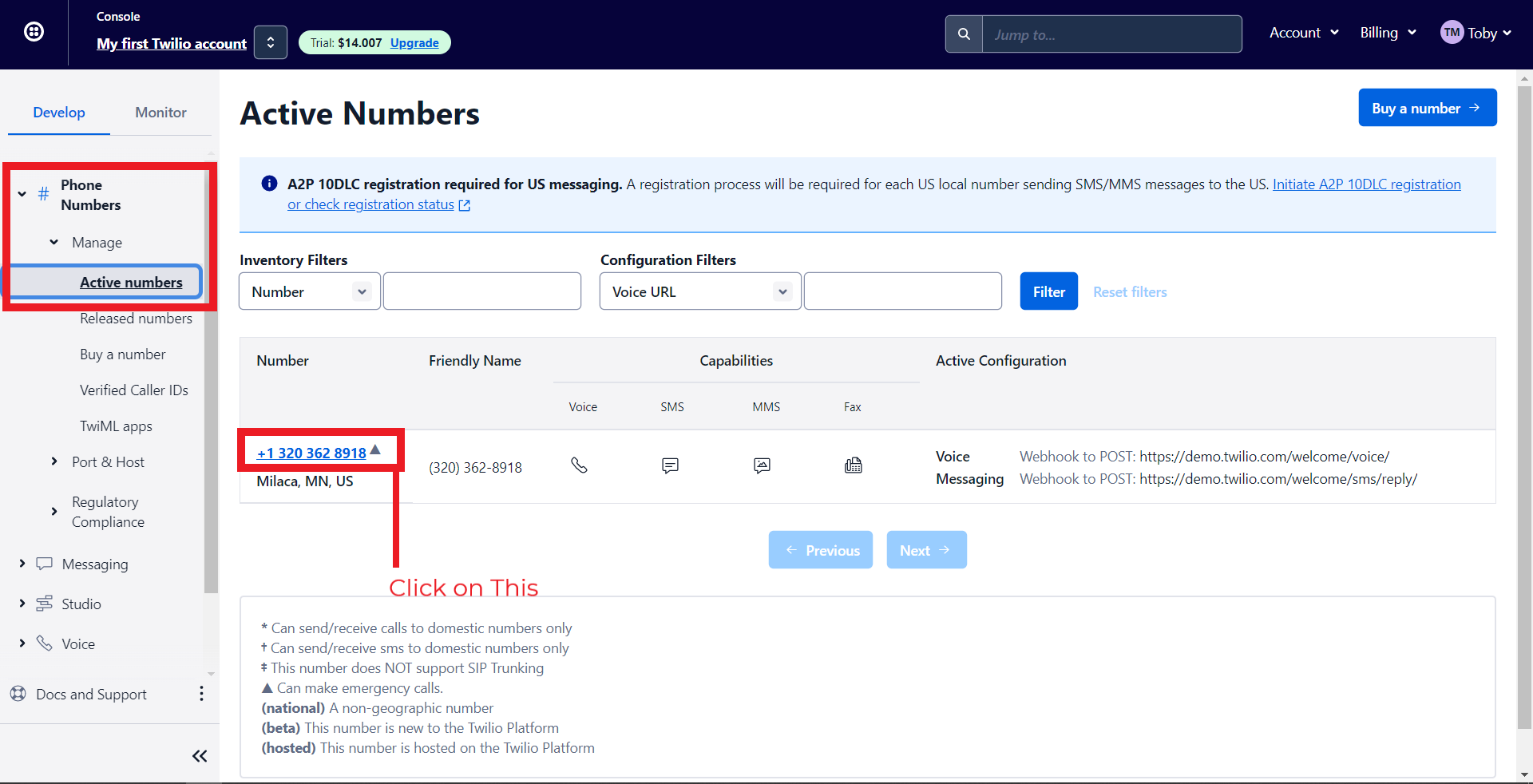
- To do this, navigate to Phone Numbers > Manage > Active Numbers > Click on a Number.
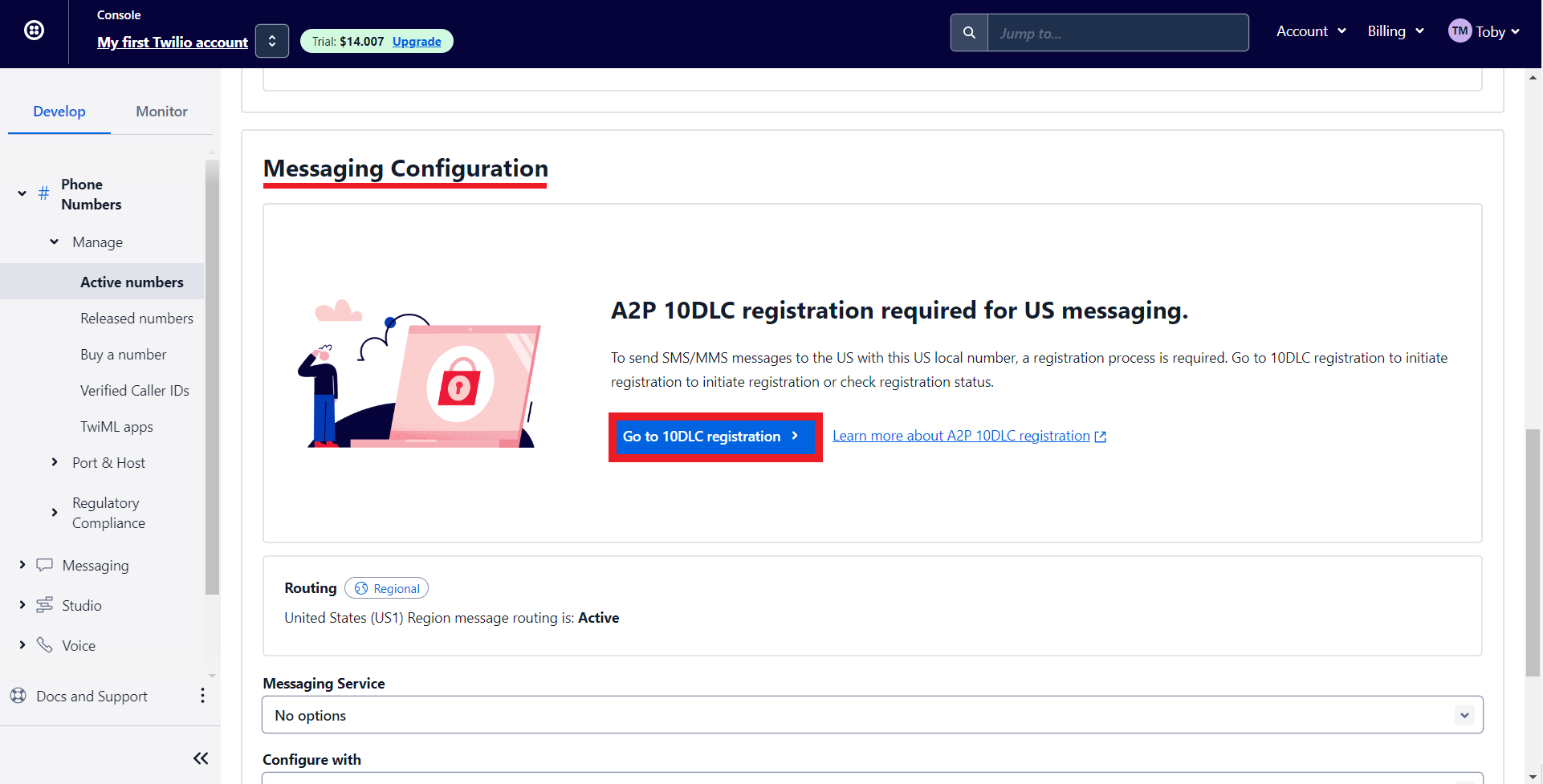
- Under Messaging Configuration, click on 'Go to 10DLC registration.'
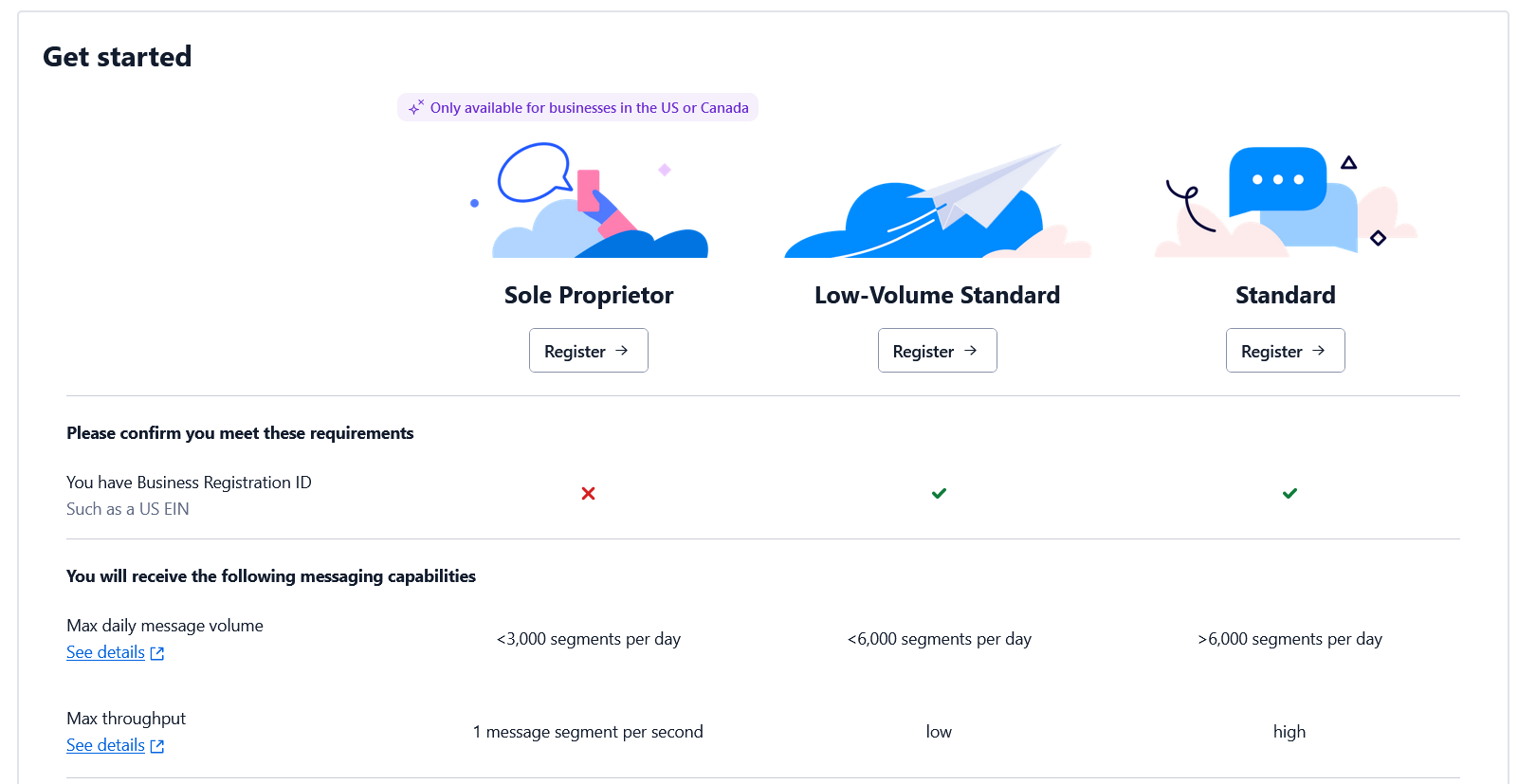
- Depending on whether you have an EIN (Tax ID) or not, you can register for the corresponding option. Check out this page for more details.
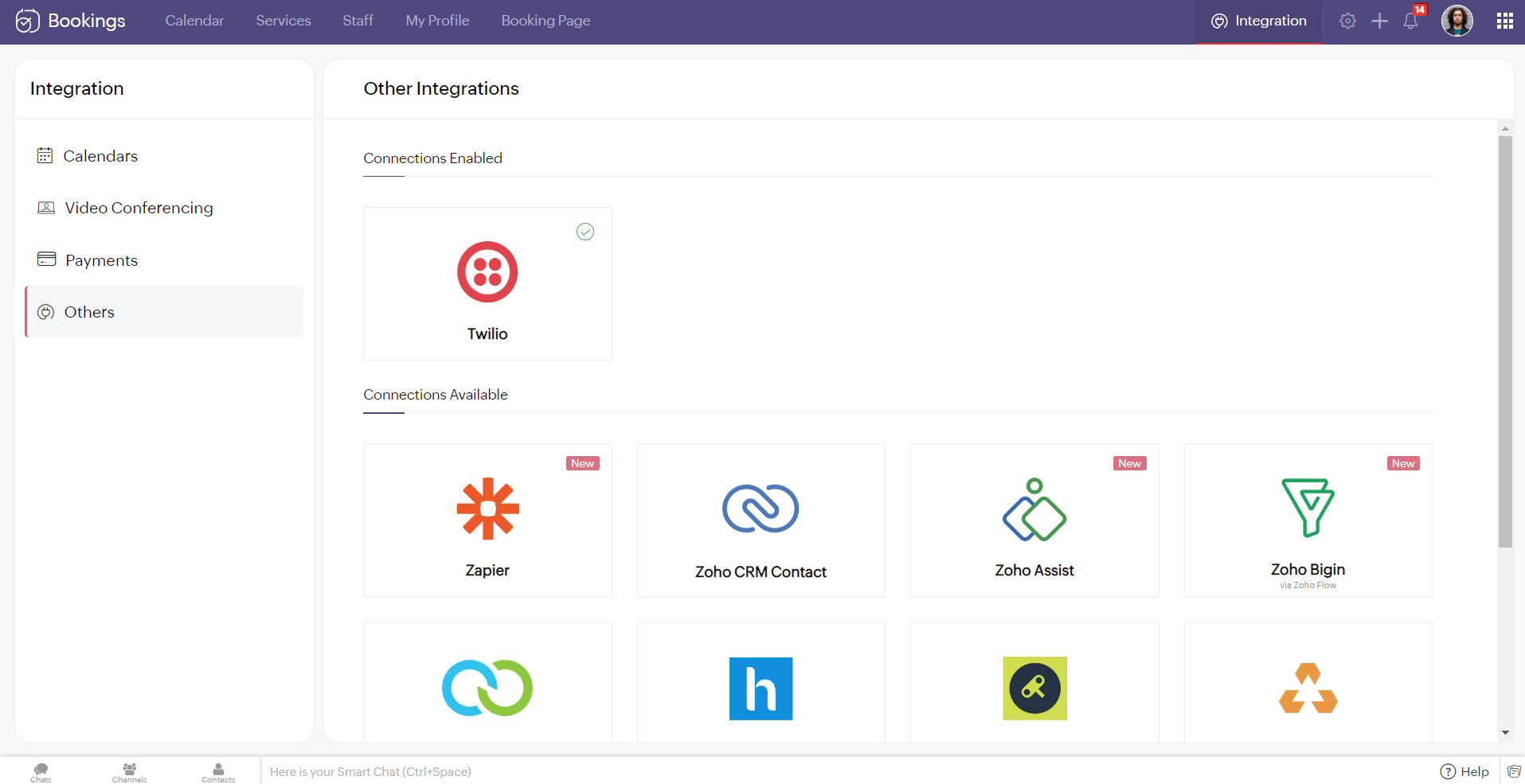
Note - You cannot integrate multiple SMS providers to Zoho Bookings simultaneously.
Configuring Twilio with Zoho Bookings
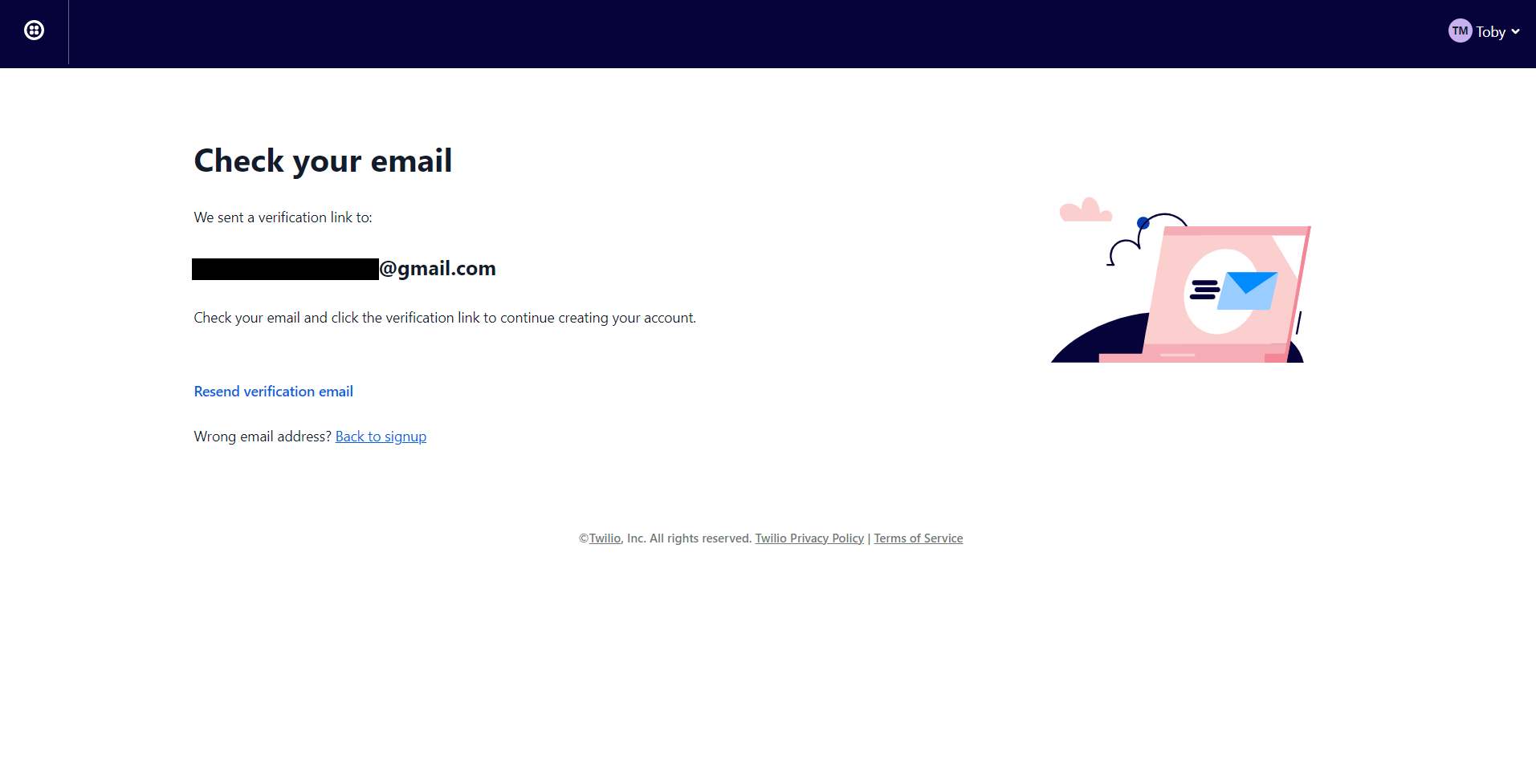
2. You'll be redirected to the following screen once you've signed up. Check your mail inbox.
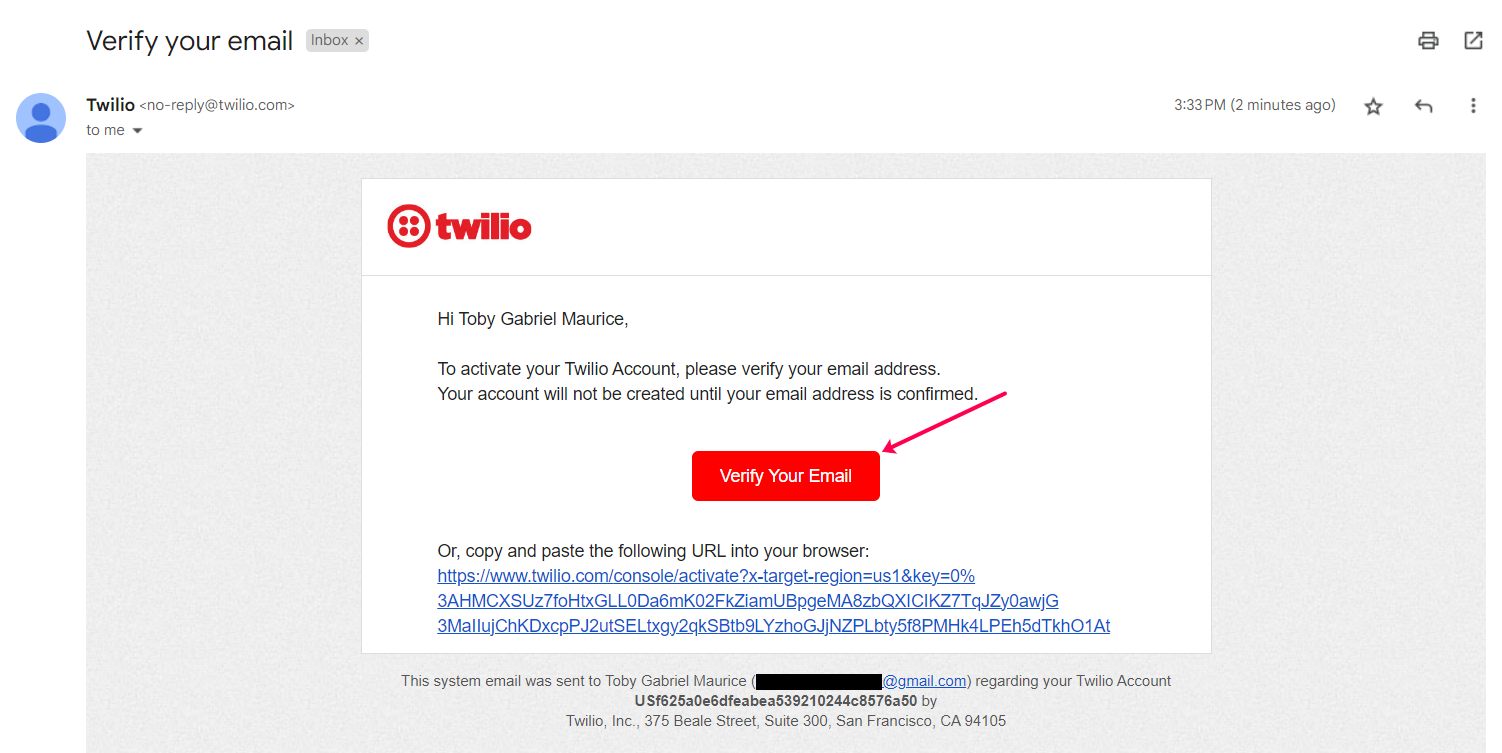
3. Your email would look like this. Confirm your account.
4. Twilio asks you to secure your account with a phone number. Enter your number and click on Send verification code/Get code via phone call depending on your choice.

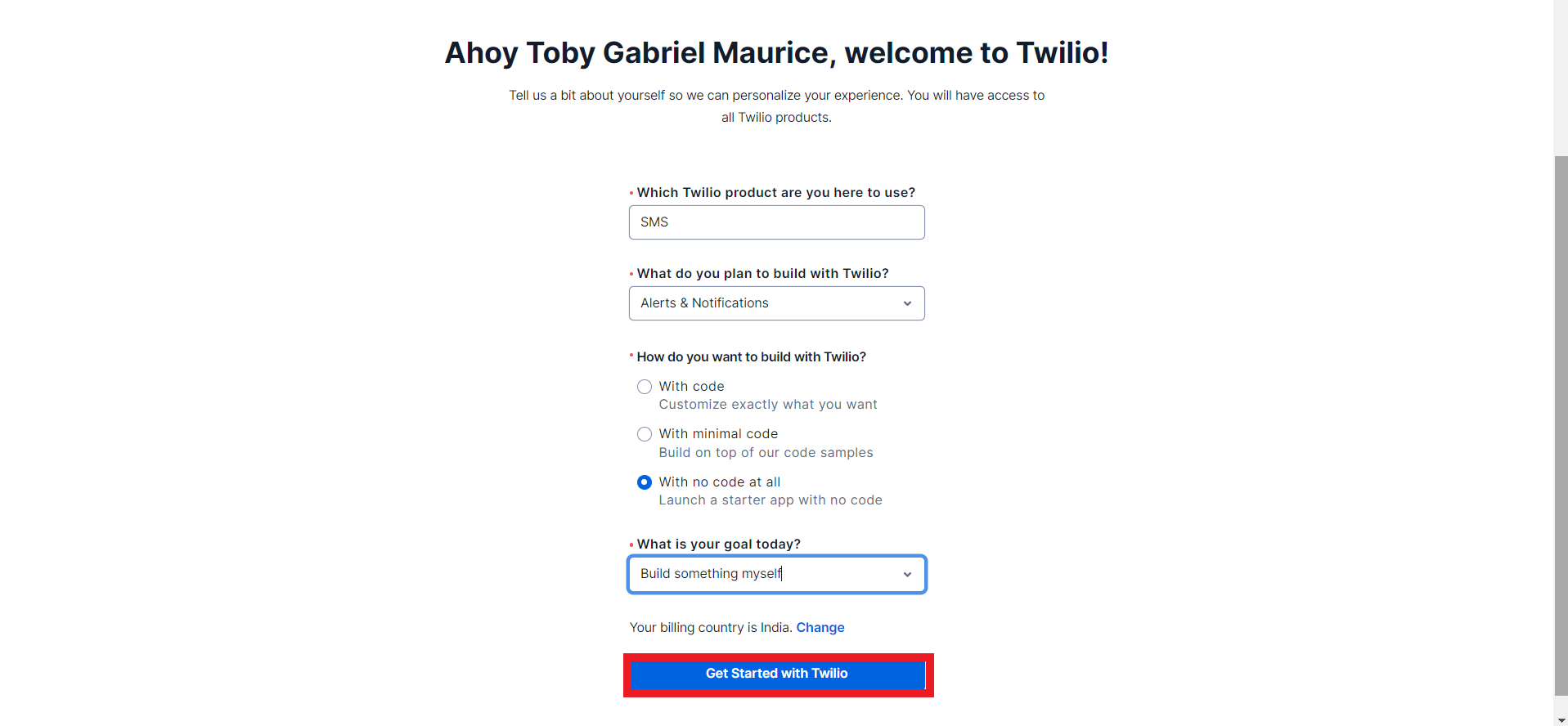
5. Once you've confirmed your phone number you can fill in the onboarding form and click on get started with Twilio.
6. You'll be redirected to the Twilio dashboard.
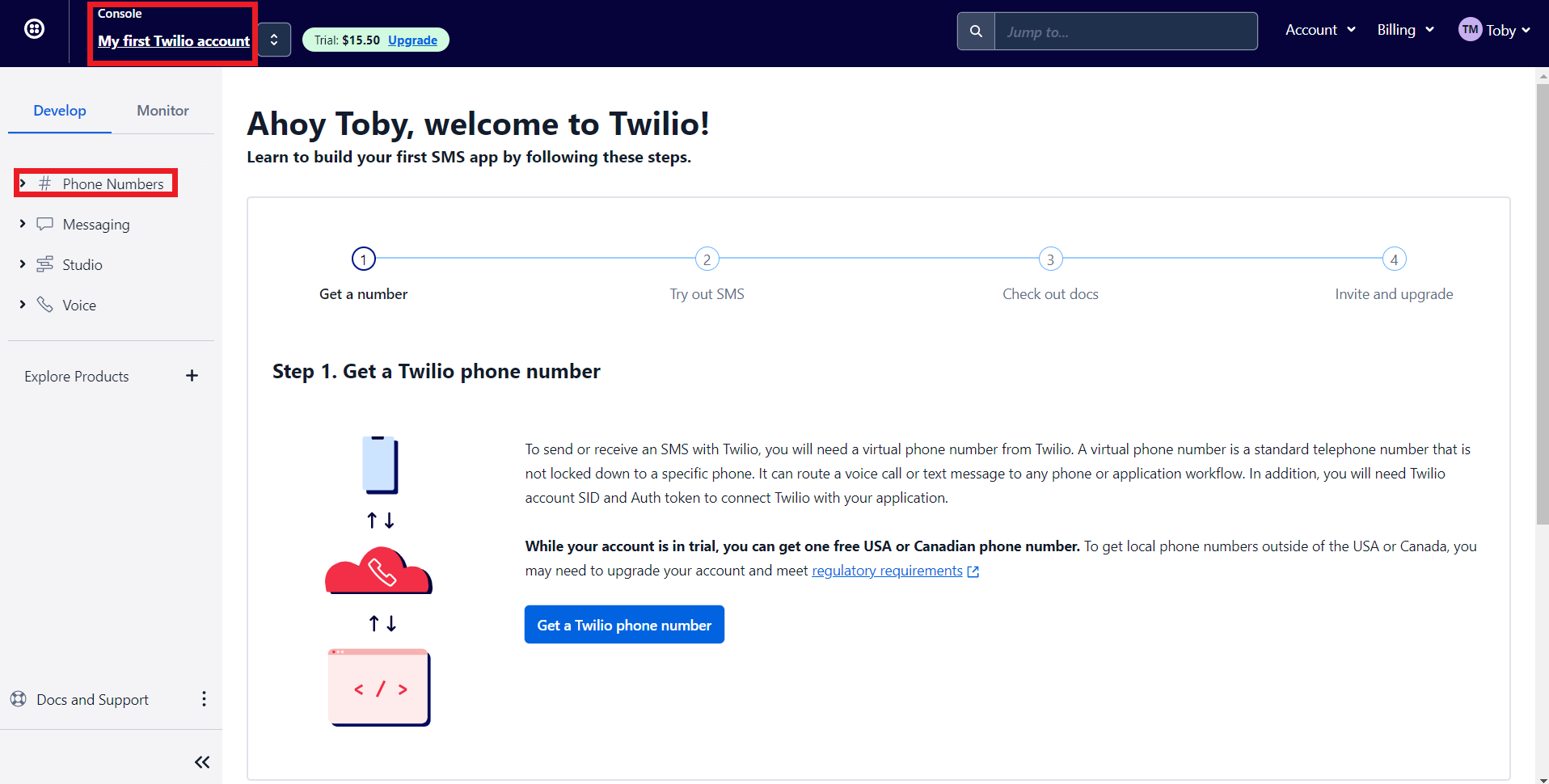
- 'My first Twilio account' is the account name of your Twilio SMS account. If you have multiple Twilio SMS accounts you can navigate it from here
- The Phone numbers tab helps you to
- Manage all your Phone numbers
- Buy new Numbers
- Release a Phone number
- When you sign up for a Twilio account, you'll get $15.50. You can get a trial number using this to test their configurations before opting for a premium plan.
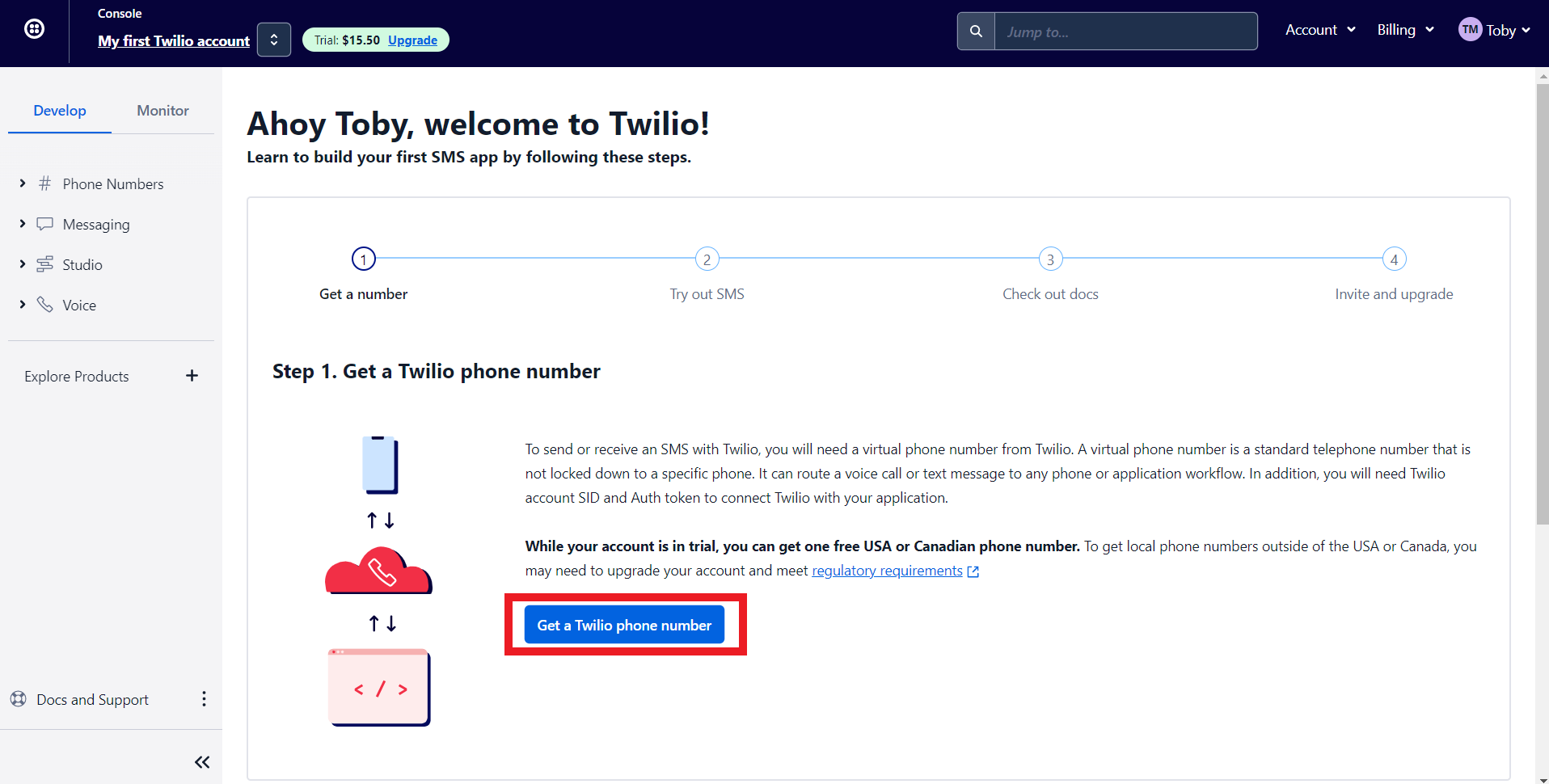
7. Let's get a phone number from Twilio. Click on 'Get a Twilio Phone Number.'
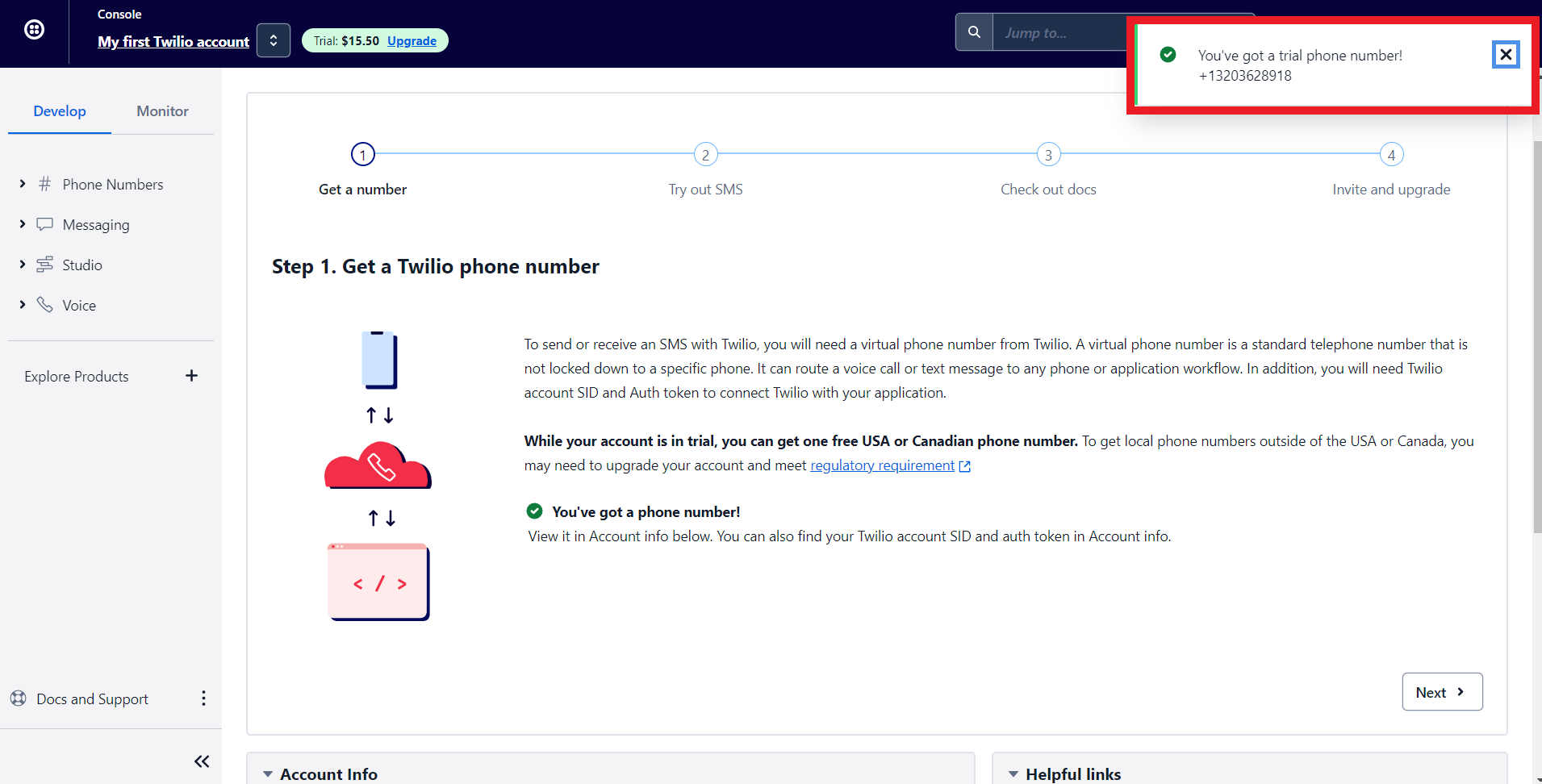
8. Twilio will assign you a phone number. Now let's configure Twilio with Zoho Bookings.
Note - To get a premium number, navigate to Phone numbers > Manage > Buy a Number
Choose which country's number you wish to get, SMS (as capability), and click search. You can click on buy to obtain the number.
Choose which country's number you wish to get, SMS (as capability), and click search. You can click on buy to obtain the number.

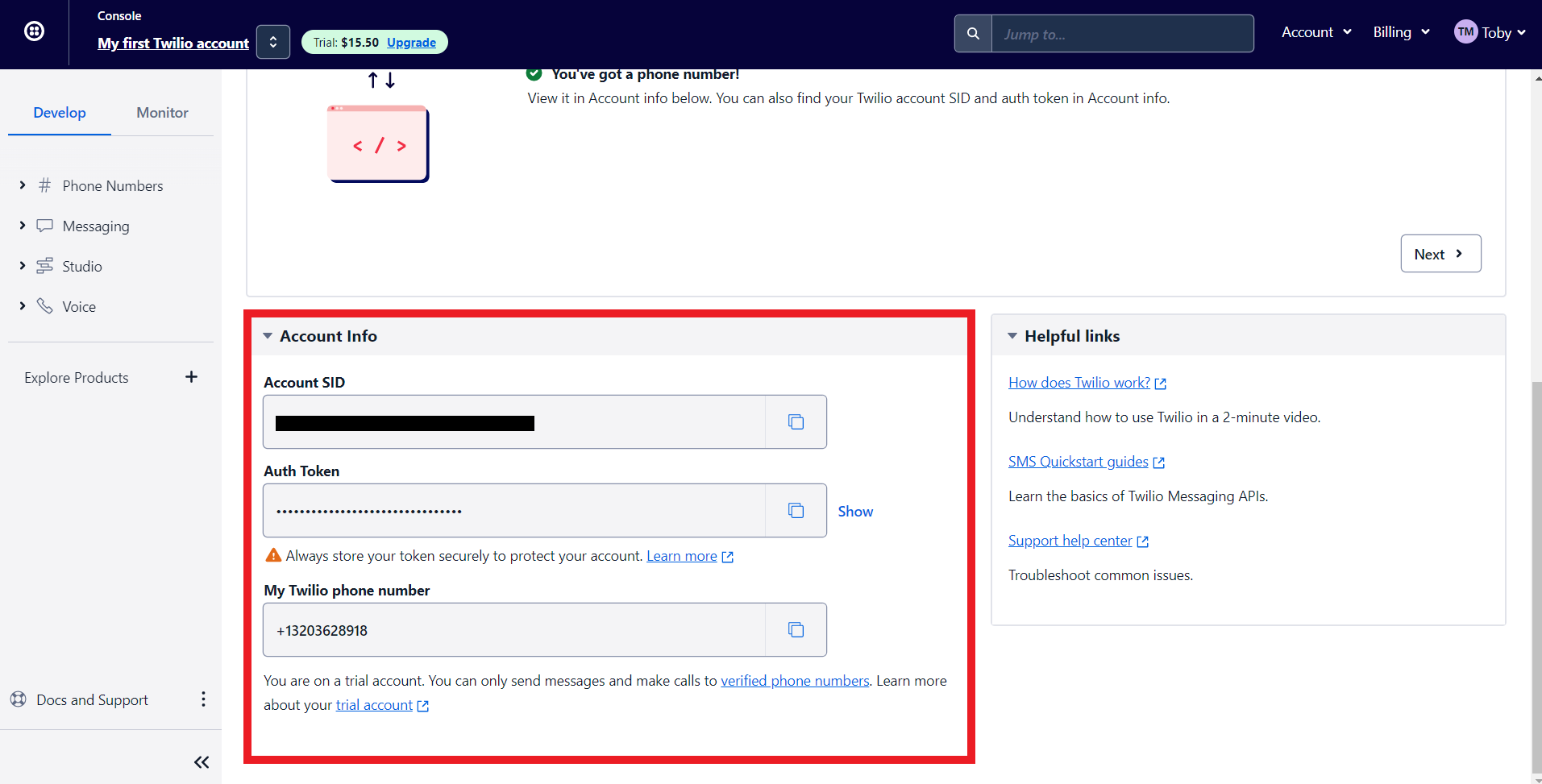
9. Scroll to the bottom of Twilio's main dashboard. You'll find three fields here, Auth Token, Account SID, and your Phone number. We'll paste all this data to integrate Zoho Bookings and Twilio.'
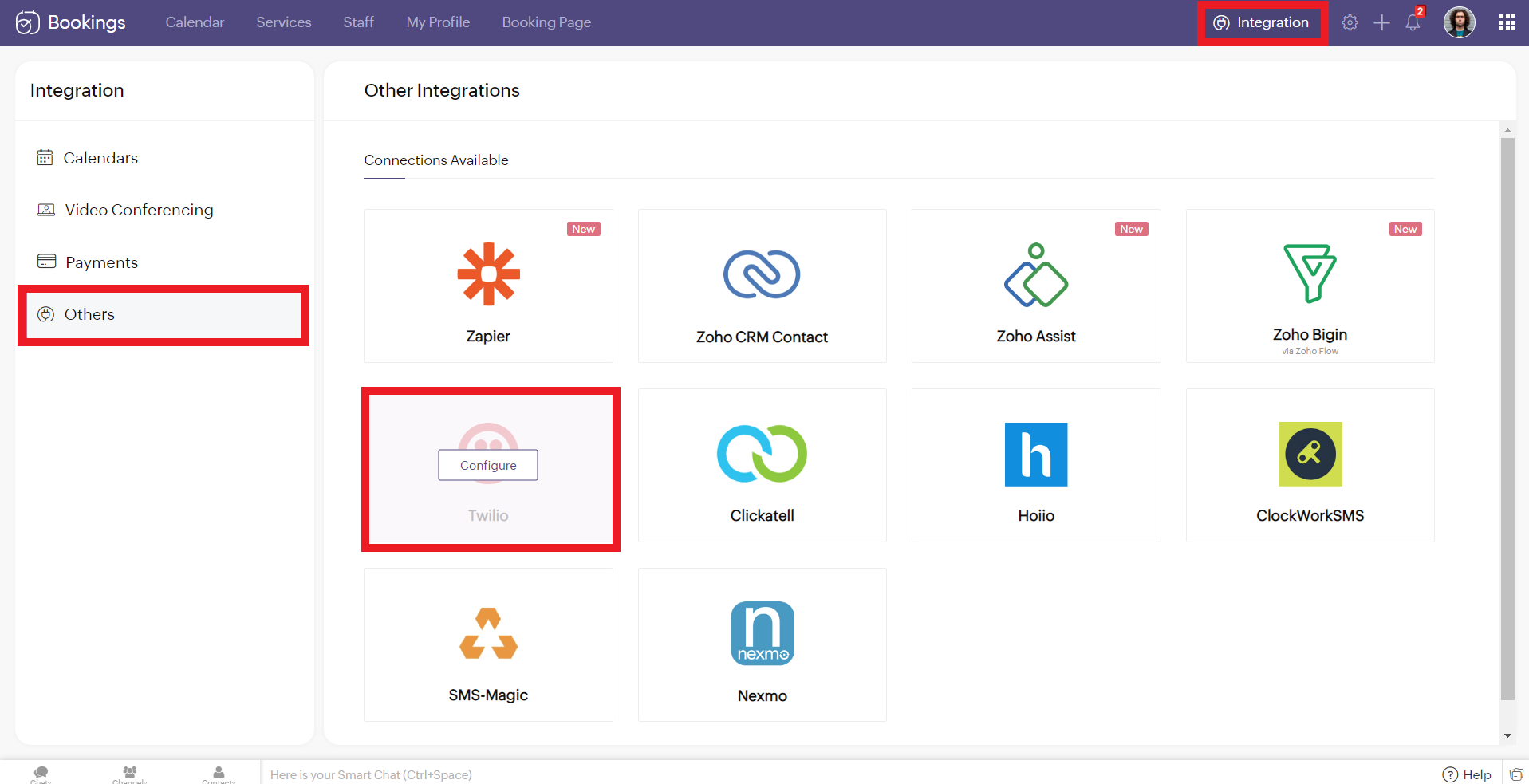
10. Now log in to your Zoho Bookings Dashboard. Navigate to Integrations > Others > Twilio. Hover over Twilio and click on Configure.
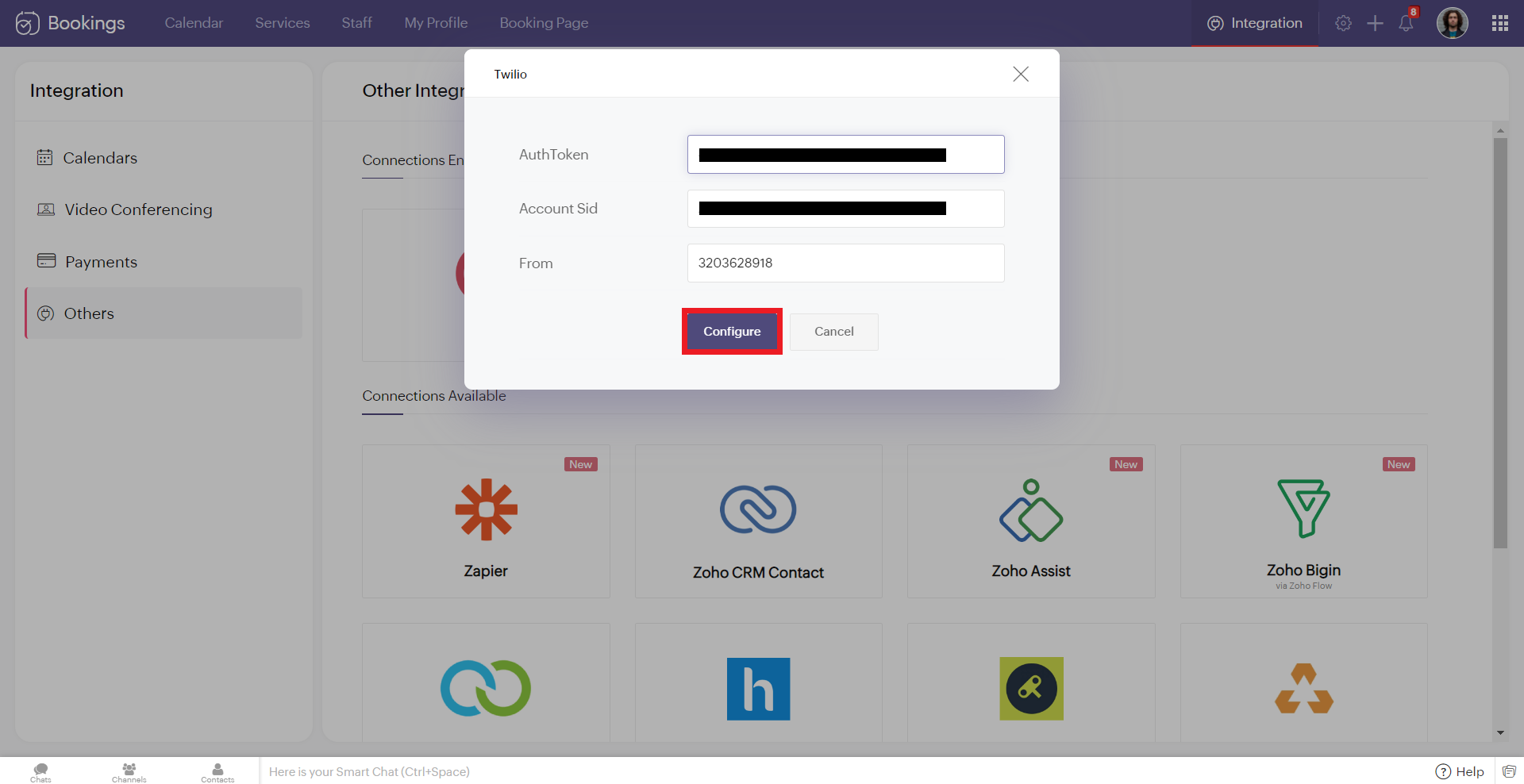
11. Copy and paste the details from Twilio to the corresponding fields in Zoho Bookings. Once you have pasted the details, click 'Configure.'
Note: While pasting the phone number, remove the country calling code. In this case, my phone number was +13203628918. '+1' is the country calling code. Remove it and paste the rest (i.e., 3203628918 without any spaces/symbols in between)
Note: While pasting the phone number, remove the country calling code. In this case, my phone number was +13203628918. '+1' is the country calling code. Remove it and paste the rest (i.e., 3203628918 without any spaces/symbols in between)
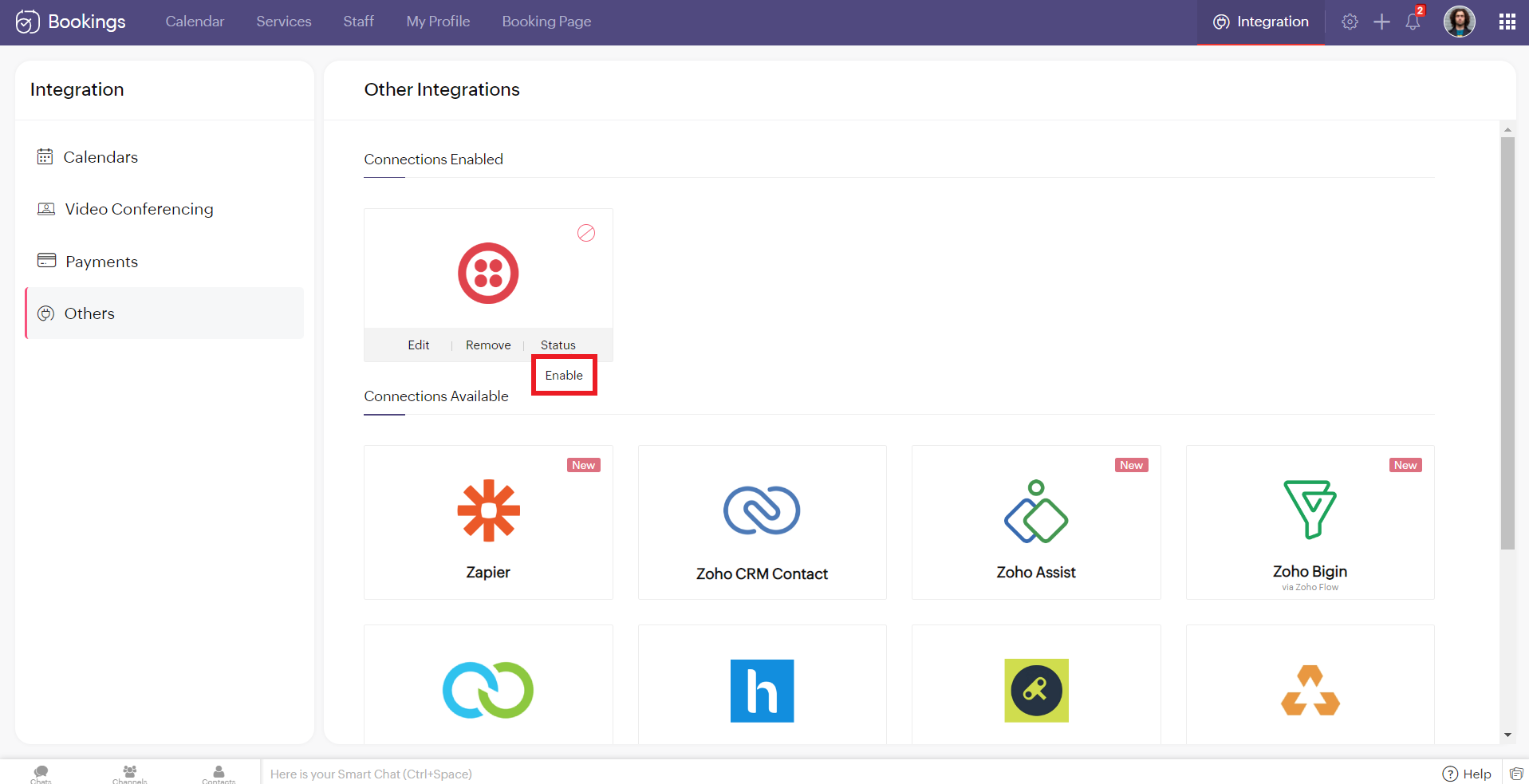
12. Hover over the created Twilio connection and click enable. Reload the page if the connection is still not active. You've successfully integrated Twilio with Zoho Bookings.
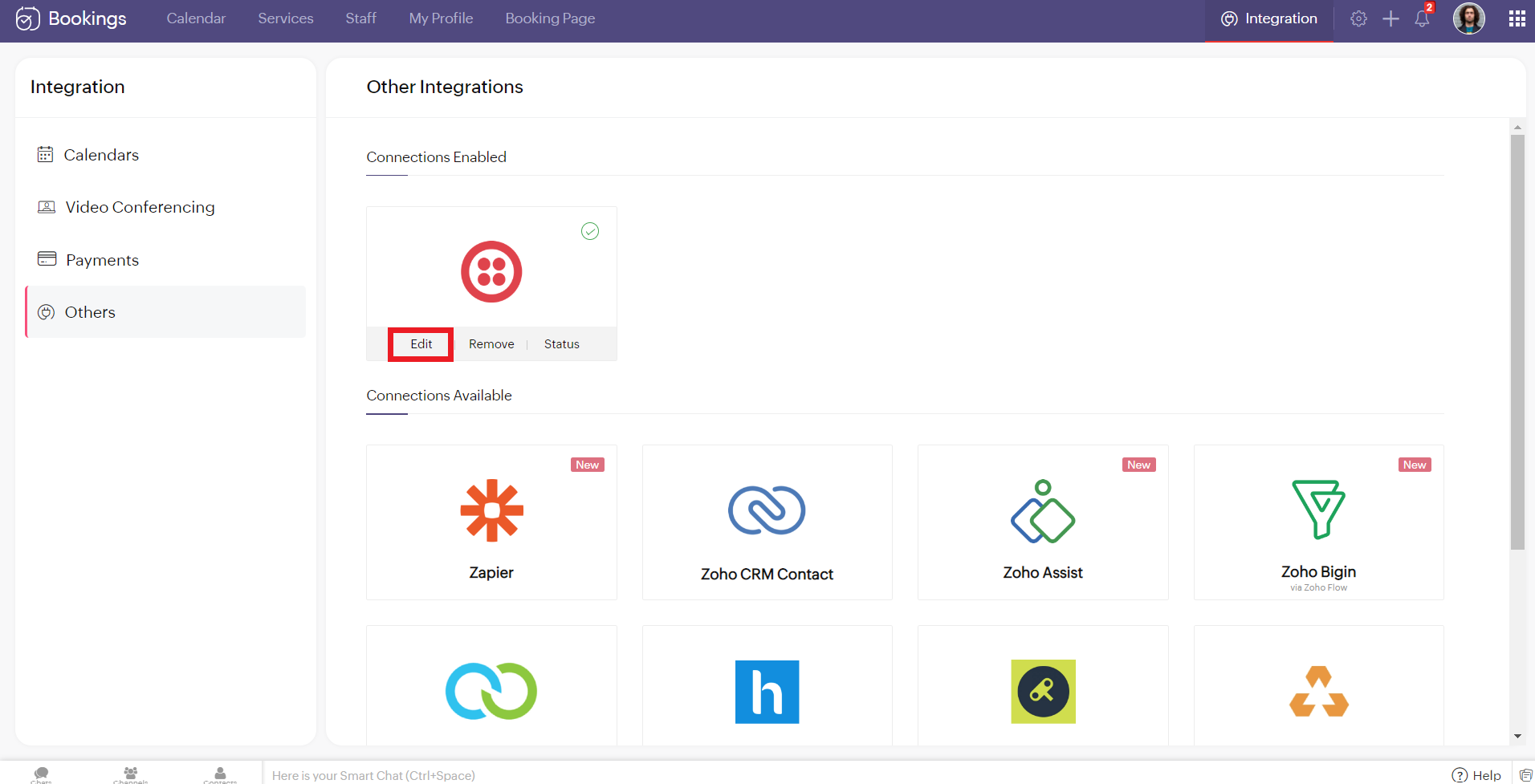
Editing Your Twilio Connection
To edit your Twilio connection, hover over the Twilio integration and click on edit. Once you've made the changes, click Configure.
If you wish to remove your Twilio connection, hover over the Twilio integration and click remove.

A pop-up appears asking you to confirm. Click 'Proceed' to delete your Twilio connection.
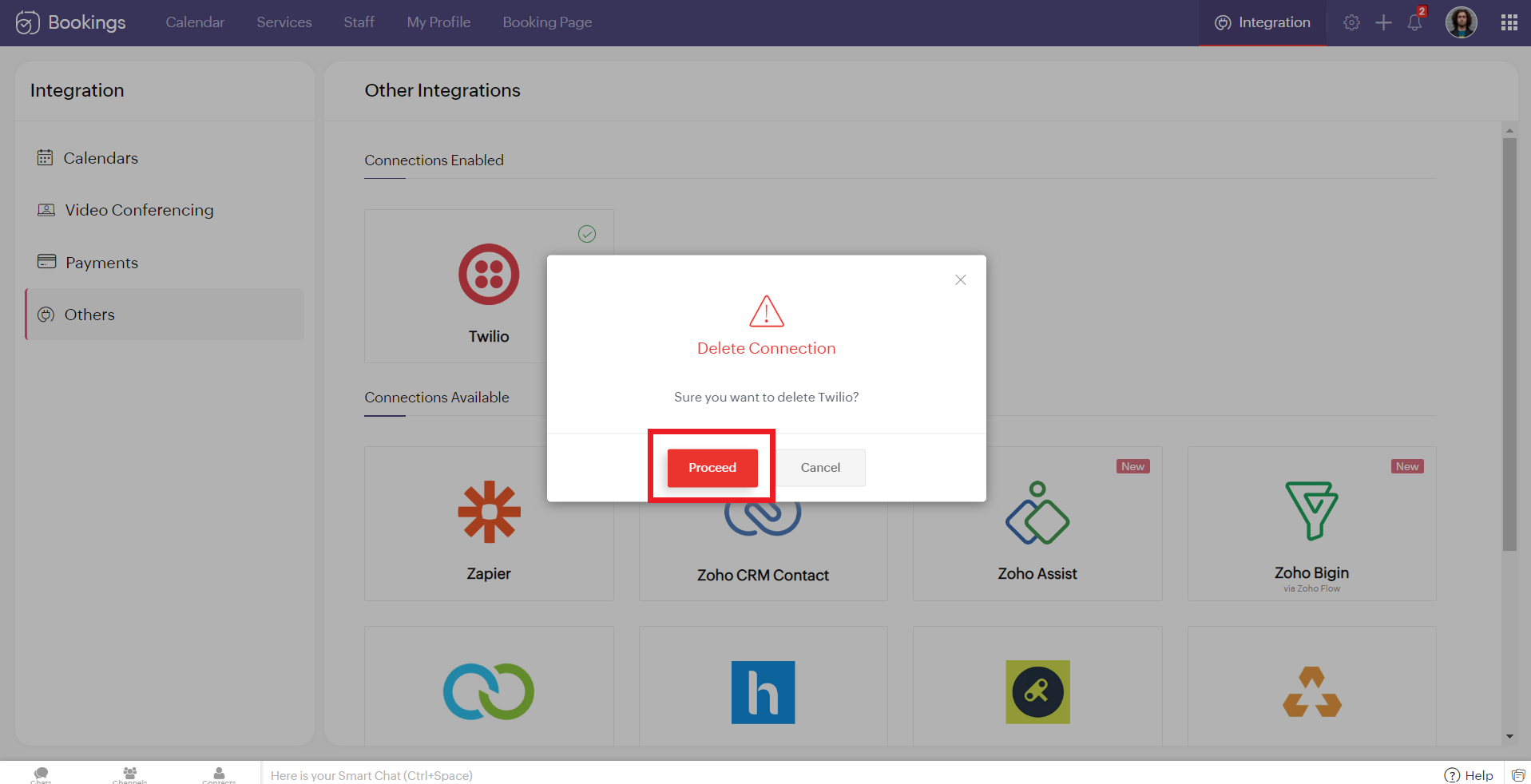
Note - While Editing or Removing your Twilio connections, if the changes don't reflect immediately, reload the page for the changes to reflect.
Configuring SMS Notifications
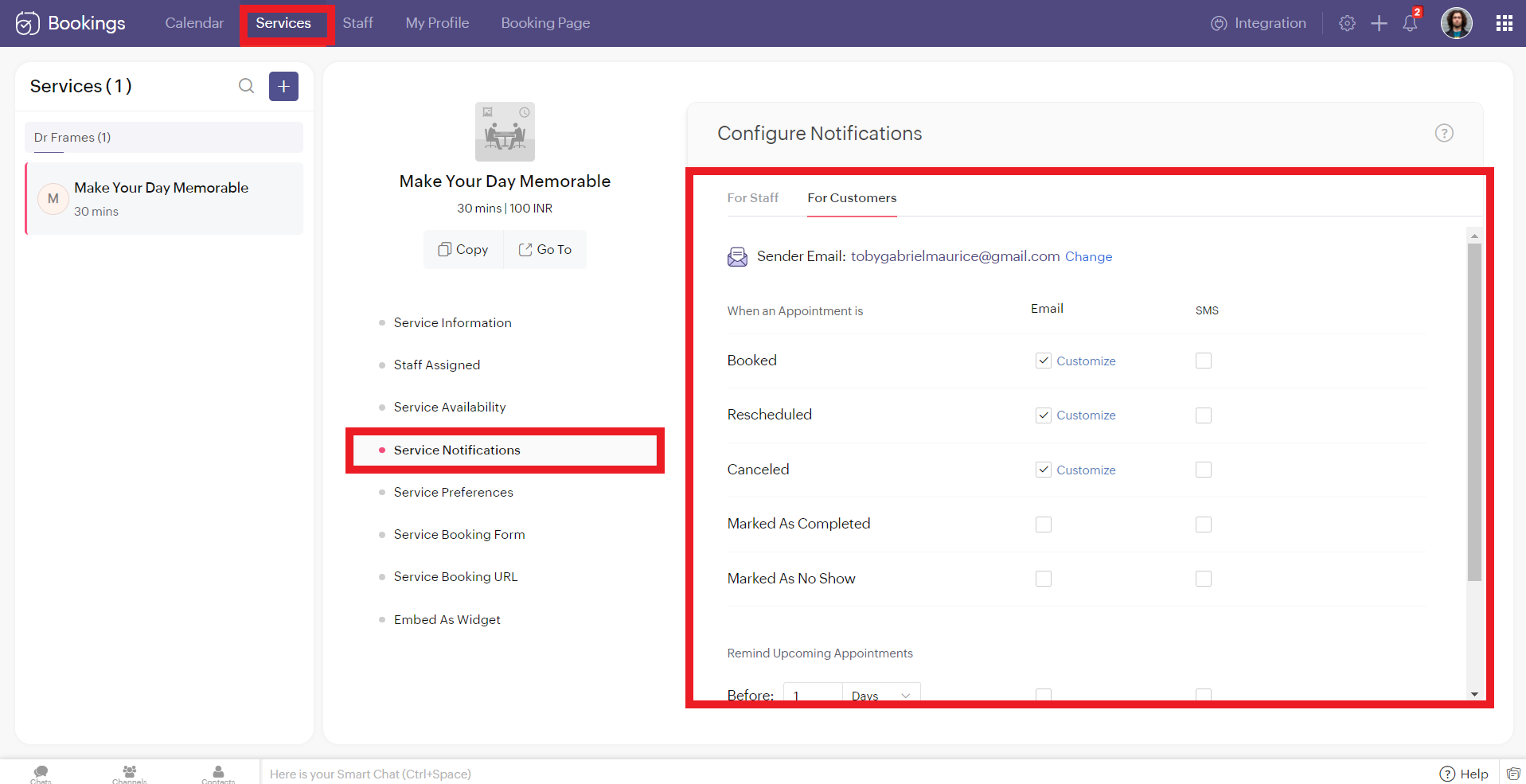
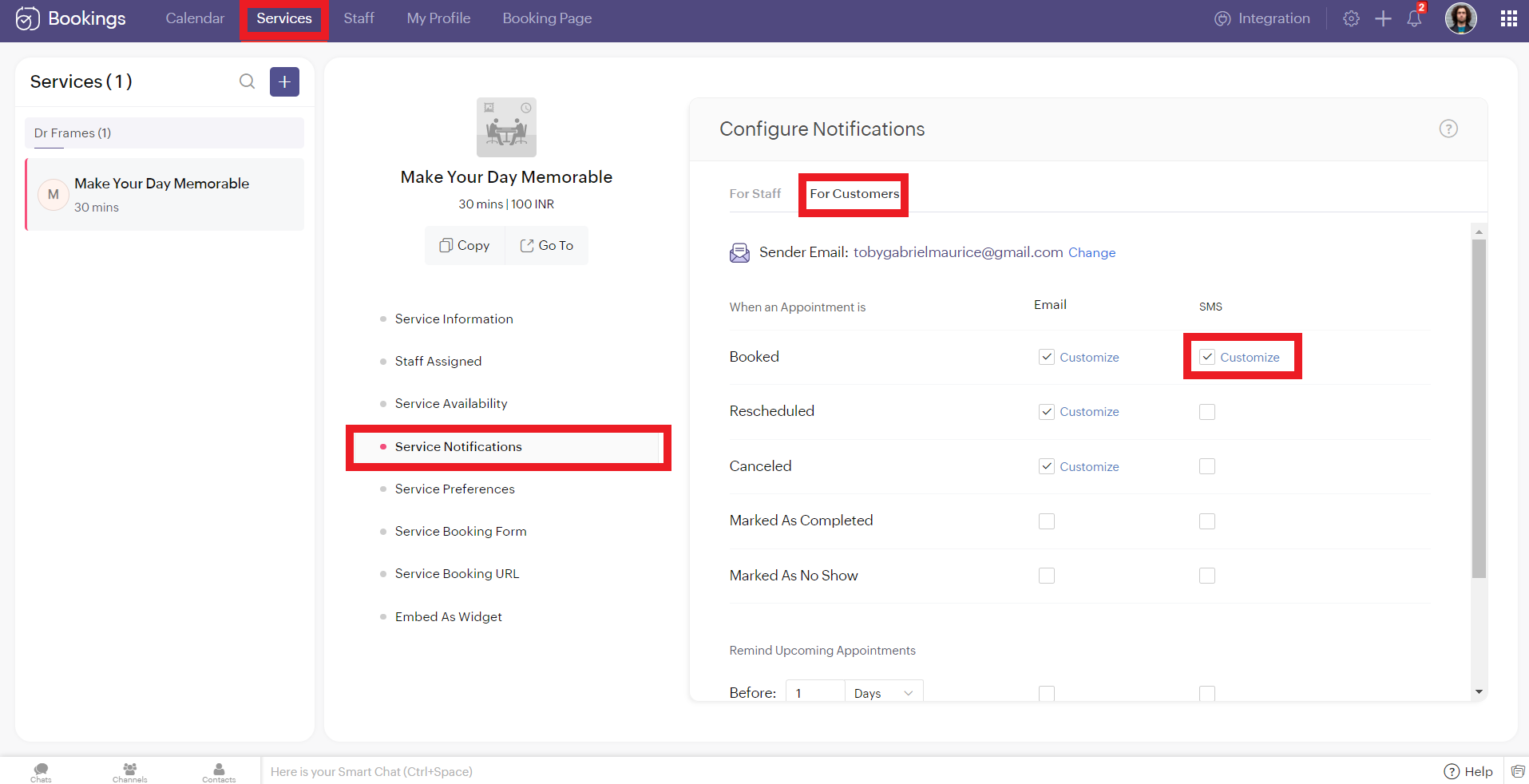
To configure SMS notifications for one on one bookings, navigate to services > service notification.
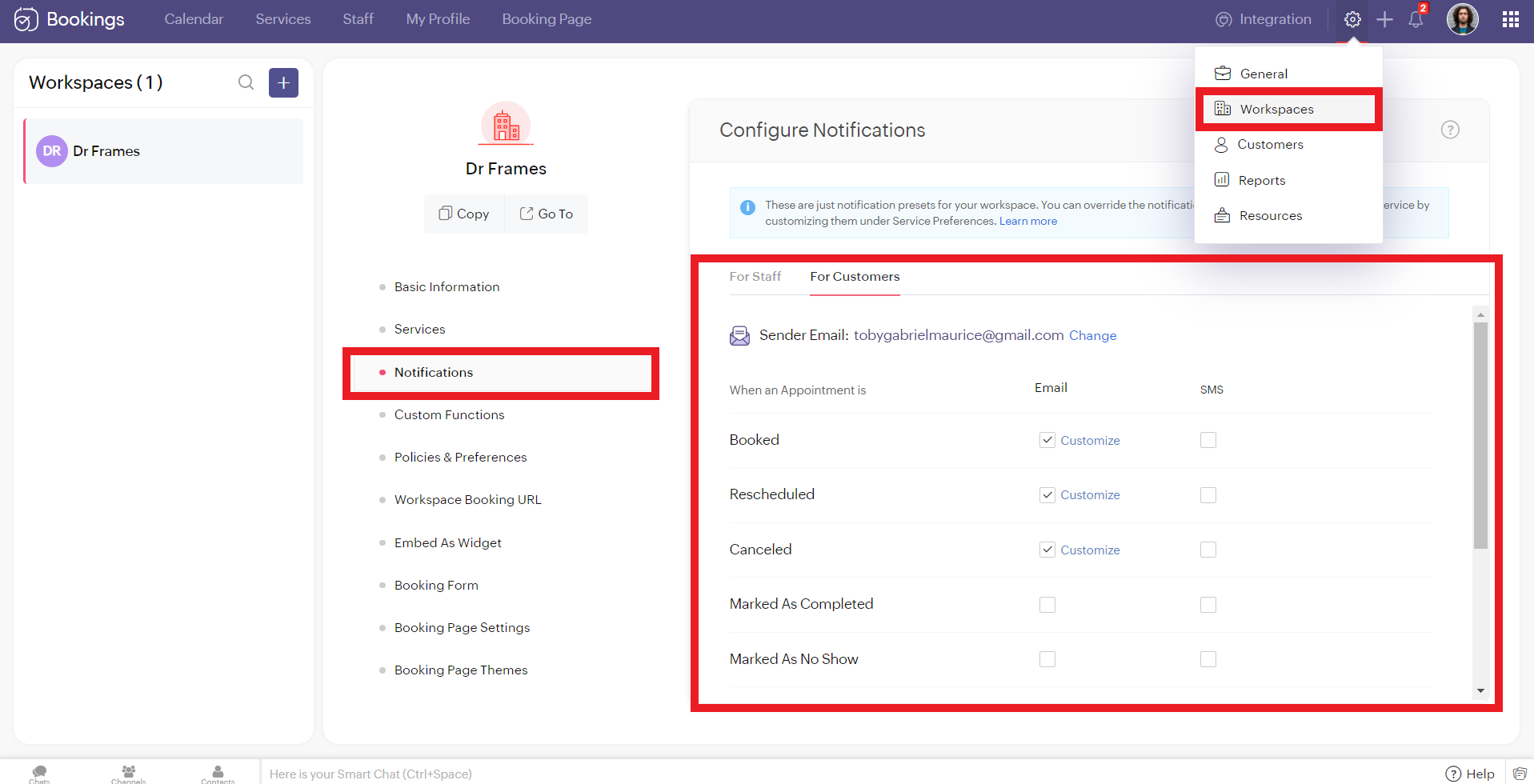
To configure SMS notifications for group/ resource bookings, navigate to settings > workspaces > notifications.
You'll see two tabs here. 'For Staff' and 'For Customers.' Zoho Bookings allows you to send eight different types of SMS under each tab.
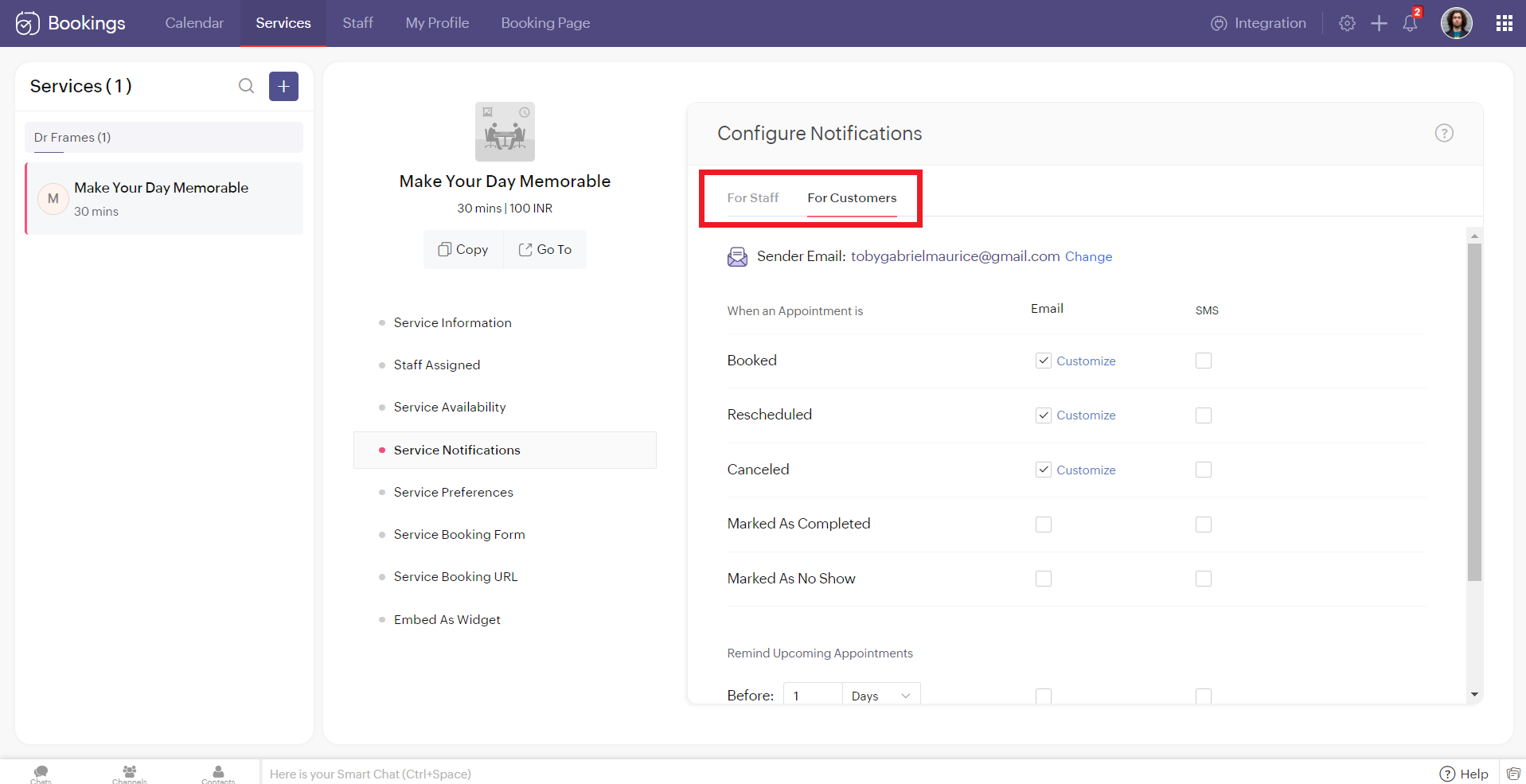
You can configure Zoho Bookings to send SMS using Twilio when you change the appointment status to
- Booked
- Rescheduled
- Canceled
- Marked As Completed
- Marked As No Show
Alternatively, you can set up to three reminders before your appointment time.

Illustration: Let's send SMS notifications to a customer when an appointment(one-on-one) is booked.
- Make sure that the checkbox is enabled corresponding to the booked notification in the customer tab. It ensures that the customer receives an SMS notification when an appointment is booked.
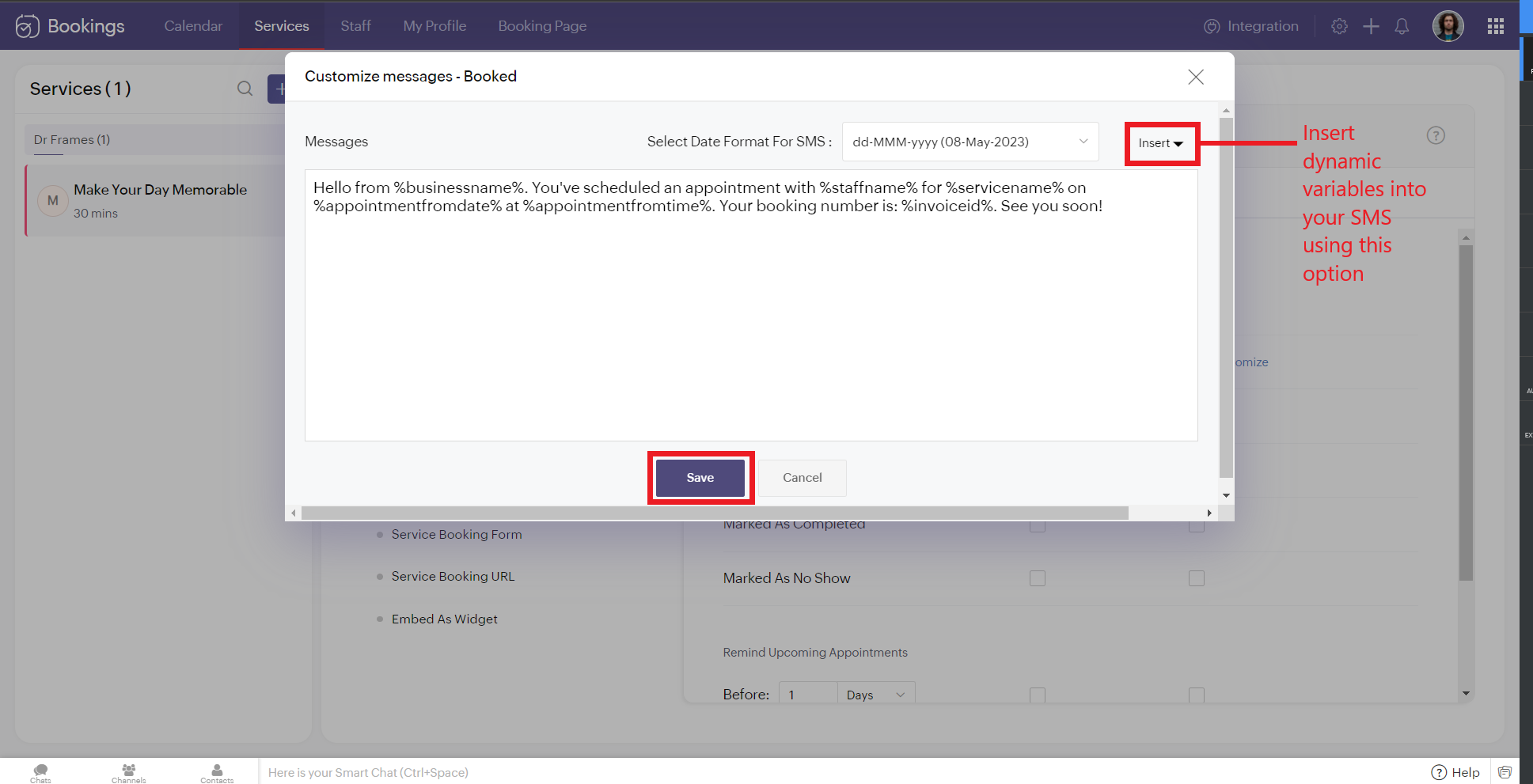
2. To customize the messages that will be sent, click on customize. You can change the message and insert dynamic variables like meeting info, customer name, meeting date, and more into your outgoing messages. Click 'Save' once you are done with the changes.
The customer receives the following message when an appointment is made.
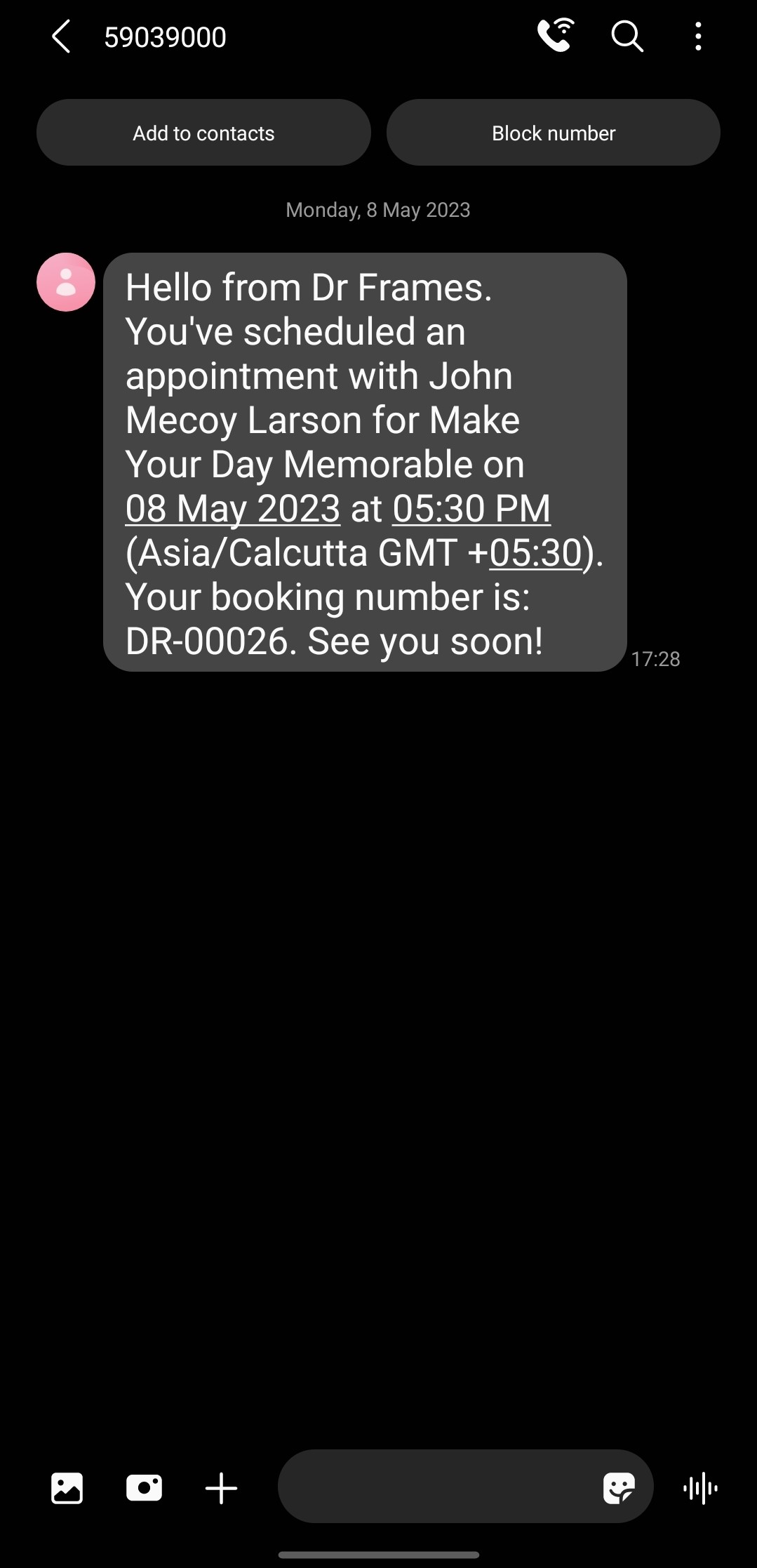
Note that the message is from the number '59039000' and not my original phone number. This is because the message is sent from a US number to an Indian Number. So the original long code is replaced with this number to ensure seamless deliverability.
If the sender and recipient belong to the same country, then the SenderID (i.e., your phone number) doesn't change.
There are cases where you might want to block incoming messages. For example, customers might reply to your SMS notifications requesting a reschedule or cancellation. This breaks the flow of Zoho Bookings and introduces unnecessary manual work. If that's the case, check out this document to block all incoming messaging.
If the sender and recipient belong to the same country, then the SenderID (i.e., your phone number) doesn't change.
There are cases where you might want to block incoming messages. For example, customers might reply to your SMS notifications requesting a reschedule or cancellation. This breaks the flow of Zoho Bookings and introduces unnecessary manual work. If that's the case, check out this document to block all incoming messaging.
SMS Customization Recommendations
- Since each message can accommodate only 160 characters, we recommend keeping your message crisp. Include vital info like appointment date, time, and business name.
- Avoid using emojis in your sms. As a single emoji consumes a lot of characters.
- We recommend you have your entire message length from 160 to 320 characters (i.e., 1 to 2 messages per message) to avoid consuming too many message credits for a single SMS.
Zoho Bookings Plans supporting this feature
Applicable in |
Premium |
If you want to start a trial of the Zoho Bookings Premium plan, please send an email to support@zohobookings.com including the word 'Twilio' in the subject line.
Topic Participants
Siva
Spencer Schmerling
Warren Krige
Recent Topics
Changing Default PDF Name
Is it possible to change the default name of a PDF? As of right now, all of my quotes are named 'QT_$QuoteNumber' (i,e: 'QT_19803471298374) - would it be possible to change this to: '$CompanyName - $AccountName - $QuoteNumber' for instance?Tip 2: Recursive functions in Deluge: How to dynamically run a function for a specified number of times.
Hi folks, As part of the Zoho Creator - Tips and Tricks series every fortnight, we are back today with a new tip on Recursive functions. Let us first quickly understand what Recursive functions are: A function that calls itself one or more times is known as a Recursive function. That is, you can execute a function to perform a particular action a specific number of times. And, at the end of each iteration, a new output is generated. Recursive functions are commonly used by programmers as it enablesFunction #48: Manage fixed installment payments using Zoho Books
Hello everyone, and welcome back to our series! Businesses offer installment payment options to their customers, particularly for expensive purchases, to ease the financial burden on them. By breaking down the total cost into smaller, more manageableSpotlight series #6: The Show app for Android TV has a new look!
Hello everyone! We are delighted to introduce our revamped and redesigned Show app for Android TV. Smart TVs are exploding in popularity. Android TV alone has over 110 million active monthly devices. Zoho Show, as part of a constant effort to improveCan’t create alias “Email alias already exists”
Hi, I’m trying to create the following alias for my domain email. contact@ personal@ private@ But I get a email alias already exists. I had a soho account previously which I deleted which I suspect is causing the issue. Can someone assist? Kind RegaAppraisals - Order of Previous Reviews Should Be Newest to Oldest
The new Zoho People layout generally does a decent job at providing the necessary information for performing appraisals of employee performance. One example of this is the Previous Reviews section: This information is helpful when conducting a review.Paging through API results. a major gap in your documentation.
There is no way for me. to get all of my data through a single API call. Typically REST APis have mechanisms for paging through API results. But the documentation for the API I am using: https://desk.zoho.com/DeskAPIDocument#Introduction Has no mentionRecurring invoices were generated with old template...
I have recurring invoices setup. Ones generated on 10.20.2025 used the modified template I had used. But for some reason, on the ones created on 11/20/2025, it seems the invoices created reverted to the previous version of the invoice template. Notably,Tip #54- Exploring the Files Icon in Zoho Assist- 'Insider Insights'
As we’re already in mid-December, it’s a good time to take a closer look at one of the most useful options in the Zoho Assist remote support dashboard—the Files icon. To get started, log in to Zoho Assist using your credentials. Once you’re in, navigateTip#47: Estimation planner
Sprint planning becomes easier, smoother, more collaborative and more accurate with the Estimation Planner extension. Most work items involve multiple users, and each user's role and effort vary. To provide an unbiased and fair estimation point to theTime Tracking on Iphone doesn't stop
When I start a time tracking session the timer starts as expected. However when I hit stop, the timer remains on that project. The only buttons available are discard and start. Start runs the timer more and discard says it will throw away the data fromZoho Sign - Zoho CRM extension upgrade
Hi everyone, We've updated Zoho Sign extension for Zoho CRM with significant internal changes. Impact on existing Zoho Sign extension users Users using the extension without customization If you are using the integration without implementing Zoho Sign'sGroup by Owner/ Owner Kanban /Group by Custom Field
Hi, We are missing the option of viewing Tasks grouped by their owner, as it is an essential function for us to manage our employees' working tasks. We find it hard to inspect what are the tasks that our employees are working on. We are seeking an optionFlow using way too many tasks
I built a flow that is using way too many tasks for what it is doing. I reached out to support a week ago but never heard back so hoping the community can help. Does a filter count as a task? I am seeing tons of records filtered with < 1 Sec Time TakenRegarding the integration of Apollo.io with Zoho crm.
I have been seeing for the last 3 months that your Apollo.io beta version is available in Zoho Flow, and this application has not gone live yet. We requested this 2 months ago, but you guys said that 'we are working on it,' and when we search on GoogleStart Workflow from Deluge Script
I have developed a customized process from our CRM that leverages a deluge script to create a statement of work document. Once the document has been created via the merge and store function, I would like the ability to start a workdrive review & approveSaved Sections?
In sites editor, the + button reveals options to add a section, element, etc. It includes Saved Sections, but I can find no way to save a section I've already created. Otherwise, is there a way to copy a section from one page to another?Marketer's Space: Unable to select a sender address? Here's the fix
Hello Marketers, Welcome back to yet another post! So you've added a sender address in Zoho Campaigns and later found that you're not able to select it while creating an email campaign. Has this ever happened to you? If so, don't worry—you're not alone.Loading Project Balances in ZOHO Books for each project
Hello, What is the best method for loading project balances actual and budget into ZOHO books to provide tracking to our project managers. We have projects and federal awards (also treated as projects) which span multiple years. We are converting fromScale up your writing style with content analysis tool in Knowledge Base
Hello everyone, Sometimes writers may have strong knowledge about the subject but may find it challenging to articulate clearly or produce comprehensible, jargon free content. To make the process easier and to ensure consistent, high-quality articles,Zoho Books "Update" Trigger for Zapier?
Hi Zoho Team, I've been in talks with Zapier about using their services to connect my Zoho Books account to various apps, but I require an additional trigger beyond the "New" trigger. I require an "Update" trigger, which will allow me to filter and create Zaps only when certain conditions are fulfilled on the Zoho Books end before I automate a separate app. Specifically this will help me create invoices in QuickBooks Online only when payments are recorded in Zoho Books, rather than when a new invoiceHow to prevent editing of closed tickets in Zoho Desk?
I would like to confirm whether it is possible to completely prevent agents from editing tickets once their status is set to Closed. Is there any configuration, permission, or best practice in Zoho Desk to ensure that closed tickets remain read-only andZoho Desk Limitations
Good day, all, I would like to know whether others share my frustration with some of Zoho's limitations. Don't get me wrong, I like Desk (and I also have a subscription for Analytics), I have been with them for close to 10 years, and unfortunately, INew Mandatory One-Click Unsubscribe Link Overshadowing Custom Unsubscribe Link
I was recently informed by Zoho CRM Support that they are now mandated by the large email service providers like Google and Yahoo to provide a one-click unsubscribe option in the header (not the body) of all mass emails. I have a custom unsubscribe linkhow to undoreconciled transaction
how to undo reconciled transactionExciting Updates to the Kiosk Studio Feature in Zoho CRM!
Hello Everyone, We are here again with a series of new enhancements to Kiosk Studio, designed to elevate your experience and bring even greater efficiency to your business processes. These updates build upon our ongoing commitment to making Kiosk a powerfulChange eMail Template for Event-Invitations
Hello ZOHO-CRM Team How I can change the eMail Template for Event-Invitations? I work with the German Version of the Free Version. I know how I can modify eMail alerts or Signature Templates, but where I can other eMails modify you send out? Thank you for your answer. Regards, JuergService Title in Service Report Template Builder
I am currently working on the Service Report Template Builder in Zoho FSM. I have created three separate service report templates for different workflows: Preventive Maintenance Report Requested Service Report Installation Report My issue is that I cannotZoho Sign for Zoho Projects
Documents authorization and validation with signature is now easier in project management with Zoho Projects' Zoho Sign extension. Sign documents or send them for signatures directly from tasks and issues using Zoho Sign extension in Zoho Projects. ExtensionDeluge Learning Series – Best Practices in Deluge | December 2025
We’re excited to bring you the next session of the Deluge Learning Series, focused entirely on writing cleaner, faster, and more reliable Deluge code. In this edition, we’ll dive deep into the essential best practices every Deluge developer should followAssociate a Contact to a Campaign using deluge?
If I want to add one record to another related list, which zoho function do I use? zoho.updateRelatedRecord is not it I don't think. I simply want to take a "Contact" and associate it to a "Campaign" using deluge. Can anyone help? contactId = 5122008000000796037;Add "Groups" above "Users" in the Zoho Forms Left Menu
Hi, We have Groups but you have to go to a Form and Share or use the Directory App to manage them, please add "Groups" above "Users" in the Zoho Forms Left Menu so you can manage them in 1 place within Zoho Forms too. Thanks DanZoho Books | Product updates | October 2025
Hello users, We’ve rolled out new features and enhancements in Zoho Books. From iOS 26 updates to viewing reports as charts, explore the updates designed to enhance your bookkeeping experience. Zoho Books Updates for Apple Devices At WWDC 2025, AppleAdding Taxes to paid consultations in Zoho Bookings
I created a 'paid' consultation under Zoho Booking and integrated it with payment gateways for online/instant payment before a booking is done. How can I add 'taxes' to the price of consultation? I can add taxes to other Zoho apps (liks Books, Checkout,Zoho CRM Reports Module on Mobil App
I have the mobile app and the reports module doesn't appear in the sidebar for some reason. I saw a Youtube video where the user had the Reports module on mobile. Is there a setting to show it on mobile? Thanks.Inquiry on Help Centre Tab Customisation
Hi Zoho team, I’m wondering if it’s possible to further customise the Help Center tabs, specifically the descriptions under Knowledge Base, Community, and Tickets. While the current setup allows customising tab names, being able to tailor the descriptionsPassing a form object to a function
Suppose I have a sort_order field in multiple tables and I want to increment it by +1 onCreate of a new record. Is there a way to pass the form object as an argument into the function to keep things DRY? The following function from Zia works, but I'dCan you copy and paste a page within a form?
I have been looking at trying to copy/duplicate a whole page within a form. I can't see how I can do this without having to add all the data in again. This is very time consuming. Any help would be great.Unable to sort as Descending order
Trying to change the sort order for a lookup field (checkboxes) from Ascending to Descending and keep getting an error in Deluge that the order must be Ascending Did anyone ran into this? Thanks EyalHow do I copy an email message to one or more other folders?
I can move a message to another folder using the "move to" option but I can't figure out how to copy a message.Next Page