Upcoming Features for Zoho Subscriptions
Hello everyone,
Zoho Subscriptions is set to receive a massive update, with a bunch of new features and usability improvements. This update will also provide a shared user experience with other apps from the Zoho Finance suite, such as Zoho Books or Zoho Inventory.
Zoho Subscriptions is set to receive a massive update, with a bunch of new features and usability improvements. This update will also provide a shared user experience with other apps from the Zoho Finance suite, such as Zoho Books or Zoho Inventory.
Here's a quick peek at some of the features that will be available to you soon:
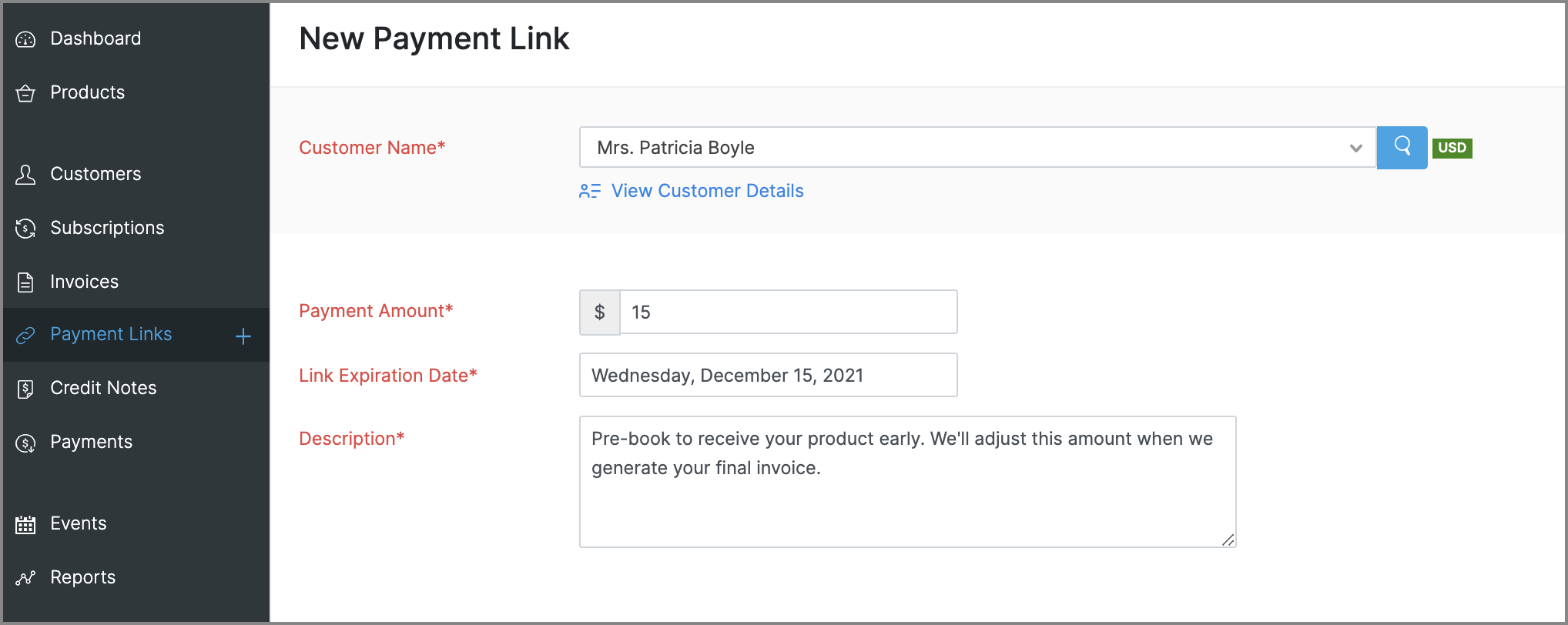
Payment Links for ad hoc payments
This is a new feature that will let you request and accept one-time payments from customers by sending them payment links, which they can use to make online payments to you. These payments can be for miscellaneous reasons that need not be related to any subscriptions, such as an advance payment or a convenience fee.
Enhancements to reports
- Revamped UI: Most reports will get a slicker UI, that's more intuitive and puts commonly used customization features in places that are easier to access. Some reports will also get comparative percentage changes across different periods, along with the option to set expected figures as a benchmark. Here's a glimpse of what the new UI will look like:
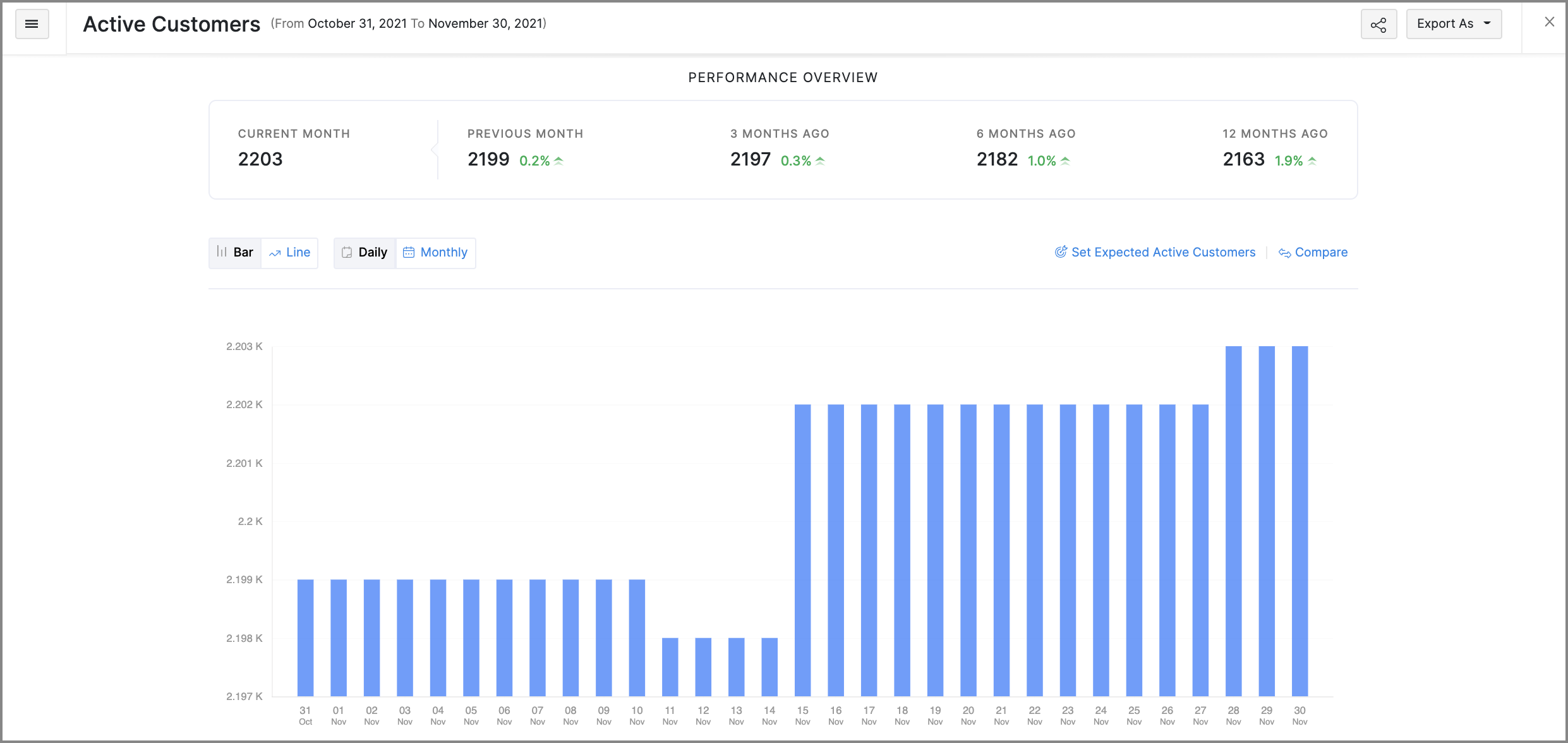
- Favorites: Mark frequently visited reports as favorites to pin them at the top of the Reports module.
- Share reports: You can quickly share the reports that you've generated with other users and set the level of access they have for that report as well.
- Schedule reports: You can schedule some reports to be generated routinely and emailed to the recipients that you choose.
More control for emails
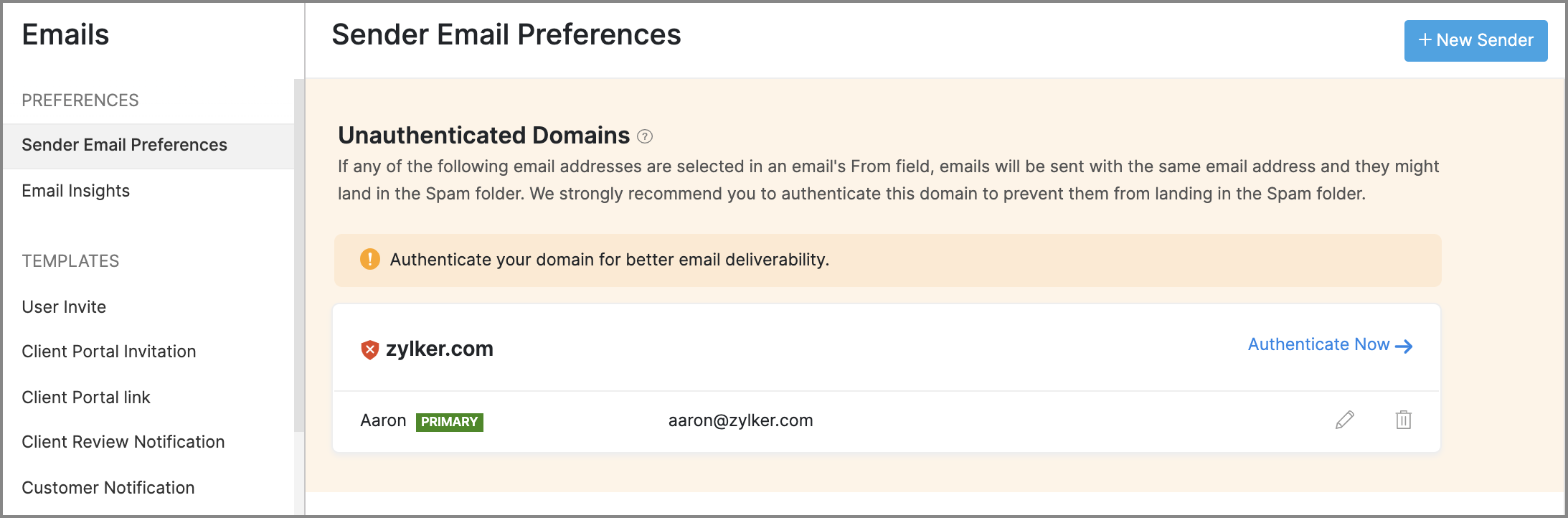
- Sender Email Preferences will allow you to manage the From address of emails that are sent from Zoho Subscriptions. It will also assist you in adding SPF and DKIM records for your domain, to prevent your emails from landing in a recipient's spam or trash folder.
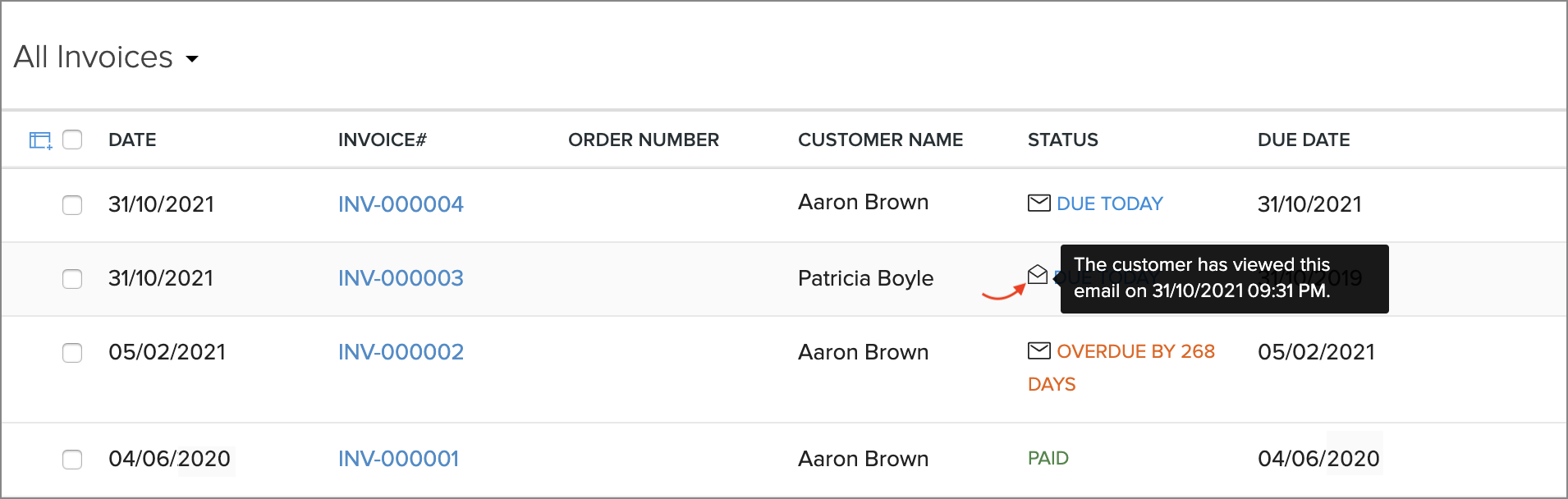
- Email Insights lets you keep track of the notification emails that have been sent to customers. You will be able to know if an email was opened, and exactly when it was opened, which can help in deciding when to initiate follow-up conversations with customers.
Revamped modules
The following modules will receive new features and improvements all-around:
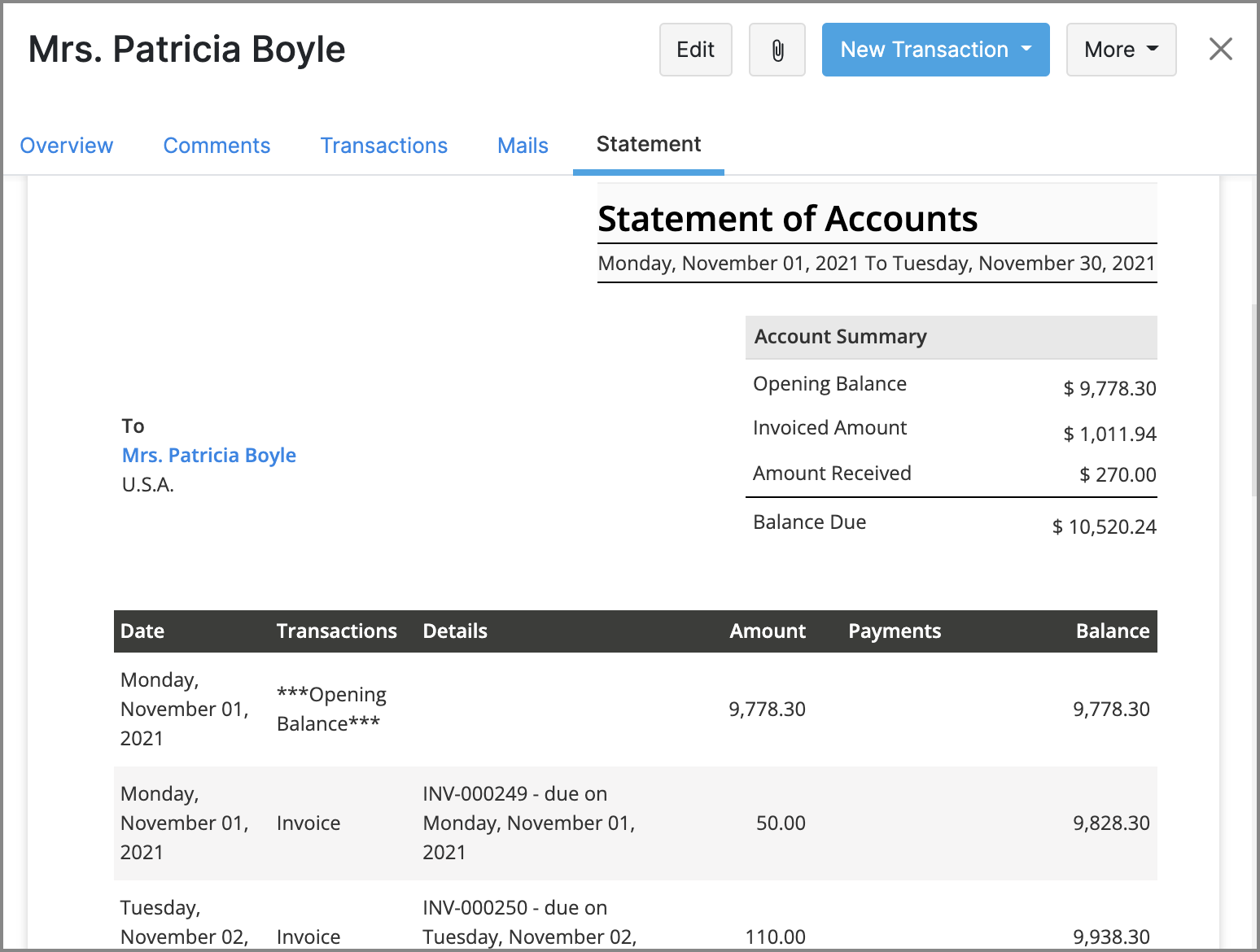
- Customers: You will be able to generate customer statements, send emails directly from Zoho Subscriptions, and find related transactions more easily with an improved Transactions tab.
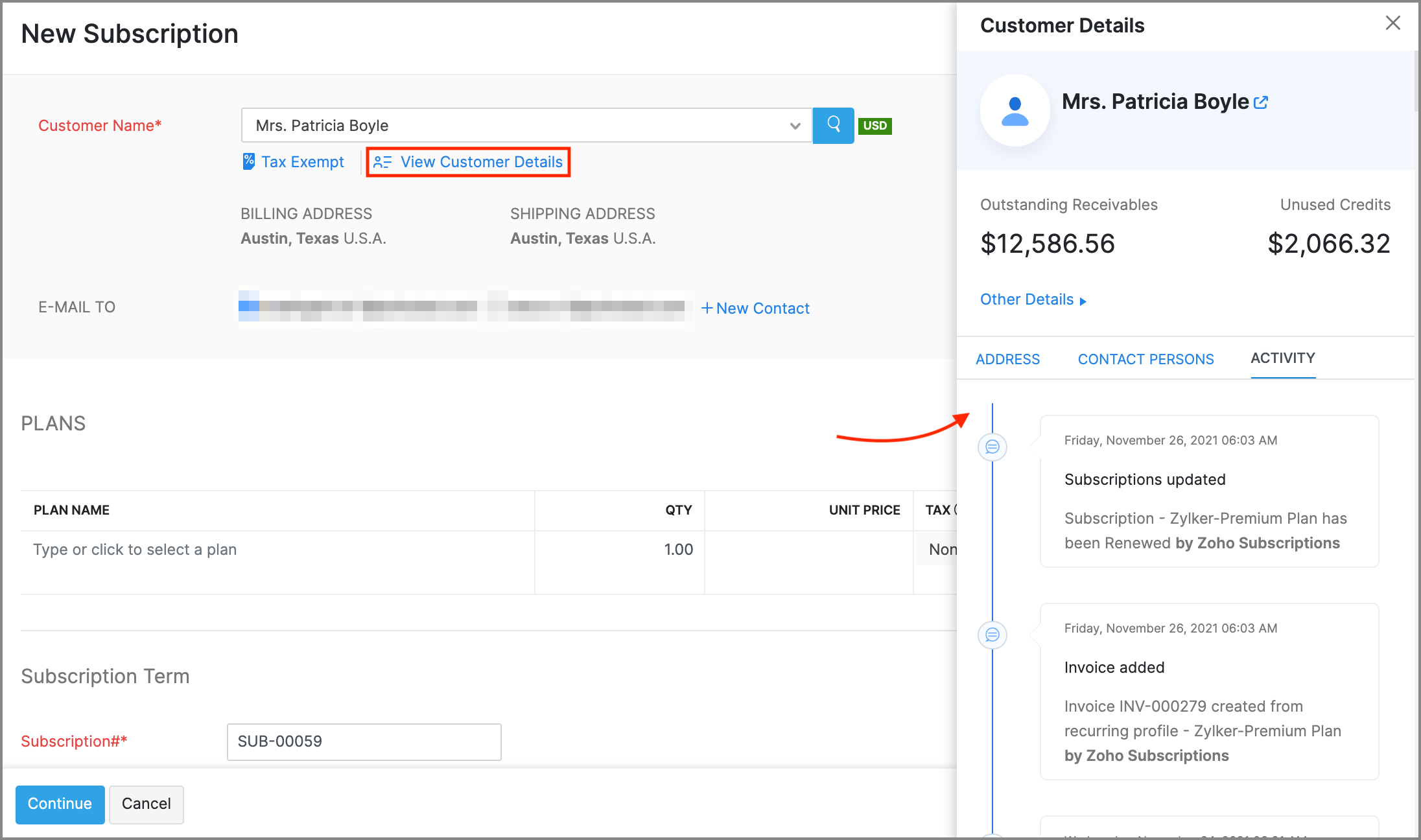
- Subscriptions: New features like creating customers on the fly, contextual customer details, and Advanced Search for customers will make it much faster to create new subscriptions.
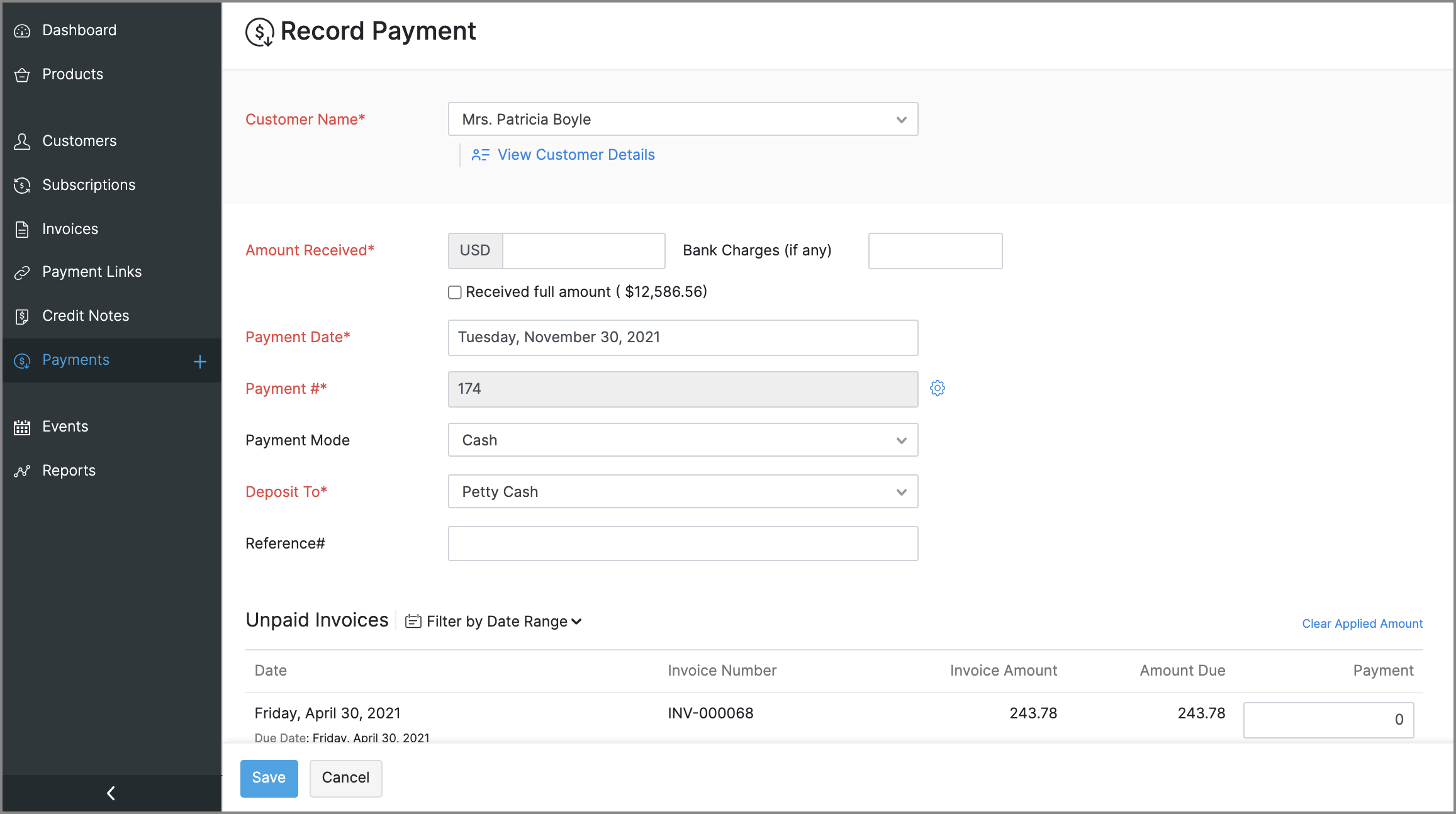
- Payments: The existing Transactions module will be renamed to Payments. You can use it to record or edit payments, view payment receipt PDFs, and perform an Advanced Search to find payments easily.
General usability improvements
Throughout the app, you will find changes that aid with usability and accessibility. Here are some that will be evidently visible:
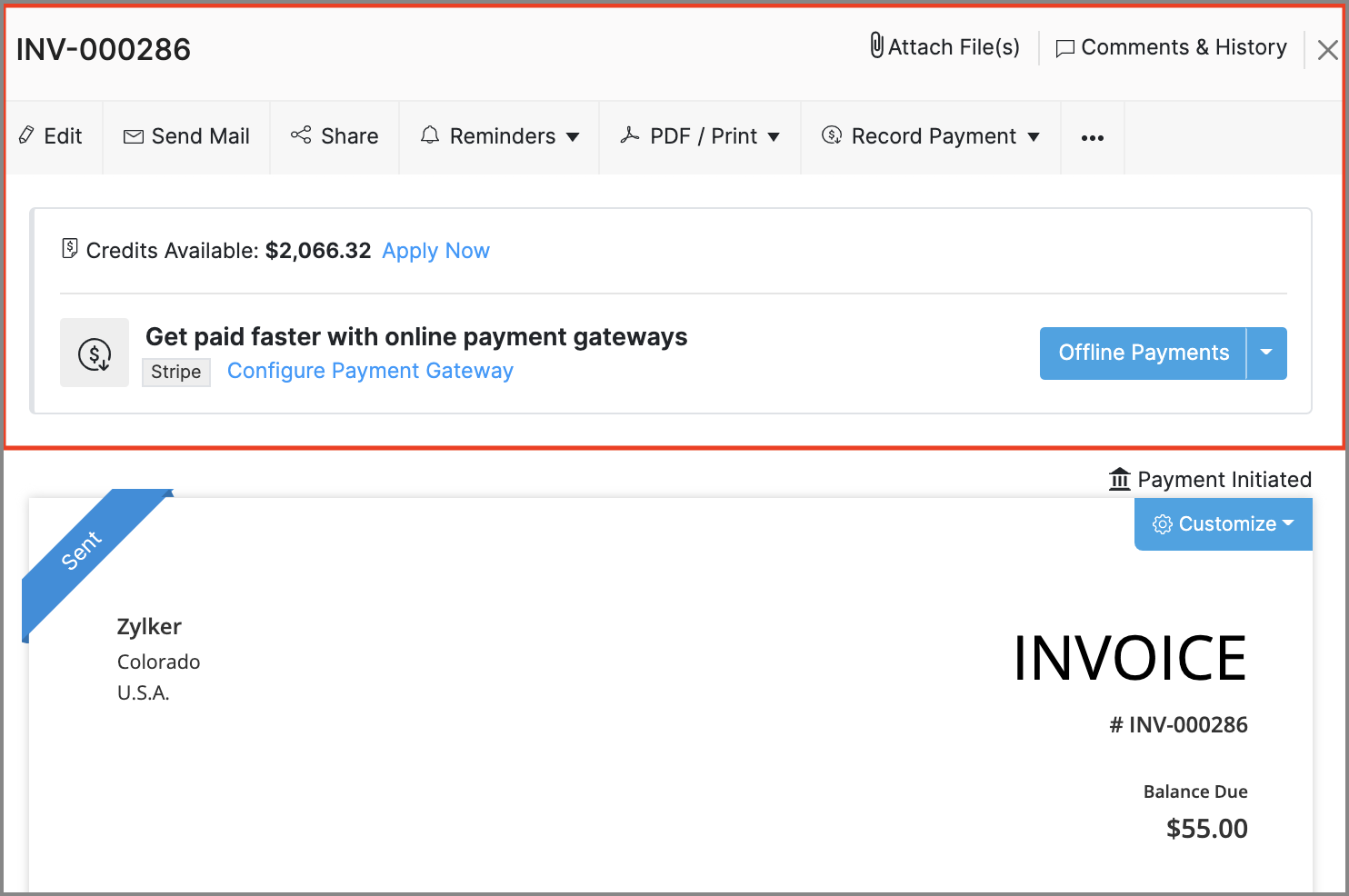
- Invoice Details: The action bar in the invoice details screen has been revamped. The new design adds text to previously standalone icons and also groups certain options to make them easier to find.
- Recent Activities: The recent activities dropdown, that's always present near the search bar will assist in navigation by listing any transactions or customers that have recently been updated, created or visited.
- Online Payments: The Online Payments section in Settings > Integrations, will be moved out to its own spot in Settings, and all the payment gateway integrations that are available will be grouped based on the type of payment methods that they support.
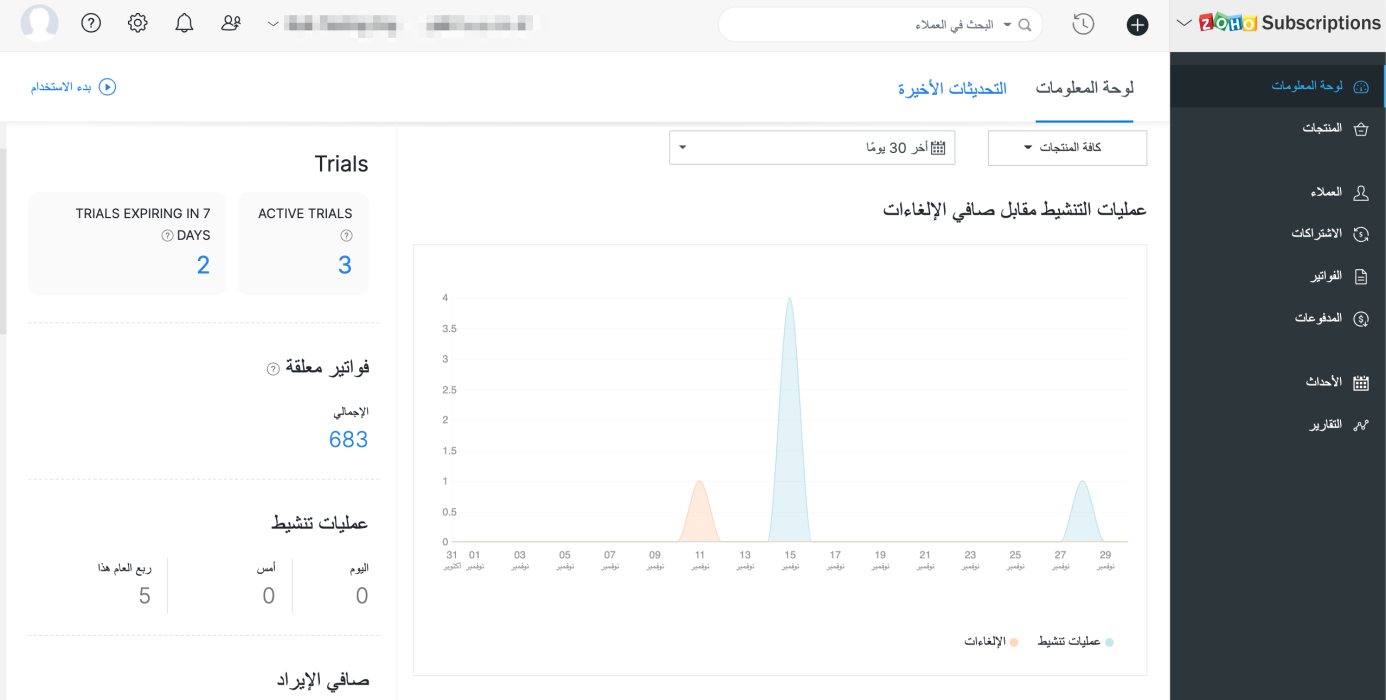
- Right-to-left interface: If your organization's language is set to Arabic, Zoho Subscriptions' entire interface, including navigation bars and other visual elements will be switched to a right-to-left style, so Arabic speakers will feel right at home.
New and improved settings
Apart from bolstering some existing modules with more preferences, there will also be new sections in Settings, to accommodate preferences for the newly added features.
Here's what will change in Settings:
- Users and Roles: You will be provided with an extensive range of configurations for how users can access reports.
- Templates: The existing Templates section will house templates for two new documents: Customer Statements & Payment Receipts. The template editor will also see improvements, such as the ability to add annexure content and adjust the width of individual rows in item tables.
- Reporting Tags: A new section to manage reporting tags will be added.
- Emails: The existing Email Notifications section will be renamed to Emails, and will direct towards Sender Email Preferences, Email Insights, and templates for email notifications.
The following changes will be made in Settings > Preferences.
- General: This is a new section that will contain common preferences, such as options for your organization's address format or PDF attachments in emails.
- Payments: The existing Payments section will be renamed to Payments Received, along with preferences fo custom fields and custom buttons.
- Delivery Notes & Packing Slips: These are two new sections, which will let you configure the layout and label names for delivery notes and packing slips.
- Users: This is a new section which will allow you to configure custom fields for the users of your organization.
These are some of the major features and improvements that will be available in Zoho Subscriptions. We'll reveal a full list of the new features and shed more light on the ones mentioned above soon.
We'll release these features in the weeks that follow. We can't wait for you to try them out! You can also write to us at support@zohosubscriptions.com if you'd like early access to these features. Your feedback is valuable to us, so make sure to let us know what you think about these updates in the comments below!
Best regards,
The Zoho Subscriptions Team
Topic Participants
Varun Steven
OfficeServ Accounts
Jim Kubicek
Trey Shadwick
pmc
Sticky Posts
What's New in Zoho Billing - February 2024
Hello everyone, We are excited to share the first set of updates for Zoho Billing in 2024. Read along to know more about a wide range of updates, from the Aging Summary in customer statements to Apple Pay support in Stripe. One-Time Invoice with PlansZoho Finance Workshop 2023 is coming to the USA. Get exclusive training on Zoho Finance apps, one-on-ones, and more.
Hello all, We'd like to invite you to our biggest Zoho Finance workshop in the United States. After a brief break, we are excited to be back. This year, we're bringing together our customers and community members for two days of curated hands-on sessions,Zoho Subscriptions wins IDC's 2020 SaaS CSAT Award for Subscription Billing
Dear customers, We're excited to share that Zoho Subscriptions has won IDC's 2020 SaaS Customer Satisfaction Award! As a team, we cherish each and every milestone with our customer community. And this particular award, focusing on customer satisfaction,Introducing: SMS notifications via Zoho Subscriptions
Dear customers, We hope you are doing well! We are happy to announce that you can now send SMS notifications to your customers right from Zoho Subscriptions. To facilitate this, we've integrated with Twilio, a leader in the business communication space.What's new this December in Zoho Subscriptions
The year is almost over and we here at Zoho Subscriptions have released new features and updates on the month of November. Let's take a look at the features we have worked on in the past month. Zendesk Integration The Zoho Subscriptions app for Zendesk allows your customer support executive to access customer details in an instant. You will be able to view the customer information from Zoho Subscriptions right from your ticket view. On enabling the integration, you will be able to: Get your customer
Recent Topics
Izettle or Sumup Integration for Zoho Books.
The Stripe & Square clearing works great in Zoho Books. Any further integrations planned in the future for Izettle or Sumup? These card processors are very common for taking payments with a card reader.Trying to access records in a custom module in Zoho Desk and not having luck
I've built a custom module in Zoho Desk and am using a custom function to query the records in the module and I'm not having any luck. The only way I have found to retreive a record is by getting it by its recordID (the long zoho assigned one). The functionZOHO Books Smart Accounting Software for Travel Agency
Dear Travel partner, Contact for Travel Agency Accounting Setup & Training Vansh Travel (ZOHO Books Authorised partner) Email: info@vanshtravel.com Mo: +91 98984 95155 Please find PDF452 Mailbox delivery restricted by policy error
We have been testing Zoho desk for about a week now and have been forwarding emails in via an Exchange Online Mail flow rule without issue until yesterday. Suddenly yesterday morning we started getting the vast majority of the emails stuck in PendingSend Email reply on behalf of Agent
Hi, When using the send email reply via the API I can set the reply on behalf of the customer by using impersonatedUserId in the header of the API call. Is there a way to do this for Agents too? I need to be able to send an email reply on behalf of anSharing Tickets to a team within a department
Hi there, We have a need for one department to be able to share tickets to a specific team within a department, I'm wondering if this is possible? All the shared tickets are going into the 'Shared Tickets' view for the whole department but is there aAutomatic Department and Employee Sync Between Zoho One and Zoho People
Dear Zoho Support, I'm writing to propose a valuable feature request that would streamline data management and improve user experience within the Zoho ecosystem: automatic synchronization between departments and employees in Zoho One and Zoho People.Maximum limit of bank accounts
I'm currently setting up Zoho Books in order to migrate at the start of our next financial year (April) and while adding bank accounts I've tried to add a second account from the same bank and receive an error about the maximum limit of bank accounts.Unable to load a specific image
Hi I am trying to upload an svg file, which reports that there is "a problem with the file", but does not say what sort of problem. I can't find anything which says which files are supported, so it may be it does not support svg. (which would be a real shame) The file itself will open in either Firefox or Chrome without problem. For the moment I am using a png file, which does not zoom well of course. DavidWhy does the Address field show the wrong map location even with a correct Pincode?
I am noticing an issue with the Address field map in Zoho Creator. When I enter a city name that exists in multiple locations within the same state, the map sometimes points to the wrong area even if I have entered the correct Pincode. Currently, it seemsArchive Option in Conversation View
Hello, I have a suggestion\request to add an "Archive Thread" button in conversation view of Zoho Mail. The best suggestion I have is to put an "Archive Thread" button next to the "Label Entire Thread" button in conversation view. Most users don't justOutlook/Hotmail Blocking Zoho SMTP IPs (S3150)
We are currently facing a serious deliverability issue with Zoho SMTP while sending transactional OTP emails for our production application. Emails sent to Outlook / Hotmail addresses are being rejected with the following error: 550 - 5.7.1 Unfortunately,Outlook is blocking incoming mail
Outlook is blocking all emails sent from the Zoho server. ERROR CODE :550 - 5.7.1 Unfortunately, messages from [136.143.169.51] weren't sent. Please contact your Internet service provider since part of their network is on our block list (S3150). It looksZoho Social API for generating draft posts from a third-party app ?
Hello everyone, I hope you are all well. I have a question regarding Zoho Social. I am developing an application that generates social media posts, and I would like to be able to incorporate a feature that allows saving these posts as drafts in Zoho Social.Temporarily rate limited due to IP reputation.
We have suddenly started receiving the following Mail Delivery Status Notification: Diagnostic-Code: 4.7.650 The mail server [136.143.184.12] has been temporarily rate limited due to IP reputation. For e-mail delivery information, see https://aka.ms/postmasterIMPORTANT: It doesn´t search for letters with portuguese characters.
Some of my articles have for example the word "vídeo". But if I search for "vídeo" it doesn´t find them. If I search for "video" it does find them. Idealy, it should find the articles either way. But if I have to choose, it would be better to find theIMPORTANT: It doens´t show full article name on search - Should add line break
When we search for articles, it doesn´t show the full name. There should be a line break so the user can see the full article name, otherwise the user can´t know if that´s the article he/she is looking for. This is very important, otherwise the user hasZoho Books - Payment Gateway - Revolut
Hi Books Team, My feature request if to include the popular platform Revolut as a payment collection option on invoices in Zoho Books. Please upvote if you are also looking for this option.Zoho Books | Product updates | January 2026
Hello users, We’ve rolled out new features and enhancements in Zoho Books. From e-filing Form 1099 directly with the IRS to corporation tax support, explore the updates designed to enhance your bookkeeping experience. E-File Form 1099 Directly With theKaizen #233 - Generating AI-powered Follow-up Emails Using CRM Functions and Widgets
Hey everyone! Welcome back to another interesting post in the Kaizen series! Sales teams regularly capture interaction notes in CRM after speaking with prospects. However, drafting a follow-up email that reflects the conversation context can be repetitiveConnect Bank in Zoho Books
Can I connect UOB or Ariwallex in Zoho Books?Using MPN across multiple SKUs and inventory tracking
I have several different SKU's that share a common MPN and would like to track inventory by MPN. SKU1 has MPN1 assigned SKU2 has MPN1 assigned Here is an example If I start with 5 of MPN 1 in stock I want each SKU1 and SKU2 to show as 5 in stock, If IMarketing Tip #1: Optimize item titles for SEO
Your item title is the first thing both Google and shoppers notice. Instead of a generic “Leather Bag,” go for something detailed like “Handcrafted Leather Laptop Bag – Durable & Stylish.” This helps your items rank better in search results and instantlyFeature Enhancement Request – Text Formatting Options in Item Description (Zoho Books/Quotes Module)
Dear Zoho Development Team, Greetings from Radiant360 Integrated Technical Services LLC. We would like to bring to your attention a functional limitation we've encountered within the Item Table / Quote Description section of Zoho Books (and Zoho CRM Quotes).ZOHO Books Query
Good day, Can someone please advise. I recently migrated from ZOHO Invoice to ZOHO Books. No that I want to use the inventory on Books I cant as all my items have transaction history. The person I spoke to at ZOHO said I need to create a new Company profileBest way to schedule bill payments to vendors
I've integrated Forte so that I can convert POs to bills and make payments to my vendors all through Books. Is there a way to schedule the bill payments as some of my vendors are net 30, net 60 and even net 90 days. If I can't get this to work, I'll haveinventory removal at packing list or shipment.
currently our system is set to remove inventory at invoice. This is creating an inventory nightmare? Is it possible to change the settings to remove the item from inventory at either the packing slip stage or shipping the item.How to add employee and not invite them to log in?
I want to add 50 employees, but invite them only when everything will be configured and ready. Is it possible? Should we create employee profiles and then convert them later? Thank you,Any Offline Developing Environements or IDE's for Zoho Creator
Hi there, Is there any offline developing environment for zoho creator like the Eclipse for sales force.com? So that i could make my development faster. Its taking a laot of time to write save and verify the code in Zoho Creator online. Thanks in advanceHow is Your eCommerce Experience w/Zoho Inventory?
First off, I'm SUPER grateful for the advent of Zoho Inventory and now the Zoho Commerce Suite. Overall, Inventory is a great product, especially for customers without an eCommerce presence. For eCommerce companies (especially those shipping more than ~10 packages/day), however, there are certain drawbacks that keep my clients from moving over to Zoho Inventory: Cons: 1. Invoice + Package Creation from Shopify/Other eCommerce Integrations: Zoho Inventory makes the somewhat perplexing decision toAbility to Use Both AND and OR When Creating Rules (Advanced Conditions)
I'd like to be able to use more complicated logic when setting up rules. E.g. in Zoho Mail, I can choose "Advanced conditions (AND/OR) to create a rule that can be applied to multiple subject lines from the same sender. But in Zoho TeamInbox, I will haveFacturation électronique 2026 - obligation dès le 1er septembre 2026
Bonjour, Je me permets de réagir à divers posts publiés ici et là concernant le projet de E-Invoicing, dans le cadre de la facturation électronique prévue très prochainement. Dans le cadre du passage à la facturation électronique pour les entreprises,Zoho Desktop App- Unable to Minimize/Freezes
I'm having issues with my Zoho Mail desktop app (PC). When go on my desktop and open the app this is what happens: - Unable to minimize and close app (in the screenshot attached you can see at the top right there is no option to minimize/close) - UnableZoho Invoice Zapier Integration
Is there still a way to use Zapier with Zoho Invoice? I've read online that that migrated to Zoho Books or Billing but since I am just using Invoice I can not find a Zapier Connection anymore.Conect chat of salesiq with zoho cliq
Is there any way to answer from zoho cliq the chat of salesiq initiated by customers?Bug: OAuth 2.0 State Parameter fails with Pipe Delimiters (RFC 6749 Non-Compliance)
I've discovered a bug in how Zoho's API Console handles the OAuth 2.0 authorization flow when the state parameter contains pipe characters (|), and I'm hoping the Zoho team can address this in a future update. The Issue Zoho's OAuth 2.0 implementationZobot with Plugs
Hello, I am having a problem with Zobot using Plugs. Here is my current flow: When I run the flow, I should immediately see the messages from the initial cards (Send Message cards), then after running the plug, and finally, see the messages after thePrint a document from Zoho Writer via Zoho Creator
If i use the code below i can get writer to create a new document or email it to me but i want to be able to print it directly from the browser and not have to send it via email and then print. Below is the code im using. Attached options form zoho writerTraining for How can i Operate the Software Features
need to Help for Training of the ZOHO Billing SoftwareAutomating Vendor Contract Management between Zoho Contracts and Zoho Books using Zoho Flow
Managing vendor agreements across procurement and finance systems often requires manually downloading executed contracts and attaching them to vendor records. This can become time-consuming and difficult to manage when dealing with a large number of contracts.Next Page