Use Zoho Creator as a source for merge templates in Zoho Writer

Use Zoho Creator as a source for merge templates in Zoho Writer

Hello all!

We're excited to share that we've enhanced Zoho Creator's integration with Zoho Writer to make this combination even more powerful. You can now use Zoho Creator as a data source for mail merge templates in Zoho Writer.

Making more data from your favorite low-code development platform accessible in Writer will open new opportunities for users to create and send a wide variety of documents, manage business processes efficiently, and ensure security.

Features

Seamless integration with subform fields
Zoho Creator users can now seamlessly utilize subform fields in Zoho Writer with the merge task feature. This empowers businesses to create documents that are more data-driven and user-friendly, and reduces the manual effort required for document preparation.

Access more Creator fields
Access to comprehensive data from Creator empowers users to produce intricate and data-rich documents. With this enhanced integration, you can access data in subform fields, and lookup fields.
This seamless data integration streamlines the creation of complex business documents, which is particularly beneficial for organizations dependent on data-intensive documents like contracts, reports, and financial statements.

Uses and benefits

Unlock the power of signatures
One of the standout features of this integration is the ability to use the signature field in Zoho Writer. For instance, in contract management, you can use electronic signatures to streamline the approval and signing process while ensuring security.


Turn IDs or fields into barcodes
Another exciting feature is the ability to convert Creator IDs or fields into barcodes with help of the mail merge templates. Using barcodes enables efficient data tracking and retrieval, enhances accuracy and accessibility, and much more.

Assume a Vendor management app which contains contracts. The mail merge templates feature will facilitate the seamless extraction data from Creator to Writer, and help you create a document for contracts. Within the Writer document, the fields, Product IDs, Alphanumeric or numeric fields can be shown can be visually represented as barcodes.
   

How to get started

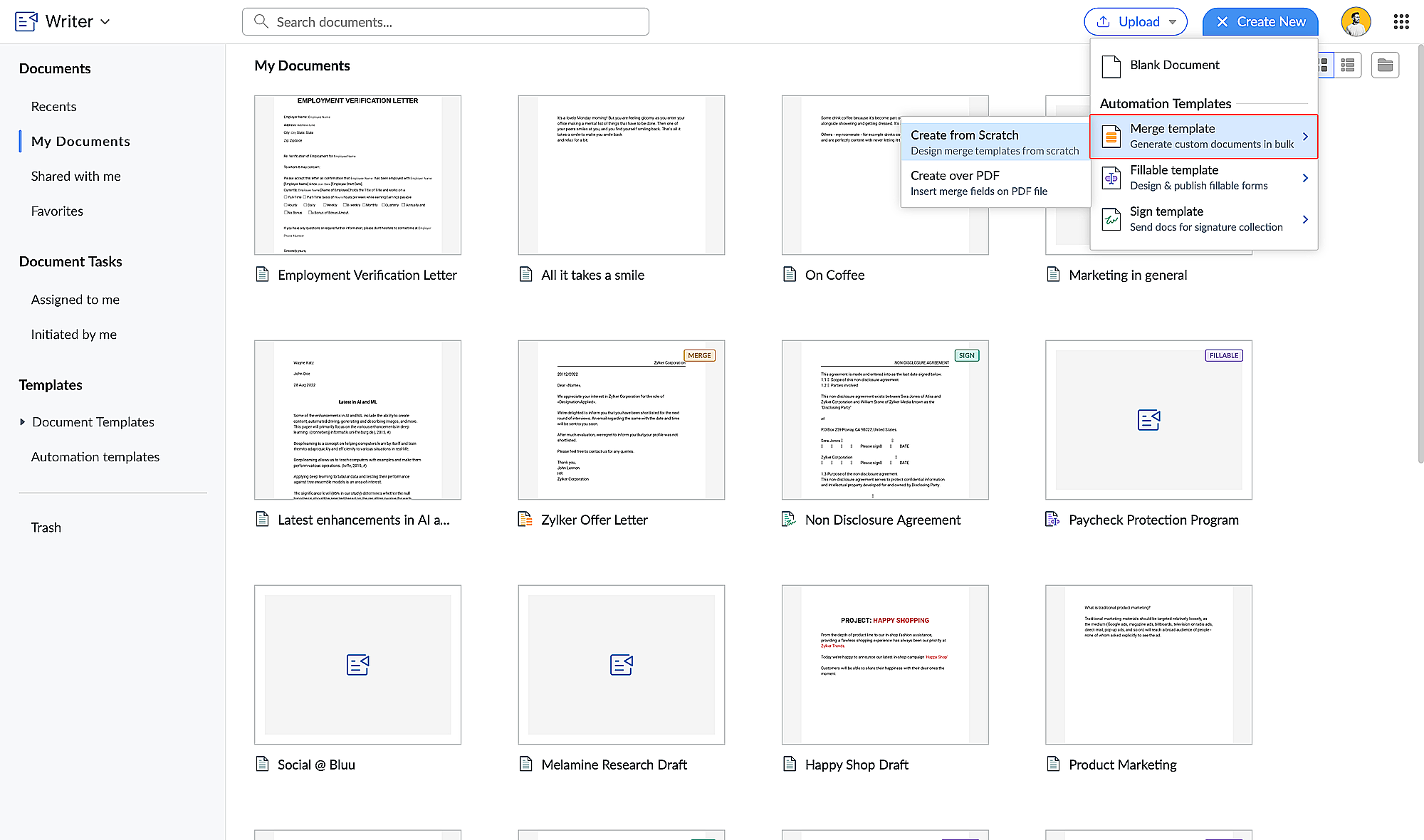
  1. Go to writer.zoho.com and click Create New.
  2. Choose Merge Template under Automation Templates and click Create from Scratch. Design your merge template using these steps.
  3. Click the hamburger menu on the left and click Automate.

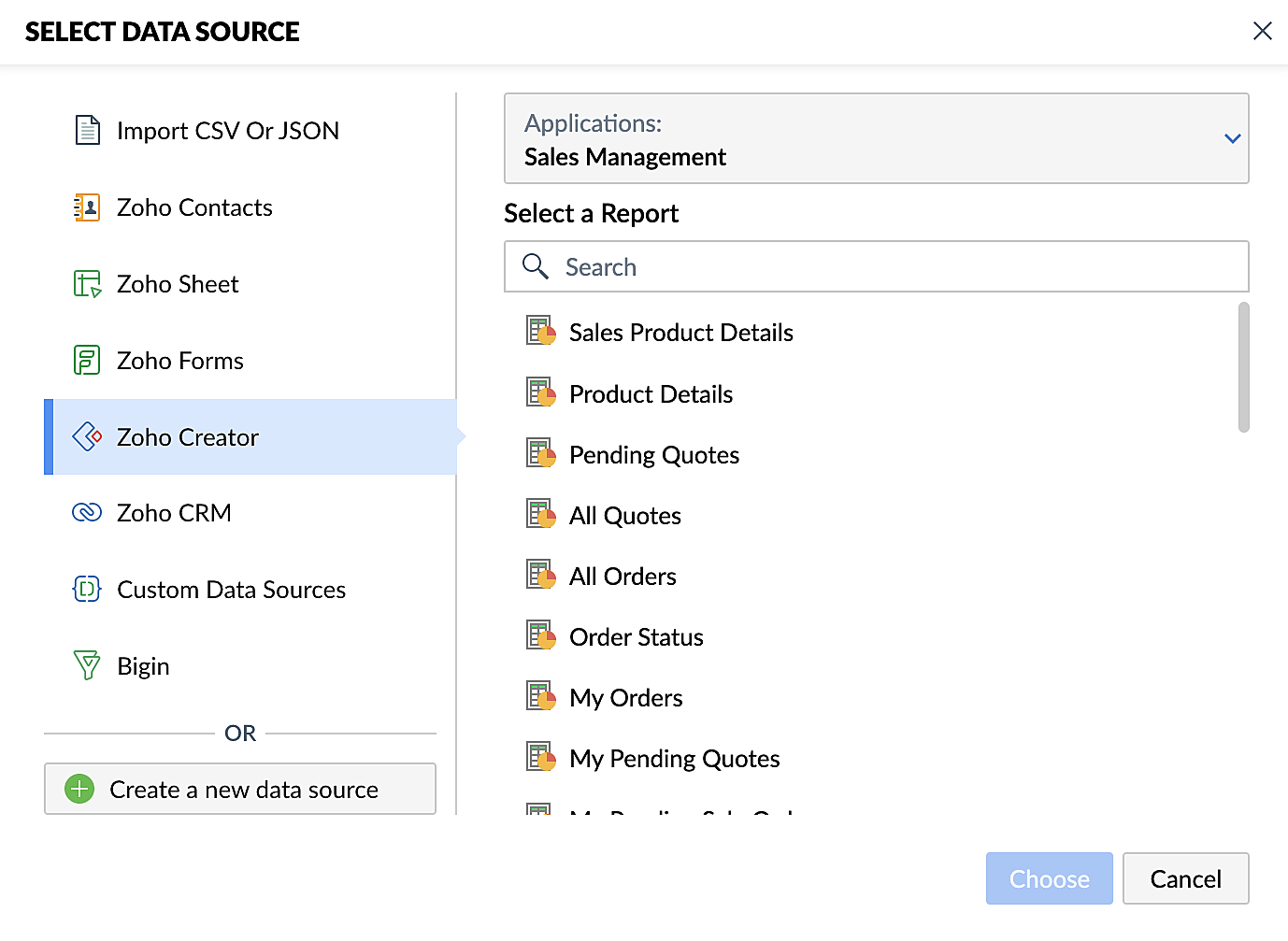
  4. Under Select the Data Source, choose Zoho Creator and select your application.
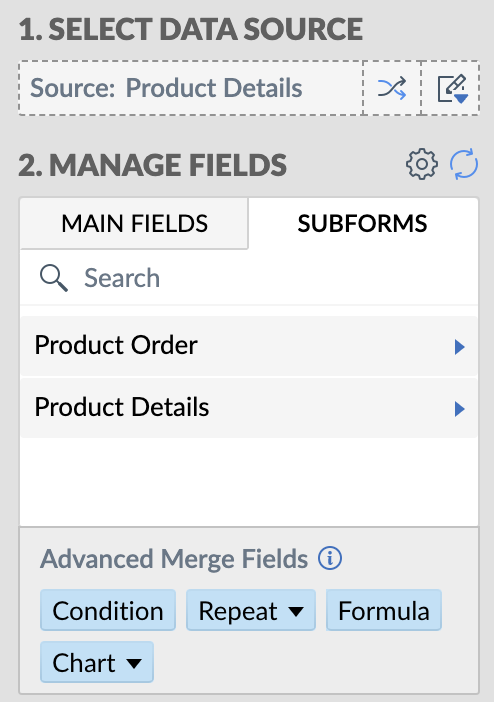
  5. Add the appropriate fields from your Creator application. Click here for a detailed guide to working with fields.

Steps for creating merge documents using a Zoho Creator workflow
  1. Create a form in Zoho Creator with the necessary fields.
  2. Create a merge template in Zoho Writer using these steps.
  3. Create a workflow for your Creator form and choose Deluge Script as the workflow action. This allows you to perform custom functions with Writer's mail merge.
  4. Use the name of the connection you've added in the Deluge script to perform the function you've configured. Connections enable you to integrate cloud services via Deluge.
These enhancements make Zoho Creator and Zoho Writer an even more valuable combination for businesses looking to simplify document management. By harnessing the capabilities of both platforms, businesses can look forward to a future where document creation and data management are more efficient, secure, and user-friendly than ever before.

Also, do take a look at Zoho Writer's post regarding mail merge templates.

Feel free to test out this integration and provide your feedback by reaching out to support@zohocreator.com or sharing your thoughts in the comments section below.

Regards,
The Zoho Creator Team
    • Sticky Posts

    • Introducing Zoho Creator's 2025 Release Projection 2

      Hello Creators! I'm Prakash, from the Creator product management team, and today I'm delighted to unveil our next set of features as part of Release Projection 2 for 2025. With thoughtful analysis and planning, we've curated powerful new capabilities
    • Zoho Creator - 2023 Release Projection 1

      Hello everyone! A very Happy New Year to you and your family. Hope you're all good and having a great time using Zoho Creator to make your lives easier and your businesses prosper. 2022 was an action-packed year for us at Creator, and we hope to continue
    • Zoho Creator User Group meetups in a city near you! - Oct - Nov, 2023

      Greetings from the Zoho Creator team! We're hosting a series of Zoho Creator meetups in various cities across the globe, and we'd love to meet you there! Our meetups are a great opportunity to network with industry peers, exchange ideas and best practices,
    • Zoho Creator - 2023 Release Projection 2

      Hello everyone! Time truly flies when you're having an incredible journey, and today we mark the completion of an eventful and action-packed six months. It feels like just yesterday when we embarked on this adventure together with the launch of our new
    • Upcoming Updates - August 2022

      Hi all, Greetings from the Zoho Creator team! Today we've got news for you on some exciting updates. And rest assured— there’s more to come! In this post, we'll be going over the upcoming features and improvements for this month as mentioned below. A
    • Recent Topics

    • In App Auto Refresh/Update Features

      Hi,    I am trying to use Zoho Creator for Restaurant management. While using the android apps, I reliased the apps would not auto refresh if there is new entries i.e new kitchen order ticket (KOT) from other users.   The apps does received notification but would not auto refresh, users required to refresh the apps manually in order to see the new KOT in the apps.    I am wondering why this features is not implemented? Or is this feature being considered to be implemented in the future? With the
    • Sync Task Status from Zoho Projects to Zoho Desk

      Hi Zoho Desk Team, Hope you’re doing well. We’re actively using the Zoho Desk–Zoho Projects integration, which helps our support and project teams stay aligned. However, we noticed that when we change a task’s status in Zoho Projects, the change is not
    • Lost the ability to sort by ticket owner

      Hi all, in the last week or so, we have lost the ability to sort tickets by Ticket Owner. Unlike the other columns which we can hover over and click on to sort, Ticket Owner is no longer clickable. Is it just us, or are other customers seeing this too?
    • Placeholder doesnt work in email tempalate

      Hi Team,  I have put in the customer happiness rating place holder in my email template but when I pick the template in my ticket and send it to client, the place holder doesnt get generated. What am I missing here? screenshot attached. 
    • Search API filter/sort ignores comment-triggered modifiedTime updates

      Summary When a comment is added to a Call or Account, the parent record's modifiedTime is correctly bumped. This bumped value is visible in: GET /api/v1/calls/{id} ✅ GET /api/v1/calls/search without a filter ✅ — the record's response body shows the new
    • Automation#17: Auto-Create Tasks in Zoho Projects Upon Ticket Creation in Zoho Desk

      Hello Everyone, This edition delivers the solution to automatically create a task in Zoho Projects when a ticket is created in Zoho Desk. Zylker Resorts uses Zoho Desk for bookings and handling guest requests. Zylker resorts outsources cab bookings to
    • Introducing parent-child ticketing in Zoho Desk [Early access]

      Hello Zoho Desk users! We have introduced the parent-child ticketing system to help customer service teams ensure efficient resolution of issues involving multiple, related tickets. You can now combine repetitive and interconnected tickets into parent-child
    • Cross Module Filtering – Use Fields from Lookup modules in Custom Views criteria and Advanced Filters

      Hello everyone, Zoho CRM now enables you to achieve deeper filtering of records in a module, using fields of a lookup, thereby enhancing your data management experience manifold. This filtering based on lookup module fields is now available in advanced
    • Schedule Timeout 5 minutes vs. stated 15 minutes

      I am running into a function run timeout error after 5 minutes for my schedules. The Functions - Limits documents states it should be 15 minutes: Functions - Limits | Online Help - Zoho CRM. What should it actually be? Due to the 5 minute timeout, I'm
    • Printing invoice from creator using writer

      Hello. I have created my invoices using Zoho Writer and i'm sending data to them from Zoho Creator by selecting a row in a report and then clicking a button which has workflow connected to it to send the date to the invoice in writer. This is working
    • Remove Bounced email addresses from CRM after running a campaign

      HI, Is there a simple way to remove bounced leads in the CRM where there email doesn't exist anymore after running a campaign?
    • CRM Notes

      Hello, We want to add a Note to the Contact record when a Note is added to a Case or Deal. I wasn't able to do this using a workflow, so I tried using Zoho Flow, but that didn't work either. Does anyone have a suggestion on how we can accomplish thi
    • Building a custom site

      do we have an option in Zoho to build custom sites like adding custom functionalities? want to make a site like jumble puzzle answers for today. Is it doable? Please assist.
    • How to Automate an Unsubscribe based on Scoring

      I automatically assign a negative point score to bounced emails and would like to automate unsubscription of these emails from our Campaigns, without losing the contact data. (Oftentimes the lead is no longer at a business, but I want to keep the business
    • Introducing PDF conversion in Deluge

      Hello everyone, We're pleased to introduce built-in PDF conversion capabilities in Deluge with the launch of the convertToPDF task. As PDF is one of the most widely used formats in professional environments, this task helps streamline document generation
    • Recurring Addons

      Hi, I know you can set the pricing interval for addons to weekly, monthly and yearly & set it for one off or recurring, which these are fine as a base addon item. It really would be helpful if when creating a subscription when you add on the addon item
    • Start Workflow from Deluge Script

      I have developed a customized process from our CRM that leverages a deluge script to create a statement of work document. Once the document has been created via the merge and store function, I would like the ability to start a workdrive review & approve
    • Re: Application Architecture in Zoho Creator — A Platform-Specific Deep Dive

      A recent community post on application architecture made some excellent points about planning architecture early in Zoho Creator projects. The core message is right — Creator applications have a habit of growing organically into maintenance nightmares,
    • Option+C shortcut conflict

      In the latest Cliq release, you introduced `Option+C` shortcut to start a new audio call. In Polish, `option+C` is used for letter `ć`. I changed this button combo but `Option+C` is still being blocked and doesn't allow me to write letter `ć`.
    • Zoho Books | Product updates | April 2026

      Hello users, Welcome to our April 2026 product updates roundup! Highlights include profit margin for sales transactions, insights in reports, recording deposits from undeposited funds in banking, and faster production workflows with improved assembly
    • Need Easy Way to Update Item Prices in Bulk

      Hello Everyone, In Zoho Books, updating selling prices is taking too much time. Right now we have to either edit items one by one or do Excel export/import. It will be very useful if Zoho gives a simple option to: Select multiple items and update prices
    • What is the maximum length/size of a presentation on Apple TV?

      Hello, I have a presentation here that I regularly show on Apple TV. It’s always the same presentation, which keeps getting longer and more extensive over time. Almost every slide contains a graphic or photo that takes up the entire slide. That means:
    • Items Landed Cost and Profit?

      Hello, we recently went live with Zoho Inventory, and I have a question about the Landed Cost feature. The FAQ reads: "Tracking the landed cost helps determine the overall cost incurred in procuring the product. This, in turn, helps you to decide the
    • How to set custom Sales Order numbers

      I am trying to create Sales Orders with data from Jotform submissions. Auto number generation is disabled within Books. Whereas the flow Input recognizes the number (40732 in this example), the Output does not. How can I fix this? I'd like the number
    • Differences - Blueprint vs. Approval Process

      Cannot seem to get my head around the key differences between the Blueprints and the Approval Process. For me it seems like different flavours of more or less the same thing - especially now that we have the option of Record Locking. Have a quote to sales
    • Displaying Rate Inclusive of GST per unit

      Hello, Currently when I enter the pricing of a line item it shows the overall amount (price including tax * quantity). I would like to see price/unit inclusive of GST. Is there any way to simplify this and to be able to view it? I've attached my current
    • RouteIQ user Licensefor Non–Zoho One User

      Zoho RouteIQ needs to be purchased for Zoho CRM. The current setup uses the Zoho One plan, but RouteIQ is required for a different user who is not part of Zoho One. However, they need access to routes and customer details within RouteIQ for planning their
    • Zoho Flow not handling Boolean properly

      Hi, I have a checkbox in one system that I'm trying to sync with a checkbox in Zoho CRM. The value from the source system comes in as blank (unticked) or 1 (ticked). I've written the following custom function to convert the output to either boolean false
    • Set Default Status of Assembly to "Assembled" When Entered in UI

      I've just discovered the new "confirmed" status of Assemblies within Inventory. While I understand the intent of this (allowing for manufacturing planning and raw material stock allocation), it was initially confusing to me when manually entering some
    • Introducing the New Applications Module

      We're excited to introduce the Applications module, a powerful new feature designed to revolutionize how you manage job applications. This module offers a more streamlined, efficient approach to tracking and processing candidates throughout your recruitment
    • Zoho Browser??

      hai guys, this sounds awkward but can v get a ZOHO BROWSER same as zoho writer, etc. where i can browse websites @ home and continue browsing the same websites @ my office, as v have the option in Firefox, once i save and close the browser and again when i open it i will be getting the same sites. If u people r not clear with my explanation, plz let me know. Thanks, Sandeep  
    • since the new interface of ZOHO writer can't turn of automatic reminder option for merge documents

      Since the new interface of ZOHO writer I have this problem. I have a large set of templates that I use to send documents to ZOHO Sign. But now in all those templates the box for Sending reminders is ticked, which i don't want. But even if I untick the
    • Sales Allowed Beyond Available Stock and Payment Recorded Without Restriction

      Hi, While testing in Zoho Inventory, I noticed that a sales order can be created with a quantity exceeding the available stock in the selected warehouse. In my case: Available stock: 5 units Ordered quantity: 6 units Despite this: I was able to convert
    • Function #25: Automatically generate purchase orders from a sales order

      We kicked off the "Function Fridays" series with the goal of helping you automate your everyday accounting tasks. As we delve into today's post, I'm delighted to announce that we're here to present the 25th custom function in this series. While it is
    • How can I add Material cost to a project?

      Hello, We use Zoho project to manage scheduled work. This consists in labour tasks and matrials cost. How can I add the material budget, then teh cost to the project? Thanks Barbara
    • Users I've shared the sheet with cannot use the Custom Functions

      Hi, I have a Zoho Sheet worksheet that I shared to 2 colleagues, giving them full access: In that worksheet, I created a button with a custom Deluge function and it works flawlessly for me: For those I shared the worksheet to, when they click the button,
    • Mail bounces due to bad reputation

      Good evening. I'm seeing these errors from both hotmail/outlook and yahoo, as well as hard bounce from Virgin Media and talktalk for some time now. Bounce category: Connection issues Reason: uncategorized-bounce Message: 4.7.650 The mail server [136.143.188.237]
    • Automation Series #3: Macro vs Workflow in Zoho Desk

      Workflows vs Macros in Zoho Desk: Choosing the right help desk automation This post is part of the "Desk Automation Series," Chapter 1. Through this series, we will help you choose the right automation type in Zoho Desk by comparing commonly confused
    • WO Completion Status Not Updating Automatically

      Hello Latha, Hope you are doing well. Over the past few days, we have been facing an issue with WO completion. When an AP is marked as complete, the work order status is not automatically updating to “Completed,” and we have to mark it manually. Could
    • Limiting the form - Zoho People

      Hi Team, I would like to limit the number of form/request submissions for employees within a given month. For example, if an employee has already submitted 3 requests in the current month, they should not be allowed to submit any further requests. An
    • Next Page