We're thrilled to announce a significant update focused on expanding your data connectivity, enhancing visualization capabilities, and delivering a more powerful, intuitive, and performant analytics experience. Here’s a look at what’s new.
Explore What's New!
Accessibility
Introducing a new Accessibility section in Zoho Analytics. It gives you full control over how you view and interact with your Zoho Analytics interface. This update brings enhanced usability and helps ensure a more comfortable, efficient, and accessible reporting experience.
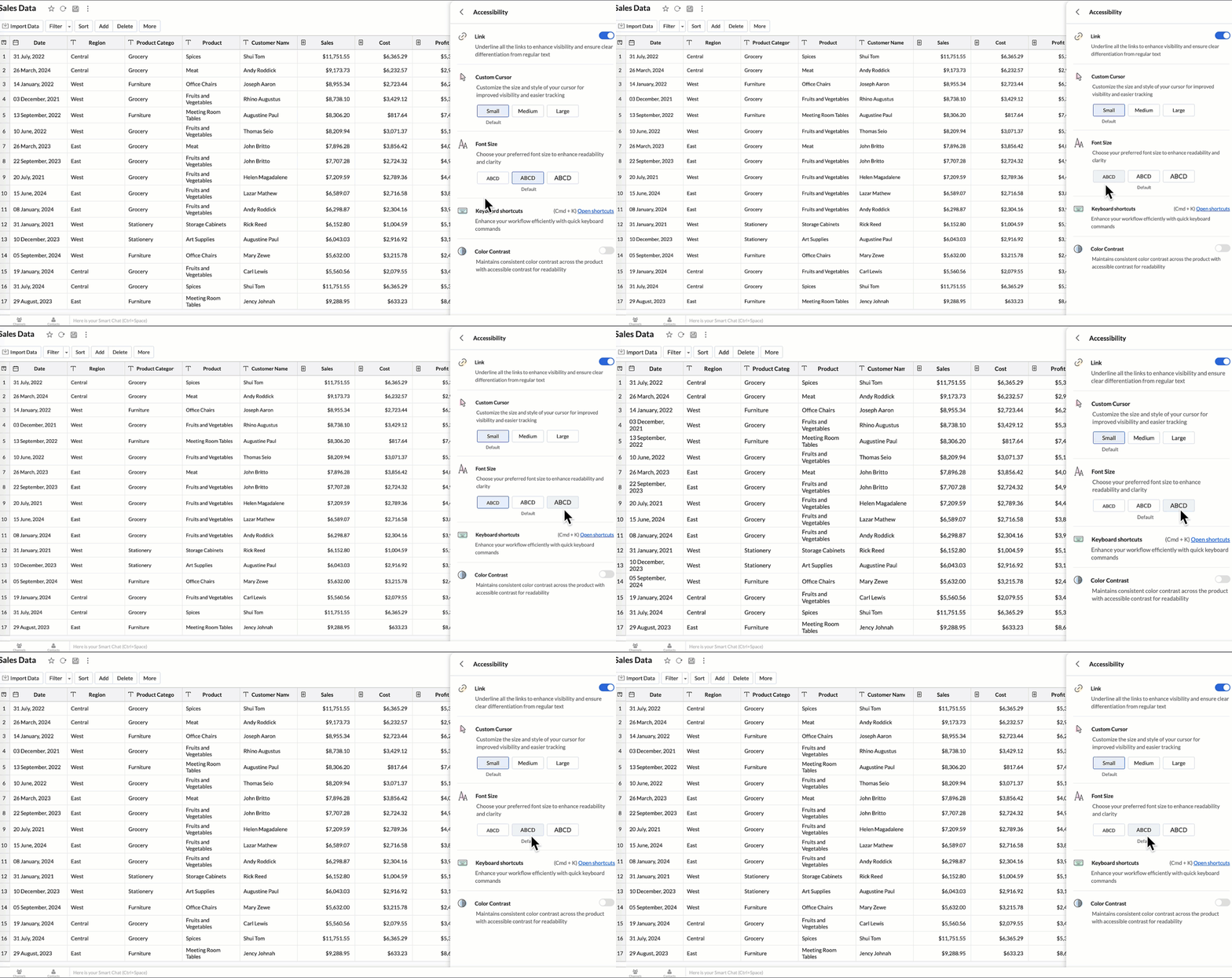
You can now personalize your interface with these new settings:
- Highlight Links - Underline all links to distinguish them clearly from regular text.
- Custom cursor - Choose the size of your mouse cursor (Small / Medium / Large) for better visibility and easier navigation.
- Font size - Adjust the font size of the interface to suit your reading comfort.
- Color contrast - Enable high-contrast mode to improve readability and support users with visual impairments.
- Keyboard shortcuts - Access a full list of built-in shortcuts, to speed up your workflow and navigate quickly using the keyboard.
Learn more.
New Data Connectors
Bring data from more sources into your analytics ecosystem with these new native connectors.
Qntrl Connector
Effortlessly bring workflow and process data from Qntrl into Zoho Analytics. Build reports to analyze task progress, approvals, and operational efficiency.
Learn more.
Asana Connector
Sync your Asana tasks, projects, and workflows seamlessly. Create visual dashboards to track productivity, timelines, and team performance.
Learn more.
Zoho Community Spaces Connector
Import engagement and activity data from Zoho Community Spaces. Analyze member participation, content performance, and community growth trends.
Learn more.
Zoho Finance Connector - New Modules
Gain deeper financial insights with newly added modules, enabling more granular reporting and analysis across your Zoho Finance suite.
Learn more.
Data Sync & Live Connect Enhancements
Incremental Fetch Enhancements
- From Other Workspaces: Users can now configure incremental fetch for data imported from another workspace, bringing in only new or updated records. This improves sync efficiency and reduces load times.
- For Custom Queries: Incremental fetch is now supported for data imported via custom queries, retrieving only new or updated records to enhance performance and reduce processing time.
Learn more.
Developer Hub Enhancements
API – Ruby Language Support
Zoho Analytics SDK now supports Ruby, enabling developers to build Ruby-based integrations and automation with native methods.
Learn more.
JS API - Tab Switch
Enhance embedded dashboard navigation. The JavaScript API now allows you to switch between tabs programmatically, enabling a better navigation control and interactive dashboard experiences.
Learn more.
Map & Geo Analytics Enhancements
Map-Layering Enhancements
Map Layering now includes drill-through for individual layers, options to fix unresolved locations, and the ability to use layered maps as filters in dashboards. These updates deliver deeper and more interactive geo-analysis.
Learn more.
Map Chart – Tooltip Enhancements
Map chart tooltips have been refined by removing Latitude/Longitude values. Users now see cleaner, more meaningful data highlights.
Reporting & Visualization Enhancements
Drill Through Enhancements
Drill-through is now supported for both Public Views and Embedded Views, enabling viewers to seamlessly access related reports for deeper data exploration and enhanced analytical context.
Previously, drill-through functionality was limited to shared reports. With this enhancement, viewers can now open linked drill-through reports, provided those reports have also been made Public.
Learn more.
Tooltip / Info Icon in Widgets
Widgets now support tooltips and Info icons to display additional descriptions or context. This helps dashboard viewers understand metrics instantly.
Learn more.
Anomaly Detection for Dimensional Fields
Zoho Analytics now supports enhanced anomaly detection when a dimension field (category) is added to the Color shelf. Users can choose from multiple detection modes to better analyze deviations across different perspectives
- Overall data
- Each X-Series
- Each Color-Series Individually
- Each Combined Series of X and Color Columns
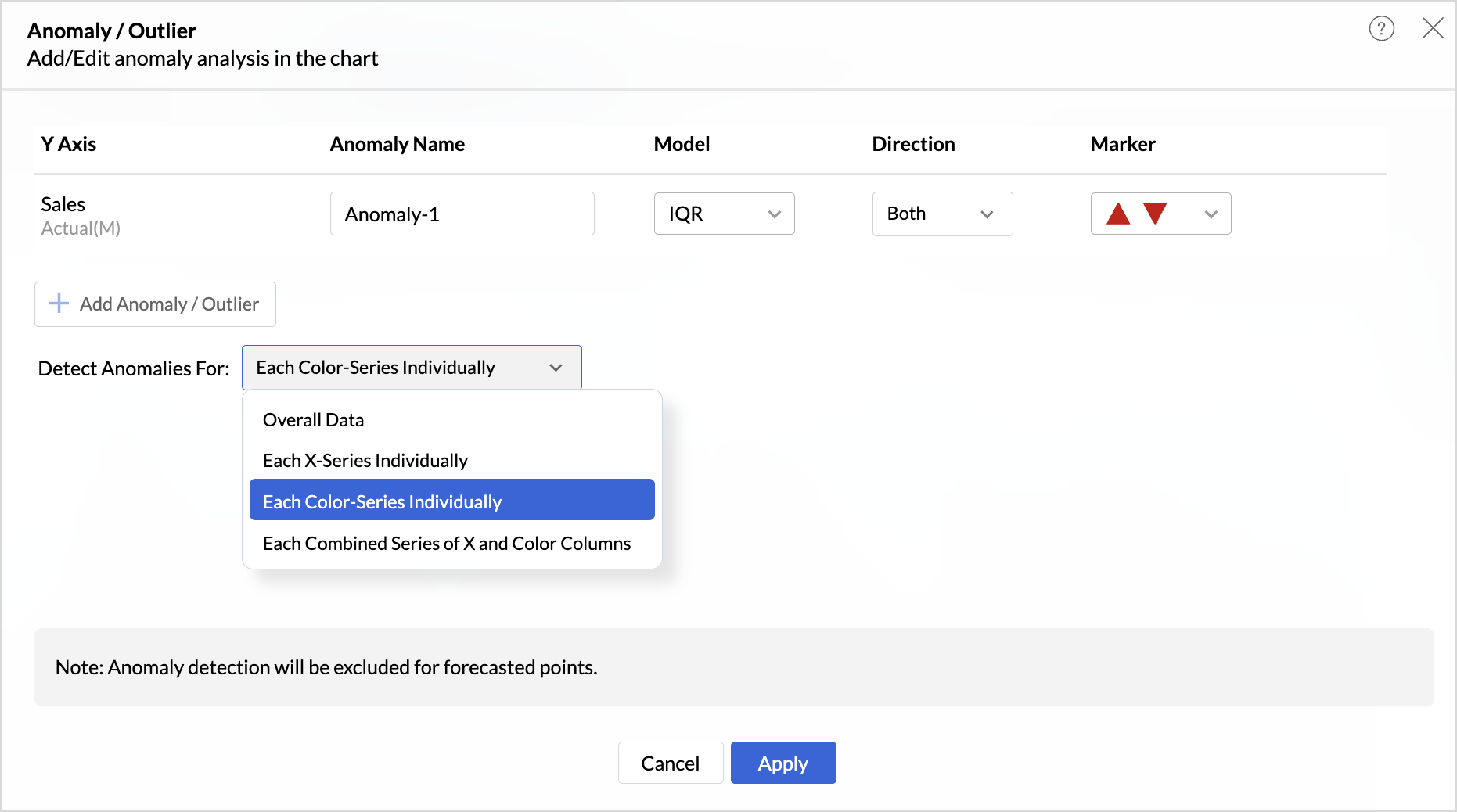
These enhancements offer greater flexibility and precision in uncovering unusual trends and outliers across segmented data visualizations.
Learn more.
Sorting of Values Across Group in Pivot Views
We have added a new option called Sort across Group which helps you apply clearer and more consistent sorting in Pivot Tables.
Earlier, sorting worked only inside each group. With Sort across Group, you can now sort the entire pivot table based on the selected column, regardless of how the groups are arranged.
Freeze Column Support in Pivot & Summary Views
We have added Freeze Column support in Pivot and Summary Views to help you work more comfortably with wide reports. This feature keeps selected columns fixed on the left side of the table while you scroll horizontally, allowing you to compare key columns with other metrics without losing context.
Report-Level Fiscal Year Option
Align individual reports with your organization's financial calendar by defining the Fiscal Year start month at the report level. This setting applies only to the selected report and appears when a date column is used, enabling accurate time-period analysis.
Learn more.
Dynamic Thresholds with Variables in User Filters
Aggregate formulas can now be used with variables inside thresholds. When paired with User Filters, threshold values are calculated dynamically based on each user’s filter selections ensuring every user sees context-relevant threshold boundaries instead of a fixed value.
Datatype-based Variable Suggestions for Default User Filters
When configuring default values in User Filters, only variables matching the filter’s datatype are now listed. This prevents configuration issues such as assigning a text variable to a numeric filter, and ensures accurate default value mapping.
Learn more.
AI & ML Enhancements
AutoML – 128GB Server Support
AutoML now runs on high-power 128GB servers in the US Data Center. This enables faster model training and support for significantly larger datasets.
Learn more.
Zia Insights - Enhancements
Customize Zia Insights
Users can now tailor Zia Insights by selecting specific metrics and dimension columns for insight generation and choose the types of insights to focus on:
- Contribution Analysis: Understand key factors impacting outcomes.
- Time Series Insights: Detect trends, seasonality, anomalies, and forecast future values.
- Comparison Between Dimensions: Analyze performance and variance across different dimensions.
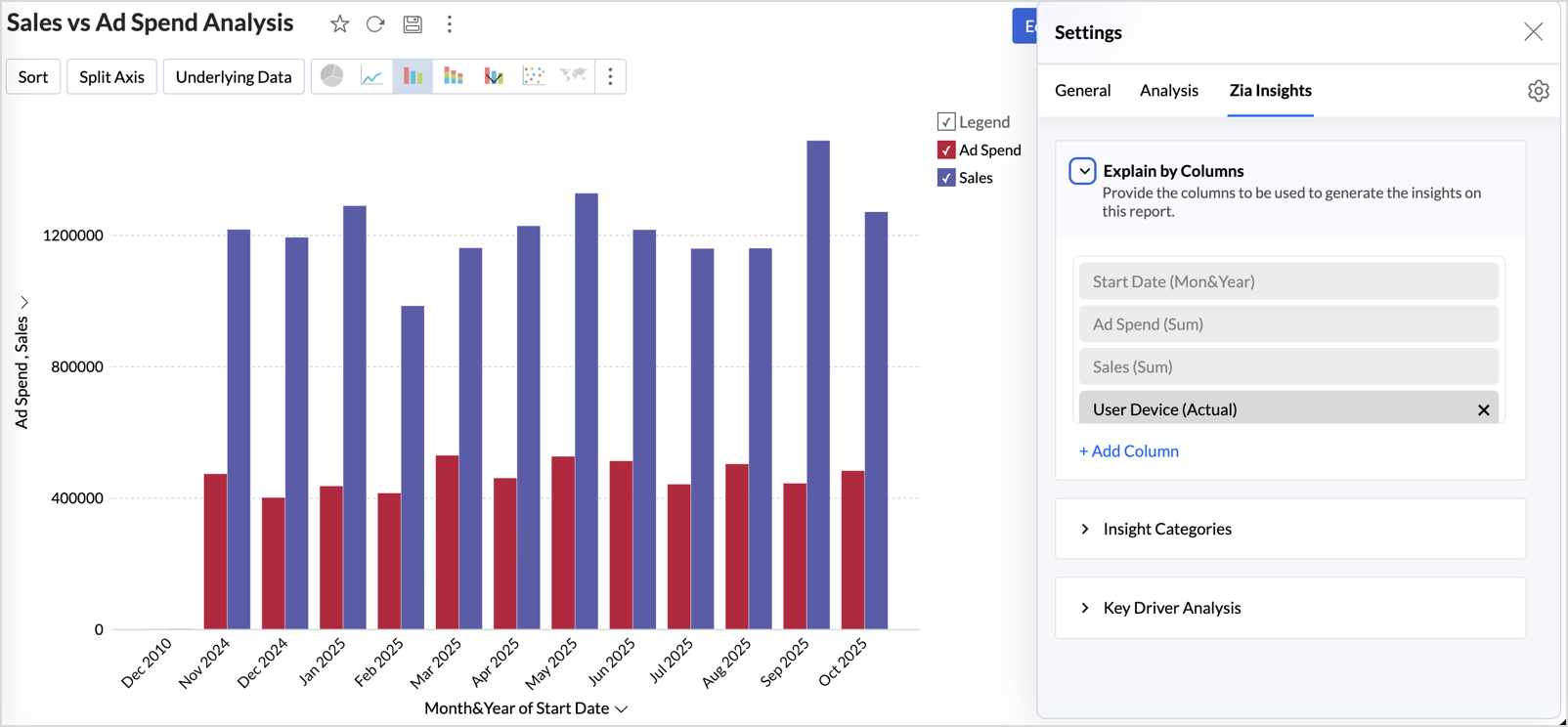
This customization ensures insights are focused, relevant, and tailored to the report’s context.
Learn more.
Diagnostic Insights Now Available for Multiple Time Series Analyses
Previously, diagnostic insights were available only for Recent Time Period Analysis. With this update, users can now access diagnostic insights across multiple time series analyses like, Anomalies/Outliers, Largest Incline/Decline, Period-over-Period Changes, and Start vs End Period Analysis revealing the “why” behind the data for more informed decisions.
Other Updates
Audit Logs for White label Users
Track administrative actions with greater precision. All activities performed in the White Label admin console are now comprehensively logged in the Audit Logs for improved security and compliance.
New Language Support
Zoho Analytics is now more accessible globally, with support for 29 international and 11 Indian languages.
Learn more.
Recent Topics
Programmatic Itemized Expenses?
It does not appear that it is possible to create itemized expenses programmatically (via the API)? Is this correct, or am I misunderstanding the situation?
Go Multilingual with Instant Bot Auto-Translation
Imagine you run a travel company with customers across different regions. Your website chatbot helps visitors discover travel packages, answers questions, and makes bookings. As your business expands into new markets, you want to offer the same experience
JOIN with Select and TOP not returning data to results
hi when I add TOP to yellow it does not return cl."Id", cl."Date",cl."Outcome", cl."Membership" from the join. Remove it and they appear. The TOP and the ON seem to work as in the number of rows returned. Doing the classic join log table and return only
Zoho CRM Multi-select values not translated
Hello! I have some issue with translate custom multi-select fields in zoho CRM in other language. I download export file, but it has all my custom fields and picklist values exept multi-select fields picklist values. Please, help me to undestand, is
[Free webinar] Blueprint as a business process engine - Creator Tech Connect
Hello everyone, We are excited to invite you to another edition of the Creator Tech Connect webinar. About Creator Tech Connect The Creator Tech Connect series is a free monthly webinar comprised of pure technical sessions, where we dive deep into the
Automating CRM backup storage?
Hi there, We've recently set up automatic backups for our Zoho CRM account. We were hoping that the backup functionality would not require any manual work on our end, but it seems that we are always required to download the backups ourselves, store them,
Allow Email Attachments to Be Opened Directly in Zoho CRM
Hi all, It would be very helpful if attachments linked to an email in Zoho CRM could be clicked and opened directly from the email preview. Currently, the attachment names are displayed, but the experience of viewing them is unnecessarily limited. Users
Dashboard Metric Drill-Down Shows Stale Data
Summary: When clicking between different metric components on a custom dashboard, the drill-down list shows data from the previously opened metric instead of the one just clicked. Steps to Reproduce: Create a custom dashboard with multiple pre-defined/templatized
Zoho email suddenly stopped working - any ideas to fix this ?
Zoho email suddenly stopped working. although got this sent to me Reporting-MTA: dns; mx.zohomail.eu Arrival-Date: Wed, 26 Aug 2026 12:48:05 +0100 Original-Recipient: rfc822; Final-Recipient: rfc822; Status: 421 Action: delayed Last-Attempt-Date: 26 Aug
GCLID and Zoho Bookings
Is there anyway to embed a Zoho Bookings signup on a landing page and pass the GCLID information? More specifically, can this be done using auto-tagging and not manual tagging the GCLID? I know Zappier has an integration to do this but is there a better
Calendar Booking - Rescheduled and cancelled appointments not deleting in G Suite calendar
We started using the built in calendar booking feature and are really liking it! However, we are having one issue. If a client reschedules an appointment using the reschedule feature the original appointment doesn't get deleted out of our g suite calendar
Automate pushing Zoho CRM backups into Zoho WorkDrive
Through our Zoho One subscription we have both Zoho CRM and Zoho WorkDrive. We have regular backups setup in Zoho CRM. Once the backup is created, we are notified. Since we want to keep these backups for more than 7 days, we manually download them. They
Backup to external location (Dropbox etc)
Dear Zoho Team, I've set the CRM Backup schedule to once a month, which when complete sends me an email. Of course I then need to manually login and download the file. Nice but VERY 20th century and relies on us humans not to fail. Can you please provide
Cloud backup for CRM
This is an idea / feature request for ability to periodically export CRM backup to an external cloud provider, similar to Zoho Vault: https://www.zoho.com/vault/data-backup.html Alternatively I would help being able to access manual data backup programatically
Introducing throw statements in Deluge
Hello everyone, We're introducing a powerful addition to Deluge that gives you more precise control over error handling in your scripts. Whether you're calling an external API, validating user input, or enforcing a business rule, there are moments when
Introducing throw statements in Deluge
Hello everyone, We're introducing a powerful addition to Deluge that gives you more precise control over error handling in your scripts. Whether you're calling an external API, validating user input, or enforcing a business rule, there are moments when
WhatsApp Coexistence
Hello, please implement WhatsApp Coexistence, we need to track staff whatsapp chats on their PC and they need to be able to use WhatsApp on their mobile in around the office and warehouse, as we video call customers and send them product pictures. Thank
Zoho Creator to Zoho Writer for prefilled documents...
In response to the question about connecting Zoho Creator to Zoho Writer for prefilled documents, I wanted to share a working implementation that demonstrates how to use the record_id parameter with the Zoho Writer Merge API. This allows Writer to automatically
Upload a video to embed into an article
How can we upload a video to embed into the article...? We can upload images but this only seems to support image files. And the video option seems to just support YouTube, Vimeo and DailyMotion which is no good, we need to create our own videos and upload
PAN - Aadhar Link Status
Can Zohobooks also get latest PAN-Aadhar Linking Status from Income Tax Portal ?
LinkedIn RSC is now live in Zoho Recruit
LinkedIn Recruiter System Connect (RSC) is here. Your Zoho Recruit data (candidates, jobs, notes, stage updates, resume attachments, and more) now syncs with LinkedIn in real time. Note: LinkedIn RSC is included with your LinkedIn Recruiter Corporate
Zoho Writer for Android - Headings
Hello Zoho team, I have created structured doc with headings in writer web version on pc. Then I have opened it in my phone. Write is crashing while used function: menu "three dots", Document Navigation, Headings. Zoho Writer for Android 6.1.4 Samsung
The in between line spacing management
In the Microsoft Word, when we write something there is a tool from where we can manage the line spacing. Here in writer app in mobile it is by default 1.5. I request Zoho Team to give the option from where I can control Line Spacing, Remove space between
Zoho Books | Product updates | September 2026
Hello Partners, We've rolled out new updates to Zoho Books. From a brand-new Nigeria edition expanding our presence on the African continent to the new Super Admin privilege, here's everything that's new this month. Nigeria Edition Now Live [Nigeria Edition]
Cross-application Deluge calls fail when application link name starts with a number
I encountered an issue when calling a custom function in another Zoho Creator application within the same account. The target application’s URL/application link name began with a number, similar to: 27_example_application The following cross-application
Pulling data from lookup fields
If I try to pull in CRM data from a lookup field, it only shows a number and not the actual name. Is there a way to get around this? It impossible to do reports using lookup field data.
CRM x WorkDrive: We're rolling out the WorkDrive-powered file storage experience for existing users
Release plan: Gradual rollout to customers without file storage add-ons, in this order: 1. Standalone CRM 2. CRM Plus and Zoho One DCs: All | Editions: All Available now for: - Standalone CRM accounts in Free and Standard editions without file storage
Marketing Tip #49: Set up Meta Pixel and turn store visitors into repeat buyers
Most of your store visitors don't buy on their first visit. They browse, get distracted, and leave. Without a way to reach them again, that traffic is gone forever. Meta Pixel changes that. What is Meta Pixel? Meta Pixel (previously called Facebook Pixel)
unable to join meeting due to speaker issue
Unlock smarter scheduling with AI in Zoho Bookings
Hello everyone! Scheduling touches more parts of a business than we often realize. Teams need to coordinate. Workflows need to move. Business apps need to connect. And with AI, the way we interact with scheduling is changing too. Join our upcoming live
Zoho CRM Layout Rules: Nine New Actions, Profile-Based Execution, and Interactive Preview
Hello everyone, Availability: This feature is now available for all users. We’re excited to announce powerful new enhancements to Layout Rules in Zoho CRM - a feature built to guide our teams through form-filling by showing the right information to the
I want to delete payment detail of my cards from the system.
Urgent: Outgoing Emails Delayed Across All Zoho Desk Departments
Dear Zoho Support, We have started receiving delivery delay notifications across all our Zoho Desk departments. Error details: Error: 451 4.7.500 Server busy Action: Delayed Receiving system: Microsoft 365 / Exchange Online Affected Zoho sending IPs identified
Zoho Desk API modifiedTimeRange returns HTTP 500 around 2026-03-08T02:00:00.000Z
Hello Zoho Support Team, We are experiencing a reproducible HTTP 500 Internal Server Error when querying the Zoho Desk API search endpoint with a specific modifiedTimeRange boundary. ### API Endpoint GET /api/v1/tickets/search ### Reproduction Steps &
Les meilleures pratiques d’email marketing pour booster les ouvertures, les clics et les conversions
L’email marketing connaît aujourd’hui des changements profonds. Gmail, Yahoo et Microsoft ont notamment renforcé leurs exigences en matière d’authentification, ce qui rend la délivrabilité plus complexe et exigeante. Dans le même temps, les filtres basés
prefill_data for Creator + Merge & Sign
Hello, Is there an option to use prefill_data for signer fields from creator? I see the option for CRM but it will not work with creator? I have tried passing the value in the signer data, and that also does not work. Alternatively, is there a way to
Time Zone is incorrect
Time zone is not working properly...I've checked it twice. I'm eastern U.S. time it's currently 12:22 pm EST. CRM shows 3:22 pm EST.
Announcing the new SKILL.md for Zoho CRM and the updated OAS repository!
We are introducing a new zoho-crm skill to make working with Zoho CRM Developer tools (like APIs, functions, widgets, client scripts, queries etc) easier and faster, with the help of AI in your preferred AI harness like Claude Code, Codex, Cursor, VSCode
Kaizen #258 - Getting Started with zoho-crm SKILL.md
Howdy tech wizards, Welcome to a fresh week of Kaizen. This week, we are taking a look at the zoho-crm SKILL.md, an Agent Skill designed to help AI coding agents work with Zoho CRM’s developer capabilities. What is zoho-crm SKILL.md? The zoho-crm skill
Support Required for Integrating Zoho SalesIQ in Flutter Web
Hi Team, I have developed a Flutter application and I am currently using the salesiq_mobilisten: ^6.5.4 package. As per the package documentation ( https://pub.dev/packages/salesiq_mobilisten ), it supports only Android and iOS, and it is working fine
Next Page