Hello everyone,
This month's updates pack a punch! From highly requested features, to those that can elevate your subscription management in general, here's what's new in March:
More Control Over Proration
Proration is when subscription invoice amounts are adjusted according to usage. Until now, Zoho Subscriptions has handled all proration at the back end automatically. However, we've seen that some businesses, like those that ship physical goods to their customers, may not want to prorate subscriptions based on usage. The following updates address those needs:
Toggle Proration (Early Access)
You can now enable/disable all proration that occurs for subscriptions. This includes prorated invoices based on usage, and automatic invoice and credit note generation for subscription upgrades and downgrades, respectively. Proration can also be toggled at the subscription-level when creating subscriptions.
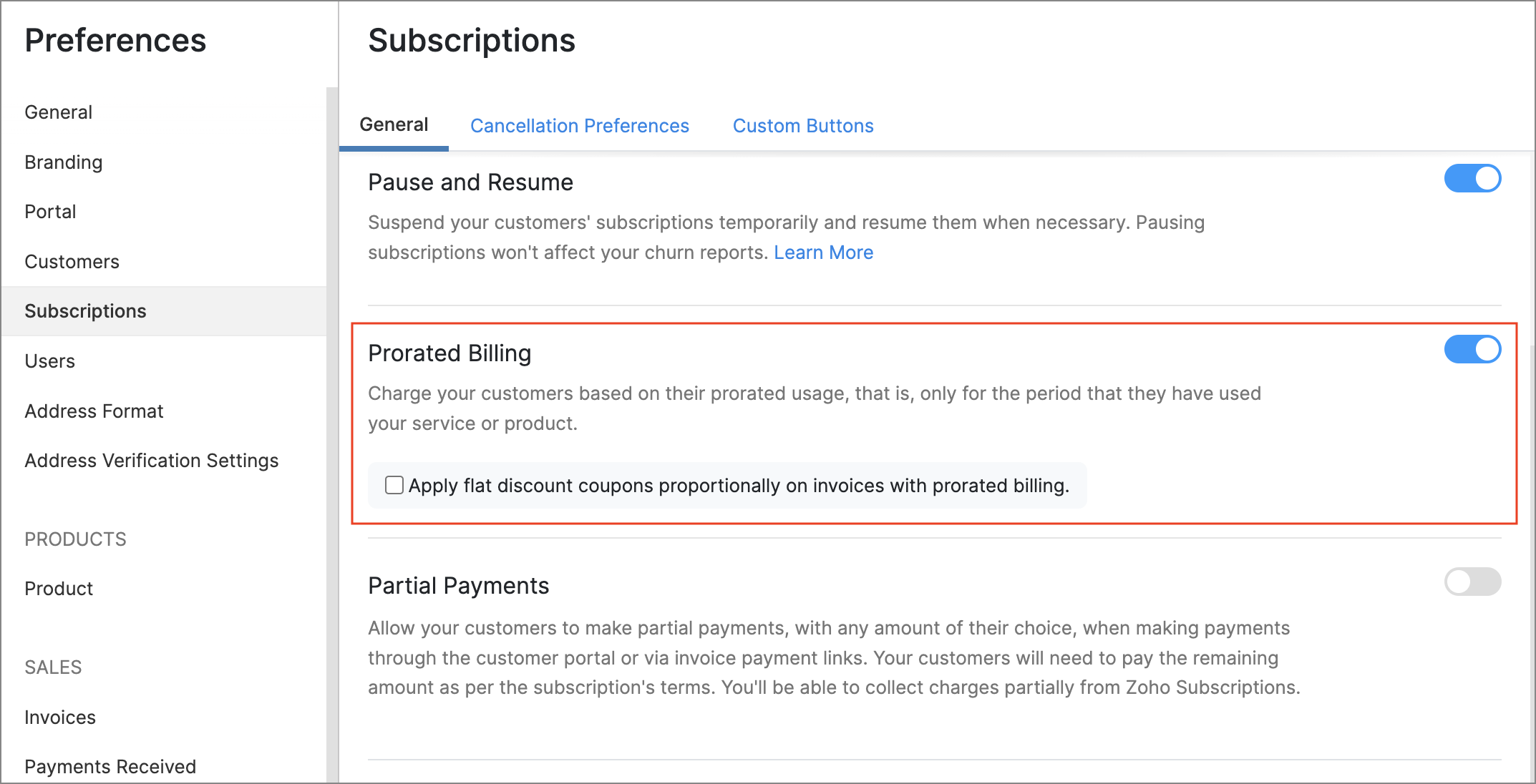
Note: Proration cannot be toggled for existing subscriptions.
Prorate Flat Discount Coupons
Coupons that you've created with flat discount amounts can now be prorated too. This way, a coupon's discount amount will scale according to the number of days that a subscription was used, and can prevent situations where a coupon completely nullifies a subscription's prorated invoice amount.
To enable this feature, go to Settings > Preferences > Subscriptions > Prorate Flat Discount Coupons.
New Reports
We've added a host of new reports that provide actionable data points for your subscription business.
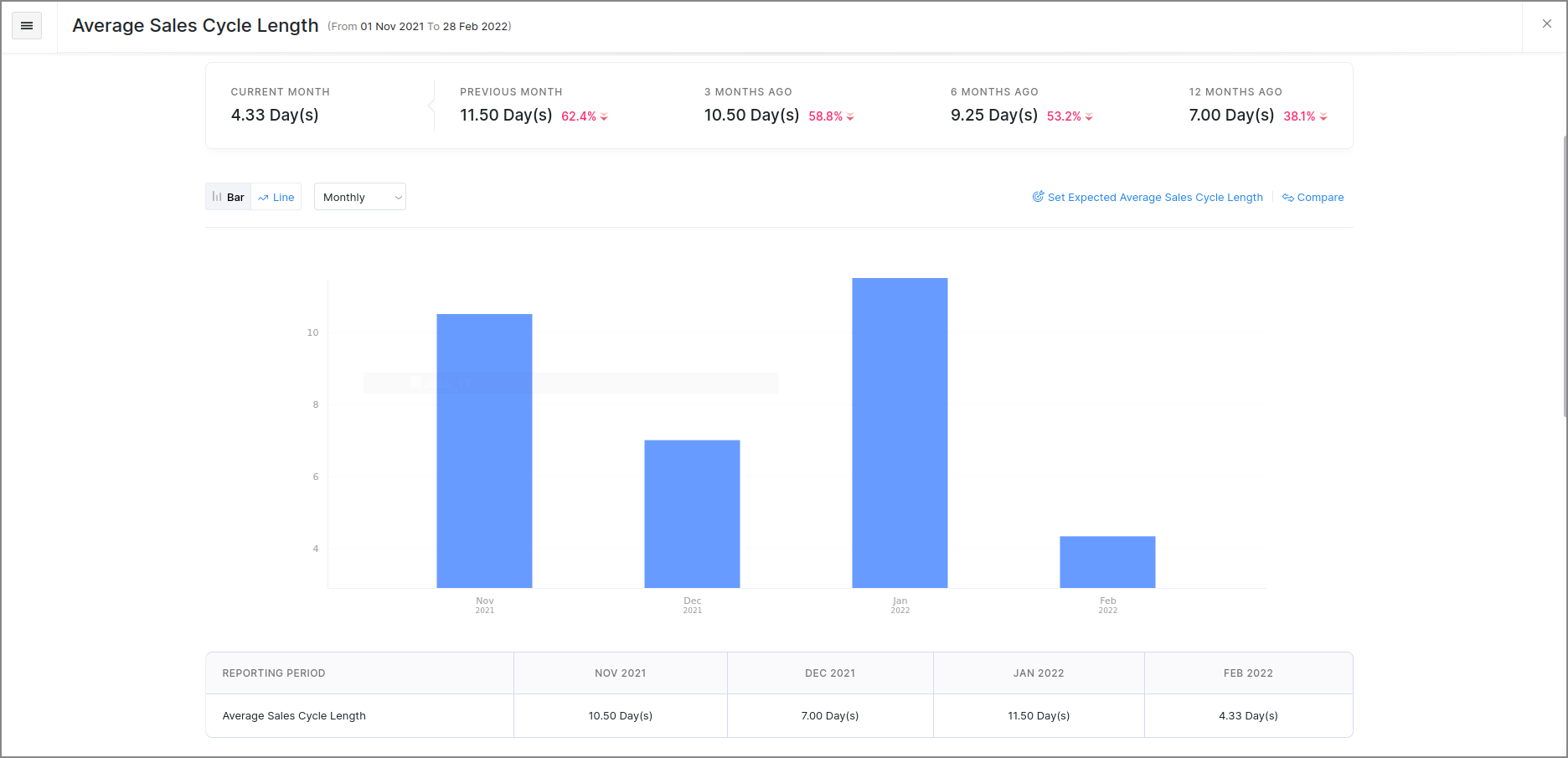
Average Sale Cycle Length
This report displays the average length of your subscriptions' sales cycles in days, i.e., the average number of days that it takes to receive the first payment after a subscription's trial period was started. This data can be valuable in measuring the steps that you take to get paid sooner.
Upgrade & Downgrade Details
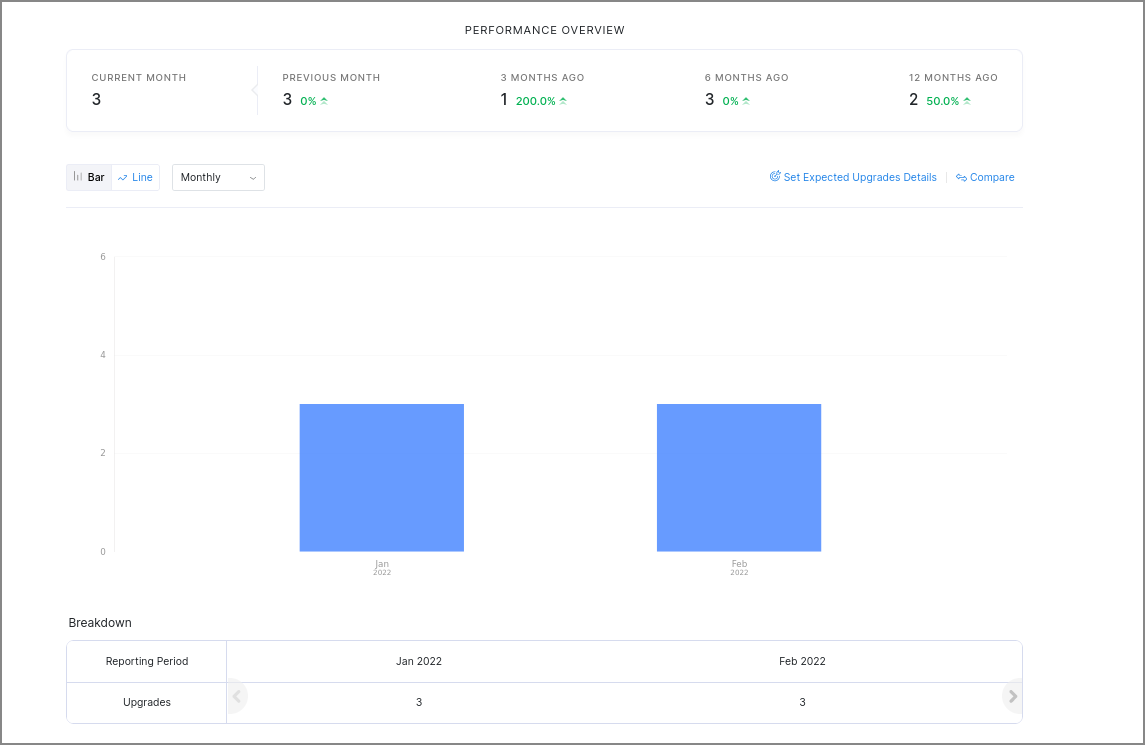
The Upgrade Details and Downgrade Details reports, can display details about when subscriptions were upgraded or downgraded. You can also generate comparisons between particular products or plans, and choose between different chart styles. This can give you insights on how product-level changes affect your business, along with details about how particular plans are performing.
Trial To Live Conversions
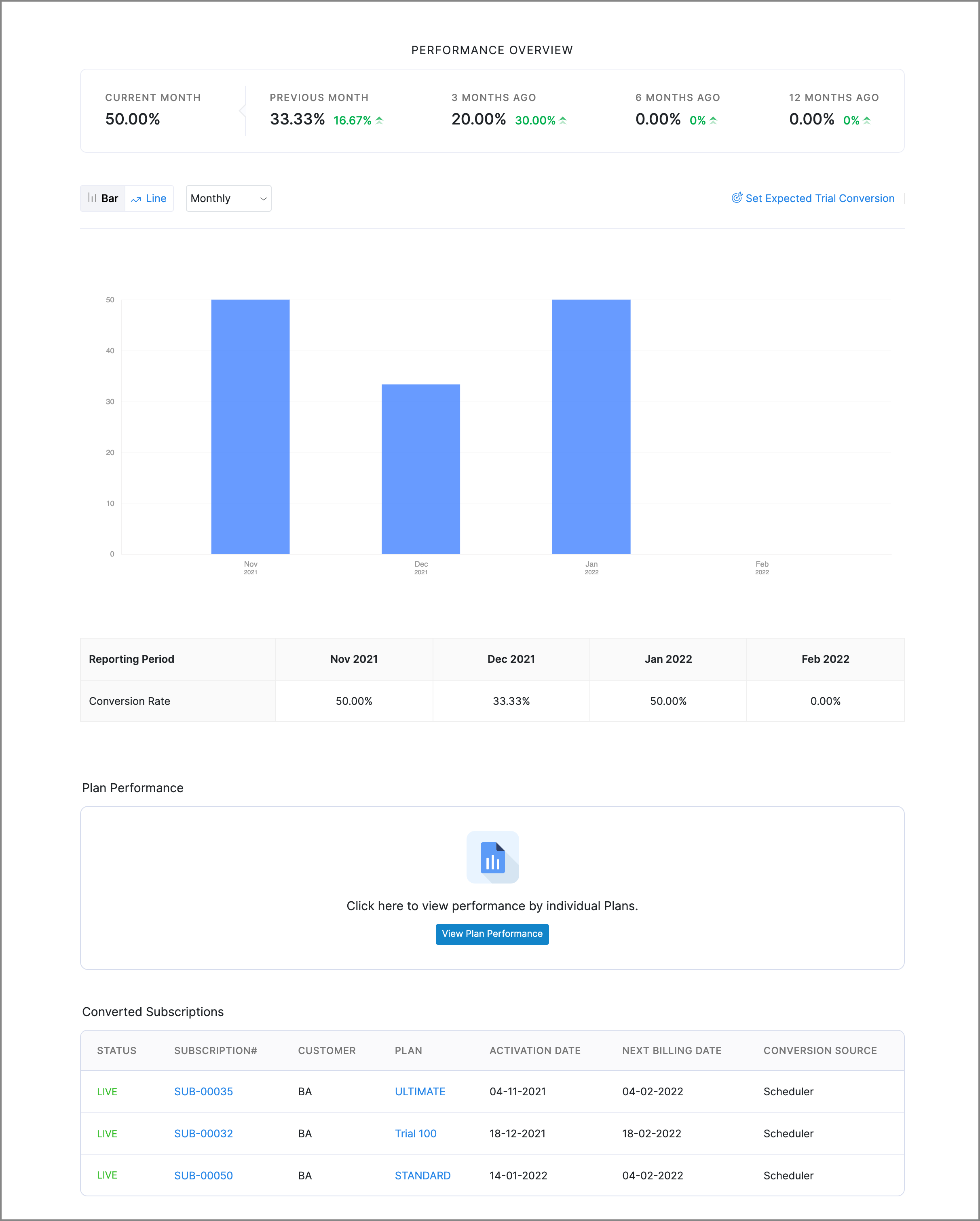
This report charts the conversion rate of trial subscriptions at any given time and also gives you a list of all the trial subscriptions that were moved to the Live status during a particular period. Additionally, you can view the conversion rate of different plans to gauge their performance.
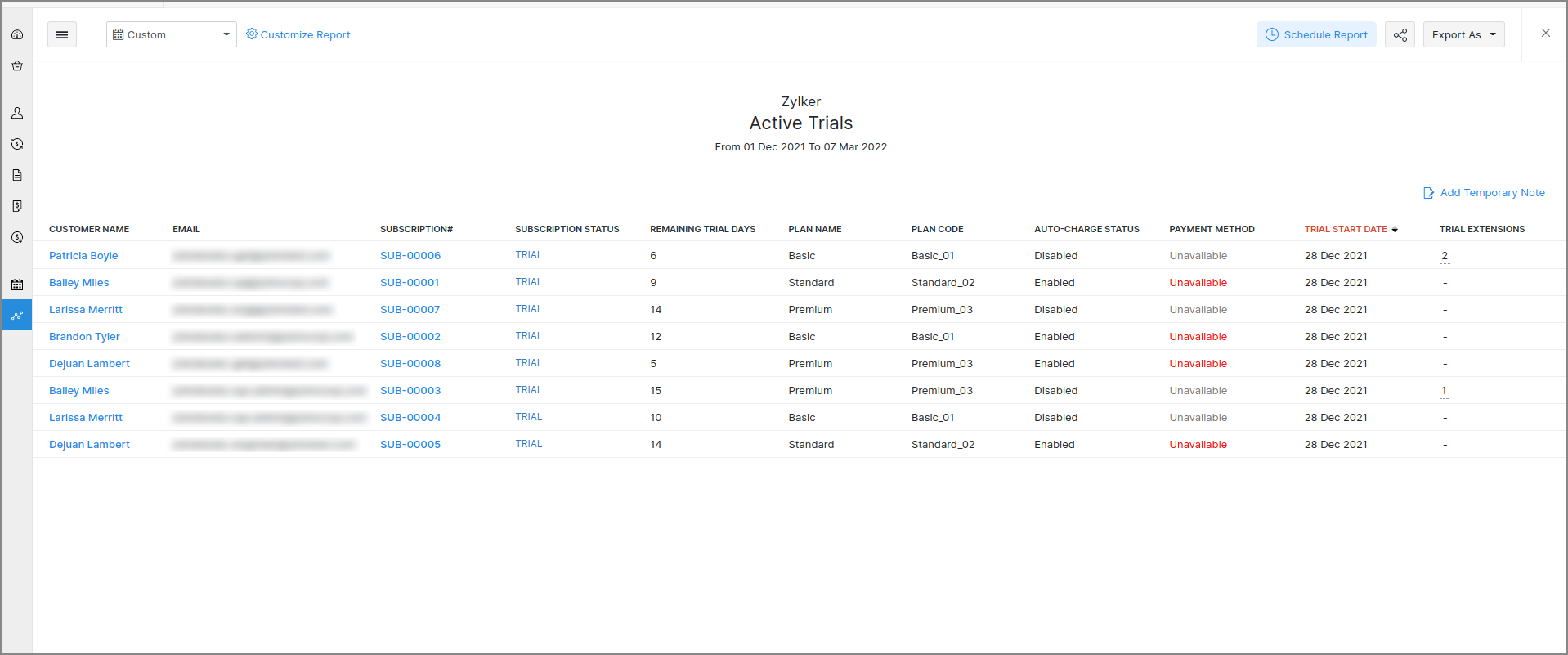
Active Trials
View a list of active trials for a particular date range. You can filter this report based on criteria like the trial's status, non-renewing trials, and trials expiring in the next 7 days. If you've enabled trial subscriptions to be extended from the customer portal, you can view the number of times a trial was extended too, along with the source from where it was extended.
Inactive Trials
View a list of inactive trials, i.e., trial subscriptions that were either cancelled or expired, for a particular date range. You can filter this report based on criteria like the trial's start date, end date or cancellation date. All of these reports can be accessed from the Reports module in the left sidebar of Zoho Subscriptions.
Hosted Payment Pages: Multiple Templates & Customization
These highly requested features enable you to go one step further in customizing the hosted payment pages for your customers.
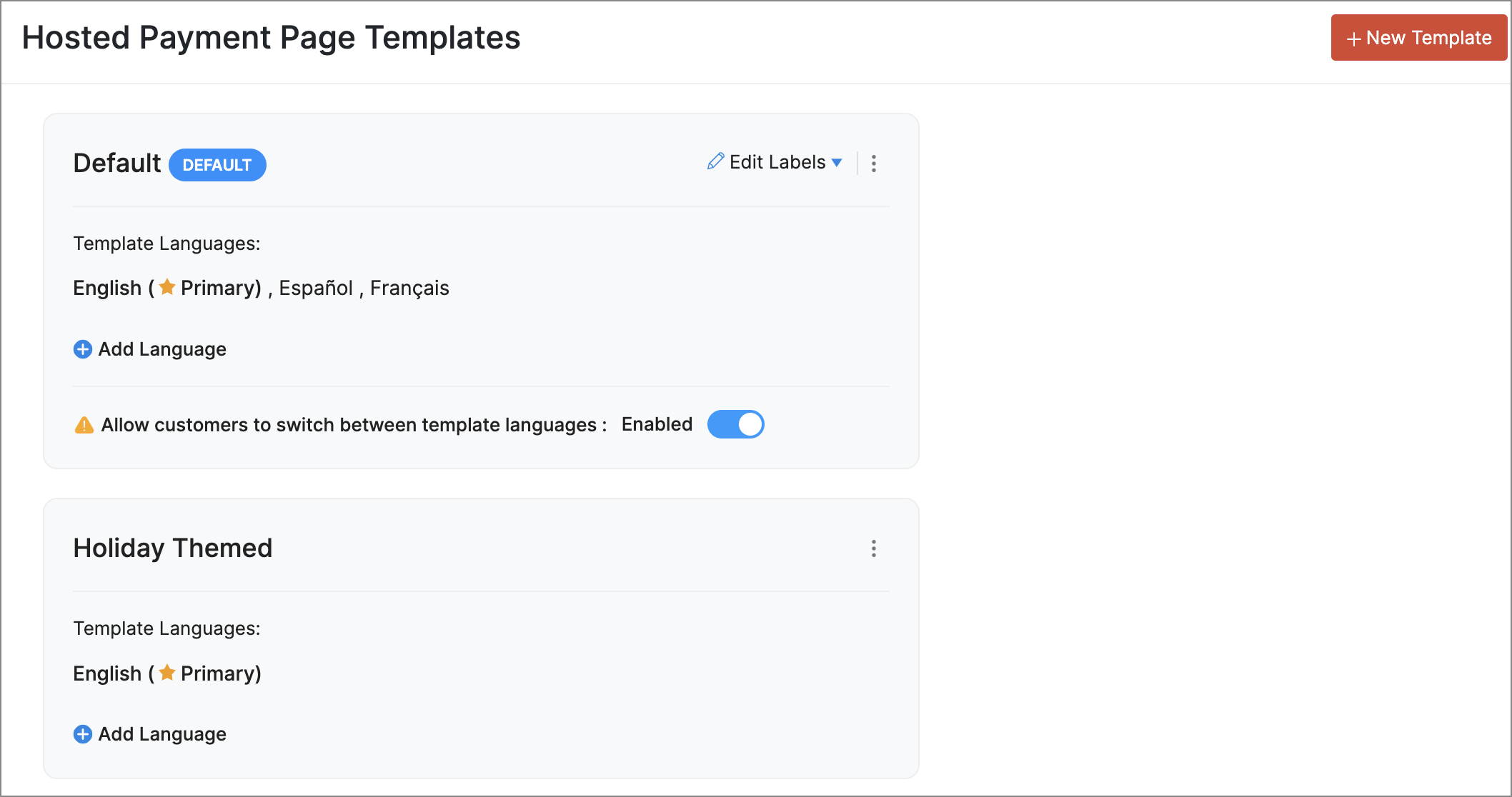
Multiple Templates with Multi-language Support
You can now create multiple templates for the hosted payment pages and pick one as default for your organization. You can also add multiple languages for each template and customize label names and layouts for each language. When you've configured multiple languages your customers will be able to select the language which they prefer when they visit a hosted payment pages.
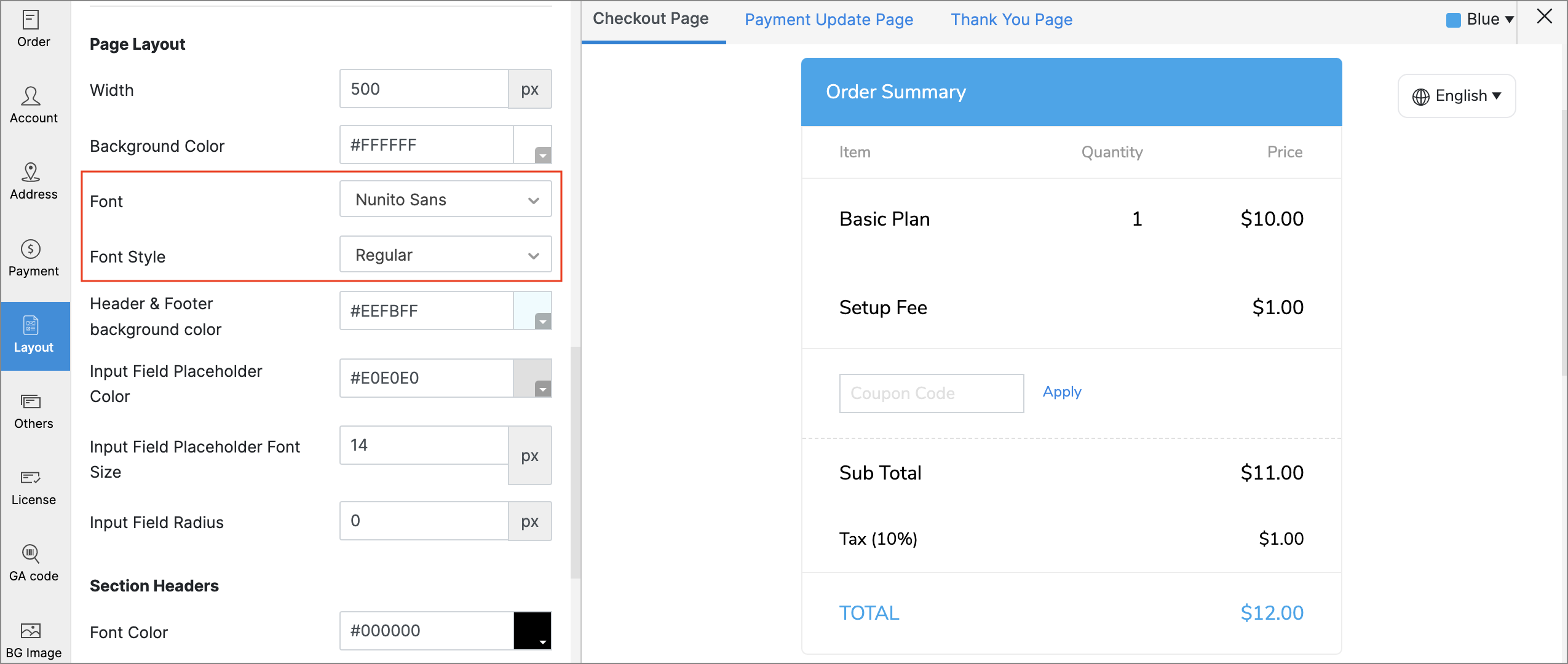
Font Customization
Choose between multiple fonts and font styles while editing the hosted payment pages to reflect your brand's aesthetic better.
Reorder Fields & Sections
The sections and fields in the hosted payment pages such as the Billing Address, Shipping Address, and Account Information can be reordered while editing hosted payment pages.
Customer Portal: Seamless Onboarding & Collaboration
Our main goal with these features was to save time for both you and your customers by simplifying the process of accessing the portal.
Customer Portal Signup
You can provide your customers and their contacts with the ability to sign up to the Customer Portal by themselves, using signup links that will be displayed to them while making invoice payments, or after completing payments on the hosted payment pages. A signup link will also be displayed on the portal's sign-in page. To prevent unwarranted signups, customers can sign up only with the same email address that exists for their customer record in Zoho Subscriptions.
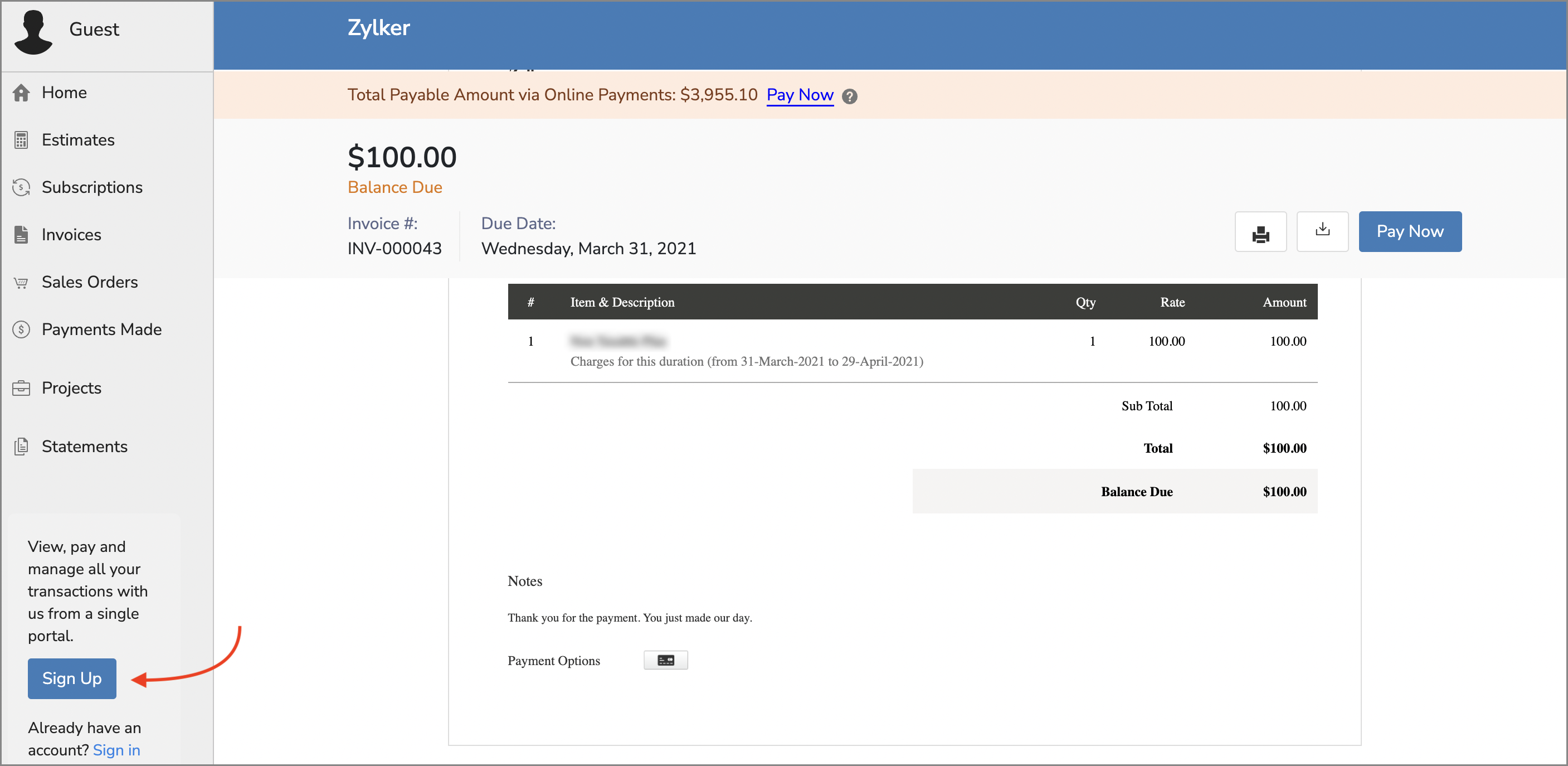
To enable this feature, go to Settings > Preferences > Portal. Check the Allow customer to sign up to the customer portal option.
Pro Tip: You can use the new Portal URL placeholder in your email templates to place a link to the customer portal's sign-in page.
Share Documents from the Portal
Your customers can share documents with you right from the Customer Portal. Only the Primary Contact will be able to do this, and customers must be allowed to edit their details from the portal.
These are some of the noteworthy features that were rolled out recently, but our What's New Timeline covers a lot more features, so be sure to check it out! We've also completed rolling out features for all users from our previous major update.
We hope you like the new features, and would love to know what you think in the comments below! If you need any assistance, feel free to write to us at support@zohosubscriptions.com, we'd be happy to help.
Best regards,
The Zoho Subscriptions Team
Recent Topics
Is this a SCAM email or is it really Zoho?
L.S. I received the following message. Is this from Zoho? I have had a Zoho One account for many years and my website has been online for years. If it is a scam, I think you should know about it.
Is it possible to use HTML formatting in SMS messages sent from Zoho?
Hi everyone, I have a question regarding sending SMS from Zoho When we send emails from Zoho, we can include HTML code to format the message (like adding links, styling, etc.). Is it possible to do something similar when sending SMS messages through Zoho
an issue in Zoho CRM where the workflow rule is not triggering
H I’m currently facing an issue in Zoho CRM where the workflow rule is not triggering when a new lead is created through a webform. I’ve double-checked the criteria and field updates, everything seems fine but it still doesn’t fire. Has anyone faced this
Option in pipeline deal to select which hotel or branch or store if client has more than one local store
Hi, I would like to know if there is an option in the deal pipeline to select which hotel, branch, or store a deal is related to—if the company has more than one location. For example, I have a client that owns several hotels under the same company, and
Email Insights included in Bigin emals are marked as SPAM everywhere
Today I noticed that email recipients who use Office 365 never receive emails sent from Bigin. Further examination showed that all Email Insights links in email headers are marked as spam/phishing by Office 365. Example screen included. The problem is
Email Parser Not Extracting Fields Correctly with Certain Label Formats
I’ve been testing the Email Parser functionality in Zoho CRM to automatically extract data from incoming emails and map it to CRM fields. During testing, I noticed that parsing sometimes fails when the email contains field labels formatted like this:
How do I import Connected Records for a Deal?
Can you point me to an example of the CSV file that would add related records to an existing CRM Deal? I imported a Deal, then tried importing a connected record using a unique ID that references the Deal ID, but it doesn't attach it to the Deal rec
File Upload Field in Zoho Forms Not Updating Existing File in Zoho CRM
Hi everyone, I’m trying to understand the behavior of a file upload field mapped from Zoho Forms to Zoho CRM. Scenario There is a File Upload field in a Zoho CRM module. A Zoho Form also has a File Upload field, which is mapped to that CRM field. When
Zoho Training
Greetings! I am trainer. My focus area is Project Management and MS Project. I have used Zoho CRM to a good extent. Though, I was interested in using ZOHO projects, as there were no live projects, I could not take it up for studies. Recently a client
Detailed list of scoring rules in Zoho CRM
Good morning Zoho community, warm greetings The reason for my message today is that I have a problem with my CRM, which I will explain below: Our organization has scoring rules designed to rate our potential customers or leads in the application based
How to create a summary document from Projects details
Hi, Our team is creating many projects inside Zoho Project. When closing a project, they write a summary document containing data from the projects it-self (understand project budget, customers, etc...), and editable (ie the document is either a Writer
Request to Recover Deleted Task List – Project ID: RIV-MOD-10722
Hi Zoho Team, I hope this message finds you well. My Zoho task list associated with Project ID: RIV-MOD-10722 appears to have been deleted. When I clicked on the task link from the email notification, I received the following message: "Task has been deleted
Host in US Data Centre
I humble apply to be registered on US Data centre
convert the project to templet
i have some deployment ME product for different customer , i need to create a fixed template for use it rather then keeping creating this template every time
Best practices for managing Project Charters, Business Case and RAID logs within Zoho?
Hello everyone, I’m currently refining our PMO setup within Zoho Projects and I’m curious how others are handling high-level governance documentation. We’ve been using the standardized Project Charter, Business Case and RAID frameworks from projectmanagertemplate.com
Resource Management System built using Zoho CRM, Creator, Projects, and People:
In a Resource Management System built using Zoho CRM, Creator, Projects, and People: CRM Deal Closed → Creator Allocation Engine → Zoho Projects Task Assignment What is the recommended architecture to handle dynamic reassignment when: an employee goes
Dynamic Remaining Quantity in Lookup During Allocation
Hi everyone, From what I understand in Zoho Creator, lookup fields only display the stored value from the source record and do not dynamically update while a form is being filled. Because of this, showing a real-time updated remaining quantity inside
connect zoho creator with google drive
Hello everyone, I need to connect to a folder drive. The idea, is that google drive loads a text document with some data, I must read that text document to be able to autofill a form that I have in zoho creator with that data. I also attach PDFs and place
Ability to Attach Record-Specific Files Automatically in Workflow Email Templates
Currently in Zoho CRM, email templates allow attachments to be added, but these attachments are static and remain the same for every recipient. There is no straightforward option to automatically attach a file that is stored within the specific CRM record
Uploaded files are not included when using "Include user submitted data" in Email Notification
In Send Email notification workflow in Zoho Creator, there is an option called "Include user submitted data" which allows the email to contain all the form submission details. However, when this option is enabled, files or images uploaded through File
kanban view for client portal
Are kanban views an option for client portals? Access to Kanban views in the client portals would solve some mobile-compliant issues I have with the UI. Kanban functions very nicely on mobile and would be a super asset for my clients and vendors as they
Credit Card Pre-Authorization with later Capture/Settlement
We really enjoy the convenience of being able to pay off a customer's invoice using our Auth.Net integration with Zoho Books. Unfortunately, we can only take advantage of this feature with a small percentage of our customers as it leaves a gaping hole
Zoho Cliq not working on airplanes
Hi, My team and I have been having this constant issue of cliq not working when connected to an airplane's wifi. Is there a reason for this? We have tried on different Airlines and it doesn't work on any of them. We need assistance here since we are constantly
Zoho Sign 2025–2026: What's new and what's next
Hello! Every year at Zoho Sign, we work hard to make document signing and agreement execution easy for all users. This year we sat down with our head of product, Mr. Subramanian Thayumanasamy, to discuss what we delivered in 2025 and our goals for 2026.
Work Orders / Bundle Requests
Zoho Inventory needs a work order / bundle request system. This record would be analogous to a purchase order in the purchasing workflow or a sales order in the sales cycle. It would be non-journaling, but it would reserve the appropriate inventory of
Izettle or Sumup Integration for Zoho Books.
The Stripe & Square clearing works great in Zoho Books. Any further integrations planned in the future for Izettle or Sumup? These card processors are very common for taking payments with a card reader.
Train Zoho Answer Bot Based on Customer
Hi all, Is it currently possible to mark Help Centre articles to a specific customer, and restrict the answer bot to only use relevant information if it is either marked as "General", or tagged for the specific customer in question? We currently have
Trying to access records in a custom module in Zoho Desk and not having luck
I've built a custom module in Zoho Desk and am using a custom function to query the records in the module and I'm not having any luck. The only way I have found to retreive a record is by getting it by its recordID (the long zoho assigned one). The function
Composite items inside of composite items; bill of materials needed
Hi Zoho and Everyone, I am evaluating whether Zoho Inventory will work for my small business. I grow and harvest herbs and spices but also get from wholesalers. I use all these items to make herbal teas, but also sell them as individual items on my Shopify store and Etsy. I discovered the composite item bundling and am wondering if I could get some assistance since there is no bill of materials: Our herbal company's best selling tea is a sleepytime tea. Sleepytime Tea can be purchased in three weights
ZOHO Books Smart Accounting Software for Travel Agency
Dear Travel partner, Contact for Travel Agency Accounting Setup & Training Vansh Travel (ZOHO Books Authorised partner) Email: info@vanshtravel.com Mo: +91 98984 95155 Please find PDF
452 Mailbox delivery restricted by policy error
We have been testing Zoho desk for about a week now and have been forwarding emails in via an Exchange Online Mail flow rule without issue until yesterday. Suddenly yesterday morning we started getting the vast majority of the emails stuck in Pending
Send Email reply on behalf of Agent
Hi, When using the send email reply via the API I can set the reply on behalf of the customer by using impersonatedUserId in the header of the API call. Is there a way to do this for Agents too? I need to be able to send an email reply on behalf of an
Sharing Tickets to a team within a department
Hi there, We have a need for one department to be able to share tickets to a specific team within a department, I'm wondering if this is possible? All the shared tickets are going into the 'Shared Tickets' view for the whole department but is there a
Removing To or CC Addresses from Desk Ticket
I was hoping i could find a way to remove unnecessary email addresses from tickets submitted via email. For example, a customer may email the support address AND others who are in the helpdesk notification group, in either the TO or CC address. This results
Do not use isnull()
Does not always return booleans. Can also return null. Never use this function. Just use var==null instead.
Organization wide Account and Contacts Visibility/Sharing Capabilities?
Has anyone figured out a way to make visibility or sharing of Accounts and Contacts to be available across the entire organization without having to have every individual user edit their Sharing permissions? For our sales folks they need to be able to
Is there a way to configure dark mode for Campaigns emails that go out to customers?
I've found a lot of information on how to configure dark mode for my (The user) personal Zoho workspace and email, but is there any way to edit dark mode settings on emails that we send out to customers via campaigns? We sent out a test email the other
When Does WorkDrive integrate with Books?
FSM integration with Books
Hi, I have spent a few months working with FSM and have come across a critical gap in the functionality, which I find almost shocking....either that, or I am an idiot. The lack of bi-directional sync between Books and FSM on Sales Orders/ Work Orders
How to close an estimate ?
Hello, I have created estimates, and converted them to invoices to get 50% payment. Now I have 2 cases where the estimate stills shows status partially invoiced, however: 1. for one of them, project stopped half way, so the remaining part will never be
Next Page