What's New - March 2025 | Zoho Backstage
Hello there,
We’re thrilled to introduce a much-awaited lineup of powerful features and enhancements designed to fulfill your event management needs. Here's a round-up of the latest updates that will enhance your experience with Zoho Backstage this month.
Offer Tickets
Early bird and limited-time offers are powerful tools to boost ticket sales and generate early revenue. With the new Offer Tickets feature, you can create multiple offers as tiers within a single ticket class, making the process more streamlined and automated.
Previously, you had to create separate ticket classes for each offer and manually manage their availability. Now, you can:
- Add multiple offers under a single ticket class
- Automate the offer start and stop conditions
- Reduce manual intervention
Key benefits
- Increased marketing impact: Time-sensitive discounts create a sense of urgency, encouraging faster ticket purchases.
- Early revenue and cash flow: Early sales provide immediate cash flow to cover event expenses like venue deposits, marketing, and logistics.
- Leverage Psychological Triggers:
- FOMO (Fear of Missing Out): Limited-time availability compels attendees to act quickly.
- Perceived Savings: Attendees feel they are getting a deal, making them more likely to buy.
How to use
Setting up offers

You can add offers as tiers within a ticket class and configure their availability based on:
- Time: Set specific start and end dates for the offer.
- Quantity: Define the number of tickets available at the offer price.
Flexible offer progression
From the second offer onward, you can choose to automatically start the next offer when the previous one ends. Or, set a custom start date for the new offer.
Customizing offer display
You can customize how offers are displayed on your event website using the Website Designer. The offer card can show:

- Current Offer
- Previous Offer
- Next Offer
- Both Previous and Next Offers
This flexibility helps you highlight the most relevant deals and enhance visibility.
Good to know
- During the ticket purchase process, the offer name appears alongside the ticket class name. The order summary clearly displays the applied offer.
- After attendees purchase their tickets, the "Your Orders" section displays the offer name along with the ticket class name. The invoice also reflects the offer name for transparency.
- When manually adding an order, any valid offers associated with the ticket class are applied automatically. There's no need for manual price adjustments.
- During check-in, only the original ticket class amount is displayed.
- Offer-tiered tickets cannot be selected during manual check-in.
Click here to learn more.
Tax Rules - Canada (Early access)
Accurate tax calculation is essential for ensuring compliance and transparency in event management. With the new Tax Rules feature for Canada, you can automatically apply the correct tax rates based on your event location, making tax management simpler and more efficient. Zoho Backstage now allows you to create tax rules for all 10 provinces and 3 territories, which can be selected and applied to an event automatically, ensuring the correct tax rates are applied without manual adjustments. This feature supports in-person, hybrid, and online events, offering flexibility and accuracy.
The Canadian tax rule engine covers 10 provinces, 3 territories, multiple tax agencies, and 12 sales tax rates, providing a comprehensive solution for handling event-related taxes.

How do taxes work on Canadian events?
For in-person and hybrid events, the tax rate is determined by the event’s physical location, based on the Place of Supply, in compliance with Canada Revenue Agency (CRA) regulations. This ensures attendees are charged the appropriate tax rate according to the province or territory where the event takes place.
For online events, where no physical venue exists, the tax is calculated based on the attendee’s location. This ensures the correct sales tax is applied, even when attendees purchase tickets from different provinces or countries.
How to use
To enable Canada Tax Rules, configure your organization’s location:
- Go to Portal Settings > Payments and Tax.
- Select Canada as the organization location.
Once configured, the system automatically populates:
- 12 default tax rates covering all provinces and territories.
- 13 tax rules (one for each region).
- A default rule for online events, applying the correct tax based on the attendee’s location.
- 5 tax agencies for accurate tax handling.
You can create new tax rates, groups, and authorities to meet your event’s specific needs. Additionally, you can add custom tax rules for both in-person/hybrid and online events, giving you full control over how taxes are applied.
Applying Tax Rules to In-Person and Hybrid events
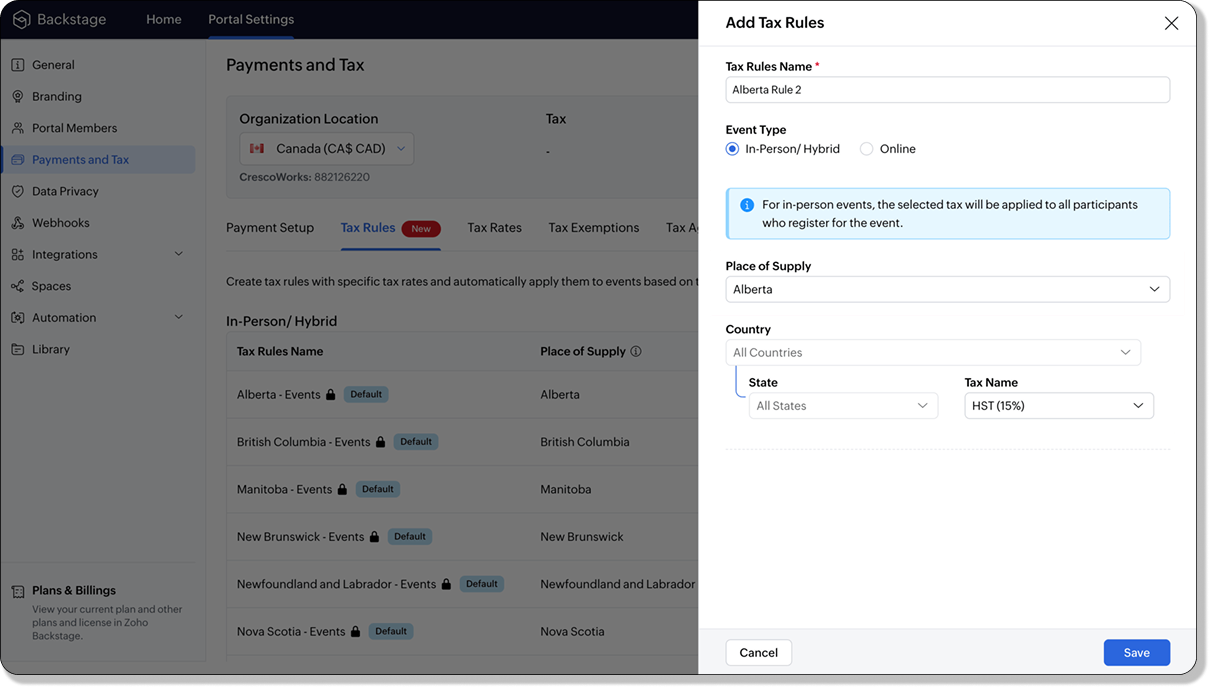
For in-person and hybrid events, Zoho Backstage automatically suggests tax rules based on the event location. The 13 default tax rules cover all Canadian provinces and territories. If the event location changes, the system automatically updates the relevant tax rules to reflect the new region’s rates.
You can also create custom tax rules by selecting a specific province or territory and applying a custom tax rate, offering greater flexibility for managing event taxes.
Applying Tax Rules to Virtual events
For online events, the system uses a default tax rule that covers all Canadian provinces and territories. Taxes are applied based on the attendee's location.
Canadian attendees are charged the applicable provincial tax rate.
International attendees are assigned a zero tax rate by default.
If you need to apply taxes to international attendees, you can create new tax rules tailored for online events, ensuring compliance with international tax regulations.

- Tax rules in Zoho Backstage are flexible and dynamic. You can modify them at any time during your event setup. However, changes will only apply to new transactions. Existing transactions will retain the original tax rule, ensuring previous purchases remain unaffected.
- If you select a non-Canadian location for your event, the Canada Tax Rule will not be applied. This ensures taxes are only charged where applicable, preventing errors in cross-border events.
Event Category

Categorize and filter events based on custom classifications for organizers and attendees to find and manage events easily. This new addition is aimed at improving event management by giving organizers the flexibility to create, manage, and filter events using custom categories. Organizers can now create up to 100 custom categories when setting up an event, giving them the freedom to define categories that suit their specific needs.
Previously, categories selected in Event Info were not utilized elsewhere, and there was no option to add new/manage categories.
Now, organizers can tailor categories to their specific needs and filter them on the Event Directory.
To access:
- While Creating an Event: On the Event Info page.
- For Category Management: Under Portal Settings > Branding > Event Category.
Permissions:
Portal Owners & Admins:
- Add, edit, and delete custom categories.
- Cannot edit or delete default categories.
Event Organizers:
- Can only add new categories.
- Cannot edit or delete existing custom or default categories.
Other Enhancements
Floor plan Focus Area

The Focus Area in the floor plan refers to designated spaces within the event venue that are visually highlighted to draw attention to specific sections, such as booths, stages, or key locations. These areas allow organizers to emphasize important spots, making navigation easier for attendees and improving the overall flow of the event. Focus areas help guide visitors to essential parts of the venue, enhancing their event experience.
Custom Dates for ticket classes (Early access)
In cases where smaller sessions or events (like welcome events, after-event parties, etc.) occur before or after the main event, this feature allows organizers to assign specific dates to separate ticket classes, ensuring tickets are only valid for the selected dates.
Custom dates can be set within 30 days before or after the main event.
New WhatsApp triggers and templates
The WhatsApp Integration, designed to enhance communication and engagement with all event stakeholders, now includes new triggers and templates to facilitate messaging and ensure timely updates for everyone.
For Purchasers:
- Send Registration Confirmation: Instantly confirm registration to enhance the attendee experience.
- Order Canceled: Notify purchasers promptly in case of any order cancellations.
For Speakers:
- Welcome Speaker: Extend a warm welcome to our speakers and set a positive tone for their participation.
- Speaker Added to a Session: Inform speakers when they’re added to a session, ensuring they are well-prepared.
- Speaker Removed from a Session: Provide timely updates should there be any changes to their session involvement.
For Sponsors:
- Thank a Sponsor Before Website is Live: Show appreciation early on, fostering positive relationships with sponsors.
- Welcome and Thank Sponsor After Website is Live: Acknowledge sponsors publicly once the event website goes live.
- Deny Sponsor Proposal: Deliver sensitive information with professionalism and clarity.
- Acknowledge Sponsor Proposal: Confirm receipt of sponsor proposals, keeping communication open and transparent.
For Participants:
- Event Canceled: Quickly inform participants in the event of cancellations, ensuring they’re kept in the loop.
We are continuously refining Zoho Backstage to make your event management experience even more powerful and intuitive. Stay tuned for more updates in the coming months!
If you have any questions, please contact support@zohobackstage.com.
Topic Participants
Jithan Raghuraj
Recent Topics
Access Denied
I am iOS Developer and updating our clients project and shifted ZohoDeskPortalCore SDKs from cocoapods to SPM and changed few lines of code but now i am get access denied, the help center app is unavailable. please contact administrator.Using Zoho Desk to support ISMS process
Hi, I am evaluating using Zoho Desk for security incident management. This seems to be aligned with Zoho Desk purpose as its just another type of incident. However in security incident management, ideally I can link incidents (tickets) with a risk fromTaxJar vs Avalara
Hi, I'm evaluating adoption of a sales-tax service for US based business. Anyone else have experience with TaxJar and Zoho Books? I am a Zoho One subscriber so anticipate needing to use Flow to make this work. It seems like Avalara are simply too expensiveHow to check Leads with no Task (open activity)
Hi everyone, I was wondering if there’s a way to view leads that don’t have any tasks assigned or open activities linked to them.What can we do on our end to improve the Answer bot answers?
Hi, I'm using the Answer bot card in the Codeless bot builder. I've input several questions and their answers in the FAQ section to feed the Answer bot. The text is all in French, as this is the language our customers communicate in. I've tried testingHow to upload file to Connect using API?
Hi there. I looked at the API documentation and nowhere did it mention how to use the API method to upload a file even though it is mentioned that it is possible to be done so. Please help.Group Tax in Service Line Items
Hi FSM Team! I noticed that when you update a tax in the service line item the group tax is not showing up as an option. Let me know what can be done thank you!FSM Improvement Idea - Show an Import button when there is no data
I am setting up FSM for a client and I noticed that there is no option to import data, see screenshot below. Even when you click Create Contact there is only an option to Import from Zoho Invoice. It is only after you add at lease 1 record that the ImportOAUTH_SCOPE_MISMATCH Error for Marketing Automation APIs with CRM Plus Account
I'm trying to integrate Marketing Automation journey triggering via API but getting OAUTH_SCOPE_MISMATCH errors. I need clarification on API access for CRM Plus users.Access token generate from the refresh token not working for API
Dear Sir/Madam, When I use my refresh token to obtain new access_token, that token return INVALID_TOKEN when the same API is called. I made sure that my api site is correct and match the auth web site. However the original access_token work fine.Function #4: Schedule Customer Statements
Regularly sending statements to customers is an imperative part of many business processes as it helps foster strong customer relationships and provides timely guidance on payments. While you can generate the statement of accounts and have it sent overLimiting search or dependencies with an asterisk "*".
I have a form with several dependency fields with options still developing for each field. Since these options were developing and not yet ready to be a selection in the field, I placed a filter for the dropdown field. In this filter, I selected fieldsCross Data Center Support for 1:1 Chats with External Users
Hello Zoho Cliq Team, We hope you're doing well. We appreciate the recent enhancement that enables cross data center collaboration in external channels, which has already improved communication across distributed teams. However, we’ve noticed that thisHandling Greetings/Small Talk at the Beginning of a Zobot Conversation
Hello everyone, I’m currently configuring a **Zobot** in Zoho SalesIQ and everything is working as expected, except for one specific scenario at the very beginning of the conversation. My target audience has the habit of starting with a **greeting orRegex in Zoho Mail custom filters is not supported - but it works!
I recently asked Zoho for help using regex in Zoho Mail custom filters and was told it was NOT supported. This was surprising (and frustrating) as regex in Zoho Mail certainly works, although it does have some quirks* To encourage others, here are 3 regexImporting a new list into campaigns
I'm in the middle of switching my email platform to campaigns. I have a list that I want to import, and it overlaps with my existing Zoho CRM list. The fields in my Zoho CTM are more robust. Will this new list that I upload into my campaigns overwritewhen I email a invoice how can i see it was sent and also were i can go to see all emails sent
when I email a invoice how can i see it was sent and also were i can go to see all emails sent?How can I see content of system generated mails from zBooks?
System generated mails for offers or invices appear in the mail tab of the designated customer. How can I view the content? It also doesn't appear in zMail sent folder.CRM Blueprint Notification by Cliq
Dear Zoho team, In Workflow, there is nofication by cliq, but in blueprint, there is no option as cliq notification. I think it is very convenient to get notified by Cliq , as there are multi modules in apps, but we will always check CliqsSync Contacts in iOS
What does the "Sync Contacts" feature in the iOS Zoho Mail app do?Live webinar: Craft the ideal sales pitch deck with Show
Every great sale starts with a great story. And your pitch deck? That’s where the story takes shape. But too often, these presentations end up looking generic, overloaded with text, or lacking structure. The good news is, it's easier to fix than you think!Project Statuses
Hi All, We have projects that sometimes may not make it through to completion. As such, they were being marked as "Cancelled". I noticed that these projects still show as "Active" though which seems counter intuitive. In fact, the only way I can get them👋 Welcome to the Zoho MCP Community
Hello all, glad to have you here! This is your space for everything AI agents, MCP tools, and intelligent business apps. This community is for you — developers, partners, creators, and businesses exploring how agents can transform work. Whether you’reDNS Manager
Where Can I find my DNS manager so I can link this to click funnels or AWEBERHow do I sync multiple Google calendars?
I'm brand new to Zoho and I figured out how to sync my business Google calendar but I would also like to sync my personal Google calendar. How can I do this so that, at the very least, when I have personal engagements like doctor's appointments, I canNeed to extract date from datetime field
I have a datetime field and need only the date part from it. I am unable to find a built-in function that would be <DateTime>.Date(). I don't think I want to go the string conversion route of converting the datetime to string and then parsing out values and create a date out of it. Any one out there has a better solution to this? Thanks in adavnce. Regards Moiz Tankiwala Smart Training & IT SolutionsNew in Cadences: WhatsApp follow-ups, upgraded limits, and options for add-ons
Hello everyone, We're rolling out two key updates to help you engage better and scale smarter with Cadences in Zoho CRM. Reach customers on WhatsApp, directly from Cadences Previously, Cadences have enabled you to automate follow-ups through emails, calls,additional accounts
If I brought 5 emails to my account. Can I later buy additional emails.Why I am unable to configure Zoho Voice with my Zoho CRM account?
I have installed Zoho Voice in my Zoho CRM, but as per the message there is some config needed in Zoho Voice interface. But when I click on the link given in the above message, I get an access denied page.Cliq Meeting Calls No Audio and Screen Share
When in a Cliq channel meeting, the audio does not work at all on pc. When i use my phone as audio source, screen share on pc does not work. I have updated audio drivers but the strangest thing is that during a 1 on 1 call, it works well. Therefore theWork anniversary and birthdays on connect
Hello, I like the idea of having employee's work anniversary and birthdays on the dashbaord. Do you have to have the employee complete this information themselves in connect settings, or does it pull from their directory settings? (ie. we use Zoho oneAlias Email Id already exists
Hi I'm trying to create an alias : contact @ yoavarielevy.co.il but i get the message Alias Email Id already exists I had an account with the same name but I deleted it. Can you help? Thanx YoavFeature Request: Ability to Set a Custom List View as Default for All Users
Dear Zoho CRM Support Team, We would like to request a new feature in Zoho CRM regarding List Views. Currently, each user has to manually select or favorite a custom list view in order to make it their default. However, as administrators, we would likeAdding Multiple Products (Package) to a Quote
I've searched the forums and found several people asking this question, but never found an answer. Is ti possible to add multiple products to a quote at once, like a package deal? This seems like a very basic function of a CRM that does quotes but I can'twebinar registration confirmation are landing in SPMA folders
I am trialing zoho webinar and do not have access to custom domains. When I test user registrations, they are working but the resulting confirmation email is landing in a spam folder. How can I avoid this?Multiple organizations under Zoho One
Hello. I have a long and complicated question. I have a Zoho One account and want to set it up to serve the needs of 6 organizations under the same company. Some of the Zoho One users need to be able to work in more than 1 organization’s CRM and otherUnbundle feature for composite items
We receive composite items from our vendors and sell them either individually or create other composite items out of them. So, there is a lot of bundling and unbundling involved with our composite items. Previously, this feature was supported in formRegarding the integration of Apollo.io with Zoho crm.
I have been seeing for the last 3 months that your Apollo.io beta version is available in Zoho Flow, and this application has not gone live yet. We requested this 2 months ago, but you guys said that 'we are working on it,' and when we search on Googleworkflow not working in subform
I have the following code in a subform which works perfectly when i use the form alone but when i use the form as a subform within another main form it does not work. I have read something about using row but i just cant seem to figure out what to changeFetch data from another table into a form field
I have spent the day trying to work this out so i thought i would use the forum for the first time. I have two forms in the same application and when a user selects a customer name from a drop down field and would like the customer number field in theNext Page