Zoho Creator Developer Console | Improved Distribution and Lifecycle Management for apps

Zoho Creator Developer Console | Improved Distribution and Lifecycle Management for apps

Hello everyone,

We're excited to introduce new enhancements now in the Zoho Creator Developer Console. These updates strengthen private app distribution through licensing controls and extend environment support across all installed apps, helping teams test changes safely before going live.

What is private sharing?
Private sharing of apps gives you the flexibility to distribute your apps directly to specific clients using their Zoho email address. This is especially useful for developers and Partners who want to deliver tailored solutions to select customers.

Why this matters
Many of our Partners would like to distribute applications directly to clients and manage payments offline. Until now, Zoho Creator had no in-product mechanism to enforce app validity based on your payment or agreement status with clients. This meant that even if a client stopped renewing their license, the application remained fully functional in their account.
This new enhancement solves that issue by allowing Partners to define a clear validity period. Once expired, the app automatically becomes disabled, and the Partner gains the ability to block access fully. This protects your IP and ensures fair usage of your apps.

Additionally, there was previously no way to share apps for evaluation purposes. With this update, the Trial License feature enables developers to offer a time-bound preview before subscription.

While Developer Console already supported private sharing, we recognized that the existing flow was limited and didn't fully address the diverse requirements of our Partners. That’s why we've rolled out this new update to make the flow more robust and professional.

Here's how the new flow works:
  1. Evaluation: You can now offer your client a Trial License for your app. Once the client is added and the app is shared with a trial license, they'll receive an installation email. After they install the app using the provided link, it becomes available in their Creator account for the trial period.

  2. Post-evaluation: If an agreement isn't reached, the application will be disabled after the evaluation period ends. This means the app will switch to read-only mode, where the client would have access to existing data but won't be able to add new entries. At any point after the trial period expired, the developer will have the option to delete the disabled application (along with its data) from the client's account.

  3. Subscription: Following the evaluation, if the client decides to proceed with a purchase, you can offer them a Subscription License after completing the transaction through your preferred channels. Based on your agreement, the subscription can be granted for as little as one month or set to lifetime validity.

    Once the subscription period ends, the application is automatically disabled and moved to read-only mode, allowing clients to view existing data but not perform any actions. If required, developers can further restrict the application, completely blocking client access. If the client and developer agree to extend the subscription, the app can be unblocked and access restored. 

    These safeguards ensure clients can't continue using your app beyond your agreed terms with the client, giving you complete control, since payments are handled outside Zoho Creator. 
 
To share applications with your clients:
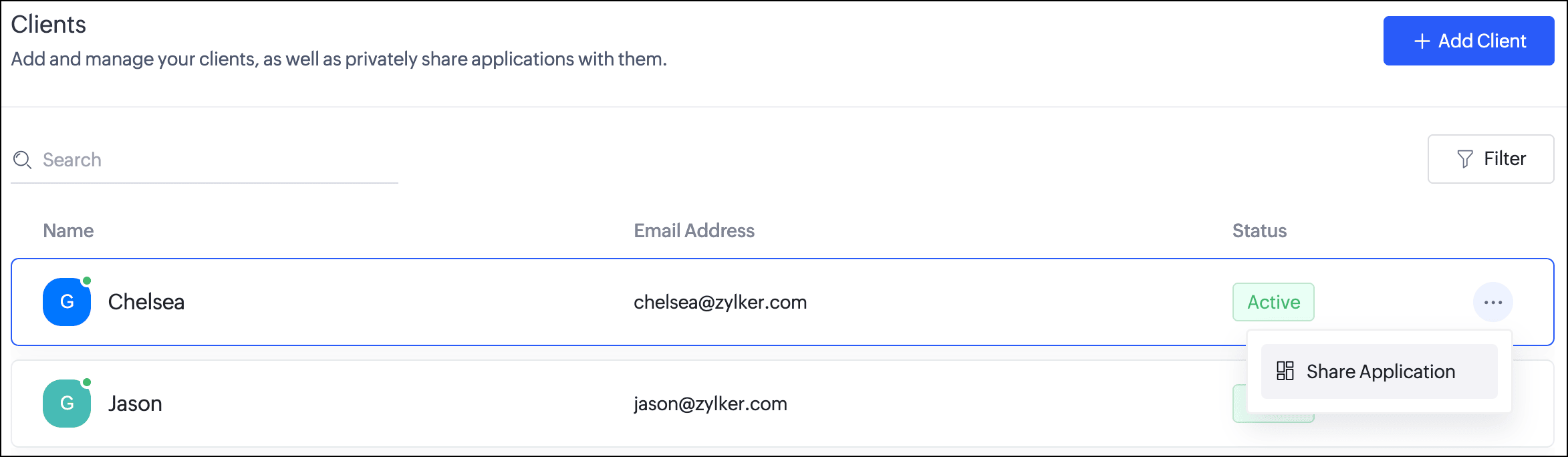
  1. Navigate to the Clients section. Click the horizontal ellipsis icon next to a client and select Share Application.
  2. In the popup, you can choose the Application and the version to be shared with the client.
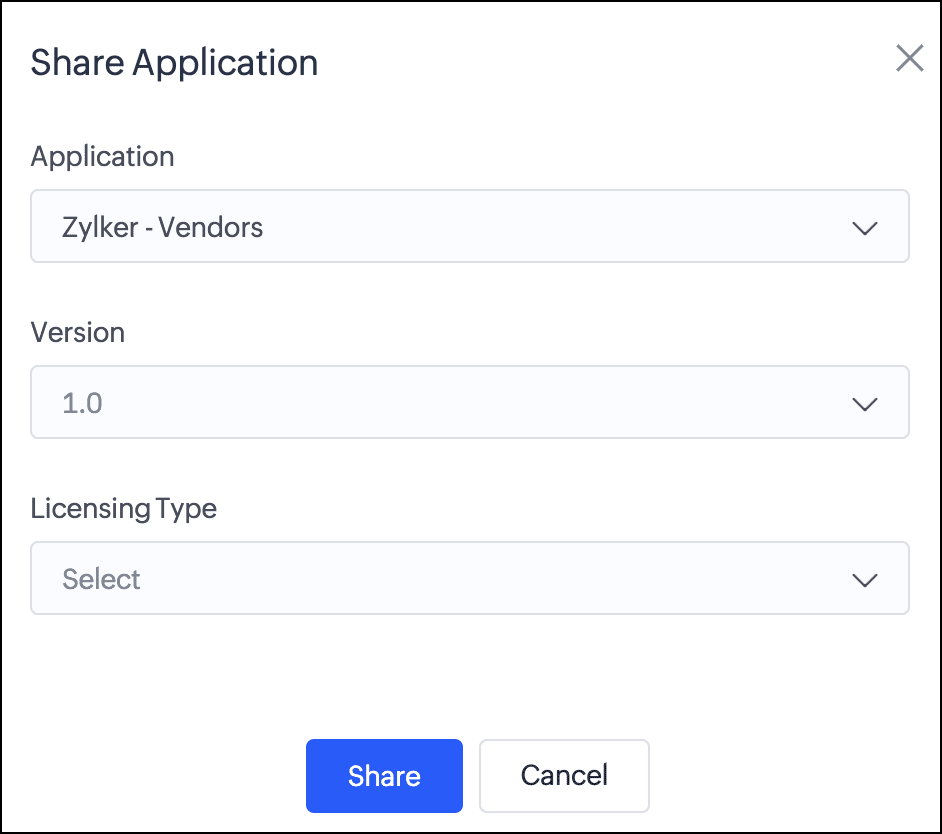
  3. Next, you can choose from two license types:
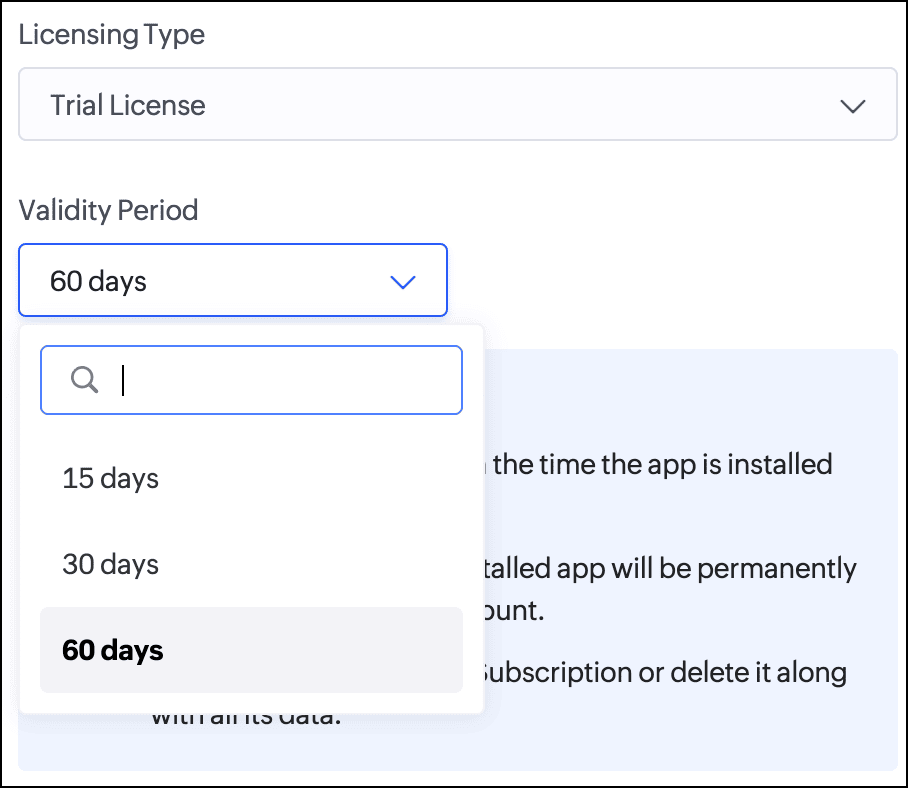
    Trial License: Provide your client with a trial period to evaluate the app. You can set the duration to 15, 30, or 60 days.
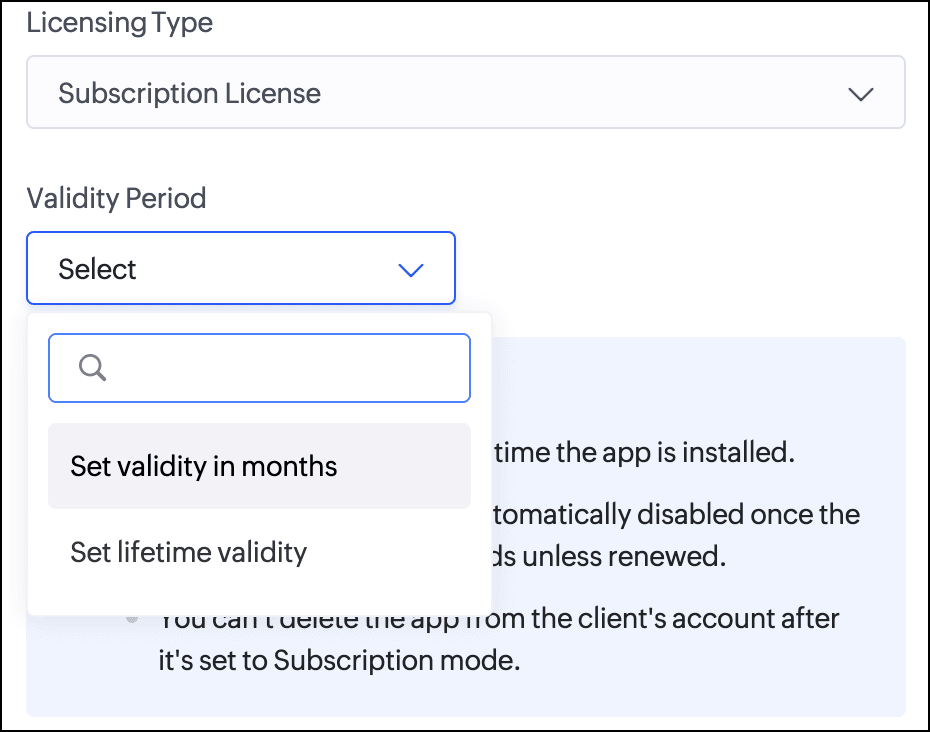
    Subscription License: Once you've finalized the subscription terms with your client, you can issue a subscription license. You have the option to set a fixed validity period in months (from 1 to 36) or grant lifetime access to the app.

Consequently, with the introduction of this new flow, we've implemented automated email reminders to keep clients informed about their subscription status and expiry timelines. Developers will be proactively notified about client subscription activity and upcoming license expirations. This ensures both parties stay in sync throughout the subscription lifecycle.

Documentation
To help you better understand these changes, we've provided comprehensive resources to assist you with the private sharing of applications. They can be accessed at the Understanding private distribution of apps help page.

Environment support for installed apps  
Along with the above enhancements, we're also introducing environment support for apps you've distributed. Your clients will now be able to add installed apps to environments and thoroughly test them in the staging environment before publishing them to production. This ensures the changes to apps are validated before they become accessible to end users.

This enhancement removes the earlier limitation that prevented distributed apps from being added to environments. Please note that while your clients can add distributed apps to environments, they will not have access to development. This continues our policy of protecting intellectual property and ensuring that developers remain in control of their apps.

For more information, visit the Installing and managing distributed apps help doc.

Timeline
These enhancements have already been rolled out and are now accessible to users in all DCs.

We believe this new enhancement to the private sharing feature will provide you with greater control and flexibility when distributing your Zoho Creator applications. We hope you love it!

We'll be back soon with more exciting updates, so stay tuned.

Regards,
The Zoho Creator Team

    • Sticky Posts

    • Introducing Zoho Creator's 2025 Release Projection 2

      Hello Creators! I'm Prakash, from the Creator product management team, and today I'm delighted to unveil our next set of features as part of Release Projection 2 for 2025. With thoughtful analysis and planning, we've curated powerful new capabilities
    • Zoho Creator - 2023 Release Projection 1

      Hello everyone! A very Happy New Year to you and your family. Hope you're all good and having a great time using Zoho Creator to make your lives easier and your businesses prosper. 2022 was an action-packed year for us at Creator, and we hope to continue
    • Zoho Creator User Group meetups in a city near you! - Oct - Nov, 2023

      Greetings from the Zoho Creator team! We're hosting a series of Zoho Creator meetups in various cities across the globe, and we'd love to meet you there! Our meetups are a great opportunity to network with industry peers, exchange ideas and best practices,
    • Zoho Creator - 2023 Release Projection 2

      Hello everyone! Time truly flies when you're having an incredible journey, and today we mark the completion of an eventful and action-packed six months. It feels like just yesterday when we embarked on this adventure together with the launch of our new
    • Upcoming Updates - August 2022

      Hi all, Greetings from the Zoho Creator team! Today we've got news for you on some exciting updates. And rest assured— there’s more to come! In this post, we'll be going over the upcoming features and improvements for this month as mentioned below. A
    • Recent Topics

    • Power Pivot and Data Modeling functionality in Zoho Sheet

      When will MS Excel functionalities like Power Pivot and Data Modeling functionalities be available in Zoho Sheet?
    • Sender Email Configuration Error.

      Hello Team, Hope you are all doing well. We are in the process of creating the Zoho FSM environment in the UAE. When we try to add the sender email address “techsupportuae@stryker.com”, we receive the error message: “Error occurred while sending mail
    • Canvas View bug

      I would like to report a bug. When clone a canvas view from an existing canvas view, if the original canvas view have canvas button with client script. Then the new create canvas view will have canvas button, it is make sense. But when I try to delete
    • Global Search placement in the new UI

      Having a hard time with the global search placement in the UI redesign. Surely I can't be the only one. Previously global search placement was perfect. A bar at the top/center of the page. Exactly where you would expect it to be. Since the new UI has
    • What's New - January 2026 | Zoho Backstage

      Welcome to 2026! If you thought last year was big, buckle up. We’re stepping into this year with a singular focus: unimaginable growth, elite scalability, and performance benchmarks that leave the old ways of event management in the rearview mirror. As
    • Cliq on your mobile phone

      Some of the employees in my company get their cliq on their mobile phones but it will not let them answer the call. The employee has to go to their laptop to access it. 
    • Bulk Delete Messages in Cliq

      Isn't it possible to bulk delete messages in Cliq? I have them delivered to me as notifications from another service but most of them need to be deleted as not of value. I get dozens of them per day, and deleting them is already difficult is the "Delete"
    • stock movement report by each transaction for each item

      Dear Sir we are using zoho inventory for foodstuff and we lack the transaction report which clearly shows movement of an item from Opening balance of the month to Goods received in, Supplier return out, Invoice out, Sales return In, Transfer out and Transfer
    • Select the task view on the board in the Zoho Connect iPhone app

      Hello. How do I select the task view on the board in the Zoho Connect iPhone app? The Android app has this functionality.
    • Unable to change Company Logo

      Hi Guys, I have an issue where I've uploaded a Company image in Gif format and the logo has now got a black background whereas the logo is supposed to be black not the background. I didn't think it would be an issue so I created a PNG version to upload
    • Metadata API Access to Functions

      I think it would be incredibly helpful to have api access to every function's code. Our team primarily uses deluge functions to update fields across modules according to business logic. I would like to create a visual dependancy model for our CRM, but
    • Historical Sales Info - Blend with Finance Invoice Line Items, Access in CRM and Desk

      My company has been using Zoho One since 2021, with sales data going back through 2020. However, we have been in business much longer, and we have historical sales information that we want to have at our fingertips when talking with customers (usually
    • Introducing Record Category in CRM: Group options to see record status at a glance.

      Release update: Currently available for CN, JP, and AU DCs (all paid editions). It will be made available to other DCs by mid-March. Hello everyone, We are pleased to introduce Record Category in Zoho CRM - a new capability where the user can get an overview
    • Change Last Name to not required in Leads

      I would like to upload 500 target companies as leads but I don't yet have contact people for them. Can you enable the option for me to turn this requirement off to need a Second Name? Moderation update (10-Jun-23): As we explore potential solutions for
    • Zoho recruit's blueprint configuration is not functioning as mapped

      Current Status: Zoho Blueprint is not functioning as configured. Issue: We are moving a Candidate status in Zoho Recruit "for active file" but we encountered: "Status cannot be changed for records involved in Blueprint." This happens to various client
    • Zoho CRM Layouts

      I have customised all our modules, Leads, Contacts and deals, and within them, I have created lots of different layouts depending on the type of Lead or contact, for example. Since the new Zoho UI came out, they have all disappeared. I have gone into
    • Service disruption in Zoho Cliq (EU Region) – February 9, 2026

      Hello everyone, We’d like to inform you about a brief service disruption that affected Zoho Cliq users in the EU region earlier today. The issue has been resolved, and all services are now operating normally. Summary On February 9, 2026, Zoho Cliq experienced
    • Spotlight series #26 - Build slides with visual clarity using Diagram

      Hello all! The feature in the spotlight this month is Diagram. Let's say you are a part of a project kickoff meeting and your teammate starts explaining the project life cycle like this: "First we ideate, then we create an initial prototype and share
    • Client scripts for Zoho Books ?

      Good day everyone, I am looking for a way to be able to interact with the Quotes and Invoices as they are being created. Think of it like Zoho client script in Zoho CRM. But for the life of me I dont see a way to do this. The issue with having function
    • Uplifted homepage experience

      Hello everyone, Creating your homepage is now much easier, more visual, and more impactful. Until now, your homepage allowed you to display custom views, widgets, analytic components, and Kiosk. With the following improvements, the homepage is now a smarter,
    • Unable to produce monthly P&L reports for previous years

      My company just migrated to Books this year. We have 5+ years financial data and need to generate a monthly P&L for 2019 and a monthly P&L YTD for 2020. The latter is easy, but I'm VERY surprised to learn that default reports in Zoho Books cannot create
    • Sort by age

      It would be very helpful if there was a way to sort by age in the Age column. Please add this function if possible. Thanks!
    • Task Order

      Hello! I've recently switched to Zoho Projects and a long time user of MS Project, Asana and LiquidPlanner (which has recently been purchased) and I'm running into a frustration I'm hoping someone can assist with. It has to do with how tasks are ordered
    • Crossbeam

      Does anyone use Crossbeam with their Zoho CRM? I'm looking for a way to import Crossbeam partner leads into Zoho CRM. If so: - What's your experience been like? - Are you able to automatically import Crossbeam leads > Zoho CRM? How? - What doesn't work
    • Access forms within a form

      I have multiple forms that I would like to create access to for users within one form. Example: I have forms A, B, C, D. I would like to create a form with the links to forms A, B, C, & D. That way we can send one link and then the user can select the
    • WorkDrive issues with Windows Explorer Not Responding

      We are using WorkDrive to collaborate on editing video content. We have a lot of files and quite a few are a few gigs. Recently anytime I try and work with the files Explorer freezes for a couple minutes whether it's dragging the files into Premiere or
    • Multiple Cover Letters

      We are using the staffing firm edition of Recruit and we have noticed that candidates cannot add more than one cover letter. This is a problem as they might be applying for multiple jobs on our career site and when we submit their application to a client,
    • Issues with Actions By Zoho Flow

      Hi, I have a workflow that fires when a deal reaches a stage. This then sends out a contract for the client to sign. I have connected this up through Actions by Zoho Flow. Unfortunately this fails to send out. I have tracked it down to the date fields.
    • Fill Mail Merge document up with subform fields of an Inventory module record being in the Related List

      Hi, I try to insert subform fields from an inventory module record being on the Related List of another inventory module record into a Mail Merge template without success. For example: we use ratecards in licensing and this ratecard items are available
    • Enhancements for Currencies in Zoho CRM: Automatic exchange rate updates, options to update record exchange rates, and more

      The multi-currency feature helps you track currencies region-wise. This can apply to Sales, CTC, or any other currency-related data. You can record amounts in a customer’s local currency, while the CRM automatically converts them to your home currency
    • Better use of contacts

      Zoho inventory has the ability to add multiple contacts to customers. However Zoho inventory doesn't currently provide a way to link a contact to objects like sales orders. This means that while you can tell what company has placed a sales order you can't
    • How can we add products using a Wizard?

      We want to create a Wizard to add products. Why is there no possibility to use the products module when creating a wizard?
    • Orphan email alias blocking user creation – backend cleanup required

      Hello Zoho Mail Support, I´m unable to assign or create the address xx@iezzimatica.ar in my organization. Current situation: Alias cannot be assigned to any user (system says it is already in use) New user with this address cannot be created Address does
    • Direct Access and Better Search for Zoho Quartz Recordings

      Hi Zoho Team, We would like to request a few enhancements to improve how Zoho Quartz recordings are accessed and managed after being submitted to Zoho Support. Current Limitation: After submitting a Quartz recording, the related Zoho Support ticket displays
    • Ensure Consistent Service Delivery with Comprehensive Job Sheets

      We are elated to announce that one of the most requested features is now live: Job Sheets. They are customizable, reusable forms that serve as a checklist for the services that technicians need to carry out and as a tool for data collection. While on
    • Something wrong with client script??

      Someone have the same feeling? Client script behavior become very strange..
    • API 500 Error

      Hello amazing ZOHO Projects Community, I get this message. How can we solve this? { "error": { "status_code": "500", "method": "GET", "instance": "/api/v3/portal/2010147XXXX/projects/2679160000003XXXX/timesheet", "title": "INTERNAL_SERVER_ERROR", "error_type":
    • Polish signer experience to compete with docusign

      I would like to suggest that someone spend the little bit of time to polish the signer experience, and the email templates to more of a modern professional feel. They are currently very early 2000s and with some simple changes could vastly improve the
    • how to change the page signers see after signing a document in zoho sign

      Hello, How can I please change the page a signer sees after signing a document in Zoho Sign? I cannot seem to find it. As it is now, it shows a default landing page "return to Zoho Sign Home". Thanks!
    • Digest Janvier - Un résumé de ce qui s'est passé le mois dernier sur Community

      Bonjour chers utilisateurs, Le premier mois de l’année est déjà derrière nous ! Découvrons ensemble comment s'est passé janvier pour Zoho Community France. Nous avons démarré le mois avec une nouvelle intégration entre Zoho Desk et Zoho Contracts. Cette
    • Next Page