Zoho Desk: 2023 Feature Release - All New Zoho Desk with accessibility controls and exciting new features and enhancements

Zoho Desk: 2023 Feature Release - All New Zoho Desk with accessibility controls and exciting new features and enhancements

Redefining customer service experiences

I. New Generation Zoho Desk
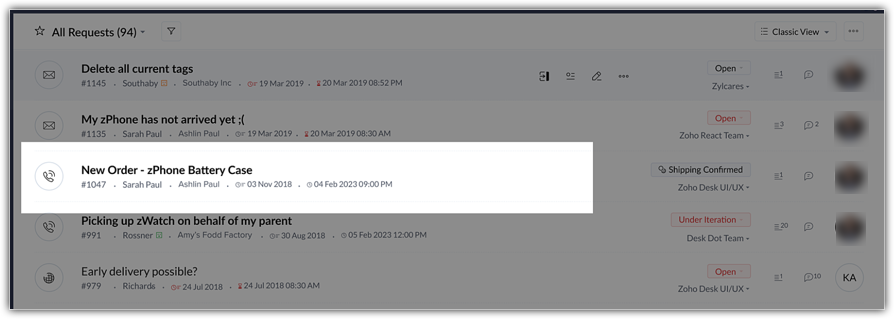
The Zoho Desk UI has been enhanced with a more engaging, intuitive, and user-friendly interface. The new design adheres to an advanced unified component library and follows standard design guidelines.

The fresh Zoho Desk interface brings changes that provide support to agents with a range of easy-to-use and convenient options that save time and effort while increasing productivity.

Take a look at some of the elements of our new UI:

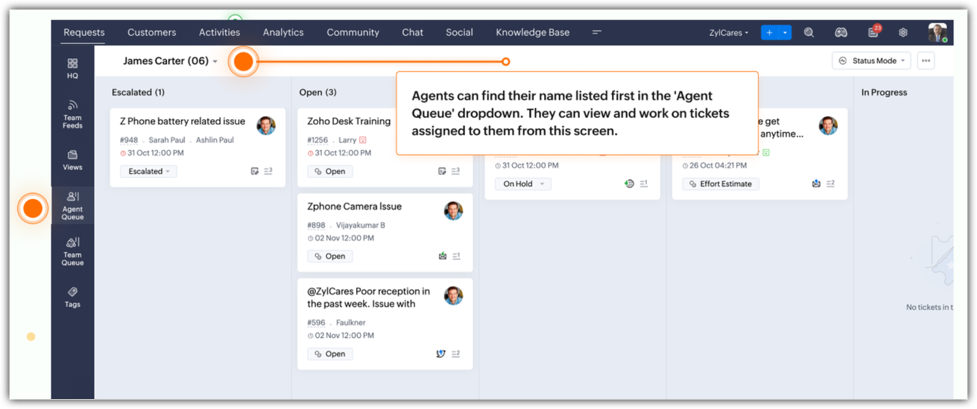
The Agent Queue now displays the agent's name first in the queue. Agents can work on assigned tickets right from this window. 

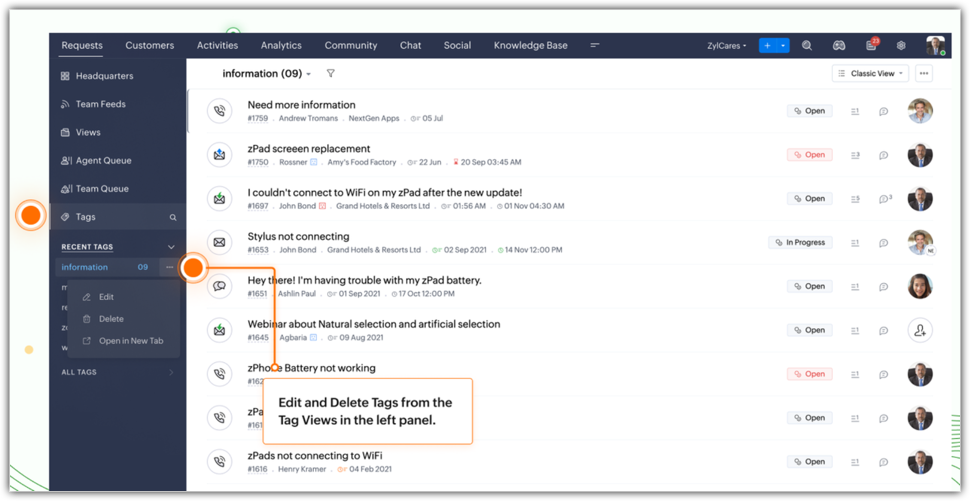
Tags can be edited and deleted from the Tag view in the left panel.

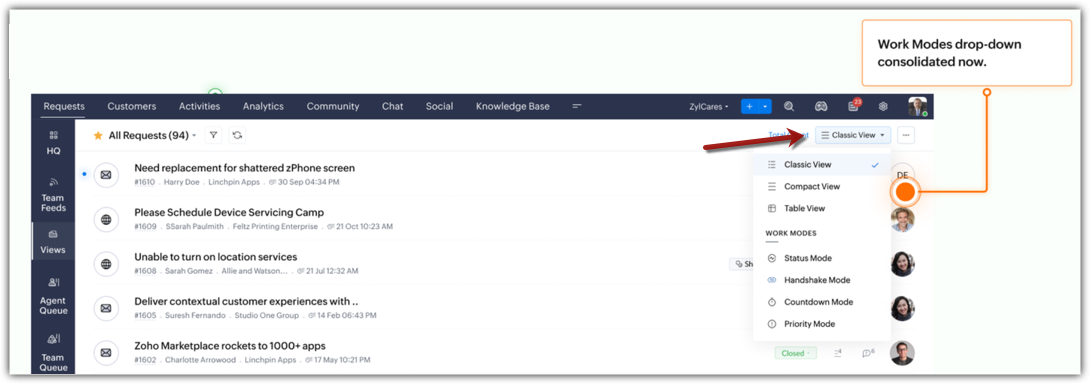
Work Modes provide an organized and clutter-free view. All work modes, including status, handshake, countdown, and priority are consolidated under the list views. 

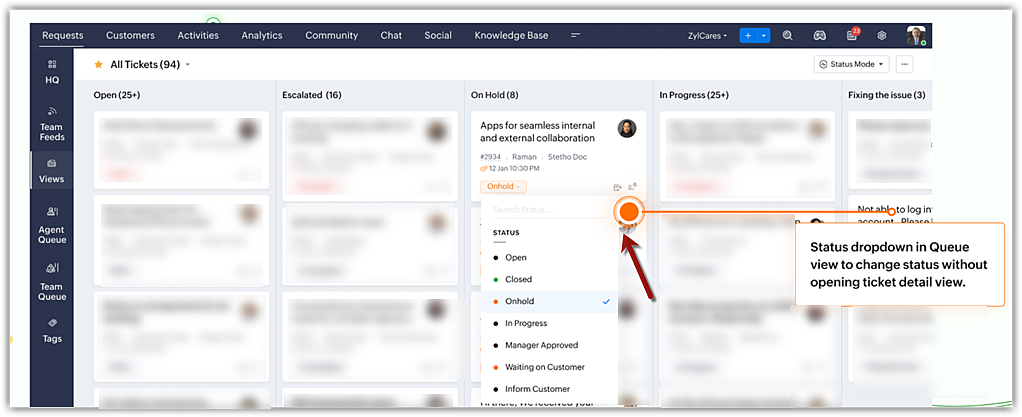
Ticket status can now be changed right from the Queue view without opening the Ticket Detail view. 

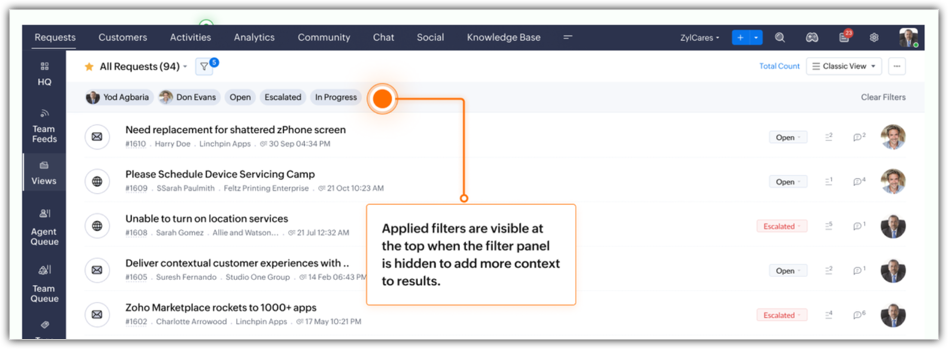
Filters applied to quick search a record are now displayed as breadcrumbs to provide better context and facilitate better understanding.

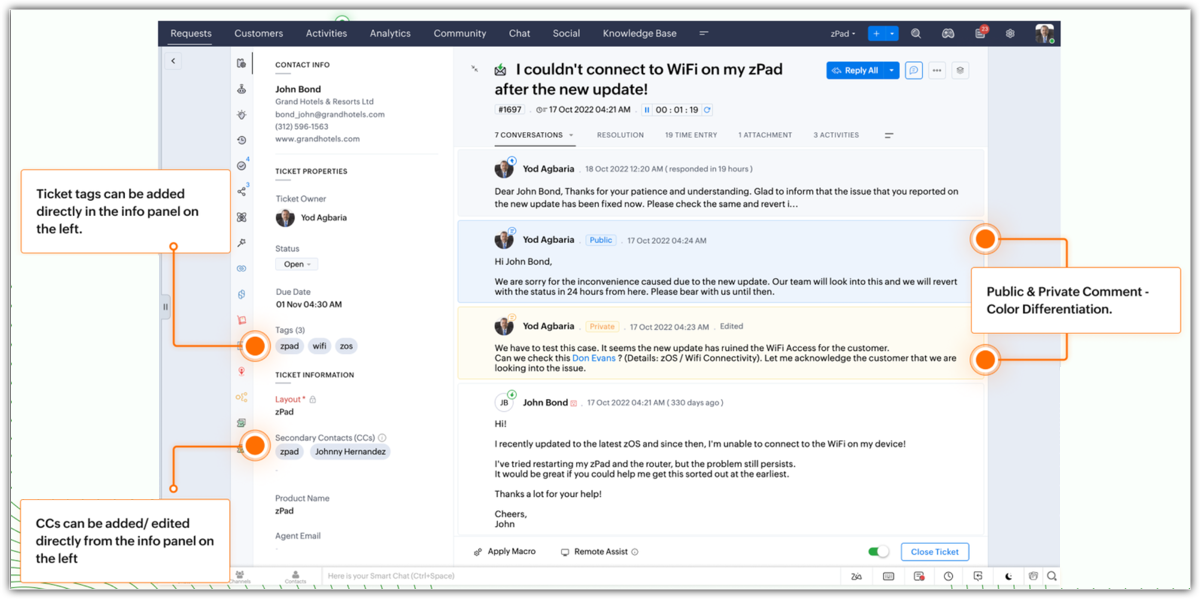
Ticket Detail view now includes more functionalities:
  • Tags can be added from the info panel.
  • CCs can be added and edited from the info panel.
  • Color distinction differentiates between public and private comments.
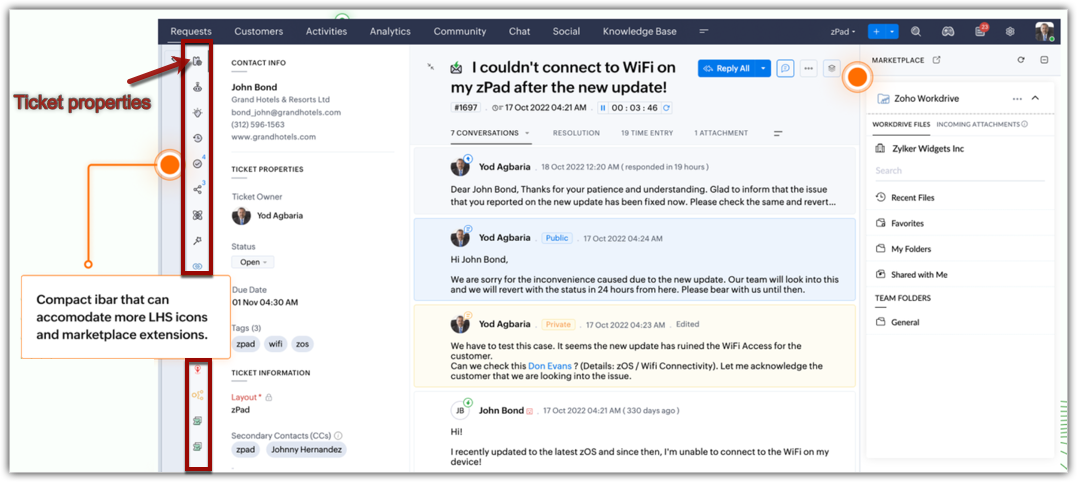
  • Compact info bar holds more icons and displays extensions for quick access.
This is just a glimpse of some of the key changes incorporated into the new UI design.
Resources: Help documents 

II. Providing inclusive experiences

We believe that software should be accessible to all. This was our goal in building an all-inclusive interface to cater to our world-wide customer base. With this in mind, we introduce:
  • Accessibility controls that help users adjust, enable, or disable visual and display preferences to their liking. Users now have the option to:
    • Highlight critical information, such as Ticket ID, agent name, email address, and ticket owner in striking colors for prominence and cognitive appeal.
    • Underline links for quick identification.
    • Emphasize areas that a user should focus on with highlights and colored outlines around the text.
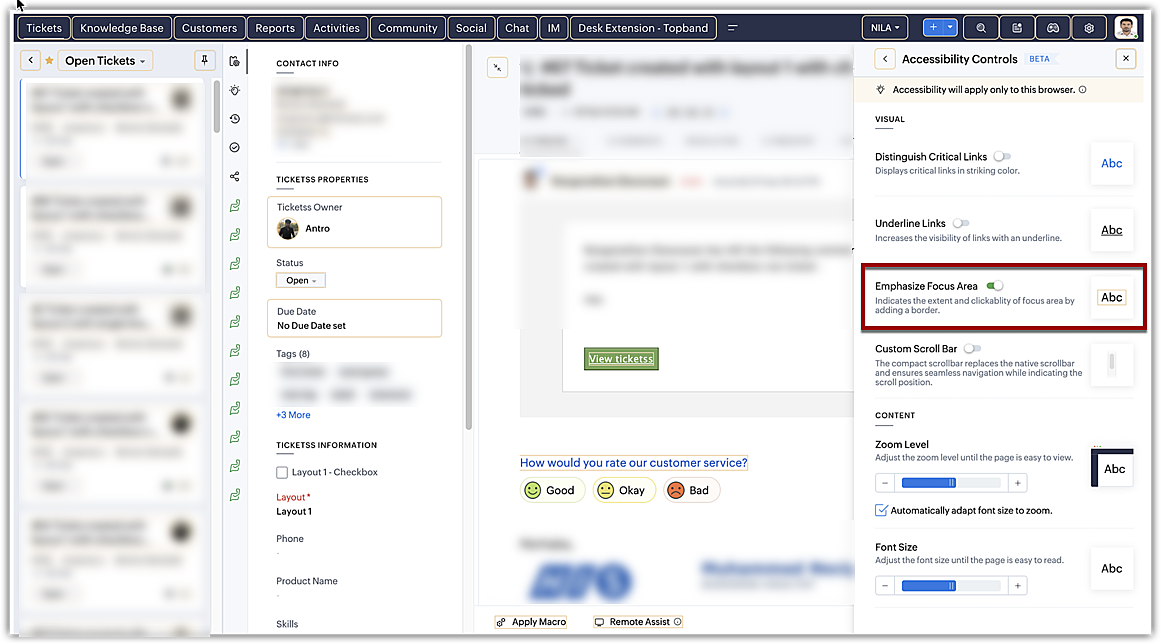
    • Optimize animations, motion graphics, and transitions by reducing motion or by allowing Zoho Desk to auto-adjust based on the computer settings. The screen jerks, page transitions, unwanted animations, and motions that can cause distraction and increase strain on the eyes can be mitigated substantially.
    • Use a reading mask to shine a spotlight on the text as you hover over it. Blur the background for distinction, less distraction, and better comprehension. 
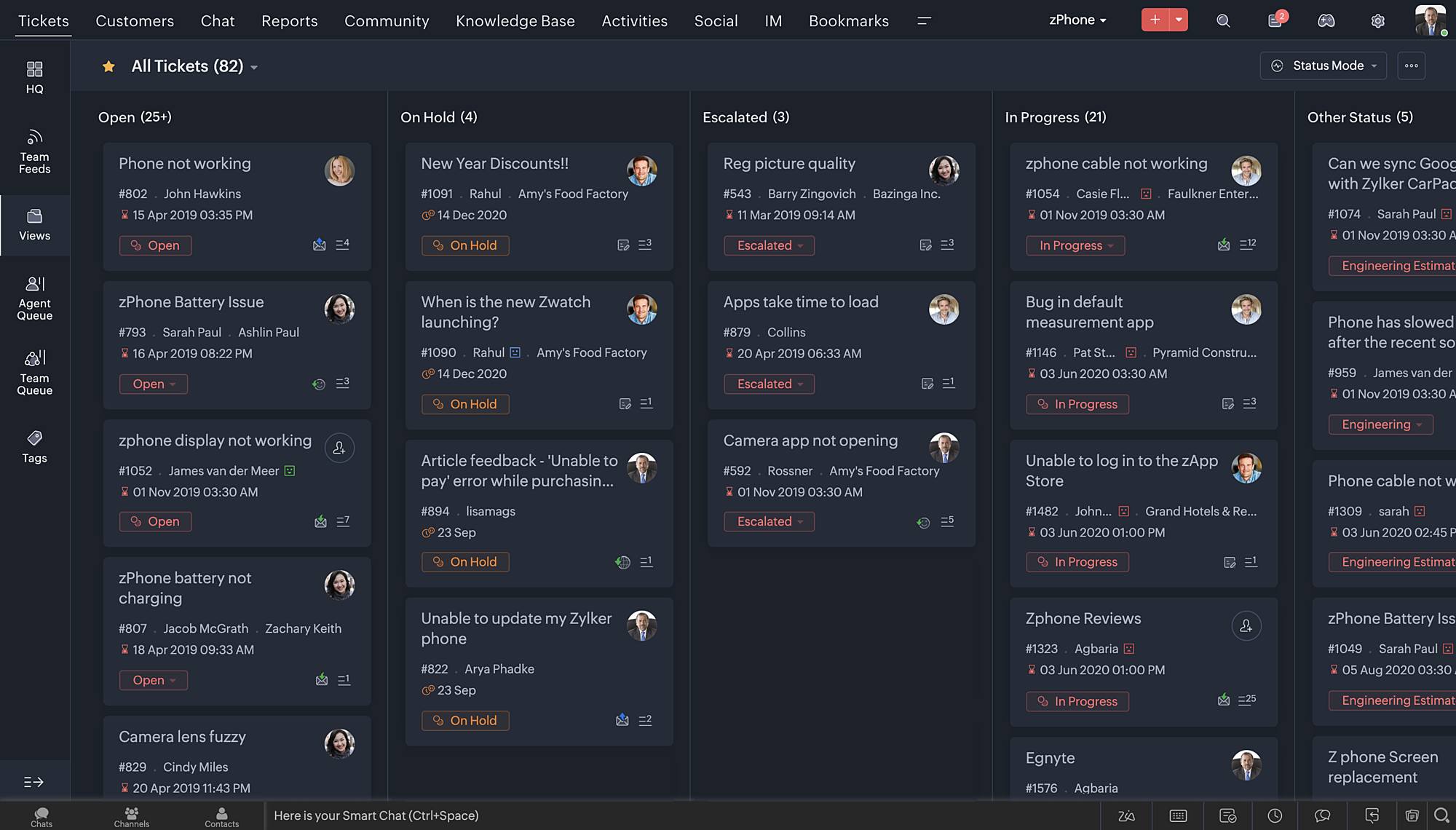
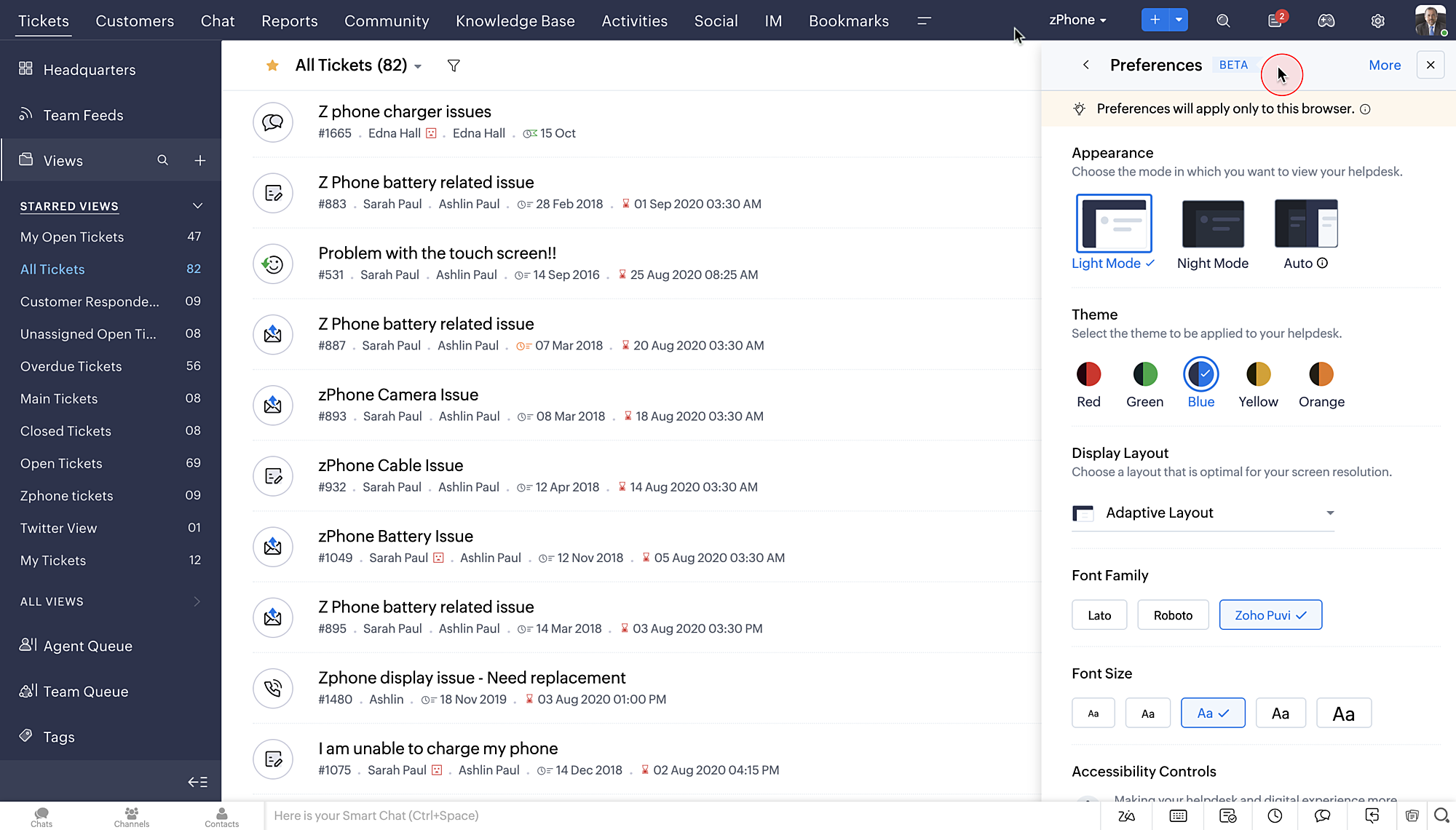
    • Adjust display and layout with page zoom and font size and type. 
    • Set display preferences with new themes and night/dark mode. Switch between light mode, night mode, or auto-mode based on your surroundings.


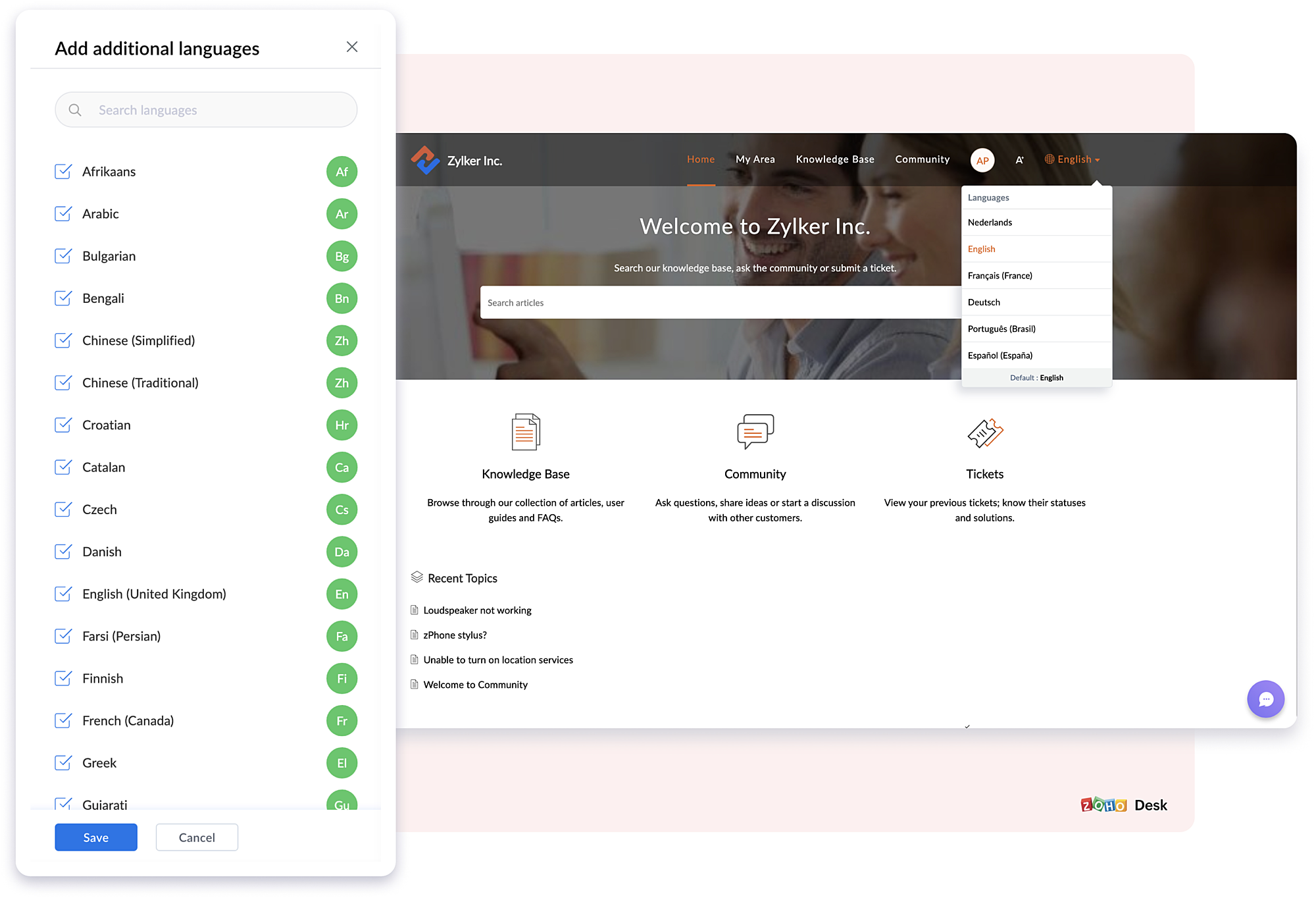
  • Multilingual support for your Knowledge Base helps customers access self-service content in their preferred language. Your KB content can be translated and published in 50+ languages.
III. Introducing enhanced privacy and transparent management

Data is the backbone of a business and it requires secure handling. This year, Zoho Desk took big strides to enhance privacy and provide better data management options by introducing:

Data subject rights: In accordance with GDPR, Zoho Desk now provides a reliable and secure system to protect and process customer data. DSR protects two different rights: Right to Access and Right to Erasure. Refer to the help doc for more details.
  • Right to Access: Data subjects can request a copy of their personal data. In Zoho Desk, you can register a request and send a copy of the data from one or more modules. Data will be exported, and you can send it securely from your official email account.
  • Right to Erasure: Data subjects can raise a request asking the organization to delete their personal data. In Zoho Desk, you can take up this request and permanently delete the data from one or more modules.
Read receipts for emails: Emails sent from tickets will bear a green double check mark when they've been read by the recipient. This helps agents manage high-priority tasks, deadlines, follow-up conversations, and more. Check marks in different colors indicate whether CC or BCC recipients have read the email, the number of recipients that replied to the email, whether the email bounced or failed, and more. Read the help doc for more details.

Data Backup: A foolproof method for preventing data loss is to periodically back up your data. Zoho Desk now facilitates instant and scheduled backups. Data from the Tickets, Products, KB, Activities, Agents, Teams, and other modules can be backed up as and when needed. Refer to the help doc for more details. 

Other new features and enhancements

Aside from these updates, we have some exciting new features:

Auto-translation of your help center
To support your multilingual knowledge base further, Zoho Desk now offers auto-translation of your KB articles to multiple languages. The article, title, tags, SEO title, meta descriptions, and meta keywords will be auto-translated using tools such as Google Translate, Unbable, or Zia, based on their configuration. Refer to the help doc for more details.

Custom actions gallery for Workflow automations
Introducing custom actions to improve workflow automations. The new set of available actions includes: Assign Ticket, Add Comment, Send Email Reply, Share Ticket, Send Cliq Notification, Reply and Notify via Instant Messaging, and more. Refer to the help doc for more details. 

Idle timeout to improve agent productivity and optimize ticket assignment
Desk provides the option to set the maximum duration for which an agent can remain idle.  After that time, their status will automatically change from online to offline. Increase productivity and maintain better control over ticket assignment by choosing agents based on status. Refer to the help doc for more details.  

More functionalities added to Blueprints
Advanced configurations we've added to Blueprint include:
  • Strict mode: Agents can be restricted from performing certain actions, like editing fields, sending replies, leaving comments, and asking for approvals during a transition. These functions will be hidden from the ticket interface.
  • Dynamic transition owner: Users can assign transition owners for records as and when needed. The transition owners need not be necessarily from the same department that the record belongs to.
  • Save draft: Blueprints that are in progress can be saved as drafts so you can resume work at another time.
  • Additional fields provided during transition: During transition, "tags" is included as a field that can be updated by the agent.  Ticket sharing is also an available action. If the agents want, they can share a ticket with team members during the transition.
  • Transition draft: Save a transition until its finalized as a partial draft. During this stage, multiple transition owners can be involved in its completion. The draft will display the name of the person who drafted the transition and when it was drafted.
New set of marketplace extensions
Earlier this year, we introduced a set of new extensions aimed at enhancing Zoho Desk's performance. The new extensions are:

Zoho Campaigns integration
Experience the benefits of Campaigns within your help desk. Create mailing lists, add or remove customers from mailing lists, find out how many campaigns customers are part of, and more. Refer to the help doc for more details.

Broadcast email template
Create email templates for multiple departments at once, insert an agent's signature and default happiness rating within the template, provide profile-based access to the template, and more. Refer to the help doc for more details.

Related tickets by custom fields
Improve ticket resolutions by adding custom fields. Using these fields, agents can look up tickets with similar field values to identify similar problems, and provide quicker and more personalized solutions. Up to five custom fields can be added to a layout, and can display information such as ticket ID, ticket owner, status, and date/time created from related tickets. Refer to the help doc for more details.   

That's a wrap.
We're excited to share the new version of Zoho Desk with its inclusive functionality, improved automation, comprehensive privacy options, helpful extensions, and more.

The new features are now available for all users. Give them a try and share your feedback.

Regards,
Anumita Gupta

Book the date!
We will be hosting an exclusive webinar for the 2023 Release Features on 22nd December (Thursday) at 9pm IST
Kindly register using the link below. 


    • Sticky Posts

    • Zoho Desk Partners with Microsoft's M365 Copilot for seamless customer service experiences

      Hello Zoho Desk users, We are happy to announce that Zoho Desk has partnered with Microsoft's M365 to empower customer service teams with enhanced capabilities and seamless experiences for agents. Microsoft announced their partnership during their keynote
    • WhatsApp pricing changes: Pay per message starting July 1, 2025

      Starting July 1, 2025, WhatsApp is shifting from conversation-based pricing to per-message billing. That means every business-initiated message you send will count. Not just the first one in a 24-hour window. Pricing updates on the WhatsApp Business Platform
    • Live Webinar - Work smarter with Zoho Desk and Zoho Workplace integration

      Hello customers! Zoho Desk and Zoho Workplace are coming together for a webinar on 14th May, 2024. Zoho Workplace is a suite of productivity apps for email, chat, docs, calls, and more at one single place. Zoho Desk is closely integrated with a few tools
    • Apple iOS 17 and iPadOS 17 updates for Zoho Desk users

      Hello Zoho Desk users! Apple recently announced the release of iOS 17 and iPad OS 17. These latest OS updates will help you stay productive and efficient, through interactive and seamless user experiences. Zoho Desk has incorporated the updates to help
    • Zoho Desk Cheat Sheet For The Year-End

      Check out these Zoho Desk best practices to end this year on a high and have a great one ahead! #1 Set Business (Holiday) Hours - If you have limited working hours, please make sure you restrict your business hours or set them as holidays for the coming days. Let your customers know when you will, and won't, be available. #2 Update the Annual Holiday List - Check the holidays for the new year and update the holiday schedule. Usually, holidays from the current year will be carried over for the next
    • Recent Topics

    • Record history and ticket interaction tab in contacts and accounts

      Hello everyone! We have improved the History tab to help users trace updates in the interaction activity logs of the Contacts and Accounts detail pages in the Customer Module. This enhancement make it easier to get clear details about who made each update,
    • Using IMAP configuration for shared email inboxes

      Our customer service team utilizes shared email boxes to allow multiple people to view and handle incoming customer requests. For example, the customer sends an email to info@xxxx.com and multiple people can view it and handle the request. How can I configure
    • Auto-Invite Users to Portals in Zoho CRM based on Conditions

      Hello Everyone, You can now automate portal invitations in Zoho CRM with the new Auto-Invite users feature in Portal management. No more manually enabling portal access one by one. With this enhancement, you can automatically send invites for users to
    • Zoho CRM for Everyone's NextGen UI Gets an Upgrade

      Hello Everyone We've made improvements to Zoho CRM for Everyone's Nextgen UI. These changes are the result of valuable feedback from you where we’ve focused on improving usability, providing wider screen space, and making navigation smoother so everything
    • Auto-sync field of lookup value

      This feature has been requested many times in the discussion Field of Lookup Announcement and this post aims to track it separately. At the moment the value of a 'field of lookup' is a snapshot but once the parent lookup field is updated the values diverge.
    • Zoho Recruit Subscription

      Hello Zoho Recruit Team, Good day! I would like to inquire about your recruitment subscription plans and would also like to verify the current subscription our company is enrolled in under Zoho Recruit. Thank you, and I look forward to your response.
    • Keyboard shortcut M key

      I'm trying to customize my keyboard shortcuts and assign the "m" key. But it says the key is already assigned. I've looked through all my shortcuts and can't see any assigned "m". When I select an email and press the M key, nothing happens. What is the
    • Is it possible to create a meeting in Zoho Crm which automatically creates a Google Meet link?

      We are using Google's own "Zoho CRM for Google" integration and also Zoho's "Google Apps Sync" tools, but none of them provide us with the ability to create a meeting in Zoho CRM that then adds a Google Meet link into the meeting. Is this something that
    • Ensure Consistent Service Delivery with Comprehensive Job Sheets

      We are elated to announce that one of the most requested features is now live: Job Sheets. They are customizable, reusable forms that serve as a checklist for the services that technicians need to carry out and as a tool for data collection. While on
    • Automatic Portal invite

      We have numerous customers we move through a blueprint in deals, when they get to a certain point we need to give them portal access, how can this be done through deluge or a workflow? Latest Update (December 2025): The option to automate portal invitations
    • Enhancements in Canvas

      Dear All, Greetings! Canvas lets you design the record details page to suit your brand or business preferences. We are glad to introduce the following enhancements to uplift your design experience. Reusable Components Style Presets Let's go! Reusable
    • Introducing Dark Mode / Light Mode : A New Look For Your CRM

      Hello Users, We are excited to announce a highly anticipated feature - the launch of Day, Night and Auto Mode implementation in Zoho CRM's NextGen user interface! This feature is designed to provide a visually appealing and comfortable experience for
    • Whatsapp Connection Status still "Pending" after migration

      Hello, I migrated my WhatsApp API to Zoho from another provider a day ago. So far the connection status is still “Pending”. There is a problem? How long does it usually take?
    • Create New Tasks Layout in CRM

      I am able to do this in Leads, Contacts, Meetings, Calls - every other module, but cannot create a new layout in tasks. I have the appropriate access but it's simply not appearing as an option. Only "Standard" option shows. Please help!
    • ABN with Legal Entity Name

      Hi, How can I execute this? The ABN number is entered in Accounts Module and ideally, it should display or suggest the correct Legal Entity Name based on the ABN lookup. ex. Account Name: JPG Resources ABN Number: 65 067 761 871 Legal Entity Name: (auto
    • Presenting ABM for Zoho CRM: Expand and retain your customers with precision

      Picture this scenario: You're a growing SaaS company ready to launch a powerful business suite, and are looking to gain traction and momentum. But as a business with a tight budget, you know acquiring new customers is slow, expensive, and often delivers
    • Has CSS Changed for Common Elements?

      I noticed today that the standard title headings on my Forms and Reports display smaller in size than before. Google Dev Tools (attached), seems to confirm my suspicion. Something appears to be overriding the 1.375rem to 1.125rem. The font size on the
    • Text snippet

      There is a nice feature in Zoho Desk called Text Snippet. It allows you to insert a bit of text anywhere in a reply that you are typing. That would be nice to have that option in Zoho CRM as well when we compose an email. Moderation Update: We agree that
    • Zoho Cliq not working on airplanes

      Hi, My team and I have been having this constant issue of cliq not working when connected to an airplane's wifi. Is there a reason for this? We have tried on different Airlines and it doesn't work on any of them. We need assistance here since we are constantly
    • Prepopulating Fields

      Hello, I have a form (Assets) with 2 lookup fields: Client (from Clients) Site (from Client Sites) I modified the code (highlighted in red below), so the Site dropdown shows the list of sites related to the Client. must have Client_Site ( type = picklist
    • Timeline Tracking Support for records updates via module import and bulk write api

      Note: This update is currently available in Early Access and will soon be rolled out across all data centers (DCs) and for all editions of Zoho CRM. The update will be available to all users within your organization, regardless of their profiles or roles.
    • What is the difference between Zoho Campaigns and marketing hub?

      Zoho Campaigns is a permission-based email marketing tool for sending marketing emails and mass emails. Marketing Automation is a multichannel marketing automation tool that caters to organizations looking for tools to engage their users across multiple
    • Unify Overlapping Functionalities Across Zoho Products

      Hi Zoho One Team, We would like to raise a concern about the current overlap of core functionalities across various Zoho applications. While Zoho offers a rich suite of tools, many applications include similar or identical features—such as shift management,
    • Detailed Account Reports - Add Running Balance

      When one clicks into an account from a report (say P/L or Balance Sheet), the default reports have the Debit, Credit, and then the Amount. The Amount column (last one) is duplicate information. It would be far better and fit more peoples' use cases if
    • Can we add custom fields to portal community profiles?

      How do we add custom fields to our profile pages in our portal community? If we have the ability to add custom fields, will we be able to access those fields via API? We want to use our Desk community in our help portal as our primary community and would
    • Future Orders - Due Date

      Hi In my role, I can receive tickets where the work required is requested months in advance. Using a Future Orders option, which I believe was setup under the On Hold status type, hides the Due Date, in all views/ticket etc. Whilst I understand the reasoning
    • Start Workflow from Deluge Script

      I have developed a customized process from our CRM that leverages a deluge script to create a statement of work document. Once the document has been created via the merge and store function, I would like the ability to start a workdrive review & approve
    • Issue: Ticket Export Does Not Include Ticket Threads

      Dear Zoho Desk Support Team, I hope you’re doing well. I wanted to bring to your attention that the current ticket export feature in Zoho Desk does not seem to include the ticket threads or conversation history. When exporting tickets, only the summary
    • Pushover Notification Module

      Hello, it would be good if there would be a "Pushover" (https://pushover.net/) module besides the standard SMS module. Pushover is now very well known, especially in IT, and is becoming more and more popular. The biggest advantage are the customizable
    • Forward - no Ticket Number

      Hello, when I send an email to Zoho Desk via Reply or Reply All, the ticket number is in the subject line. But if I use forward then not. Is there an option to change this? We often forward e-mails and a reply to this will of course create a new ticket
    • Checkout: Adding Images

      Hello everyone, I’m trying to add a small GoGreen logo in the shipping section of the checkout to promote our sustainable shipping. While I can insert text without any issues, it seems that adding images is not supported in this area. Is there currently
    • Sortie de Zoho TABLE ??

      Bonjour, Depuis bientôt 2 ans l'application zoho table est sortie en dehors de l'UE ? Depuis un an elle est annoncée en Europe Mais en vrai, c'est pour quand exactement ??
    • [solved] #original_sender trick not working for us

      Hello community ! We really like DESK.. it's working like a charm for us but I have a request. Some users are sending emails personnaly to me (instead of using the support adress).. and I saw there was a possibilty to use : #original_sender {mail@mail.com}
    • SalesIQ Chat Notifications

      I am the admin of our salesIQ implementation. About two weeks ago, I started hearing/seeing notification for ALL chats messages from monitored agents/chat participants. I don't need to see these, we have a manager who deals with this. I can't stop the
    • Correlated subqueries not supported in Zoho Analytics. This creates huge limitations

      Running into a major limitation in Zoho Analytics: correlated subqueries simply don’t work, even in completely standard SQL patterns inside a JOIN. Example: LEFT JOIN "Bills" b ON d."Id" = b."Deal ID" AND EXISTS ( SELECT 1 FROM "Bill
    • Unknown table or alias 'A1'

      I would like to create a subquery but i am getting the following error: Unknown table or alias 'A1' used in select query. This is the sql statement:  SELECT A1.active_paying_customers, A1.active_trial_customers, A1.new_paying_signup, date(A1.date_active_customers), 
    • HubSpot CRM to Zoho Creator Integration

      I'm trying to create an integration between HubSpot CRM and Zoho Creator with HubSpot being the push source (if a contact is created or updated in HubSpot, it pushes the information to Zoho Creator). I have two questions: 1- Is it best to use Zoho Flow
    • Sorting Descending in a lookup

      I have a case number lookup on multiple forms. I need the most recent added to appear at the top of the lookup or as the list of cases grom it's too much to scroll. Is there a way to have a look up sort descending?
    • Batch Emails in CRM Plus without using a template?

      Hi guys. Is it possible to send the same email to multiple people at the same time within CRM Plus without using an email template? At the moment we create a custom view in Contacts to display the people that we need. We then click the boxes on the left, and click 'Send Mail', but always need to select a template. Sometimes its better to write a quick one off message, without needing to set up a template first. Thanks.
    • bank charge

      a charge to my account was made that I did not authorize, of $16.46, for something that looks like "computer maintenance or something to that matter". please refund.
    • Next Page