Automation Series: Auto-update Phase Status

Automation Series: Auto-update Phase Status

Hello Folks!

You can auto-update your phase's status based on status of underlying tasks using custom functions.

In this series, we will showcase how to create and run custom functions, using Deluge, with ease. Follow the steps below and automate your project management process.

Use-case

Consider a scenario where a sales representative manages all his customers conversations as tasks in Zoho Projects. To stay organised, he divides the year into four quarters and sets up one milestone for each.
He wants the milestone status to be updated automatically once all the tasks in a milestone are updated.

So, if every task in Q1 is marked In Progress, the milestone status should automatically be updated to In Progress. When all tasks are Completed, the milestone should also be completed.

Configuration Flow

To automate this process, the sales representative should
  1. Create custom status for tasks and milestones.
  2. Establish a connection.
  3. Create a custom function using Deluge.
  4. Define a Workflow Rule to set a trigger.

Create Custom Status:

Create a custom status by double-clicking the Status column name in the milestone and task list view.

Establish a connection:

A Connection is a secure and reusable authentication layer that lets your custom functions and integrations communicate with external services or other Zoho apps.
Users can select the relevant scopes to create a connection. Scopes for this particular use case are,

Zohoprojects.portals.all,
Zohoprojects.projects.all,
Zohoprojects.tasks.all,
Zohoprojects.milestones.all

Click here to learn how to establish a connection.

Create a custom function:

You don't need development expertise to execute this custom function. Zoho Projects manages the underlying execution. Simply add the function code, map the required inputs, and the system will run it automatically whenever the workflow is triggered.

Sample connection name - milestonestatus
Sample status name - In Review

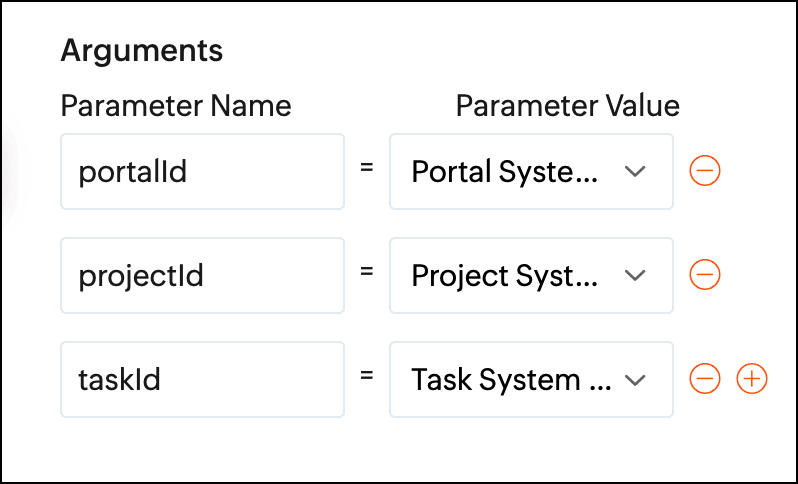
Arguments required:

Arguments are variables or parameters that pass an input value to execute a custom function.

  1. //scopes: Zohoprojects.portals.all, Zohoprojects.projects.all, Zohoprojects.tasks.all, Zohoprojects.milestones.all
  2. endPointV3 = "https://projects.zoho.in/api/v3/portal/";
  3. endPoint = "https://projects.zoho.in/restapi/portal/";
  4. milestoneStatusIds = List();
  5. milestoneStatusNames = List();
  6. milestoneParameter = Map();
  7. statusName = "In Review";
  8. indexValue = 0;
  9. rangeValue = 100;
  10. taskStatusId = "";
  11. state = true;
  12. // Get task layout details
  13. taskLayoutDetailsResponse = invokeurl
  14. [
  15. url :endPoint + portalId + "/projects/" + projectId + "/tasklayouts"
  16. type :GET
  17. connection:"milestonestatus"
  18. ];
  19. statusDetails = taskLayoutDetailsResponse.get("status_details");
  20. for each status in statusDetails
  21. {
  22. if(status.get("name").notContains(statusName))
  23. {
  24. taskStatusId = taskStatusId + status.get("id") + ",";
  25. }
  26. }
  27. taskStatusId = taskStatusId.removeLastOccurence(",");
  28. taskResponse = zoho.projects.getRecordById(portalId,projectId,"Tasks",taskId,"milestonestatus");
  29. milestoneId = taskResponse.get("tasks").get(0).get("milestone_id");
  30. id_list = taskStatusId.toList(",");
  31. chunk_size = 4;
  32. count = 0;
  33. chunk = List();
  34. all_chunks = List();
  35. for each id in id_list
  36. {
  37. count = count + 1;
  38. chunk.add(id);
  39. if(count == chunk_size)
  40. {
  41. all_chunks.add(chunk);
  42. chunk = List();
  43. count = 0;
  44. }
  45. }
  46. if(chunk.size() > 0)
  47. {
  48. all_chunks.add(chunk);
  49. }
  50. for each sub_chunk in all_chunks
  51. {
  52. param = sub_chunk;
  53. // Get All Tasks
  54. taskParameter = Map();
  55. taskParameter.put("custom_status",param.toString());
  56. taskParameter.put("index",indexValue);
  57. taskParameter.put("range",rangeValue);
  58. taskParameter.put("milestone_id",milestoneId);
  59. tasks = zoho.projects.getRecords(portalId,projectId,"tasks",taskParameter,0,"milestonestatus");
  60. if(tasks.containKey("tasks"))
  61. {
  62. state = false;
  63. break;
  64. }
  65. }
  66. if(state)
  67. {
  68. // Get milestone layout details
  69. info "in";
  70. milestoneLayoutDetails = invokeurl
  71. [
  72. url :endPointV3 + portalId + "/projects/" + projectId + "/milestones/layouts"
  73. type :GET
  74. connection:"milestonestatus"
  75. ];
  76. milestoneCustomFieldDetails = milestoneLayoutDetails.get("section_details").get(0).get("customfield_details");
  77. for each milestoneCustomFieldDetail in milestoneCustomFieldDetails
  78. {
  79. if(milestoneCustomFieldDetail.get("api_name").equalsIgnoreCase("status"))
  80. {
  81. milestoneStatusIds = milestoneCustomFieldDetail.getJSON("picklist_details");
  82. milestoneStatusNames = milestoneCustomFieldDetail.getJSON("picklist_valuemap");
  83. }
  84. }
  85. // Milestone re-open status id
  86. indexOfReopen = milestoneStatusNames.indexOf(statusName);
  87. // Get milestone details
  88. milestoneResponse = zoho.projects.getRecordById(portalId,projectId,"milestones",milestoneId,"milestonestatus");
  89. if(milestoneResponse.containKey("milestones"))
  90. {
  91. milestoneStatusId = milestoneResponse.get("milestones").get(0).get("status_det").get("id");
  92. }
  93. else
  94. {
  95. return "Couldn't update status of none milestone";
  96. }
  97. if(milestoneStatusId != milestoneStatusIds.get(indexOfReopen))
  98. {
  99. milestoneParameter = Map();
  100. milestoneParameter.put("milestone_ids",{"" + milestoneId + ""});
  101. milestoneParameter.put("update_fields",{"CUSTOM_STATUSID":"" + milestoneStatusIds.get(indexOfReopen) + ""});
  102. updateMilestoneDetails = invokeurl
  103. [
  104. url :endPointV3 + portalId + "/projects/" + projectId + "/milestones/" + milestoneId + "/updatefieldvalue"
  105. type :POST
  106. parameters:toString(milestoneParameter)
  107. connection:"milestonestatus"
  108. ];
  109. info updateMilestoneDetails;
  110. }
  111. }
  112. return "success";

Define a Workflow Rule:

After creating the custom function, define a task-based workflow rule. Set the trigger as "when task is updated" and associate the custom function under Add Action.
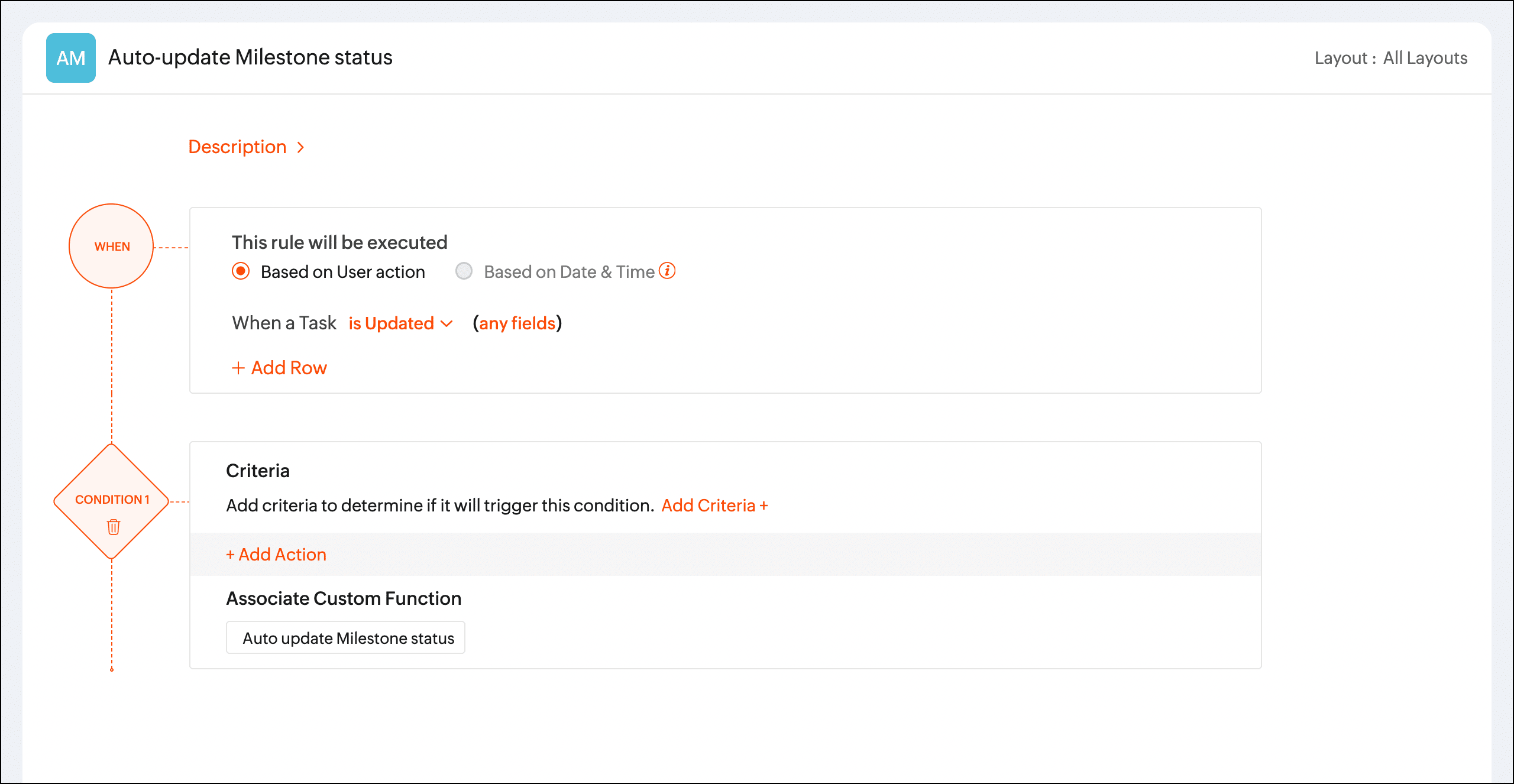


Once the workflow rule is triggered, the custom function will update the phase status automatically.

We hope you found this post to be helpful. If you have any questions, please leave a comment below or email us at support@zohoprojects.com.

    Access your files securely from anywhere

        All-in-one knowledge management and training platform for your employees and customers.


                              Zoho Developer Community


                                                    • Desk Community Learning Series


                                                    • Digest


                                                    • Functions


                                                    • Meetups


                                                    • Kbase


                                                    • Resources


                                                    • Glossary


                                                    • Desk Marketplace


                                                    • MVP Corner


                                                    • Word of the Day


                                                    • Ask the Experts


                                                              • Sticky Posts

                                                              • Enhanced Collaboration and Global Web Tabs

                                                                Hello Users, We are rolling out two key enhancements in Zoho Projects that will be part of our November release. Here’s what to expect: 1. Collaboration Section in the Left Navigation Panel What’s new? All communication and interactive tools will be grouped
                                                              • Choosing the Right Automation in Zoho Projects

                                                                In any project, different types of actions are needed at different points. Some projects require control on how tasks move, some require reacting to updates, and some require executing additional actions beyond the task. Automation in Zoho Projects is
                                                              • Introducing Version-3 APIs - Explore New APIs & Enhancements

                                                                New Update - The end of life timeline for V2 APIs has now been extended to 30th June, 2026 Happy to announce the release of Version 3 (V3) APIs with an easy to use interface, new APIs, and more examples to help you understand and access the APIs better.
                                                              • CodeX Scripts for Enforcing Custom Project Logic

                                                                Every organization has a defined way of executing projects. There are clear expectations around how tasks should move, when projects should progress, and which actions require validation. When these rules are consistently followed, projects remain structured
                                                              • Automation Series: Auto-create Dependent Task on Status Change

                                                                In Zoho Projects, you can automatically create and assign a dependent task when a task’s status is updated. This helps teams stay aligned, ensures reviews happen on time, and reduces manual effort. In this post, we’ll walk through an easy setup using


                                                              Manage your brands on social media


                                                                    Zoho TeamInbox Resources


                                                                        Zoho CRM Plus Resources

                                                                          Zoho Books Resources


                                                                            Zoho Subscriptions Resources

                                                                              Zoho Projects Resources


                                                                                Zoho Sprints Resources


                                                                                  Qntrl Resources


                                                                                    Zoho Creator Resources


                                                                                        Zoho CRM Resources

                                                                                        • CRM Community Learning Series

                                                                                          CRM Community Learning Series


                                                                                        • Kaizen

                                                                                          Kaizen

                                                                                        • Functions

                                                                                          Functions

                                                                                        • Meetups

                                                                                          Meetups

                                                                                        • Kbase

                                                                                          Kbase

                                                                                        • Resources

                                                                                          Resources

                                                                                        • Digest

                                                                                          Digest

                                                                                        • CRM Marketplace

                                                                                          CRM Marketplace

                                                                                        • MVP Corner

                                                                                          MVP Corner


                                                                                            Design. Discuss. Deliver.

                                                                                            Create visually engaging stories with Zoho Show.

                                                                                            Get Started Now


                                                                                              Zoho Show Resources

                                                                                                Zoho Writer

                                                                                                Get Started. Write Away!

                                                                                                Writer is a powerful online word processor, designed for collaborative work.

                                                                                                  Zoho CRM コンテンツ


                                                                                                    Nederlandse Hulpbronnen


                                                                                                        ご検討中の方


                                                                                                                • Recent Topics

                                                                                                                • What’s the Correct Integration Flow Between Zoho Inventory, ShipStation, and Multi-Channel Sales Platforms?

                                                                                                                  Hi Zoho Community, I’m currently implementing Zoho One to manage all of my business processes, and I’d appreciate some guidance on the correct integration flow for the tools I’m using. Here’s my current setup: Zoho Inventory is my central system for managing
                                                                                                                • Remove Zoho Header from Portals

                                                                                                                  I have a portal page with custom domain. But when I print directly from a webpage, the Zoho CRM header shows. It kind of kills the branding aspect. Is there a way to get rid of this?
                                                                                                                • Setting defaults for "Find and Merge Duplicate for..."

                                                                                                                  To remove some of the extreme tedium from Zoho's poorly implemented merge function, I would like to set defaults.  Currently I am defaulted to match "ANY" when I would never do that, so I always have to click "ALL". Then it makes me click on several totally irrelevant drop boxes to turn off phone, mobile and other useless match criteria. Is there a way I can set: Match to default as "ALL" Firstname to default to "IS" Lastname to default to "IS" every other match field default to "-NONE-" This will
                                                                                                                • Let's bring Manufacturing Resource Planning (MRP), Material Requirement Planning (MRP), and Production Planning/Management module / feature in Zohobooks

                                                                                                                  Let's bring Manufacturing Resource Planning (MRP), Material Requirement Planning (MRP), and Production Planning/Management module / feature in Zohobooks
                                                                                                                • CLIENT PORTAL (If clients can place orders directly on the portal)

                                                                                                                  Zoho client portal is excellent. Everything is there except one thing. Client should be able to place orders directly on the portal. This would enhance the portal and end users will be extremely happy. This suggestion infact came from one of our client.
                                                                                                                • アナリティクスで商談中のパイプライン(ステージ)の件数比較

                                                                                                                  アナリティクスで商談中のパイプライン(ステージ)の件数を前週と前々週で比較したい。前々週の件数が更新することで変動してしまう。対象方法をご教授ください。
                                                                                                                • How do I remove a data source from Zoho Analytics?

                                                                                                                  I am unable to find a delte option on a datasource that i put in the system as an error. On teh web it refers to a setup icon but I do not see that on my interface?
                                                                                                                • Identify and clean hard bounce lists in Automation 2.0

                                                                                                                  Hello. 1. I want to know how I can identify hard bounces in the lists I created to clean them before sending an email, given that the bounce rate has increased and it is necessary to clean the lists. 2. How can I exclude hard bounces and invalid emails
                                                                                                                • Enhanced Sign-in UI and OTP-Based Password Reset for Portals

                                                                                                                  As of 5th December, 2024, we are introducing enhanced sign-in interfaces and One-Time Password (OTP) based verification for password reset in an effort to improve security and stream the user journey across all portals. What's changing New Interface for
                                                                                                                • Trigger workflows from SLA escalations in Zoho Desk?

                                                                                                                  Hey everyone, I’m currently working with SLA escalation rules in Zoho Desk and ran into a limitation that I’m hoping someone here has solved more elegantly. As far as I can tell, SLA escalations only support fairly limited actions (like changing the ticket
                                                                                                                • Delete a department or category

                                                                                                                  How do I delete a Department? Also, how do I delete a Category? This is pretty basic stuff here and it's impossible to find.
                                                                                                                • Zoho Webinar - Sharing System Audio (NOT AVAILABLE)

                                                                                                                  Hi, We are having a serious problem with Zoho Webinar. In the webinars we run, we very often share the audio from a video we are streaming directly from YouTube or other applications. Until recently we were using Zoom, but as we use other Zoho applications
                                                                                                                • Big Time HELP

                                                                                                                  I am old, disabled and need to speak to a person. I needed to use a service to copy my zoom contacts to. I think I signed up for a security service, which I do not need. I don't know enough to choose from your many lists or how to see what I have and
                                                                                                                • Cancellation Fees

                                                                                                                  Hi, It really would be good if Billing could take subscription management further with cancellations & being able to apply or set a cancellation fee for a plan that is either fixed or prorated. It is not uncommon in subscriptions for cancellation fees
                                                                                                                • Custom Field for Subscription

                                                                                                                  Hi, I can't find a way to add a custom field (to contain a license key generated from our software) against a subscription? Is the only place to add this information in the Invoice module (as custom field for invoice)? When a customer views his subscription
                                                                                                                • Zoho CRM Meetings Module Issues

                                                                                                                  We have a use-case that is very common in today's world, but won't work in Zoho CRM. We have an SDR (Sales Development Rep) who makes many calls per day to Leads and Contacts, and schedules meetings for our primary Sales Reps. He does this by logging
                                                                                                                • How to get the campaingns key?

                                                                                                                  Reading the documentations of the API, I see that is necessary have the campaign key, but I don't see how can I get it. For example to get the campaign details we need to do the request: https://campaigns.zoho.com/api/getcampaigndetails?authtoken=[API Authentication Token]&scope=CampaignsAPI&campaignkey=[campaignkey] I have the API Authentication Token but I don`t see how to generate the campaignkey
                                                                                                                • Unable to switch existing AWS RDS connection to DataBridge after moving RDS behind VPN

                                                                                                                  Unable to switch existing AWS RDS connection to DataBridge after moving RDS behind VPN Hi everyone, I’m facing a problem with an existing Zoho Analytics setup and would like to know the best migration path. Originally, my Zoho Analytics connection to
                                                                                                                • [Bug] WebAuthn passkey registration blocked on rpIds with TLDs longer than 6 characters (.accountant, .technology, etc.) — isValidDomain regex too strict

                                                                                                                  Hi, Filing on behalf of an enterprise customer where Zoho Vault is deployed across the company. The Chrome extension blocks WebAuthn passkey registration on legitimate sites whose Relying Party ID (rpId) has a TLD longer than 6 letters. This affects every
                                                                                                                • Native QuickBooks integration for Zoho CRM: Connecting sales and finance

                                                                                                                  Greetings, I hope all of you are doing well. We're excited to announce Zoho CRM's integration with QuickBooks Web, which is designed to synchronize your CRM data with your QuickBooks accounting records and bridge the gap between sales and finance. This
                                                                                                                • Feature Request — Allow updating Status / Bounced_Time / Bounce_Reason on emails created via actions/associate_email (v8)

                                                                                                                  Summary Emails created through the v8 POST /{module}/{record}/actions/associate_email endpoint are returned by View Email with "editable": false and reject every update method (PUT, PATCH) with INVALID_REQUEST_METHOD. There is no way via the public API
                                                                                                                • ZohoBooks_add_expense_attachment Fails

                                                                                                                  I'm working MCP in Claude to automate bookkeeping. Claude cannot seem to attach and reciept to an expense. The 'add expense attachment' tool is added to the server and enabled in Claude. I asked Claude to give me the calls he performed and this is what
                                                                                                                • ZohoBooks_create_chart_of_account

                                                                                                                  I'm setting up Claude to do my bookkeeping workflows using a Zoho MPC server I setup. He does not seem to be able to create a chart of account. The 'create chart of account' tool is added to the server and enabled in Claude. I asked Claude to give me
                                                                                                                • Zoho Books Product Road Map

                                                                                                                  I am planning to look into Zoho Books to maintain my Company's Account Books. Is the roadmap of Zoho Books Development available online? What happens if you product dies, without an export feature to other popular Accounting softwares like Tally or Quickbook. Are we going to be left in lurch? Do you have a product road map? Regards, Vishal.
                                                                                                                • I want to delete the email but I can't.

                                                                                                                  I want to delete emails but I can't, please help me. Thanks!
                                                                                                                • Error while creating new user

                                                                                                                • Zoho Mail is blacklisted on magicspam.com and spamauditor.org

                                                                                                                  As of today, the same problem with the IP addresses 136.143.188.51 and 136.143.188.52 How long does it take them to clear their IP addresses? I've read on this forum that these IP addresses have been blacklisted for years. //////////////////////// This
                                                                                                                • Unable to send emails from the delegated mailbox

                                                                                                                  currently it's not possible to send emails from our delegated mailbox (just in our own name, our own mail-accounts) The permissions granted include "Send as," and we are also unable to delete delegated employees or add new ones. We can only add employees
                                                                                                                • Change Password

                                                                                                                  How can I reset OR Change the Passwords for the Whole Organization at Once as Administrator using Admin Console?
                                                                                                                • Zoho Books bill pay option not available with zoho one

                                                                                                                  Why isn't Zoho Books bill pay add-on not available for Zoho one customers not even as a purchasable option. I think this is very inconvenient for companies wanting to use this feature all in one system
                                                                                                                • Support - what am I doing wrong?

                                                                                                                  Hi Everyone - I'm a new user and looking particularly for a replacement mail service. I'm just a home user not a professional but I do look after half a dozen domains. Zoho looks lovely and I'd like to switch but just want to get answers to a few 'easy'
                                                                                                                • Consider Making Printing Easier (UI)

                                                                                                                  I'm using Zoho Analytics in much the way that it was intended when it was "Zoho Reports" - as a way to pull together information across several apps in the ecosystem. I have a dashboard that I need to run each week for every employee (change the filter
                                                                                                                • Email Routing to Zoho from Cloudflare

                                                                                                                  Hello, I'm new to Cloudflare, having had my domain hosted on Fasthosts and just used it for email forwarding. I'm looking for a little help to configure my email routing/hosting. I've looked at the documentation but haven't found exactly what I need to
                                                                                                                • Emails

                                                                                                                  Good Morning, Is anyone else experiencing emails bouncing back? Thanks,
                                                                                                                • Secondary Reporting Manager permission level

                                                                                                                  Hi, same time last year I was speaking to Zoho about the use of a Secondary Reporting Manager and certain challenges that I was facing. at the time, I was told that this functionality did not exist. I am still facing challenges, so I would like to ask
                                                                                                                • why is my folder list is gone?

                                                                                                                  Hi, All my email folders are gone, i cant found any email. could you please check it?
                                                                                                                • Our ZOHO mail is not working

                                                                                                                  ZOHO mail is not working for any of our company's employees. All are able to access it in mobile. But not in laptops as a app or in webpage. please help asap.
                                                                                                                • Request to Release Email Aliases for Our Domain

                                                                                                                  Dear Zoho Support Team, Greetings, We are currently configuring the email system for our organization in Zoho Mail and encountered an issue while creating several email aliases. When attempting to create these aliases, we receive the following error message:
                                                                                                                • Changing Base Currency to USD (we are based in the UAE)

                                                                                                                  Hello everyone, Good day. We are based on the UAE and our bookkeeping is in USD. I followed the online resource that I select the country first where the currency I want as base is native then later on changed the country once the whole setup is done.
                                                                                                                • Error "The domain pinakajewels.com appears to be already in use in another organization. Learn More"

                                                                                                                  Hi Team, I have the following account with zoho mail Organization ID: 644368849 This zoho mail account was earlier mapped to www.senacareese.com I no longer own the domain www.senacareese.com I wish to map www.pinakajewels.com to the same zoho mail account.
                                                                                                                • Next Page