Power up Zoho CRM with project intelligence

Dear user,
You're probably one of those businesses using your CRM as a single source of truth. It's where sales, project execution, and finance teams go to analyze past decisions and formulate future strategies. But what happens when project data is either missing or out of sync with the CRM? Delayed or missed action results in missed opportunities.
It's important to allow users to track projects and allow salespeople and stakeholders to keep an eye on the client lifecycle without leaving the CRM.
The Zoho Projects-Zoho CRM integration
The existing Zoho CRM plugin for Zoho Projects helps users associate and create new projects right from their CRM modules, as well as map project tasks to CRM deal activities, at a basic level.
But there's more to it than meets the eye. In this post, we're exploring how to sync data so that project activities drive action inside Zoho CRM and vice versa. Let's dive in.
But there's more to it than meets the eye. In this post, we're exploring how to sync data so that project activities drive action inside Zoho CRM and vice versa. Let's dive in.
Accelerate onboarding with discovery

When CRM has a sales qualified lead (SQL) or qualifies a lead as "hot," discovery or onboarding tasks should be created in the appropriate project, assigning the lead owner to the task. This reduces manual coordination and facilitates better tracking, reduced wait times, and faster execution.
'Closed Won' to Active Projects
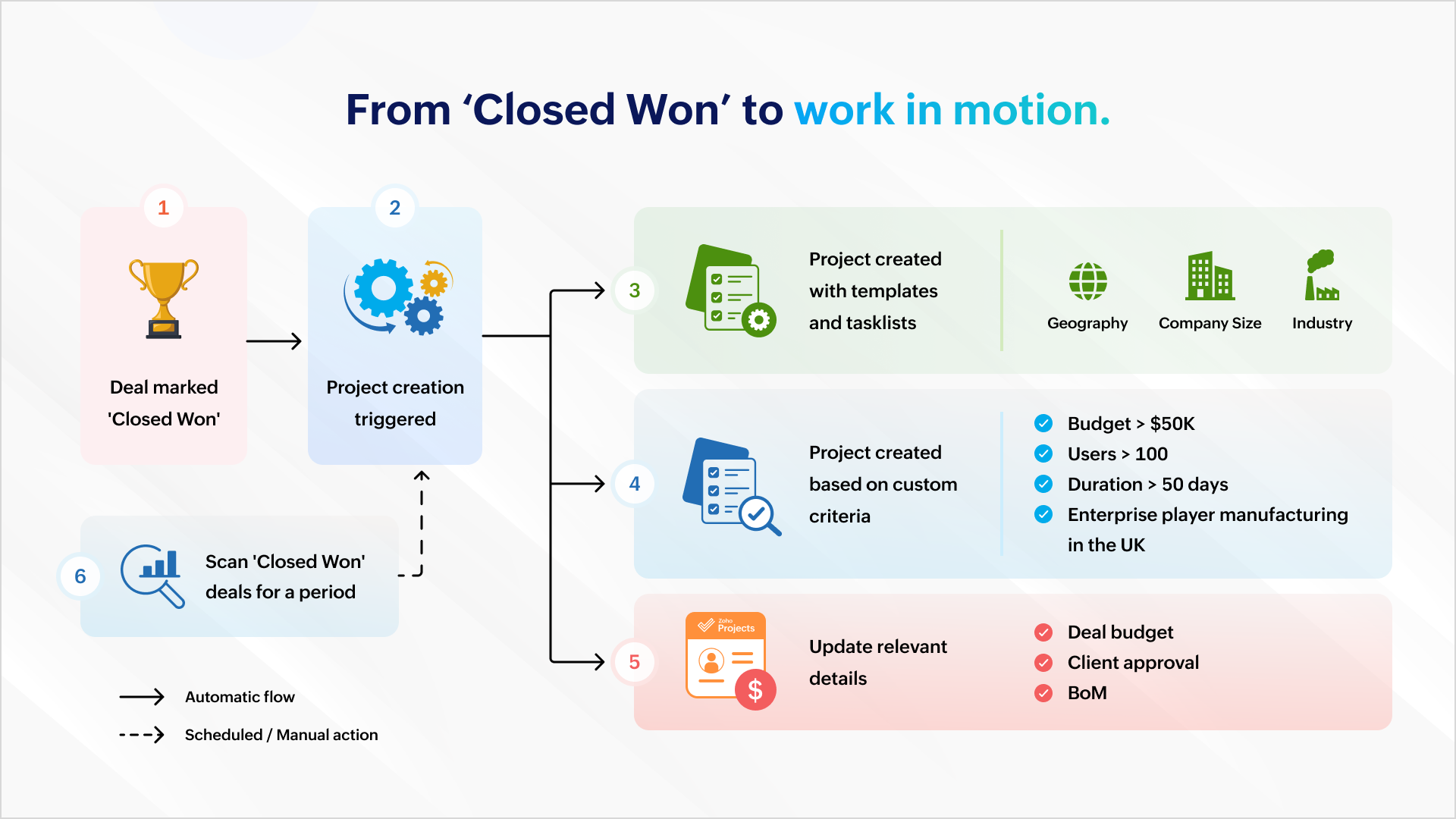
'Closed Won' to Active Projects
Once a deal is won, a project can be created automatically to ensure work commences immediately. Project creation can be automated with predefined task lists (for EU compliance or HIPAA-readiness) and project templates based on geography, company size, or industry.
It can also be based on custom criteria like a high-value deal (say, a budget that's greater than $50K), a bigger deal size (say, more than 100 users), a fast-track deal (needs closure within 50 days) or a combination of criteria (say, enterprise businesses in the manufacturing sector in the UK).
The deal's budget can be auto-populated during or after project creation so that users are mindful of expenses and effort.
You can scan all the "closed won" deals this quarter and create a project which matches your criteria.
You can scan all the "closed won" deals this quarter and create a project which matches your criteria.
Managing ownership and assignments
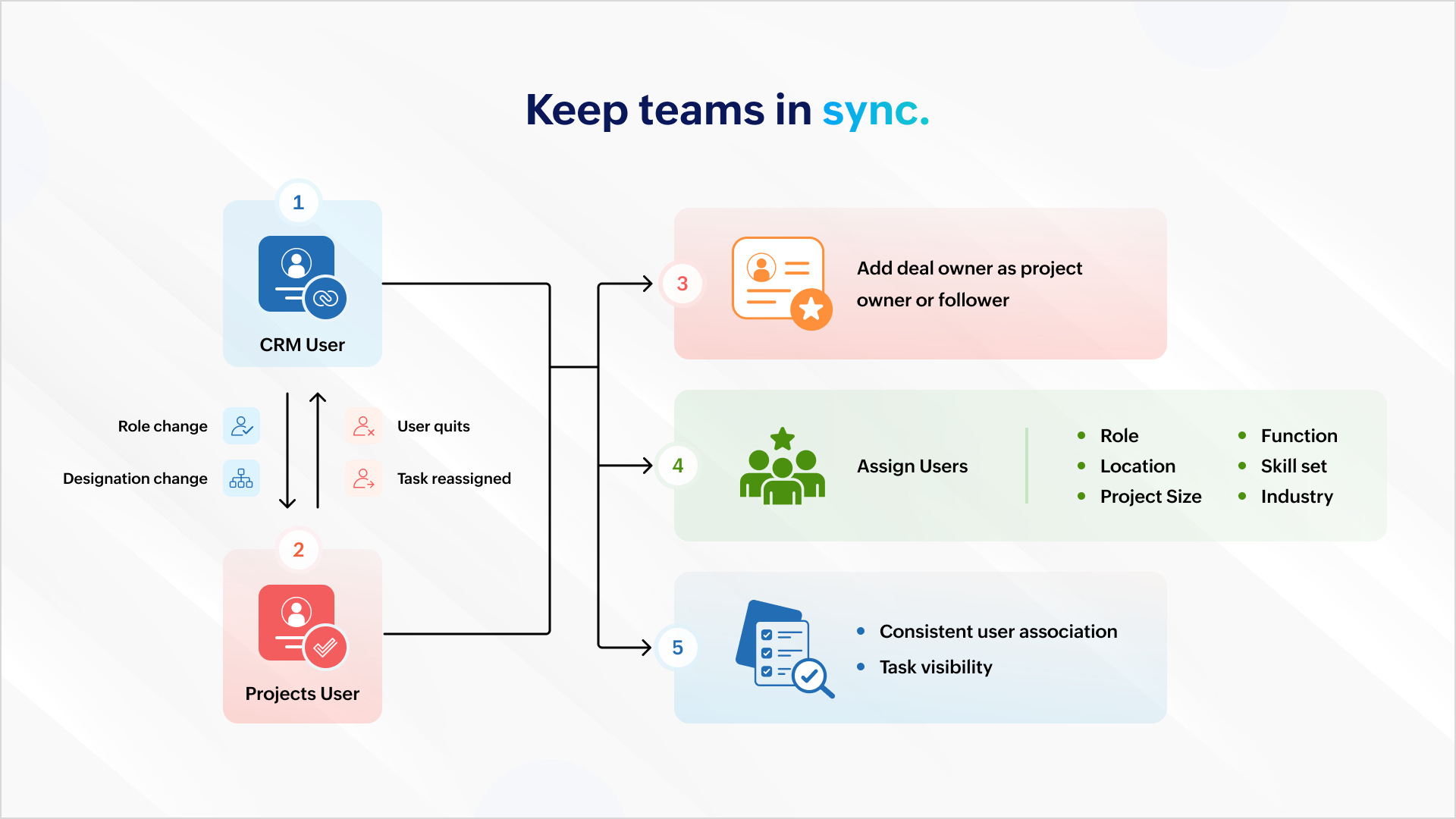
All role and designation changes should reflect uniformly across both platforms to ensure consistent association and task visibility. If a projects user quits or is assigned a new task, the reassignment should reflect inside Zoho CRM.
You can also add the deal owner as the project owner or project follower to ensure accountability carries over. Project users can then be assigned based on role, location, function, skill set, project size, industry, and more.
Deal management

Mapping your project phases to respective deal stages helps mirror project status inside the CRM. Estimated project spends and project completion percent can help identify possible bottlenecks.
Notifying relevant stakeholders about delays or budget overruns helps them intervene and get involved early in damage control. Marking the deal as "At Risk" also ensures it gets the necessary attention among relevant stakeholders.
Tracking

Tasks created in a project must be logged as activities against the associated deal to ensure stakeholders have a complete view of the progress.
Similarly, when users log time in Zoho Projects, it should update against the respective deal in CRM. This gives a picture of the billable hours consumed and the hours remaining to identify scope creep.
Stay on top of issues

It's important to keep customer success and account management teams up to date with showstoppers and blocking issues. This requires creating a case for each issue logged in Zoho Projects so that managers can take ownership and take issues to closure with constant monitoring.
Invoicing

Milestone completion should automatically draft an invoice and send it for approval. Automating invoicing based on project progress gives more time to focus on essential work.
Compliance

It's important that deals don't spring up surprise data during an audit. Zoho Books, Zoho CRM, and Zoho Projects can restrict deal activity during the "Legal Review" stage. Records can return to business as usual when legal review is complete.
And, there's more..
What we discussed here is only the tip of the iceberg. You can do more with analytics, insight-based actions, and advanced forecasting.
As a business owner or head of operations, charting your business process and identifying the gaps, problems, and aspirations will help your identify more opportunities. Once you have what you want, there are two ways to go about it.
1. Customization
You can create workflow rules, custom functions, blueprints, conditional field updates, and webhooks to strengthen automation, alert other systems, and receive data all by yourself.
But there's the risk of your org users meddling with the setup during everyday work.
2. Work with a partner
You can create workflow rules, custom functions, blueprints, conditional field updates, and webhooks to strengthen automation, alert other systems, and receive data all by yourself.
But there's the risk of your org users meddling with the setup during everyday work.
2. Work with a partner
If you think you don't have the time for it or require assistance, our partners can help. As certified Zoho Experts, partners can help you customize your requirements and help you set it up. They can also help you package the entire setup (workflow rules, custom functions, etc.) into a single installable unit like a plugin or an extension from Zoho Marketplace. The custom plugin can then be installed and set up according to your needs.
AI-powered utilities
You can leverage MCP for Zoho Projects and orchestrate project management from your favorite LLMs using natural language.
You can leverage MCP for Zoho Projects and orchestrate project management from your favorite LLMs using natural language.

This means you can get answers and initiate actions for the following requests right from a chat box:
"Show me all tasks that don't have a task owner."
"List the least profitable projects from the previous year."
"Create onboarding tasks for all hot leads in Mumbai."
"Generate invoices for milestones completed this week."
We will showcase an extension with custom capabilities to track activities and initiate automated action in one of our upcoming articles. Write to us if you are interested and we can talk - support@zohoprojects.com.
Learn more about the existing integration - setup, capabilities, and uses here - Zoho Projects and Zoho CRM integration.
Feel free to read up on the previous editions of the series:
#1 Effective project and task customization using CodeX
#2 Build an approval management system using custom modules
Feel free to read up on the previous editions of the series:
#1 Effective project and task customization using CodeX
#2 Build an approval management system using custom modules
Best,
The Zoho Projects Team