Building extensions #5: Integrating applications with Zoho Projects through Connections

Building extensions #5: Integrating applications with Zoho Projects through Connections

In our last post, we discussed the essential features that a Zoho Projects extension can provide. Starting with this post andin every subsequent post going forward, we'll go through each of those features in depth, one by one, with an example use case.
In this post, we'll explore the Connections feature in detail.

Connections: When and why?

Creating a tightly coupled integration requires the establishment of a secure connection between applications. To achieve this secured connection, the Sigma platform provides the Connection feature that can be used to establish a secure link and perform data operations across applications seamlessly and efficiently through an extension.

Use case

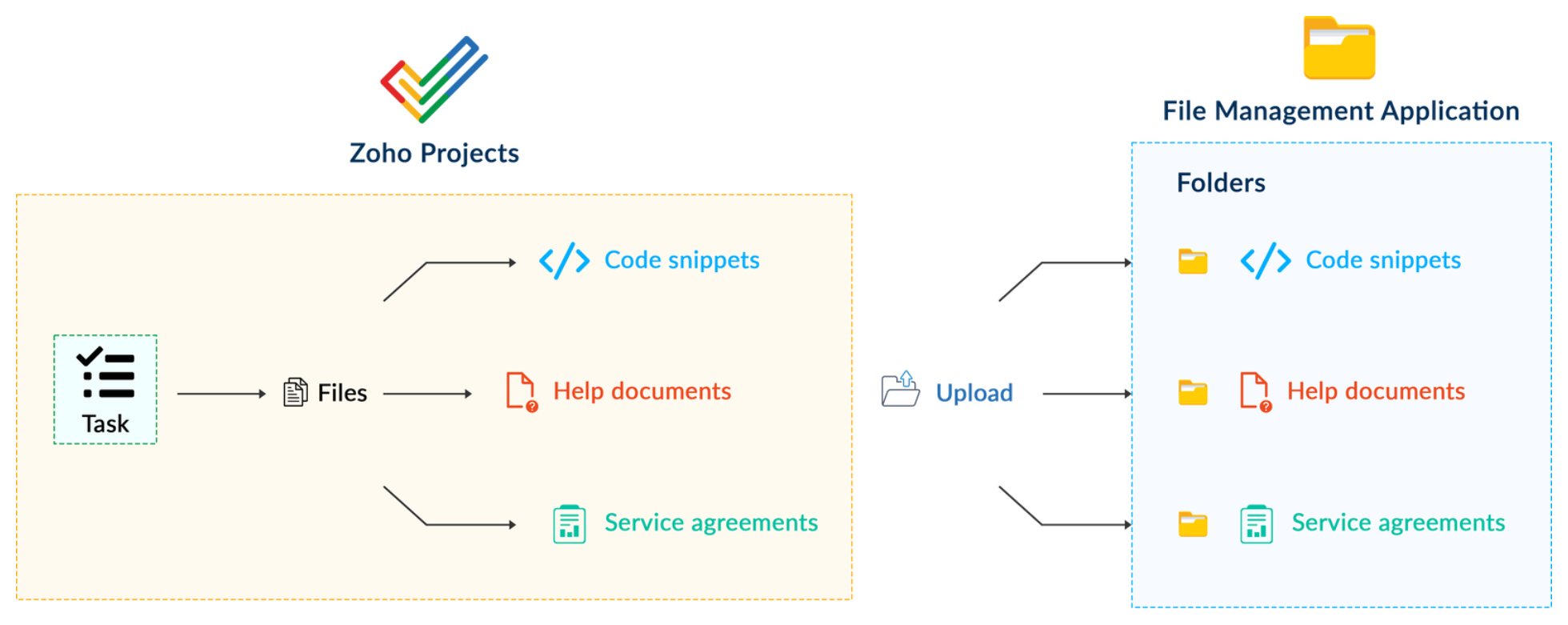
Working on development-related tasks might require dealing with a variety of files, such as code snippets, help documents, or service level agreements. While several file management applications are available to securely store and organize data, manually handling file storage between applications remains challenging.

For our example, let's use Zoho Projects to manage all tasks, and Dropbox to manage and store data.

What is the difficulty faced?

Dropbox offers a file request feature that allows you to collect files and organize them into folders. However, as we talked about in our previous post, manually categorizing and uploading task-related files to their respective file request folders in Dropbox would be a time-consuming and laborious activity. Instead, it would be more efficient to integrate Dropbox with Zoho Projects so that uploading task files to Dropbox file request folders can be done instantly from within Zoho Projects.

How can it be sorted?

You can create a connection between Zoho Projects and Dropbox. With the secure connection setup, the file request folders available in Dropbox can be listed on the task details page of Zoho Projects through an extension. You may then easily upload files from Zoho Projects to their corresponding folders in Dropbox, saving time and making you more organized.

What are the components required to achieve this use case?

  1. A connection between Zoho Projects and Dropbox.
  2. An extension configuration that includes:
  • Creating an extension
  • Configuring the plugin manifest
  • Setting up the widget code to display the Dropbox file request folders inside the Zoho Projects task details page.
Now, let's see how we can achieve each of these components.

1. Creating a secure connection using the Connection feature

  • Log in or sign up into developer.zoho.com.
  • Go to Sigma and access your workspace.
  • Once you enter your workspace, select the Connections section in Sigma.
Note: Connections created in Zoho Projects are also accessible within the Connections section in Sigma. These connections can be used in extensions to connect with other applications.
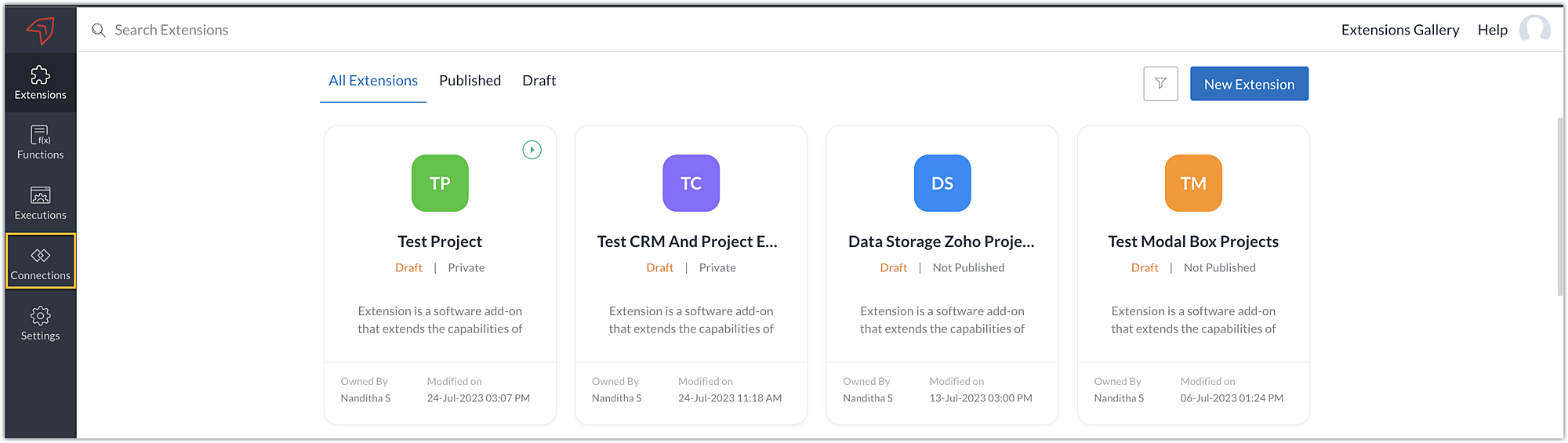
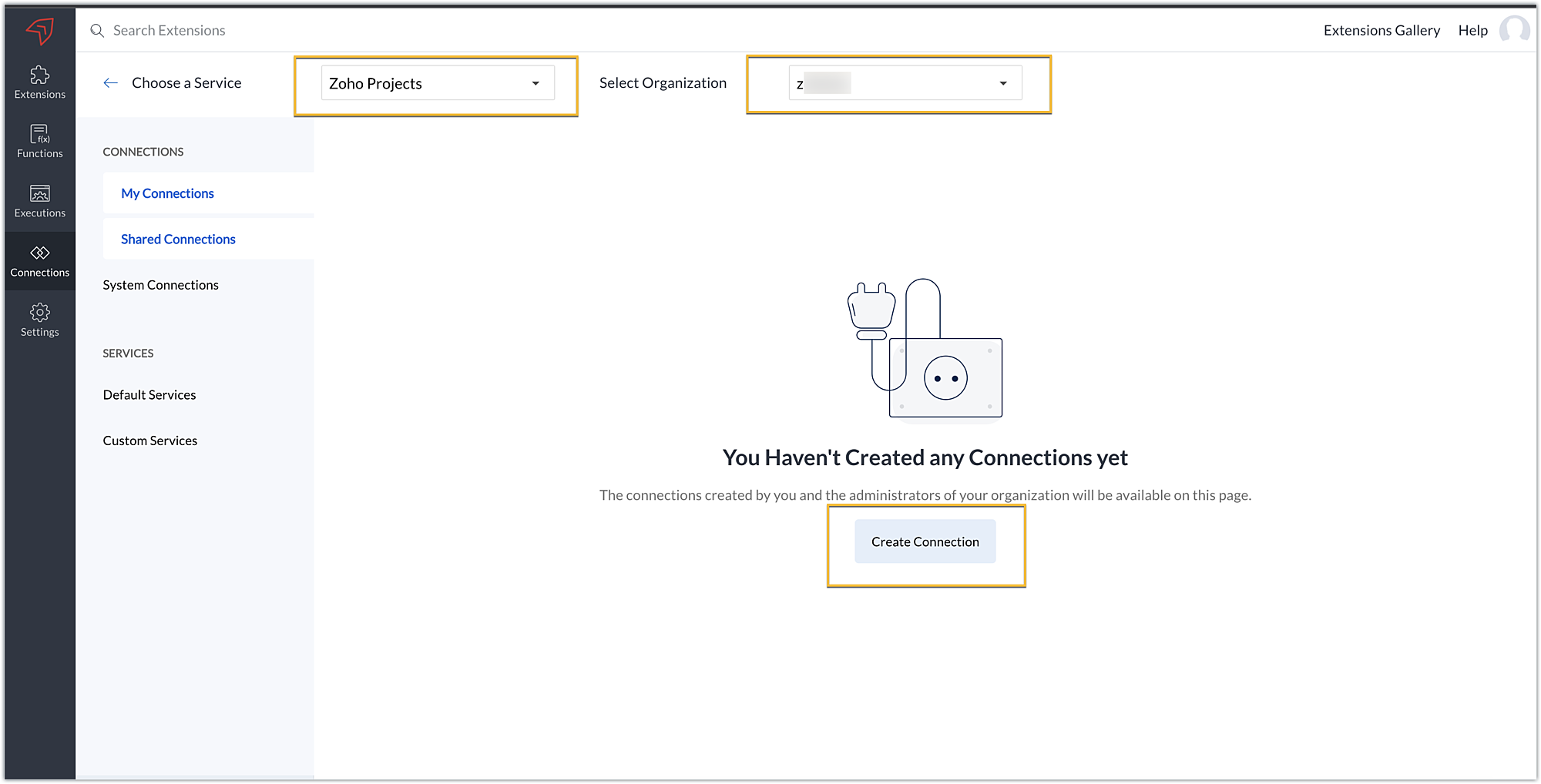
  • Choose the service as Zoho Projects and select your Zoho Projects organization. Click on Create Connection.
  • Sigma offers a list of default services from which you can choose and easily connect with Zoho Projects. If the application you want to integrate isn’t in the default list, you can add and build a connection with it using the custom services option.
Note: If you’re looking to connect Zoho Projects with another Zoho Product that also follows the OneAuth authentication mechanism, select the service Zoho OneAuth from the Default Services list to create the connection.
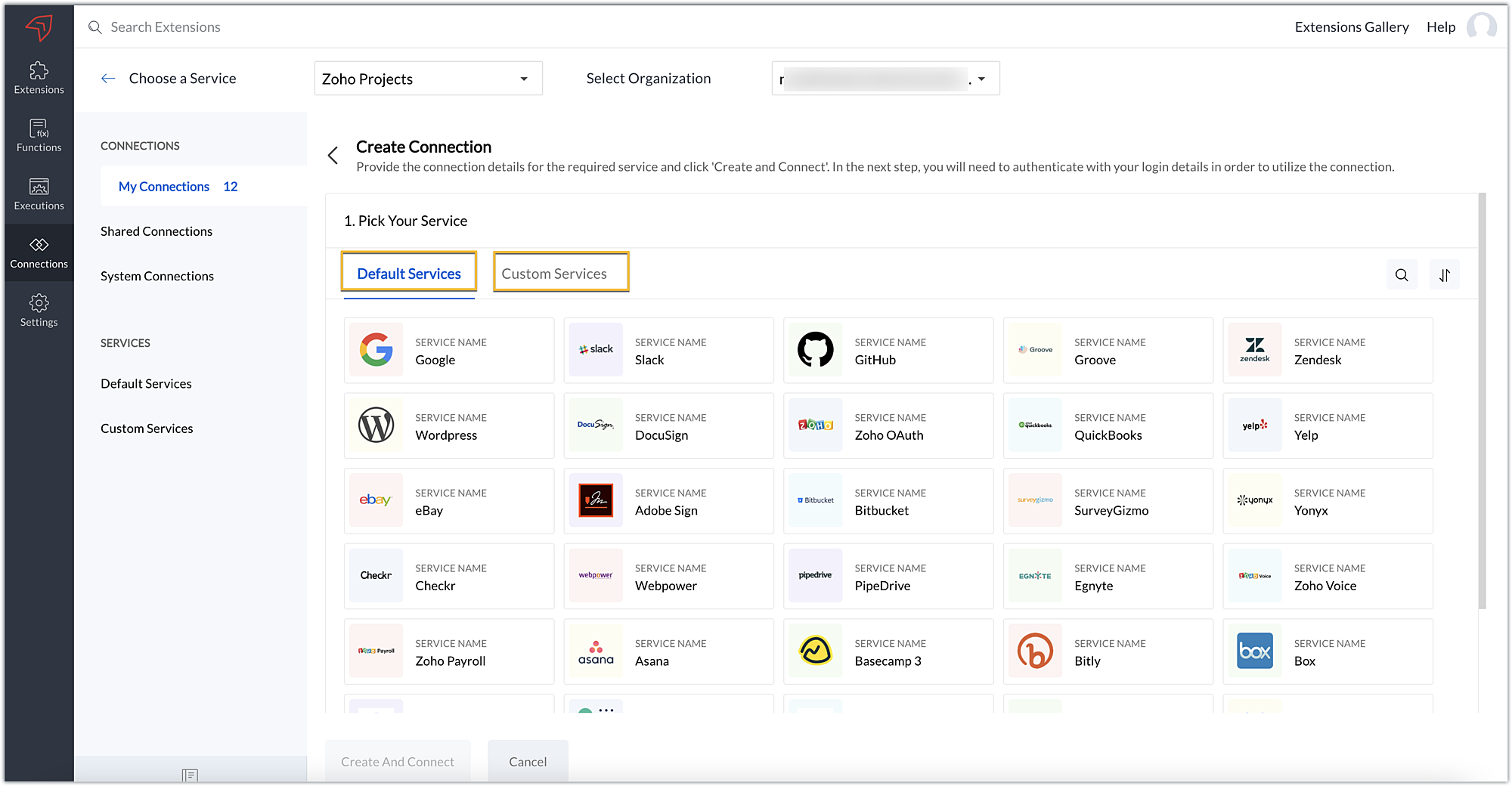
  • In our example, the application to connect with Zoho Projects is Dropbox, and because it’s in the Default Services list, go ahead and choose Dropbox.
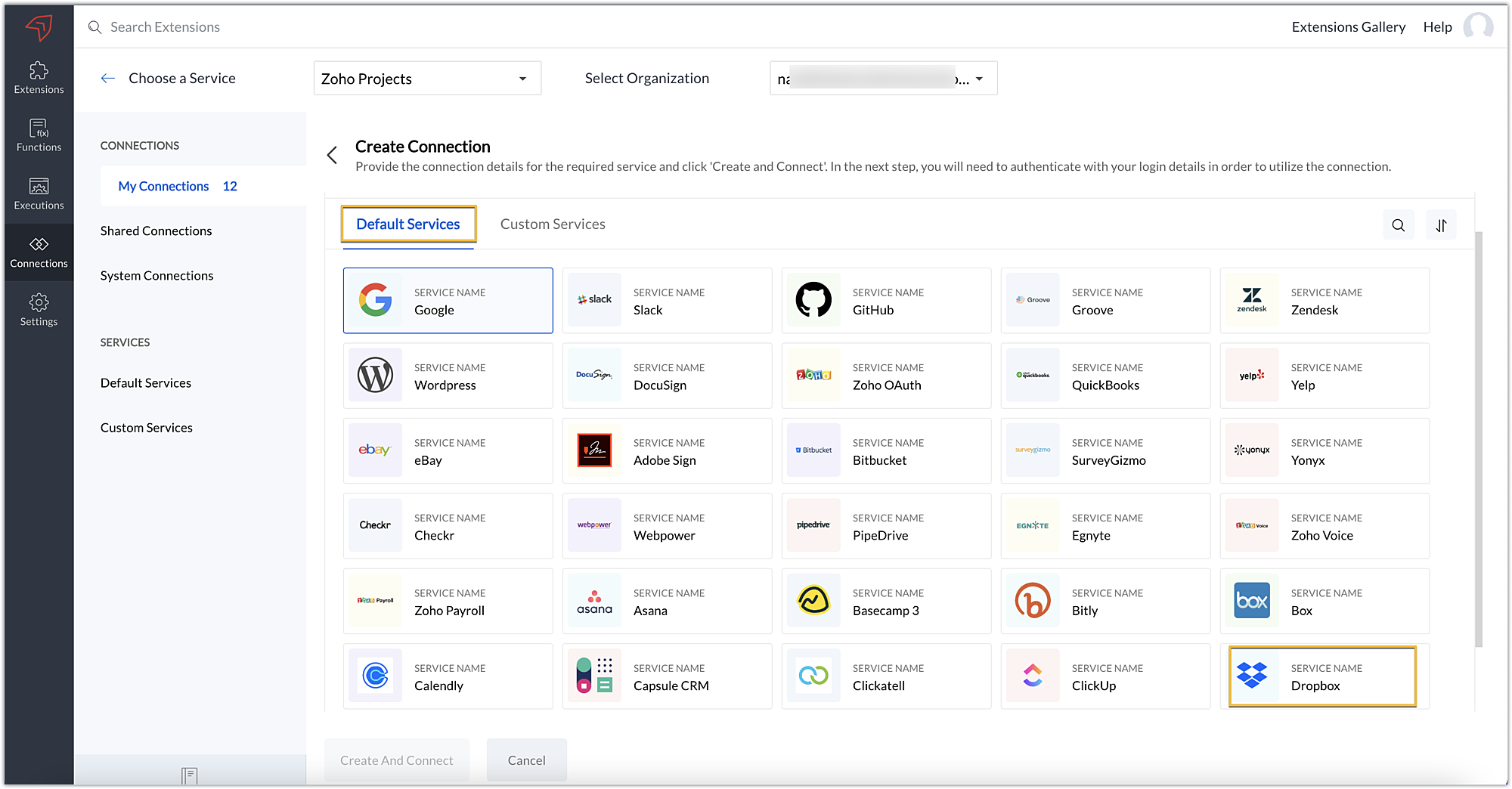
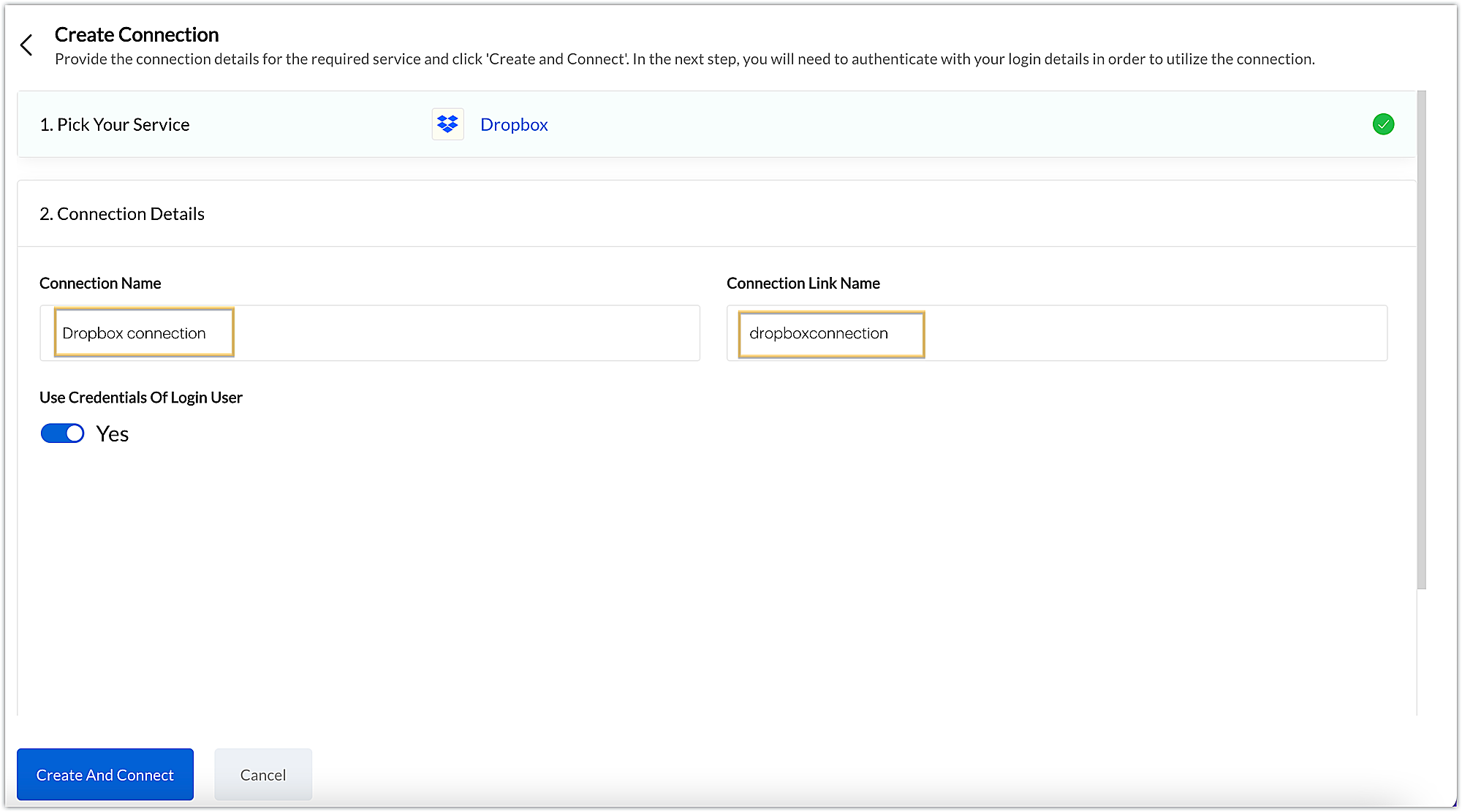
  • After choosing the service, enter the connection name. A connection link name will be populated automatically.
  • Toggle Use credentials of login user to Yes if you want every user installing the extension to access the connection using their own login credentials, or No if admin credentials are enough to access the connection.
  • In our example, we'll proceed with the former. So toggle to Yes, and then click Create and connect.
Note: For services in which the option to choose the scopes is displayed, choose the necessary scopes, and then click Create and connect.
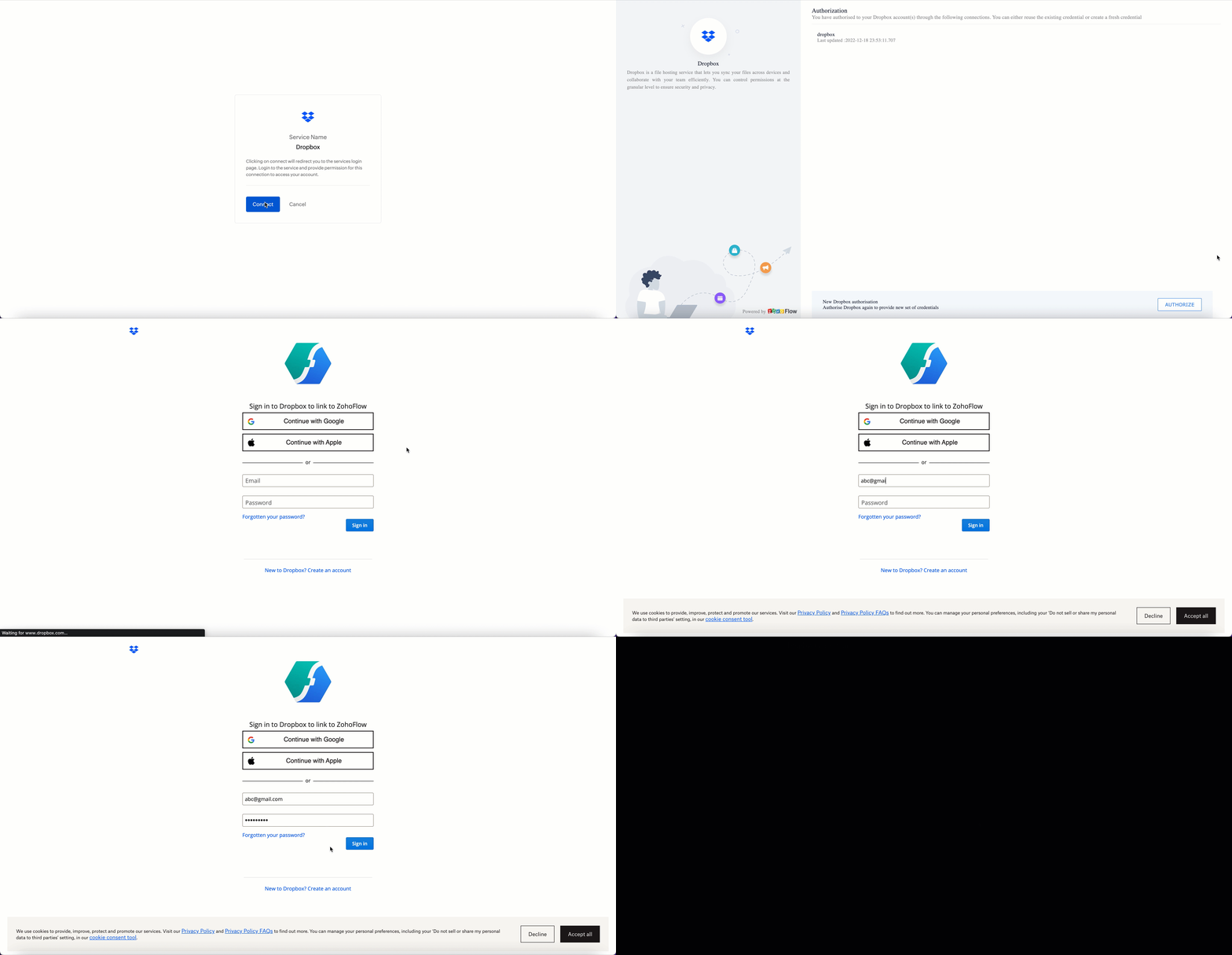
  • You’ll be directed through a series of authorization steps before being prompted to connect with Dropbox by entering your login information.
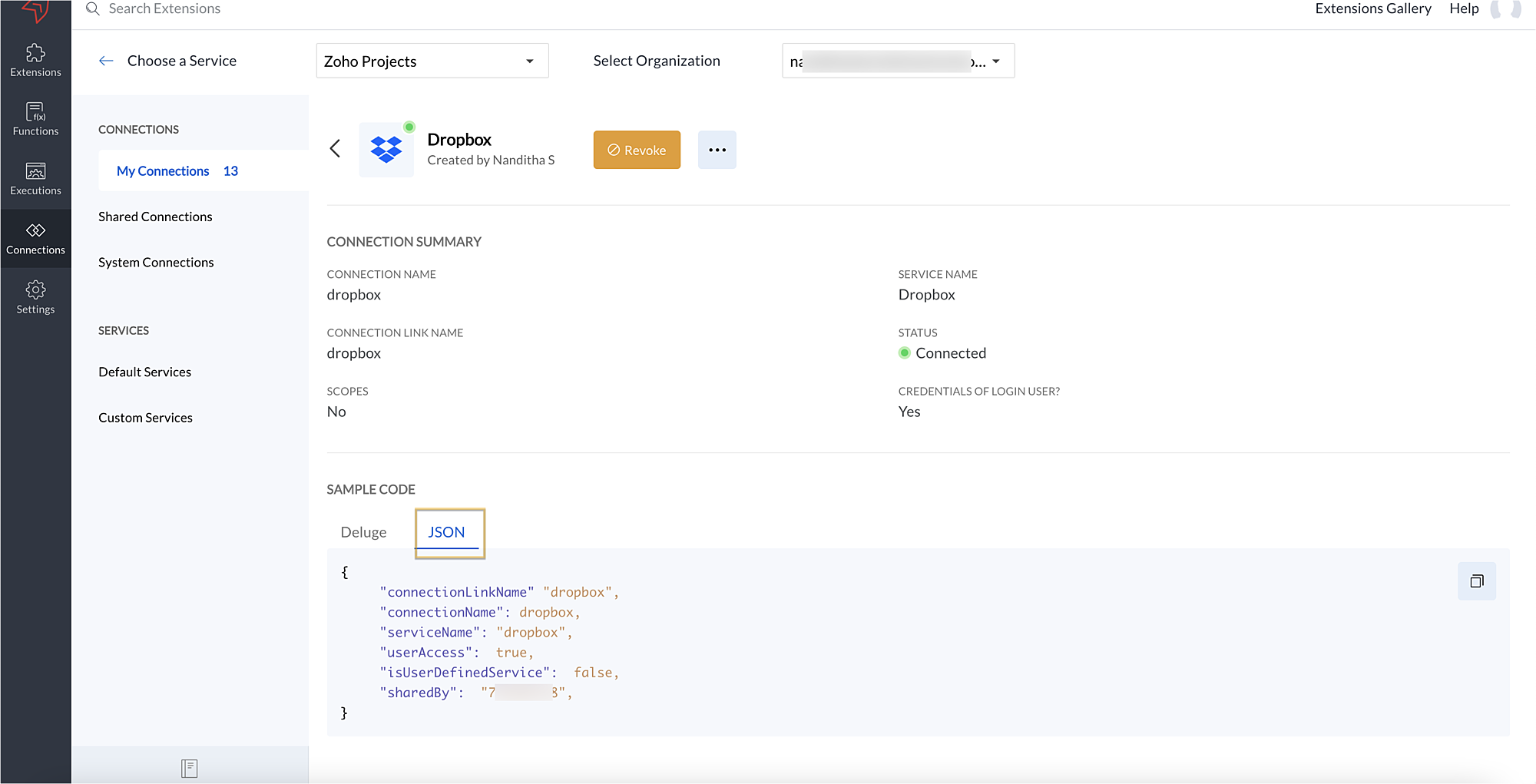
  • The connection will be established successfully once you sign in with Dropbox, and you will be redirected to the Connection Summary details page in Sigma.
  • To access this connection as part of an extension, you’ll need to configure the sample code provided under the JSON section in the plugin-manifest.json file. We’ll explore this in the next section.
2. Extension configuration

Now that we've successfully established our connection, let's look at how we can achieve our use case feature of displaying the Dropbox file request folder within the Zoho Projects task detail page. As mentioned earlier, to accomplish this, we’ll need to implement the following measures.
A. Create an extension

B. Configure the plugin-manifest.json file

C. Set up the widget code
Let's explore these steps in order.

A. Create an extension
B. Configure the plugin-manifest.json file
  • As previously stated, to access the connection established between Zoho Projects and Dropbox, the connection must first be configured in the plugin-manifest.json file.
  • Copy the JSON sample code from the Connection Summary Details page and paste it into the plugin-manifest.jsonfile as the value for the connections key.
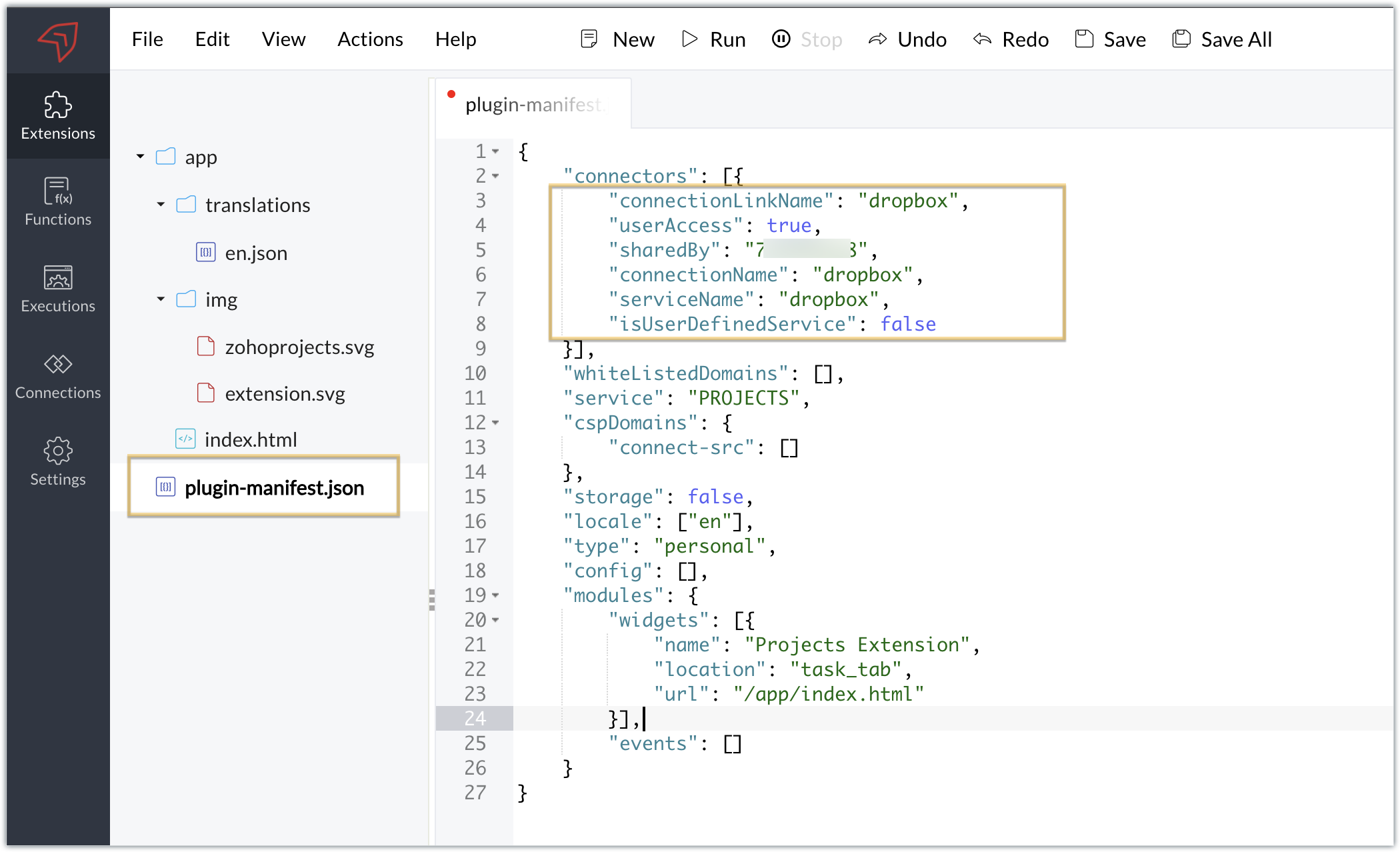
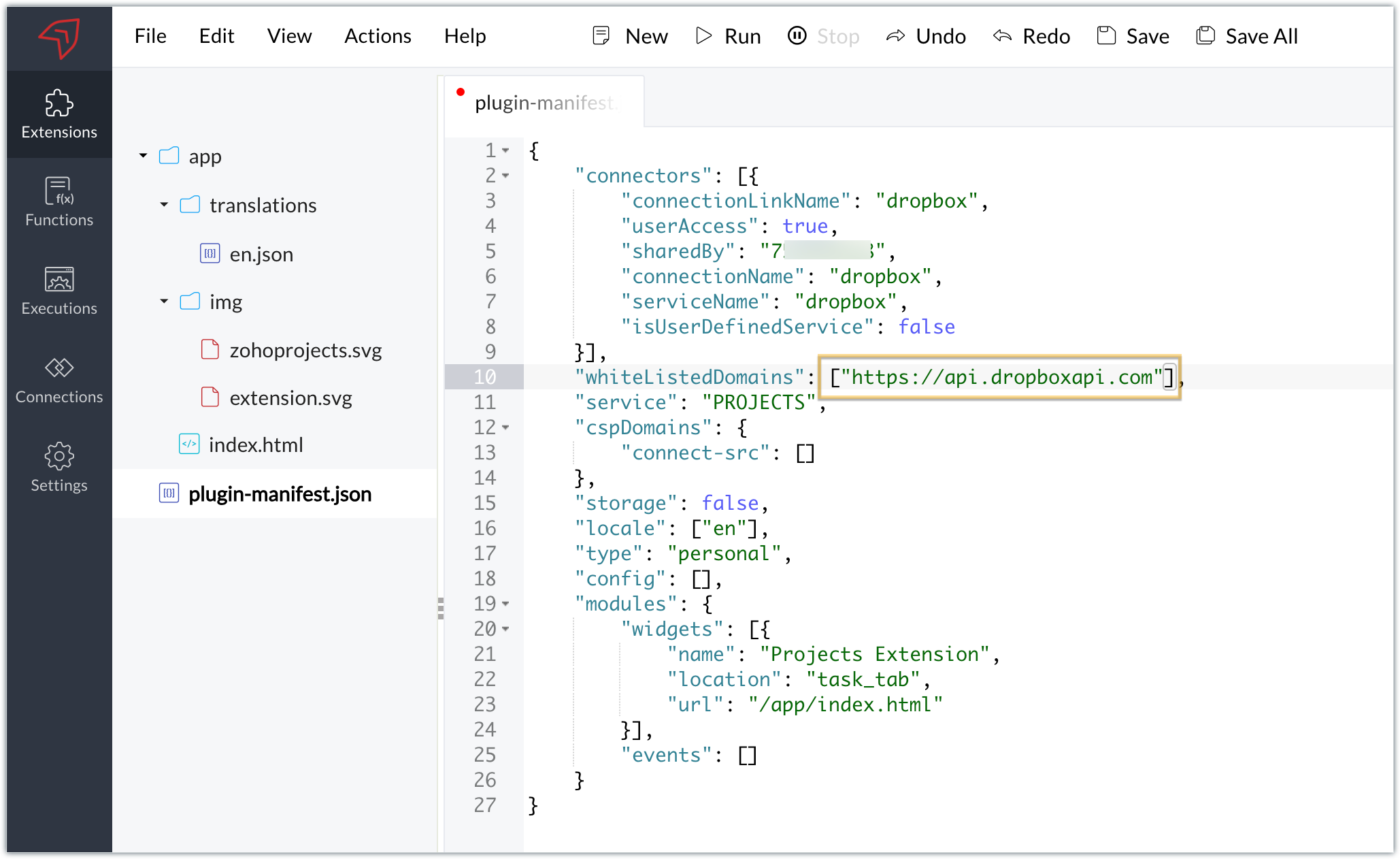
  • You will also need to white list the Dropbox domain for Dropbox calls to be processed without being blocked.
  • Include the domain in the plugin-mainfest.json file as the value for the whiteLitsedDomains key.
  • As we saw in our earlier post, the plugin-manifest.json file includes a widget called Projects Extension by default. For our example, because we’re connecting with Dropbox and constructing a widget that will include Dropbox request folders to upload files, enter the widget name and location.
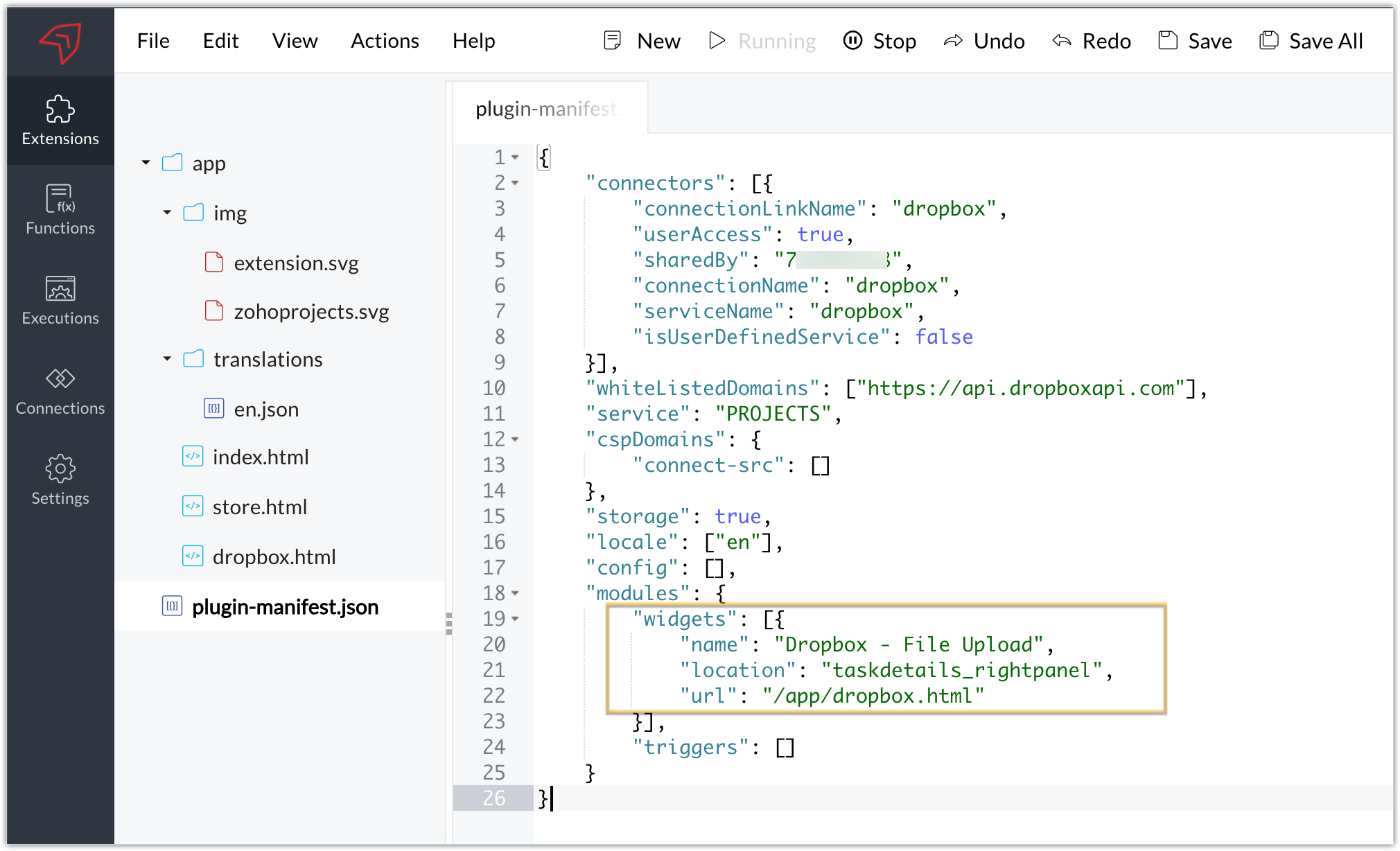
  • The final configured plugin-manifest.json file for our example would be as follows:
  1. {
  2. "connectors": [{
  3. "connectionLinkName": "dropbox",
  4. "userAccess": true,
  5. "sharedBy": "xxxxxxx",
  6. "connectionName": "dropbox",
  7. "serviceName": "dropbox",
  8. "isUserDefinedService": false
  9. }],
  10. "whiteListedDomains": ["https://api.dropboxapi.com"],
  11. "service": "PROJECTS",
  12. "cspDomains": {
  13. "connect-src": []
  14. },
  15. "storage": true,
  16. "locale": ["en"],
  17. "config": [],
  18. "modules": {
  19. "widgets": [{
  20. "name": "Dropbox - File Upload",
  21. "location": "taskdetails_rightpanel",
  22. "url": "/app/dropbox.html"
  23. }],
  24. "triggers": []
  25. }
  26. }

C. Setting up the widget code

Now, that we’ve created an extension and configured the plugin manifest file, let's finally set up the widget code in order to display all Dropbox file request folders inside our task details right panel.

Dropbox.html widget code: Please find the widget code snippet as an attachment in this post.
  • In this widget code, we’ve invoked the Dropbox API to list file request folders by constructing and passing the required data along with the connection we had established for Dropbox.
  • The API will be invoked and return all of the file request folders in the task details right panel, from which users can click on the link and directly upload files to Dropbox from within a task in Zoho Projects itself.
Sample output
  • Once the code is setup, publish and install the extension to check the functionality in the Zoho Projects portal.
  • Enter a task and click the extensions icon in the right panel.
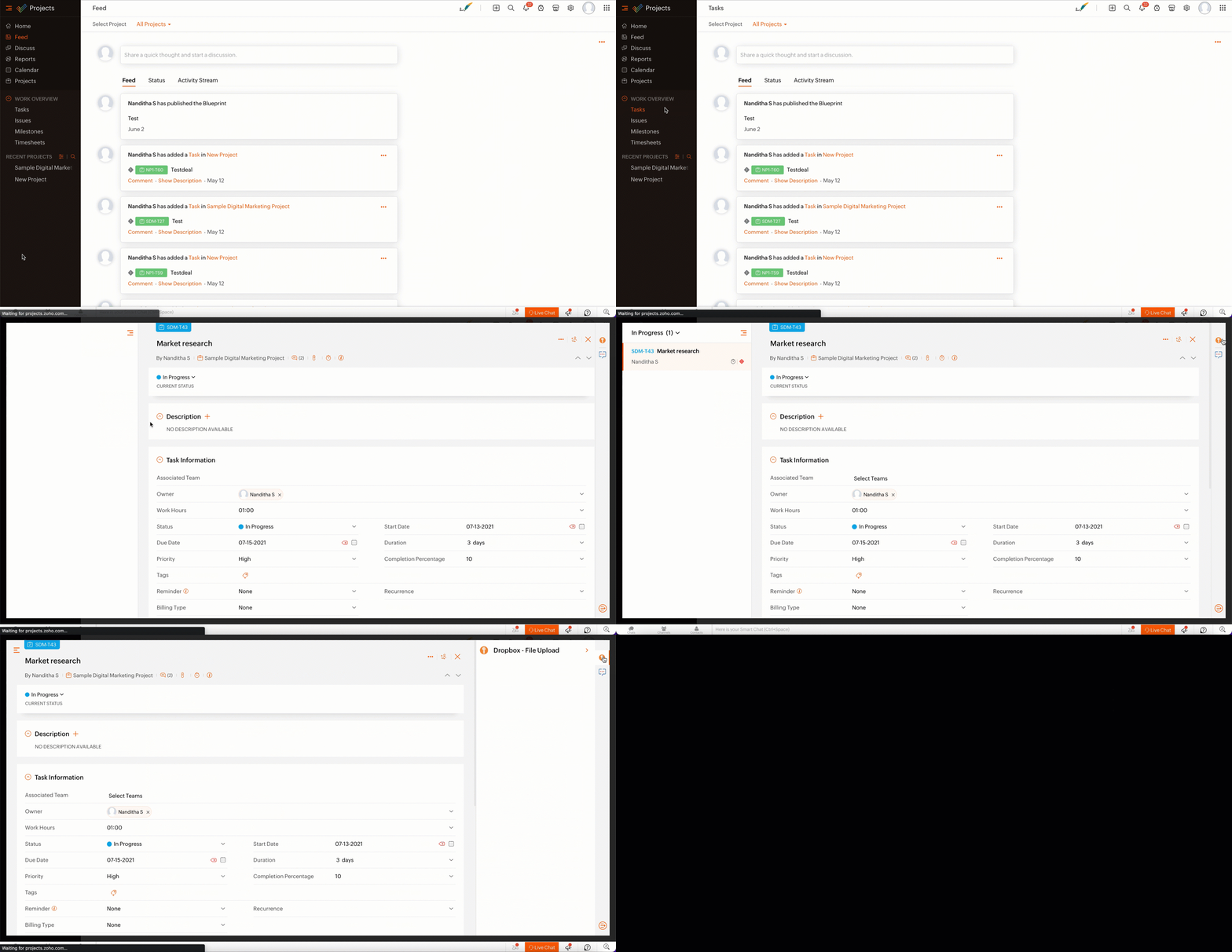
  • From the lists of your Dropbox file requests, select the requests to which you wish to upload files.
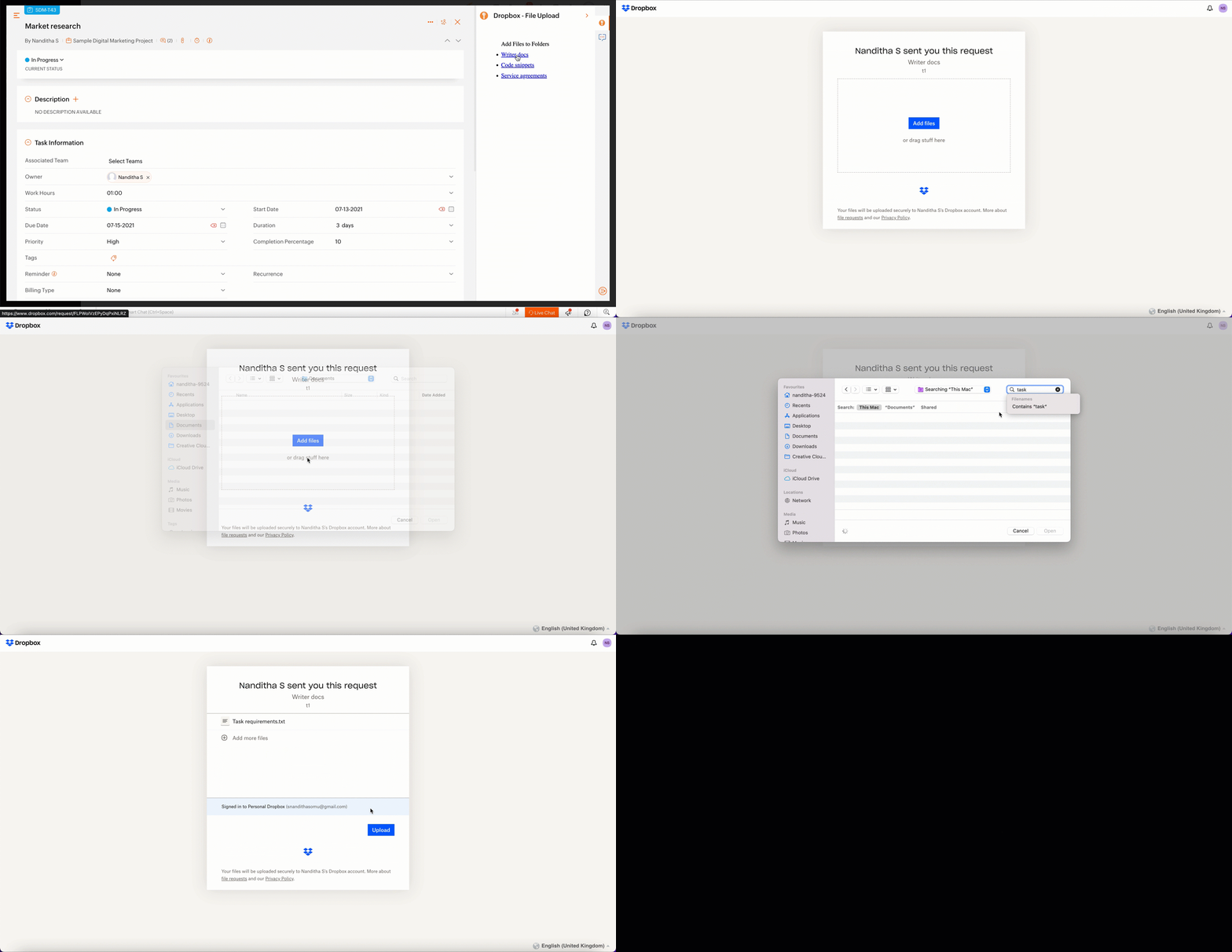
  • The file will be successfully uploaded in the respective Dropbox file request.
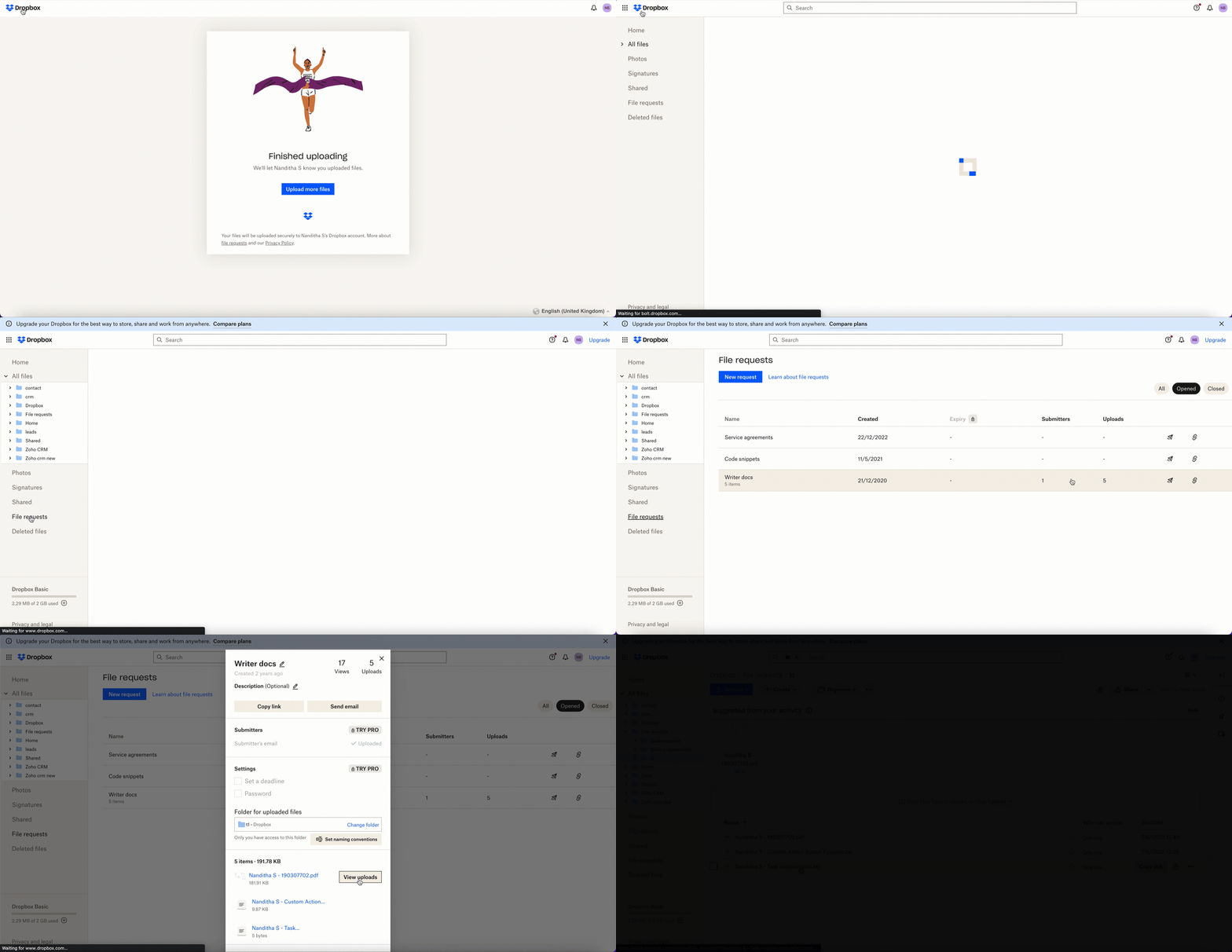

We’ve demonstrated how to upload files directly to Dropbox file request folders from within Zoho Projects in this example. As part of your extension, you can use the Connections feature to do a variety of tasks, some of which are highlighted below.
  • View and update files associated with a certain request.
  • Create Dropbox folders and share them with collaborators.

Connections, therefore serves as a powerful tool that assists you in establishing a connection with other apps and performing smooth data transactions across your applications, thereby improving business functions and optimizing your work.

We hope this information was useful to you. Continue to follow us for further updates!

Sign up for a Zoho Developer account and start developing extensions for Zoho products using Sigma.

SEE ALSO


    Access your files securely from anywhere


                          Zoho Developer Community


                                                • Desk Community Learning Series


                                                • Digest


                                                • Functions


                                                • Meetups


                                                • Kbase


                                                • Resources


                                                • Glossary


                                                • Desk Marketplace


                                                • MVP Corner


                                                • Word of the Day


                                                • Ask the Experts


                                                          Manage your brands on social media


                                                                Zoho TeamInbox Resources


                                                                    Zoho CRM Plus Resources

                                                                      Zoho Books Resources


                                                                        Zoho Subscriptions Resources

                                                                          Zoho Projects Resources


                                                                            Zoho Sprints Resources


                                                                              Qntrl Resources


                                                                                Zoho Creator Resources


                                                                                    Zoho CRM Resources

                                                                                    • CRM Community Learning Series

                                                                                      CRM Community Learning Series


                                                                                    • Kaizen

                                                                                      Kaizen

                                                                                    • Functions

                                                                                      Functions

                                                                                    • Meetups

                                                                                      Meetups

                                                                                    • Kbase

                                                                                      Kbase

                                                                                    • Resources

                                                                                      Resources

                                                                                    • Digest

                                                                                      Digest

                                                                                    • CRM Marketplace

                                                                                      CRM Marketplace

                                                                                    • MVP Corner

                                                                                      MVP Corner


                                                                                        Design. Discuss. Deliver.

                                                                                        Create visually engaging stories with Zoho Show.

                                                                                        Get Started Now


                                                                                          Zoho Show Resources

                                                                                            Zoho Writer

                                                                                            Get Started. Write Away!

                                                                                            Writer is a powerful online word processor, designed for collaborative work.

                                                                                              Zoho CRM コンテンツ


                                                                                                Nederlandse Hulpbronnen


                                                                                                    ご検討中の方


                                                                                                            • Recent Topics

                                                                                                            • Admin asked me for Backend Details when I wanted to verify my ZeptoMail Account

                                                                                                              Please provide the backend details where you will be adding the SMTP/API information of ZeptoMail Who knows what this means?
                                                                                                            • Playback and Management Enhancements for Zoho Quartz Recordings

                                                                                                              Hello Zoho Team, We hope you're all doing well. We would like to submit a feature request related to Zoho Quartz, the tool used to record and share browser sessions with Zoho Support. 🎯 Current Functionality As of now, Zoho Quartz allows users to record
                                                                                                            • Zoho Analytics - Feature Request For Time Based Data Source Fetch

                                                                                                              Hi Analytics Team, I have a client using Zoho CRM and they want a weekly report at 4:30pm every Friday, emailed to the sales team showing a pie chart of Closed Won Deals for that week. This is easy to achieve in Analytics but not so easy to ensure the
                                                                                                            • Which user's capacity is used for Shared Mailbox storage?

                                                                                                              We use shared mailboxes at our company, and their size is increasing daily. Which user(s)'s total mailbox limit is being used up by this space?
                                                                                                            • Inserting the current date / time

                                                                                                              I'd like to use Zoho Notebook as a log - so it would be great to be able to insert the current date and time at the beginning (or end) of each my log/journal entries - or wherever I want. Something simple, like pressing a button/icon to insert it wherever my text cursor is. It could be formatted like "Mon Dec 11, 2017 - 11:43p". 
                                                                                                            • Migrate data from old to new account

                                                                                                              Hy, Have one Old Zoho Notebook Account with Data , want to migrate that whole Data to New Zoho Notebook Account which is in Zoho One . Is that possible ? If Yes then how?
                                                                                                            • Campaign editor overrides href value

                                                                                                              I've been trying to insert a deep link in an email campaign so recipients can directly open a native app on their device. My deep link looks something like "myapp://". The options to insert links in the campaign editor are limited to strict urls, emails,
                                                                                                            • Can't login IMAP suddenly

                                                                                                              Since this evening I'm getting the error: You are yet to enable IMAP for your account. Please contact your administrator... IMAP always been enabled in my account and was workign fine for the past 7 years. Already tried turning IMAP off and on again.
                                                                                                            • how to add subform over sigma in the CRM

                                                                                                              my new module don't have any subform available any way to add this from sigma or from the crm
                                                                                                            • Bug Report and Suggestions for Improvement in Zoho Applications

                                                                                                              Hi Zoho Team, I’d like to report a few bugs and improvement suggestions I’ve noticed while using Zoho products: Zoho Cliq Video Call: The camera sometimes turns off automatically during video calls. This seems to be a bug — please check and fix it. Zoho
                                                                                                            • Super Admin Logging in as another User

                                                                                                              How can a Super Admin login as another user. For example, I have a sales rep that is having issues with their Accounts and I want to view their Zoho Account with out having to do a GTM and sharing screens. Moderation Update (8th Aug 2025): We are working
                                                                                                            • Canvas Flex Box containers should not require a width/height.

                                                                                                              Flexbox containers are often used as organizational concepts, to ease re-flow on mobile etc. - I cannot use % for flexbox W or H - I cannot omit W or H This means that the content cannot dictate, and a Flexbox container cannot be used merely as an organizational
                                                                                                            • Zoho Desk Android app update: Filter enhancement, Save Filters

                                                                                                              Hello everyone! We have now enhanced the filter section on the ticket listing screen of Zoho Desk Android app as it is on the web(desk.zoho.com). Also, we have introduced an option to save filters for tickets on the mobile app. You can easily apply, rename,
                                                                                                            • Very long loading times | bad performance [ZOHO DC: EU]

                                                                                                              Hello there, we have recently noticed that the loading times have become extremely long when retrieving tickets and ticket details. For example, I open any ticket and get the following view. The subject and standard information (ticket owner, status etc.)
                                                                                                            • How to add to Subforms via Zapier with Zoho Writer?

                                                                                                              I have the following layout for a Zoho Writer Document. As you can see there is a repeating subform taking in "Items". I am trying to make a Zapier integration with it, and I can see there is 1 field saying: "Items", but it does not specify how I'm supposed
                                                                                                            • Zia Profile Summary now supports six languages and responds faster

                                                                                                              After numerous customer requests, we’ve expanded Zia Profile Summary to do more than just summarize resumes quickly. It can now summarize them in six different languages and deliver results even faster. What’s New 1. Extended language support Zia can
                                                                                                            • Introducing Zoho Show Android 3.0

                                                                                                              Good ideas need the right space to grow. They deserve tools that move as fast as your thoughts and make creating feel effortless. And that is why we are bringing you Zoho Show Android 3.0! From a brand-new look and smoother navigation to improved collaboration
                                                                                                            • Properly Capture Dropdowns & Hover Elements When Recording a Window/Tab

                                                                                                              Hi Zoho WorkDrive Team, Hope you are doing great. We encountered a limitation when recording a selected window or browser tab: Certain UI elements, such as dropdown lists, hover menus, and overlays, are not captured unless we record the entire screen.
                                                                                                            • Peppol integration zoho invoicefu

                                                                                                              Hi, Belgium will require Peppol invoicing as of 2026. I found that this is being prepared for Zoho books, to be released in Sep 2025. Will Zoho Invoice get this functionality too? I like the Invoice app for my part-time side business as bike mechanic
                                                                                                            • CRM x WorkDrive: File storage for new CRM signups is now powered by WorkDrive

                                                                                                              Availability Editions: All DCs: All Release plan: Released for new signups in all DCs. It will be enabled for existing users in a phased manner in the upcoming months. Help documentation: Documents in Zoho CRM Manage folders in Documents tab Manage files
                                                                                                            • Allow Recording Only a Selected Portion of the Screen

                                                                                                              Hi Zoho WorkDrive Team, Hope you are doing well. We would like to request a more flexible recording option in Zoho WorkDrive. At the moment, we can record either the entire screen or a specific window/tab — but not a custom selected portion of the screen
                                                                                                            • Restricting Calendar View to Working Hours

                                                                                                              Hi: I'm trying to implement a calendar which displays all of my customer appointments.  Currently, the calendar shows all 24 hours of the day.  Is there a way to restrict the hours to simply the times my business is open? Thanks!
                                                                                                            • Add Camera Background Blur During Recording

                                                                                                              Hi Zoho WorkDrive Team, Hope everything is well. We would like to request an enhancement to the video recording feature in Zoho WorkDrive. Currently, the camera preview displayed during a recording does not support background blur. This is an essential
                                                                                                            • Amazon FBA integration - Handle invoice reconciliation under different GSTINs,

                                                                                                              Dear Zoho Community, Thank you for the clarification regarding the Amazon FBA integration, default warehouse, and GSTIN mapping in Zoho Inventory. I understand that Zoho currently supports only one warehouse for Amazon FBA, and that all FBA orders are
                                                                                                            • Whatsapp Integration questions

                                                                                                              Hi Questions: 1. Whatsapp messages are not reaching our CRM, is there a delay? 2. Is there any way to create a whatsapp catalog on a number that is integrated with ZOHO? 3. How do I configure my profile picture on a number that is integrated with ZO
                                                                                                            • Allow Font Size 11 in Editors...

                                                                                                              That is basic functionality...
                                                                                                            • link mail.zoho.com/UnblockMe to unblock

                                                                                                              Could you please unblock my account heloisa.bomfim@expansaodenegocios.com
                                                                                                            • Unblocked me

                                                                                                              Please can you help unblocked my account thanks materiauxjcbrunet2000@zohomail.com
                                                                                                            • Archiving Contacts

                                                                                                              How do I archive a list of contacts, or individual contacts?
                                                                                                            • Integrating External Portal Tickets Into Zoho Desk

                                                                                                              A B2B travel company has a customer portal where clients can raise and submit tickets related to their bookings. These tickets need to be handled and managed in the backend through Zoho Desk. Ticket updates and replies from Zoho Desk should also be visible
                                                                                                            • Make Camera Overlay & Recording Controls Visible in All Screen-Sharing Options

                                                                                                              Hi Zoho WorkDrive Team, Hope you are doing well. We would like to request an improvement to the screen-recording experience in Zoho WorkDrive. Current Limitation: At the moment the recording controls are visible only inside the Zoho WorkDrive tab. When
                                                                                                            • Send WhatsApp voice messages from Bigin

                                                                                                              Greetings, I hope all of you are doing well. We're happy to announce this enhancement we've made to Bigin. Bigin's WhatsApp integration now supports audio messages, so you can record and send voice messages. This makes it easier to handle customer questions
                                                                                                            • CUSTOM FUNCTION GIVE ERROR #EVAL!

                                                                                                              CUSTEM FUNCTION CREATE KYA ZOHOSHEET ME US FUNCTION KO USE KIYA LEKIN DATA TO SAHI HAI LAKIN DATA SHEET ME NAHI LAG LAHA HAI KRUPYA SOLVE KARE MY CODE IS float ADDTWO_TWO(float NO1, float NO2) { ADD = NO1 + NO2; return ADD; }
                                                                                                            • Samsung Keyboard Issues with Notebook

                                                                                                              Dear Users, We're sorry to inform you that some of our users are experiencing certain issues like scrolling, delay/lag, cursor placement especially within the text notes. This occurs mainly due to Samsung Keyboard compatibility with Android 13 and some
                                                                                                            • Zoho Books | Product updates | October 2025

                                                                                                              Hello users, We’ve rolled out new features and enhancements in Zoho Books. From iOS 26 updates to viewing reports as charts, explore the updates designed to enhance your bookkeeping experience. Zoho Books Updates for Apple Devices At WWDC 2025, Apple
                                                                                                            • Zoho Books | Product updates | November 2025

                                                                                                              Hello users, We’ve rolled out new features and enhancements in Zoho Books. From translating email notification templates to the new transaction locking restrictions, explore the updates designed to enhance your bookkeeping experience. Making Tax Digital
                                                                                                            • Zoho Developer Community Hackathon 2025 is LIVE!

                                                                                                              Hey developers! It’s that time of the year again — the Zoho Developer Community Hackathon 2025 is officially open for registrations! If you’ve been waiting for a chance to stretch your skills, try something new, or finally bring that idea to life, this
                                                                                                            • Zoho Books | Product updates | September 2025

                                                                                                              Hello users, We’ve rolled out new features and enhancements in Zoho Books. From PayNow payment method to applying journal credits to invoices and bills in other locations, explore the updates designed to enhance your bookkeeping experience. Integrate
                                                                                                            • Custom Related List Inside Zoho Books

                                                                                                              Hello, We can create the Related list inside the zoho books by the deluge code, I am sharing the reference code Please have a look may be it will help you. //..........Get Org Details organizationID = organization.get("organization_id"); Recordid = cm_g_a_data.get("module_record_id");
                                                                                                            • Contact data removes Account data when creating a quote

                                                                                                              Hi, Our customer has address fields in their quote layout which should be the address of the Account. They prefill the information, adding the account name - the address data is populated as per what is in the account - great. However when they then add
                                                                                                            • Next Page