Building extensions #5: Integrating applications with Zoho Projects through Connections

Building extensions #5: Integrating applications with Zoho Projects through Connections

In our last post, we discussed the essential features that a Zoho Projects extension can provide. Starting with this post andin every subsequent post going forward, we'll go through each of those features in depth, one by one, with an example use case.
In this post, we'll explore the Connections feature in detail.

Connections: When and why?

Creating a tightly coupled integration requires the establishment of a secure connection between applications. To achieve this secured connection, the Sigma platform provides the Connection feature that can be used to establish a secure link and perform data operations across applications seamlessly and efficiently through an extension.

Use case

Working on development-related tasks might require dealing with a variety of files, such as code snippets, help documents, or service level agreements. While several file management applications are available to securely store and organize data, manually handling file storage between applications remains challenging.

For our example, let's use Zoho Projects to manage all tasks, and Dropbox to manage and store data.

What is the difficulty faced?

Dropbox offers a file request feature that allows you to collect files and organize them into folders. However, as we talked about in our previous post, manually categorizing and uploading task-related files to their respective file request folders in Dropbox would be a time-consuming and laborious activity. Instead, it would be more efficient to integrate Dropbox with Zoho Projects so that uploading task files to Dropbox file request folders can be done instantly from within Zoho Projects.
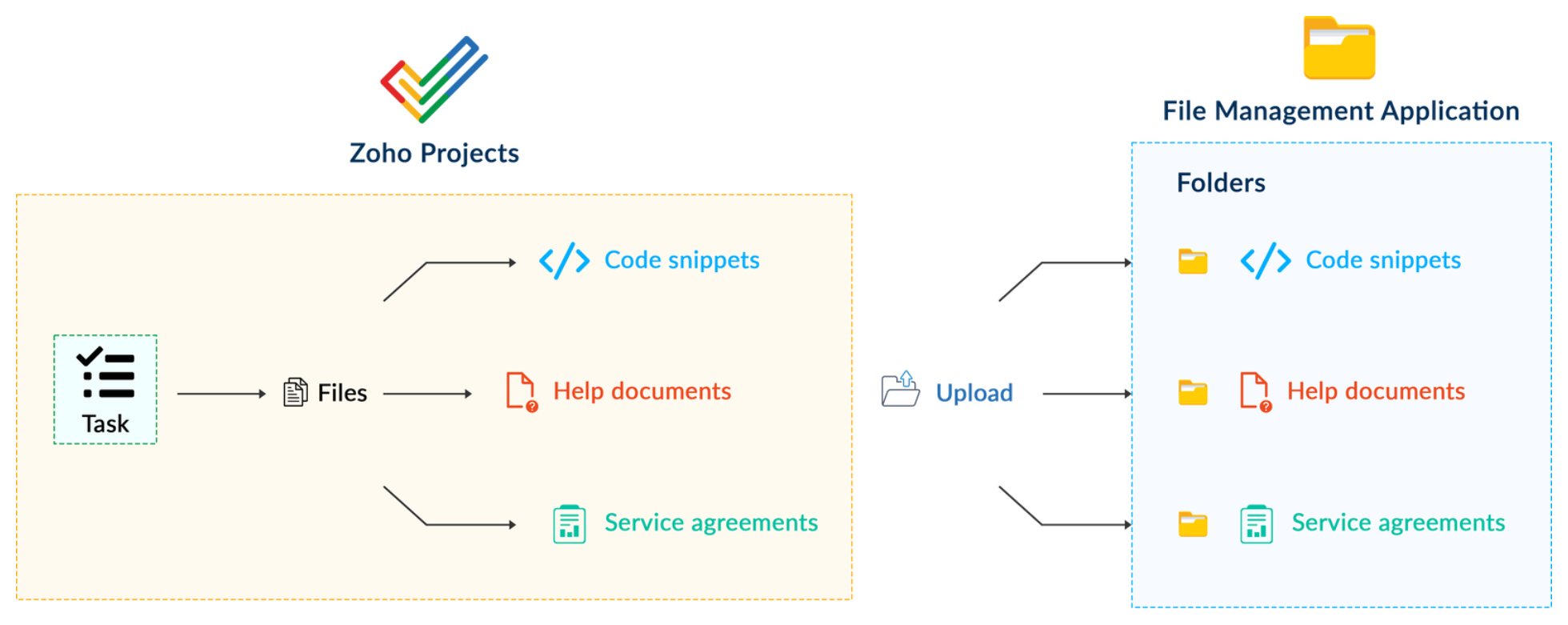

How can it be sorted?

You can create a connection between Zoho Projects and Dropbox. With the secure connection setup, the file request folders available in Dropbox can be listed on the task details page of Zoho Projects through an extension. You may then easily upload files from Zoho Projects to their corresponding folders in Dropbox, saving time and making you more organized.

What are the components required to achieve this use case?

  1. A connection between Zoho Projects and Dropbox.
  2. An extension configuration that includes:
  • Creating an extension
  • Configuring the plugin manifest
  • Setting up the widget code to display the Dropbox file request folders inside the Zoho Projects task details page.
Now, let's see how we can achieve each of these components.

1. Creating a secure connection using the Connection feature

  • Log in or sign up into developer.zoho.com.
  • Go to Sigma and access your workspace.
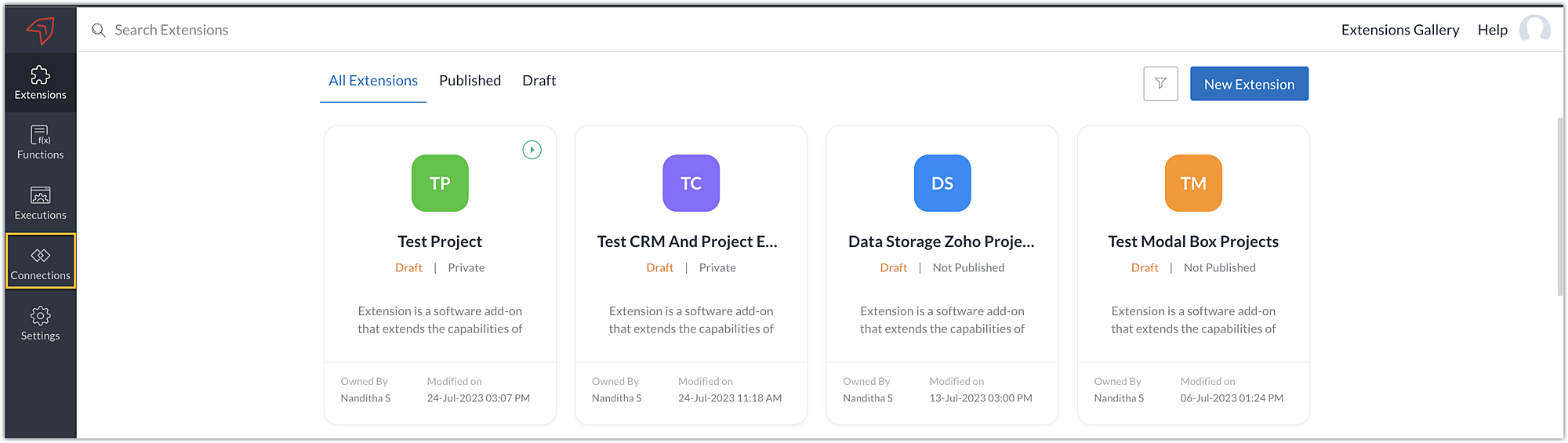
  • Once you enter your workspace, select the Connections section in Sigma.
Note: Connections created in Zoho Projects are also accessible within the Connections section in Sigma. These connections can be used in extensions to connect with other applications.
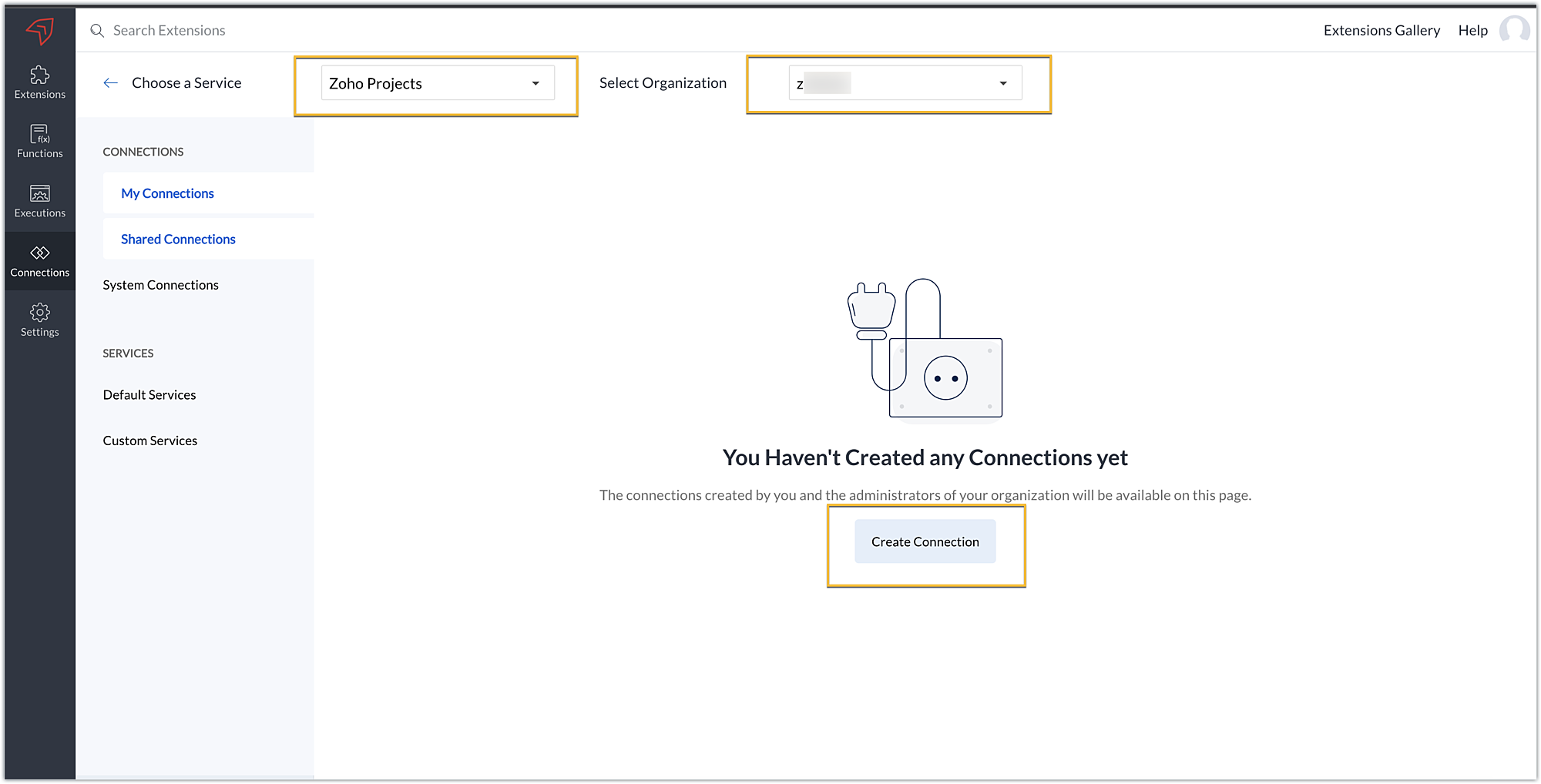
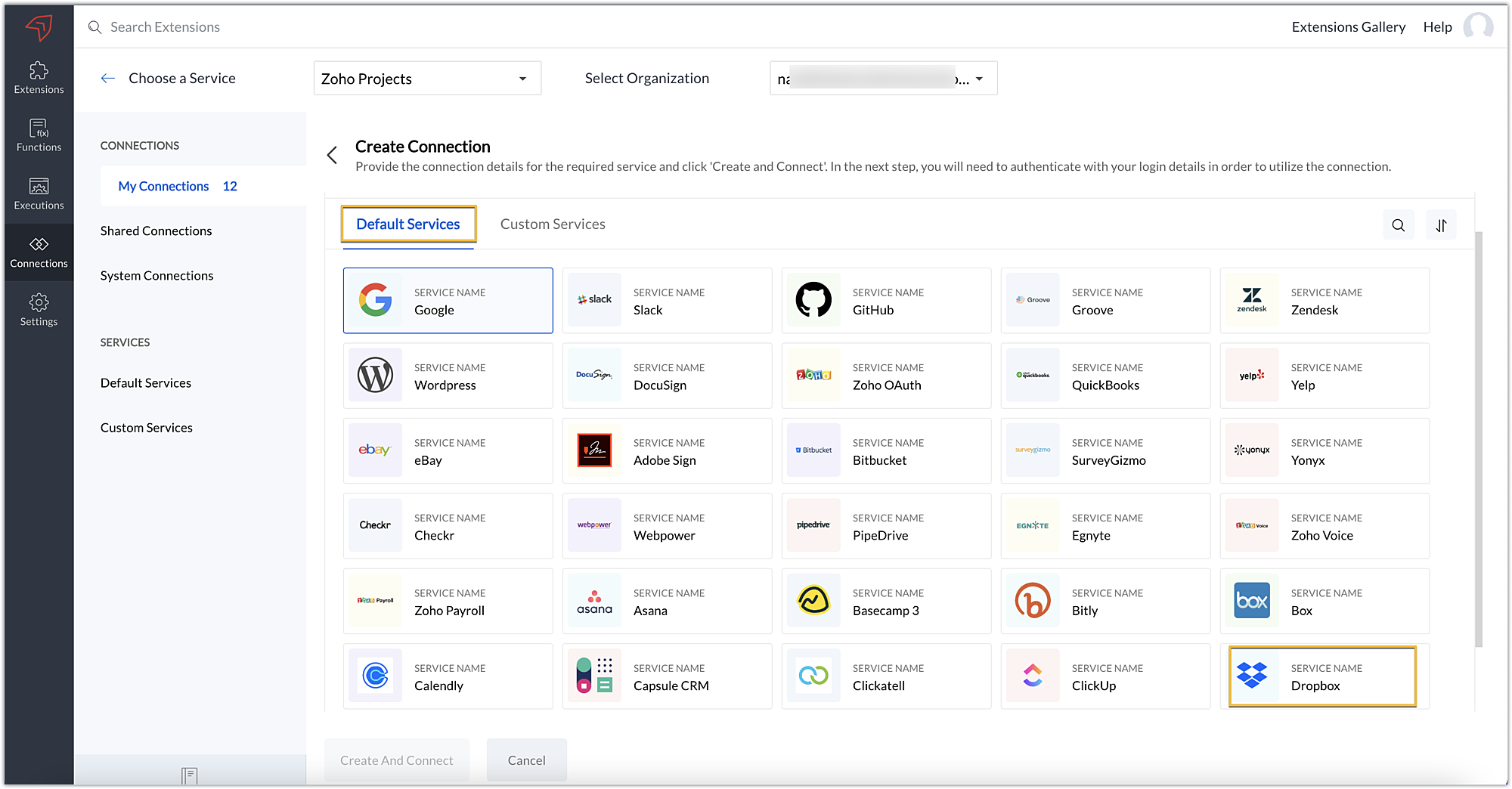
  • Choose the service as Zoho Projects and select your Zoho Projects organization. Click on Create Connection.
  • Sigma offers a list of default services from which you can choose and easily connect with Zoho Projects. If the application you want to integrate isn’t in the default list, you can add and build a connection with it using the custom services option.
Note: If you’re looking to connect Zoho Projects with another Zoho Product that also follows the OneAuth authentication mechanism, select the service Zoho OneAuth from the Default Services list to create the connection.
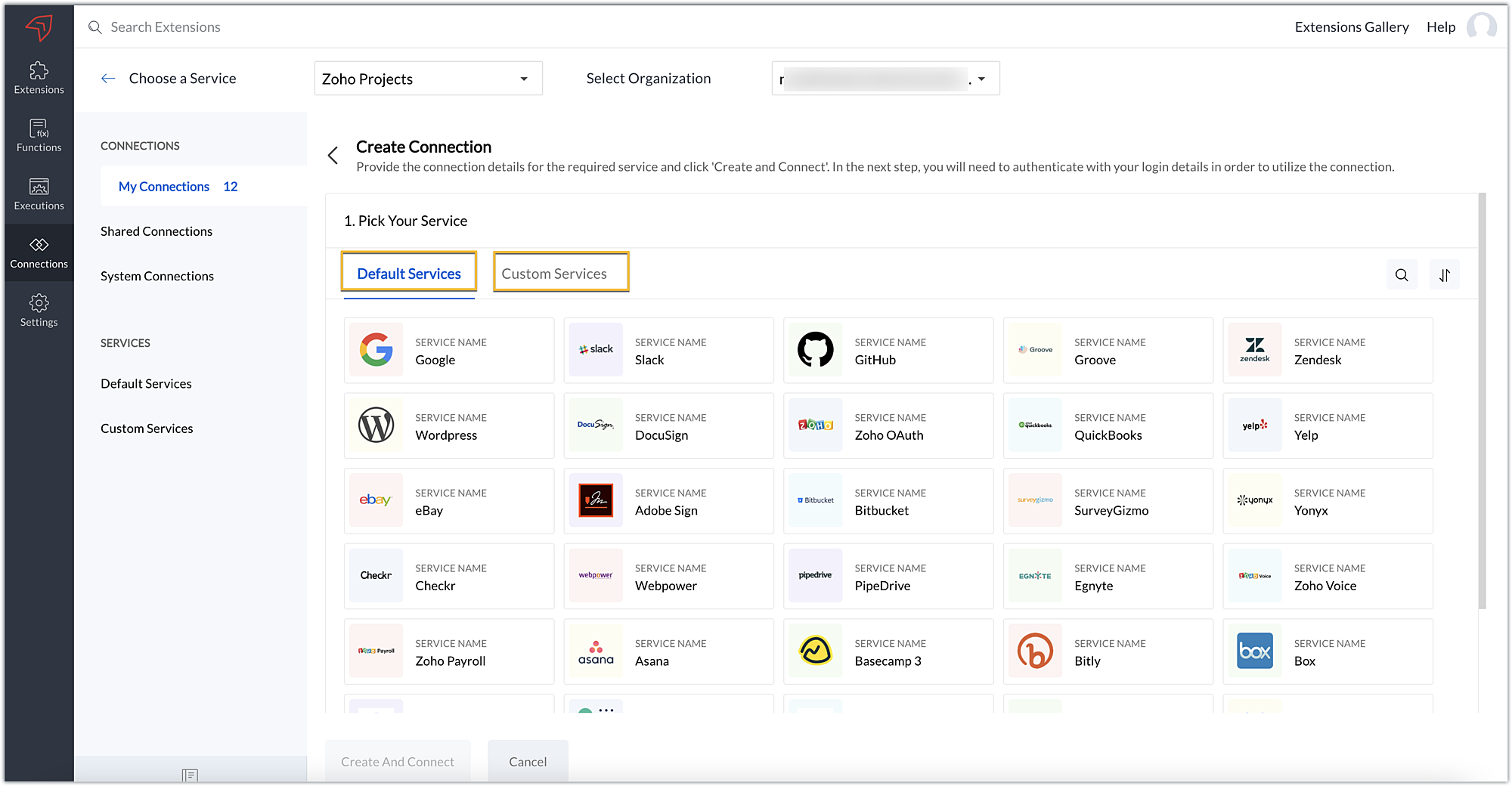
  • In our example, the application to connect with Zoho Projects is Dropbox, and because it’s in the Default Services list, go ahead and choose Dropbox.
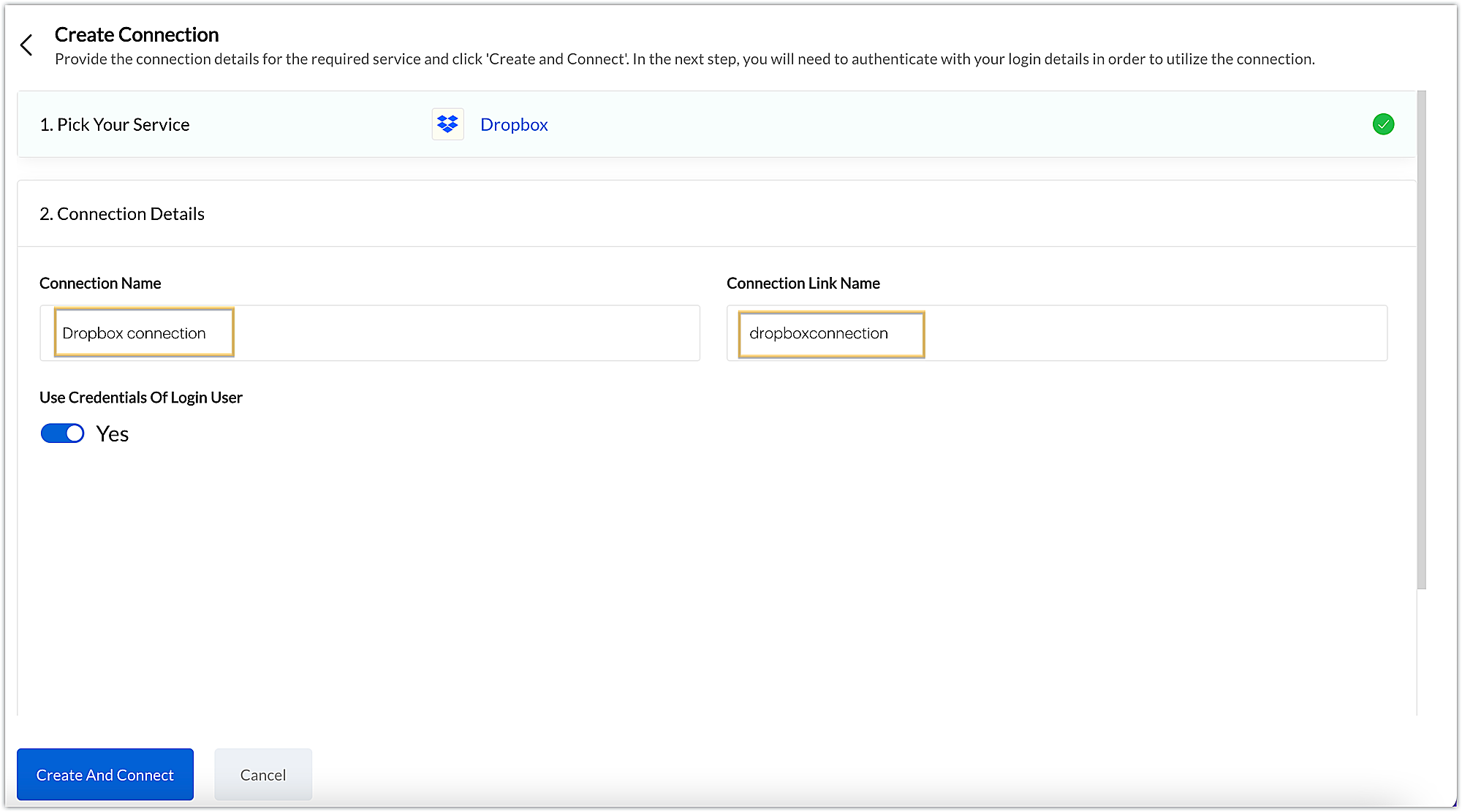
  • After choosing the service, enter the connection name. A connection link name will be populated automatically.
  • Toggle Use credentials of login user to Yes if you want every user installing the extension to access the connection using their own login credentials, or No if admin credentials are enough to access the connection.
  • In our example, we'll proceed with the former. So toggle to Yes, and then click Create and connect.
Note: For services in which the option to choose the scopes is displayed, choose the necessary scopes, and then click Create and connect.
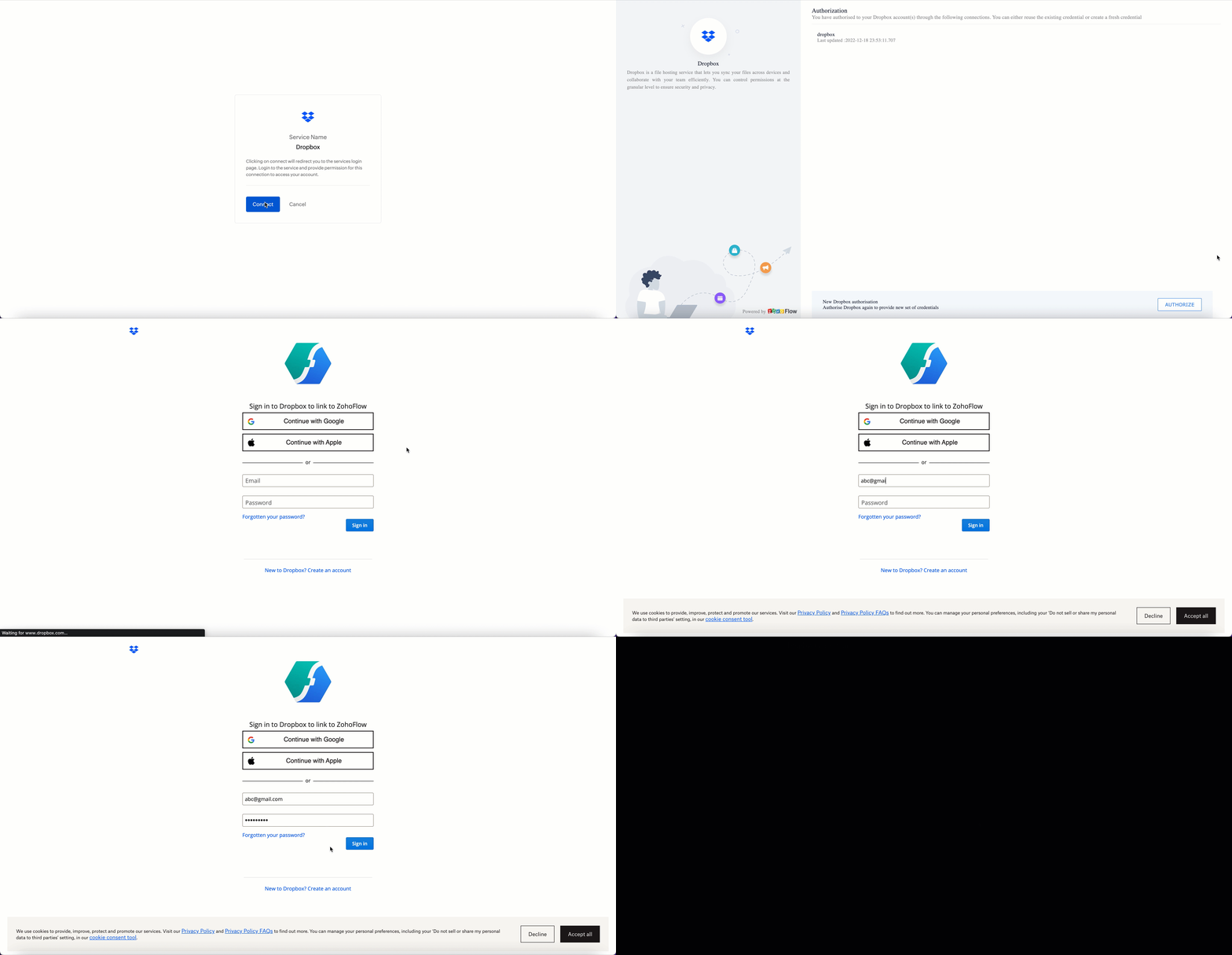
  • You’ll be directed through a series of authorization steps before being prompted to connect with Dropbox by entering your login information.
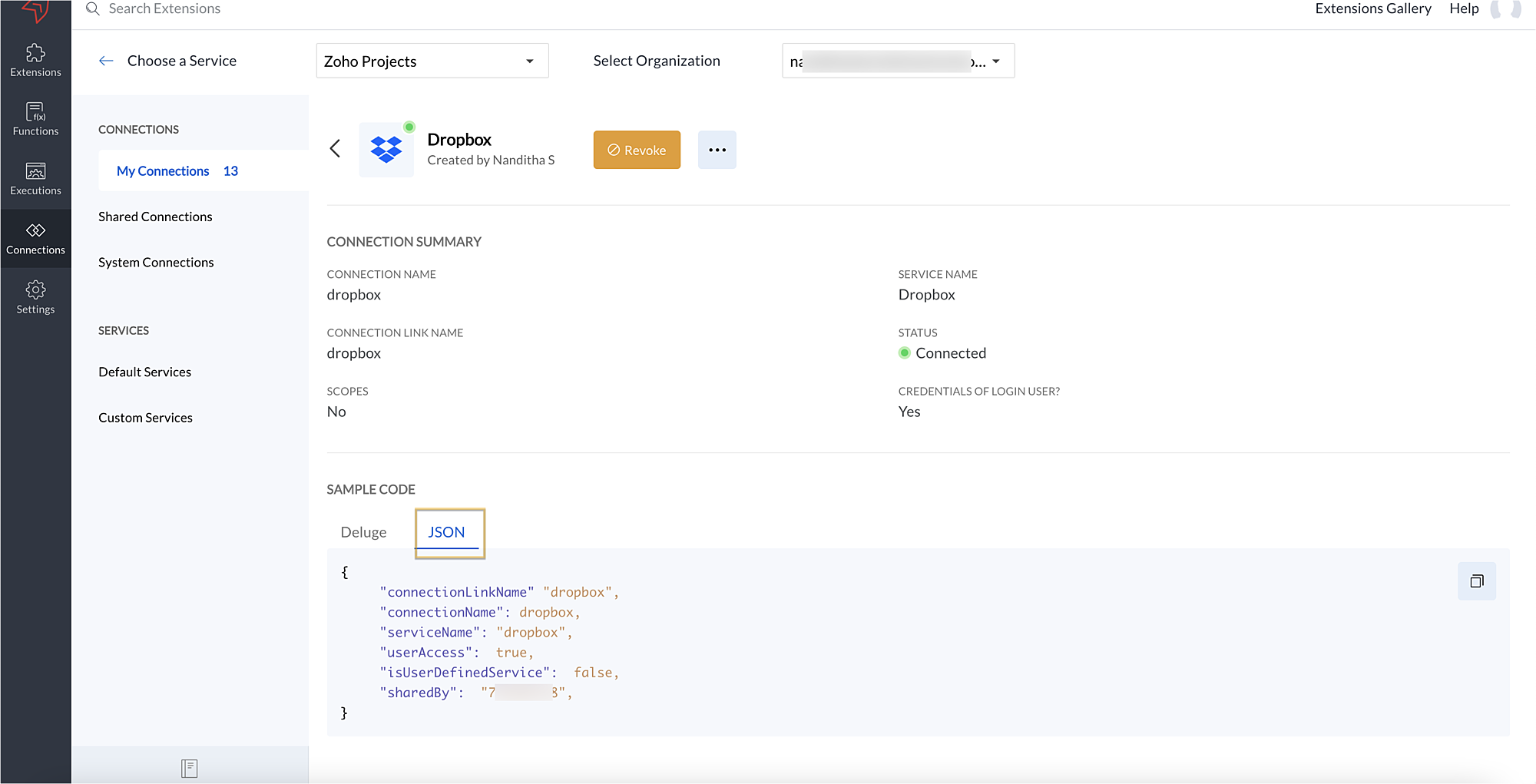
  • The connection will be established successfully once you sign in with Dropbox, and you will be redirected to the Connection Summary details page in Sigma.
  • To access this connection as part of an extension, you’ll need to configure the sample code provided under the JSON section in the plugin-manifest.json file. We’ll explore this in the next section.
2. Extension configuration

Now that we've successfully established our connection, let's look at how we can achieve our use case feature of displaying the Dropbox file request folder within the Zoho Projects task detail page. As mentioned earlier, to accomplish this, we’ll need to implement the following measures.
A. Create an extension

B. Configure the plugin-manifest.json file

C. Set up the widget code
Let's explore these steps in order.

A. Create an extension
B. Configure the plugin-manifest.json file
  • As previously stated, to access the connection established between Zoho Projects and Dropbox, the connection must first be configured in the plugin-manifest.json file.
  • Copy the JSON sample code from the Connection Summary Details page and paste it into the plugin-manifest.jsonfile as the value for the connections key.
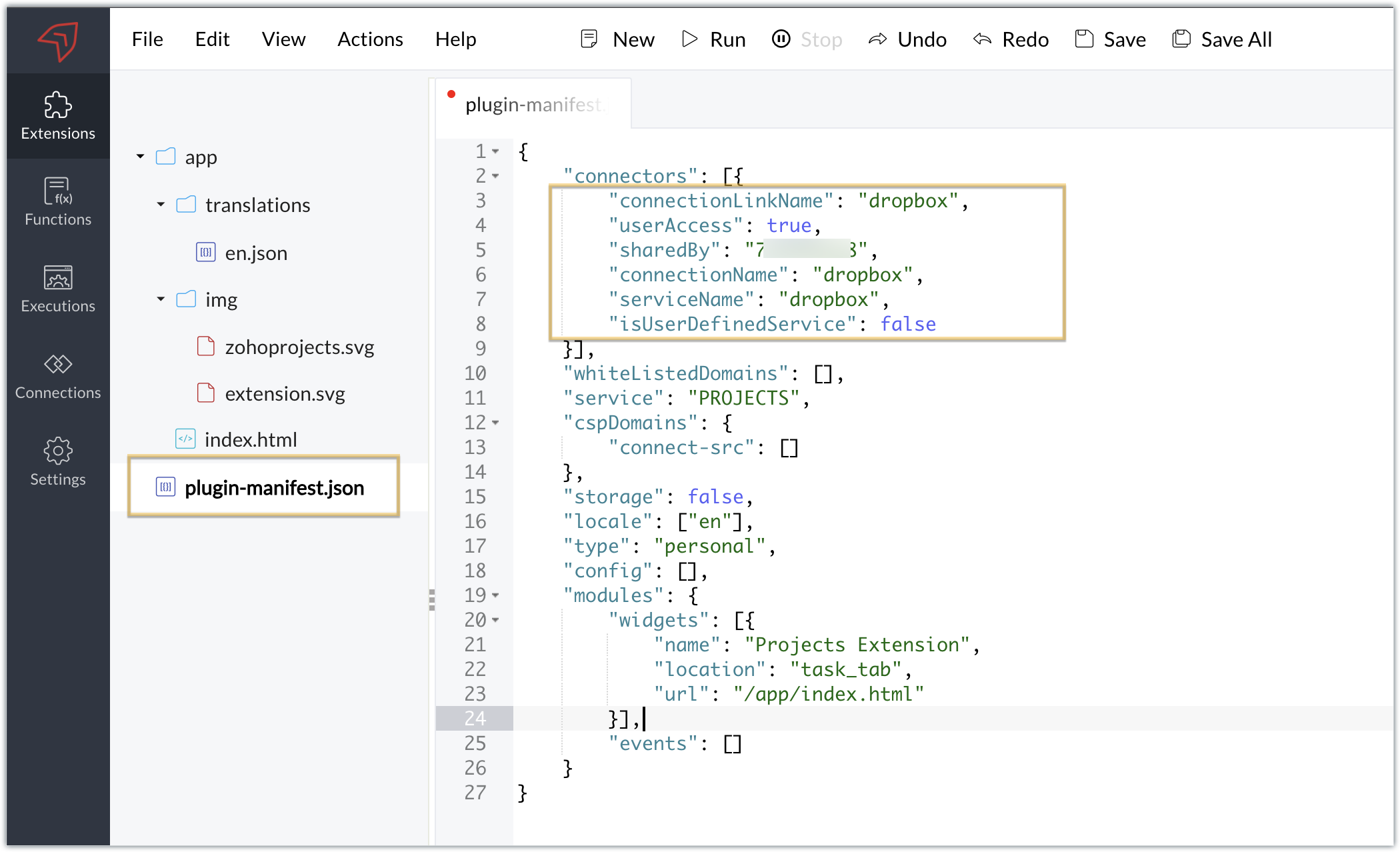
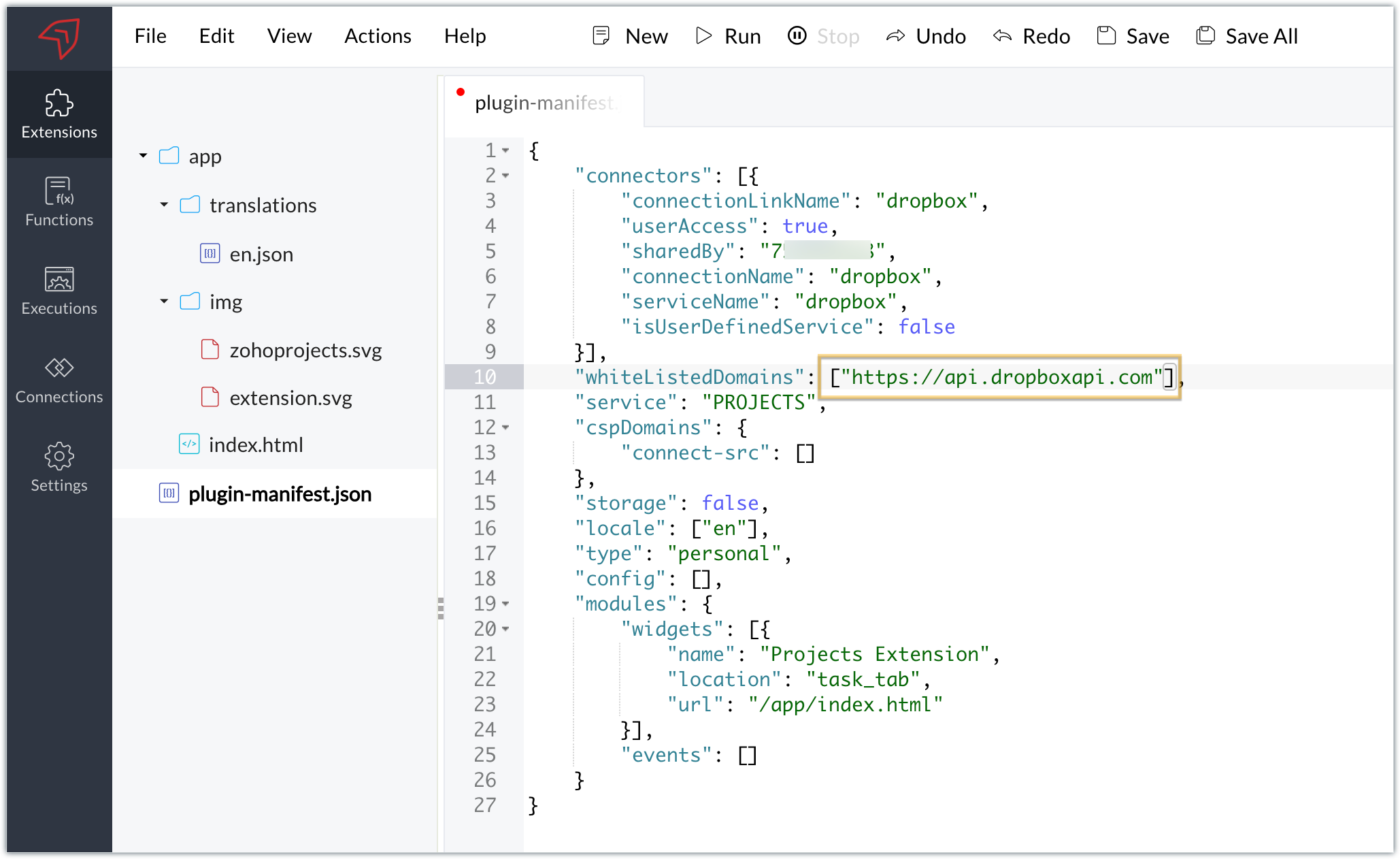
  • You will also need to white list the Dropbox domain for Dropbox calls to be processed without being blocked.
  • Include the domain in the plugin-mainfest.json file as the value for the whiteLitsedDomains key.
  • As we saw in our earlier post, the plugin-manifest.json file includes a widget called Projects Extension by default. For our example, because we’re connecting with Dropbox and constructing a widget that will include Dropbox request folders to upload files, enter the widget name and location.
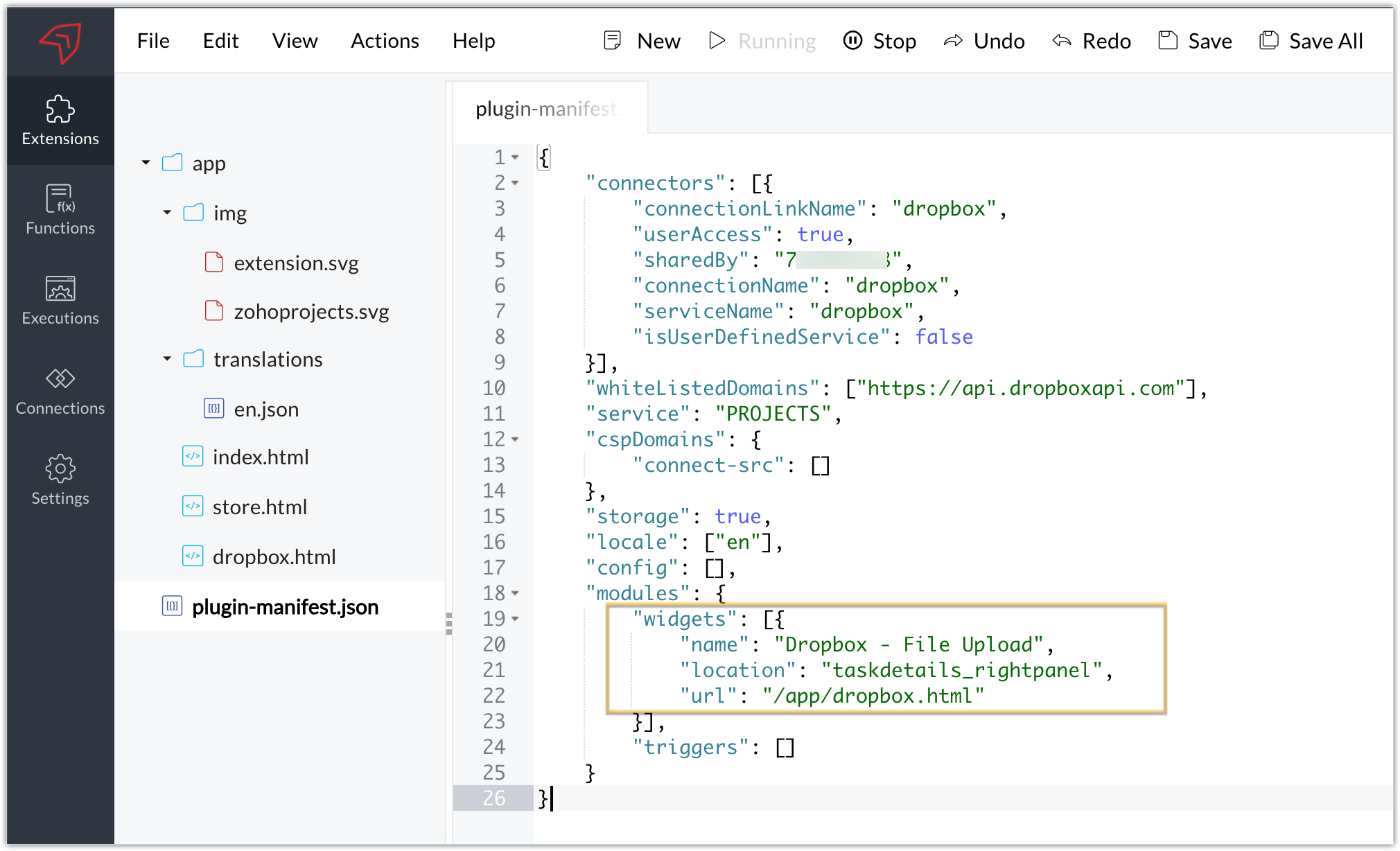
  • The final configured plugin-manifest.json file for our example would be as follows:
  1. {
  2. "connectors": [{
  3. "connectionLinkName": "dropbox",
  4. "userAccess": true,
  5. "sharedBy": "xxxxxxx",
  6. "connectionName": "dropbox",
  7. "serviceName": "dropbox",
  8. "isUserDefinedService": false
  9. }],
  10. "whiteListedDomains": ["https://api.dropboxapi.com"],
  11. "service": "PROJECTS",
  12. "cspDomains": {
  13. "connect-src": []
  14. },
  15. "storage": true,
  16. "locale": ["en"],
  17. "config": [],
  18. "modules": {
  19. "widgets": [{
  20. "name": "Dropbox - File Upload",
  21. "location": "taskdetails_rightpanel",
  22. "url": "/app/dropbox.html"
  23. }],
  24. "triggers": []
  25. }
  26. }

C. Setting up the widget code

Now, that we’ve created an extension and configured the plugin manifest file, let's finally set up the widget code in order to display all Dropbox file request folders inside our task details right panel.

Dropbox.html widget code: Please find the widget code snippet as an attachment in this post.
  • In this widget code, we’ve invoked the Dropbox API to list file request folders by constructing and passing the required data along with the connection we had established for Dropbox.
  • The API will be invoked and return all of the file request folders in the task details right panel, from which users can click on the link and directly upload files to Dropbox from within a task in Zoho Projects itself.
Sample output
  • Once the code is setup, publish and install the extension to check the functionality in the Zoho Projects portal.
  • Enter a task and click the extensions icon in the right panel.
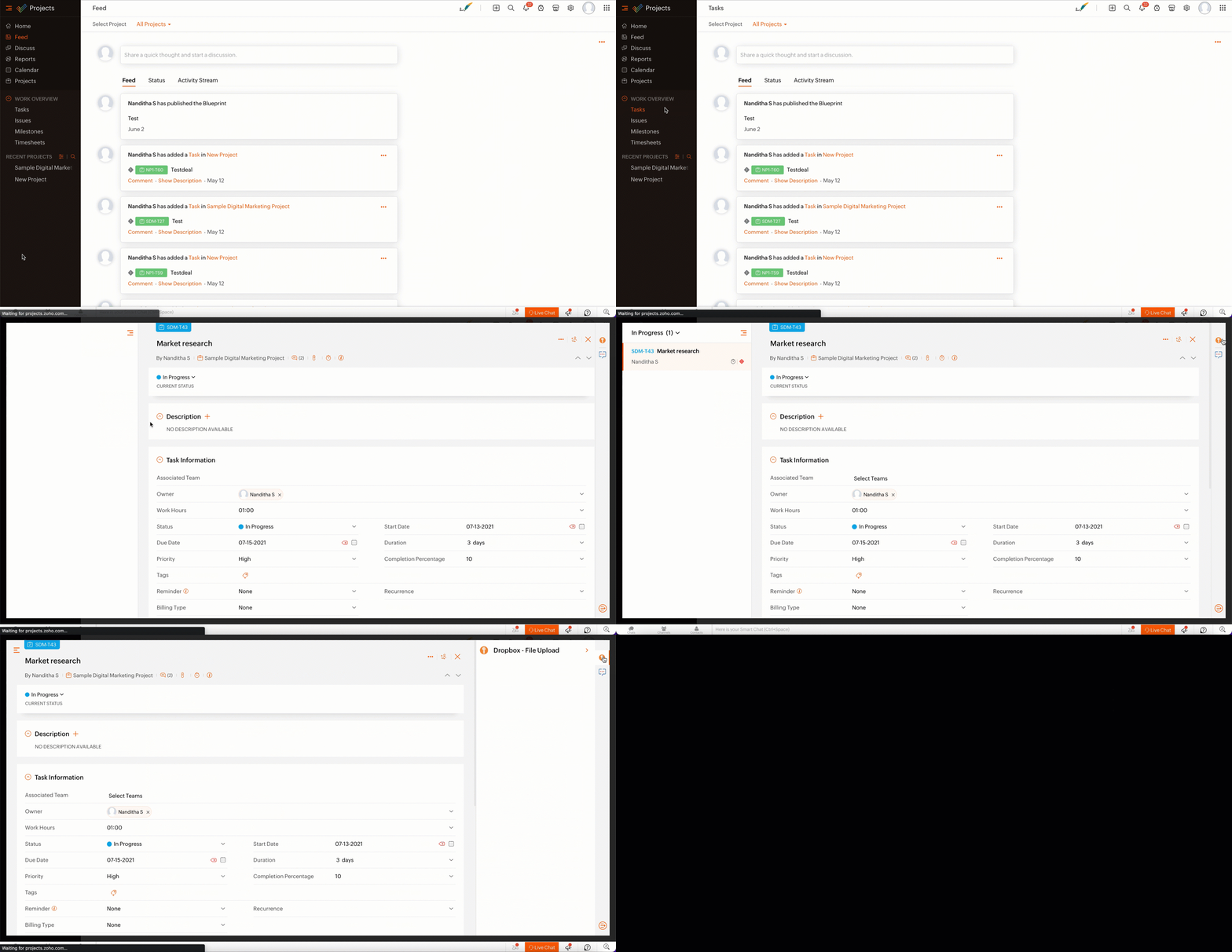
  • From the lists of your Dropbox file requests, select the requests to which you wish to upload files.
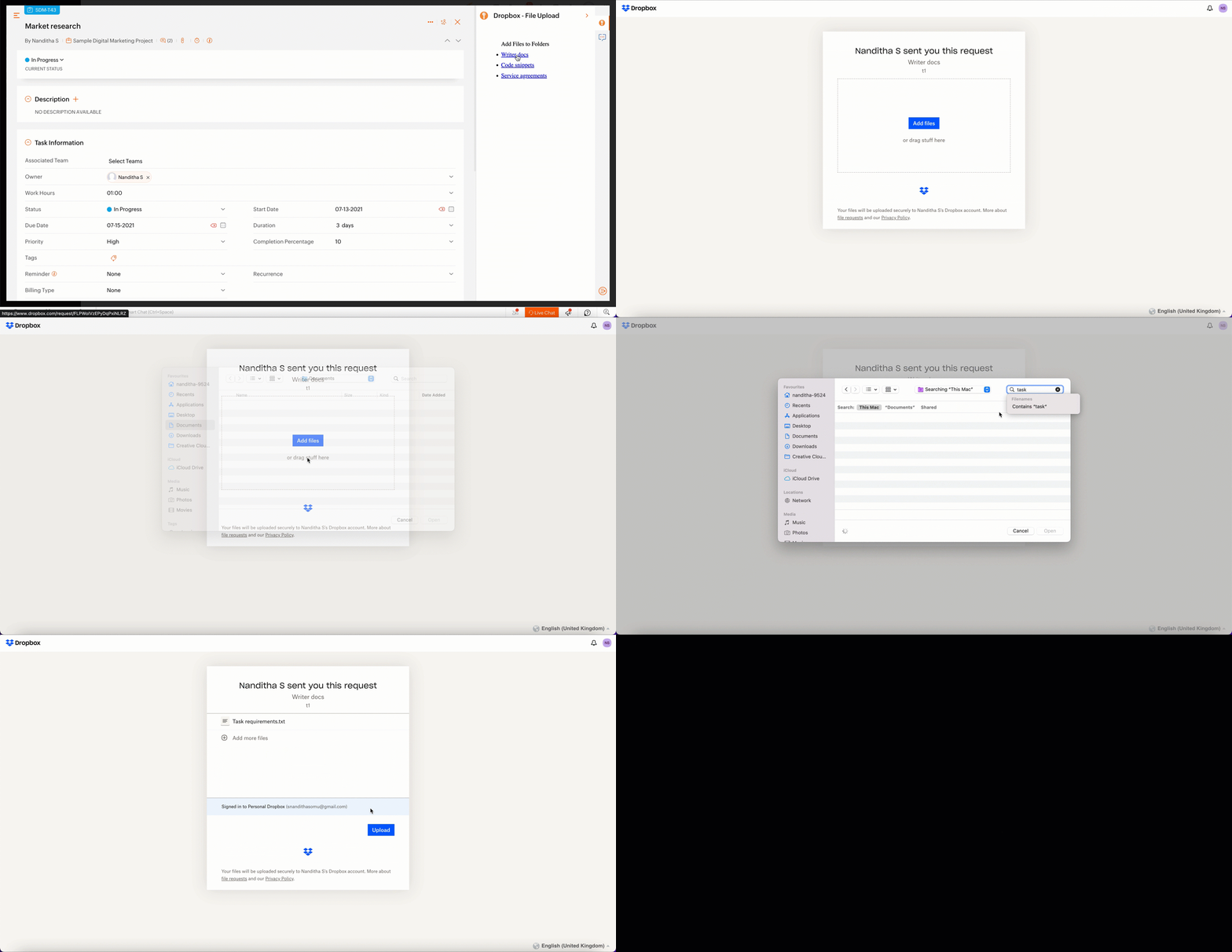
  • The file will be successfully uploaded in the respective Dropbox file request.
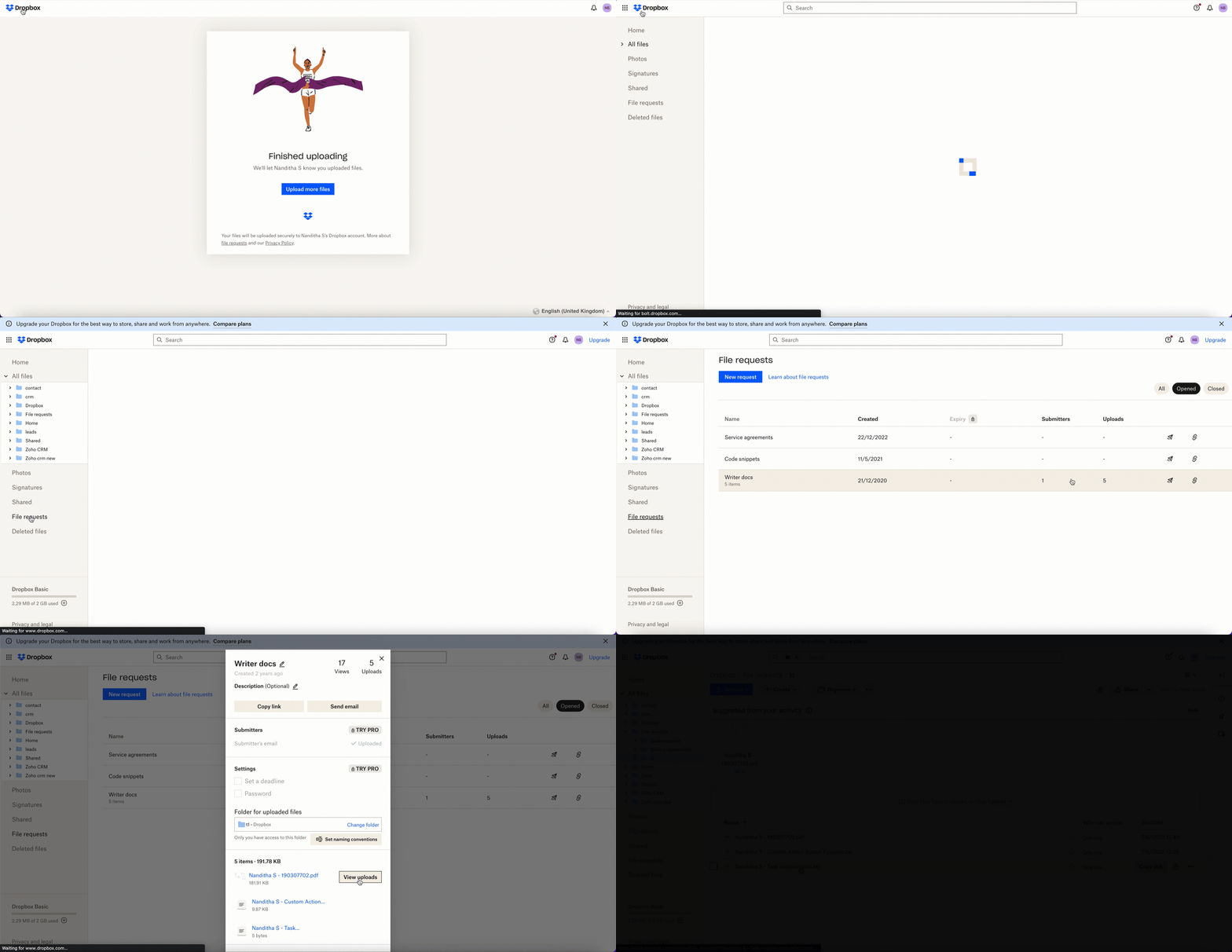

We’ve demonstrated how to upload files directly to Dropbox file request folders from within Zoho Projects in this example. As part of your extension, you can use the Connections feature to do a variety of tasks, some of which are highlighted below.
  • View and update files associated with a certain request.
  • Create Dropbox folders and share them with collaborators.

Connections, therefore serves as a powerful tool that assists you in establishing a connection with other apps and performing smooth data transactions across your applications, thereby improving business functions and optimizing your work.

We hope this information was useful to you. Continue to follow us for further updates!

Sign up for a Zoho Developer account and start developing extensions for Zoho products using Sigma.

SEE ALSO


    Access your files securely from anywhere

        All-in-one knowledge management and training platform for your employees and customers.


                              Zoho Developer Community


                                                    • Desk Community Learning Series


                                                    • Digest


                                                    • Functions


                                                    • Meetups


                                                    • Kbase


                                                    • Resources


                                                    • Glossary


                                                    • Desk Marketplace


                                                    • MVP Corner


                                                    • Word of the Day


                                                    • Ask the Experts


                                                              Manage your brands on social media


                                                                    Zoho TeamInbox Resources


                                                                        Zoho CRM Plus Resources

                                                                          Zoho Books Resources


                                                                            Zoho Subscriptions Resources

                                                                              Zoho Projects Resources


                                                                                Zoho Sprints Resources


                                                                                  Qntrl Resources


                                                                                    Zoho Creator Resources


                                                                                        Zoho CRM Resources

                                                                                        • CRM Community Learning Series

                                                                                          CRM Community Learning Series


                                                                                        • Kaizen

                                                                                          Kaizen

                                                                                        • Functions

                                                                                          Functions

                                                                                        • Meetups

                                                                                          Meetups

                                                                                        • Kbase

                                                                                          Kbase

                                                                                        • Resources

                                                                                          Resources

                                                                                        • Digest

                                                                                          Digest

                                                                                        • CRM Marketplace

                                                                                          CRM Marketplace

                                                                                        • MVP Corner

                                                                                          MVP Corner


                                                                                            Design. Discuss. Deliver.

                                                                                            Create visually engaging stories with Zoho Show.

                                                                                            Get Started Now


                                                                                              Zoho Show Resources

                                                                                                Zoho Writer

                                                                                                Get Started. Write Away!

                                                                                                Writer is a powerful online word processor, designed for collaborative work.

                                                                                                  Zoho CRM コンテンツ


                                                                                                    Nederlandse Hulpbronnen


                                                                                                        ご検討中の方


                                                                                                                • Recent Topics

                                                                                                                • Zoho Community Digest : Jan 2026 | Part 1

                                                                                                                  Hello Everyone! Staying in the loop with Zoho's latest product updates and features across the vast Zoho Community Forums can be a real challenge. We get it. With over 50+ applications, each with its dedicated forum, it's easy to miss out on important
                                                                                                                • World date & time format

                                                                                                                  Hello, Is there a timeline to get the worldwide used date and time format ? I mean not the american one... I mean day month year, and 24 hours clock. Regards
                                                                                                                • Nimble enhancements to WhatsApp for Business integration in Zoho CRM: Enjoy context and clarity in business messaging

                                                                                                                  Dear Customers, We hope you're well! WhatsApp for business is a renowned business messaging platform that takes your business closer to your customers; it gives your business the power of personalized outreach. Using the WhatsApp for Business integration
                                                                                                                • Conditional layouts - support for multi-select picklists

                                                                                                                  Hi, The documentation for conditional layouts says the following: "Layout Rules cannot be used on the following field types: Auto Number Lookup Multi Select Lookup User Lookup Formula File Upload Multi Line" I have a custom module with a multi-pick list
                                                                                                                • Dont want to list inactive items.

                                                                                                                  If an item is made inactive, there is no point in showing it in the item list. Please provide an option to hide all inactive items in 'Preferences'. 
                                                                                                                • Actual vs Minimum

                                                                                                                  Hi all, I am sure I am not the only one having this need. We are implementing billing on a 30-minute increment, with a minimum of 30 minutes per ticket. My question is, is there a way to create a formula or function to track both the minimum bill vs the
                                                                                                                • Client Script Not Working When Field is Set by Workflow

                                                                                                                  Problem Context: I have implemented a client script in the Cases module that automatically assigns commands based on the value of the Priority field. The script functions correctly when the Priority field is manually set by a user through the form. Observed
                                                                                                                • Integration of CRM and Recruit

                                                                                                                  hi team, Is it possible to sync deals <> job openings from only 1 pipeline? My configuration of CRM has pipeline for each business unit, so I will have all data in the CRM system. body leasing and recruitment is one BU (hence 1 pipeline) - can I sync
                                                                                                                • {Action Required} Re-authenticate your Google Accounts to Continue Data Sync

                                                                                                                  Hello Users! To align with Google’s latest updates on how apps access files in Google Drive, we’ve enhanced our integration to comply with the updated security and privacy standards, ensuring safer and more reliable access to your data. With this update,
                                                                                                                • integrating Zoho CRM vendors with Zoho projects

                                                                                                                  In most of our projects we collaborate with our Vendors. Being able to integrate only Accounts and not Vendors from CRM, is a huge limitation for our perspective and needs. We would really love to see this feature in the CRM-Projects integration.
                                                                                                                • Zoho Creator Workshops 2026—Europe & UK | Coming to a city near you!

                                                                                                                  Hello everyone! We're excited to announce the Zoho Creator Workshop Series 2026, coming to cities across Europe and the United Kingdom this year! Whether you're looking to explore the intermediate-to-advanced capabilities of Creator or you're a seasoned
                                                                                                                • Validation rule for Date field

                                                                                                                  The condition settings for a Date field are are absolutlly usless. Conditions can only be set for a specific date, which is logically ineffective in most cases. When setting a condition for a Date field, users usually need to compare the value relative
                                                                                                                • Number 9 envelopes for invoice printing

                                                                                                                  I email and print invoices. Being new to Zoho and coming from QB, we did both as we have a more traditional So in Zoho i want to do the same using Number 9 envelopes. These have both a return window and mail to windoow see attached image. Im just looking for best suggestions on how to get a ZOHO invoice to work, so I can mail my invoices...
                                                                                                                • Zoho Books/Square integration, using 2 Square 'locations' with new Books 'locations'?

                                                                                                                  Hello! I saw some old threads about this but wasn't sure if there were any updates. Is there a way to integrate the Square locations feature with the Books locations feature? As in, transactions from separate Books locations go to separate Square locations
                                                                                                                • Open Sans Font in Zoho Books is not Open Sans.

                                                                                                                  Font choice in customising PDF Templates is very limited, we cannot upload custom fonts, and to make things worse, the font names are not accurate. I selected Open Sans, and thought the system was bugging, but no, Open Sans is not Open Sans. The real
                                                                                                                • Super Admin Logging in as another User

                                                                                                                  How can a Super Admin login as another user. For example, I have a sales rep that is having issues with their Accounts and I want to view their Zoho Account with out having to do a GTM and sharing screens. Moderation Update (8th Aug 2025): We are working
                                                                                                                • Add Reporting feature to display variance/change columns when comparing periods

                                                                                                                  When running reports to compare periods (for example, Profit and Loss comparing current year to previous), I would like to be able to display variance columns in both (a) amount or (b) percentage.
                                                                                                                • Payroll and BAS ( Australian tax report format )

                                                                                                                  Hello , I am evaluating Zoho Books and I find the interface very intuitive and straight forward. My company is currently using Quickbooks Premier the Australian version. Before we can consider moving the service we would need to have the following addressed : 1.Payroll 2.BAS ( business activity statement ) for tax purposes 3.Some form of local backup and possible export of data to a widely accepted format. Regards Codrin Mitin
                                                                                                                • Invalid scope choice: Workdrive integration in CRM

                                                                                                                  Bug: There is an invalid option in the permission choices for Workdrive integration in CRM. If the entry "WorkDrive.teamfolder.CREATE" is selected, it will return a message indicating invalid OAuth scope scope does not exist.
                                                                                                                • What's New - February 2026 | Zoho Backstage

                                                                                                                  February 2026 brings a major new addition and a collection of enhancements across Zoho Backstage. We thought about writing a long introduction, but the updates in this release make a strong case on their own. So we’ll skip the buildup and dive straight
                                                                                                                • Attaching files to emails within CRM Deals.

                                                                                                                  Hello, We have recently started using the extension "Workdrive for CRM" (Related List) to view/store our documents for each Deal, instead of using Attachments. Overall it feels like a better way to go but the user experience is not so great when it comes
                                                                                                                • Anyone worked out how to export or screengrab a full heatmap?

                                                                                                                  I'd love to be able to include a copy of a heatmap in a report but can't work out how to grab the whole thing as there doesn't appear to be an export function? Thanks in advance.
                                                                                                                • Establishing Relationships among contacts/leads with Reciprocal

                                                                                                                  Is there any way to create a relationship between contacts and leads and be able to go into just one of the files and have it reciprocate the entry in the other file? For example, if I have two people say John and Jane Smith who are husband and wife.
                                                                                                                • Placeholder for Agent Signature in Email Templates

                                                                                                                  Dear Zoho Team, I hope this message finds you well. We currently face a limitation when designing email templates in Zoho Desk. While we can create email templates and include a footer at the end, the agent signature is always appended by default at the
                                                                                                                • Custom View and Custom Fields on Zoho Books

                                                                                                                  Hi, I have some custom fields on Estimates and Invoices. I also use Custom Views so I can have a lot of information at a glance. I want to include my custom fields as columns in my custom views of estimates / invoice, but it looks like is not possible.
                                                                                                                • %PaymentLink%

                                                                                                                  Does not work. Software creates a BAD link. ....and yes payment options are turned on. Link on the invoice pdf once opened will work but this template is a joke.
                                                                                                                • Syncing calendar with Google Calendar doesn't work when events are sent to auto repeat

                                                                                                                  Hi... The ZOHO CRM -- GOOGLE CALENDAR sync is broken. If I create a single event on either side, sync works, but if I create an event with auto repeat on either side it doesn't work. Furthermore, events created before the sync don't show up in the calendar.
                                                                                                                • Allow Global Admin to access/edit all forms without changing owners

                                                                                                                  Hi there, Please consider adding a feature where the Global Admin of the account an automatically access/edit any form in the Company Account. I'm the Global Admin on our Zoho One plan, and we have multiple users that use/create forms. But for me to access
                                                                                                                • Can Zoho Marketing Automation send OTP codes via WhatsApp during user registration?

                                                                                                                  The flow I would like to implement is: A user signs up in the mobile app and enters their phone number. The system generates a one-time verification code (OTP). The OTP is sent to the user via WhatsApp message. The user enters the code in the app to confirm
                                                                                                                • Where to show Customization Field ?

                                                                                                                  Dear Sir, I have made some New Field in Item Field Customisation. Now I don't require that field in Estimate, Sales Orders etc. I just wants that field in Sales Invoice to Show/Hide... Is that possible ?
                                                                                                                • What's New in Zoho Analytics - February 2026

                                                                                                                  Hello Users! We're back with another round of updates for Zoho Analytics. This month's release focuses on giving you greater flexibility in how you visualize, manage, and act on your data - with new features like custom visualizations, remote MCP server,
                                                                                                                • Zoho Books (and other Finance Suite Apps) - Clickable Item Name on Invoices and Reports

                                                                                                                  Hi Zoho Books team, It would be really helpful if the Item Name on Reports were clicable to take me to the item. The same on Invoices, often I am looking at an invoice and I want to look at the deails of a product. A link here would be helpful to jump
                                                                                                                • ZOHO Reports are taking longer time to get refresh

                                                                                                                  Hi Team, Since last few days, I'm facing issues in getting updated reports. For eg: right after making an expense entry or even posting a journal, it is taking longer then expected for the updated reports. Refer below: "You are viewing the report that
                                                                                                                • Display actual mileage on an invoice

                                                                                                                  My users are creating expenses in Zoho expense. For example, they expense 10 miles and get paid 7 dollars (10 miles * IRS rate of .70). If I look at the expenses in Zoho Books, it does show them at 10 miles at .70 cent When I add these expense to an invoice
                                                                                                                • Can't change form's original name in URL

                                                                                                                  Hi all, I have been duplicating + editing forms for jobs regarding the same department to maintain formatting + styling. The issue I've not run into is because I've duplicated it from an existing form, the URL doesn't seem to want to update with the new
                                                                                                                • Can you create relationships BETWEEN contacts within the same module

                                                                                                                  I am setting up my CRM, and I want to have a way to connect contacts within the same module.  Is there a way to do this?  If not - how do I decide how to split up contacts to make connections?  What are best practices for this? We have clients who need
                                                                                                                • Function and workflow to create customer payment and send receipt

                                                                                                                   I am attempting to set up a workflow/custom function for the automatic creation of a customer payment and sending the email receipt, but am receiving the error "Improper Statement Error might be due to missing ';' at end of the line or incomplete expression" I've been over everything several times and cannot see where the error is (code is copied into the attached document).  I haven't used custom functions before with Deluge, so it's very likely something very simple, or I've completely mucked
                                                                                                                • Disable Sign Up option in Zoho Creator Portal and show only Sign In page

                                                                                                                  Is it possible to disable the Sign Up option in a Zoho Creator portal? The requirement is to show only the Sign In page and completely remove or hide the Sign Up page, so users cannot create accounts directly from the portal login page. Is there any setting
                                                                                                                • Restrict Payment Methods

                                                                                                                  Allow us to restrict certain payment methods specific for each customer.
                                                                                                                • How to install Widget in inventory module

                                                                                                                  Hi, I am trying to install a app into Sales Order Module related list, however there is no button allow me to do that. May I ask how to install widget to inventory module related list?
                                                                                                                • Next Page