Building extensions #6: Custom user interfaces with Widgets

Building extensions #6: Custom user interfaces with Widgets

Welcome to our post on Widgets for Zoho Projects!

In our last post, we explored the significance of the connections feature, showed how to use it, and provided an example use case. In this article, we'll look at the importance of widgets, another feature available in Zoho Projects.

Importance of widgets

Widgets are graphical user interface components that enable you to customize the user interface to provide users with easy data access and the flexibility to perform data operations. Zoho Projects offers widget support in multiple locations to enable users to further customize the UI in the location that most suits their needs.

When and where can widgets be used?

Widgets can be used for multiple purposes, some of which include:
➤ Collect and organize data from multiple sources before presenting it to the end user in a customized style.
➤ Display data to end users to allow them to make an input decision, then use that input data to carry out business processes.
You can also load and utilize widgets in multiple locations in Zoho Projects based on your business needs.

Configuring widgets in plugin-manifest.json

To include a widget in an extension, it must be configured in the plugin-manifest.json file. As we explained in an earlier post, the plugin-manifest.json file includes a sample widget named "Projects Extension" in the task details tab by default.

However, as part of an extension, you can add multiple widgets at various locations. In order to include a widget, you need to provide values for the below three keys:
  • name - The name of the widget.
  • location - The location in which the widget must be loaded. You may find the value to be used for each specific place in the widget locations document.
  • url - The path to the HTML file containing the widget UI that must be rendered.


Depending on the functionality of your extension, you can configure as many widgets as you want in your plugin-manifest.json in this manner.

Support for Widgets in Zoho Projects - JS SDKs

Zoho Projects offers JS SDKs that allow widget code to interact with the extension. In order for the javascript widget code to communicate with the extension, Zoho Projects provides JS SDKs support for multiple functionality. Some example functionalities include:
  • Initializing the extension
  • Fetching current user details
  • Getting details of portal, task, and much more
  • Setting details for tasks, issues, projects, and so on
  • Invoking connections inside the extension
You can refer to the JS SDK document for the available SDKs.

Prerequisite for using the JS SDKs
Note: It is important to invoke the init method in order to initialize the extension and utilize the other JS SDKs. All other JS SDK methods can be used only once the init method is invoked.

A few use case examples
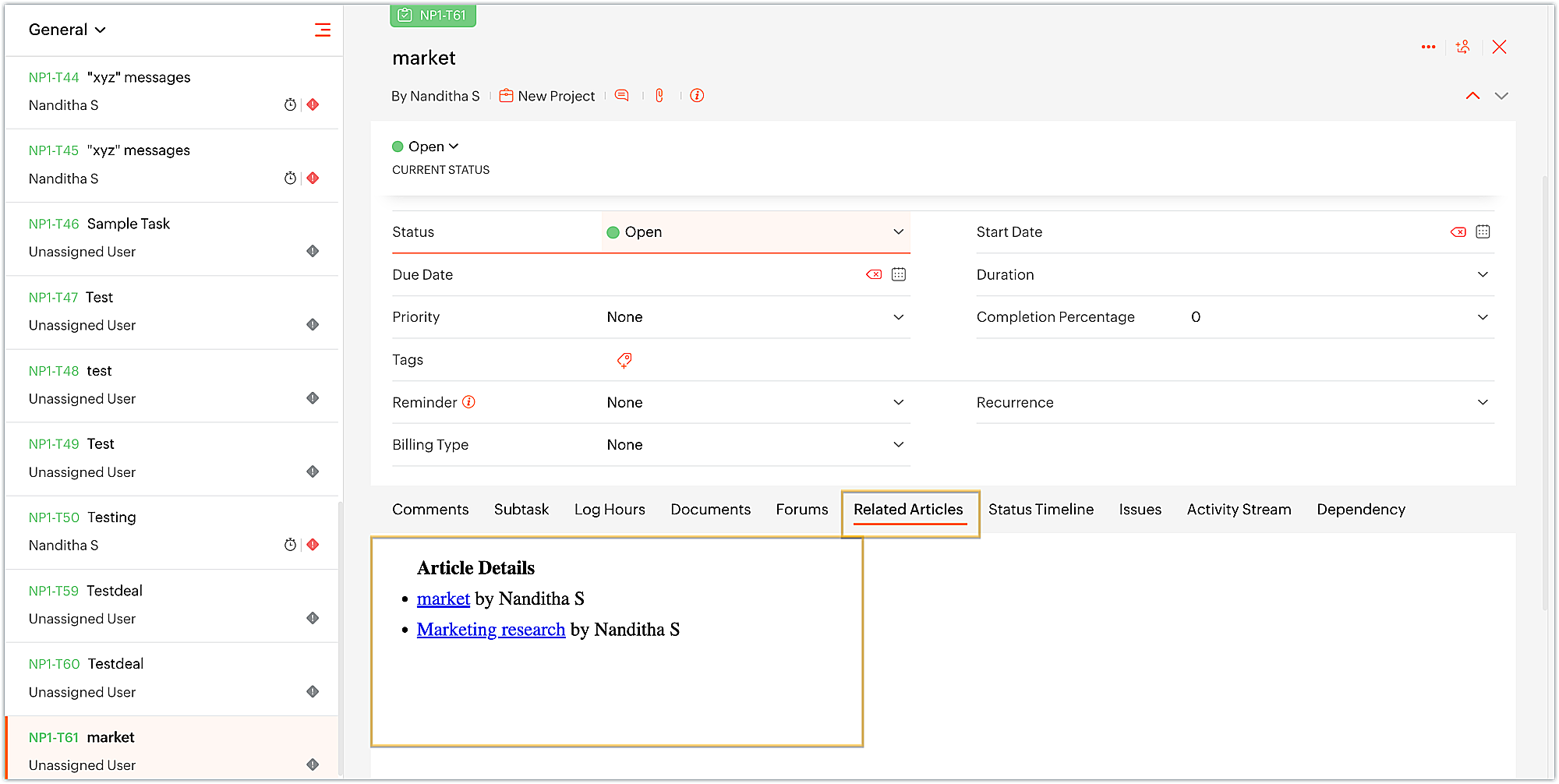
  • Streamlining Zoho Projects developers' work by displaying Zoho Desk articles related to the task's subject as a tab on the task details page. This allows them to find any existing references related to the task at hand that they can refer to and get a head start on the work.
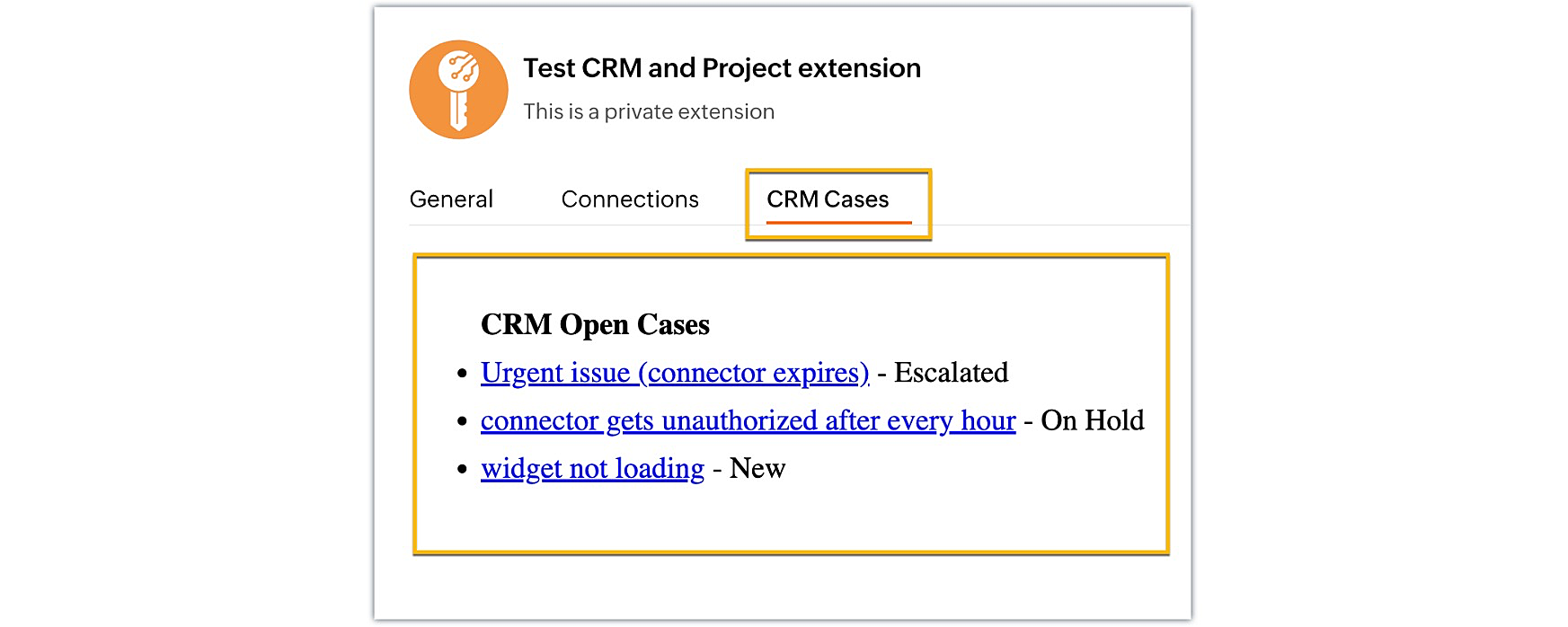
  • Managing your Zoho CRM open cases from within Zoho Projects to efficiently track and prioritize the cases based on their status.
  • Uploading and associating files with ease to a third-party file management service, such as Sharepoint or Dropbox, right from Zoho Projects. Similarly, having access to and managing third-party files within the Zoho Projects module of your choice. These synchronized data exchanges between applications help you stay organized and save time.
  • Managing your company's expenses and project budgets by collaborating with Zoho Books to allocate funds and generate invoices for each project. As a result, you can easily create estimates, invoices, and deliver the generated bills to the project client while maintaining all of your finances in one place.
These are just some of the examples of what widgets can be used for. Widgets provide you more control and flexibility over the UI design and help in simplifying the user experience.

We hope you found this information useful. Keep following this space as we will explore more such sample business solutions along with their implementation in our upcoming posts!

Sign up for a Zoho Developer account and start developing extensions for Zoho products using Sigma.

SEE ALSO:


    Access your files securely from anywhere


                            Zoho Developer Community


                                                  • Desk Community Learning Series


                                                  • Digest


                                                  • Functions


                                                  • Meetups


                                                  • Kbase


                                                  • Resources


                                                  • Glossary


                                                  • Desk Marketplace


                                                  • MVP Corner


                                                  • Word of the Day


                                                  • Ask the Experts


                                                            Manage your brands on social media


                                                                  Zoho TeamInbox Resources


                                                                      Zoho CRM Plus Resources

                                                                        Zoho Books Resources


                                                                          Zoho Subscriptions Resources

                                                                            Zoho Projects Resources


                                                                              Zoho Sprints Resources


                                                                                Qntrl Resources


                                                                                  Zoho Creator Resources


                                                                                      Zoho CRM Resources

                                                                                      • CRM Community Learning Series

                                                                                        CRM Community Learning Series


                                                                                      • Kaizen

                                                                                        Kaizen

                                                                                      • Functions

                                                                                        Functions

                                                                                      • Meetups

                                                                                        Meetups

                                                                                      • Kbase

                                                                                        Kbase

                                                                                      • Resources

                                                                                        Resources

                                                                                      • Digest

                                                                                        Digest

                                                                                      • CRM Marketplace

                                                                                        CRM Marketplace

                                                                                      • MVP Corner

                                                                                        MVP Corner


                                                                                          Design. Discuss. Deliver.

                                                                                          Create visually engaging stories with Zoho Show.

                                                                                          Get Started Now


                                                                                            Zoho Show Resources

                                                                                              Zoho Writer

                                                                                              Get Started. Write Away!

                                                                                              Writer is a powerful online word processor, designed for collaborative work.

                                                                                                Zoho CRM コンテンツ


                                                                                                  Nederlandse Hulpbronnen


                                                                                                      ご検討中の方


                                                                                                              • Recent Topics

                                                                                                              • How to print a label from zoho creator app?

                                                                                                                Hello, I would like to print a label from zoho creator app record similar to attached one. Size 74mm x 102mm. I tried record template. It leaves plenty of space around the content and also I couldn't set the height of the page. So it is not printing properly. Could someone please direct me to right direction for this requirement?
                                                                                                              • Integration between "Zoho Sprints Stories" and "Zoho Projects Tasks/Subtasks"

                                                                                                                We have two separate teams in our organization using Zoho for project management: The Development team uses Zoho Sprints and follows Agile/Scrum methodology. The Infrastructure team uses Zoho Projects for traditional task-based project management. In
                                                                                                              • Where can we specify custom CSS in Zoho Forms custom theme ?

                                                                                                                I'm using a form with a dark theme. The OTP popup window is unreadable, because for some reason, the OTP popup background fixes color to white, but still takes the font color specified in the custom theme. This ends up as white on white for me, rendering
                                                                                                              • Team Gamification

                                                                                                                Would love to motivate, engage and encourage our team with our social media posts. Would like to include Gamification features of Social Media in Zoho Social or Marketing Automation. And also bring in Social Advocacy tools/tracking/management to these,
                                                                                                              • Sync Data from MA to CRM

                                                                                                                Currently, it's a one-way sync of data from the CRM to MA. I believe we should have the ability to select fields to sync from MA to the CRM. The lead score is a perfect example of this. In an ideal world we would be able to impact the lead score of a
                                                                                                              • Update CRM record action

                                                                                                                Currently, MA only offers a "Push Data" action to push data to a CRM module. This action is built to cover the need to both create a new record and update an existing record. Because it has been implemented this way all required fields on the CRM module
                                                                                                              • Pro Lite Upgrade - Quick Access Tray

                                                                                                                Hello, I was going to upgrade to Pro Lite but the Quick Access Tray feature isn't available for Windows. Of the four features not available for Windows, the QAT is what I'm most interested in. Are there plans to add this feature for Windows anytime soon?
                                                                                                              • Boost your CRM communication with new font types, sizes, and default reply-to options while composing emails

                                                                                                                Hello Everyone, We’re excited to introduce a series of impactful enhancements to the email composer settings in Zoho CRM. These updates enable you to personalize and optimize your customer interactions with greater efficiency. So what's new? Add custom
                                                                                                              • 3 year sick leave cycle

                                                                                                                How do you set up a sick leave cycle for South Africa? In SA the sick works like this for the first 6 months you get 0.83 paid sick days a month, then after 6 months you sick leave balance is reset to 30 days that can be used over a 36 month cycle.  This
                                                                                                              • WorkDrive and CRM not in sync

                                                                                                                1/ There is a CRM file upload field with WorkDrive file set as the source: 2/ Then the file is renamed in WorkDrive (outside CRM): 3/ The File in CRM is not synced after the change in WorkDrive; the file name (reference) in CRM record is not updated (here
                                                                                                              • Introducing Connected Records to bring business context to every aspect of your work in Zoho CRM for Everyone

                                                                                                                Hello Everyone, We are excited to unveil phase one of a powerful enhancement to CRM for Everyone - Connected Records, available only in CRM's Nextgen UI. With CRM for Everyone, businesses can onboard all customer-facing teams onto the CRM platform to
                                                                                                              • Is Zoho Communityspaces now part of Zoho One?

                                                                                                                Is Zoho Communityspaces now part of Zoho One?
                                                                                                              • How to update "Lead Status" to more than 100 records

                                                                                                                Hello Zoho CRM, How do I update "Lead Status" to more than 100 records at once? To give you a background, these leads were uploaded or Imported at once but the lead status record was incorrectly chosen. So since there was a way to quickly add records in the system no matter how many they are, we are also wondering if there is a quicker way to update these records to the correct "Lead Status". I hope our concern makes sense and that there will be a fix for it. All the best, Jonathan
                                                                                                              • Bigin’s 2025 Evolution: Highlights from 2025 and What’s Ahead in 2026

                                                                                                                Dear Biginners, Wishing you a very happy New Year! As we stand at the cusp of endless possibilities in 2026, we would like to take a moment to reflect on what we achieved together in 2025. Your continued support, thoughtful feedback, and kind words of
                                                                                                              • Send Supervisor Rule Emails Within Ticket Context in Zoho Desk

                                                                                                                Dear Zoho Desk Team, I hope this message finds you well. Currently, emails sent via Supervisor Rules in Zoho Desk are sent outside of the ticket context. As a result, if a client replies to such emails, their response creates a new ticket instead of appending
                                                                                                              • Zoho Desk - Change Time Zone for all users and set default for new user

                                                                                                                Hi,   Is there a way to set a default time zone so that when user creates an account via the Zoho Desk invitation, they don't need to select the time zone via the hundreds of choice?   And, for already created users, can we edit the incorrect time zone selected by the user at the account creation ?   Thanks ! Fred
                                                                                                              • Introducing WhatsApp integration in Bigin

                                                                                                                Greetings! In today's business landscape, messaging apps play a significant role in customer operations. Customers can engage with businesses, seek support, ask questions, receive personalized recommendations, read reviews, and even make purchases—all
                                                                                                              • Allow Manual Popup Canvas Size Control

                                                                                                                Hello Zoho PageSense Team, We hope you're doing well. We would like to request an enhancement to the PageSense popup editor regarding popup sizing. Current Limitation: Currently, the size (width and height) of a popup is strictly controlled by the selected
                                                                                                              • Why does Zoho’s diff viewer highlight parts of unchanged lines?

                                                                                                                Hi everyone, I’ve noticed something odd in the Zoho editor’s diff view. When I delete a single line, the diff doesn’t just mark that line as removed. Instead, it highlights parts of the next line as if they changed, even though they are identical. Example:
                                                                                                              • CRM x WorkDrive: File storage for new CRM signups is now powered by WorkDrive

                                                                                                                Availability Editions: All DCs: All Release plan: Released for new signups in all DCs. It will be enabled for existing users in a phased manner in the upcoming months. Help documentation: Documents in Zoho CRM Manage folders in Documents tab Manage files
                                                                                                              • Passing the CRM

                                                                                                                Hi, I am hoping someone can help. I have a zoho form that has a CRM lookup field. I was hoping to send this to my publicly to clients via a text message and the form then attaches the signed form back to the custom module. This work absolutely fine when
                                                                                                              • Automating Employee Birthday Notifications in Zoho Cliq

                                                                                                                Have you ever missed a birthday and felt like the office Grinch? Fear not, the Cliq Developer Platform has got your back! With Zoho Cliq's Schedulers, you can be the office party-cipant who never forgets a single cake, balloon, or awkward rendition of
                                                                                                              • Drop Down Value

                                                                                                                Hi, May I know why Zoho Flow treat this drop down as number and not as string. If so, how can I fetch the right value for filtering. This field is from Creator, in Creator upon checking by default it is a string since it's not a lookup field.
                                                                                                              • Zoho Survey reminder settings are extremely confusing

                                                                                                                Hi, I just want to set 3 reminders, one week apart from the first email out. Your form is too confusing and I don't understand. Can you simplify and be more specific regarding the language used on the form ?
                                                                                                              • Add deluge function to shorten URLs

                                                                                                                Zoho Social contains a nice feature to shorten URLs using zurl.co. It would be really helpful to have similar functionality in a Deluge call please, either as an inbuilt function or a standard integration. My Creator app sends an email with a personalised
                                                                                                              • form data load issue when saving as duplicate record is made

                                                                                                                Hello. I have a form with a lookup when a value is selected the data from the corresponding record is filled into all of the fields in the form. But the form is loaded in such a state that if any value is changed it will take all of the values pre loaded
                                                                                                              • Recurring Tasks and Reminders in Projects

                                                                                                                Recurring tasks are tasks that are created once, and then recreated automatically after a designated time period. For example, the invoice for your billable tasks is due every week. You can set that task to recreate itself every week. Also, the future
                                                                                                              • Unable to remove the “Automatically Assigned” territory from existing records

                                                                                                                Hello Zoho Community Team, We are currently using Territory Management in Zoho CRM and have encountered an issue with automatically assigned territories on Account records. Once any account is created the territory is assigned automatically, the Automatically
                                                                                                              • Google Fonts Integration in Pagesense Popup Editor

                                                                                                                Hello Zoho Pagesense Team, We hope you're doing well. We’d like to submit a feature request to enhance Zoho Pagesense’s popup editor with Google Fonts support. Current Limitation: Currently, Pagesense offers a limited set of default fonts. Google Fonts
                                                                                                              • Improved Contact Sync flow in Google Integration with Zoho CRM

                                                                                                                Hello Everyone, Your contact sync in Google integration just got revamped! We have redesigned the sync process to give users more control over what data flows into Google and ensure that this data flows effortlessly between Zoho CRM and Google. With this
                                                                                                              • Improved Functionality PO Bill SO Invoice

                                                                                                                Hello, I need to enter over 100 items, it's frustrating to scroll a few item rows and wait for more to load, then scroll again. It would be nice to have buttons that scroll to the top or bottom with one click. Furthermore, these items I'm adding are VAT
                                                                                                              • Wishes for 2026

                                                                                                                Hello, and a happy new year 2026! Let's hope it's better for everyone. I'd like to share some thoughts on Zoho One and what could be useful in the short, medium, and long term. Some things are already there, but not applied to Zoho One. Others seem like
                                                                                                              • How to Integrate Zoho Books with Xero (No Native Connection Available)

                                                                                                                Hi everyone, I’m currently facing an issue with integrating Zoho Books invoices with Xero, as I’ve noticed Zoho does not provide a native integration with Xero at this time. I would like to ask: What are the common or recommended solutions for syncing
                                                                                                              • How to install Widget in inventory module

                                                                                                                Hi, I am trying to install a app into Sales Order Module related list, however there is no button allow me to do that. May I ask how to install widget to inventory module related list?
                                                                                                              • error while listing mails

                                                                                                                I can't access email in any of my folders: Oops, an error occurred - retry produces the second error response: error while listing mails (cannot parse null string). I've signed in and out of Zoho, restarted my iMac.
                                                                                                              • Unlocking New Levels: Zoho Payroll's Journey in 2025

                                                                                                                Every year brings its own set of challenges and opportunities to rethink how payroll works across regulations and teams. In 2025, Zoho Payroll continued to evolve with one clear focus: giving businesses more flexibility, clarity, and control as they grow.
                                                                                                              • Sync desktop folders instantly with WorkDrive TrueSync (Beta)

                                                                                                                Keeping your important files backed up and accessible has never been easier! With WorkDrive desktop app (TrueSync), you can now automatically sync specific desktop folders to WorkDrive Web, ensuring seamless, real-time updates across devices. Important:
                                                                                                              • MCP no longer works with Claude

                                                                                                                Anyone else notice Zoho MCP no longer works with Claude? I'm unable to turn this on in the claude chat. When I try to toggle it on, it just does nothing at all. I've tried in incognito, new browsers, etc. - nothing seems to work.
                                                                                                              • Ability to Edit YouTube Video Title, Description & Thumbnail After Publishing

                                                                                                                Hi Zoho Social Team, How are you? We would like to request an enhancement to Zoho Social that enables users to edit YouTube video details after the video has already been published. Your team confirmed that while Zoho Social currently allows editing the
                                                                                                              • Free Webinar : Unlock AI driven business insights with Zoho Inventory + Zoho Analytics

                                                                                                                Are you tired of switching between apps and exporting data to build customized reports? Say hello to smarter & streamlined insights! Join us for this exclusive webinar where we explore the power of the Zoho Inventory–Zoho Analytics integration. Learn
                                                                                                              • Next Page