Client Script | Update - Client Script Support For Custom Buttons

Client Script | Update - Client Script Support For Custom Buttons

Hello everyone!

We are excited to announce one of the most requested features - Client Script support for Custom Buttons. This enhancement lets you run custom logic on button actions, giving you greater flexibility and control over your user interactions. This support is now available across all DCs.

Custom Buttons enables you to extend your Zoho CRM and perform a predefined set of actions based on your requirements.

What you can do with this new capability?

With Client Script support for custom buttons, you unlock a whole new level of control, interactivity, and speed within Zoho CRM. Here is what this powerful enhancement enables:

  • Trigger record-specific logic instantly, based on where and what you're viewing.
  • Auto-fill fields and suggest values intelligently for faster input.
  • Cut down clicks and complete tasks faster with in-context buttons.
  • Run guided multi-step flows that adapt to user input.
  • Prompt users for confirmation before taking action - prevent mistakes and keep control in their hands
  • Dynamically control a field’s visibility and properties, such as mandatory status, read-only state, and more
  • Act in place - no tab-switching, no disruptions, just smooth execution and much more
How to configure this new capability?

You can now create a custom button and add Client Script for the created button by following these steps.

  • Go to Setup → Modules and Fields under Customization.
  • Select a Module (e.g., Leads, Deals).
  • Click on Buttons → Then click + New Button.
  • Enter Button Name and select Action Type as "Client Script"
  • Choose Button Position and Layout details.
  • Click Create in Configured Client Script, enter the script, and click Add.
  • Select the profiles for which these buttons should be visible.
  • Click Save.

Note

The Client Script you intend to link with the button will be saved only after the custom button is saved.


Details of Custom Button Configuration with Client Script

  • Event Type - Button
  • Event Name - onClick
  • Argument - context

    The context differs based on where the button is placed.
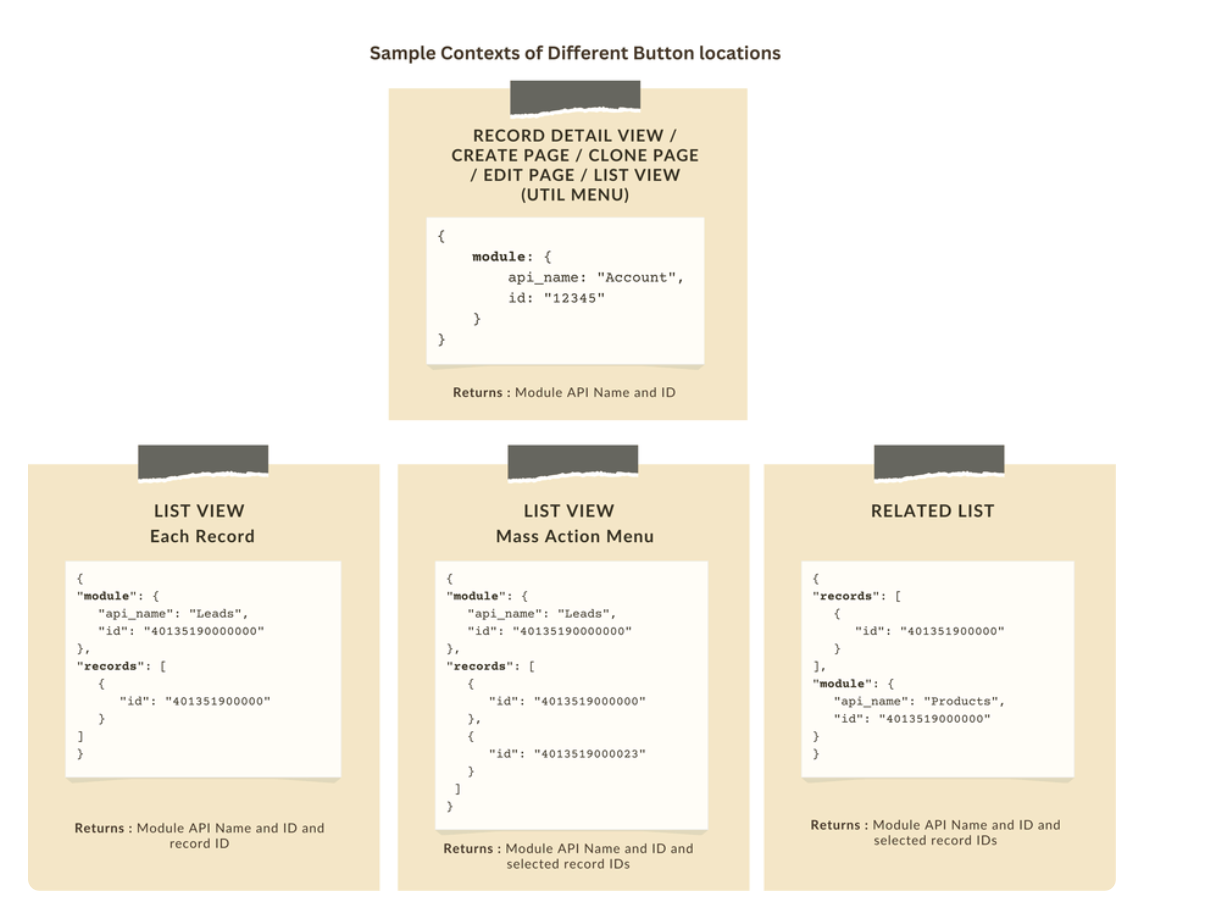


Let's explore how to implement this through the following use cases.

Use case 1: Add Notes instantly from List View or Bulk push notes to multiple records with a click!

Zylker’s sales team often needs to add notes while reviewing or after campaigns. Currently, they must open each record individually, making the process slow and inefficient. To streamline this, the admin wants to:

a. Include an "Add Notes" option directly from the List View for individual records, allowing sales reps to add notes without opening each record.

b. Add a "Add Bulk Notes" option, allowing users to select multiple records and add a common note to all selected records at once.

a) Here is the implementation of "Add Notes" in the List Page.


b) Here is the implementation of "Add Bulk Notes" in the List view page.


Use case 2 : Import product details effortlessly from Zoho Sheet and populate the Subform with a single click!

Zylker manufactures medical instruments, and its sales representatives manage bulk orders from distributors and hospitals. Product details are typically provided in a sheet, which the sales reps must manually enter into the subform on the Order Creation Page(Create Page). To streamline this time-consuming process, the admin wants to add a custom button named "Import Products" to the Order Creation Page. When clicked, it should
  • Prompt for the Sheet ID.
  • Fetch order details (product names, quantities, and prices) from the specified Zoho Sheet.
  • Populate the Product list Subform in Zoho CRM.


    Code Sample link
Use case 3 - Send bulk emails to selected students directly from the Course Module's Related List with ease!

Zylker’s managers often need to reach out to multiple students enrolled in a course - whether to share updates, newsletters, or important announcements. Currently, they have to open each student record individually to send an email, which is time-consuming.
To simplify this process, the admin wants to provide a "Send bulk mail" option in the Student Related List under the Course record, allowing managers to select multiple students and send a personalized email to all selected students in one go.


Note

  • Client Script can be configured only from the Buttons page. The setup page displays existing scripts. Once a script is created, it can be edited and updated from the Client Script setup page.

  • Mobile support will be available in Q3, 2025.

This support will be rolled out soon. We hope you find this incredibly beneficial!


Happy Client Scripting! 

    Access your files securely from anywhere

        All-in-one knowledge management and training platform for your employees and customers.


                              Zoho Developer Community


                                                    • Desk Community Learning Series


                                                    • Digest


                                                    • Functions


                                                    • Meetups


                                                    • Kbase


                                                    • Resources


                                                    • Glossary


                                                    • Desk Marketplace


                                                    • MVP Corner


                                                    • Word of the Day


                                                    • Ask the Experts


                                                              • Sticky Posts

                                                              • Kaizen #198: Using Client Script for Custom Validation in Blueprint

                                                                Nearing 200th Kaizen Post – 1 More to the Big Two-Oh-Oh! Do you have any questions, suggestions, or topics you would like us to cover in future posts? Your insights and suggestions help us shape future content and make this series better for everyone.
                                                              • Kaizen #226: Using ZRC in Client Script

                                                                Hello everyone! Welcome to another week of Kaizen. In today's post, lets see what is ZRC (Zoho Request Client) and how we can use ZRC methods in Client Script to get inputs from a Salesperson and update the Lead status with a single button click. In this
                                                              • Kaizen #222 - Client Script Support for Notes Related List

                                                                Hello everyone! Welcome to another week of Kaizen. The final Kaizen post of the year 2025 is here! With the new Client Script support for the Notes Related List, you can validate, enrich, and manage notes across modules. In this post, we’ll explore how
                                                              • Kaizen #217 - Actions APIs : Tasks

                                                                Welcome to another week of Kaizen! In last week's post we discussed Email Notifications APIs which act as the link between your Workflow automations and you. We have discussed how Zylker Cloud Services uses Email Notifications API in their custom dashboard.
                                                              • Kaizen #216 - Actions APIs : Email Notifications

                                                                Welcome to another week of Kaizen! For the last three weeks, we have been discussing Zylker's workflows. We successfully updated a dormant workflow, built a new one from the ground up and more. But our work is not finished—these automated processes are


                                                              Manage your brands on social media


                                                                    Zoho TeamInbox Resources


                                                                        Zoho CRM Plus Resources

                                                                          Zoho Books Resources


                                                                            Zoho Subscriptions Resources

                                                                              Zoho Projects Resources


                                                                                Zoho Sprints Resources


                                                                                  Qntrl Resources


                                                                                    Zoho Creator Resources


                                                                                        Zoho CRM Resources

                                                                                        • CRM Community Learning Series

                                                                                          CRM Community Learning Series


                                                                                        • Kaizen

                                                                                          Kaizen

                                                                                        • Functions

                                                                                          Functions

                                                                                        • Meetups

                                                                                          Meetups

                                                                                        • Kbase

                                                                                          Kbase

                                                                                        • Resources

                                                                                          Resources

                                                                                        • Digest

                                                                                          Digest

                                                                                        • CRM Marketplace

                                                                                          CRM Marketplace

                                                                                        • MVP Corner

                                                                                          MVP Corner


                                                                                            Design. Discuss. Deliver.

                                                                                            Create visually engaging stories with Zoho Show.

                                                                                            Get Started Now


                                                                                              Zoho Show Resources

                                                                                                Zoho Writer

                                                                                                Get Started. Write Away!

                                                                                                Writer is a powerful online word processor, designed for collaborative work.

                                                                                                  Zoho CRM コンテンツ


                                                                                                    Nederlandse Hulpbronnen


                                                                                                        ご検討中の方


                                                                                                                • Recent Topics

                                                                                                                • Clone Entire Zoho Boooks Organization, including all transactions for testing & training

                                                                                                                  Can Zoho Books support help with direct cloning of entire Zoho Books & Inventory Organization? including all transactions, just like a copy & paste or disk cloning. Is this possible?
                                                                                                                • Restrict portal signup until registration form and payment are completed

                                                                                                                  Hi everyone, I am working on a Zoho Creator portal for a project. In our business flow, users must first fill out a registration form and pay a registration fee before they are allowed to access the portal. However, when I share the portal link, users
                                                                                                                • Zoho Creator In-App Notification

                                                                                                                  Hi Team, I have implemented an in-app notification using code, as it required some customization. I followed the example in the link below: https://www.zoho.com/deluge/help/pushnotify-using-deluge.html#Example I have a couple of questions regarding this
                                                                                                                • System Components menu not available for Tablet to select language

                                                                                                                  I have attached a screenshot of my desktop, mobile, and tablet menu builder options. I am using 2 languages in my application. Language Selection is an option under the System Components part of the menu, but only for my desktop and phone(mobile). My
                                                                                                                • Tip #64- Exploring Technician Console: Screenshot- 'Insider Insights'

                                                                                                                  Hello Zoho Assist Community! Have you ever needed to capture exactly what's happening on a remote machine, whether to document an issue, guide a customer, or keep a record of your session? That's where the Screenshot feature in Zoho Assist comes in! With
                                                                                                                • Integration of CRM and Recruit

                                                                                                                  hi team, Is it possible to sync deals <> job openings from only 1 pipeline? My configuration of CRM has pipeline for each business unit, so I will have all data in the CRM system. body leasing and recruitment is one BU (hence 1 pipeline) - can I sync
                                                                                                                • Relating Invoices to Projects

                                                                                                                  Hi Zoho team, If I have already created previously an invoice in Books, so I want to know how can I associate it with a relevant project? Thank you
                                                                                                                • Create a quote/estimate that includes a range of prices

                                                                                                                  I am interested in using Zoho Books' Quote templates to create estimates for my customers. I do a mix of fixed-bid quotes and quotes based on an hourly rate. For the hourly rate quotes/estimates, I like to include a price range, for example: 2-4 labor
                                                                                                                • Budget

                                                                                                                  I have just upgraded to the standard plan in order to be able to utilize the budgeting function and record budget amount
                                                                                                                • Capirec bank Automatic feed update

                                                                                                                  Can anyone tell me if Zoho supports Automatic bank feed update from a Capitec bank account in south africa?
                                                                                                                • Free webinar! Accelerate deals with Zoho Sign for Zoho CRM and Bigin by Zoho CRM

                                                                                                                  Hello, Paperwork shouldn’t slow you down. Whether you’re growing a small business or running a large enterprise, manual approvals and slow document turnaround can cost you time and revenue. With Zoho Sign for Zoho CRM and Bigin by Zoho CRM, you can take
                                                                                                                • Add Lookup Field in Tasks Module

                                                                                                                  Hello, I have a need to add a Lookup field in addition to the ones that are already there in the Tasks module. I've seen this thread and so understand that the reason lookup fields may not be part of it is that there are already links to the tables (
                                                                                                                • CRM x WorkDrive: File storage for new CRM signups is now powered by WorkDrive

                                                                                                                  Availability Editions: All DCs: All Release plan: Released for new signups in all DCs. It will be enabled for existing users in a phased manner in the upcoming months. Help documentation: Documents in Zoho CRM Manage folders in Documents tab Manage files
                                                                                                                • Upload own Background Image and set Camera to 16:9

                                                                                                                  Hi, in all known online meeting tools, I can set up a background image reflecting our corporate design. This doesn't work in Cliq. Additionally, Cliq detects our cameras as 4:3, showing black bars on the right and left sides during the meeting. Where
                                                                                                                • 【まだ間に合う!】Zoho ユーザー交流会 | AI活用・CRM・Analytics の事例を聞いて、ユーザー同士で交流しよう!

                                                                                                                  ユーザーの皆さま、こんにちは。コミュニティチームの藤澤です。 3月27日(金)に東京、新橋で開催する「東京 Zoho ユーザー交流会 NEXUS」へのお申し込みがまだの方は、この機会にぜひお申し込みください!(参加無料) ーーーーーーーーーーーーーーーーーーーーーーーーーーーーーーーーーーーー イベントの詳細はこちらから▷▷ https://www.zohomeetups.com/tokyo2026vol1#/?affl=communityforumpost3 ーーーーーーーーーーーーーーーーーーーーーーーーーーーーーーーーーーーー
                                                                                                                • ZeptoMail API

                                                                                                                  Hello Since today, we experience issues with the ZeptoMail API. When trying to send e-mails using: https://api.zeptomail.eu/v1.1/email we receive the error: (503) Site unavailable due to a traffic surge. Please try again shortly. I kindly ask you to identify
                                                                                                                • Sender Email Configuration Error.

                                                                                                                  Hello Team, Hope you are all doing well. We are in the process of creating the Zoho FSM environment in the UAE. When we try to add the sender email address “techsupportuae@stryker.com”, we receive the error message: “Error occurred while sending mail
                                                                                                                • Managing user mailbox actions

                                                                                                                  An organization often has users with different roles and responsibilities, such as leadership, operations, or support teams. While some users may require full access to email features, others may only need limited functionality. For example, enabling
                                                                                                                • Super Admin Logging in as another User

                                                                                                                  How can a Super Admin login as another user. For example, I have a sales rep that is having issues with their Accounts and I want to view their Zoho Account with out having to do a GTM and sharing screens. Moderation Update (8th Aug 2025): We are working
                                                                                                                • Custom function return type

                                                                                                                  Hi, How do I create a custom deluge function in Zoho CRM that returns a string? e.g. Setup->Workflow->Custom Functions->Configure->Write own During create or edit of the function I don't see a way to change the default 'void' to anything else. Adding
                                                                                                                • Update P_Leave: code: 7052 "Employee_ID": "Enter Employee ID"

                                                                                                                  Hi, Zoho People - Update Leaves Can someone assist? ------------------------------------------------------------------------------------------ col = Collection(); col.insert("recordid":id); col.insert("Date_Check_Approval":zoho.currentdate); info zoho.people.update("P_Leave",col.toMap());
                                                                                                                • Prevent tracking users from specific countries

                                                                                                                  Currently, I’m receiving many bot visits from the United States and Malaysia. I would like these visits not to be recorded in SalesIQ. I already enabled the option to exclude traffic from cloud service providers, but I’m still receiving bot visits. Ideally,
                                                                                                                • Print a document from Zoho Writer via Zoho Creator

                                                                                                                  If i use the code below i can get writer to create a new document or email it to me but i want to be able to print it directly from the browser and not have to send it via email and then print. Below is the code im using. Attached options form zoho writer
                                                                                                                • Es posible cambiar el lenguaje de los modulos del ASAP?

                                                                                                                  Es posible cambiar el lenguaje de estos textos? Tengo Zoho configurado en español pero aun así me muestra estos textos en ingles:
                                                                                                                • Using workflows to automatically set classification of new tickets

                                                                                                                  Hello, I am trying to use a workflow to set a classification for a new ticket that is created via an email coming into my desk department. The workflow is working fine if I create a ticket from within desk, however if a ticket is emailed in then this
                                                                                                                • Text/SMS With Zoho Desk

                                                                                                                  Hi Guys- Considering using SMS to get faster responses from customers that we are helping.  Have a bunch of questions; 1) Which provider is better ClickaTell or Screen Magic.  Screen Magic seems easier to setup, but appears to be 2x as expensive for United States.  I cannot find the sender id for Clickatell to even complete the configuration. 2) Can customer's reply to text messages?  If so are responses linked back to the zoho ticket?  If not, how are you handling this, a simple "DO NOT REPLY" as
                                                                                                                • Default/Private Departments in Zoho Desk

                                                                                                                  1) How does one configure a department to be private? 2) Also, how does one change the default department? 1) On the list of my company's Zoho Departments, I see that we have a default department, but I am unable to choose which department should be default. 2) From the Zoho documentation I see that in order to create a private department, one should uncheck "Display in customer portal" on the Add Department screen. However, is there a way to change this setting after the department has been created?
                                                                                                                • Show unsubscribed contacts ?

                                                                                                                  Hello, I would like to display the unsubscribed contacts. Unfortunately, I do not have this subscription type as described in the documentation (https://help.zoho.com/portal/en/kb/marketing-automation-2-0/user-guide/contacts/contact-management/articles/subscription-type-24-1-2024#Subscription_Type_field.)
                                                                                                                • What's New in Zoho Inventory | Q2 2025

                                                                                                                  Hello Customers, The second quarter have been exciting months for Zoho Inventory! We’ve introduced impactful new features and enhancements to help you manage inventory operations with even greater precision and control. While we have many more exciting
                                                                                                                • "Spreadsheet Mode" for Fast Bulk Edits

                                                                                                                  One of the challenges with using Zoho Inventory is when bulk edits need to be done via the UI, and each value that needs to be changed is different. A very common use case here is price changes. Often, a price increase will need to be implemented, and
                                                                                                                • Cloning Item With Images Or The Option With Images

                                                                                                                  Hello, when I clone an item, I expect the images to carry over to the cloned item, however this is not the case in Inventory. Please make it possible for the images to get cloned or at least can we get a pop up asking if we want to clone the images as
                                                                                                                • ZOHO BOOKS - RECEIVING MORE ITEMS THAN ORDERED

                                                                                                                  Hello, When trying to enter a vendor's bill that contains items with bigger quantity than ordered in the PO (it happens quite often) - The system would not let us save the bill and show this error: "Quantity recorded cannot be more than quantity ordered." 
                                                                                                                • Stock count by bin location

                                                                                                                  Is there a configuration to make a stock count by bin or area and not by product. these is useful to manage count by area Regards
                                                                                                                • Server-based Appication API access for Social, Sites, Flow, Pages.

                                                                                                                  Hello, I am trying to hook up API access for a number of apps and I have hit a wall trying to add these scopes to the API feed. We cannot find the correct way to list the scope for these Zoho apps; Social, Sites, Flow, Writer. Error on web-page comes
                                                                                                                • Zoho Survey – Page Skip Logic Not Working

                                                                                                                  Hi everyone, I'm experiencing an issue with the page skip logic in Zoho Survey. Last week, it was working fine, and I haven’t changed anything in the settings. However, today the skip logic is not working at all. I also tried testing it with different
                                                                                                                • Zoho Survey: Bulk Exporting Raw Data (CSV/Excel) from 100+ Individual Survey Projects

                                                                                                                  Hi Zoho Community, I am currently managing a 360-degree evaluation process that involves 100+ individual survey projects (one separate survey for each employee being evaluated). I need to download the raw response data (CSV or Excel) for all 100 surveys.
                                                                                                                • Brand Studio Projects in Analytics

                                                                                                                  Hi All, Currently pulling my hair out over trying to link together some social media posts for a reporting dashboard in Analytics, so I thought I'd see if anyone on here had a solution. Our Marketing Team created a LinkedIn campaign in Zoho Brand Studio,
                                                                                                                • ERROR: Product type cannot be changed for Items having transactions.

                                                                                                                  I have mistakenly added a product type as goods for an item that was a digital service. Now when HSN/SAC became mandatory, this brought my attention to this error I did. So I tried changing the product type but it displayed this error message Product
                                                                                                                • Combine and hide invoice lines

                                                                                                                  In quickbooks we are able to create a invoice line that combines and hides invoices lines below. eg. Brochure design         $1000 (total of lines below, the client can see this line) Graphic Design           $600 (hidden but entered to reporting and
                                                                                                                • Introducing Built-in Telephony in Zoho Recruit

                                                                                                                  We’re excited to introduce Built-in Telephony in Zoho Recruit, designed to make recruiter–candidate communication faster, simpler, and fully traceable. These capabilities help you reduce app switching, handle inbound calls efficiently, and keep every
                                                                                                                • Next Page