Introducing Inbox in Zoho Social

Introducing Inbox in Zoho Social

Hey everyone,
 
We are excited to introduce the Inbox in Zoho Social to help manage all social media interactions from Facebook, Instagram, X (formerly Twitter), Google Business Profile and YouTube for your brand in one place. You can track and assign them to your team members to ensure a timely response from your brand. 


Why Inbox?

More than 10 years ago, reaching out to brands regarding issues could be frustrating. Most of us have been in the situation where we had to dial a toll free helpline, wait for the entire IVR message, try and press the right combination of numbers and hope somehow we hear the voice of a service representative. But no! You are #234 in queue and this is what you hear "your call is important to us, please stay on the line" followed by soulful music.

It's still predominantly used but apart from that, consumers can also reach out to brands via emails, raise a ticket through online forms, live chat, chat bots, WhatsApp, and across various social media channels.
 
More than half the world's population are active across social media platforms and an estimated 67% of consumers use social channels like Twitter, Facebook to resolve issues that they face on a day to day basis. 

Therefore, it's essential for brands to be available across all channels and take service right where their customers are. Many businesses actively respond to customer queries on Twitter, Facebook, Instagram, Google Business Profile, and so on. Since these interactions are held in a public forum, it's critical for the brands to have a quick response time, which goes a long way in offering an exceptional experience for the customer. Prospects evaluating your brand will also get the affirmation that their voice will also be heard, no matter what. 

What can you do with Inbox in Social?

Track interactions across social media channels

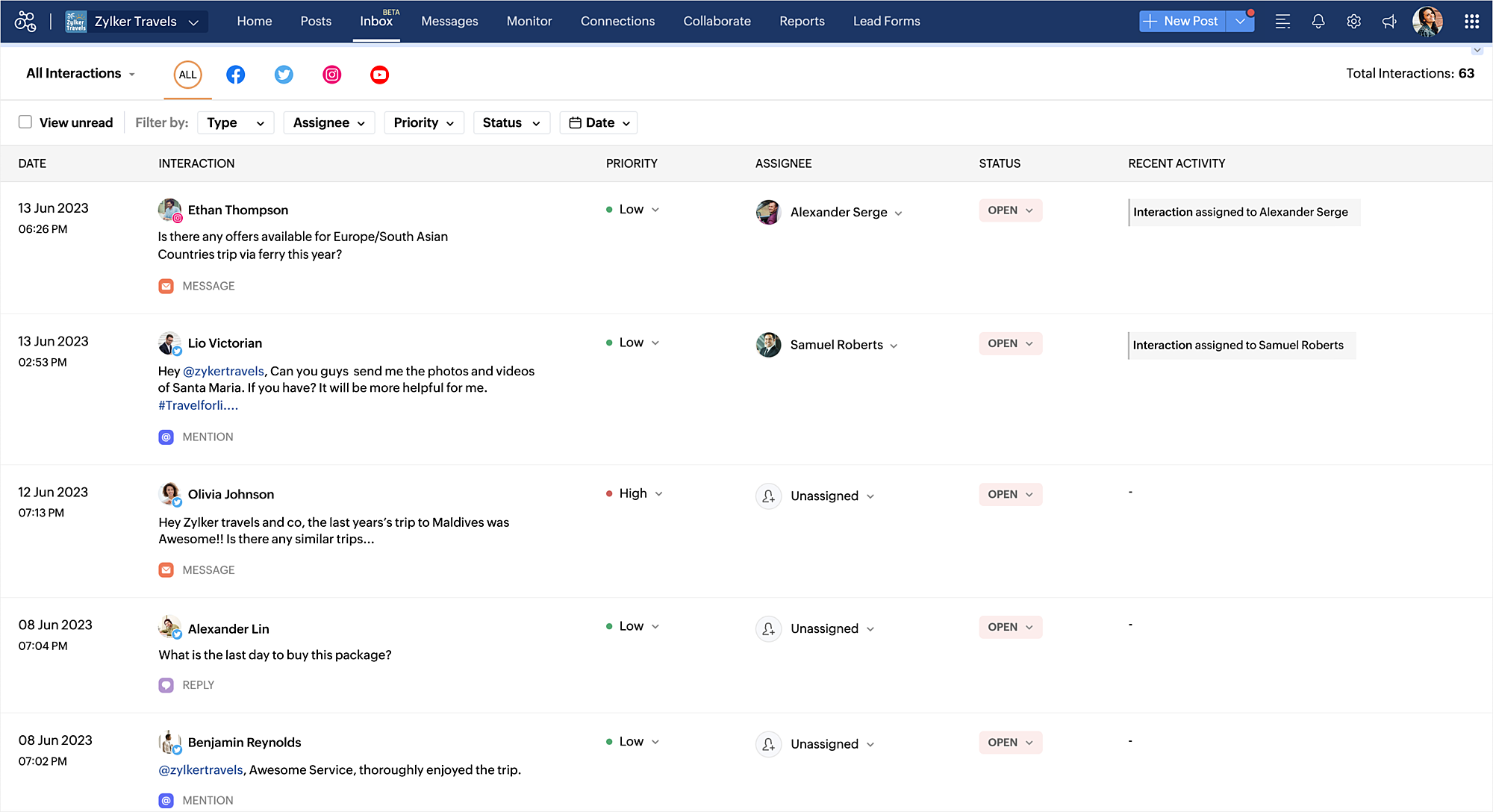
You can view all the comments/replies, messages, reviews, questions, dark comments, and @mentions across Facebook, Twitter, Instagram, Google Business Profile, and YouTube in one place. You can also use the filters available to drill-down and find the exact type of interaction that you are looking for. Priority can be specified for these interactions which can help team members address the most important ones at the earliest. 


Reply to interactions with Zia

While interacting with your audience, you can get the help of Zia - generative AI powered by ChatGPT to draft the reply, or rephrase your message.

Assign interactions to your team

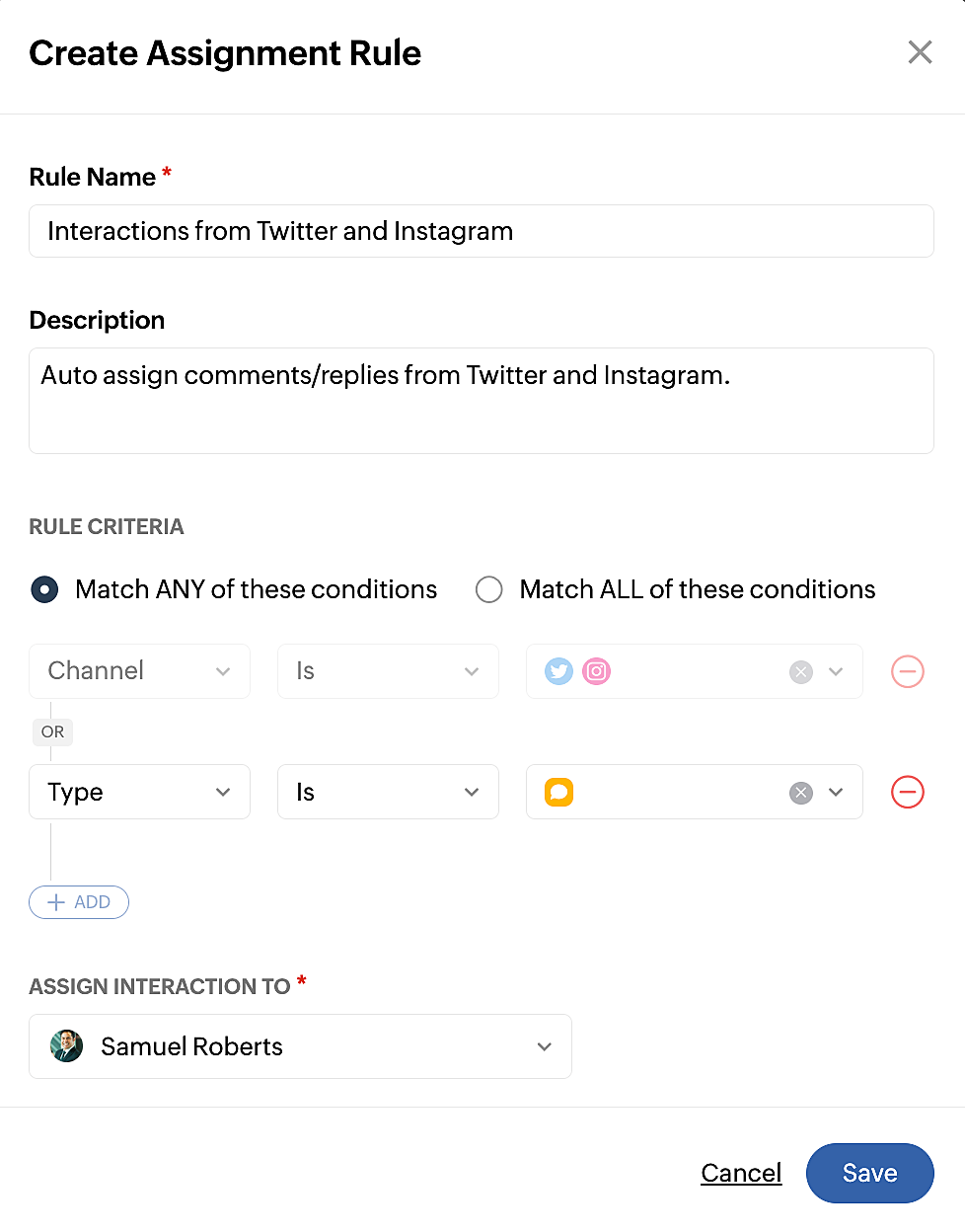
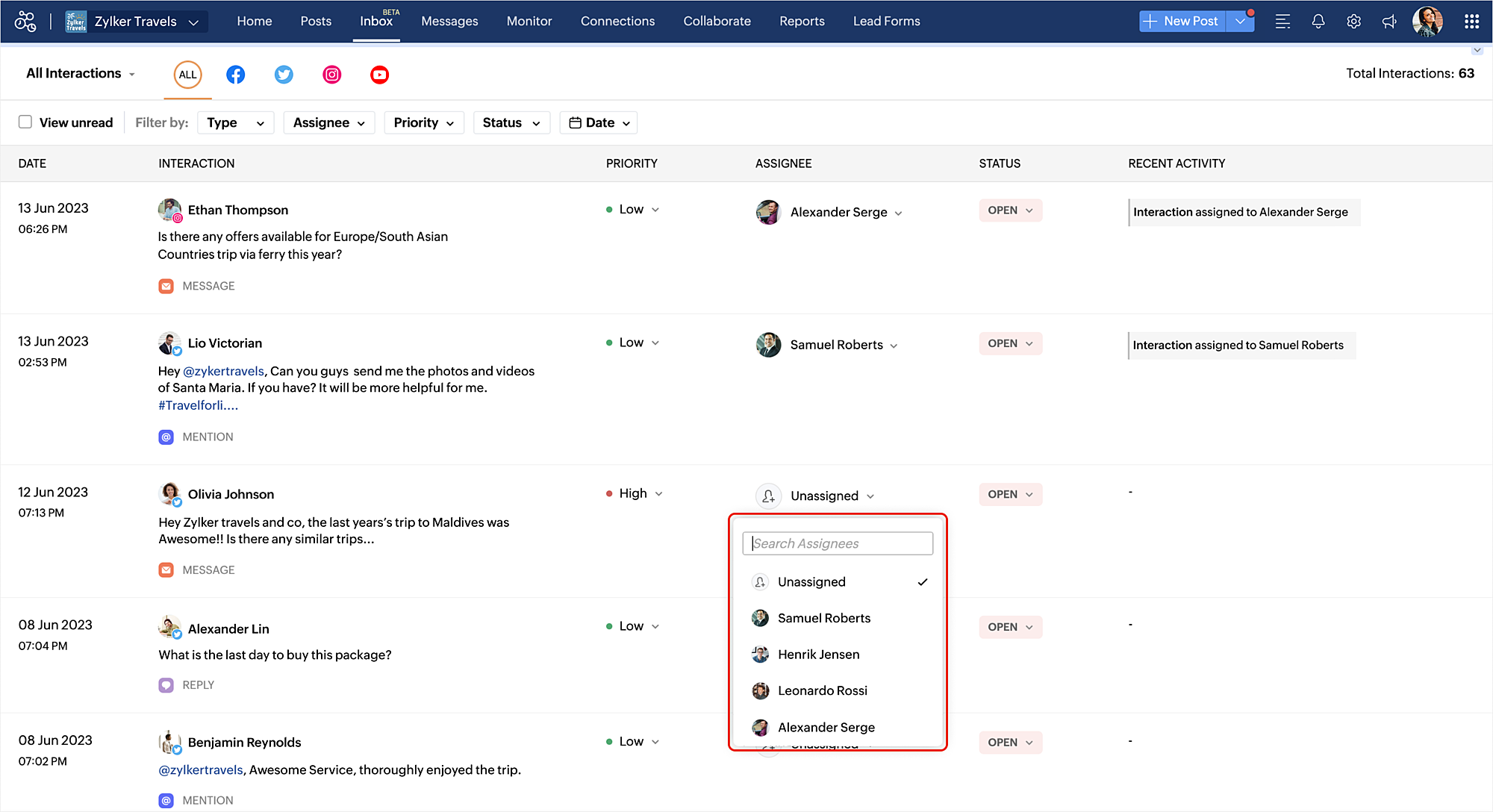
Assignment rules can be created to assign the interactions to your team members automatically. You also have the option to assign a team member manually for an interaction. To create assignment rules, you can click the gear icon  on the top right corner of the Inbox module or go to Settings > Inbox Preferences and click + Create New Rule.


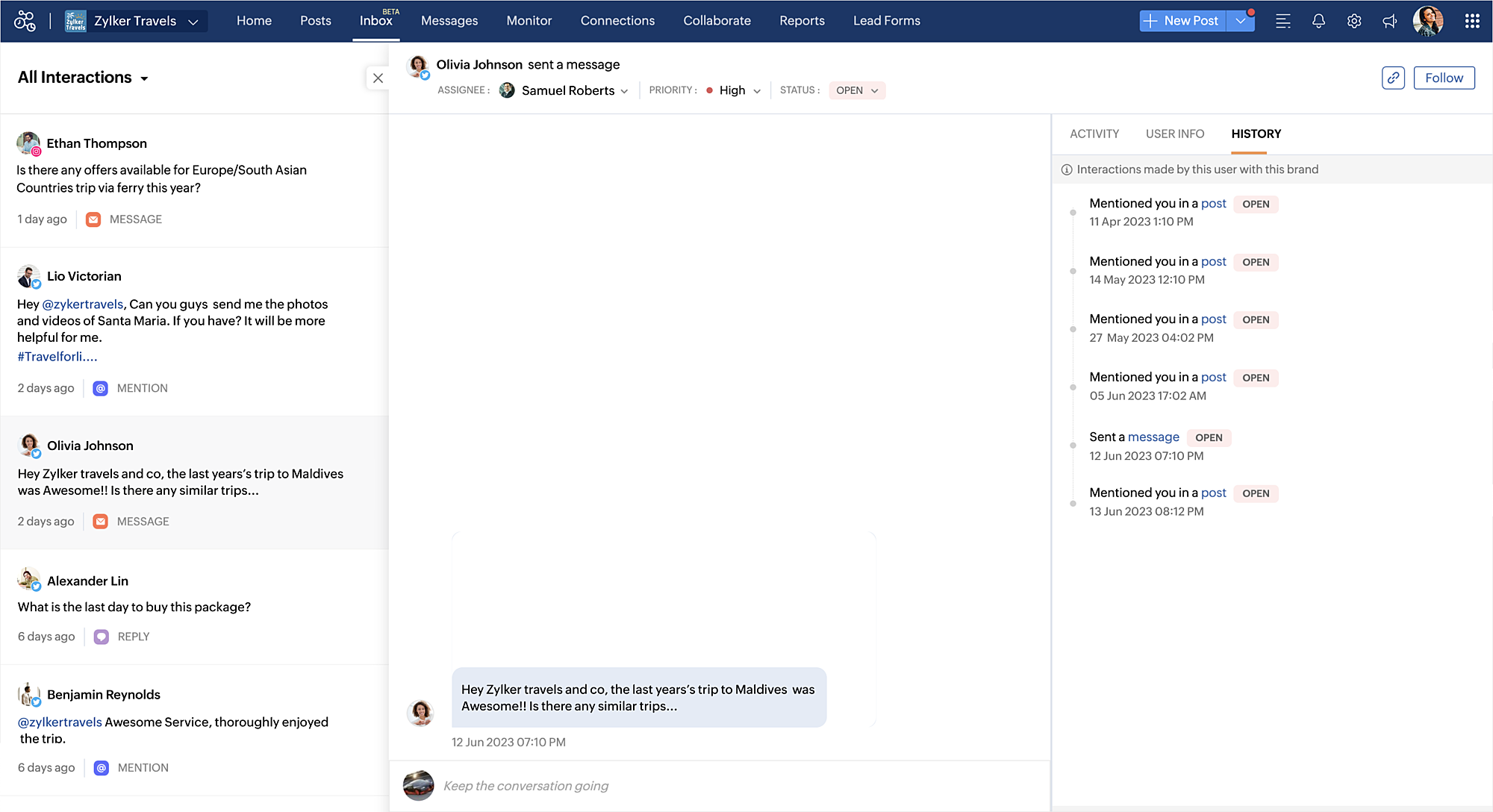
View history of interaction between the user and the brand

To get complete context of an interaction, it might be important to take a look at all the previous interactions between your brand and the user. The history tab lists out all the interactions along with the date and the status to help you understand if there are any open queries to be addressed.

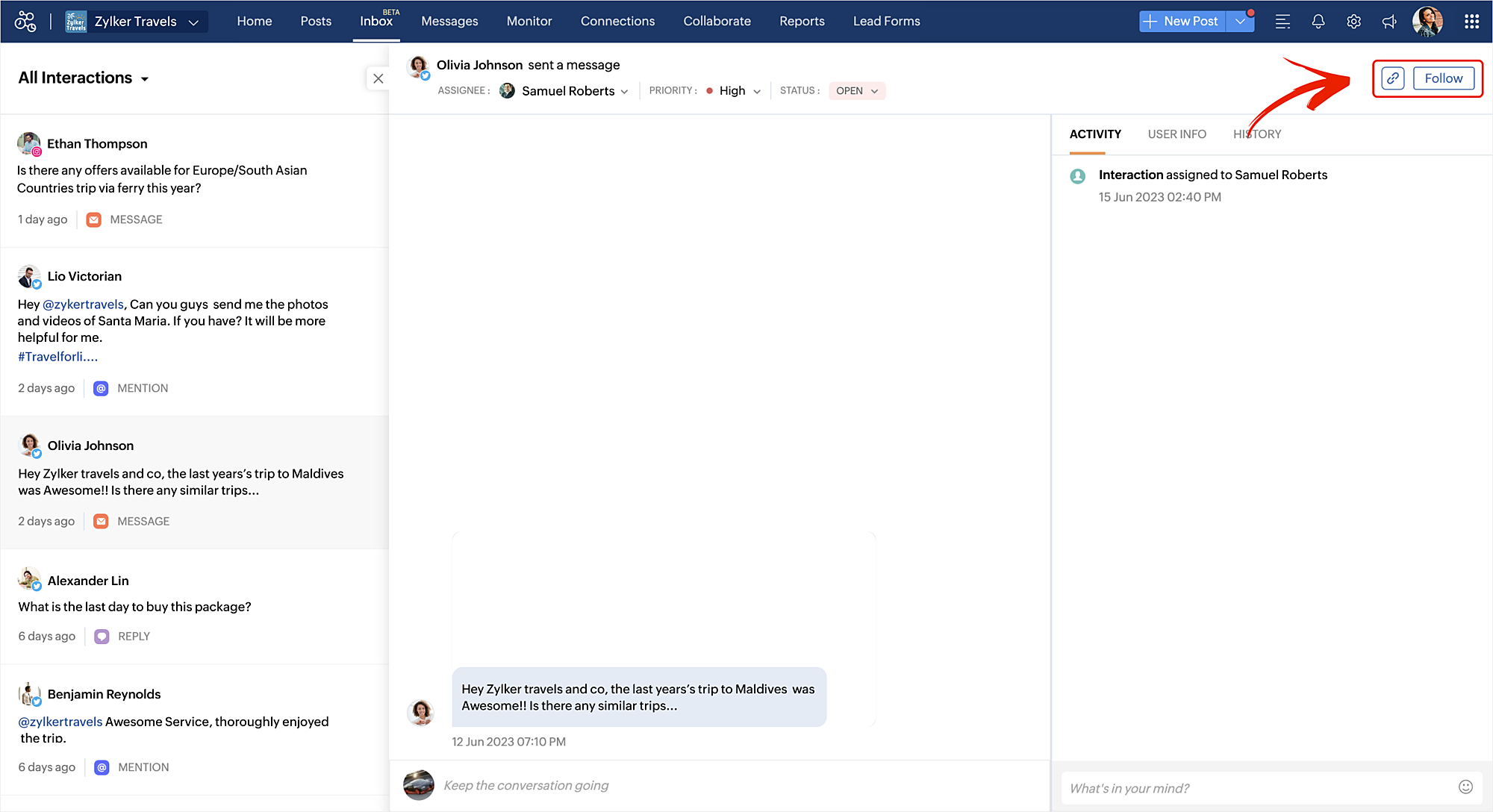
Follow and share an interaction

You can use the Follow option to be notified about a particular interaction, whether a reply is added, or whether the status is changed and so on. You can also copy the permalink of an interaction and share it with your team wherever required. 

Group interactions using views

Inbox comes with various pre-defined views which helps you group all the interactions that you are looking for such as all open interactions, interactions assigned to you, high priority and low priority ones and so on. You can also create a custom view by specifying various filters and share it with your team.
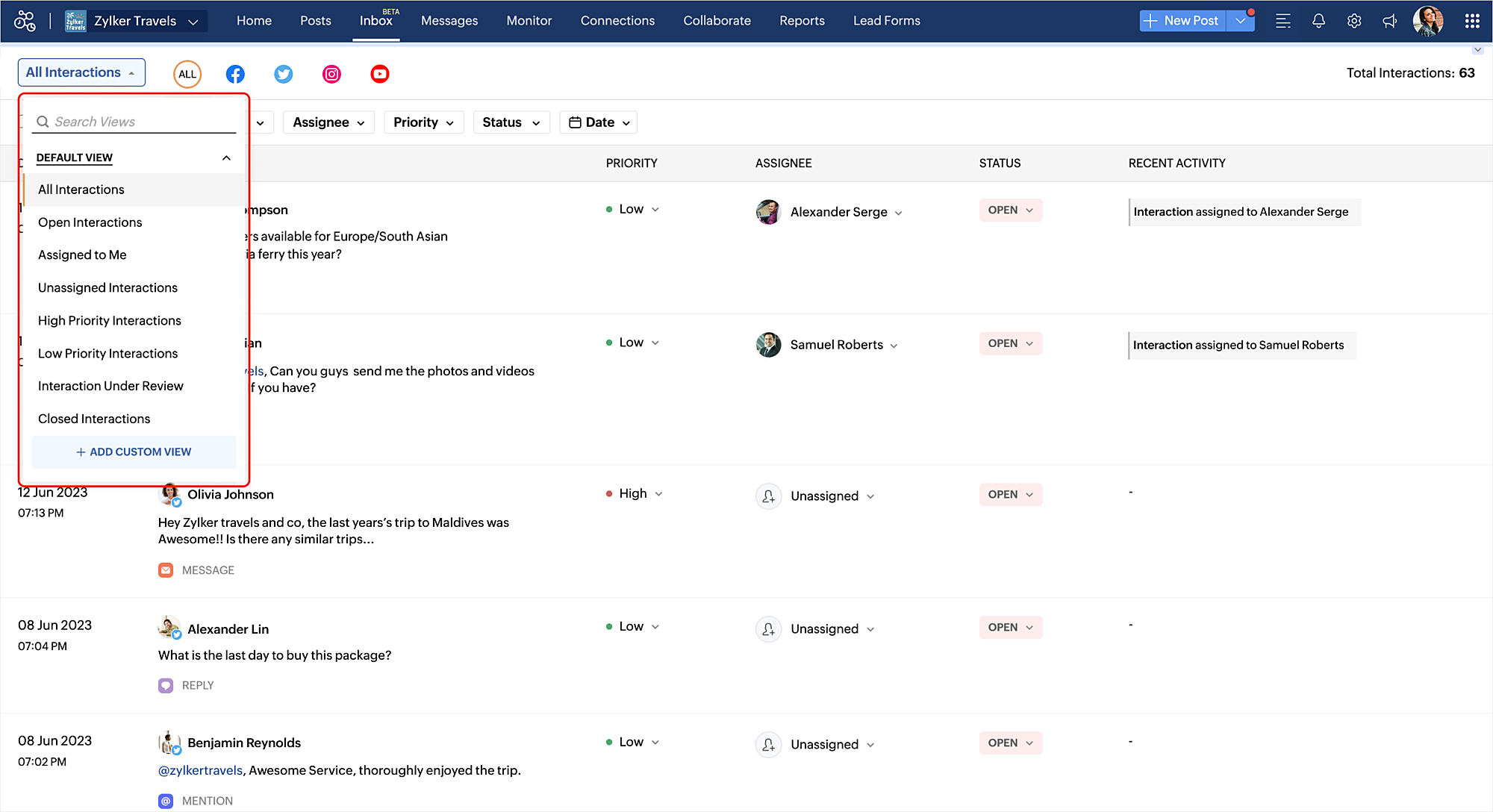


For example, you can create a custom view to track only the comments/replies from Twitter that are tagged as high priority over the last 30 days. 

Refer to the help document to understand all about how Inbox can help your brand on Social Media. Please feel free to leave your feedback or suggestions in the comment section.

Thank you.


    Access your files securely from anywhere

        All-in-one knowledge management and training platform for your employees and customers.


                              Zoho Developer Community


                                                    • Desk Community Learning Series


                                                    • Digest


                                                    • Functions


                                                    • Meetups


                                                    • Kbase


                                                    • Resources


                                                    • Glossary


                                                    • Desk Marketplace


                                                    • MVP Corner


                                                    • Word of the Day


                                                    • Ask the Experts


                                                              • Sticky Posts

                                                              • Introducing Inbox in Zoho Social

                                                                Hey everyone, We are excited to introduce the Inbox in Zoho Social to help manage all social media interactions from Facebook, Instagram, X (formerly Twitter), Google Business Profile and YouTube for your brand in one place. You can track and assign them
                                                              • A decade together - Thank you for being a part of the journey with Zoho Social!

                                                                A decade ago, we started Zoho Social with a simple vision: to make social media management easier, smarter, and more impactful for your business. What began as a small idea has grown to a powerful platform that helps businesses across the globe reach
                                                              • Advanced statistics for LinkedIn page, posts and monitor @mentions in Zoho Social

                                                                Hello everyone,   We've made enhancements to the Monitor, Reports tabs, and Post Stats for the LinkedIn channel in Zoho Social, so we wanted to briefly share some information about the updates. Monitor LinkedIn mentions  LinkedIn is one of the most popular
                                                              • Introducing advanced statistics for all your social media posts

                                                                When you're publishing on social media, it's important to understand how the audience engages with your content. This insight helps you come up with ideas for different types of content and also identify the social media channel that's most effective
                                                              • It's here! A Publishing Calendar to give you better view and more control over your posts.

                                                                Hello!   Just a couple of days back my colleague Vishal announced that you can now do more on Twitter with the Advanced Search Filters, along with a bunch of other cool stuff. I hope you got a chance to check it out.  In fact, I'm itching to you tell you all about the latest updates we have lined up, but I'd rather give you doses of excitement every week to last until the very end. ;) Alright, I hear you. That's enough tease for the day.  Here we go! Introducing... an all-new Publishing Calendar,


                                                              Manage your brands on social media


                                                                    Zoho TeamInbox Resources


                                                                        Zoho CRM Plus Resources

                                                                          Zoho Books Resources


                                                                            Zoho Subscriptions Resources

                                                                              Zoho Projects Resources


                                                                                Zoho Sprints Resources


                                                                                  Qntrl Resources


                                                                                    Zoho Creator Resources


                                                                                        Zoho CRM Resources

                                                                                        • CRM Community Learning Series

                                                                                          CRM Community Learning Series


                                                                                        • Kaizen

                                                                                          Kaizen

                                                                                        • Functions

                                                                                          Functions

                                                                                        • Meetups

                                                                                          Meetups

                                                                                        • Kbase

                                                                                          Kbase

                                                                                        • Resources

                                                                                          Resources

                                                                                        • Digest

                                                                                          Digest

                                                                                        • CRM Marketplace

                                                                                          CRM Marketplace

                                                                                        • MVP Corner

                                                                                          MVP Corner


                                                                                            Design. Discuss. Deliver.

                                                                                            Create visually engaging stories with Zoho Show.

                                                                                            Get Started Now


                                                                                              Zoho Show Resources

                                                                                                Zoho Writer

                                                                                                Get Started. Write Away!

                                                                                                Writer is a powerful online word processor, designed for collaborative work.

                                                                                                  Zoho CRM コンテンツ


                                                                                                    Nederlandse Hulpbronnen


                                                                                                        ご検討中の方


                                                                                                                • Recent Topics

                                                                                                                • Internal Fillable Contract with Zoho Writer (Before Sending to Client)

                                                                                                                  Hi everyone, I’m trying to automate the following process in Zoho CRM and would appreciate some guidance. Process: When a Deal moves to a specific stage, CRM triggers an automation. CRM sends a contract template to an internal team member so they can
                                                                                                                • Update P_Leave: code: 7052 "Employee_ID": "Enter Employee ID"

                                                                                                                  Hi, Zoho People - Update Leaves Can someone assist? ------------------------------------------------------------------------------------------ col = Collection(); col.insert("recordid":id); col.insert("Date_Check_Approval":zoho.currentdate); info zoho.people.update("P_Leave",col.toMap());
                                                                                                                • Prevent tracking users from specific countries

                                                                                                                  Currently, I’m receiving many bot visits from the United States and Malaysia. I would like these visits not to be recorded in SalesIQ. I already enabled the option to exclude traffic from cloud service providers, but I’m still receiving bot visits. Ideally,
                                                                                                                • Print a document from Zoho Writer via Zoho Creator

                                                                                                                  If i use the code below i can get writer to create a new document or email it to me but i want to be able to print it directly from the browser and not have to send it via email and then print. Below is the code im using. Attached options form zoho writer
                                                                                                                • Es posible cambiar el lenguaje de los modulos del ASAP?

                                                                                                                  Es posible cambiar el lenguaje de estos textos? Tengo Zoho configurado en español pero aun así me muestra estos textos en ingles:
                                                                                                                • System Components menu not available for Tablet to select language

                                                                                                                  I have attached a screenshot of my desktop, mobile, and tablet menu builder options. I am using 2 languages in my application. Language Selection is an option under the System Components part of the menu, but only for my desktop and phone(mobile). My
                                                                                                                • Using workflows to automatically set classification of new tickets

                                                                                                                  Hello, I am trying to use a workflow to set a classification for a new ticket that is created via an email coming into my desk department. The workflow is working fine if I create a ticket from within desk, however if a ticket is emailed in then this
                                                                                                                • Text/SMS With Zoho Desk

                                                                                                                  Hi Guys- Considering using SMS to get faster responses from customers that we are helping.  Have a bunch of questions; 1) Which provider is better ClickaTell or Screen Magic.  Screen Magic seems easier to setup, but appears to be 2x as expensive for United States.  I cannot find the sender id for Clickatell to even complete the configuration. 2) Can customer's reply to text messages?  If so are responses linked back to the zoho ticket?  If not, how are you handling this, a simple "DO NOT REPLY" as
                                                                                                                • Default/Private Departments in Zoho Desk

                                                                                                                  1) How does one configure a department to be private? 2) Also, how does one change the default department? 1) On the list of my company's Zoho Departments, I see that we have a default department, but I am unable to choose which department should be default. 2) From the Zoho documentation I see that in order to create a private department, one should uncheck "Display in customer portal" on the Add Department screen. However, is there a way to change this setting after the department has been created?
                                                                                                                • Show unsubscribed contacts ?

                                                                                                                  Hello, I would like to display the unsubscribed contacts. Unfortunately, I do not have this subscription type as described in the documentation (https://help.zoho.com/portal/en/kb/marketing-automation-2-0/user-guide/contacts/contact-management/articles/subscription-type-24-1-2024#Subscription_Type_field.)
                                                                                                                • Can Zoho Marketing Automation send OTP codes via WhatsApp during user registration?

                                                                                                                  The flow I would like to implement is: A user signs up in the mobile app and enters their phone number. The system generates a one-time verification code (OTP). The OTP is sent to the user via WhatsApp message. The user enters the code in the app to confirm
                                                                                                                • What's New in Zoho Inventory | Q2 2025

                                                                                                                  Hello Customers, The second quarter have been exciting months for Zoho Inventory! We’ve introduced impactful new features and enhancements to help you manage inventory operations with even greater precision and control. While we have many more exciting
                                                                                                                • "Spreadsheet Mode" for Fast Bulk Edits

                                                                                                                  One of the challenges with using Zoho Inventory is when bulk edits need to be done via the UI, and each value that needs to be changed is different. A very common use case here is price changes. Often, a price increase will need to be implemented, and
                                                                                                                • Cloning Item With Images Or The Option With Images

                                                                                                                  Hello, when I clone an item, I expect the images to carry over to the cloned item, however this is not the case in Inventory. Please make it possible for the images to get cloned or at least can we get a pop up asking if we want to clone the images as
                                                                                                                • ZOHO BOOKS - RECEIVING MORE ITEMS THAN ORDERED

                                                                                                                  Hello, When trying to enter a vendor's bill that contains items with bigger quantity than ordered in the PO (it happens quite often) - The system would not let us save the bill and show this error: "Quantity recorded cannot be more than quantity ordered." 
                                                                                                                • Stock count by bin location

                                                                                                                  Is there a configuration to make a stock count by bin or area and not by product. these is useful to manage count by area Regards
                                                                                                                • Server-based Appication API access for Social, Sites, Flow, Pages.

                                                                                                                  Hello, I am trying to hook up API access for a number of apps and I have hit a wall trying to add these scopes to the API feed. We cannot find the correct way to list the scope for these Zoho apps; Social, Sites, Flow, Writer. Error on web-page comes
                                                                                                                • Feature Request: "Send Invitation" Toggle for Events

                                                                                                                  I am writing to request a critical "Quality of Life" update for the Activities module. Currently, adding people to the Participants field in an Event triggers an automatic email invitation/acceptance tracking with no way to opt-out. For general events
                                                                                                                • Zoho Survey: Bulk Exporting Raw Data (CSV/Excel) from 100+ Individual Survey Projects

                                                                                                                  Hi Zoho Community, I am currently managing a 360-degree evaluation process that involves 100+ individual survey projects (one separate survey for each employee being evaluated). I need to download the raw response data (CSV or Excel) for all 100 surveys.
                                                                                                                • Zoho Survey – Page Skip Logic Not Working

                                                                                                                  Hi everyone, I'm experiencing an issue with the page skip logic in Zoho Survey. Last week, it was working fine, and I haven’t changed anything in the settings. However, today the skip logic is not working at all. I also tried testing it with different
                                                                                                                • CRM x WorkDrive: File storage for new CRM signups is now powered by WorkDrive

                                                                                                                  Availability Editions: All DCs: All Release plan: Released for new signups in all DCs. It will be enabled for existing users in a phased manner in the upcoming months. Help documentation: Documents in Zoho CRM Manage folders in Documents tab Manage files
                                                                                                                • Anyone worked out how to export or screengrab a full heatmap?

                                                                                                                  I'd love to be able to include a copy of a heatmap in a report but can't work out how to grab the whole thing as there doesn't appear to be an export function? Thanks in advance.
                                                                                                                • Introducing Built-in Telephony in Zoho Recruit

                                                                                                                  We’re excited to introduce Built-in Telephony in Zoho Recruit, designed to make recruiter–candidate communication faster, simpler, and fully traceable. These capabilities help you reduce app switching, handle inbound calls efficiently, and keep every
                                                                                                                • Sender Email Configuration Error.

                                                                                                                  Hello Team, Hope you are all doing well. We are in the process of creating the Zoho FSM environment in the UAE. When we try to add the sender email address “techsupportuae@stryker.com”, we receive the error message: “Error occurred while sending mail
                                                                                                                • Auto-publish job openings on my Zoho Recruit Careers Website

                                                                                                                  I have developed a script using the Zoho Recruit API that successfully inserts new jobOpening records to my Zoho Recruit website, but my goal is to auto-publish to the Careers Website. The jobOpening field data shows two possible candidates to make this
                                                                                                                • [Free webinar] Custom domains for portals in Zoho Creator - Creator Tech Connect

                                                                                                                  Hello everyone, We’re excited to invite you to another edition of the Creator Tech Connect webinar. About Creator Tech Connect The Creator Tech Connect series is a free monthly webinar featuring in-depth technical sessions designed for developers, administrators,
                                                                                                                • Remove my video

                                                                                                                  Hi, How can I remove my video so that I don't have to see myself. It's weird so I always remove my own video from what I see but cannot find this feature here. Thanks!
                                                                                                                • Marking a meeting 'done'.

                                                                                                                  I would like to somehow mark a meeting 'done' and placed under the contact's page rather than deleting it and having no record of it. Am I missing a button that does this?
                                                                                                                • Add Lookup Field in Tasks Module

                                                                                                                  Hello, I have a need to add a Lookup field in addition to the ones that are already there in the Tasks module. I've seen this thread and so understand that the reason lookup fields may not be part of it is that there are already links to the tables (
                                                                                                                • Super Admin Logging in as another User

                                                                                                                  How can a Super Admin login as another user. For example, I have a sales rep that is having issues with their Accounts and I want to view their Zoho Account with out having to do a GTM and sharing screens. Moderation Update (8th Aug 2025): We are working
                                                                                                                • Cannot find zpuid for Zoho Projects user

                                                                                                                  I'm using the Zoho Projects v3 API to create a task. The task is created successfully, but in order to assign the task owner, the "Create a Task" API also requires the zpuid of the task owner. Unfortunately I cannot find any user-related API calls that
                                                                                                                • Allocating inventory to specific SO's

                                                                                                                  Is there a way that allocate inventory to a specific sales order? For example, let's say we have 90 items in stock. Customer 1 orders 100 items. This allocates all 90 items to their order, and they have a back order for the remaining 10 items which could
                                                                                                                • Incorrect Functioning of Time Logs API (Version 3)

                                                                                                                  We need to fetch the list of time logs for each task for our company internal usage. We are trying to achieve it by using the next endpoint: https://projects.zoho.com/api-docs#bulk-time-logs#get-all-project-time-logs Firstly, in the documentation the
                                                                                                                • Partial payments for retainer invoices

                                                                                                                  When a customer does not pay the entire retainer invoice there is no way to apply a partial payment. PLEASE add this function.
                                                                                                                • Can I export to PDF in Zoho Learn

                                                                                                                  I have seen help pages where export to pdf options are available but I do not see that option available from the application. I see that exprt is available in my free trial version but that is only to html pages. I need to be able to export my manuals
                                                                                                                • Service line items

                                                                                                                  Hello Latha, Could you please let me know the maximum number of service line items that can be added to a single work order? Thanks, Chethiya.
                                                                                                                • Sending emails via Books

                                                                                                                  Anyone else getting similar problems recently ??..... Hi, Your message to the following recipient was not delivered. Please find the details below.  Bounce Details: Bounced Address : someone@google.com Bounce Reason : other ; Status : 5.0.0 (undefined status) ; Daignostic-Code : smtp;542 someone@google.com Rejected ; Bounced Time : Sep 05, 2017 06:37 PM BST Regards, Zoho Team The email addresses were fine only a few days ago but are now being rejected ?
                                                                                                                • PDF Generator Upgrade

                                                                                                                  Hi Team, What will happen if I don't make any changes for existing template. Zoho just ask us upgrade but haven't tell the benefit. Zoho Corporation
                                                                                                                • No Need To Fix Something That Is Working

                                                                                                                  Zoho Books is a great financial tool which helps businesses to become more efficient and productive with day-to-day operations. As such, every change, upgrade, improvement needs to be carefully thought before implemented in the software and I'm sure Zoho
                                                                                                                • Total Cost in reports showing zero

                                                                                                                  The image below shows my issue. The column Total Cost should show the cost to our company based on hours logged and the employee's rate. For instance, if the person working on Subtask 1 is paid 20/hr, then Total Cost should display $160 ($20x8 logged
                                                                                                                • Next Page