Kaizen #177: Duplicate Check Preferences API vs. Upsert API

Kaizen #177: Duplicate Check Preferences API vs. Upsert API

Hello all!!!

Welcome back to another week of Kaizen. Last week, we discussed Optimizing the Use of Record ID Variables in Zoho CRM Queries.

This week, we will explore two important APIs for managing duplicate records in Zoho CRM - Duplicate Check Preferences API and Upsert Records API. While both of these APIs help manage duplicate records, they serve different purposes and are to be used in different scenarios. 


This post covers:
  • What is the Duplicate Check Preferences API?
    • Use Case
    • Duplicate Check Configurations
    • Updating Duplicate Check Configuration
    • How Duplicate Check Preferences Work During Record Creation/Update?
  • What is the Upsert API?
    • Use Case
  • Differences between Duplicate Check Preferences API and Upsert API

What is the Duplicate Check Preferences API

The Duplicate Check Preferences API is a configuration API that allows you to set up criteria using unique fields to manage duplicates across Leads module including Converted Leads and Contacts
in Zoho CRM. Based on the given criteria, the system will restrict the creation or update of duplicate records. For example, if the Phone field is marked as unique and set for duplicate checks, the system will make sure that no two records have the same phone number during records creation or update.

With the Duplicate Check Preferences API, you can define criteria to find duplicates, such as matching email addresses, phone numbers, or custom fields. During record creation or update, Zoho CRM checks the configured criteria against converted leads or contacts. If a match is found, it triggers a "DUPLICATE_DATA" error and blocks duplicates based on your configuration.

By default, the Insert Records API and Update Records API automatically check for this configuration. If a record matches the defined duplicate criteria, the system prevents its creation or update.

Use case

Zylker, a sales team managing customer contacts in Zoho CRM, often imports leads from various sources like website forms, events, and campaigns. However, the team noticed that many duplicate contacts are being created because the same phone number is associated with some of the contacts. This creates confusion and results in redundant work in their sales process.
By using the Duplicate Check Preferences API, Zylker can prevent the anymore duplicate contacts based on phone numbers (phone is used for an example).

Duplicate Check Configurations

In Zoho CRM, you can configure duplicate check preferences via API in two ways. 

i. Configuration in Leads module
The system checks for duplicates on all the Leads using the specified unique fields. By selecting this option, the duplicates will be checked on all the Converted Leads (custom view) as well. This configuration is applicable across all the layouts.
The following is the configuration for duplicate check in the Leads module via API. 

Request Method: POST

Note:
  • The "module" parameter is mandatory, and its supported value is Leads. 
  • The above URL applies to both Leads and Contacts module configurations.
  •  You must mark at least one field as mandatory. So, the system can check for duplicates based on the value in the unique field within the Leads module when creating a record.
Input JSON

{
    "duplicate_check_preference": {
        "type": "converted_records", //Converted Leads custom view in Leads module
    }
}


Response

{
    "duplicate_check_preference": {
        "code": "SUCCESS",
        "details": {},
        "message": "Duplicate check enabled for converted_records successfully.",
        "status": "success"
    }
}


ii. Configuration in Contacts module

By selecting this option, the system will check for duplicates in the Contacts module using mapped fields.

Input JSON

{
    "duplicate_check_preference": {
        "type": "mapped_module_records",
        "type_configurations": [
            {
                "field_mappings": [
                    {
                        "current_field": {
                            "api_name": "Email",
                            "id": "5725767000000002601"
                        },
                        "mapped_field": {
                            "api_name": "Email",
                            "id": "5725767000000002503"
                        }
                    }
                ],
                "mapped_module": {
                    "api_name": "Contacts",
                    "id": "5725767000000002179"
                }
            }
        ]
    }
}


The "Phone" field from both the Leads and Contacts modules is mapped to identify duplicate records.

How Duplicate Check Preferences Work During Record Creation/Update

Consider Zylker has configured the Contacts module ("type":"mapped_module_records") to check duplicate contacts.
For example, a sales representative at Zylker attempts to add a contact from the Cold Call lead source. However, the same contact already exists in the Contacts module, either from the same or a different lead source.
Since the Contacts module is configured for duplicate check preferences, the system will check for duplicates in the Contacts module using mapped fields. During the record insertion action, the system verifies the Contacts module for any matching records based on these unique identifiers. Based on the result, it either creates the record or throws an error.

Use the Insert Records API to create records in a module.

Request Method: POST

Input JSON

{
    "data": [
        {
            "Company": "Villa Margarita",
            "Last_Name": "Dolan",
            "First_Name": "Brian",
            "Email": "brian@villa.com",
            "Phone": "12345",
            "State": "Texas"
        }
    ]
}


Response


 {

    "data": [

        {

            "code": "DUPLICATE_DATA",

            "details": {

                "api_name": "Email",

                "duplicate_record": {

                    "Owner": {

                        "name": "Patricia Boyle",

                        "id": "5725767000000411001",

                        "zuid": "808233918"

                    },

                    "module": {

                        "api_name": "Contacts",

                        "id": "5725767000000002179"

                    },

                    "id": "5725767000000774010" //The record that already exists in the Contacts module.

                },

                "json_path": "$.data[0].Email",

                "more_records": false

            },

            "message": "duplicate data",

            "status": "error"

        }

    ]

}


Duplicates are also checked during record updates. If a record is updated with a value that already exists in a unique field, the system indicates it as a duplicate and returns a "DUPLICATE_DATA" error.

Update Duplicate Check Configuration

To update the previously enabled Duplicate Check option configured in your account, use the Update Duplicate Check Option API.


The Contacts ("type": "mapped_module_records") configuration is used in the below sample input. 


{
    "duplicate_check_preference": {
        "type": "mapped_module_records",
        "type_configurations": [
            {
                "field_mappings": [
                    {
                        "mapped_field": {
                            "api_name": "Phone", //The previously configured Email field as a unique identifier in Contacts has now been replaced with the Phone field.
                            "name": "Contacts",
                            "id": "5725767000000411001"
                        },
                        "current_field": {
                            "api_name": "Phone",
                            "name": "Leads", //The previously configured Email field as a unique identifier in Leads has now been replaced with the Phone field.
                            "id": "5725767000005381030"
                        }
                    }
                ],
                "mapped_module": {
                    "api_name": "Contacts",
                    "name": "Contacts",
                    "id": "5725767000000002179"
                }
            }
        ]
    }
}

You can also retrieve and delete duplicate configuration.

What is the Upsert API?

The Upsert API is a combination of "update" and "insert". 


How it works?

  • You provide a unique identifier (e.g., email, phone number, or a custom field) to check for existing records.

  • If a record with the same identifier exists, it updates that record.

  • If no matching record is found, it creates a new one.
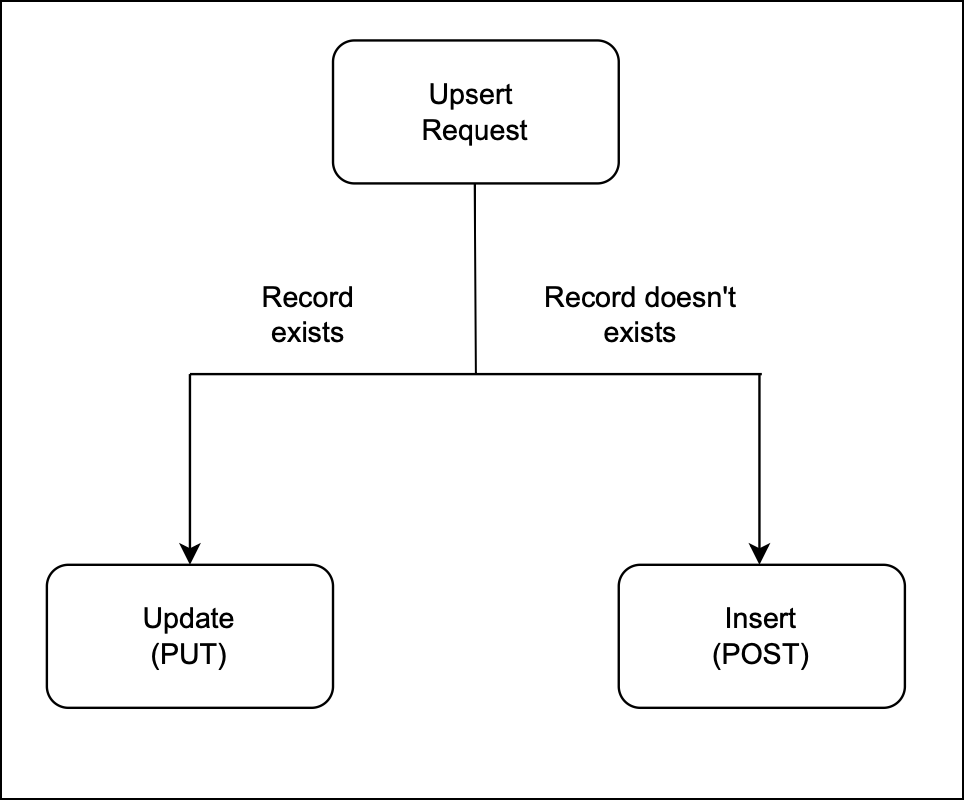
Flow diagram

Use Case 

Zylker, an e-commerce company, uses Zoho CRM to manage customer data. Customers sign up on Zylker’s online store, and their details are stored in the e-commerce platform like Shopify. Over time, customers may update their contact information, or new customers may sign up. To keep customer records in Zoho CRM accurate and avoid duplicates, Zylker uses the Upsert API to:
  • Update existing customer records details if the given unique identifier, such as email or phone number, matches an existing record in Zoho CRM.
  • Insert a new record if no match is found.  This way, Zylker ensures that new customers are added efficiently.

There are two types of duplicate check fields:

i. System-defined duplicate check fields.
ii. User-defined duplicate check fields.

i. System-defined duplicate check fields
The table below lists the system-defined unique fields. When you create a record using the Upsert API, the system checks these fields for duplicate entries. 

Leads

Email

Contacts

Email

Accounts

Account_Name

Deals

Deal_Name

Campaigns

Campaign_Name

Cases

Subject

Solutions

Solution_Title

Products

Product_Name

Vendors

Vendor_Name

PriceBooks

Price_Book_Name

Quotes

Subject

SalesOrders

Subject

PurchaseOrders

Subject

Invoices

Subject

Custom Module

Name


ii.
User-defined duplicate check fields
You can set a normal field as a duplicate check field by enabling "Do not allow duplicate values." Note that you can only set fields with the following field-types as unique— Single Line, Email, Phone, Number, Long Integer, and URL.


Request Method: POST

Sample Input JSON

Here, "Email," a system-defined field, has been used as a duplicate check field.
{
    "data": [
        {
            "Email": "alice@mail.com",
            "First_Name": "Alice",
            "Last_Name": "Brown",
            "Phone": "+1-555-222-3333",
            "Order_Date": "2024-01-10",
            "Order_Value": "$175.00"
        },
        {
            "Email": "pat@mail.com",
            "First_Name": "pat",
            "Last_Name": "Davis",
            "Phone": "+1-555-666-7777",
            "Order_Date": "2024-01-15",
            "Order_Value": "$300.00"
        }
    ],
    "duplicate_check_fields": [
        "Email" //You can set the order in which the system checks for duplicate records by specifying the duplicate_check_field array in the input. 
    ]
}

Response


{
    "data": [
        {
            "code": "SUCCESS",
            "duplicate_field": null,
            "action": "insert",
            "details": {
                "Modified_Time": "2025-02-08T09:43:08-08:00",
                "Modified_By": {
                    "name": "Patricia Boyle",
                    "id": "5725767000000411001"
                },
                "Created_Time": "2025-02-08T09:43:08-08:00",
                "id": "5725767000005425036",
                "Created_By": {
                    "name": "Patricia Boyle",
                    "id": "5725767000000411001"
                }
            },
            "message": "record added",
            "status": "success"
        },
        {
            "code": "SUCCESS",
            "duplicate_field": "Email",
            "action": "update",
            "details": {
                "Modified_Time": "2025-02-08T09:43:08-08:00",
                "Modified_By": {
                    "name": "Patricia Boyle",
                    "id": "5725767000000411001"
                },
                "Created_Time": "2025-02-08T08:52:22-08:00",
                "id": "5725767000005425002",
                "Created_By": {
                    "name": "Patricia Boyle",
                    "id": "5725767000000411001"
                }
            },
            "message": "record updated",
            "status": "success"
        }
    ]
}


For more details on how the Upsert API works, refer to the Kaizen #56 - Upsert Records #API.

Differences between Duplicate Check Preferences API and Upsert API


                Duplicate Check API

                           Upsert API

Duplicate Check Preferences can be enabled only in the Leads module.

Supports all modules.

Throws a "DUPLICATE_DATA" error if a duplicate is detected.

Updates the existing record with new field values if a match is found for the unique fields; otherwise, inserts a new record.


Use the above Zoho CRM APIs which fit your use cases.
---------------------------------------------------------------------------------------------------------------------

We trust that this post meets your needs and is helpful. Let us know your thoughts in the comment section or reach out to us at support@zohocrm.com 
Stay tuned for more insights in our upcoming Kaizen posts!

Info

    Access your files securely from anywhere


                          Zoho Developer Community


                                                • Desk Community Learning Series


                                                • Digest


                                                • Functions


                                                • Meetups


                                                • Kbase


                                                • Resources


                                                • Glossary


                                                • Desk Marketplace


                                                • MVP Corner


                                                • Word of the Day


                                                • Ask the Experts


                                                          Manage your brands on social media


                                                                Zoho TeamInbox Resources


                                                                    Zoho CRM Plus Resources

                                                                      Zoho Books Resources


                                                                        Zoho Subscriptions Resources

                                                                          Zoho Projects Resources


                                                                            Zoho Sprints Resources


                                                                              Qntrl Resources


                                                                                Zoho Creator Resources


                                                                                    Zoho CRM Resources

                                                                                    • CRM Community Learning Series

                                                                                      CRM Community Learning Series


                                                                                    • Kaizen

                                                                                      Kaizen

                                                                                    • Functions

                                                                                      Functions

                                                                                    • Meetups

                                                                                      Meetups

                                                                                    • Kbase

                                                                                      Kbase

                                                                                    • Resources

                                                                                      Resources

                                                                                    • Digest

                                                                                      Digest

                                                                                    • CRM Marketplace

                                                                                      CRM Marketplace

                                                                                    • MVP Corner

                                                                                      MVP Corner


                                                                                        Design. Discuss. Deliver.

                                                                                        Create visually engaging stories with Zoho Show.

                                                                                        Get Started Now


                                                                                          Zoho Show Resources

                                                                                            Zoho Writer

                                                                                            Get Started. Write Away!

                                                                                            Writer is a powerful online word processor, designed for collaborative work.

                                                                                              Zoho CRM コンテンツ


                                                                                                Nederlandse Hulpbronnen


                                                                                                    ご検討中の方


                                                                                                          • Recent Topics

                                                                                                          • Tip of the week #30: Share calendars publicly in Zoho Calendar.

                                                                                                            In Zoho Calendar, calendars that are created under My Calendars can be shared publicly. Making your calendar public allows others to view it. When you need to share your calendar with a larger group, public sharing can help. You can restrict others from
                                                                                                          • Tip of the week #31: Share your personal calendars within organization.

                                                                                                            Keep your Organization members aware of what's happening. In Zoho Calendar, you can share your personal calendar with all the members in your organization using the Share with org option.When you enable org sharing for a particular personal calendar,
                                                                                                          • Tip of the Week #33: Appointment scheduler in Zoho Calendar.

                                                                                                            In Zoho Calendar, you can use the Schedule Appointment option to share your appointment request form with the public, allowing people to fill out the form to request an appointment with you. This form can be embedded on your website or blog. Visitors
                                                                                                          • Tip of the Week #34: Embed Calendars using Zoho Calendar

                                                                                                            You can make your calendars public and visible to the general public by embedding them in your websites/blogs using Zoho Calendar. You can use the embed code to add your own calendars to your website's/ blog's HTML code, and the calendar will appear on
                                                                                                          • Tip of the week #35: Migrate to Zoho Calendar from Google Calendar.

                                                                                                            If you are looking to move your Google Calendar events to Zoho Calendar, never worry about missing out the events from your Google Calendar. You can migrate the events from Google Calendar using the export option and import it to Zoho Calendar and manage
                                                                                                          • Tip of the week #36: Migrate to Zoho Calendar from Outlook Calendar.

                                                                                                            If you've been using Outlook calendar and looking to migrate to Zoho Calendar, you can seamlessly export your calendars from Outlook and import them into Zoho Calendar without losing any events, participants, and the reminders set for each event. To migrate
                                                                                                          • Shared calendar issues and duplications

                                                                                                            Apparently there was a calendar update?  Now when I schedule an event for a team member that has shared his calendar with me, the event makes me the organizer and adds the event to my calendar as well.  Previous to this "update" I would scheduled an event
                                                                                                          • Subscribed Calendar

                                                                                                            Hi i have subscribed to a calendar for Holidays in Canada it shows all the holidays perfectly but every one of them has the word Canada before the rest of the name is there a way to remove that word Canada? It takes up a lot of space in the square on
                                                                                                          • The year that was at Zoho Calendar 2023- Part 1

                                                                                                            Hello, amazing community members! Happy new year from all of us here at Zoho Calendar. As we begin the new year, we'd like to thank each and everyone of our community members for your unwavering support and love that you have shown for Zoho Calendar.
                                                                                                          • Zoho Calendar 2024: A Year in Review

                                                                                                            Hello, community members! Happy new year from all of us here at Zoho Calendar. As we turn the page to a new year, we extend our heartfelt gratitude to every member of our Zoho Calendar community for your continued support and enthusiasm. Your feedback
                                                                                                          • Zoho Calendar not syncing correctly with personal Google Calendar

                                                                                                            Coming to this forum as Zoho Calendar support team is not responding, any more. For the past 8 weeks, I have been having an issue with Zoho Calendar not syncing with my personal Google Calendar correctly. I subscribed to Zoho Calendar iCal in my personal
                                                                                                          • MTA - BAD IP reputation by outlook/hotmail

                                                                                                            Messages to Microsoft email servers are bouncing back due to poor reputation. Message: 4.7.650 The mail server [136.143.188.206] has been temporarily rate limited due to IP reputation. For e-mail delivery information see https://postmaster.live.com (S775)
                                                                                                          • Zeptomail API error 500 internal server error

                                                                                                            Hi Everyone, getting this eror continuously! Can anyone please guide around the same! Zeptomail API error 500 internal server error Best Regards
                                                                                                          • Waiting multiple days to buy credits, causing my website to suffer

                                                                                                            So I own a fairly large website that gets a lot of registered users. I use transmail send activation emails, and also forgot password emails. I sent an email to zoho's presales team when I was only at 4K/10K emails sent, hoping to buy more credits before
                                                                                                          • Follow up

                                                                                                            Hello, I sent a message 2 days ago but I don't receive any response and I cannot find my ticket here. this is the ticket: Your ticket has been created with the ticket ID 68925465 and subject "Fwd: Fishing-alert" looking forward to seeing your response.
                                                                                                          • What's new in TransMail!

                                                                                                            Note: TransMail is now ZeptoMail. Click here to know more. Hello again, everyone! We've recently crossed the 6 months mark of TransMail's launch. In this time post our launch, we have been constantly working on updating our platform and adding new features
                                                                                                          • June 2021 in TransMail!

                                                                                                            Note: TransMail is now ZeptoMail. Click here to know more. Hello again, everyone! Hope you and your loved ones are doing well. If you're doing less than fine, we truly hope that things only get better for you.  We've had a few updates in the past month
                                                                                                          • TransMail has a new name—ZeptoMail!

                                                                                                            Tried navigating to TransMail's community forum but see a different name now? That's because TransMail has a new name. TransMail is now ZeptoMail! As we’ve grown from an internal service used mainly by other Zoho products to an up-and-coming competitor
                                                                                                          • July 2021 in ZeptoMail!

                                                                                                            Note: TransMail is now ZeptoMail. Click here to know more. Hello again, everyone! Hope you and your loved ones are doing well.  We've had a few updates in the past month in ZeptoMail—some new features and some important announcements. Take look at what
                                                                                                          • Send Email From the ZeptoMail BY API

                                                                                                            What is Zeptomail:- Transactional email service with reliable and fast delivery How we can Create a Connection for Zeptomail in Zoho CRM Go to the Setup Click on Connection Enter Connection Details:- Generate Consumer Key & Consumer Secret Using Zoho
                                                                                                          • Customer email on Opencart 3

                                                                                                            When I place an order, 2 emails are sent: 1) administrator 2) to the user The administrator receives a beautiful letter, but the user receives a damaged letter (see screenshot). What could be the problem?
                                                                                                          • [Zoho Writer Webinar] Learn how to simplify your day-to-day HR operations

                                                                                                            Hi Zoho Writer users, We're excited to announce the Zoho Writer webinar for June 2024: Learn how Zoho Writer can simplify your day-to-day HR operations. This webinar will focus on how to automate your entire hiring process and generate various types of
                                                                                                          • [Announcement] Insert image from URL changes in Zoho Writer

                                                                                                            Hi Zoho Writer users! We'd like to let you know that we've changed the behavior of the Insert image from URL option in Zoho Writer for security reasons. Earlier behavior Once you inserted an image URL in a Writer document, the image would be fetched from
                                                                                                          • [Zoho Writer Webinar] Learn how to simplify your HR operations: Part 2

                                                                                                            Hi Zoho Writer users, We're excited to announce the Zoho Writer webinar for July 2024: Learn how Zoho Writer can simplify your HR operations: Part 2. This webinar will focus on how Zoho Writer can help HR teams streamline and automate their entire hiring
                                                                                                          • [Webinar] Simplifying document workflows in financial services with Zoho Writer

                                                                                                            Creating, sharing, and distributing complex documents are constant challenges in the financial services industry. That's why our next webinar is focused on how to simplify these document workflows. Join us on April 10, 2025, for a Zoho Writer webinar
                                                                                                          • Dynamic Signature - Record owner

                                                                                                            Hi everyone, I’m using Zoho Writer merge templates from Zoho CRM and have two questions: Owner signature: How can I automatically insert the CRM record owner’s signature in the merged document? I’m not sure where this signature is stored or how to reference
                                                                                                          • Writer sing up problom

                                                                                                            Zoho writer sing up prolom face
                                                                                                          • Unable to copy into a new document

                                                                                                            Whe I create a new Writer doc and attemp to copy and past I get this message. The only way to copy into a document is I duplicate an existing document, erase the text and save it under a different name and then paste the information. Not ideal. Can you
                                                                                                          • Add Comprehensive Accessibility Features to Zoho Writer

                                                                                                            Hello Zoho Writer Team, We hope you are doing well. We would like to submit a feature request to enhance Zoho Writer with a full set of accessibility tools, similar to the accessibility options already available in the Zoho Desk agent interface. 🚧 Current
                                                                                                          • [Webinar] Zoho Writer for the manufacturing industry

                                                                                                            Creating, sharing, and distributing complex documents are constant challenges in the manufacturing services industry. That's why our next webinar is focused on how to simplify these document workflows. Join us on May 8, 2025, for a Zoho Writer webinar
                                                                                                          • [Webinar] Live demos and user Q&A with Zoho Writer product experts

                                                                                                            Join us on June 12, 2025 for live demos based on your use cases and real-world scenarios raised via form. This is also an opportunity to get your questions answered directly by product experts from the Zoho Writer team. Webinar agenda Live demos based
                                                                                                          • [Webinar] Zoho Writer for SCM and logistics

                                                                                                            Creating, sharing, and distributing complex documents are constant challenges in the SCM and logistics industry. That's why our next webinar is focused on how to simplify these document workflows. Join us on Jul 10, 2025 for a Zoho Writer webinar designed
                                                                                                          • Automate insurance document workflows with Zoho Writer

                                                                                                            Insurance companies have to deal with creating and managing complex documents and forms, such as policy applications, explanation of benefits documents, brochures, renewals, and claim forms. Handling all of this manually is hugely time and effort intensive,
                                                                                                          • [Webinar] Automate sales and presales workflows with Writer

                                                                                                            Sales involves sharing a wide range of documents with customers across the presales, sales, and post-sales stages: NDAs, quotes, invoices, sales orders, and delivery paperwork. Generating and managing these documents manually slows down the overall sales
                                                                                                          • Zoho Writer's built-in citation and bibliography generator

                                                                                                            Hey researchers and writers! Do you manually format citations and bibliographies, spending hours jumping between apps and tabs? If so, then check out Zoho Writer's built-in "Citations and Bibliography" feature. Imagine you're writing a thesis on the future
                                                                                                          • Single and group checkboxes in Zoho Writer's fillable forms

                                                                                                            Hey Writer Fam, Are you making the most out of single and group checkboxes in fillable forms in Zoho Writer? Here is a handy tip to optimize your use of checkboxes, both single and group, and enhance your data collection process. Single checkboxes: Single
                                                                                                          • Collaborate efficiently with Zoho Writer's track changes feature

                                                                                                            Hi Zoho Writer Community, Zoho Writer's track changes feature is a simple, built-in solution that helps you and your team work together efficiently. Instead of juggling multiple versions of a document or building up a long email chain of comments, each
                                                                                                          • Zoho Writer's WordPress extensions

                                                                                                            Hey Zoho Writer users! Say goodbye to all your WordPress content publishing woes with Zoho Writer's WordPress extensions. Publish content with all your formatting and images, republish content when you update a document, and more—from a single window
                                                                                                          • Time-saving table hacks

                                                                                                            Hey Zoho Writer Community, Do you find yourself using a lot of tables in your documents? We're here to share some of our time-saving hacks that will help you work more efficiently, organize your data, and make your documents look neat and professional.
                                                                                                          • Automating document approval and signing with Zoho Writer and Zoho Sign

                                                                                                            Hey Zoho Writer Community! Here's another automation tip to make your processes more efficient! Question: Can I send a document for client approval first, then automatically send it for signing with Zoho Sign if they approve? Since it's the same person
                                                                                                          • Next Page