Kaizen #199: FAQs on Multi-Select Lookup (MxN) Field in Zoho CRM

Kaizen #199: FAQs on Multi-Select Lookup (MxN) Field in Zoho CRM

 Nearing 200th Kaizen Post – We want to hear from you!
Do you have any questions, suggestions, or topics you would like us to cover in future posts? Your insights and suggestions help us shape future content and make this series better for everyone. 

Hey everybody!!!
Welcome back to another post in the Kaizen series!
In this post, we will address some of the most frequently asked questions about the Multi-Select Lookup(MxN) field from the Zoho CRM developer community forum.

1. What is a Multi-select lookup field?

A multi-select lookup field in Zoho CRM lets you create a many-to-many relationship between two modules. This means a record in one module can be linked to multiple records in another module and vice versa.
For example, using an multi-select lookup field, you can associate multiple skills with an employee.

2. How does the Mutli-Select Lookup relationship work?

When you create a Multi-Select Lookup between two modules, for example, Employees and Skills, Zoho CRM automatically creates a hidden linking module, which is also known as an MxN module. This module stores the associations between records in the two modules, enabling you to track and manage many-to-many relationships.

For instance, if you link Employees and Skills, a linking module named EmpXSkills will be created.

This linking module is accessible only via API.

Backend Flow of multi-select lookup Relationship
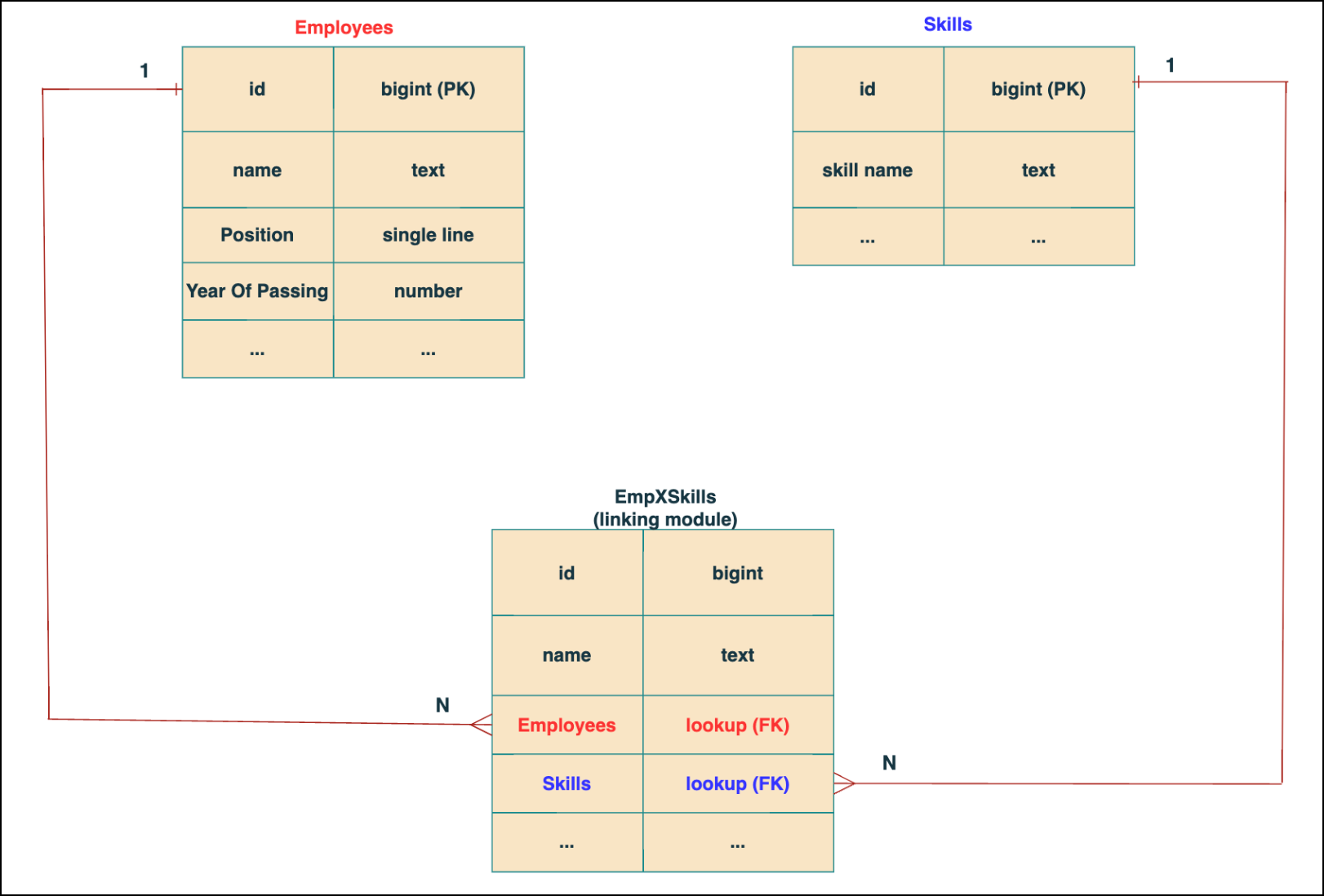


In the linking module, two lookup fields (lookup fields with api names - Employees and Skills) will be created. The lookup fields, one pointing to Employees and the other pointing to Skills from the linking module, establish a connection between the linking module and its associated module.

Why you cannot use a lookup field for this use case? 
In Zoho CRM, a lookup field creates a one-to-many relationship between two modules i.e. one record in the source module can be linked to only one record in the target module.

Example :
If you create a lookup field for Skills in the Employees module, each employee can be linked to only one skill. So, use a multi-select lookup field instead of a lookup field when you need to represent complex relationships like one employee - many skills and one skill - many employees.

3. How to create a multi-select Lookup field using Zoho CRM APIs?

To create a Multi-Select lookup field between two modules using Zoho CRM APIs, follow these steps:

Step 1: Identify the Module API Name
Before creating the field, you should know the API names of the Employees and Skills modules. For that, use the Get Module Metadata API.  

Request URL  : {{api-domain}}/crm/v8/settings/modules
Request method : GET
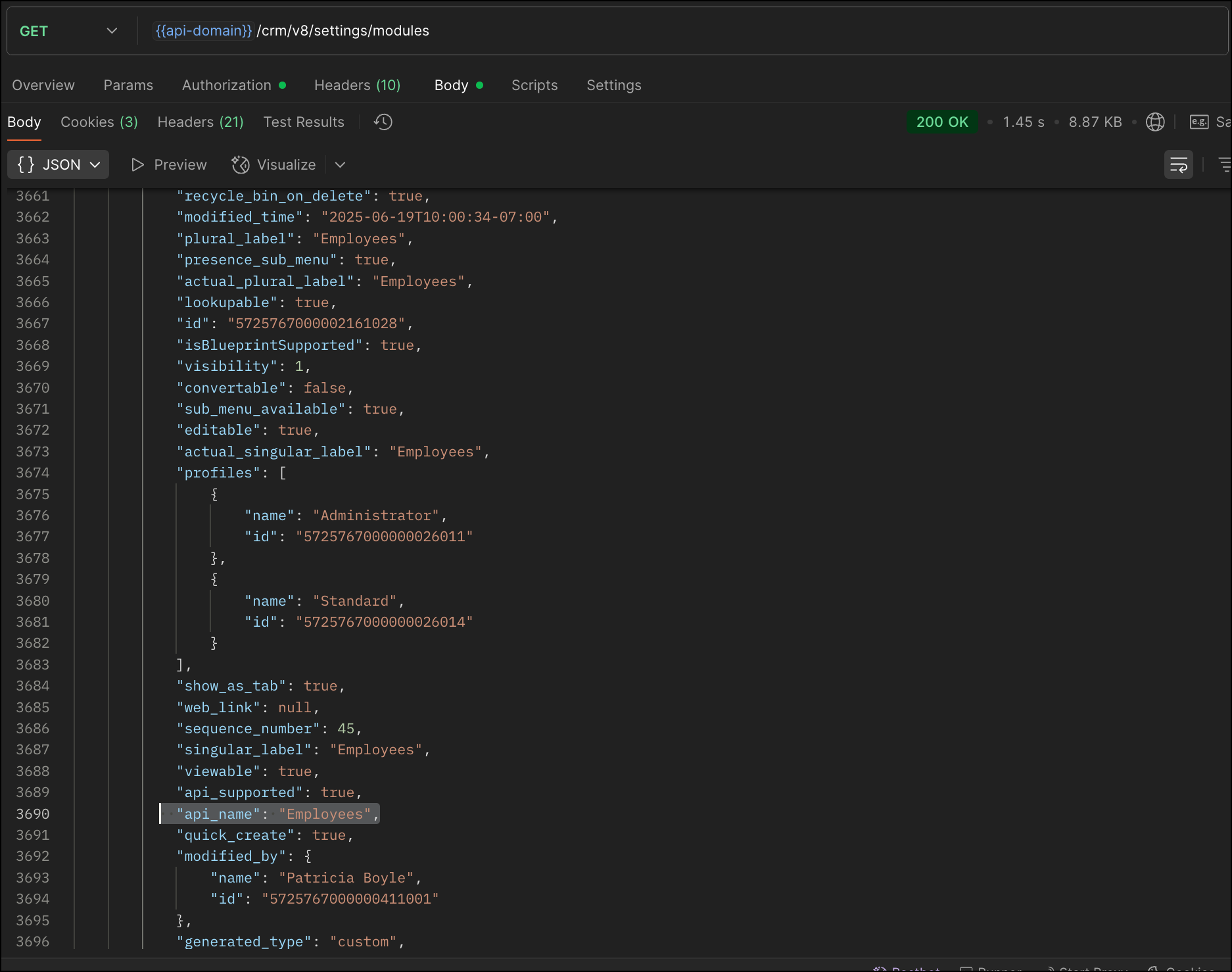


Now, search for the Employees module in the response and note its API name.

Step 2: Use the Create Custom Fields API

To establish a many-to-many relationship between two modules, in our case, Employees and Skills, you need to create a custom field of type multi-select lookup in the Employees module (parent module).  Here, we will associate multiple skills to an employee.

This custom field requires:
  • The related module you want to link to - Skills.
  • A display field from the related module
  • The linking module (EmpXSkills), which stores the actual associations.
Use the Create Custom Fields API to create custom fields.

Request URL : {{api_domain}}/crm/v8/settings/fields?module=Employees
Request method : POST

Sample input :


{
    "fields": [
        {
            "field_label": "Skills", //Name of the field in your module
            "data_type": "multiselectlookup", //Type of the field
            "multiselectlookup": { //This JSON object contains the multi-select lookup relationship details

                "connected_details": { //Details about the module and field you want to link
                    "module": {
                        "api_name": "Skills" //API name of the related module
                    },
                    "field": {
                        "field_label": "Skills" //The field in the related module to display
                    }
                },
                "linking_details": { //Details about the junction or linking module that manages the many-to-many relationship
                    "module": {
                        "plural_label": "EmpXSkills" //Plural label of the junction module
                    }
                }
            }
        }
    ]
}


4. How Do You Find the Linking Module and Field API Names?

To know the API name of the linking module:
Use the Get Modules API and search for "generated_type" : "linking" in the response to identify MxN modules. In our case, EmpXSkills.

Request URL : {{api_domain}}/crm/v8/settings/modules
Request method : GET
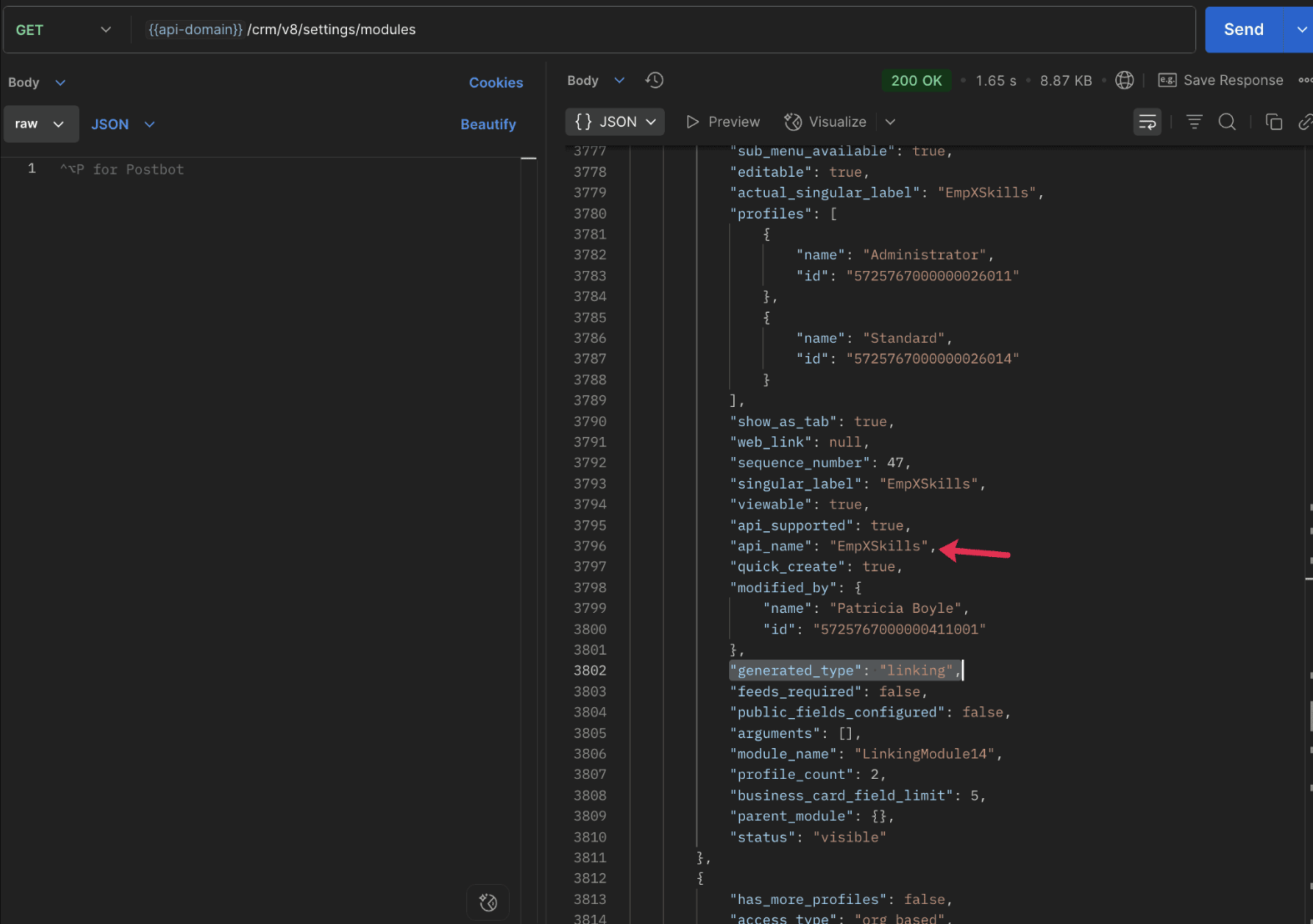


To know the field API names in the linking module:
Use the Get Fields Metadata API to retrieve the API names of lookup fields within the linking module.

Request URL : {{api_domain}}/crm/v8/settings/fields?module=EmpXSkills
Request method : GET

5. How do I associate records via a multi-select lookup field using the Insert Records API in Zoho CRM?

To associate records using a multi-select lookup field, you must provide the record IDs from the related module. The association is made through the linking module.

Example :
Associating multiple skills with an employee using the multi-select lookup field.

Request URL : {{api-domain}}/crm/v8/Employees
Request method : POST

Sample input :


{
  "data": [
    {
      "Name": "Patricia",
      "Email": "patricia@mail.com",
      "Position": "Marketing Specialist",
      "Year_of_Experience": 5,
      "Skills": [   // API name of the multi-select lookup field in the Employees module
        {
          "Skills": { // API name of the lookup field in the linking module pointing to the Skills module
            "name": "Marketing",
            "id": "5725767000002149427"  //ID from the Skills module are mandatory to establish the link
          }
        },
        {
          "Skills": {
            "name": "Social Media Marketing",
            "id": "5725767000002149476"
          }
        }
      ]
    }
  ]
}


6. How do I associate an Employee's skills using the linking module in Zoho CRM?

To establish a relationship between the Employees and Skills modules through the linking module, use the Insert Records API to create a record in the linking module, EmpXSkills.

To do this,
  • Use the appropriate lookup field API names to reference the parent module.
  • You must need the record IDs from both the Employees and Skills modules to create the associations.
Request URL : {{api-domain}}/crm/v8/EmpXSkills
Request method : POST

Sample input :


{
  "data": [
    {
      "Name": "Patricia",
      "Employees": {
        "id": "5725767000002161001"  // Record ID from the Employees module
      },
      "Skills": {
        "id": "5725767000002149476"  // Record ID from the Skills module
      }
    }
  ]
}


7. When should I use create/update operations in the Employees module vs the EmpXSkills module?

                Employees Module

               EmpXSkills (linking) Module

Use when you want to create or update an Employee and associate Skills using the Multi-select Lookup field.

Use when you want to create or remove associations between existing Employee and Skill records without modifying the actual Employee or Skill data.

Creating a new employee and assigning their skills at once.

Managing relationships between existing records i.e., linking and unlinking skills to employees.


8. How to update a record in the linking module?

To update a record in the linking module, use the Update Records API.
Request URL : {{api-domain}}/crm/v8/EmpXSkills/5725767000006269044
Request method : PUT

Sample input :


{
    "data": [
        {
            "Skills": {
                "name": "Marketing",
                "id": "5725767000002170035" //Associating another skill with the employee 
            }
        }
    ]
}

In the above sample, we have replaced an existing skill associated with an employee with another Skill in the linking module.This is done by updating the Skills lookup field in the EmpXSkills record.

Please note that in the linking module, Skills is a lookup field, so you can associate only one skill per linking record. But in the Employees module, Skills is a multi-select lookup field, so an employee can be associated with multiple skills.

9. How to unlink records from the parent module as well as the linking module?

Unlink the associated records from the parent module:

Using the Update records API, you can remove an associated skill from an employee, use the "_delete": null key within the multi-select lookup field in the Employee record update.

Request URL : {{api-domain}}/crm/v8/Employees/5725767000006269044
Request method : PUT

Sample input :

{
"data": [
        {
            "Skills": [
               {
                    "Skills": {
                        "name": "Marketing", 
                        "id": "5725767000002170035" // The Skill record you want to unlink
                    },
                    "id": "5725767000007228047", //record ID - The record created in the linking module for the employee with the Marketing skill
                    "_delete" : null 
                }
            ]
        }
    ]
}


Replace an associated record from the linking module:

Use the Update Records API to replace an existing association in the linking module.

Request URL : {{api-domain}}/crm/v8/EmpXSkills/5725767000007228035
Request method : PUT

Sample input :


{
    "data": [
        {
            "Skills": {
                "name": "Java",
                "id": "5725767000005259075" //replacing a new skill 
            }
        }
    ]
}

In the above sample, we have replaced the existing skill with Java.

10. Why am I seeing the error "DUPLICATE_LINKING_DATA"  in the Update Records API

This error occurs when you try to associate records with the parent record that are already linked with the Multi-select lookup field. To resolve this, check the records you are trying to link and make sure your association is only with records that are not already linked.

Know your existing linked records:

Before the Update Records API, use the Get Related Records Data API and search for the multi-select lookup field. In our case, Skills is the multi-select lookup field created in the Employees module. This will return all records already associated.

Example :
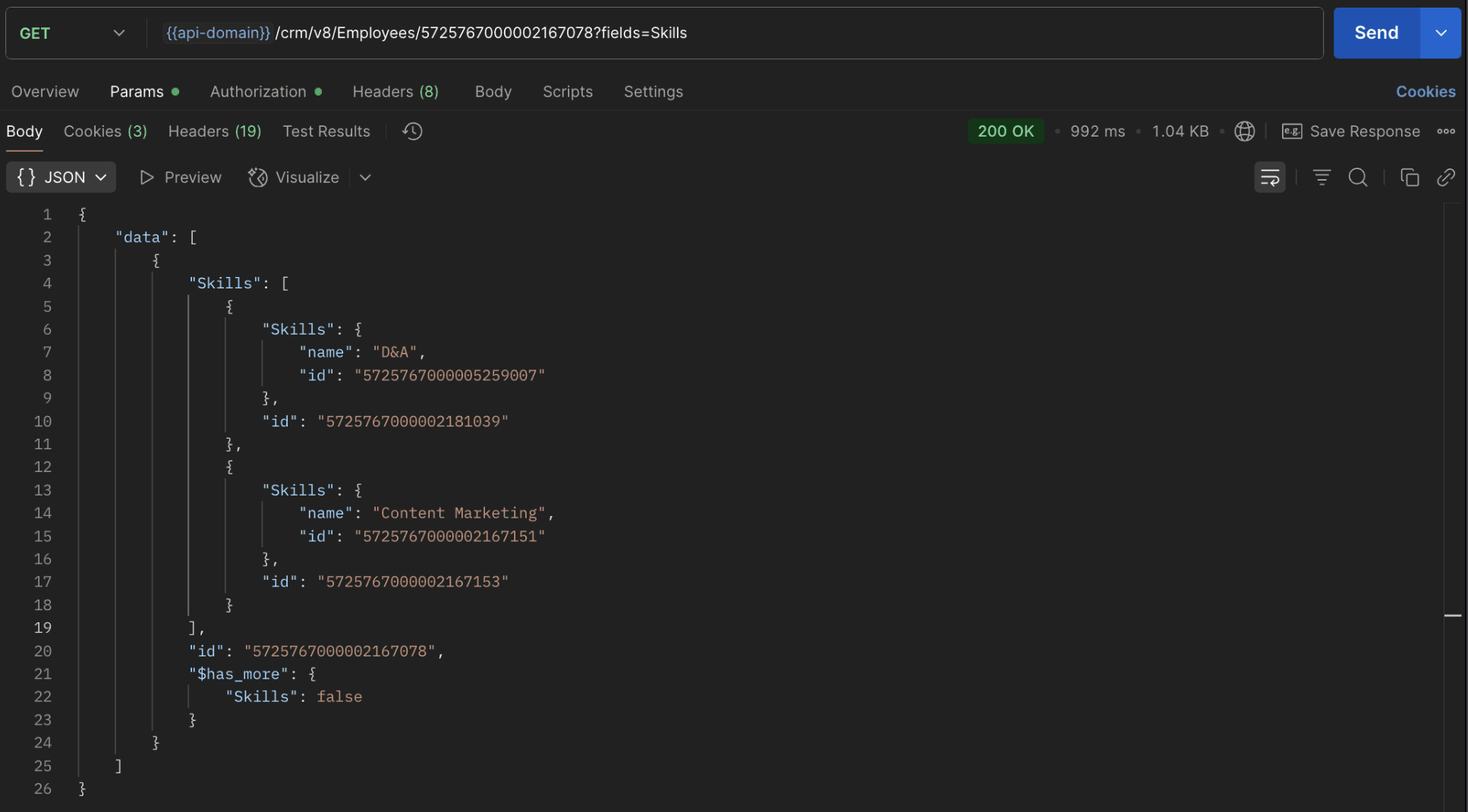

The response returns all Skills already linked with that Employee.

Using this way, compare the IDs from the API response with the new records you are about to link, and only proceed with non-duplicate IDs. This avoids duplicate entries and prevents the "DUPLICATE_LINKING_DATA" error.

11. What happens if I delete a record in the linking module?

When you delete a record in the linking module, it only removes the association between the related records in the Employees and Skills modules.

Note :
  • Deleting a linking module record removes only the relationship between two records from the Employees and Skills modules.
  • Deleting an Employee or Skill record deletes all corresponding entries in the linking module as well.

12. How do I query linked records?

Use the COQL API to query multi-select lookup data by specifying the corresponding linking module's API name directly in your query. The linking module is treated as a separate module in Zoho CRM, so you can retrieve associated records by querying it like any other module.

Sample query :


{
  "select_query": "select Skills.Name as skill, Employees.Name as employee from EmpXSkills where Skills.Name like '%Marketing%'"
}


Use the Get Module Metadata API to know the linking module's API name.

13. How do I export multi-select lookup records using the Bulk Read API?

To export multi-select lookup data, linking module records efficiently, use the Bulk Read API with the linking module’s API name.

Request method : POST

Sample Request :


{
    "callback": {
        "method": "post"
    },
    "query": {
        "module": {
            "api_name": "EmpXSkills" //API name of the linking module
        },
        "fields": [
            "Employees.Name",
            "Employees.Year_of_Experience",
            "Skills.Name"
        ],
        "criteria": {
            "group": [
                {
                    "field": {
                        "api_name": "Employees.Year_of_Experience" 
                    },
                    "comparator": "greater_than",
                    "value": "4"
                },
                {
                    "field": {
                        "api_name": "Skills.Name"
                    },
                    "comparator": "contains",
                    "value": "Social"
                }
            ],
            "group_operator": "AND"
        }
    }
}


14. Can I import my linking module's data using the Bulk Write API?

Yes. Like the Leads and Contacts modules, you can also import linking module's data into Zoho CRM using the Bulk Write API by directly specifying the linking module’s API name.

If you are importing data that involves both a parent module, Employees and its associated MxN linking module, follow these steps:

1. Create separate CSV files:
  • One for the parent module - Employees
  • One for the linking module - EmpXSkills
2. Zip the files into a single ZIP file.
3. Upload the ZIP in a single Bulk Write API request.
4. Ensure accurate field mappings are provided in the API request body.

Refer to Kaizen #131 - Bulk Write for parent-child records using Scala SDK for more details on handling parent-child records.


15. Can I receive notifications if a multi-select lookup field in a module is modified or updated?

Yes, you can receive notifications when a MxN field is updated using the Notification API. To enable instant notifications for actions performed in a module, use the respective API names of the linking module in the input body.

Request method : POST

Sample input :


{
    "watch": [
        {
            "channel_id": "10000",
            "events": [
                "EmpXSkills.all"  //EmpXSkills represents the API name of the linking module
            ],
            "return_affected_field_values": true  
        }
    ]
}


16. Can I use criteria-based filtering when accessing multi-select lookup data using the Search API?

Yes, you can filter multi-select lookup data using the criteria parameter in the Search API's URL.

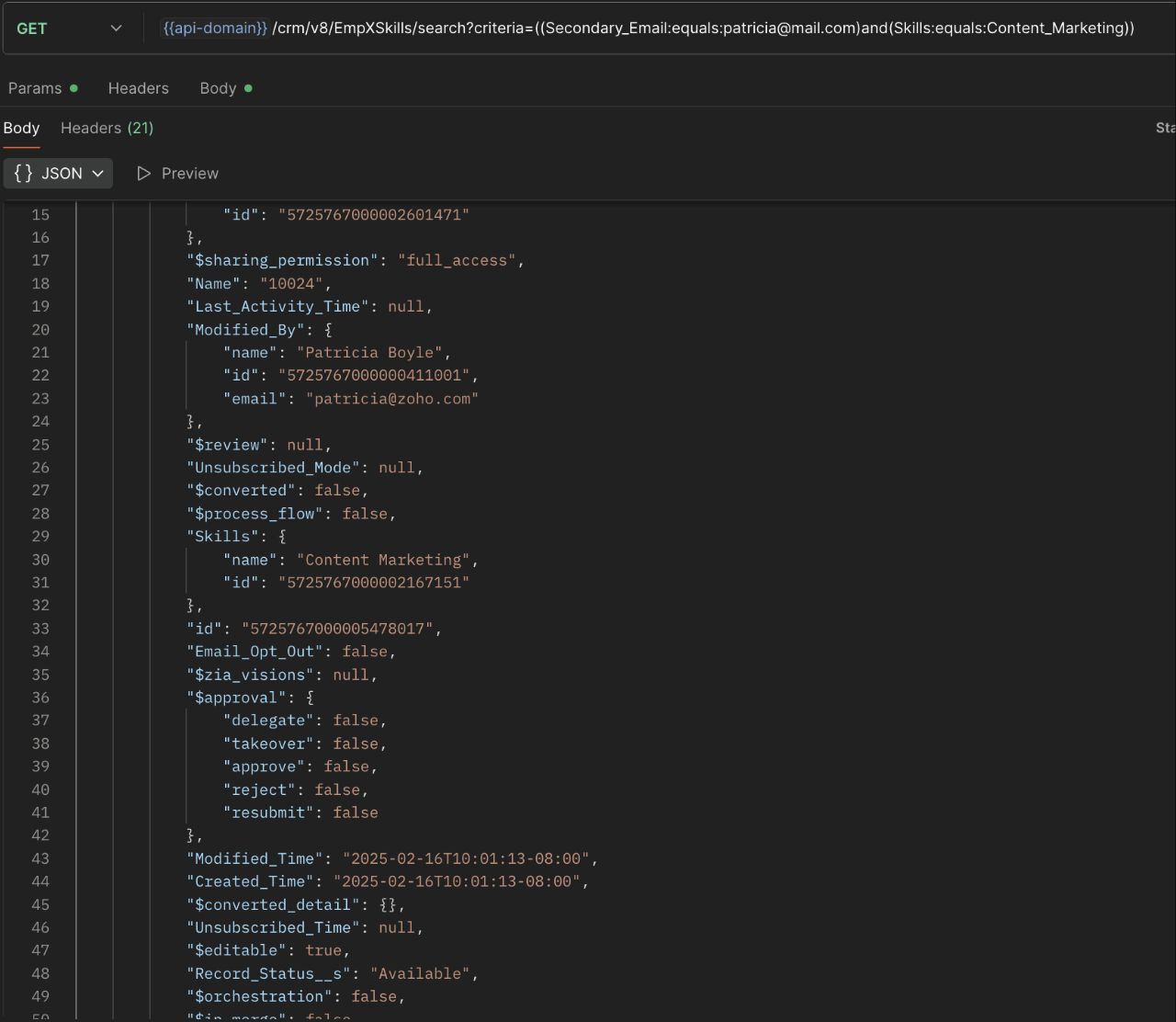
Here is an example that fetches records from the EmpXSkills linking module.

Request URL : {{api-name}}/crm/v8/EmpXSkills/search?criteria=((Secondary_Email:equals:patricia@mail.com)and(Skills:equals:Content_Marketing))
Request method : GET

Sample response :


                                                                                                                               x-----------------------------x


We trust that this post meets your needs and is helpful. Let us know your thoughts in the comment section or reach out to us at support@zohocrm.com 

Stay tuned for more insights in our upcoming Kaizen posts!


Other FAQs in the Kaizen series :


    Access your files securely from anywhere

        All-in-one knowledge management and training platform for your employees and customers.


                              Zoho Developer Community


                                                    • Desk Community Learning Series


                                                    • Digest


                                                    • Functions


                                                    • Meetups


                                                    • Kbase


                                                    • Resources


                                                    • Glossary


                                                    • Desk Marketplace


                                                    • MVP Corner


                                                    • Word of the Day


                                                    • Ask the Experts


                                                              • Sticky Posts

                                                              • Kaizen #198: Using Client Script for Custom Validation in Blueprint

                                                                Nearing 200th Kaizen Post – 1 More to the Big Two-Oh-Oh! Do you have any questions, suggestions, or topics you would like us to cover in future posts? Your insights and suggestions help us shape future content and make this series better for everyone.
                                                              • Kaizen #226: Using ZRC in Client Script

                                                                Hello everyone! Welcome to another week of Kaizen. In today's post, lets see what is ZRC (Zoho Request Client) and how we can use ZRC methods in Client Script to get inputs from a Salesperson and update the Lead status with a single button click. In this
                                                              • Kaizen #222 - Client Script Support for Notes Related List

                                                                Hello everyone! Welcome to another week of Kaizen. The final Kaizen post of the year 2025 is here! With the new Client Script support for the Notes Related List, you can validate, enrich, and manage notes across modules. In this post, we’ll explore how
                                                              • Kaizen #217 - Actions APIs : Tasks

                                                                Welcome to another week of Kaizen! In last week's post we discussed Email Notifications APIs which act as the link between your Workflow automations and you. We have discussed how Zylker Cloud Services uses Email Notifications API in their custom dashboard.
                                                              • Kaizen #216 - Actions APIs : Email Notifications

                                                                Welcome to another week of Kaizen! For the last three weeks, we have been discussing Zylker's workflows. We successfully updated a dormant workflow, built a new one from the ground up and more. But our work is not finished—these automated processes are


                                                              Manage your brands on social media


                                                                    Zoho TeamInbox Resources


                                                                        Zoho CRM Plus Resources

                                                                          Zoho Books Resources


                                                                            Zoho Subscriptions Resources

                                                                              Zoho Projects Resources


                                                                                Zoho Sprints Resources


                                                                                  Qntrl Resources


                                                                                    Zoho Creator Resources


                                                                                        Zoho CRM Resources

                                                                                        • CRM Community Learning Series

                                                                                          CRM Community Learning Series


                                                                                        • Kaizen

                                                                                          Kaizen

                                                                                        • Functions

                                                                                          Functions

                                                                                        • Meetups

                                                                                          Meetups

                                                                                        • Kbase

                                                                                          Kbase

                                                                                        • Resources

                                                                                          Resources

                                                                                        • Digest

                                                                                          Digest

                                                                                        • CRM Marketplace

                                                                                          CRM Marketplace

                                                                                        • MVP Corner

                                                                                          MVP Corner


                                                                                            Design. Discuss. Deliver.

                                                                                            Create visually engaging stories with Zoho Show.

                                                                                            Get Started Now


                                                                                              Zoho Show Resources

                                                                                                Zoho Writer

                                                                                                Get Started. Write Away!

                                                                                                Writer is a powerful online word processor, designed for collaborative work.

                                                                                                  Zoho CRM コンテンツ


                                                                                                    Nederlandse Hulpbronnen


                                                                                                        ご検討中の方


                                                                                                                • Recent Topics

                                                                                                                • Does Zoho Writer have Dropdowns

                                                                                                                  I want to add a drop down field in Zoho writer. Is this possible?
                                                                                                                • Facturation électronique 2026 - obligation dès le 1er septembre 2026

                                                                                                                  Bonjour, Je me permets de réagir à divers posts publiés ici et là concernant le projet de E-Invoicing, dans le cadre de la facturation électronique prévue très prochainement. Dans le cadre du passage à la facturation électronique pour les entreprises,
                                                                                                                • Connecting Multiple WooCommerce Stores to a Single Zoho Marketing Automation Account

                                                                                                                  Is it possible to connect multiple WooCommerce stores to a single Zoho Marketing Automation account?
                                                                                                                • Service Title in Service Report Template Builder

                                                                                                                  I am currently working on the Service Report Template Builder in Zoho FSM. I have created three separate service report templates for different workflows: Preventive Maintenance Report Requested Service Report Installation Report My issue is that I cannot
                                                                                                                • Update: New Security Admin Role

                                                                                                                  Hello Zoho Directory Admins! This post is to highlight the recent role and permission changes introduced as part of the security enhancements. Previously, Helpdesk Admins had the security permissions and were responsible for managing the security configurations
                                                                                                                • Client Script | Update #14 - Client Script Support for Quick Create

                                                                                                                  Hello Everyone! We are back with another exciting and highly awaited update in Client Script! Over the past months, many of you shared your insights and requests, asking for the power to extend Client Script functionality to Quick Create forms. This capability
                                                                                                                • Empty folders are now appearing in the sidebar...

                                                                                                                  ...and the folder list is now auto-collapsed by default with no way to change. Neither of these recent updates are useful or user-friendly. ==================== Powered by Haiku https://www.haiku.co.uk ====================
                                                                                                                • Upload from Zoho Creator File Upload field to OpenAI Vector Store

                                                                                                                  I’ve struggled for quite a while to get this working properly. For a long time we relied on Azure Functions as a workaround to handle file transfers between Zoho Creator and OpenAI Vector Stores. It worked, but added unnecessary infrastructure and complexity.
                                                                                                                • Career site URL - Suggestion to modify URL of non-english job posting

                                                                                                                  Hi, I would like to suggest making a few modification to career sites that are not in english. Currently, the URL are a mix of different languages and are very long. It makes for very unprofessional looking URLs... Here is an example of one of our URL
                                                                                                                • I'd like to suggest a feature enhancement for SalesIQ that would greatly improve the user experience across different channels.

                                                                                                                  Hello Zoho Team, Current Limitation: When I enable the pre-chat form under Brands > Flow Controls to collect the visitor’s name and email, it gets applied globally across all channels, including WhatsApp, Messenger, and Instagram. This doesn't quite align
                                                                                                                • The Social Playbook - February edition: Why moment marketing works (and how brands use it)

                                                                                                                  Imagine the final season of your favorite series is about to drop. Your entire feed is talking about it. Trailers everywhere. Fan theories. Hype at 100%. Now your go-to burger place launches a limited-edition meal box themed around that series—custom
                                                                                                                • PDF Attachment Option for Service Reports

                                                                                                                  Hello Team, I would like to check with you all if there is an option to attach PDF documents to the service reports. When I try to attach a file, the system only allows the following formats: JPEG, JPG, and PNG. Could you please confirm whether PDF attachments
                                                                                                                • Manage Every Customer Conversation from Every Channel inside Zoho SalesIQ

                                                                                                                  Your customers message you from everywhere. But are you really able to track, manage, and follow through on every conversation, without missing anything? With interactions coming in from websites, mobile apps, and messaging platforms like WhatsApp and
                                                                                                                • Approvals in Zoho Creator

                                                                                                                  Hi, This is Surya, in one of  my creator application I have a form called job posting, and I created an approval process for that form. When a user submits that form the record directly adding to that form's report, even it is in the review for approval.
                                                                                                                • Cliq Bots - Post message to a bot using the command line!

                                                                                                                  If you had read our post on how to post a message to a channel in a simple one-line command, then this sure is a piece of cake for you guys! For those of you, who are reading this for the first time, don't worry! Just read on. This post is all about how
                                                                                                                • Depositing funds to account

                                                                                                                  Hello, I have been using Quickbooks for many years but am considering moving to Zoho Books so I am currently running through various workflows and am working on the Invoicing aspect. In QB, the process is to create an invoice, receive payment and then
                                                                                                                • 【Zoho CRM】営業日のロジックに関するアップデート

                                                                                                                  ユーザーの皆さま、こんにちは。コミュニティチームの中野です。 今回は「Zoho CRM アップデート情報」の中から、営業日のロジックに関するアップデートをご紹介します。 本アップデートにより、ワークフローにおける営業日の計算方法が改善されました。 週末などの非営業日にワークフローのトリガーが発生した場合でも、 「+0」「+1」「+2 営業日」といった設定が、意図どおりに正確に動作するようになりました。 営業日に基づくワークフローでは、日付項目を基準に「何営業日後に処理を実行するか」を指定します。
                                                                                                                • Merged cells are unmerging automatically

                                                                                                                  Hello, I have been using Zoho sheets from last 1 year. But from last week facing a issue in merged cells. While editing all merged cells in a sheet became unmerged. I merged it again, but it again unmerged. In my half an hour work I have to do this 3-4
                                                                                                                • Introducing Built-in Telephony in Zoho Recruit

                                                                                                                  We’re excited to introduce Built-in Telephony in Zoho Recruit, designed to make recruiter–candidate communication faster, simpler, and fully traceable. These capabilities help you reduce app switching, handle inbound calls efficiently, and keep every
                                                                                                                • Just want email and office for personal use

                                                                                                                  I am unclear as how to how I would have just a personal email (already do have it and love it) and get to use docs, notebook, workdrive etc. In other words mostly everything I had a google. I find gocs can be free with 5gb and so can mail with 5gb. Are
                                                                                                                • Unable to change the "credentials of login user" option when creating a connection

                                                                                                                  I want to create a new Desk connection where the parameter to use 'credentials of login user' is set to YES. I'm able to create a new connection but am never given the option to change this parameter. Is this a restriction of my user profile, and if so,
                                                                                                                • Show backordered items on packing slip

                                                                                                                  Is it possible to show a column on the Packing Slip that shows number of backordered items when a PO is only partially filled? I would also like to see the Backordered column appear on POs after you receive items if you didn't get ALL of the items or partial amounts of items. And lastly, it would be nice to have the option of turning on the Backordered column for invoices if you only invoice for a partial order. -Tom
                                                                                                                • Zoho Sheet for Desktop

                                                                                                                  Does Zoho plans to develop a Desktop version of Sheet that installs on the computer like was done with Writer?
                                                                                                                • Zoho CRM Community Digest - January 2026 | Part 1

                                                                                                                  The new year is already in motion, and the Zoho CRM Community has been buzzing with steady updates and thoughtful conversations. In this edition, we’ve pulled together the key product enhancements, Kaizen learnings, and helpful discussions from the first
                                                                                                                • Zoho CRM Feature Requests - SMS and Emails to Custom Modules & Time Zone Form Field

                                                                                                                  TLDR: Add Date/Time/Timezone form field, and be able to turn off auto timezone feature. Allow for Zoho Voices CRM SMS Extension to be able to be added to custom modules, and cases. Create a feature that tracks emails by tracking the email chain, rather
                                                                                                                • Introducing Bigin's Add-in for Microsoft Outlook

                                                                                                                  Hello Everyone, Email is an important way to communicate with customers and prospects. If you use Outlook.com for emails and Bigin as your CRM, the Outlook Add-in helps you connect them easily so you can see your Bigin contact details right inside Outlook.com.
                                                                                                                • Ask the Expert – Zoho One Admin Track : une session dédiée aux administrateurs Zoho One

                                                                                                                  Vous administrez Zoho One et vous vous posez des questions sur la configuration, la gestion des utilisateurs, la sécurité ou encore l’optimisation de votre back-office ? Bonne nouvelle : une session Ask the Expert – Zoho One Admin Track arrive bientôt,
                                                                                                                • Zoho Commerce

                                                                                                                  Hi, I have zoho one and use Zoho Books. I am very interested in Zoho Commerce , especially with how all is integrated but have a question. I do not want my store to show prices for customers that are not log in. Is there a way to hide the prices if not
                                                                                                                • Will be possible to create a merge mail template for products?

                                                                                                                  Hi, we would need to create a mail merge template for products (native) module. Will be possibile? or do you have a smart solutions to merge products data with a mail merge? thanks Chris
                                                                                                                • All new Address Field in Zoho CRM: maintain structured and accurate address inputs

                                                                                                                  The address field will be available exclusively for IN DC users. We'll keep you updated on the DC-specific rollout soon. It's currently available for all new sign-ups and for existing Zoho CRM orgs which are in the Professional edition. Latest update
                                                                                                                • How to Associate Zoho Projects in Zoho CRM

                                                                                                                  Hi I need script for associating projects in zoho projects to particular Account in zoho CRM side. It can be done manually but I need the automation for this process. There are no api regarding associating a project in zoho crm account. Need assistance
                                                                                                                • Add Claude in Zoho Cliq

                                                                                                                  Let’s add a real AI assistant powered by Claude to your workspace this week, that your team can chat with, ask questions, and act on conversations to run AI actions on. This guide walks you through exactly how to do it, step by step, with all the code
                                                                                                                • Need to set workflow or journey wait time (time delay) in minutes, not hours

                                                                                                                  Minimum wait time for both Campaigns workflows and Marketing Automation journeys is one hour. I need one or the other to be set to several minutes (fraction of the hour). I tried to solve this by entering a fraction but the wait time data type is an integer
                                                                                                                • Editing Item Group to add Image

                                                                                                                  I did not have the image of the product when the Item Group was created. Now I have the product image, and would like to associate/add to the Item Group. However the Item Group Edit functionality does not show/allow adding/changing image. Please hel
                                                                                                                • Composite Product (kit) - Dynamic Pricing

                                                                                                                  I am setting up Composite Products for item kits that I sell. I also sell the items from the kit individually. Problem is when pricing changes on an individual part, the Composite Product price does not change meaning when the cost of item # 2 in the
                                                                                                                • Urgent: Slow Loading Issue on Zoho Commerce Website

                                                                                                                  Dear Zoho Support Team, I am experiencing slow loading times on my Zoho Commerce website, which is affecting its performance and user experience. The issue persists across different devices and networks. Could you please investigate this matter and provide
                                                                                                                • Zoho Books - France

                                                                                                                  L’équipe de Zoho France reçoit régulièrement des questions sur la conformité de ses applications de finances (Zoho Books/ Zoho Invoice) pour le marché français. Voici quelques points pour clarifier la question : Zoho Books est un logiciel de comptabilité
                                                                                                                • New in Office Integrator: Download documents as password-protected PDFs

                                                                                                                  Hi users, We're excited to introduce password-protected PDF as a download option in Zoho Office Integrator's document editor. This allows you to securely share your confidential information from within your web app. Highlights of the password-protected
                                                                                                                • Sales IQ - Zobot en multilangue

                                                                                                                  Bonjour, J'ai un Zobot installé sur mon site depuis longtemps. J'ai ajouté plusieurs langues, dans la configuration et dans le générateur de bot sans code Pourtant, le Chat continue à s'afficher en Francais. Comment enclencher le multilangue en front
                                                                                                                • Streamlining E-commerce Photography with AI Background Tools

                                                                                                                  Hey Zoho Community, I’ve been messing around with ways to make product images less of a headache for fashion brands on Zoho Commerce. You know how boring generic backdrops can get, and how much time traditional photoshoots eat up, right? I tried out this
                                                                                                                • Next Page