Deal Notes Sentiment Analysis with Zia Assistant API, Workflow, Deluge in Zoho CRM

Deal Notes Sentiment Analysis with Zia Assistant API, Workflow, Deluge in Zoho CRM


Hello all! 
Welcome back to a fresh Kaizen week. 
In this post, we will explore how to detect negative sentiment in notes added to a deal in Zoho CRM using the Zia Assistant API with Workflow and Custom Functions.

Introduction

Sales teams capture every interaction in notes such as calls, emails, meetings, and feedback. These notes contain important signals that indicate whether a deal is progressing or at risk.
As deals grow, manually tracking every note becomes difficult. Important signals are often missed, leading to delayed actions.
This solution builds an automated system that reads notes, detects sentiment, assigns a risk score, tracks changes over time, sends alerts, and highlights high-risk deals.

Final output

Here is how the system automatically analyses and updates the deal when a negative sentiment note is added.


Let us look at an example scenario to understand the challenge.

Example Scenario

A team manages around 50 active deals, each with 8 to 10 notes. This results in hundreds of notes to review. It is not practical for a manager to read all of them. Signals like “customer is evaluating competitors” can easily go unnoticed, and by the time they are identified, the deal is already at risk.

The real cost of missed signals

When negative sentiment goes undetected:

What Happens

Business Impact

Customer says "too expensive" in a note

Deal lost to competitor offering lower price

Customer cancels 2 meetings in a row

Prevent deals from going cold by detecting repeated meeting cancellations early and triggering timely follow-ups.

Customer mentions "evaluating other options"

Identify when customers start evaluating other options and respond quickly before they finalize their decision.

Customer says "not a priority right now"

Deal sits in pipeline for months, inflating forecasts

The common thread? The warning signs were there in the notes, but no one caught them in time.

What sales teams need?
  1. Automatic monitoring of every deal note as it's added.
  2. Zia Assistant's analysis that understands context, not just keywords.
  3. Risk scoring that quantifies how much danger a deal is in.
  4. Trend tracking to see if things are getting better or worse.The system retrieves the existing risk from the deal and compares it with the new risk calculated by Zia. Based on this comparison, it sets the trend as Increasing, Decreasing, or Stable.
  5. Instant alerts via mail when a deal crosses into dangerous territory.

Solution

Using three native Zoho CRM capabilities with the Workflow Rule, Custom Functions, and Zia Assistant API, we built an end-to-end automation with 9 steps:
  1. Fetches deal details: Name, Stage, Amount, Close date, Owner, Existing risk.
  2. Collects all deal notes: Every note linked to the deal.
  3. Sends to Zia Assistant: With enhanced prompt and classification guidelines.
  4. Extracts AI response: Structured sentiment, Risk score, and AI Analysis.
  5. Parses & normalizes: Cleans up AI output to match exact field values.
  6. Calculates risk trend: Compares current risk vs previous risk.
  7. Updates deal record: Writes all 6 custom fields.
  8. Sends email alert: Notifies deal owner if risk > 8.
  9. Manages tags: Adds/removes High Risk Deal tag automatically.
The entire flow runs automatically in the background every time a note is added or modified. Zero manual effort from the sales team.

Prerequisites

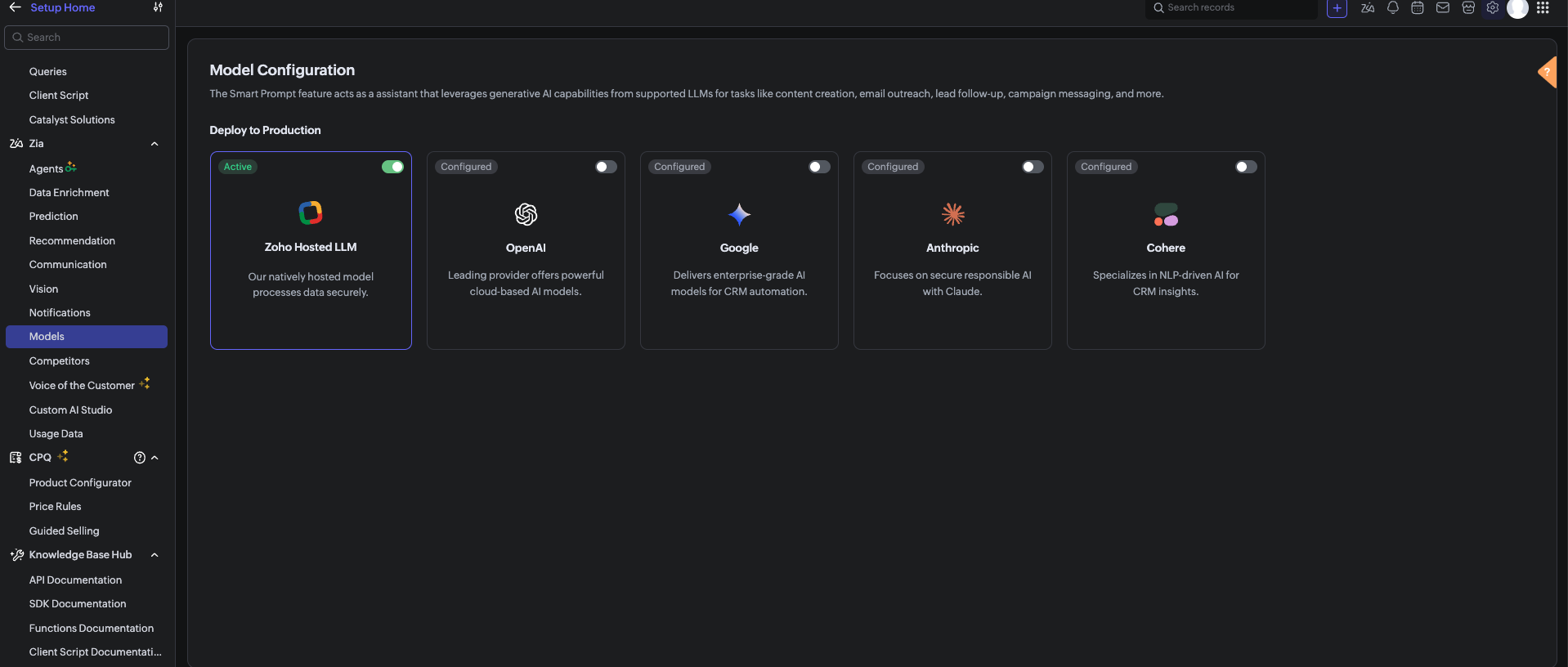
Before using the Zia Assistant API inside the Deluge function, make sure that AI is enabled in Zoho CRM.

To enable AI configuration, go to Setup > Zia > Models > Zoho Hosted LLM vendor.
Note: In V8, only the Zoho Hosted LLM vendor can be enabled and used.           


  1. CRM Connection: Connections with appropriate scopes.

Implementation steps

Step 1: Create custom fields

Navigate to Settings → Customization → Modules and Fields → Deals and create these 6 custom fields:

S.No

Field Label

API Name

Data Type

values

1

Risk

Risk

Picklist

1, 2, 3, 4, 5, 6, 7, 8, 9, 10

Risk: 1 = low risk, Risk 10 = high risk

2

Sentiment

Sentiment

Picklist

Positive, Neutral, Negative

3

AI Analysis

AI_Analysis

Multi-line Text

4

Previous Risk

Previous_Risk

Number

5

Risk Trend

Risk_Trend

Picklist

Increasing, Stable, Decreasing

6

Alert Sent

Alert_Sent

Checkbox


Note: After creating each field, verify the API Name matches exactly. Zoho sometimes appends numbers (example, Sentiment1) if a field name conflicts with existing or deleted fields. 

Step 2: Set up Zoho CRM Connection

  1. Go to Settings → Developer Space → Connections.
  2. Click Create Connection
  3. Select your services.
  4. Name the connection: zohocrm (used in this post)
  5. Add the required scopes
  6. Click Create and Connect
  7. Authorize the connection

Step 3: Create the custom function

  1. Go to Settings → Developer Space → Functions
  2. Click Create Function
  3. Display Name: Deal Notes Sentiment Analysis
  4. Function Name: DealNotesSentimentAnalysis
  5. Category: Automation
  6. Return Type: void
  7. Add Argument: dealId: Deals.Deal Id Type: int
  8. Click Save
      Note: The complete custom function code is provided at the end of this post.

Step 4: Configure the Workflow Rule

  1. Go to Settings → Automation → Workflow Rules
  2. Click Create Rule
  3. Module: Deals
  4. Rule Name: Deal Notes Sentiment Trigger
  5. When: A note is added or modified
  6. Condition: All Deals (or customize as needed)
  7. Instant Action: Associate the custom function →DealNotesSentimentAnalysis
  8. Map the dealId argument to the Deal's Record ID
  9. Click Save

What happens inside the custom function?

At this point, the workflow is fully set up. Whenever a note is added or modified in a deal, the workflow triggers the custom function. But what exactly happens inside this function?
Instead of going through the code line by line, let’s break it down into logical stages to understand how the system works end-to-end.
The snippets below highlight only the core logic for each step.

Note: The complete function code is provided in the next section for reference. You can use and adapt it based on your use case.

Step 1: Gathering complete deal context

The function begins by collecting key details about the deal:
  1.  Deal Name 
  2.  Stage 
  3.  Amount 
  4.  Close Date 
  5.  Deal Owner 
  6.  Existing Risk Score 
This ensures that the analysis is not done in isolation.
 The AI receives full deal context, which improves the accuracy of sentiment and risk evaluation.

dealData = zoho.crm.getRecordById("Deals", dealIdLong);
dealName   = ifnull(dealData.get("Deal_Name"), "");
dealStage  = ifnull(dealData.get("Stage"), "");
dealAmount = ifnull(dealData.get("Amount"), "0");
closeDate  = ifnull(dealData.get("Closing_Date"), "Not defined");
// Existing Risk
existingRisk = ifnull(dealData.get("Risk"), "0").toString().toNumber();
// Owner Info
owner = dealData.get("Owner");
ownerName  = ifnull(owner.get("name"), "");
ownerEmail = ifnull(owner.get("email"), "");


Step 2: Reading All deal notes

Next, the function fetches all notes associated with the deal.
Instead of analyzing only the latest note, it:
  1.  Collects every note.
  2.  Combines them into a structured format.
This allows the system to:
  1.  Identify repeated concerns.
  2.  Detect patterns across conversations.
  3.  Understand the overall direction of the deal.

dealNotes = zoho.crm.getRelatedRecords("Notes", "Deals", dealIdLong);

notesContext = "";
for each note in dealNotes
{
 notesContext = notesContext + "- " + ifnull(note.get("Note_Content"), "") + "\n";
}


Step 3: Sending data to Zia Assistant

The collected deal data and notes are sent to Zia Assistant using a carefully designed prompt.
The prompt includes:
  1.  Definitions of positive, negative, and neutral signals. 
  2.  Real-world sales scenarios (pricing concerns, delays, objections).
  3.  Clear risk scoring guidelines (1 to 10 scale).
This ensures that the AI response is:
  1.  Consistent.
  2.  Context-aware.
  3.  Aligned with real sales behavior.

chatEntry = Map();
chatEntry.put("role", "user");
chatEntry.put("content",
 "Deal Name: " + dealName +
 "\nStage: " + dealStage +
 "\nAmount: " + dealAmount +
 "\nClose Date: " + closeDate +
 "\n\n=== DEAL NOTES ===\n" + notesContext
);

assistantMap.put("chat_history", {chatEntry});
assistantMap.put("prompt", "<custom sentiment + scoring prompt>");

response = invokeurl
[
 type :POST
 parameters: payload.toString()
 connection:"zohocrm"
];

This is where AI transforms raw notes into structured insights.

Step 4: Interpreting the AI response

Zia Assistant analyzes the input and returns a structured response containing:
  1. Overall Sentiment (Positive / Neutral / Negative) 
  2.  Risk Score (1–10) 
  3.  AI Analysis (brief reasoning) 
The function extracts these values for further processing.


aiText = "";

if(response.get("assistant") != null)
{
 aiText = response.get("assistant").get("details").get("data");
}


Step 5: Normalizing the output

Since AI responses can vary slightly in format, the function standardizes the output:
  1. Ensures sentiment matches exact CRM field values 
  2.  Validates risk score within the 1–10 range 
  3.  Cleans up any extra characters or formatting 
This step ensures clean and consistent data inside the CRM.


// Extract & clean risk
riskLine = riskLine.replaceAll("[^0-9]", "", false);
riskScore = riskLine.toNumber();
if(riskScore > 10) riskScore = 10;
if(riskScore < 1)  riskScore = 1;

// Normalize sentiment
sentimentLower = sentiment.toLowerCase();
if(sentimentLower.contains("negative")) sentiment = "Negative";
else if(sentimentLower.contains("positive")) sentiment = "Positive";
else sentiment = "Neutral";


Step 6: Calculating risk trend

The system then compares:
  1. Previous Risk Score 
  2.  Current Risk Score 
Based on this, it determines whether the deal is:
  1. Increasing in risk
  2. Decreasing in risk
  3. Stable
This adds an important layer of intelligence and not just what the risk is, but how it is changing over time.


riskTrend = "Stable";

if(riskScore > existingRisk)
{
    riskTrend = "Increasing";
}
else if(riskScore < existingRisk)
{
    riskTrend = "Decreasing";
}


Step 7: Updating the deal record

Once all values are processed, the function updates the deal with:
  1. Risk 
  2.  Sentiment 
  3.  AI Analysis 
  4.  Previous Risk 
  5.  Risk Trend 
  6.  Alert Sent Flag 
At this stage, the deal record becomes a live reflection of customer sentiment.


updateMap = Map();
updateMap.put("Risk", riskScore.toString());
updateMap.put("Sentiment", sentiment);
updateMap.put("AI_Analysis", analysis);
updateMap.put("Previous_Risk", existingRisk.toString());
updateMap.put("Risk_Trend", riskTrend);
zoho.crm.updateRecord("Deals", dealIdLong, updateMap);


Step 8: Smart email alerting

If the risk score crosses a threshold (Risk > 8), the system triggers an alert to the record owner to take immediate action.
An email is sent to the Deal Owner with:
  1. Deal details 
  2. Risk score 
  3. Sentiment 
  4. Risk trend 
  5. AI analysis 
To avoid alert:
  1. The system checks whether an alert has already been sent. 
  2.  A new alert is triggered only if the risk increases further.
previousAlertSent = ifnull(dealData.get("Alert_Sent"), false);

if(riskScore > 8 && (previousAlertSent == false || riskScore > existingRisk) && ownerEmail != "")
{
    // Send alert email
    mailPayload = {
        "from": {"user_name": ownerName, "email": zoho.crm.getOrgVariable("defaultMail")},
        "to": {{"user_name": ownerName, "email": ownerEmail}},
        "subject": "🚨 Deal At Risk: " + dealName,
        "content": "Risk Score: " + riskScore + "/10<br>Sentiment: " + sentiment + "<br><br>" + analysis,
        "mail_format": "html"
    };

    invokeurl
    [
        url :"https://www.zohoapis.com/crm/v8/Deals/" + dealIdLong + "/actions/send_mail"
        type :POST
        parameters: {"data": {mailPayload}}.toString()
        headers: {"Content-Type":"application/json"}
        connection: "zohocrm"
    ];

    zoho.crm.updateRecord("Deals", dealIdLong, {"Alert_Sent": true});
}
else if(riskScore <= 8)
{
    // Reset alert flag
    zoho.crm.updateRecord("Deals", dealIdLong, {"Alert_Sent": false});
}

Step 9: Dynamic tag management

Finally, the system visually marks high-risk deals:
  1.  If Risk > 8 → Adds tag “High Risk Deal”
  2.  If Risk reduces → Removes the tag automatically 
This makes it easy for users to:
  1.  Identify risky deals instantly 
  2.  Prioritize follow-ups 

if(riskScore > 8)
{
 invokeurl
 [
 url :"https://www.zohoapis.com/crm/v8/Deals/" + dealIdLong + "/actions/add_tags"
 type :POST
 parameters: tagPayload.toString()
 connection:"zohocrm"
 ];
}
else
{
 invokeurl
 [
 url :"https://www.zohoapis.com/crm/v8/Deals/" + dealIdLong + "/actions/remove_tags"
 type :POST
 parameters: tagPayload.toString()
 connection:"zohocrm"
 ];


Complete custom function code
The complete Deluge script used in this implementation is provided below for reference and direct use:

Notes
  1. To get better sentiment detection, use a clear and strong prompt in the Zia Assistant API.
  2. The output depends on how well the prompt defines positive, negative, and neutral signals.
  3. Zia looks at the overall trend of notes, not just one note.
  4. If a deal had negative notes earlier but recent notes are positive, the risk (Risk field ) will decrease
  5. If new negative notes are added, the risk will increase.
  6. Sometimes Zia Assistant may not detect sentiment perfectly, as it is AI-based

Conclusion

This automation transforms deal notes from passive text into actionable intelligence. Instead of relying on sales managers to read hundreds of notes manually, Zia Assistant does it automatically detecting sentiment, scoring risk, tracking trends, alerting owners, and tagging high-risk deals all in real time.

We trust that this post meets your needs and is helpful. Let us know your thoughts in the comment section or reach out to us at support@zohocrm.com

Stay tuned for more insights in our upcoming Kaizen posts!

Happy coding!!!

Related Links:
  1. Kaizen Index
  2. Kaizen Directory
  3. API Directory
  4. Zoho CRM API Document


    Access your files securely from anywhere

        Zoho FSM Video Tutorials


              All-in-one knowledge management and training platform for your employees and customers.


                                    Zoho Developer Community


                                                          • Desk Community Learning Series


                                                          • Digest


                                                          • Functions


                                                          • Meetups


                                                          • Kbase


                                                          • Resources


                                                          • Glossary


                                                          • Desk Marketplace


                                                          • MVP Corner


                                                          • Word of the Day


                                                          • Ask the Experts


                                                                    • Sticky Posts

                                                                    • Announcing the new SKILL.md for Zoho CRM and the updated OAS repository!

                                                                      We are introducing a new zoho-crm skill to make working with Zoho CRM Developer tools (like APIs, functions, widgets, client scripts, queries etc) easier and faster, with the help of AI in your preferred AI harness like Claude Code, Codex, Cursor, VSCode
                                                                    • Kaizen #256 - Build an Arrival Readiness Web Tab in Zoho CRM

                                                                      Hi everyone! Welcome back to the Kaizen series! In the post, we discuss a use case in hospitality industry: how an Arrival Readiness web tab widget can be used to let reception staff identify and resolve issues before arrival of guests. Use case In the
                                                                    • Kaizen #198: Using Client Script for Custom Validation in Blueprint

                                                                      Nearing 200th Kaizen Post – 1 More to the Big Two-Oh-Oh! Do you have any questions, suggestions, or topics you would like us to cover in future posts? Your insights and suggestions help us shape future content and make this series better for everyone.
                                                                    • Kaizen #226: Using ZRC in Client Script

                                                                      Hello everyone! Welcome to another week of Kaizen. In today's post, lets see what is ZRC (Zoho Request Client) and how we can use ZRC methods in Client Script to get inputs from a Salesperson and update the Lead status with a single button click. In this
                                                                    • Kaizen #222 - Client Script Support for Notes Related List

                                                                      Hello everyone! Welcome to another week of Kaizen. The final Kaizen post of the year 2025 is here! With the new Client Script support for the Notes Related List, you can validate, enrich, and manage notes across modules. In this post, we’ll explore how


                                                                    Manage your brands on social media


                                                                          Zoho TeamInbox Resources


                                                                              Zoho CRM Plus Resources

                                                                                Zoho Books Resources


                                                                                  Zoho Billing Resources

                                                                                    Zoho Projects Resources


                                                                                      Zoho Sprints Resources


                                                                                        Qntrl Resources


                                                                                          Zoho Creator Resources


                                                                                              Zoho CRM Resources

                                                                                              • CRM Community Learning Series

                                                                                                CRM Community Learning Series


                                                                                              • Kaizen

                                                                                                Kaizen

                                                                                              • Functions

                                                                                                Functions

                                                                                              • Meetups

                                                                                                Meetups

                                                                                              • Kbase

                                                                                                Kbase

                                                                                              • Resources

                                                                                                Resources

                                                                                              • Digest

                                                                                                Digest

                                                                                              • CRM Marketplace

                                                                                                CRM Marketplace

                                                                                              • MVP Corner

                                                                                                MVP Corner


                                                                                                  Design. Discuss. Deliver.

                                                                                                  Create visually engaging stories with Zoho Show.

                                                                                                  Get Started Now


                                                                                                    Zoho Show Resources

                                                                                                      Zoho Writer

                                                                                                      Get Started. Write Away!

                                                                                                      Writer is a powerful online word processor, designed for collaborative work.

                                                                                                        Zoho CRM コンテンツ


                                                                                                          Nederlandse Hulpbronnen


                                                                                                              ご検討中の方


                                                                                                                        • Recent Topics

                                                                                                                        • Zoho Marketing Automation WhatsApp Campaign Import Sync for Zoho Analytics

                                                                                                                          WhatsApp is a critical channel in modern marketing, yet WhatsApp Campaign metrics from Zoho Marketing Automation currently cannot be natively imported into Zoho Analytics via the default advanced analytics connector. Integrating this into the standard
                                                                                                                        • merge the Multiple POs to single PO if Vendor of PO"s --in Zoho Inventory

                                                                                                                          HI Merge the Multiple POs to single PO if Vendor of PO"s are Same ----in Zoho inventory Please provide any work around to achive this .
                                                                                                                        • Delug script

                                                                                                                          I have been looking at auto-update a amount (home currency) field from another module. Zoho native multicurrency was used in the other module (we have 4 here). Custom script was input with no error, but the field was not updated on trigger. Script as
                                                                                                                        • Is there a CRM Deluge function available to convert an RTF (rich text field) to plain text (with no formatting tags)?

                                                                                                                          I know that we can run reports so that RTF fields can either show as plain text or the text or the text with the formatting fields included (which is wonderful, btw, as it helps me adjust tags when I need to troubleshoot and just see what I need to see
                                                                                                                        • 【Zoholics Japan 2026】ITreview 口コミ投稿キャンペーンを実施します!

                                                                                                                          ユーザーの皆さま、こんにちは! 2026年9月25日(金)開催の「Zoholics Japan 2026」会場にて、 Zoho CRM・Zoho Workplace・Zoho Mail を対象とした「ITreview 口コミ投稿キャンペーン」を実施します! Zoholics にご来場いただく皆さま、ぜひこの機会に普段お使いの Zoho 製品について、率直なご感想をお聞かせください。 【キャンペーン内容】 対象製品: ・Zoho CRM ・Zoho Workplace ・Zoho Mail キャンペーン実施時間:
                                                                                                                        • Contact removed when picking ticket template.

                                                                                                                          hi new to Desk rolling out to company, replacing Freshdesk. Is there way to keep the in context contact when selecting a template? When you choose a template you lose the contact!
                                                                                                                        • Using IMAP configuration for shared email inboxes

                                                                                                                          Our customer service team utilizes shared email boxes to allow multiple people to view and handle incoming customer requests. For example, the customer sends an email to info@xxxx.com and multiple people can view it and handle the request. How can I configure
                                                                                                                        • Global Sets for Multi-Select pick lists

                                                                                                                          When is this feature coming to Zoho CRM? It would be very useful now we have got used to having it for the normal pick lists.
                                                                                                                        • Bank Transaction Rules Link Under Each Bank Account

                                                                                                                          Hello, can you'll move the "transaction rules" button or link back under each bank account? It is now on Bank Overview, if I am working on a specific bank account, I don't want to go out to overview to check the rules. That button displays rules for all
                                                                                                                        • Nested notebooks

                                                                                                                          Dear Sir/Madam, I would like to know if it is possible to nest notebooks. It would be very helpful when there are too many, as it would improve organization. Thank you for your response. Best regards.
                                                                                                                        • Zia Agents looks promising, but I still cannot deploy my first agent or connect WhatsApp after weeks of support tickets

                                                                                                                          Hi Everyone, I am posting here because I am stuck and need practical help from someone who has successfully deployed a Zia Agent with WhatsApp. Zia Agents looks like a very promising product. I have watched the platform expand quickly, and I have noticed
                                                                                                                        • Zoho CRM

                                                                                                                          Cuándo voy a adjuntar un archivo .pdf en un registro en el campo Archivo obtengo el siguiente error:
                                                                                                                        • Implement Meeting Polls in Zoho Bookings

                                                                                                                          Dear Zoho Bookings Support Team, We'd like to propose a feature enhancement related to appointment scheduling within Zoho Bookings. Current Functionality: Zoho Bookings excels at streamlining individual appointment scheduling. Users can set availability
                                                                                                                        • Recording Salaries and wages in zoho books with bank fees

                                                                                                                          Hello Community, I am posting this questions to understand the best way to record the salary and payroll expenses in zoho books. The way it works here, For example if I have 3 employees and each employee salary is lets say $1000. I usually use the bank
                                                                                                                        • API - Available Stock Definitions

                                                                                                                          Okay, Zoho team... your copywriters fell down on the job for this one :) I think these warrant a bit more explanation as to what they include and what they don't.
                                                                                                                        • [BUG] WebTabs in ZohoCRM now have a spurious "\" displayed along with some additional HTML Head code included

                                                                                                                          An example of the issue can be seen below:
                                                                                                                        • CNIL - Suivi de Pixel

                                                                                                                          Bonjour à tous, À la suite de la nouvelle recommandation de la CNIL sur les pixels de suivi dans les e-mails, savez-vous si Zoho Campaigns permet : de conditionner le suivi des ouvertures au consentement de chaque contact ; de proposer un lien permettant
                                                                                                                        • Scheduled import

                                                                                                                          The tutorial shows a scheduled import option but this option doesn't appear to be available when using Zoho DB.
                                                                                                                        • #4 Choosing How My Invoice Should Look

                                                                                                                          Day 4: Meera had the basics sorted. Her business name was there, the address looked right, and her logo finally appeared where it should. But the invoice still did not quite look like hers. Her old studio used invoices that were clean, tightly laid out,
                                                                                                                        • Transaction rules for "Owner's Contribution" ?

                                                                                                                          I have a bank account where a lot of the deposits are "Owner's Contributions" (i.e., the business owner investing money in the company). Is it possible to create a Transaction Rule to automatically recognize these? They all have the same verbiage from
                                                                                                                        • DYK 12: Turn Email into Work Items

                                                                                                                          Did you know you can add work items to your Zoho Projects portal directly from your inbox? The initial step of important collaborations start over an email, and most of these require an immediate follow-up by creating a task, or reporting an issue. During
                                                                                                                        • Custom Function not getting package details when triggered from Workflow Rules.

                                                                                                                          I have a custom function for Packages that submits a form in our Creator app that we use to generate custom shipping labels (internal staff complete deliveries so we cannot generate shipping labels straight from Inventory). When the function is executed
                                                                                                                        • how to Solve Conflict Invoices in Zoho POS

                                                                                                                          Hello Team, I am facing a repeated issue in Zoho POS while saving a sale that contains service-based items. My products are intentionally created as Service (Non-Inventory) items because I do not want to track stock for them. However, every time I try
                                                                                                                        • ¿Cuándo estará disponible la edición de Zoho POS para México?

                                                                                                                          He estado revisando las capacidades de Zoho POS y su evolución dentro de la estrategia de Zoho for Retail, y me parece que existe una oportunidad muy interesante para el mercado mexicano. Zoho POS ya ofrece funcionalidades para gestionar ventas, inventario,
                                                                                                                        • Important update for Zoho RPA Windows Agent users

                                                                                                                          Hi everyone, We would like to share an important update for Zoho RPA Windows Agent users running Windows Server 2016 or Windows Server 2019. The new Zoho RPA Windows Agent 6.0.0 and later versions are not supported on Windows Server 2016 and Windows Server
                                                                                                                        • Multi-Option Estimates: One Estimate, Multiple Choices

                                                                                                                          Every service request can have multiple solutions. Multi-Option Estimates help you present these different solutions in a single estimate with its own name, parts, price, and total. Each option can differ in scope, approach, or price — whatever choices
                                                                                                                        • Marketing Tip #32: Improve SEO and customer confidence with an FAQ section

                                                                                                                          Before making a purchase, customers often have simple questions about delivery times, returns, product usage, or sizing. If they can’t quickly find answers, they may leave your store without buying. Adding a clear FAQ (Frequently Asked Questions) section
                                                                                                                        • ZOHO Campaigns in ZOHO Analytics - Campaigns vs Contacts Table

                                                                                                                          There seems to be information in the Zoho Campaigns table such as Unique Opens and Unique Clicks that can't be found in the Campaigns vs Contacts table where only Opens and Clicks are shown on a per contact level. Is there a way to bring Unique Opens
                                                                                                                        • How to change an employee mail id

                                                                                                                          Hi, Does the administrator have the rights to edit an  employees mail id. 
                                                                                                                        • Cousin Domain Verification in Zoho Mail: Identify and block look-alike domains

                                                                                                                          Phishing attacks often rely on domain names that closely resemble legitimate ones. This makes it difficult for users to identify fraudulent emails at first glance. Zoho Mail's Cousin Domain Verification feature allows administrators to define trusted
                                                                                                                        • How do I add 2 agents under the same email?

                                                                                                                          I have 2 agents who use the same email address. I added one, but when adding the second agent, it says that the email is already registered. How do I configure this properly?
                                                                                                                        • Zoho Desk API modifiedTimeRange returns HTTP 500 around 2026-03-08T02:00:00.000Z

                                                                                                                          Hello Zoho Support Team, We are experiencing a reproducible HTTP 500 Internal Server Error when querying the Zoho Desk API search endpoint with a specific modifiedTimeRange boundary. ### API Endpoint GET /api/v1/tickets/search ### Reproduction Steps &
                                                                                                                        • Updating an Invoice Line Item's Discount Account via API Call / Deluge Custom Function

                                                                                                                          I need help updating an invoice line item's discount account via API. Below is a screenshot of the line item field I am referring to. Now the field to the left of the highlighted field (discount account) is the sales income account. I am able to modify
                                                                                                                        • Associate project with timer on iPhone

                                                                                                                          When I start the timer without first associating a project (on my iPhone), its starts fine but now when I need to associate a project, and click on the link, I get a list of EVERY project I've ever put into Zoho Books. It used to just show active projects.
                                                                                                                        • Sales Tax Refund on Commerce Order

                                                                                                                          I've looked high and low. Relatively new to ZOHO but not to systems in general. How do we produce a refund for sales tax charged and paid for by a customer in error? This does not impact inventory stock. Simply for accounting and getting the $ back to
                                                                                                                        • Importing Chart of Accounts from Quickbooks -- "Debit or Credit"?

                                                                                                                          I'm trying to switch from QB to Zoho Books. I've prepped my chart of accounts and put it into the format following the structure of the sample CSV file. But one thing that does not exist at all on the Quickbooks side is the Zoho column for "Debit or Credit".
                                                                                                                        • Long term pricing for customers managing multiple organizations

                                                                                                                          I've been using Zoho extensively for quite some time and genuinely think it's one of the most powerful and customizable business platforms available. Between Zoho Books and Zoho Analytics, I've invested a significant amount of time building automations,
                                                                                                                        • Default Status for Appointments to Completed

                                                                                                                          We use Zoho Bookings integrated with Zoho Desk to book time for tech support sessions, we've configured it to only allow for a contact to book a single session to avoid customers overbooking time that may not be needed. The trouble is, once a session
                                                                                                                        • Customer User Fields for use in Rules

                                                                                                                          Hi, I would like to be able to add custom fields to the users, such as Department or Role, which can then be used in Rules, Reports, etc. as a condition. A use case is limiting Global lists or Choices based on the users Custom Field, so one form can be
                                                                                                                        • Add ZeptoMail to Zoho One

                                                                                                                          Hi Zoho Team, I would like to request that ZeptoMail be added as a fully included application within Zoho One. Why this is important Zoho One is positioned as a unified business operating system that brings the applications an organization needs under
                                                                                                                        • Next Page