Deal Notes Sentiment Analysis with Zia Assistant API, Workflow, Deluge in Zoho CRM

Deal Notes Sentiment Analysis with Zia Assistant API, Workflow, Deluge in Zoho CRM


Hello all! 
Welcome back to a fresh Kaizen week. 
In this post, we will explore how to detect negative sentiment in notes added to a deal in Zoho CRM using the Zia Assistant API with Workflow and Custom Functions.

Introduction

Sales teams capture every interaction in notes such as calls, emails, meetings, and feedback. These notes contain important signals that indicate whether a deal is progressing or at risk.
As deals grow, manually tracking every note becomes difficult. Important signals are often missed, leading to delayed actions.
This solution builds an automated system that reads notes, detects sentiment, assigns a risk score, tracks changes over time, sends alerts, and highlights high-risk deals.

Final output

Here is how the system automatically analyses and updates the deal when a negative sentiment note is added.


Let us look at an example scenario to understand the challenge.

Example Scenario

A team manages around 50 active deals, each with 8 to 10 notes. This results in hundreds of notes to review. It is not practical for a manager to read all of them. Signals like “customer is evaluating competitors” can easily go unnoticed, and by the time they are identified, the deal is already at risk.

The real cost of missed signals

When negative sentiment goes undetected:

What Happens

Business Impact

Customer says "too expensive" in a note

Deal lost to competitor offering lower price

Customer cancels 2 meetings in a row

Prevent deals from going cold by detecting repeated meeting cancellations early and triggering timely follow-ups.

Customer mentions "evaluating other options"

Identify when customers start evaluating other options and respond quickly before they finalize their decision.

Customer says "not a priority right now"

Deal sits in pipeline for months, inflating forecasts

The common thread? The warning signs were there in the notes, but no one caught them in time.

What sales teams need?
  1. Automatic monitoring of every deal note as it's added.
  2. Zia Assistant's analysis that understands context, not just keywords.
  3. Risk scoring that quantifies how much danger a deal is in.
  4. Trend tracking to see if things are getting better or worse.The system retrieves the existing risk from the deal and compares it with the new risk calculated by Zia. Based on this comparison, it sets the trend as Increasing, Decreasing, or Stable.
  5. Instant alerts via mail when a deal crosses into dangerous territory.

Solution

Using three native Zoho CRM capabilities with the Workflow Rule, Custom Functions, and Zia Assistant API, we built an end-to-end automation with 9 steps:
  1. Fetches deal details: Name, Stage, Amount, Close date, Owner, Existing risk.
  2. Collects all deal notes: Every note linked to the deal.
  3. Sends to Zia Assistant: With enhanced prompt and classification guidelines.
  4. Extracts AI response: Structured sentiment, Risk score, and AI Analysis.
  5. Parses & normalizes: Cleans up AI output to match exact field values.
  6. Calculates risk trend: Compares current risk vs previous risk.
  7. Updates deal record: Writes all 6 custom fields.
  8. Sends email alert: Notifies deal owner if risk > 8.
  9. Manages tags: Adds/removes High Risk Deal tag automatically.
The entire flow runs automatically in the background every time a note is added or modified. Zero manual effort from the sales team.

Prerequisites

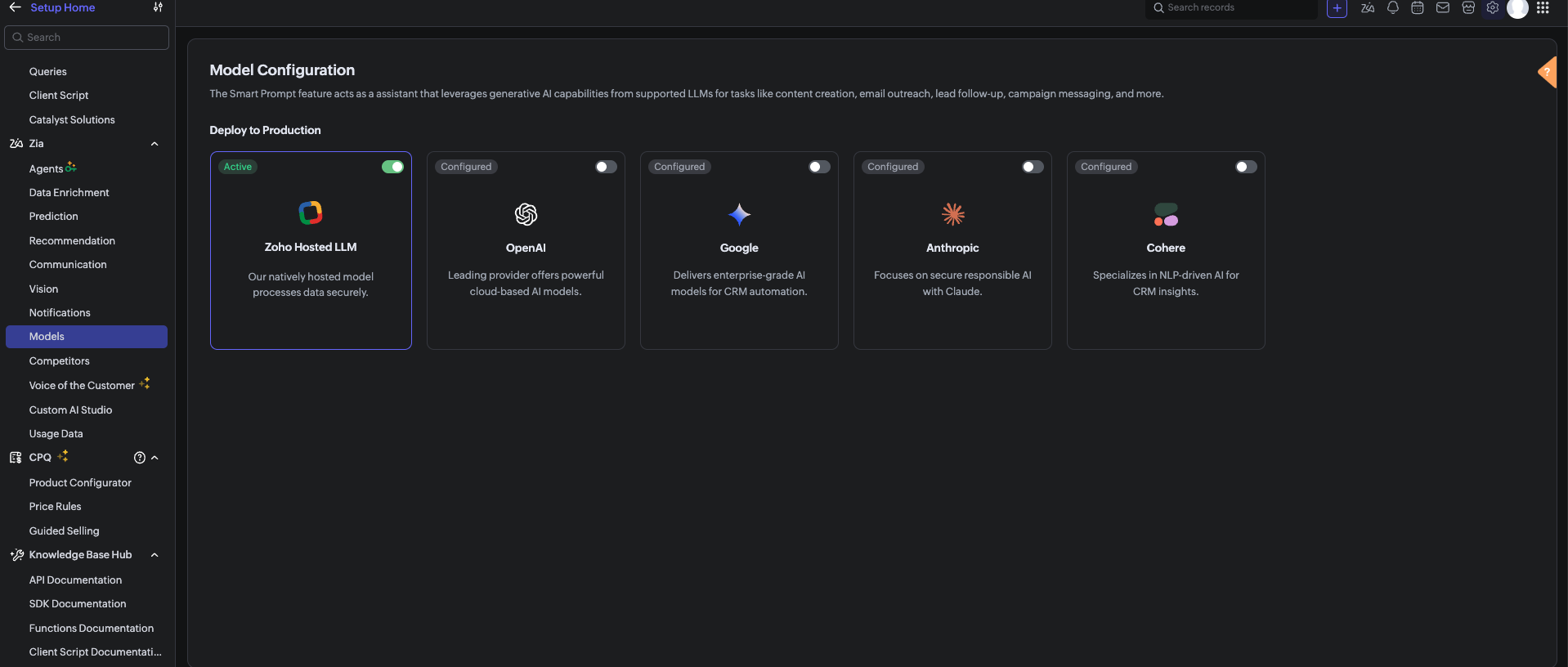
Before using the Zia Assistant API inside the Deluge function, make sure that AI is enabled in Zoho CRM.

To enable AI configuration, go to Setup > Zia > Models > Zoho Hosted LLM vendor.
Note: In V8, only the Zoho Hosted LLM vendor can be enabled and used.           


  1. CRM Connection: Connections with appropriate scopes.

Implementation steps

Step 1: Create custom fields

Navigate to Settings → Customization → Modules and Fields → Deals and create these 6 custom fields:

S.No

Field Label

API Name

Data Type

values

1

Risk

Risk

Picklist

1, 2, 3, 4, 5, 6, 7, 8, 9, 10

Risk: 1 = low risk, Risk 10 = high risk

2

Sentiment

Sentiment

Picklist

Positive, Neutral, Negative

3

AI Analysis

AI_Analysis

Multi-line Text

—

4

Previous Risk

Previous_Risk

Number

—

5

Risk Trend

Risk_Trend

Picklist

Increasing, Stable, Decreasing

6

Alert Sent

Alert_Sent

Checkbox

—


Note: After creating each field, verify the API Name matches exactly. Zoho sometimes appends numbers (example, Sentiment1) if a field name conflicts with existing or deleted fields. 

Step 2: Set up Zoho CRM Connection

  1. Go to Settings → Developer Space → Connections.
  2. Click Create Connection
  3. Select your services.
  4. Name the connection: zohocrm (used in this post)
  5. Add the required scopes
  6. Click Create and Connect
  7. Authorize the connection

Step 3: Create the custom function

  1. Go to Settings → Developer Space → Functions
  2. Click Create Function
  3. Display Name: Deal Notes Sentiment Analysis
  4. Function Name: DealNotesSentimentAnalysis
  5. Category: Automation
  6. Return Type: void
  7. Add Argument: dealId: Deals.Deal Id Type: int
  8. Click Save
      Note: The complete custom function code is provided at the end of this post.

Step 4: Configure the Workflow Rule

  1. Go to Settings → Automation → Workflow Rules
  2. Click Create Rule
  3. Module: Deals
  4. Rule Name: Deal Notes Sentiment Trigger
  5. When: A note is added or modified
  6. Condition: All Deals (or customize as needed)
  7. Instant Action: Associate the custom function →DealNotesSentimentAnalysis
  8. Map the dealId argument to the Deal's Record ID
  9. Click Save

What happens inside the custom function?

At this point, the workflow is fully set up. Whenever a note is added or modified in a deal, the workflow triggers the custom function. But what exactly happens inside this function?
Instead of going through the code line by line, let’s break it down into logical stages to understand how the system works end-to-end.
The snippets below highlight only the core logic for each step.

Note: The complete function code is provided in the next section for reference. You can use and adapt it based on your use case.

Step 1: Gathering complete deal context

The function begins by collecting key details about the deal:
  1.  Deal Name 
  2.  Stage 
  3.  Amount 
  4.  Close Date 
  5.  Deal Owner 
  6.  Existing Risk Score 
This ensures that the analysis is not done in isolation.
 The AI receives full deal context, which improves the accuracy of sentiment and risk evaluation.

dealData = zoho.crm.getRecordById("Deals", dealIdLong);
dealName   = ifnull(dealData.get("Deal_Name"), "");
dealStage  = ifnull(dealData.get("Stage"), "");
dealAmount = ifnull(dealData.get("Amount"), "0");
closeDate  = ifnull(dealData.get("Closing_Date"), "Not defined");
// Existing Risk
existingRisk = ifnull(dealData.get("Risk"), "0").toString().toNumber();
// Owner Info
owner = dealData.get("Owner");
ownerName  = ifnull(owner.get("name"), "");
ownerEmail = ifnull(owner.get("email"), "");


Step 2: Reading All deal notes

Next, the function fetches all notes associated with the deal.
Instead of analyzing only the latest note, it:
  1.  Collects every note.
  2.  Combines them into a structured format.
This allows the system to:
  1.  Identify repeated concerns.
  2.  Detect patterns across conversations.
  3.  Understand the overall direction of the deal.

dealNotes = zoho.crm.getRelatedRecords("Notes", "Deals", dealIdLong);

notesContext = "";
for each note in dealNotes
{
 notesContext = notesContext + "- " + ifnull(note.get("Note_Content"), "") + "\n";
}


Step 3: Sending data to Zia Assistant

The collected deal data and notes are sent to Zia Assistant using a carefully designed prompt.
The prompt includes:
  1.  Definitions of positive, negative, and neutral signals. 
  2.  Real-world sales scenarios (pricing concerns, delays, objections).
  3.  Clear risk scoring guidelines (1 to 10 scale).
This ensures that the AI response is:
  1.  Consistent.
  2.  Context-aware.
  3.  Aligned with real sales behavior.

chatEntry = Map();
chatEntry.put("role", "user");
chatEntry.put("content",
 "Deal Name: " + dealName +
 "\nStage: " + dealStage +
 "\nAmount: " + dealAmount +
 "\nClose Date: " + closeDate +
 "\n\n=== DEAL NOTES ===\n" + notesContext
);

assistantMap.put("chat_history", {chatEntry});
assistantMap.put("prompt", "<custom sentiment + scoring prompt>");

response = invokeurl
[
 type :POST
 parameters: payload.toString()
 connection:"zohocrm"
];

This is where AI transforms raw notes into structured insights.

Step 4: Interpreting the AI response

Zia Assistant analyzes the input and returns a structured response containing:
  1. Overall Sentiment (Positive / Neutral / Negative) 
  2.  Risk Score (1–10) 
  3.  AI Analysis (brief reasoning) 
The function extracts these values for further processing.


aiText = "";

if(response.get("assistant") != null)
{
 aiText = response.get("assistant").get("details").get("data");
}


Step 5: Normalizing the output

Since AI responses can vary slightly in format, the function standardizes the output:
  1. Ensures sentiment matches exact CRM field values 
  2.  Validates risk score within the 1–10 range 
  3.  Cleans up any extra characters or formatting 
This step ensures clean and consistent data inside the CRM.


// Extract & clean risk
riskLine = riskLine.replaceAll("[^0-9]", "", false);
riskScore = riskLine.toNumber();
if(riskScore > 10) riskScore = 10;
if(riskScore < 1)  riskScore = 1;

// Normalize sentiment
sentimentLower = sentiment.toLowerCase();
if(sentimentLower.contains("negative")) sentiment = "Negative";
else if(sentimentLower.contains("positive")) sentiment = "Positive";
else sentiment = "Neutral";


Step 6: Calculating risk trend

The system then compares:
  1. Previous Risk Score 
  2.  Current Risk Score 
Based on this, it determines whether the deal is:
  1. Increasing in risk
  2. Decreasing in risk
  3. Stable
This adds an important layer of intelligence and not just what the risk is, but how it is changing over time.


riskTrend = "Stable";

if(riskScore > existingRisk)
{
    riskTrend = "Increasing";
}
else if(riskScore < existingRisk)
{
    riskTrend = "Decreasing";
}


Step 7: Updating the deal record

Once all values are processed, the function updates the deal with:
  1. Risk 
  2.  Sentiment 
  3.  AI Analysis 
  4.  Previous Risk 
  5.  Risk Trend 
  6.  Alert Sent Flag 
At this stage, the deal record becomes a live reflection of customer sentiment.


updateMap = Map();
updateMap.put("Risk", riskScore.toString());
updateMap.put("Sentiment", sentiment);
updateMap.put("AI_Analysis", analysis);
updateMap.put("Previous_Risk", existingRisk.toString());
updateMap.put("Risk_Trend", riskTrend);
zoho.crm.updateRecord("Deals", dealIdLong, updateMap);


Step 8: Smart email alerting

If the risk score crosses a threshold (Risk > 8), the system triggers an alert to the record owner to take immediate action.
An email is sent to the Deal Owner with:
  1. Deal details 
  2. Risk score 
  3. Sentiment 
  4. Risk trend 
  5. AI analysis 
To avoid alert:
  1. The system checks whether an alert has already been sent. 
  2.  A new alert is triggered only if the risk increases further.
previousAlertSent = ifnull(dealData.get("Alert_Sent"), false);

if(riskScore > 8 && (previousAlertSent == false || riskScore > existingRisk) && ownerEmail != "")
{
    // Send alert email
    mailPayload = {
        "from": {"user_name": ownerName, "email": zoho.crm.getOrgVariable("defaultMail")},
        "to": {{"user_name": ownerName, "email": ownerEmail}},
        "subject": "🚨 Deal At Risk: " + dealName,
        "content": "Risk Score: " + riskScore + "/10<br>Sentiment: " + sentiment + "<br><br>" + analysis,
        "mail_format": "html"
    };

    invokeurl
    [
        url :"https://www.zohoapis.com/crm/v8/Deals/" + dealIdLong + "/actions/send_mail"
        type :POST
        parameters: {"data": {mailPayload}}.toString()
        headers: {"Content-Type":"application/json"}
        connection: "zohocrm"
    ];

    zoho.crm.updateRecord("Deals", dealIdLong, {"Alert_Sent": true});
}
else if(riskScore <= 8)
{
    // Reset alert flag
    zoho.crm.updateRecord("Deals", dealIdLong, {"Alert_Sent": false});
}

Step 9: Dynamic tag management

Finally, the system visually marks high-risk deals:
  1.  If Risk > 8 → Adds tag “High Risk Deal”
  2.  If Risk reduces → Removes the tag automatically 
This makes it easy for users to:
  1.  Identify risky deals instantly 
  2.  Prioritize follow-ups 

if(riskScore > 8)
{
 invokeurl
 [
 url :"https://www.zohoapis.com/crm/v8/Deals/" + dealIdLong + "/actions/add_tags"
 type :POST
 parameters: tagPayload.toString()
 connection:"zohocrm"
 ];
}
else
{
 invokeurl
 [
 url :"https://www.zohoapis.com/crm/v8/Deals/" + dealIdLong + "/actions/remove_tags"
 type :POST
 parameters: tagPayload.toString()
 connection:"zohocrm"
 ];


Complete custom function code
The complete Deluge script used in this implementation is provided below for reference and direct use:

Notes
  1. To get better sentiment detection, use a clear and strong prompt in the Zia Assistant API.
  2. The output depends on how well the prompt defines positive, negative, and neutral signals.
  3. Zia looks at the overall trend of notes, not just one note.
  4. If a deal had negative notes earlier but recent notes are positive, the risk (Risk field ) will decrease
  5. If new negative notes are added, the risk will increase.
  6. Sometimes Zia Assistant may not detect sentiment perfectly, as it is AI-based

Conclusion

This automation transforms deal notes from passive text into actionable intelligence. Instead of relying on sales managers to read hundreds of notes manually, Zia Assistant does it automatically detecting sentiment, scoring risk, tracking trends, alerting owners, and tagging high-risk deals all in real time.

We trust that this post meets your needs and is helpful. Let us know your thoughts in the comment section or reach out to us at support@zohocrm.com

Stay tuned for more insights in our upcoming Kaizen posts!

Happy coding!!!

Related Links:
  1. Kaizen Index
  2. Kaizen Directory
  3. API Directory
  4. Zoho CRM API Document


    Access your files securely from anywhere

          Zoho FSM Video Tutorials


                All-in-one knowledge management and training platform for your employees and customers.


                                      Zoho Developer Community


                                                            • Desk Community Learning Series


                                                            • Digest


                                                            • Functions


                                                            • Meetups


                                                            • Kbase


                                                            • Resources


                                                            • Glossary


                                                            • Desk Marketplace


                                                            • MVP Corner


                                                            • Word of the Day


                                                            • Ask the Experts


                                                                      • Sticky Posts

                                                                      • Announcing the new SKILL.md for Zoho CRM and the updated OAS repository!

                                                                        We are introducing a new zoho-crm skill to make working with Zoho CRM Developer tools (like APIs, functions, widgets, client scripts, queries etc) easier and faster, with the help of AI in your preferred AI harness like Claude Code, Codex, Cursor, VSCode
                                                                      • Kaizen #261 : Using Zoho CRM Skill to generate complex COQL queries

                                                                        Hello everyone, In the previous Kaizen posts, we introduced the zoho-crm SKILL.md and discussed how it can help you when you are working with Zoho CRM APIs and Client Script. In this Kaizen, we will focus on using the Zoho CRM `SKILL.md` with GitHub Copilot
                                                                      • Kaizen #256 - Build an Arrival Readiness Web Tab in Zoho CRM

                                                                        Hi everyone! Welcome back to the Kaizen series! In the post, we discuss a use case in hospitality industry: how an Arrival Readiness web tab widget can be used to let reception staff identify and resolve issues before arrival of guests. Use case In the
                                                                      • Kaizen #198: Using Client Script for Custom Validation in Blueprint

                                                                        Nearing 200th Kaizen Post – 1 More to the Big Two-Oh-Oh! Do you have any questions, suggestions, or topics you would like us to cover in future posts? Your insights and suggestions help us shape future content and make this series better for everyone.
                                                                      • Kaizen #226: Using ZRC in Client Script

                                                                        Hello everyone! Welcome to another week of Kaizen. In today's post, lets see what is ZRC (Zoho Request Client) and how we can use ZRC methods in Client Script to get inputs from a Salesperson and update the Lead status with a single button click. In this


                                                                      Manage your brands on social media


                                                                            Zoho TeamInbox Resources


                                                                                Zoho CRM Plus Resources

                                                                                  Zoho Books Resources


                                                                                    Zoho Billing Resources

                                                                                      Zoho Projects Resources


                                                                                        Zoho Sprints Resources


                                                                                          Qntrl Resources


                                                                                            Zoho Creator Resources


                                                                                                Zoho CRM Resources

                                                                                                • CRM Community Learning Series

                                                                                                  CRM Community Learning Series


                                                                                                • Kaizen

                                                                                                  Kaizen

                                                                                                • Functions

                                                                                                  Functions

                                                                                                • Meetups

                                                                                                  Meetups

                                                                                                • Kbase

                                                                                                  Kbase

                                                                                                • Resources

                                                                                                  Resources

                                                                                                • Digest

                                                                                                  Digest

                                                                                                • CRM Marketplace

                                                                                                  CRM Marketplace

                                                                                                • MVP Corner

                                                                                                  MVP Corner


                                                                                                    Design. Discuss. Deliver.

                                                                                                    Create visually engaging stories with Zoho Show.

                                                                                                    Get Started Now


                                                                                                      Zoho Show Resources

                                                                                                        Zoho Writer

                                                                                                        Get Started. Write Away!

                                                                                                        Writer is a powerful online word processor, designed for collaborative work.

                                                                                                          Zoho CRM コンテンツ


                                                                                                            Nederlandse Hulpbronnen


                                                                                                                ご検討中の方


                                                                                                                          • Recent Topics

                                                                                                                          • Auto-Sync Field of Lookup Values When Parent Record Changes

                                                                                                                            Hi Zoho Team, Currently, when you use a "Field of Lookup" in Zoho CRM, the value is captured as a snapshot at the time the lookup is set. If the parent record is later updated, the Field of Lookup value on the child record does NOT update and stays stale.
                                                                                                                          • [Request] Pivot filter date option : from set date to relative value ie from 01Jan to LastMonth

                                                                                                                            I don't think I can currently do this... but it's worth asking if it's possible. My use case is concerning annual leave which is calculated from the beginning of the calendar year (01Jan) then each month I want to have details of leave taken etc... In
                                                                                                                          • Customer Statement Showing Incorrect Negative Balance Due to Unused Advance

                                                                                                                            Dear Zoho Support Team, We are facing an issue with the Customer Statement in Zoho Invoice related to customer advances/mobilization advances. The issue is that when a customer has made an advance payment that has not yet been fully utilized against invoices,
                                                                                                                          • Mois de la sensibilisation à la cybersécurité 2026 : faites de la sécurité un réflexe avec Zoho

                                                                                                                            Imaginez : vos systèmes informatiques répondent aux normes de sécurité en vigueur et votre entreprise est assurée contre les cyberattaques. Pourtant, un matin, tout bascule. Vos données sont chiffrées et un message glaçant s’affiche à l’écran : « Si vous
                                                                                                                          • Specifying time increments on a Date/Time field

                                                                                                                            Hi all, Im using a Date/Time field in my CRM module. At the moment the increments are 30 minutes. How can I change these to be 15 minutes? Thanks
                                                                                                                          • What's new in Zoho Workplace | August 2026

                                                                                                                            Hello Zoho Workplace community! Here's a roundup of all the new features and announcements that went live across Zoho Workplace applications in August. Zoho Mail Zoho Mail is now available in AWS Marketplace! AWS Marketplace users can access and subscribe
                                                                                                                          • What's new in Zoho Social - Q3 recap

                                                                                                                            Hello everyone, We've rolled out a bunch of exciting updates in Q3, and we're thrilled to walk you through them. Here's a quick look at everything we released in July, August, and September to help you experiment with content, automate engagement workflows,
                                                                                                                          • Zoho Books | Product updates | October 2026

                                                                                                                            Hello users, October brings a range of new features and enhancements to Zoho Books, designed to simplify compliance, streamline accounting workflows, and improve inventory management. From the launch of the Nigeria Edition and France’s e-invoicing capabilities
                                                                                                                          • The Social Wall: September 2026

                                                                                                                            Hello everyone! This month, we’re bringing Snapchat to Zoho Social. You can now connect your Snapchat account and manage your content alongside your other social channels. Whether you want to reach a wider audience through Spotlights or share quick updates
                                                                                                                          • Turning off the recorded welcome in Zoho Webinar

                                                                                                                            Is there a way to turn off the recorded voice that comes up at the beginning of every webinar session? It devalues the experience for attendees from feedback, interrupting their connection with our brand and delaying webinar start unnecessarily.
                                                                                                                          • Option to Disable Knowledge Base Section in Feedback Widget Popup Hello Zoho Desk Team

                                                                                                                            Hello Zoho Desk Team, How are you? We are actively using Zoho Desk and would like to make more use of the Feedback Widget. One of the ways we implement it is through the popup option. At the moment, the popup always displays the Knowledge Base section,
                                                                                                                          • Zoho Recruit mailserver get blocked by Microsoft!

                                                                                                                            Hi, We have experienced this issue twice now, where Zoho Recruit outbound IP addresses are being blocked by Microsoft. We are confident that Microsoft is the blocking party, as all outbound emails to candidates with @hotmail.com, @live.com, and @outlook.com
                                                                                                                          • Owner's Draw

                                                                                                                            Example: I have a charge account at ABC Company. During the month I charge one $50 item for my business. I also pick up a $20 item for personal use. At the end of the month, I receive a statement with a balance due of $70 and I want to PAY THE ENTIRE
                                                                                                                          • Months of WooCommerce–Zoho Inventory sync failures and repeated support requests – has anyone experienced this?

                                                                                                                            Months of WooCommerce–Zoho Inventory sync failures and repeated support requests – has anyone experienced this? I run a small retail business using WooCommerce and Zoho One. For months, I have been trying to resolve recurring synchronisation failures
                                                                                                                          • View Cannot Use UPC as Criteria

                                                                                                                            When creating a new custom view, the UPC field is not available as a criterion for the view. This seems strange, because both ISBN and EAN are available in the dropdown. Because of this, I feel like the situation is possibly an oversight rather than by
                                                                                                                          • What are the best practices for managing tax records and financial information for a small business?

                                                                                                                            I’m interested in learning how other small business owners and accounting professionals organize their financial records and prepare for tax filing. With bookkeeping, expense tracking, income records, and tax documents all needing to stay accurate, having
                                                                                                                          • Automating CRM backup storage?

                                                                                                                            Hi there, We've recently set up automatic backups for our Zoho CRM account. We were hoping that the backup functionality would not require any manual work on our end, but it seems that we are always required to download the backups ourselves, store them,
                                                                                                                          • not able to convert pdf to jpg and other forms and vice versa.

                                                                                                                            i want to change my pdf to jpg, word, etc and some times jpg to pdf. i don't know how to do in this.
                                                                                                                          • How Can I Collect Payments for Credit Sales Directly from Zoho POS Billing App?

                                                                                                                            We are currently testing Zoho POS for a retail business and have encountered an issue with collecting payments on outstanding invoices from customers who purchase on credit. When we process a Credit Sale, Zoho POS correctly creates an Unpaid Invoice.
                                                                                                                          • Indeed has retired Organic (Free) job posting support for Staffing Agency edition users

                                                                                                                            Dear Zoho Recruit Users, Due to a policy change by Indeed, Organic Job Posting support for staffing agencies is no longer be available in all regions, except Japan. Keep in mind that Corporate HR edition accounts will not be impacted by this change in
                                                                                                                          • Changing an existing item to different accounts & inventory-tracked

                                                                                                                            Hi everyone, I have an item in Zoho Books that was originally set up as a non-inventory item. Over time, I associated it with different sales and purchase accounts, and I now have many invoices, bills, and reports that use this item. My business process
                                                                                                                          • Lookups and Custom Modules

                                                                                                                            I created a Custom Module that I'm calling "Item Purchasing Group". This module will store information for groups of Items that must be purchased together (including minimum overall quantities and/or values, etc.). This will have a one-to-many relationship
                                                                                                                          • Why is it so hard to get a fiscal YTD P&L report in Zoho Books?

                                                                                                                            Yes I know that it could be done in Zoho Analytics, but I would have expected this default report view to be easily accessible in the list of Books accounting reports. Just like any other basic accounting system, I'm looking for monthly columns of the
                                                                                                                          • Button or Links order

                                                                                                                            Is there a way to re-order the buttons or links that are created? Moderation Update: With our recent enhancement to custom button creation from the layout editor, administrators can now reorder custom buttons directly from the layout editor, and this
                                                                                                                          • Grok Bot integrations ASAP

                                                                                                                            Grok Bot integration is critical. Please hurry. Zoho Books, CRM, all of it needed right away.
                                                                                                                          • Bulk updating tags

                                                                                                                            My organisation handles a number of restricted funds. We previously did this by having a chart of accounts where each restricted fund has its own income and expense accounts. However, our accountant changed this, moving all transactions into accounts
                                                                                                                          • Zoho Writer Label Template Merge/Print Via API/Webhook/Flow

                                                                                                                            Short version of goal: To be able to kick off a Zoho Writer Label Template Document via API or Webhook or even using Zoho Flow. As of right now I have been unable to figure out a way to do that. Long version of goal: We would like to press a button (run
                                                                                                                          • Generate a Zoho Sign link

                                                                                                                            From time to time I get a response "I never received your you e-document for electronic signature" is there a way to generate a Zoho Sign link to share.
                                                                                                                          • Kaizen #263: Using Zoho CRM Skill to Build Widgets

                                                                                                                            Hello everyone! Welcome back to another exciting Kaizen post. In the previous Kaizen posts, we introduced the zoho-crm skill.md and explored how it can help with Zoho CRM APIs, Client Scripts, complex COQL queries, and Skill to build Queries. In this
                                                                                                                          • Extracting/automating sign link

                                                                                                                            Is there a way to copy the sign link to a specific recipient? And also, is it possible to automate the sending of the link to myself or external automation tools? In more details: It can sometimes happen that the recipient email is spelled wrong/unavailable
                                                                                                                          • Zoho notebook No login

                                                                                                                            Hello Team, I recently downloaded and installed the latest version of zoho notebook for windows. But I am not able to login without providing any sso or email address. Did you removed the no login feature for this app? This is just a windows app. can
                                                                                                                          • Search is completely broken for PC

                                                                                                                            I go to note, try to search for "mtga" and it shows 702 results (it's a big note), highlights all letters "m" and I can't find anything. Same for "gathering" - it thinkgs I think only for "g". Looking for "zoho" shows as if I searched only for "z". Using
                                                                                                                          • Generate a link for Zoho Sign we can copy and use in a separate email

                                                                                                                            Please consider adding functionality that would all a user to copy a reminder link so that we can include it in a personalized email instead of sending a Zoho reminder. Or, allow us to customize the reminder email. Use Case: We have clients we need to
                                                                                                                          • Behind a great customer experience is a team

                                                                                                                            Hi everyone, October is here, and the first week marks the Customer service week. Each year, we thank our customer service professionals. Service professionals are all around us, even in our own workplaces: They handle essential administrative work like
                                                                                                                          • What's New - August and September 2026 | Zoho Backstage

                                                                                                                            Hello everyone, August and September bring a fresh wave of intelligence to Zoho Backstage. AI takes the spotlight with tools that help you create content, support attendees, and manage how AI fits into your events. Alongside AI, we’ve refined email communication,
                                                                                                                          • Images Not Displaying Properly in Zoho Desk

                                                                                                                            Hi, We are experiencing an issue with image rendering in Zoho Desk, affecting both incoming and outgoing emails. Images embedded in email conversations are not displaying properly. Instead, we see broken image icons or empty placeholders where the images
                                                                                                                          • Announcing the new SKILL.md for Zoho CRM and the updated OAS repository!

                                                                                                                            We are introducing a new zoho-crm skill to make working with Zoho CRM Developer tools (like APIs, functions, widgets, client scripts, queries etc) easier and faster, with the help of AI in your preferred AI harness like Claude Code, Codex, Cursor, VSCode
                                                                                                                          • Zoho Projects - Has something changed regarding to linking Projects and Deals via the API?

                                                                                                                            I am trying to link Zoho Projects to Deals in CRM using the API, but each time, the Deal Contact is added as a Client user and receives an email invite asking them to join the organisation. These are internal projects and the customer should not have
                                                                                                                          • How long does it take to review campaigns?

                                                                                                                            Hello Zoho, i scheduled my campaigns yesterday afternoon and it has been under review for over how many hours and those campaigns were supposed to be out yesterday so new ones can go out today. Is there something i'm doing wrong?
                                                                                                                          • Using Mail Merge Template to Print Documents with One Subform Record's Fields per Document

                                                                                                                            Hello, We have a Mail Merge template created in Zoho Writer which is not able to perform the functionality which is currently required to automate the documentation task portion of our process. The CRM module we are primarily using is based on a "Loans"
                                                                                                                          • Next Page