Incoming Lead Email Intent Detection using Zia Assistant API in Zoho CRM

Hello all!
Welcome back to a fresh Kaizen week.
In this post, we will explore how Zia detects positive intent from incoming emails in the Leads module using the Zia Assistant API along with Workflow Rules and Custom Functions in Zoho CRM.
Use Case
Problem
Sales teams often manage 1000+ leads in Zoho CRM. Sometimes, a lead sends an email showing clear buying interest such as:
- I want to buy your product.
- Please share pricing details.
- Can we schedule a demo?
These important emails can easily get buried among other emails and activities. As a result, sales representatives may respond after several days, and by that time, the lead may already move to a competitor. This leads to missed opportunities and revenue loss.
Solution
Using Workflow, Deluge, CRM Email APIs, and Zia Assistant API, incoming lead emails are automatically analyzed for purchase intent.
When a lead sends an email with strong buying interest:
- Workflow automatically triggers the custom function.
- The function fetches the latest incoming email.
- Zia Assistant analyzes the email intent and buying interest.
- If positive purchase intent is detected, CRM instantly performs multiple automated actions.
The system automatically:
- Marks the Lead as an Interested Lead.
- Creates a high-priority follow-up task.
- Adds a note to the lead record.
- Sends an alert email to the Lead owner.
- Sends an automatic acknowledgement reply to the Lead.
Result
Zero missed hot leads. Response time drops from days to minutes. Direct revenue protection, immediate follow-up for interested leads, and better customer engagement.
What sales teams need?
- Automatic monitoring of incoming lead emails.
- AI-based purchase intent detection instead of simple keyword matching.
- Automatic identification of hot leads.
- Immediate task creation for sales representatives.
- Instant alerts for faster follow-up.
- Automatic acknowledgement replies for better customer experience.
- Reduced chances of missing highly interested leads.
Prerequisites
1. Configure Mail Integration
Configure your mail with Zoho CRM. Without mail configuration, the workflow cannot detect incoming emails. Navigate to Setup → Channels → Email.
Configure one of the following:
- IMAP Integration
- POP Integration
- Zoho Mail Integration
- Microsoft 365 / Gmail Integration
Make sure:
- Incoming emails are synced successfully.
- Incoming emails are successfully appearing under the related Lead records in CRM.
- The sales representative mailbox is connected properly.
2. Enable Zia AI Configuration
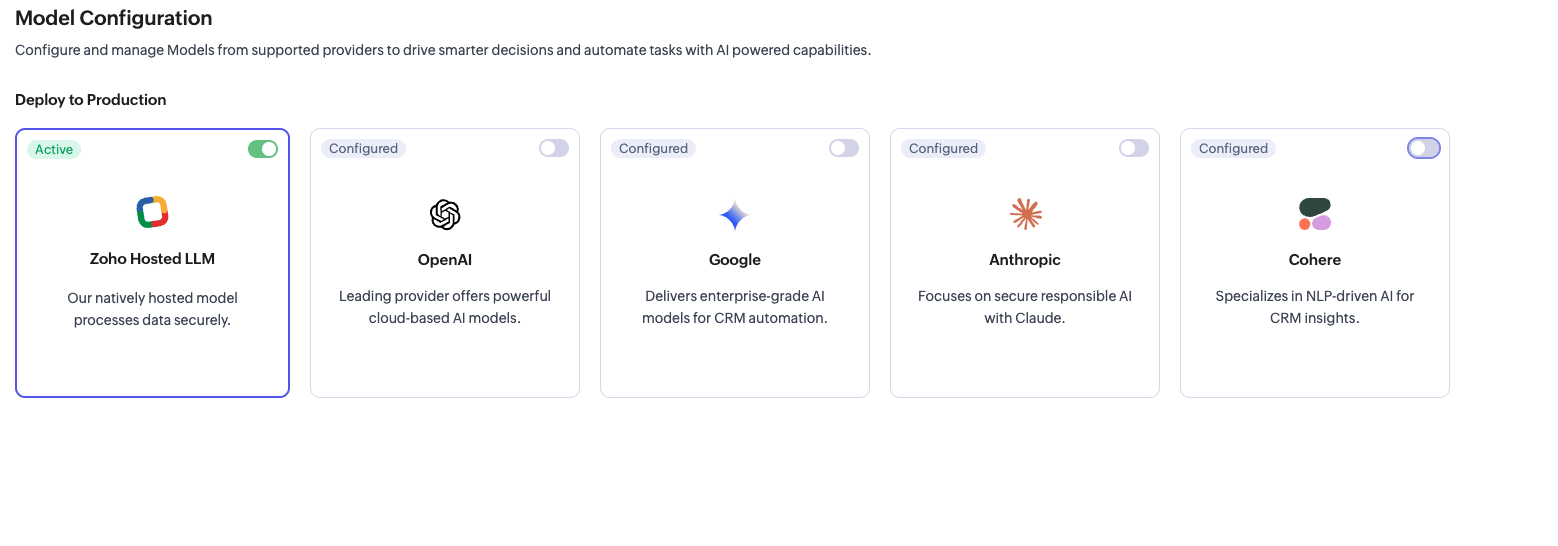
Before using the Zia Assistant API inside the Deluge function, make sure that AI is enabled in Zoho CRM.
- To enable AI configuration, go to Setup → Zia → Models → Zoho Hosted LLM vendor. Note: In V8, only the Zoho Hosted LLM vendor is supported.
3. Connection
Create a CRM connection with the required scopes. Navigate to Setup → Developer Space → Connections. Add the required OAuth scopes based on your use case.
Implementation steps
Step 1: Create Custom Fields
Navigate to Settings → Customization → Modules and Fields → Leads. Create the following custom fields for intent detection and automation.
Field Label | Field Type | Purpose |
Hot Lead Flag | Checkbox | Marks highly interested leads. |
Email Intent | Picklist | Stores detected intent such as Purchase Intent, General Inquiry, or Neutral. |
Intent Detected Time | Date-Time | Stores the last intent detection time. |
Alert Sent | Checkbox | Indicates whether an alert email was sent to the sales representative. |
We will continue using the following existing Lead fields in this implementation:
Existing Field | Purpose |
Lead Status | Updated to Interested when purchase intent is detected. |
Rating | Updated to Active for interested leads. |
Owner | Used to notify the assigned sales representative. |
Step 2: Set up Zoho CRM Connection
- Go to Settings → Developer Space → Connections.
- Click Create Connection
- Select your services.
- Name the connection: zohocrm (used in this post)
- Add the required scopes
- Click Create and Connect
- Authorize the connection
Step 3: Create the Custom function
- Go to Settings → Developer Space → Functions
- Click Create Function
- Display Name: Detect Positive Lead Intent
- Function Name: detectPositiveLeadIntent
- Category: Automation
- Return Type: void
- Add Argument: leadId: Leads.Lead Id Type: int
- Click Save
Step 4: Configure the Workflow Rule
- Go to Settings → Automation → Workflow Rules
- Click Create Rule
- Configure:
- Module: Emails
- Rule Name: Detect Positive Lead Intent
- Description: (optional) Triggers when incoming email is received for a Lead.
- Click Next
- WHEN: Execute this workflow rule based on: Select Incoming email → is → Received
- Click Done
- CONDITION:
- Would you like to set conditions for email fields? → No
- Apply this rule to → Lead
- Which Leads would you like to apply this rule to? → All Leads
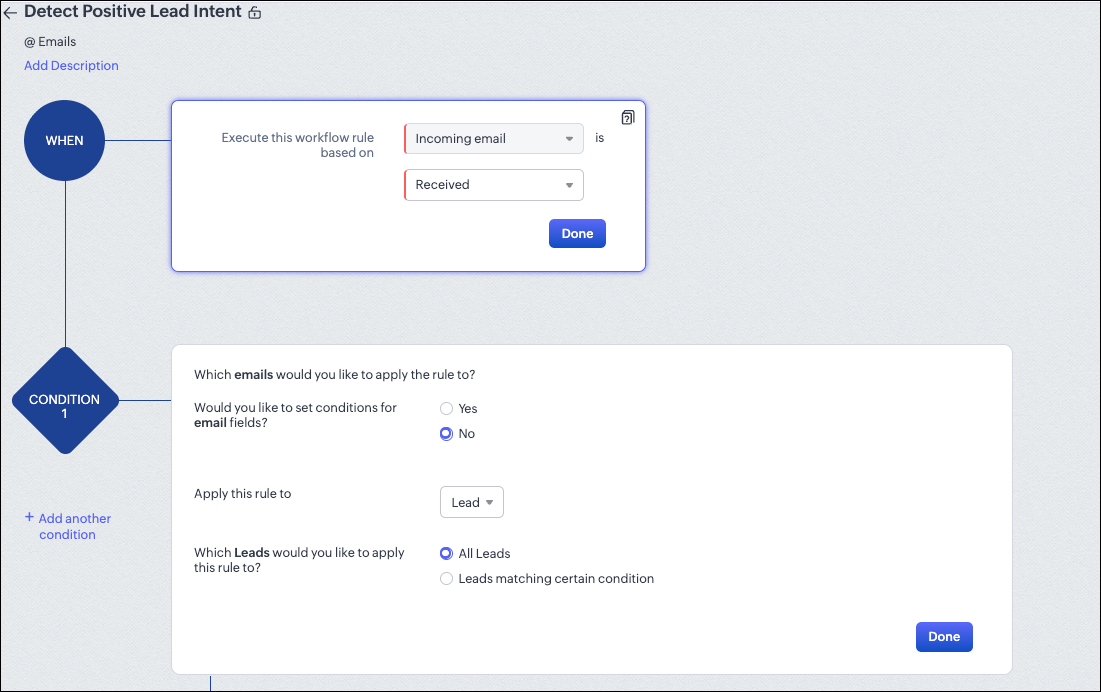
8. Click Done
9. INSTANT ACTIONS:
- Click Function
- Select your function: Detect Positive Lead Intent
- Map the argument: leadId → Select Lead → Lead Id
10. Click Save.
What happens inside the custom function?
At this stage, the workflow setup is complete. Whenever an email is received, the workflow automatically triggers the custom function. Now, let’s see what happens inside the function.
Instead of explaining the code line by line, we will look at the overall flow and understand how the system works step by step. The snippets below highlight only the important logic used in each stage.
Step 1: Fetch the Lead & Owner details
The function receives the leadId from the workflow trigger and immediately fetches the full Lead record. It extracts the lead's name, company, email address, and the record owner's name, email, and ID.
leadData = zoho.crm.getRecordById("Leads", leadIdLong); leadName = leadData.get("Full_Name"); company = leadData.get("Company"); leadEmail = leadData.get("Email"); owner = leadData.get("Owner"); ownerName = owner.get("name"); ownerEmail = owner.get("email"); // Alert will be sent here ownerId = owner.get("id"); // Task will be assigned here |
If no owner email is found, the function stops immediately.
Stage 2: Fetch the latest incoming email
Why analyze only the latest email?
In this post, we use the latest email to identify the lead's current buying intent and trigger immediate sales actions. Analyzing the most recent customer email is sufficient for real-time purchase intent detection and faster follow-up. You can further customize this logic based on your specific business requirements. The function calls the Get Emails of a Record API to retrieve all emails associated with the Lead record. It then loops through the emails and identifies the latest email sent by the Lead by comparing the sender's email address with the Lead's email address.
emailsResp = invokeurl [ url: ".../Leads/{id}/Emails" ... ]; // Loop — find latest email sent by the Lead if(senderEmail.toLowerCase() == leadEmail.toLowerCase()) { isIncoming = true; latestIncomingEmail = email; // keep the most recent } |
Once the latest incoming customer email is identified, the function makes the View Email API call using the email's message_id to fetch the complete email body. The retrieved email content is then sent to Zia for intent analysis.
Stage 3: Zia analyzes the email
The email subject and body are sent to the Zia Assistant API with a carefully crafted prompt that instructs Zia to detect genuine purchase intent.
The prompt instructs Zia to look for strong purchase intent signals such as pricing requests, demo requests, free trial requests, implementation discussions, contract negotiations, budget approvals, and other buying-related conversations.
Based on the email content, Zia returns either YES or NO. A YES response indicates that the lead is actively evaluating or interested in purchasing the product, while a NO response indicates that no clear purchase intent was detected.
analysisPrompt = "You are an enterprise-grade B2B sales intent detection AI. Analyze the incoming lead email and determine whether the customer shows strong and genuine PURCHASE_INTENT. Strong purchase intent includes asking for pricing, quotation, demo, free trial, implementation, onboarding, integrations, contract discussion, deployment timelines, budget approval, commercial discussion, next steps, or clear evaluation of the product for business adoption. Ignore greetings, thank you emails, support requests, informational questions, casual discussions, or unrelated conversations. Respond ONLY with YES if the lead is highly likely to purchase or actively evaluate the product for buying decision. Otherwise respond ONLY with NO.\n\nSubject:" + emailSubject + "\n\nEmail Content: " + cleanBody; ziaResponse = invokeurl [ url: ".../zia/smart_prompt/assistant" type: POST parameters: requestPayload.toString() ... ]; |
Stage 4: Parse Zia's Response
The function extracts Zia's answer from the response and sets the decision flag:
aiResponse = ziaResponse.get("assistant").get("details").get("data"); aiResponse = aiResponse.trim().toUpperCase(); if(aiResponse.contains("YES")) { hasPurchaseIntent = true; } |
Stage 5: Five actions triggered on Purchase Intent
If has PurchaseIntent is true, five actions fire in sequence:
i.Update lead fields:
updateMap.put("Hot_Lead_Flag", true); updateMap.put("Lead_Status", "Interested"); updateMap.put("Rating", "Hot"); updateMap.put("Email_Intent", "Purchase_Intent"); updateMap.put("Intent_Detected_Time", zoho.currenttime); |
ii. Create a high-priority task assigned to the Owner:
taskMap.put("Subject", "HOT LEAD: " + leadName + " wants to buy!"); taskMap.put("Priority", "High"); taskMap.put("Due_Date", zoho.currentdate); taskMap.put("Owner", ownerId); |
iii. Add a Note to the lead record:
noteMap.put("Note_Title", "Zia: Purchase Intent Detected"); noteMap.put("Note_Content", "From: " + customerEmail + "\nSubject: " + emailSubject + "\nKey content: " + noteContent); |
iv. Send alert email to the record owner:
sendmail [ from: zoho.loginuserid to: ownerEmail subject: "HOT LEAD ALERT: " + leadName + " wants to buy!" message: emailHtml ]; |
v. Auto-reply to the lead:
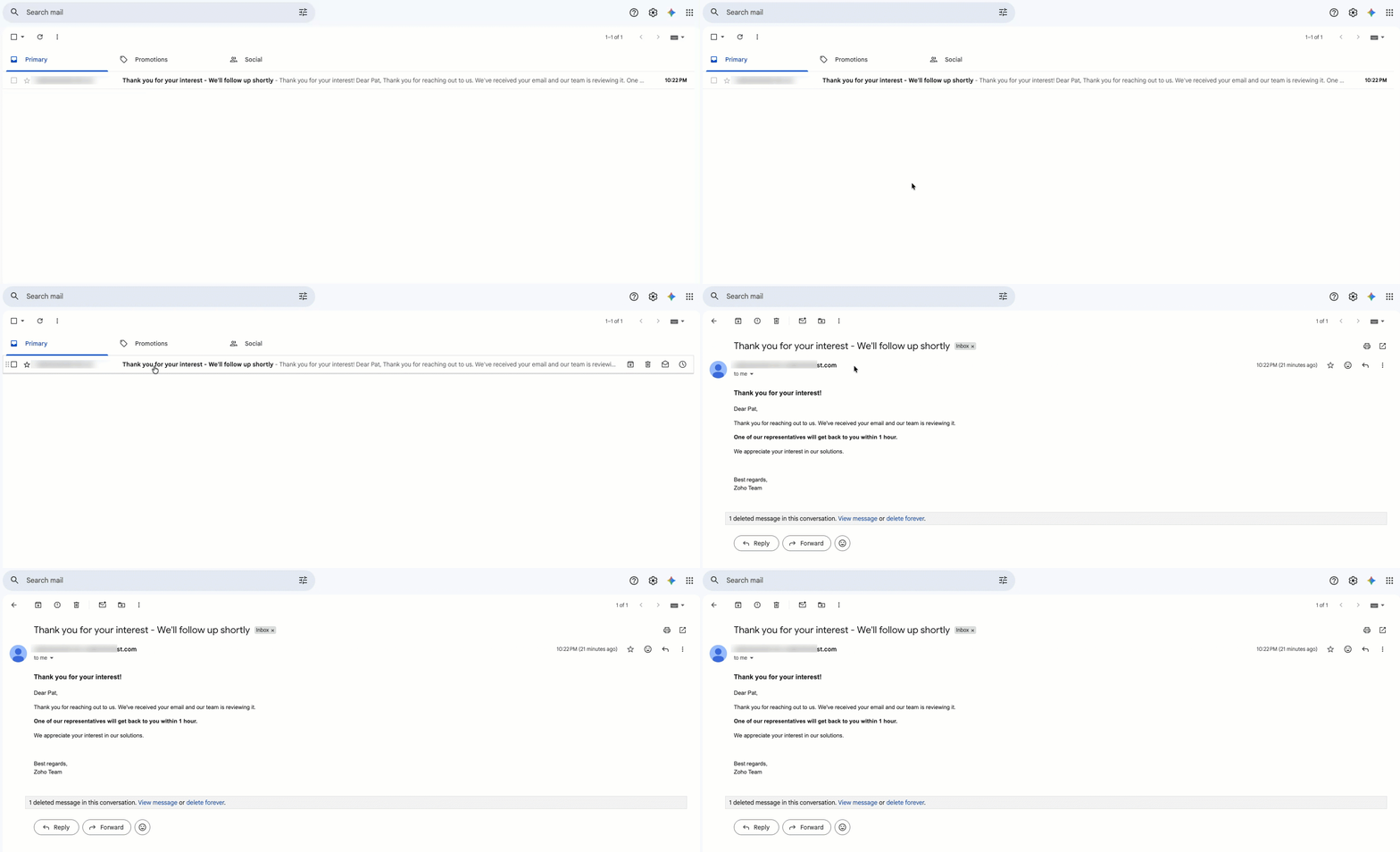
sendmail [ from: zoho.loginuserid to: leadEmail subject: "Thank you for your interest - We'll follow up shortly" message: autoReplyHtml ]; |
Note: The acknowledgement email is sent only when Zia detects purchase intent. No auto-reply is sent for general inquiries, informational emails, or emails without clear buying intent.
Output
1.Record owner receives an alert email for immediate follow-up:
 Sending alert mail to the respective record owner
2. Customer receives an automatic acknowledgement reply:
Notes
- To achieve better purchase intent detection, use a clear and strong prompt in the Zia Assistant API.
- The accuracy of intent detection depends on how well the prompt defines the purchase intent signals.
- Zia analyzes the complete email context, not just specific keywords.
- Emails containing pricing requests, demo requests, quotation requests, onboarding discussions, implementation questions, or next-step discussions are more likely to be identified as strong purchase intent.
- General support questions, greetings, thank you emails, and informational discussions may not be classified as purchase intent.
- The quality of incoming email content directly impacts the intent analysis result.
- Make sure the sales representatives' emails are properly synced with Zoho CRM before triggering the workflow.
- For better results, avoid sending incomplete or empty email bodies to Zia Assistant API.
- Sometimes Zia Assistant may not detect intent perfectly, as the analysis is AI-based.
This automation converts incoming lead emails into actionable sales insights. Instead of manually checking hundreds of emails, Zia automatically detects purchase intent, identifies hot leads, creates follow-up tasks, updates CRM fields, and alerts the sales representative in real time.
We trust that this post meets your needs and is helpful. Let us know your thoughts in the comment section or reach out to us at support@zohocrm.com
Stay tuned for more insights in our upcoming Kaizen posts!
Cheers!!!

Previous: Kaizen #245 - Real Time Signal Alerts for High-Value Abandoned Checkouts | Kaizen Collection: Home