Kaizen #63 - Layout Rules in Zoho CRM

Kaizen #63 - Layout Rules in Zoho CRM

Hello and welcome to another week of Kaizen!

This week, we will be discussing Layout Rules in Zoho CRM.
If you need to modify the layout of a module based on user inputs, or to show or hide sections based on the value of a specific field, we have got just the perfect solution for you.

What is a Page Layout?

In simple terms, a page layout is a template where you can add, choose and arrange the fields and sections that will be displayed in a module. Depending on your application requirement, you can either edit the standard layout, or create custom layouts.

What are Layout Rules and why you need them?

Layout rules are a set of criteria that you define to modify the layout of a module. These rules help you keep your layouts clean and clutter-free. Often, you may need to set up dynamic layouts, where the value selected for one field determines the subsequent sections and fields. 
For example, in an automobile rental company, the field requirements for a two-wheeler will differ from the ones for a car. By using layout rules, you can display only the relevant sections and fields based on the type of vehicle being rented. This article will use an automobile rental company as an example to explain Layout Rules.

Who can access Layout Rules feature?

Only users with permission to Customize Zoho CRM profile can access this feature.

How and when are Layout rules triggered?

You can trigger the rule when the chosen primary field meets one of the following conditions.
  • is
  • isn't
  • contains
  • doesn't contain
  • starts with
  • ends with
  • is empty
  • is not empty
You can trigger the following actions when the criteria are met:
  • Show Fields - To show specific fields. For example, show the Number of Helmets field only if the Helmets Required is YES.
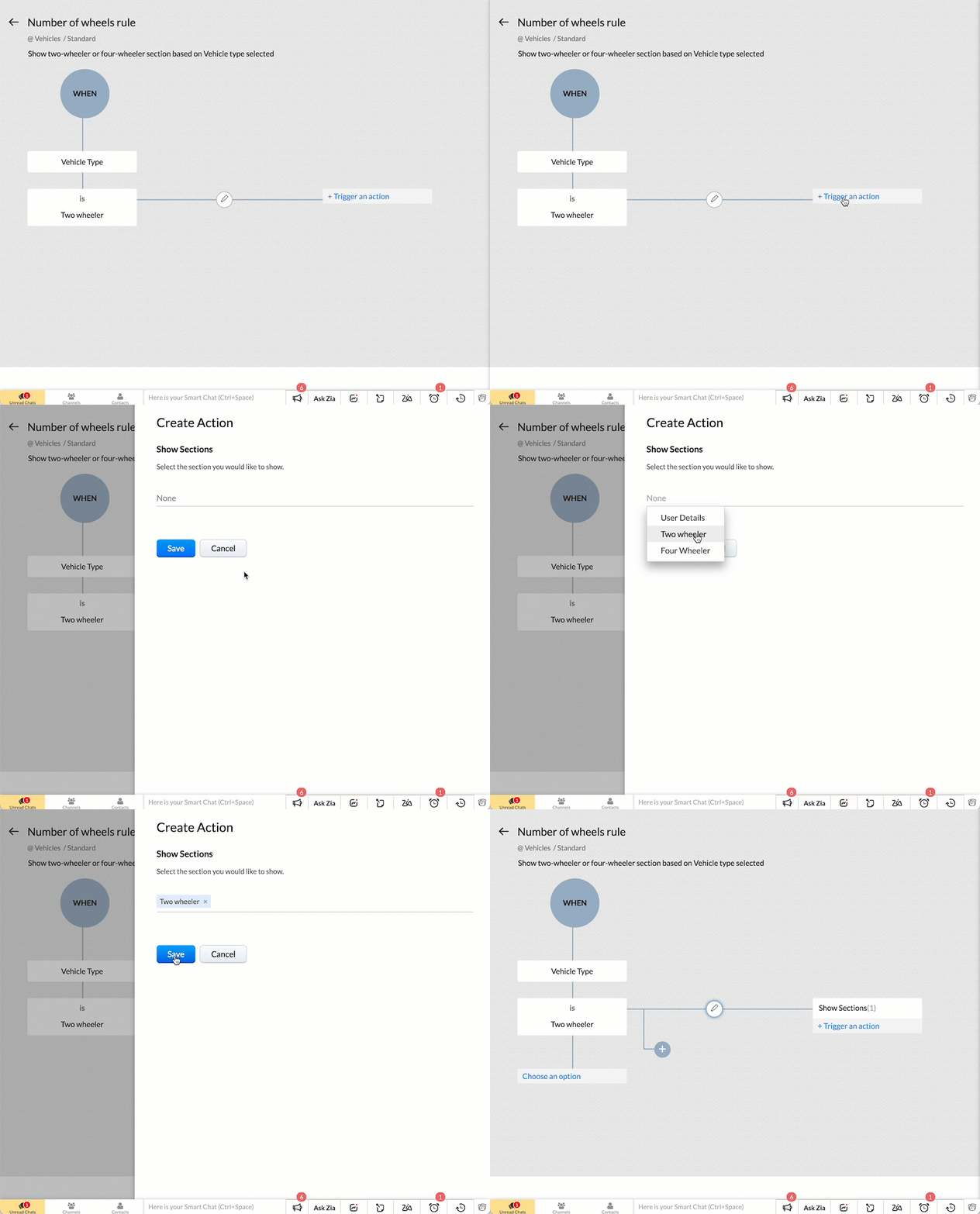
  • Show Sections - To show specific sections. For example, display the Four wheeler section only if the vehicle type is Four wheeler. 
  • Set Mandatory Fields - To set specific fields mandatory. For instance, make the car type field mandatory if the vehicle type is Four wheeler.
  • Show Subforms - To show specific subforms. For example, to show the Accessories Required only if the user chooses to rent accessories.

How to create Layout Rules?

  1. Go to Setup > Customization > Modules.
  2. Select the module.
  3. Go to the Layout Rules section and + New Layout Rule.
  4. In the New Layout Rule pop-up, enter the following details:
    1. Rule Name
    2. Rule Description
    3. Select the Layout to which the rule is applicable.
    4. Choose the primary field that controls the rule.
    5. Choose a condition to initiate the rule.
  5. Click Next.
  6. In the Rule Page, click + Trigger an action.
  7. Select the action and choose the corresponding section/field/subform according to the action you have selected.
  8. Click Save.


How to trigger more than one action with a condition?

With a single condition, you can trigger more than one action by repeating steps 6 to 8. For instance, if the vehicle type is two-wheeler, you can show the two-wheeler section, and make the bike-type field mandatory.

How to add more criteria to a condition?

To add more than one criteria to the condition, click on Edit Condition after initiating the rule. For example, you can show the Number of seating rows field only if the car type is MUV/SUV AND the seating capacity is greater than 4.
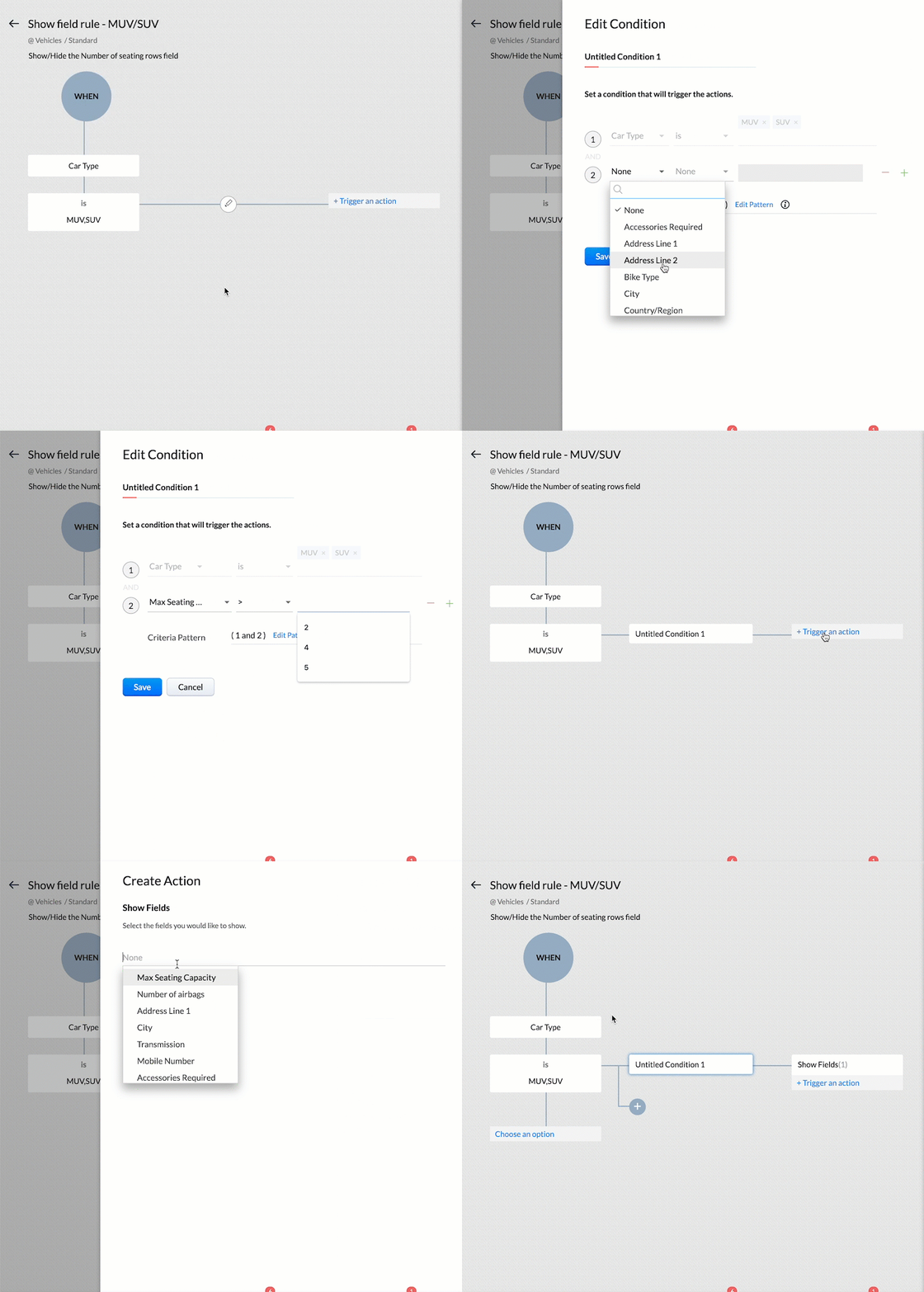


Note : You can add a maximum of five criteria in each condition, combined using AND or OR. You can use the primary field for only one criterion, and this criterion can only have AND operator with others.

How to add more conditions?

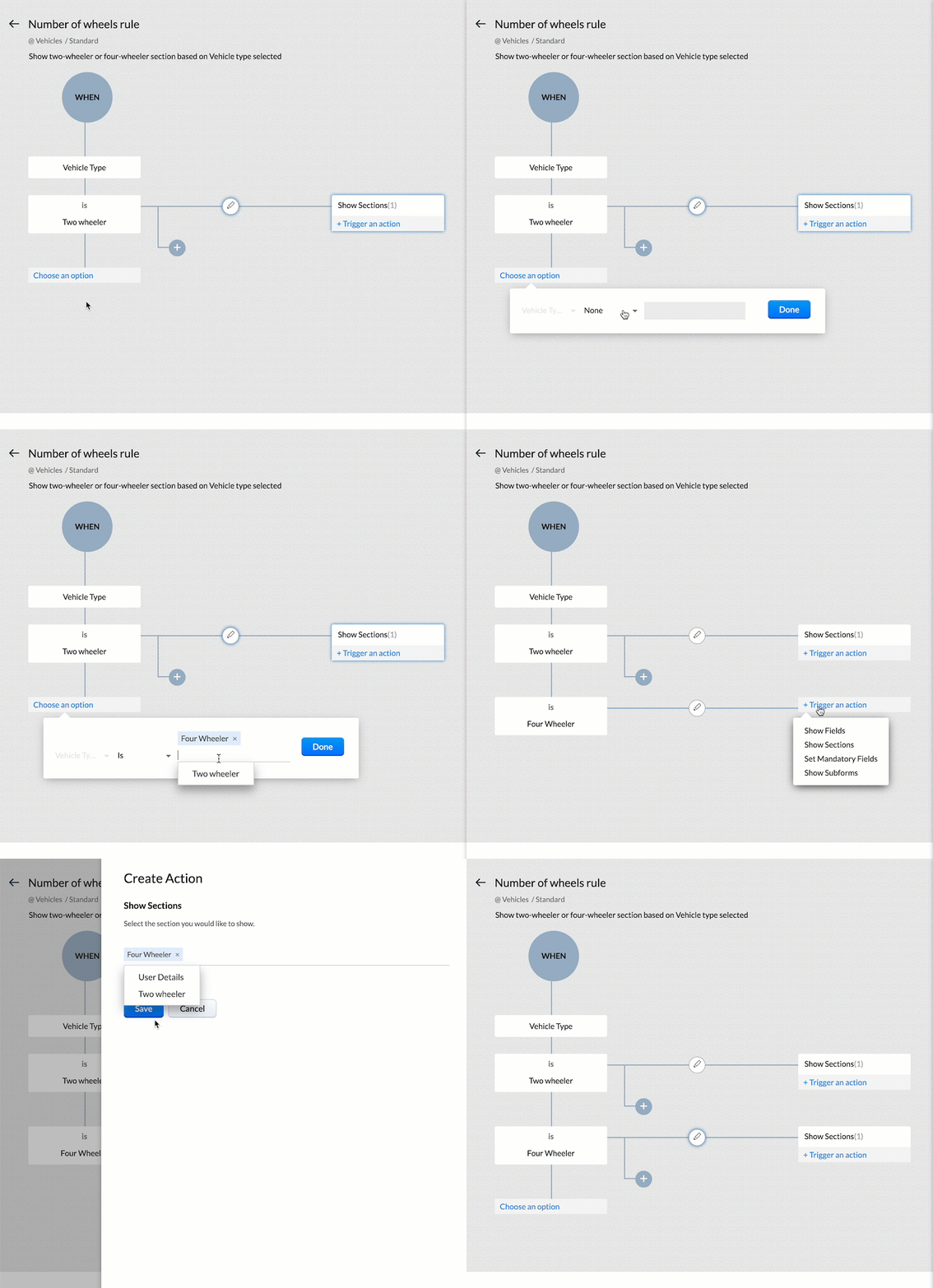
To add more conditions and actions depending on the same primary field, click on Choose an option and add them. For example, if the Vehicle Type is Four-wheeler, show the Four wheeler section of the layout.


How to make a field mandatory?

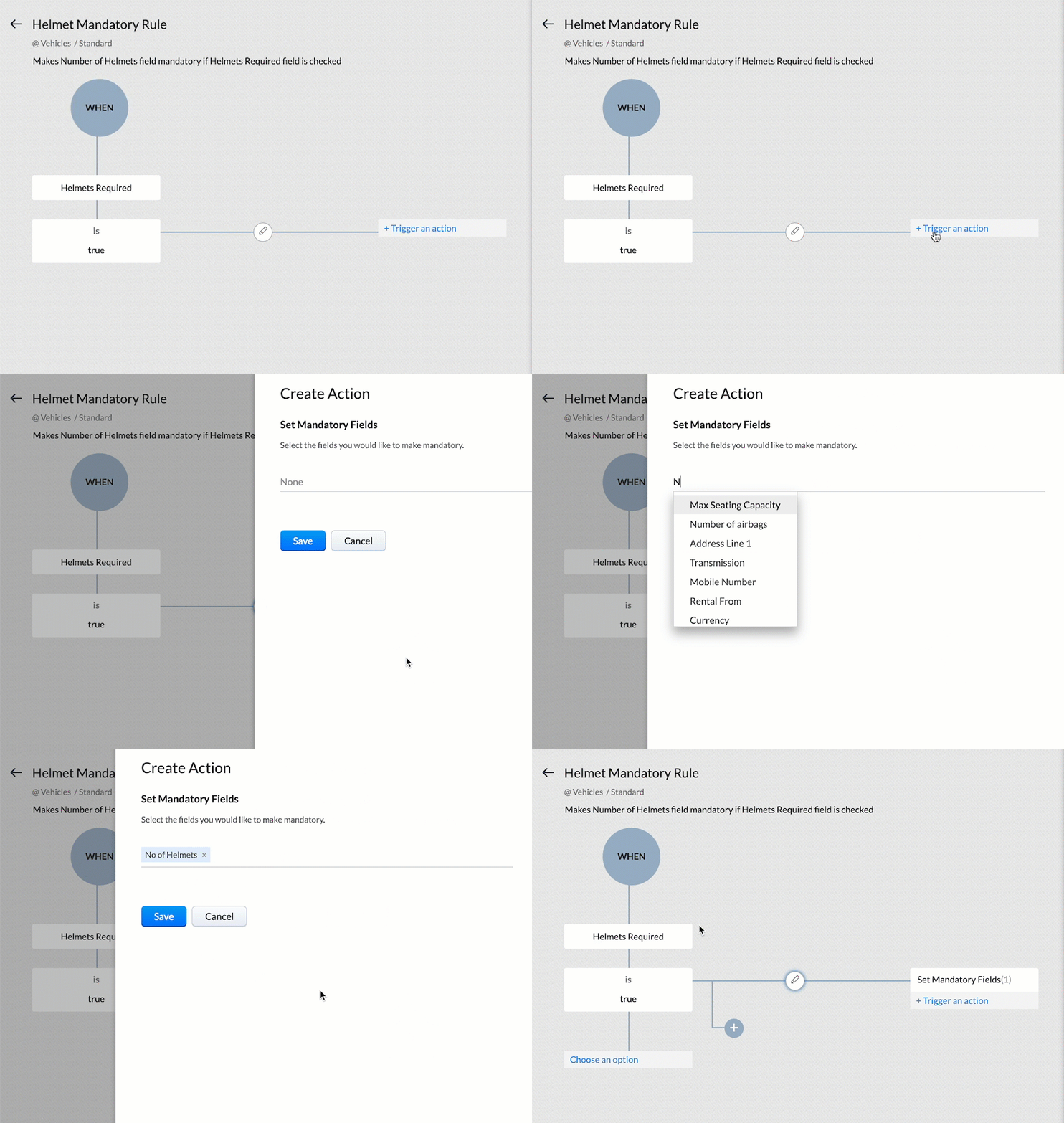
Apart from showing specific fields, sections or subforms, you can also make a field mandatory depending on a condition. For example, you can make the Number of Helmets field mandatory if the Helmets Required field is checked.


Layout Rules in action
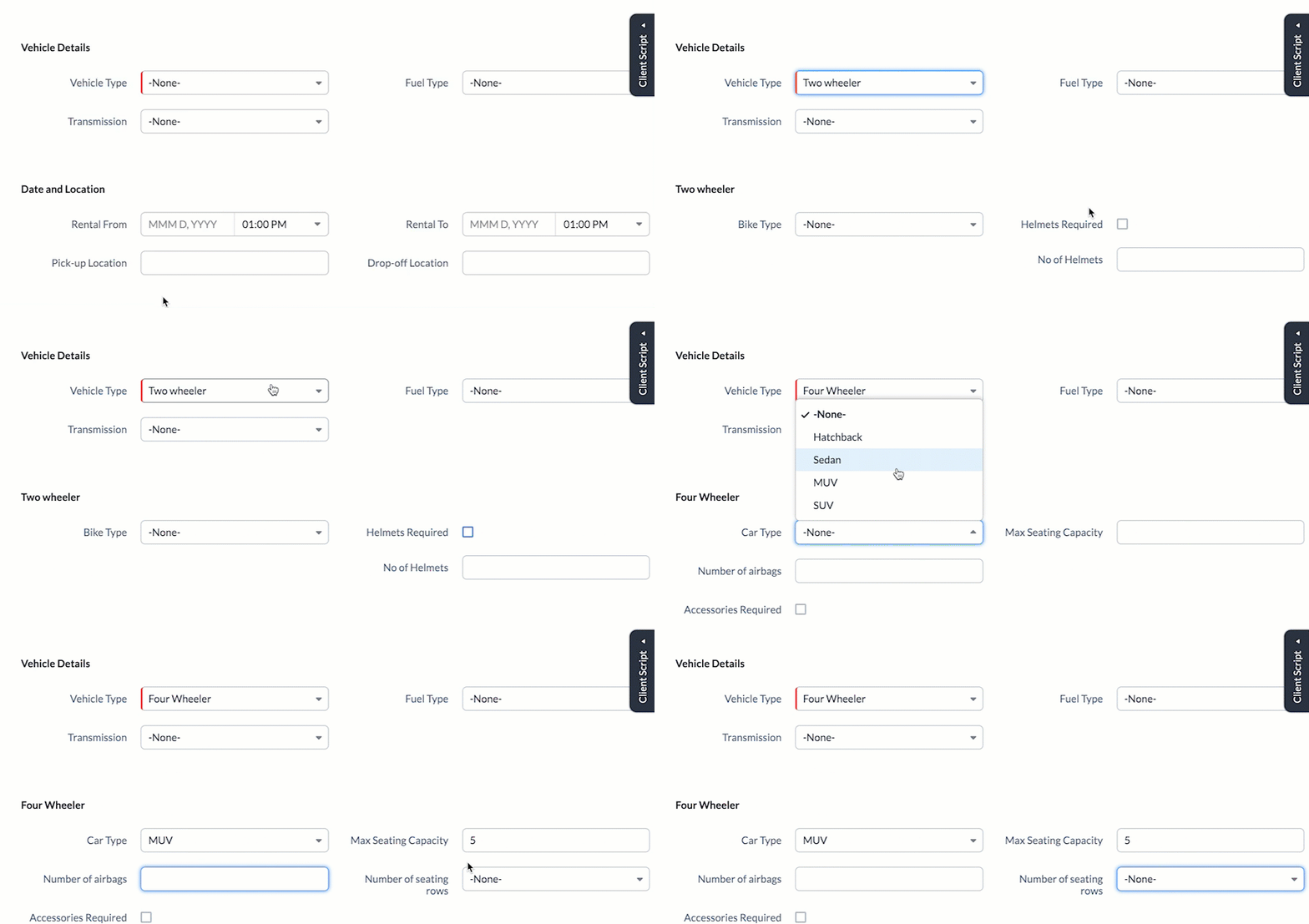

The image illustrates the effects of the layout rules. Two-wheeler or Four-wheeler sections are shown depending on the value of the Vehicle Type field. The Number of Helmets required field becomes mandatory if Helmet Required field is checked. If the car type is MUV or SUV, AND the Maximum seating capacity is more than 5, then the Number of seating rows field is displayed.

API support for Layouts and Layout Rules

If you do not specify the layout while creating a record using API call, the standard layout will be applied by default. If you specify a layout, the record will be assigned to it along with mandatory field check configured for that specific layout. In either scenario, the Show Field/Section/Subform layout rules applicable will be applied to the view record page in the UI. 

Mandatory Field Layout Rules

In order to apply the mandatory field rules, you must include the apply_feature_execution key in the input JSON. This is supported for Insert, Update and Upsert Records API from v2.
Currently API support is only available for Mandatory Field Layout Rules, during inserting or updating a record. 
Here is the sample JSON to create a record applying the layout rules.


 {
    "data": [
        {
            "Email": "patricia.boyle@zoho.com", 
            "Name": "Patricia",
            "Name1" : "Matt",
            "Mobile_Number" : "999999999",
            "Vehicle_Type": "Two wheeler",
            "Bike_Type": "Standard",
            "Helmets_Required": true,
             "Layout": {
                "name": "Standard",
                "id": "4876876000002670001"
            }
        }
    ],
     "apply_feature_execution": [
       {
           "name": "layout_rules"
       }
   ]
 }


In this example, the system will throw the following MANDATORY_NOT_FOUND error since we have made the Number of Helmets field mandatory if the Helmets Required field is True.


 {
    "data": [
        {
            "code": "MANDATORY_NOT_FOUND",
            "details": {
                "layout_rule": {
                    "name": "Helmet Mandatory Rule",
                    "id": "4876876000002695023"
                },
                "api_name": "No_of_Helmets"
            },
            "message": "required field not found",
            "status": "error"
        }
    ]
 }


You can use apply_feature_execution key in the Update and Upsert Record APIs to apply mandatory field rules to those records created without apply_feature_execution key.

Show Field/Section/Subform Rules 

API support is currently not extended to these rules. When using API calls, you can add values to all fields, even if they are hidden by layout rules.  Get Records API returns all the fields in the layout. In other words, using APIs bypasses layout rules for Show Field/Section/Subform.

Points to remember

  • You can include the primary field of one layout rule in the "Show Field" and "Set Mandatory Fields" actions for other layout rules, but not as a primary field for another rule.
  • The Record Owner field or a multi-select picklist field cannot be the primary field for a rule.
  • Layout rules are active when creating a record manually and when creating a record through the API. However, when using the API, only mandatory field rules are applied. Layout rules are not available for records generated via import, webforms or lead convert page. Refer to Layout Rule Exceptions for more details.
  • When you edit a primary field associated with a layout rule, and if the actions triggered include making one or more fields mandatory, the system will capture these mandatory fields via a pop-up prompt. For example, when you edit a record, and change the Helmets Required from No to Yes, the Number of Helmets Required field will be captured via a pop-up prompt.
  • You cannot use Layout Rules on Auto Number, Lookup, Multi Select Lookup, User Lookup, Formula, File Upload and Multi Line field types.
  • Layout Rules are applicable for create, edit and view pages.
We hope you found this post useful. We will meet you next week with another interesting topic!
If you have any questions let us know in the comment section.

Related Links


    Access your files securely from anywhere

        All-in-one knowledge management and training platform for your employees and customers.


                              Zoho Developer Community


                                                    • Desk Community Learning Series


                                                    • Digest


                                                    • Functions


                                                    • Meetups


                                                    • Kbase


                                                    • Resources


                                                    • Glossary


                                                    • Desk Marketplace


                                                    • MVP Corner


                                                    • Word of the Day


                                                    • Ask the Experts


                                                              • Sticky Posts

                                                              • Kaizen #198: Using Client Script for Custom Validation in Blueprint

                                                                Nearing 200th Kaizen Post – 1 More to the Big Two-Oh-Oh! Do you have any questions, suggestions, or topics you would like us to cover in future posts? Your insights and suggestions help us shape future content and make this series better for everyone.
                                                              • Kaizen #226: Using ZRC in Client Script

                                                                Hello everyone! Welcome to another week of Kaizen. In today's post, lets see what is ZRC (Zoho Request Client) and how we can use ZRC methods in Client Script to get inputs from a Salesperson and update the Lead status with a single button click. In this
                                                              • Kaizen #222 - Client Script Support for Notes Related List

                                                                Hello everyone! Welcome to another week of Kaizen. The final Kaizen post of the year 2025 is here! With the new Client Script support for the Notes Related List, you can validate, enrich, and manage notes across modules. In this post, we’ll explore how
                                                              • Kaizen #217 - Actions APIs : Tasks

                                                                Welcome to another week of Kaizen! In last week's post we discussed Email Notifications APIs which act as the link between your Workflow automations and you. We have discussed how Zylker Cloud Services uses Email Notifications API in their custom dashboard.
                                                              • Kaizen #216 - Actions APIs : Email Notifications

                                                                Welcome to another week of Kaizen! For the last three weeks, we have been discussing Zylker's workflows. We successfully updated a dormant workflow, built a new one from the ground up and more. But our work is not finished—these automated processes are


                                                              Manage your brands on social media


                                                                    Zoho TeamInbox Resources


                                                                        Zoho CRM Plus Resources

                                                                          Zoho Books Resources


                                                                            Zoho Subscriptions Resources

                                                                              Zoho Projects Resources


                                                                                Zoho Sprints Resources


                                                                                  Qntrl Resources


                                                                                    Zoho Creator Resources


                                                                                        Zoho CRM Resources

                                                                                        • CRM Community Learning Series

                                                                                          CRM Community Learning Series


                                                                                        • Kaizen

                                                                                          Kaizen

                                                                                        • Functions

                                                                                          Functions

                                                                                        • Meetups

                                                                                          Meetups

                                                                                        • Kbase

                                                                                          Kbase

                                                                                        • Resources

                                                                                          Resources

                                                                                        • Digest

                                                                                          Digest

                                                                                        • CRM Marketplace

                                                                                          CRM Marketplace

                                                                                        • MVP Corner

                                                                                          MVP Corner


                                                                                            Design. Discuss. Deliver.

                                                                                            Create visually engaging stories with Zoho Show.

                                                                                            Get Started Now


                                                                                              Zoho Show Resources

                                                                                                Zoho Writer

                                                                                                Get Started. Write Away!

                                                                                                Writer is a powerful online word processor, designed for collaborative work.

                                                                                                  Zoho CRM コンテンツ


                                                                                                    Nederlandse Hulpbronnen


                                                                                                        ご検討中の方


                                                                                                                • Recent Topics

                                                                                                                • How do you do ticket add ons in Backstage?

                                                                                                                  Hi Everyone, If you wanted to have general admin tickets and allow for add ons, like camping, or car or Carbon offset. What would you do? Peace Robin
                                                                                                                • From Zoho CRM to Paper : Design & Print Data Directly using Canvas Print View

                                                                                                                  Hello Everyone, We are excited to announce a new addition to your Canvas in Zoho CRM - Print View. Canvas print view helps you transform your custom CRM layouts into print-ready documents, so you can bring your digital data to the physical world with
                                                                                                                • validation rules doesn't work in Blueprint when it is validated using function?

                                                                                                                  I have tried to create a validation rule in the deal module. it works if I try to create a deal manually or if I try to update the empty field inside a deal. but when I try to update the field via the blueprint mandatory field, it seems the validation
                                                                                                                • Pull cells from one sheet onto another

                                                                                                                  Hello all! I have created an ingredients database where i have pricing and information and i want to pull from that database into a recipe calculator. I want it to pull based on what ingredient I choose. The ingredients database has an idea and i want
                                                                                                                • Emails Failing with “Relaying Issues – Mail Sending Blocked” in ZeptoMail

                                                                                                                  Hello ZeptoMail Support Team, We are facing an email delivery issue in our ZeptoMail account where emails are failing with the status “Process failed” and the reason “Relaying issues – Mail sending blocked.” Issue Details Agent Name: mail_agent_iwwa From
                                                                                                                • How does Zoho handle support operations for our EU users?

                                                                                                                  Dear Zoho users, We have some news and reminders about how we handle support operations for Zoho users in the EU Data Center. This is part of our broader commitment to ensuring GDPR compliance and providing secure data handling for all users. We'd like
                                                                                                                • Layout Adjustment.

                                                                                                                  Hello Latha, Hope you are doing well. I wanted to check with you about adjusting the layout columns in the Service Report from the backend, as currently there is no capability for us to customize the layout from our end. Below is the output that I am
                                                                                                                • Anyone in Australia using Zoho Books AND has their account with NAB?

                                                                                                                  Hi I have an account with both NAB and Suncorp. Suncorp transaction come in the next day however NAB transactions take 4-5 business days to appear. eg: A deposit made today in my Suncorp will be imported into Zoho tomorrow. A deposit made today to the NAB account will be imported maybe Saturday (Friday overnight). I have contacted both Zoho and NAB but noone seems to know why. I was just wondering if anyone else in Australia uses NAB and has this issue (or doesn't) maybe we could compare notes and
                                                                                                                • Zoho Often Lag

                                                                                                                  Desk Team, We've noticed that Desk, Creator & other apps seems to lag more these days. We often refresh multiple times.
                                                                                                                • Offer already made- but I withdrew it

                                                                                                                  I made an offer letter, but made a mistake on it. I withdrew the offer but now I can't recreate the correct offer. Zoho keeps saying that "A same offer has already been made". I look in the "offers" and there are NO offers (this is the first time I've
                                                                                                                • Importing into the 'file upload' field

                                                                                                                  Can you import attachments into the file upload field. I would expect it to work the same way as attachments do, But can't seem to get it to work. Moderation Update: The option to import into File Upload and Image Upload fields has been supported. Read
                                                                                                                • Layout Rules Don't Apply To Blueprints

                                                                                                                  Hi Zoho the conditional layout rules for fields and making fields required don't work well with with Blueprints if those same fields are called DURING a Blueprint. Example. I have field A that is used in layout rule. If value of field A is "1" it is supposed to show and make required field B. If the value to field A is "2" it is supposed to show and make required field C. Now I have a Blueprint that says when last stage moves to "Closed," during the transition, the agent must fill out field A. Now
                                                                                                                • Why is the ability Customize Calls module so limited?

                                                                                                                  Why can't I add additional sections? why can't I add other field types than the very limited subset that zoho allows? Why can I only add fields to the outbound/inbound call sections and not to the Call Information section?
                                                                                                                • Zoho Desk blank screen

                                                                                                                  opened a ticket from my email, zoho desk comes up blank, nothing loads. our receptionist also gets the same thing under her login on her computer. our sales rep also gets same thing on zoho desk at his home on a different computer. I tried clearing cache/history/cookies,
                                                                                                                • Optimum CRM setup for new B2B business

                                                                                                                  Can some advise the most common way to setup Zoho CRM to handle sales for a B2B company? Specifically in how to handle inbound/outbound emails. I have spent hours researching online and can't seem to find an accepted approach, or even a tutorial. I have
                                                                                                                • filter on sheets mobile (iOS, iPadOS) does not work

                                                                                                                  I have this issue on every spreadsheet, whether imported or created natively in Zoho Sheets. I can use on desktop without issue: desktop screenshot on iOS the filter dropdowns are not there and there is no way to add them mobile iPadOS looks the same
                                                                                                                • 【Zoho CRM】商談タブへのデータインポート

                                                                                                                  Zoho使用前にエクセルで管理していた商談情報を、Zoho一括管理のため、商談タブにインポートしたいのですが、お客さまの氏名だけが紐づけられませんでした。 「Zoho CRMにインポートする項目を関連付ける」のところが画像のようになっています。 (弊社では、「姓」を「★個人データ名」という項目名に変更し、フルネームを入れて使用しています。) どのようにしたら氏名をインポートできるかご存じの方がいらっしゃいましたら、ご教示いただきたく、よろしくお願いいたします。 (投稿先が間違っていましたらご指
                                                                                                                • Canva Integration

                                                                                                                  Hello! As many marketing departments are streamlining their teams, many have begun utilizing Canva for all design mockups and approvals prior to its integration into Marketing automation software. While Zoho Social has this integration already accomplished,
                                                                                                                • Can't edit Segments

                                                                                                                  Happening with 2 different Zoho One environments, in different browsers. Please fix.
                                                                                                                • Zoho Sheet for Desktop

                                                                                                                  Does Zoho plans to develop a Desktop version of Sheet that installs on the computer like was done with Writer?
                                                                                                                • Transfer ownership of files and folders in My Folders

                                                                                                                  People work together as a team to achieve organizational goals and objectives. In an organization, there may be situations when someone leaves unexpectedly or is no longer available. This can put their team in a difficult position, especially if there
                                                                                                                • Consumer Financing

                                                                                                                  Does Zoho currently have a payment gateway (such as Stripe, Square, etc) which offers financing for customers? So, let's say the estimate we give the customer is greater than what they can afford at the time, but we can sell the service now, letting them
                                                                                                                • Subform edits don't appear in parent record timeline?

                                                                                                                  Is it possible to have subform edits (like add row/delete row) appear in the Timeline for parent records? A user can edit a record, only edit the subform, and it doesn't appear in the timeline. Is there a workaround or way that we can show when a user
                                                                                                                • Zoho CRM - Option to create Follow-Up Task

                                                                                                                  When completing a Zoho CRM Task, it would be very helpful if there was an option to "Complete and Create Follow-Up Task" in the pop-up which appears. It could clone the task you are closing and then show it on the screen in edit mode, all the user would
                                                                                                                • Deluge function to copy parent record file upload field to child record file upload field

                                                                                                                  I'm stuck trying to write a deluge function that is triggered via automation in child record "Appointments," confirms if a file is in file upload "Report" field of parent "Contacts" record via Contacts lookup field "Contact_Name". If no file is in parent
                                                                                                                • Zoho Books Sandbox environment

                                                                                                                  Hello. Is there a free sandbox environment for the developers using Zoho Books API? I am working on the Zoho Books add-on and currently not ready to buy a premium service - maybe later when my add-on will start to bring money. Right now I just need a
                                                                                                                • Make panel configuration interface wider

                                                                                                                  Hi there, The same way you changed the custom function editor's interface wider, it would be nice to be able to edit panels in pages using the full width of the screen rather than the currently max-width: 1368px. Is there a reason for having the configuration panel not taking the full width? Its impossible at this width to edit panels that have a lot of elements. Please change it to 100% so we can better edit the layouts. Thanks! B.
                                                                                                                • Image Compression Options

                                                                                                                  Much better if we have level of options to compress the image [20%, 40%...] We are dealing with service reports daily that has before and after photos (image field)- the file size too large and one thing, the current limit is 10mb or 15mb for report
                                                                                                                • Cannot get code to work with v2.mergeAndStore!

                                                                                                                  Please can someone help me pass subform items into a repeating mail merge table row using v2.mergeAndStore? I have a mail merge template created in Writer and stored in Workdrive. This template is referenced by a custom CRM function which merges all of
                                                                                                                • How to hide or archive a blog post temporarily in Zoho commerce website builder?

                                                                                                                  I would like to temporarily hide or archive a blog post in zoho commerce website builder so that it doesnt appear on my website till I enable it again. I tried to look for this option but could not find it.  It only allows me to permanently delete a blog
                                                                                                                • Founders using Zoho — are you leveraging Zoho Campaigns + Zoho Social for thought leadership… or just sending emails?

                                                                                                                  I’ve noticed something interesting in the Zoho ecosystem. Many founders use Zoho Campaigns and Zoho Social for basic marketing—newsletters, scheduled posts, and announcements. But very few are using these tools strategically to: • Position themselves
                                                                                                                • How to mix different types of inputs (such as dropdown list and textbox)

                                                                                                                  Hi, I'm creating a form called "Room Reservations" for a company. I created a "table" using "Matrix Choice". I created "Room 1", "Room 2" and "Room 3" with the "Questions". I would then like to create two columns with the "Answers", one called "Department"
                                                                                                                • Reply to Email for SO/PO

                                                                                                                  Hello, We are new to Zoho Books and running into an issue. Our support@ email is our integration user. When our team is sending out PO/SO's we are updating the sender email, but for some reason many of our responses are coming back to our support@ email
                                                                                                                • How to Convert NSF to PST Format Effortlessly? - SYSessential

                                                                                                                  It is highly recommended to obtain the error-free solution of the SYSessential NSF to PST converter to convert NSF files from Lotus Notes. Using this professional software, it becomes easier to convert all NSF database items, including emails, journals,
                                                                                                                • Zoho Commerce - Poor Features Set for Blogging

                                                                                                                  Hi Zoho Commerce team, I'm sure you will have noticed that I have been asking many questions about the Blogs feature in Commerce. I thought that it would be useful if I share my feedback in a constructive way, to highlight the areas which I feel need
                                                                                                                • Pass shipping info to payment gateway Zoho Books to Authorize.net

                                                                                                                  For some reason the integration from Zoho books to Authorize.net does not pass the shipping address. Authorize.net is ready to receive it, but zoho books does not send it
                                                                                                                • Massive Zoho Books failure

                                                                                                                  We have not received any communication or notification from Zoho, but we have detected that Zoho Books is not working for all our users. We cannot access or use Zoho Books. This is critical. We are trying to contact Zoho on the Spain telephone number,
                                                                                                                • Does the Customer “Company Name” field appear anywhere in the Zoho Books UI outside of PDFs?

                                                                                                                  Hi everyone, I’m trying to understand how the Company Name field is actually used in Zoho Books. There is a Company Name field on the customer record, but when viewing transactions like a Sales Order in the normal UI (non-PDF view), that field doesn’t
                                                                                                                • Email outbox is now available in the sandbox

                                                                                                                  Hello all! Testing emails without visibility has always been a blind spot in the sandbox. With the new Outbox, that gap is closed. You can now view and verify every email triggered from your sandbox, whether it’s through workflows, approvals, or mass
                                                                                                                • Looking For Recruit Developer

                                                                                                                  Hi everyone, I am looking for a Zoho Certified Developer to assist with a development project for MetalXpert. We are building a software system designed to bridge the gap between a candidate mobile app and an employer web portal using Zoho Recruit as
                                                                                                                • Next Page